Install the factory on your infrastructure
A factory installation includes forge, Flycanon, identity, databases and retained source storage. Flycanon holds cited framework references, project knowledge and verified development memory. Keep those services in the same installation lifecycle: install them together, check retrieval before admitting work, and preserve their state during upgrades and recovery.
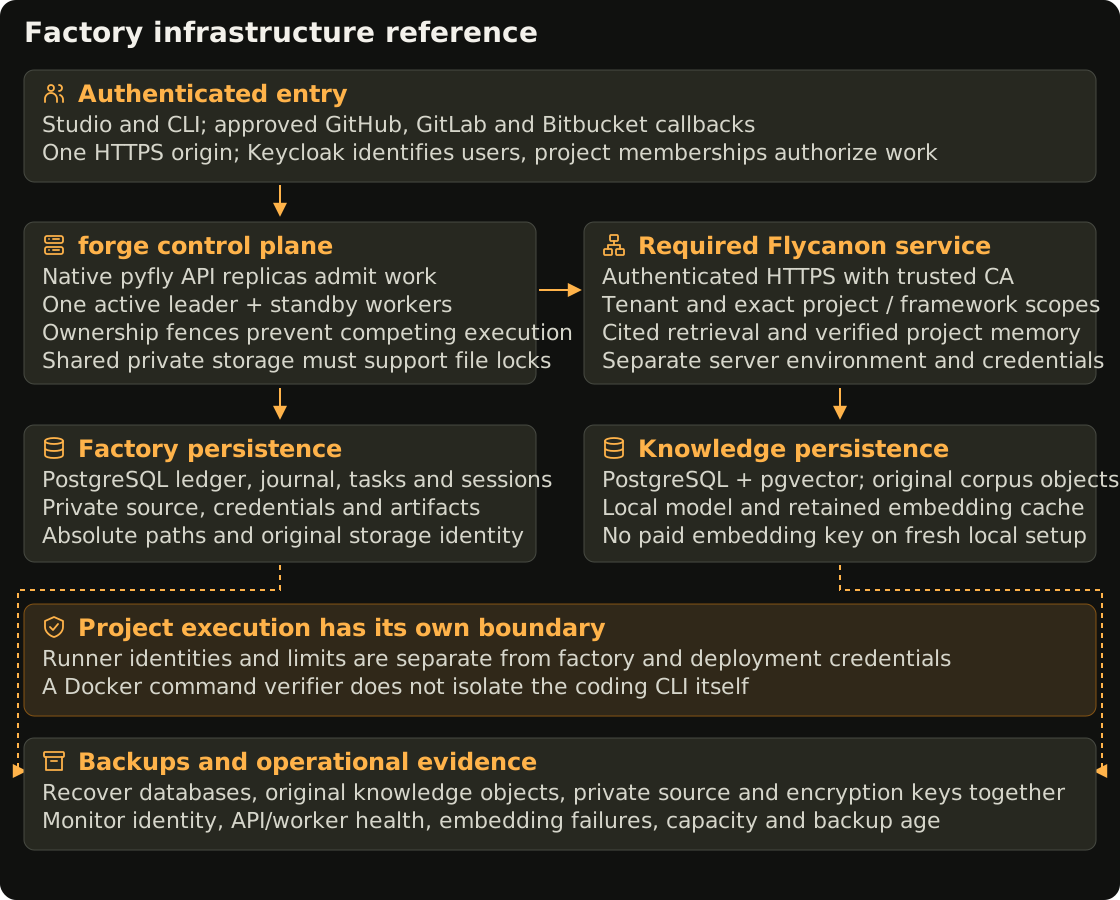
Start with the local stack. Use the production layout below when designing a shared installation on AWS, Azure, Google Cloud, DigitalOcean, VPS, dedicated servers or on-premises infrastructure. The cloud recipes in forge deploy generated products to VMs; they do not install this factory cluster. A Kubernetes installation currently requires operator-owned deployment manifests and acceptance checks. There is no factory Helm chart or automatic managed-cluster installer in this release.
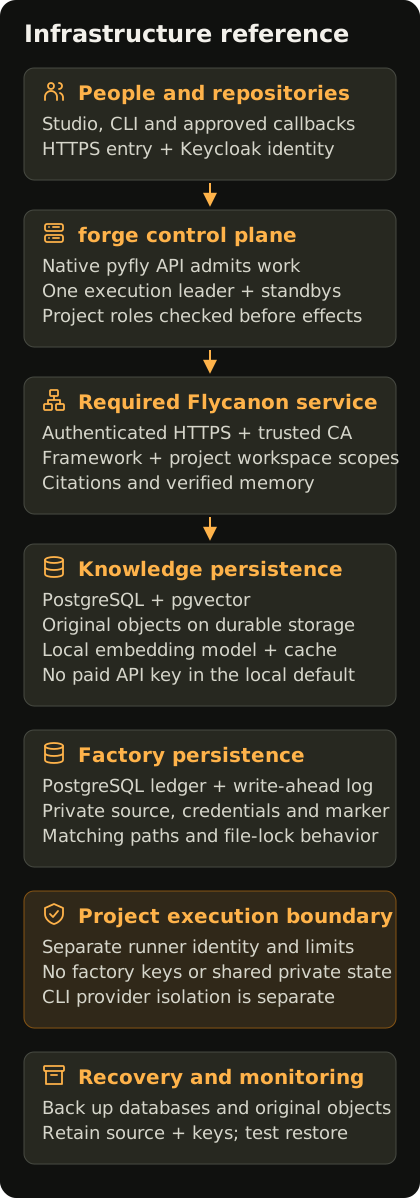
Open the infrastructure diagram · Portrait layout
1. Choose the runtime and owners
Assign an owner for the factory, identity, knowledge service, storage and backups. Record the intended recovery time and acceptable data loss. A development machine and a production installation should have different databases, credentials and private directories.
A small dedicated host can run the complete stack with Compose, a supervisor and an HTTPS reverse proxy. A cluster can place API replicas on separate nodes, with one execution leader and standby workers. Before choosing multiple hosts, verify a shared filesystem that supports the required file locks, atomic publication and durable writes. All workers need identical absolute paths and the same operating-system owner. A database alone cannot replace retained workspaces.
Runtime roles defines the execution fences and storage marker. Standby replicas replace the leader; they do not add active coding capacity. The per-leader concurrency limit and one active run per repository still apply. There is no accepted active distributed project-runner pool or Kubernetes project-job executor in this release.
2. Prepare the network and identity
Give Studio and the API one HTTPS origin, such as https://forge.example.com. Register its exact Keycloak callback and each source-control application's callback. Restrict the API's allowed hostnames. DNS, certificates, renewal and ingress ownership are operational prerequisites.
Use Keycloak OIDC for shared installations. Configure its confidential client, PKCE, API audience, server-side encryption key and administrator roles through the identity guide. Test a real sign-in, sign-out and project membership before adding users. A successful login does not give a user access to a product. Microsoft Entra ID and Google Workspace federation use Keycloak's identity brokering configuration.
Expose the browser entry and necessary repository webhook routes. Keep PostgreSQL, Flycanon, embedding endpoints, object storage and the Kubernetes management API on restricted networks. Flycanon requires authenticated HTTPS; forge retains the trusted CA certificate when the endpoint uses a private CA. Do not turn off certificate or hostname verification.
In Kubernetes, start with deny-by-default traffic between workloads, then permit DNS and the service connections the installation needs. A NetworkPolicy requires a network plugin that enforces it. Test both an allowed request and a denied request from the actual workload identity; an accepted YAML manifest alone does not prove isolation. See Kubernetes network-policy behavior.
3. Allocate durable storage
| Store | What it retains | Recovery requirement |
|---|---|---|
| forge PostgreSQL | Users and sessions, product revisions, plans, tasks, journal, execution requests and receipts | Dedicated database/schema, migrations and consistent backup |
| forge private data | Credential revisions, topology marker, workspaces, checkpoints and delivery artifacts | Private storage with matching paths, owner and lock semantics |
| Flycanon PostgreSQL with pgvector | Workspaces, source/chunk metadata, embeddings and canonical knowledge versions | Flycanon-compatible extension and database backup |
| Flycanon object storage | Original admitted documents and retained corpus objects | Preserve objects with their database references |
| Identity | Realm, clients, identity configuration and signing material | Identity backup and externally retained encryption/secrets |
| Embedding model storage | The selected local model and cache | Pin the model; rebuilding this cache requires time and model access |
The local knowledge stack uses volume-backed files for its original objects. An independently operated Flycanon deployment can use its supported object-storage configuration. Confirm that deployment's storage adapter before replacing local files with a provider bucket. Preserve embedding model and dimension settings when restoring a vector index; a different model can require reindexing.
Mount factory state only on the control-plane API and trusted worker processes that need it. Project execution must not inherit factory database keys, Flycanon platform keys, cloud deployment credentials, shared private storage or a host Docker socket. The existing command sandbox and a coding provider's own process have different boundaries; selecting a Docker verifier does not automatically move a CLI provider into that sandbox. Review runner controls before admitting untrusted projects.
4. Configure secrets and images
Select a reviewed forge revision and immutable image digest. Keep the Flycanon server environment separate from forge's native pyfly environment; the SDK and server are separate packages with their own dependency requirements. Pin Flycanon server 26.10.0 or a reviewed compatible build. The managed local stack uses a local embedding model, without a paid provider API key.
Store factory database credentials, OIDC client secrets, the shared identity-encryption key, Flycanon service keys and certificates in the installation's secret manager. Rotate them through a planned procedure that preserves queued configuration revisions. Kubernetes Secrets need the cluster's access controls and encryption policy; putting a value into a Secret does not by itself establish that policy.
Give deployment identities permissions for their own target. Give code execution a separate identity. The API should admit work and read results, with the trusted worker performing effects after rechecking authority. Avoid ambient cloud-administrator credentials on coding hosts.
5. Initialize and check dependencies
Create the selected databases and private storage before application startup. forge applies its versioned migrations to the selected PostgreSQL schema. Initialize Flycanon using its server's migration procedure, then create the authenticated framework workspace, admit its bundled core manuals and verify embedding-backed citations using knowledge initialization. Run one initialization owner at a time; do not run competing bootstrap jobs against the same private directory.
For a fresh factory, the managed bootstrap enables required knowledge and automatic verified memory. Existing configured connections and queued snapshots remain intact. An upgraded installation with disabled or external knowledge needs an explicit administrator review; restarting does not replace its endpoint or erase its history.
Check each service before opening admission:
- The database identities can access only their intended databases and schemas.
- Studio can sign in, renew its session, and enforce project read and execution permissions.
- The configured Flycanon tenant and framework scope return actual chunk citations from an embedding-backed search.
- A new project's exact knowledge workspace can be initialized and searched without returning another project's sources.
- The worker owns its execution fences and retained storage; API replicas report their API-only role.
- A small local test run retains real command results, a valid journal and matching source evidence.
The API's GET /api/v1/health reports local admission and execution state. An API replica reports remote-worker availability as unknown. Check its worker supervisors and ledger separately. Knowledge authentication, successful source admission, completed embedding and canonical memory creation have separate outcomes.
6. Configure your hosting platform
Use a dedicated VPC and private workload subnets. Restrict the EKS management endpoint to the approved administration network or private access. AWS documents that private endpoint traffic remains within the VPC and requires a connected administration path. Keep factory data and secrets private; validate storage-lock behavior before placing leader and standby on different nodes. Follow the EKS endpoint access guide.
Select the subscription, tenant, region and resource group through the owner's approved infrastructure process. Use a private AKS architecture, separate system and workload node pools, and private service endpoints where needed. Configure ingress, outbound access, identity and storage against the AKS baseline architecture. This guide does not create Azure resources or assume permission to use an account.
Choose the project and VPC, restrict control-plane access and use private nodes. Define the workloads' explicit service identities and permissions with Workload Identity Federation for GKE; node credentials should not become application-wide administrator access. Review GKE network isolation and workload identity. Verify required registry, identity and provider egress from private workloads.
Select a VPC, node pools and explicit minimum/maximum capacity. Review the load-balancer entry, database access, durable volumes, secrets and administration permissions before deploying workloads. DOKS node-pool autoscaling changes node capacity; it does not change forge's single execution-owner model. Use the DOKS setup guide, then verify the same storage, identity and knowledge checks as on other platforms.
For one host, supervise Compose and its HTTPS reverse proxy, with off-host encrypted backups and a tested restore. For multiple hosts, choose a maintained Kubernetes distribution or follow kubeadm high availability. kubeadm requires an API load-balancer endpoint matching the cluster's control-plane endpoint. Your team operates that control plane, networking, certificate lifecycle, node upgrades and storage. Check shared-filesystem behavior before moving workers across hosts.
7. Test recovery before serving projects
Stop admission and drain the active worker for a straightforward consistent backup. Preserve forge PostgreSQL, private factory state, Flycanon PostgreSQL and original objects together, plus the identity configuration. Retain decryption keys separately with restricted access. Keep an inventory of image digests, model settings, schemas and storage paths with the backup.
Restore into a new isolated local installation. Check source-tree references, journal chains, knowledge citations, object availability and an authorized user session. A missing credential revision or workspace must remain a recovery error. Inspect any external effect with an intent but no receipt before attempting it again.
In a split topology, test leader loss and standby promotion against the actual shared storage. Record whether consumers drained and ownership transferred, and verify that an uncertain command was not repeated. A forced process stop and a graceful drain establish different facts. Recovery describes reconciliation.
Collect API and worker process logs, database health, Flycanon admission/embedding errors, storage capacity, identity failures and backup age. Use the platform's monitoring system; the journal is durable execution evidence, not a substitute for infrastructure metrics. Define an alert owner and a response procedure for each failure that blocks admission or risks retained state.
Acceptance and support boundary
Test deployment changes locally before applying them to a shared or billable environment. The supplied Compose topology and native runner checks establish their specific local behavior. The provider guidance above is a production architecture reference, not evidence that a cluster, live provider integration, multi-host storage or autoscaled execution has passed acceptance. Keep those installation-specific checks with the operator's deployment record.
After a rollout, verify the factory separately from its generated products. Product deployment, rollback, health and maintenance use their own repository-bound targets and retained results. See product deployment, cloud product recipes and application operations.