Install and start firefly forge
For a fresh managed installation, use Docker Compose, Git and a configured Keycloak identity provider. The stack includes the factory database and Flycanon dependencies. Source development on the host also needs Python 3.13+, uv, a dedicated PostgreSQL database and Node.js 22.12+ for Studio. Use macOS or Linux; worker cancellation uses POSIX process groups.
Choose the managed stack below or the source-development path. Install the product toolchains in the selected execution environment: Python for pyfly, PHP 8.3+ and Composer for larafly, and Node.js for browser products.
Run the complete local stack
git clone https://github.com/fireflyframework/firefly-forge.git
cd firefly-forge
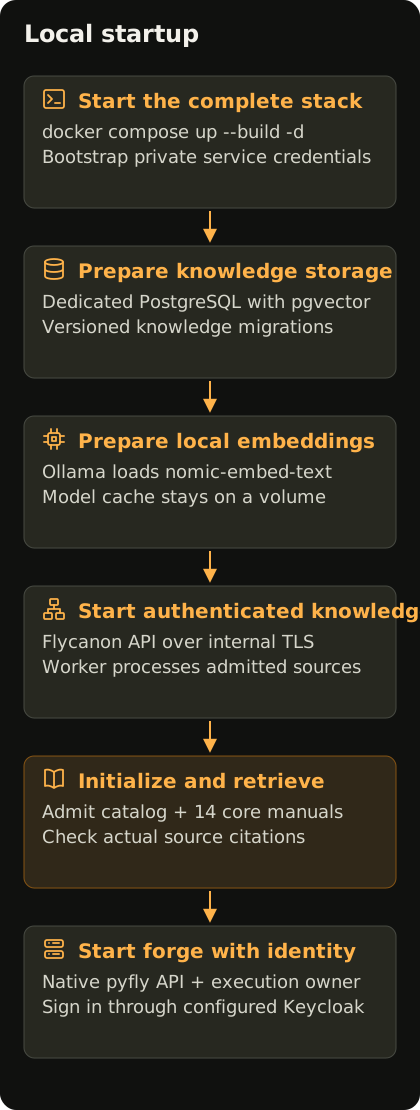
Open the local startup diagram · Portrait layout
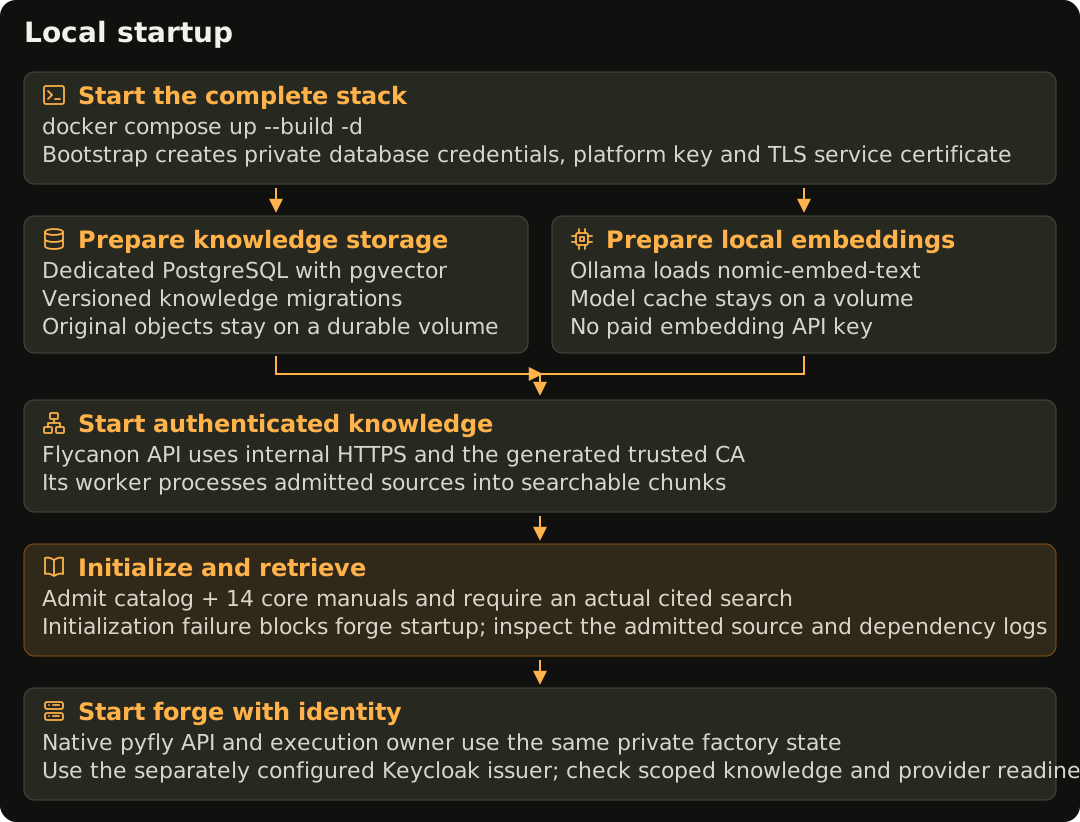
The supplied Compose file includes forge PostgreSQL, private factory state, Flycanon with its own pgvector database and original-object storage, and a local embedding service. Fresh managed setup enables required retrieval and automatic verified memory, with generated private credentials and authenticated internal TLS.
Configure a Keycloak OIDC issuer and client before starting; Compose does not install Keycloak. Complete the identity setup. The issuer must be reachable by both the browser and forge, with exact callback, audience and role settings.
Set FORGE_POSTGRES_PASSWORD and the OIDC settings from the identity guide through your private deployment environment. Set FORGE_AUTH_MODE=oidc for this stack. Its network boundary does not turn a container gateway into a trusted loopback bootstrap caller. Set FORGE_DATABASE_URL to postgresql+asyncpg://forge:YOUR_URL_ENCODED_PASSWORD@postgres:5432/forge; the host is the Compose service name postgres. The URL password must match the configured database password and reserved URI characters must be percent-encoded.
Start the complete stack:
docker compose up --build -d
docker compose ps --all
docker compose logs knowledge-initialize embeddings-initialize
Only the forge API publishes a host port, bound to 127.0.0.1:8787. Flycanon uses https://knowledge:8500 on the private service network. Bootstrap initializes its owner-private credentials once; service initialization admits the catalog and 14 pinned core pyfly/larafly manuals, then requires actual embedding-backed source citations before new work. Local embedding uses nomic-embed-text, without a paid provider API key. Model download and first initialization can take time; a running container is distinct from completed knowledge retrieval.
Open Studio, sign in through the configured identity provider and inspect Knowledge. Test the selected tenant's authentication, then perform a scoped search and inspect the source citations. Knowledge initialization explains bootstrap, external-service configuration and failed dependencies. Keep required knowledge enabled for the factory.
Back up all durable factory and knowledge stores before upgrading. Existing knowledge settings and queued snapshots remain intact; an older disabled or external connection needs an explicit administrator review. Local CLI subscription logins are host credentials; the container needs its own selected provider setup.
For API and headless-worker processes sharing one execution leader, choose the split topology on a fresh installation. For a shared server or Kubernetes cluster, use the factory infrastructure guide.
Connect a coding provider
An official CLI login is a useful first setup on a development host:
codex login
codex login status
# Or:
claude auth login
claude auth status
Native Firefly Agentic uses a provider API key and an available provider-qualified model. The internal bridge requires its authorized endpoint and token. Agents explains their tools and readiness evidence; configuration covers saved settings.
Source development
Use the following host setup for developing forge itself. Its explicit local bootstrap settings apply to the loopback host process; use a separate private environment for the OIDC Compose installation above.
Build the application
git clone https://github.com/fireflyframework/firefly-forge.git
cd firefly-forge
uv sync --locked --group dev --group docs
npm --prefix studio ci
npm --prefix studio run build
Studio's production files are written to studio/dist/. The API serves that build. The installed distribution also includes Studio; a source checkout needs the build above.
Prepare PostgreSQL
Use a database created for this factory. Give its development identity permission to create and manage the selected ledger schema. The application applies its versioned migrations to that schema; it does not require an application SQLite file or initialize unrelated databases.
Set an async PostgreSQL connection URL through your local secret manager or a private environment file:
export FORGE_DATABASE_URL="postgresql+asyncpg://forge:YOUR_DATABASE_PASSWORD@127.0.0.1:5432/forge"
export FORGE_DATABASE_SCHEMA="forge"
export FORGE_DATA_DIR="$PWD/.forge"
export FORGE_AUTH_MODE="local_bootstrap"
export FORGE_API_TOKEN="$(python3 -c 'import secrets; print(secrets.token_urlsafe(32))')"
The values above are examples. Use the actual dedicated database and a strong password. Keep the connection URL and operator token out of Git, briefs, screenshots and shell output shared with others. A container must receive its own database configuration; 127.0.0.1 inside it identifies the container itself.
PostgreSQL stores repositories, runs, events, plans, task states and the write-ahead journal. The private data directory stores connection settings, immutable credential revisions, workspaces and delivery artifacts. Back up both parts together. See operations.
Start a source-development process
A host API still needs the required Flycanon connection. The managed service's internal knowledge hostname is available to containers on its network. Configure a separately reachable authenticated HTTPS service and its CA when running forge directly on the host; do not disable knowledge or publish an unprotected service to work around that boundary.
uv run forge serve --host 127.0.0.1 --port 8787 --data-dir .forge
Open Studio. For this explicit local setup, enter the operator token once; the server exchanges it for a durable HttpOnly session. Production installations use Keycloak sign-in. Configure a provider and test its access. Connect an authorized repository, choose pyfly or larafly, and create a small run with observable acceptance checks.
A database connection or migration failure prevents startup. A rejected operator token requires matching Studio and server credentials. Missing Studio files require rebuilding its production bundle. Provider authentication and actual model execution have separate checks.
Develop Studio
Keep the API running on port 8787 and run:
npm --prefix studio run dev
The development server on port 5173 proxies /api to the API. Use /api/v1 as the browser API address. The Studio restores its server session after reload. For this separate development origin, set FORGE_BROWSER_ORIGIN=http://127.0.0.1:5173 and FORGE_OIDC_ALLOW_LOOPBACK_HTTP=true before starting the API. The browser never stores the operator token.
For remote operation, configure Keycloak OIDC, serve Studio and the API through one HTTPS origin, restrict allowed hosts, and register exact identity and source-control callback URLs. Separate API replicas from execution workers before treating an installation as cluster-ready. SCM connections describes provider-owned setup and grants.
Check local readiness
Use the installed CLI to inspect coding-provider availability and stack profiles:
uv run forge doctor
This command checks the environment where it runs. A host CLI check does not establish that the container has the same tools or subscription login. It does not probe Flycanon. Use the managed knowledge initialization result, the Knowledge authentication test and a scoped search with real citations to check that dependency. A provider login, an available embedding model and an actual coding response have separate readiness evidence.
Run the development gate
Use an explicitly isolated PostgreSQL test database. Set FORGE_TEST_DATABASE_URL to its async connection URL. Tests create uniquely named schemas and remove those test schemas during cleanup; they fail when the test database is not configured.
export FORGE_TEST_DATABASE_URL="postgresql+asyncpg://forge:YOUR_TEST_PASSWORD@127.0.0.1:5432/forge_test"
npx --prefix studio playwright install chromium
make check
Linux hosts may need Playwright's --with-deps browser installation option. The gate covers native PostgreSQL persistence, factory code, Studio behavior and the strict documentation build. Live coding-provider, SCM and generated-product acceptance are separate evidence.
Upgrade an initial SQLite installation
Stop the old service and retain a private backup of its SQLite ledger and data directory. Configure a dedicated PostgreSQL database for the current service. The current server does not automatically read or migrate the old SQLite file. Preserve the old history for inspection; do not rename a SQLite file into a PostgreSQL connection or overwrite it during setup.