Datasets
One dependency-light container to pass around your data — plus pluggable loaders that know how to fetch it.
The datasets module gives the rest of the framework a single thing to hand around: a Dataset
holding features X, an optional target y, the task, and metadata. The module is import-light
(pandas and scikit-learn are imported lazily, inside the methods that need them), so the Dataset
type and the DatasetLoaderPort protocol are usable without the tabular extra installed. Concrete
loaders — the things that actually touch sklearn or the network — live in
fireflyframework_datascience.datasets.adapters.
That split is the hexagonal "ports and adapters" idea applied to data: the port
(DatasetLoaderPort) is a tiny protocol in the pure core; the adapters
(SklearnDatasetLoader, OpenMLDatasetLoader) carry the heavy, optional dependencies.
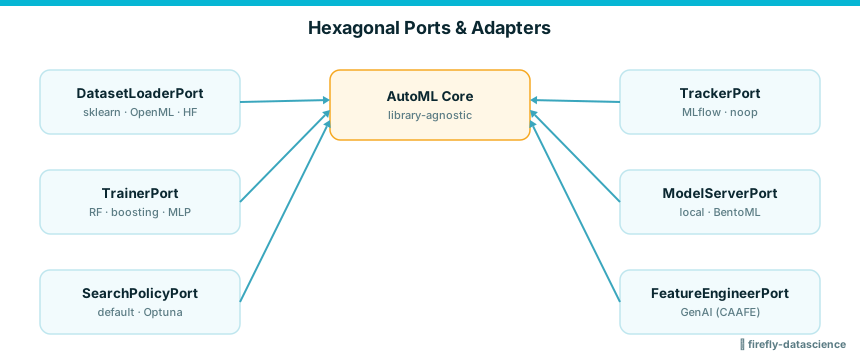
Why a port, not a base class
A loader is just any object with a name, a can_load, and a load. DatasetLoaderPort is a
@runtime_checkable Protocol, so your loader does not import or subclass anything from the
framework — duck typing is enough. The dependency points inward: adapters depend on the core,
never the reverse.
The Dataset container
Dataset is a @dataclass. The only required fields are name and X; everything else has a
default.
| Field | Type | Default | Meaning |
|---|---|---|---|
name |
str |
(required) | A human-readable label, carried into split names. |
X |
Any |
(required) | The feature matrix (a pandas DataFrame or array-like). |
y |
Any |
None |
The target; None for unsupervised data. |
task |
TaskType |
TaskType.CLASSIFICATION |
The learning task (see Core types). |
target_name |
str \| None |
None |
The target column's name. |
feature_names |
list[str] |
[] |
Column names for X. |
metadata |
dict[str, Any] |
{} |
Free-form provenance (e.g. {"source": "sklearn"}). |
from fireflyframework_datascience.core.types import TaskType
from fireflyframework_datascience.datasets import Dataset

ds = Dataset(
    name="my_data",
    X=frame_x,                 # a pandas DataFrame (or array-like)
    y=series_y,                # optional target; defaults to None
    task=TaskType.BINARY,      # defaults to TaskType.CLASSIFICATION
    target_name="label",
    feature_names=list(frame_x.columns),
    metadata={"source": "csv"},
)

ds.n_rows       # int — len(X)
ds.n_features   # int — X.shape[1]
ds.has_target   # bool — y is not None
n_rows, n_features, and has_target are read-only properties, so they always reflect the
current X and y — there is nothing to keep in sync.
train_test_split
Splits into (train, test) datasets. For classification tasks with a target present, the split is
stratified on y automatically; otherwise no stratification is applied. The returned datasets carry
the same task, target_name, and feature_names, plus a copy of metadata; their names are
suffixed [train] / [test].
train, test = ds.train_test_split(test_size=0.25, random_state=42)  # (1)!

train.name   # "my_data[train]"
test.name    # "my_data[test]"
- Both arguments are keyword-only with the defaults shown. Stratification kicks in only when
task.is_classification()is true andy is not None.
with_features
Returns a copy with the feature matrix X replaced — this is how feature engineering hands work
back without mutating the original. The new feature_names are taken from the DataFrame's columns;
y, task, target_name, and a copy of metadata are preserved.
engineered = ds.with_features(new_frame_x)
engineered.feature_names == list(new_frame_x.columns)  # True
infer_task
Infers a TaskType from a target series or array. Useful when a source does not tell you what kind
of problem its target represents.
from fireflyframework_datascience.datasets import infer_task

infer_task([0, 1, 0, 1])              # TaskType.BINARY        (2 unique values)
infer_task(["a", "b", "c"])           # TaskType.MULTICLASS    (>2 categorical)
infer_task([0.1, 0.2, ..., 3.4])      # TaskType.REGRESSION    (float, >20 unique)
The rules, in order:
- A float target (
dtype.kind == "f") with more than 20 distinct values →REGRESSION. - An integer target (
dtype.kindin"i"/"u") with more than 20 distinct values →REGRESSION. - Exactly two unique values →
BINARY. - Everything else →
MULTICLASS.
The 20-value threshold is a heuristic
An integer target with, say, 10 distinct levels is treated as MULTICLASS, not REGRESSION.
If the inference is wrong for your data, set Dataset.task explicitly rather than relying on
infer_task.
TaskType and Modality
Two enums from the core (fireflyframework_datascience.core.types) describe what you are learning
and on what kind of data. Both are StrEnums, so they compare and serialize as plain strings.
TaskType is the learning task and lives on every Dataset:
from fireflyframework_datascience.core.types import TaskType

TaskType.BINARY.is_classification()      # True
TaskType.REGRESSION.is_classification()  # False
is_classification() returns True for BINARY, MULTICLASS, and the generic CLASSIFICATION.
The full set is BINARY, MULTICLASS, CLASSIFICATION, REGRESSION, CLUSTERING, and
FORECASTING.
Modality describes the kind of data a pipeline operates on — orthogonal to the task. The
datasets module ships tabular loaders, but the enum is the framework-wide vocabulary other modules
key off:
Modality |
Value | Typical use |
|---|---|---|
TABULAR |
"tabular" |
Rows and columns — what Dataset and the built-in loaders produce. |
TEXT |
"text" |
Free-text / NLP inputs. |
VISION |
"vision" |
Images. |
TIMESERIES |
"timeseries" |
Ordered observations over time. |
MULTIMODAL |
"multimodal" |
A mix of the above. |
Modality and TaskType are both re-exported at the top level, so
from fireflyframework_datascience import Modality, TaskType works too.
DatasetLoaderPort
A @runtime_checkable Protocol. Implement it to teach the framework about a new data source — no
inheritance required.
from typing import Any, Protocol, runtime_checkable

@runtime_checkable
class DatasetLoaderPort(Protocol):
    name: str
    def can_load(self, source: str) -> bool: ...
    def load(self, source: str, *, target: str | None = None, **kwargs: Any) -> Dataset: ...
A loader inspects a string source (a name, an id, or a URI), reports whether it can_load it, and
— if so — returns a fully-populated Dataset. The framework's auto-configuration registers the
built-in loaders as DI beans when their libraries are importable: the sklearn loader is registered
when sklearn is present, and the OpenML loader additionally when openml is present.
A worked example: your own loader
Any object matching the protocol is a valid loader. Because the port is @runtime_checkable, you
can even assert the match at runtime:
import pandas as pd
from fireflyframework_datascience.core.types import TaskType
from fireflyframework_datascience.datasets import Dataset, DatasetLoaderPort, infer_task

class CsvDatasetLoader:                              # (1)!
    name = "csv"

    def can_load(self, source: str) -> bool:
        return source.endswith(".csv")

    def load(self, source, *, target=None, **kwargs):
        frame = pd.read_csv(source)
        series_y = frame.pop(target) if target else None   # (2)!
        return Dataset(
            name=source,
            X=frame,
            y=series_y,
            task=infer_task(series_y) if series_y is not None else TaskType.CLASSIFICATION,
            target_name=target,
            feature_names=list(frame.columns),
            metadata={"source": "csv"},
        )

loader = CsvDatasetLoader()
isinstance(loader, DatasetLoaderPort)  # True — duck typing satisfies the protocol
- No base class — defining
name,can_load, andloadis all the protocol asks for. targetis keyword-only onload, matching the port signature. Lettinginfer_taskpick theTaskTypemirrors whatOpenMLDatasetLoaderdoes.
SklearnDatasetLoader (offline)
Loads scikit-learn's built-in toy/real datasets by name — no network needed. Accepts bare names
(breast_cancer) or the sklearn: prefix (sklearn:breast_cancer).
from fireflyframework_datascience.datasets.adapters import SklearnDatasetLoader

loader = SklearnDatasetLoader()
loader.name                       # "sklearn"
loader.can_load("iris")           # True
loader.can_load("openml:31")      # False

ds = loader.load("breast_cancer")
ds.task          # TaskType.BINARY
ds.n_features    # 30
ds.metadata      # {"source": "sklearn", "n_rows": ..., "n_features": ...}
Available names and their tasks:
| Source | Task |
|---|---|
breast_cancer |
BINARY |
iris, wine, digits |
MULTICLASS |
diabetes, california_housing |
REGRESSION |
The loader resolves each name to load_<name> (or, failing that, fetch_<name>) in
sklearn.datasets and calls it with as_frame=True, so X is a DataFrame and y a Series. An
unknown name raises ValueError listing the available datasets.
Requires scikit-learn
load imports sklearn.datasets directly. Without scikit-learn installed (the tabular
extra), the import raises a plain ImportError.
OpenMLDatasetLoader (data extra)
Loads datasets from OpenML by id (openml:31) or name
(openml:credit-g). Requires the data extra (openml) and network access. The task is inferred
via infer_task from the resolved target (or defaults to TaskType.CLASSIFICATION when there is no
target).
from fireflyframework_datascience.datasets.adapters import OpenMLDatasetLoader

loader = OpenMLDatasetLoader()
loader.name                       # "openml"
loader.can_load("openml:31")      # True

ds = loader.load("openml:credit-g")           # by name
ds = loader.load("openml:31", target="class") # override the default target
ds.metadata                                   # {"source": "openml", "openml_id": ...}
The reference after openml: is treated as an id when it is all digits, and as a name otherwise.
When you do not pass target, the loader falls back to the dataset's default_target_attribute.
Adapter unavailable without the extra
If the openml package is not installed, load raises
AdapterUnavailableError("OpenMLDatasetLoader", "data"), whose message tells you exactly which
extra to install.
See also
- Architecture — the hexagonal ports-and-adapters design and the optional extras
- Quickstart — load a dataset and run a pipeline end to end
- AutoML — how the engine consumes a
Datasetand itstask - GenAI features — consumers of
Dataset.with_features - Benchmarks — the sklearn/OpenML datasets used to measure the framework