OpenAI-compatible applications
Quickstart · Get a token · API reference · Architecture
Connect the OpenAI Python SDK or Pydantic AI to your selected coding-agent subscription through the bridge. It supports Chat Completions, model discovery, function calls and structured output. The console, Claude integrations and workflow engine use the same authenticated API and durable queue.
Connect in four steps
- Install the Desktop extension or Code plugin, sign in through the selected official Codex or Claude Code CLI, and start the host.
- Copy the local owner token, open the console, and create an application token under Diagnostics → Application access. Chat requests require
readandsubmit; allow thedefaultprofile. - Put that application's
ffb_token inBRIDGE_TOKEN. SetBRIDGE_URLtohttp://127.0.0.1:8766, or your configured HTTPS tunnel origin. - Set the SDK base URL to
$BRIDGE_URL/v1, the SDKapi_keytoBRIDGE_TOKEN, and the model tobridge/default.
The SDK's api_key parameter is the bridge bearer token. You do not need an OpenAI key, a Claude API key, or access to Claude's stored login credentials. The SDK connects only to your configured bridge URL.
python3 -m venv .venv
. .venv/bin/activate
python -m pip install 'openai==3.19.2' 'pydantic-ai-slim[openai]==2.49.0'
export BRIDGE_URL=http://127.0.0.1:8766
# Supply BRIDGE_TOKEN through your private environment configuration.
python examples/pydantic_agent.py
On PowerShell, activate with .venv\Scripts\Activate.ps1 and set $env:BRIDGE_URL = 'http://127.0.0.1:8766'.
OpenAI Python SDK
import os
from openai import OpenAI

with OpenAI(
    base_url=os.environ["BRIDGE_URL"].rstrip("/") + "/v1",
    api_key=os.environ["BRIDGE_TOKEN"],
    max_retries=0,
    timeout=330.0,
) as client:
    print([model.id for model in client.models.list().data])
    response = client.chat.completions.create(
        model="bridge/default",
        messages=[{"role": "user", "content": "Explain a durable queue in one sentence."}],
    )
    print(response.choices[0].message.content)
GET /v1/models lists only configured profiles available to that token. bridge/default selects the default bridge profile, not a model hosted by OpenAI. The profile may pin a native model; otherwise the selected official CLI uses its default.
Pydantic AI with local Python functions
Select OpenAIChatModel explicitly. Pydantic AI also supports a Responses model; /v1/responses is outside this bridge's contract.
import asyncio
import os
from openai import AsyncOpenAI
from pydantic_ai import Agent
from pydantic_ai.models.openai import OpenAIChatModel
from pydantic_ai.providers.openai import OpenAIProvider

async def main():
    async with AsyncOpenAI(
        base_url=os.environ["BRIDGE_URL"].rstrip("/") + "/v1",
        api_key=os.environ["BRIDGE_TOKEN"],
        max_retries=0,
        timeout=330.0,
    ) as client:
        model = OpenAIChatModel("bridge/default", provider=OpenAIProvider(openai_client=client))
        agent = Agent(model)

        @agent.tool_plain
        def add(a: int, b: int) -> int:
            """Add two integers in the calling Python application."""
            return a + b

        result = await agent.run("Use add with a=2 and b=5, then report the result.")
        print(result.output)

asyncio.run(main())
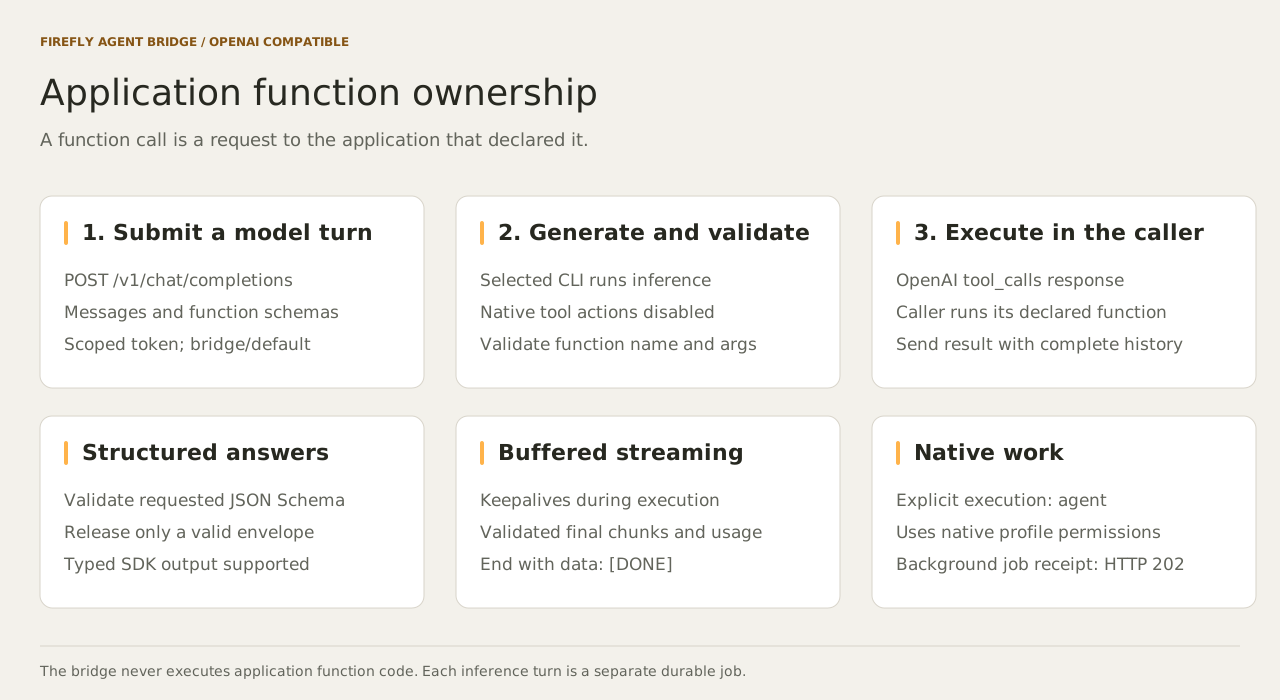
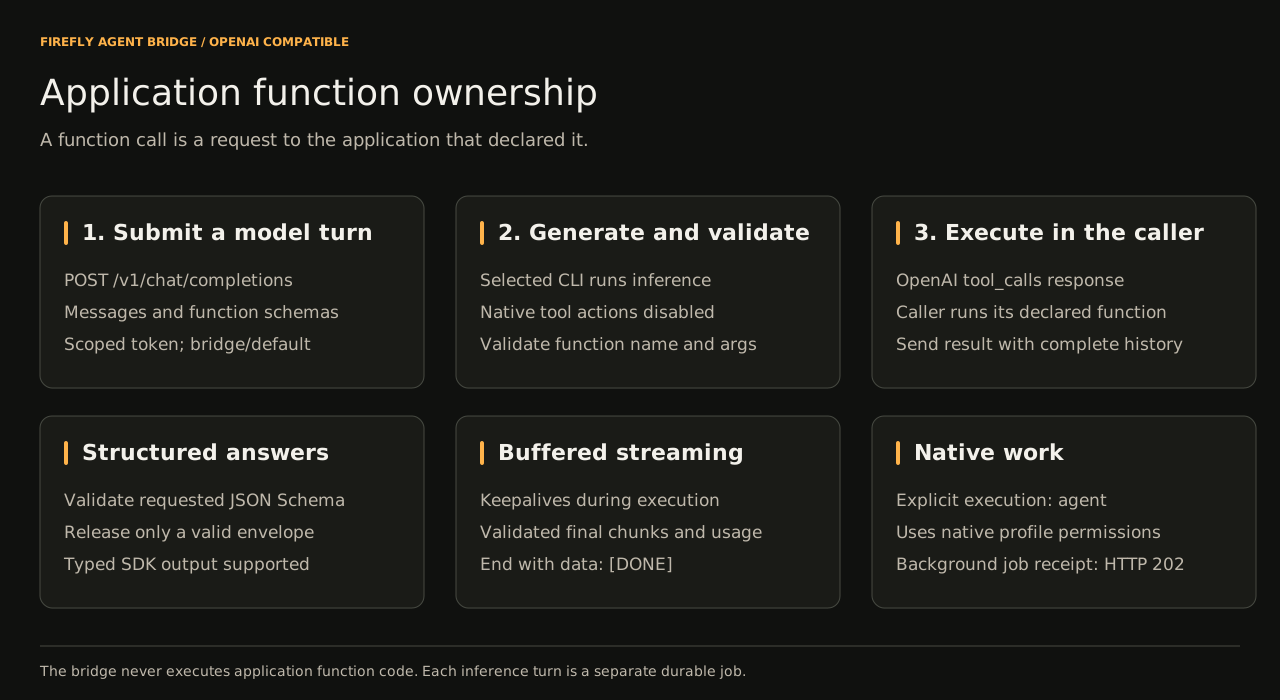
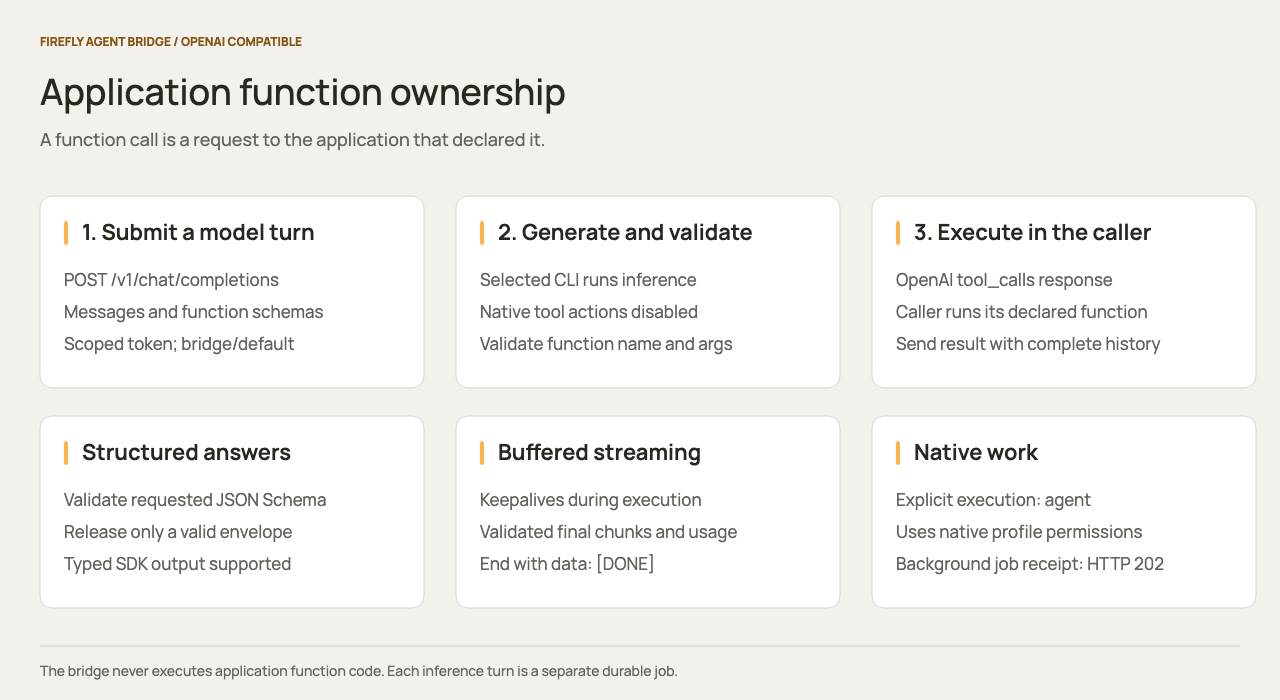
The inference worker requests add through a validated tool_calls result. Pydantic AI executes the Python function in your application, then submits the full history with its tool result. Each model turn is a separate durable inference job. Function names, JSON arguments, declared schemas, and tool-result IDs are validated. The bridge never runs client function code.
For typed output, pass a Pydantic class as Agent(model, output_type=YourModel). Pydantic AI's default output-function strategy is supported. output_type=NativeOutput(YourModel) uses response_format.json_schema. See the runnable example and SDK compatibility tests.
Execution choices, one admission endpoint
| Choice | Request | Who runs tools? | Result |
|---|---|---|---|
| Inference | Standard Chat Completions request; default bridge.execution is inference |
Your application runs declared functions. Native Bash, filesystem, MCP, and Agent tools are disabled. | OpenAI completion JSON or SSE |
| Native agent | bridge: {"execution":"agent","background":true} |
The selected official CLI runs native tools under the profile's permission policy. | HTTP 202 durable job receipt |
| Host conversation | bridge: {"execution":"channel","background":true} |
A Desktop/Code conversation explicitly claims work through MCP. | HTTP 202 durable job receipt |
background:true also works with inference. It returns immediately and preserves the queued job independently of the submitting connection. Read the result and control execution through /v1/bridge/jobs/{id} and the console. Native agent requests may use background:false to wait for completion JSON or SSE. Channel requests require background execution.
Native agent/channel requests accept one text user message and no client function tools or structured-output request. Their continued conversation uses the bridge's native follow-up controls. Inference requests instead send the full message history to /v1/chat/completions for each next turn.
To launch native subagents through the same API:
curl --fail-with-body "$BRIDGE_URL/v1/chat/completions" \
  -H "Authorization: Bearer $BRIDGE_TOKEN" \
  -H "Content-Type: application/json" \
  -H "Idempotency-Key: project-review-001" \
  -d '{"model":"bridge/code-workflow","messages":[{"role":"user","content":"Use Agent to ask reviewer to inspect /absolute/path/to/project. Return concrete findings."}],"bridge":{"execution":"agent","background":true}}'
Configure code-workflow first using the advanced workflow guide. OpenAI SDK callers pass this extension with extra_body={"bridge": {"execution": "agent", "background": True}}; a background result has the bridge Job schema, so use raw HTTP when you need a typed job receipt. Workflows use /v1/bridge/workflow-runs and the same queue, profiles, and execution controls.
Image input
Inference accepts PNG, JPEG, and WebP attachments in user-message image_url parts. Each request permits at most five attachments across the entire conversation and 6,000,000 decoded bytes in total. Use a canonical base64 data URL and detail: "auto", or omit detail. Remote URLs, host file paths, animated images, compressed PNG metadata, and other detail settings are rejected. Images are bounded to 8,192 pixels on either edge, 16 million pixels, and 64 million expanded bytes.
import base64
from pathlib import Path

image = base64.b64encode(Path("screenshot.png").read_bytes()).decode("ascii")
response = client.chat.completions.create(
    model="bridge/default",
    messages=[{
        "role": "user",
        "content": [
            {"type": "text", "text": "Describe the visible error in this screenshot."},
            {"type": "image_url", "image_url": {
                "url": "data:image/png;base64," + image,
                "detail": "auto",
            }},
        ],
    }],
)
The bridge preserves attachment order and inserts numbered references in the conversation text. Base64 stays outside the expanded text prompt. Codex receives private staged files through its official --image option; Claude receives image blocks through its official stream-JSON input. Native inference tools remain disabled. Image input does not grant filesystem, browser, or image-generation tools.
GET /v1/models includes image_input for each permitted profile. Its status starts as unverified. An owner can run one pixel-only challenge with POST /v1/bridge/image-input/probes and body {"profile":"default","request_id":"<UUID>"}. Poll GET /v1/bridge/image-input/probes/{job_id} until it reports verified or failed. A verified result includes the configuration revision, timestamp, and probe job ID. Changing the worker executable, profile, or adapter invalidates that proof. This is evidence of one successful challenge; subscription readiness and future request success still depend on the official CLI and account.
For requests that depend on verified image input, pass X-Bridge-Image-Revision with the verified config_revision from model discovery. The bridge rejects a new request with HTTP 409 if that revision is no longer verified. Image admission freezes the actual worker, executable, and profile in private storage; queued work uses that snapshot, and executable replacement fails execution. The header is included in the idempotency fingerprint. An exact replay reads its existing job even if the current profile has changed.
The probe consumes subscription allowance. Keep its request ID across uncertain HTTP outcomes; repeating it returns the same job. Inspect an image job before submitting a new request. Image jobs cannot be resumed or retried in place, including after a quota pause or interrupted outcome. Temporary Codex image files are removed when execution settles and during recovery of interrupted jobs. The private queue retains the original attachment data for audit and recovery inspection.
Official Codex image input was tested against a signed-in ChatGPT subscription using a random code present only in PNG pixels. The Claude adapter has deterministic protocol coverage; Claude subscription image acceptance requires a signed-in host and is not claimed here. The bridge does not connect a ChatGPT web account to a remote connector automatically.
Streaming behavior
Set stream=True in the OpenAI SDK, or use Pydantic AI's run_stream. The bridge sends SSE keepalive comments while the selected CLI runs, then sends the validated final output as standard completion chunks followed by data: [DONE]. Function deltas include stable IDs, names, and JSON arguments. stream_options={"include_usage": True} adds a final usage chunk when the provider reports counts.
This is buffered streaming: it keeps the connection active but does not expose token-by-token generation. A structured response must pass validation before any answer is released. The console's /v1/bridge/events stream carries durable job progress, compaction, workflow, and quota notifications; it is an orchestration extension of the same API, with its own event format and replay cursor.
Supported contract
| Field or capability | Support |
|---|---|
messages |
1 to 128 messages; system, developer, user, assistant, tool; strings or text parts; inference user messages also accept bounded image parts |
tools |
Up to 32 function definitions; up to 16 returned calls; validated JSON arguments |
tool_choice |
auto, none, required, or a named function |
parallel_tool_calls |
Boolean; false rejects a response containing multiple calls |
response_format |
text, json_object, json_schema |
| JSON Schema | Bounded schemas with acyclic local JSON Pointer $ref/$defs; asynchronous schemas, unsupported keywords, external/cyclic references, regex patterns, and format annotations are rejected |
n |
Exactly 1 |
stream, stream_options.include_usage |
Buffered OpenAI SSE and optional observed usage |
bridge |
execution and background as described above |
| Sampling and generation parameters | temperature, top_p, max_tokens, max_completion_tokens, stop, penalties, seed, and logprobs return HTTP 400 |
| Other APIs and media | Responses, embeddings, audio, image generation, video, files, and batches are unsupported |
The request object is strict: unsupported fields return an error rather than silently changing behavior. The expanded conversation is limited to 100,000 characters and the Chat Completions HTTP body to 9,000,000 bytes. Other routes retain a 120,000-byte body limit. Profiles bound attempt duration, output size, and model turns. Schema validation is enforced even when strict is false.
Usage reflects the provider's reported invocation totals, including cache reads/writes and bridge instructions. It is not an OpenAI billing record or an exact tokenization of the submitted messages. Missing provider usage is omitted.
Timeouts, retries, and quota recovery
- The default completion deadline is 300 seconds including queue wait. Set the SDK timeout slightly higher, or configure
openai.timeoutMs. The default service-wide waiting-connection limit is 16; each principal can hold four. - Set SDK
max_retries=0unless you implement deliberate recovery. New model requests can consume subscription allowance; a repeated external function may also have side effects. - Reuse one
Idempotency-Keyper logical request and exact body across uncertain retries. Existing jobs and completion IDs are reused; a different body returns 409. Generate a fresh key for each next conversation turn. Multiple connections to the same key do not cancel each other's work. X-Bridge-Job-Idlinks an admitted request to the panel. Errors after admission also includeerror.job_id. A quota pause returns 429 andRetry-Afterwhen the provider supplies a reset. An operator pause returns 503. Those jobs remain durable for recovery.- After SSE headers have been sent, a failure arrives as
data: {"error":...}followed by[DONE]; inspect the exception from your SDK and the durable job. HTTP status cannot change midstream. - Synchronous disconnects, revoked tokens, and deadlines cancel work when its last waiter leaves. Background jobs survive a disconnected submitter. Service shutdown records unfinished execution for inspection. Cancellation cannot roll back application functions or native tool effects.
- Resume a paused job through the console or
/v1/bridge/jobs/{id}/resumeafter checking the recovery guide. Reattach by sending the same body and idempotency key. Do not create a new job simply because a paused request ended.
The selected native CLI owns compaction and resumable sessions. For a new inference turn, the application owns the complete OpenAI message history; for recovery of that same interrupted turn, the bridge uses its saved native session.
Sources and verification
The contract follows OpenAI Chat Completions, Pydantic AI's OpenAI provider, and Claude Code's programmatic interface. The verification record covers deterministic client tests, live Codex acceptance, native package checks and host-specific installation limits. Claude subscription acceptance requires an authenticated developer host.