Get and use your bridge token
Quickstart · API · Advanced workflows
A bridge token authenticates to your local Firefly Agent Bridge. It starts with ffb_. It is separate from your provider subscription login. Official Codex or Claude Code manages that login; provider credentials stay with that client.
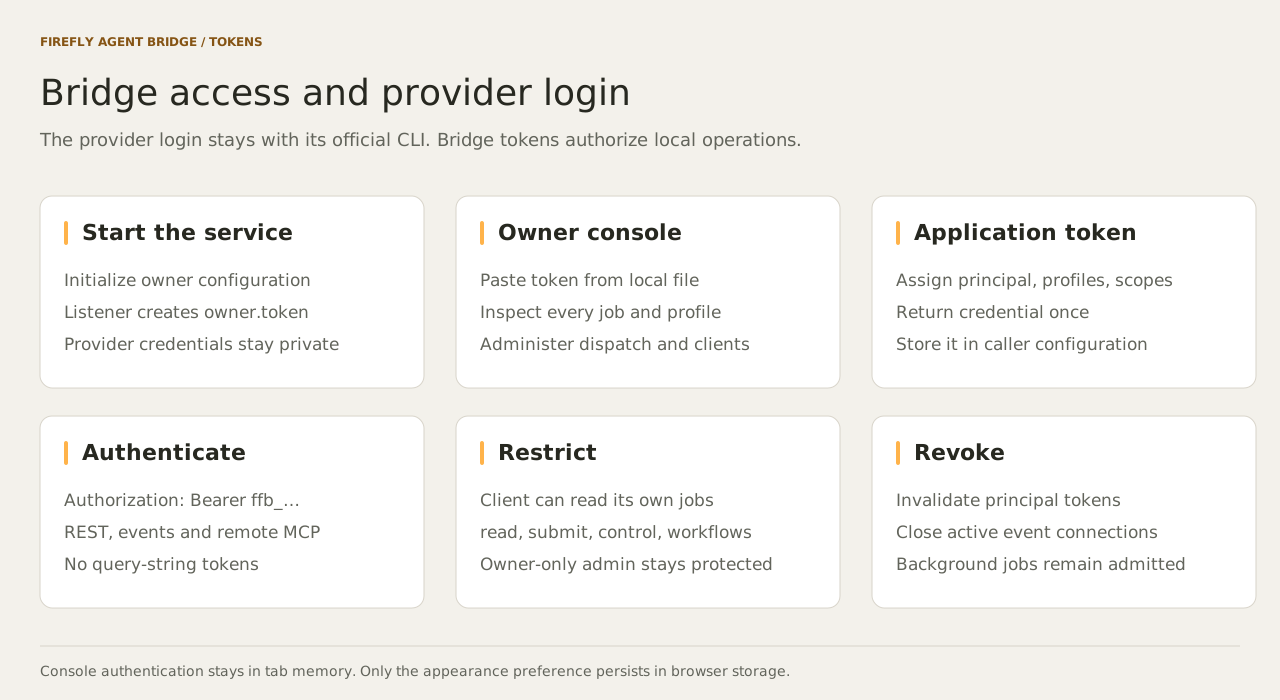
1. Start the bridge first
Install and enable the Code plugin or Desktop extension, then restart the host. Its MCP adapter starts the local listener. Ask Claude to call bridge_status and bridge_panel.
The listener creates owner.token on its first successful start. The init command only creates configuration; it does not start the service or create this token.
With the portable download, run ./firefly-bridge serve (Windows: .\firefly-bridge.exe serve) and keep that terminal open. The default console address is http://127.0.0.1:8766; bridge_panel returns the actual address if the configured port differs.
2. Get the owner token for the console
The owner token grants full local administration. Copy it from the private file on your own computer and paste it into the console's Bridge token field.
| Platform | File |
|---|---|
| macOS | ~/Library/Application Support/Firefly Agent Bridge/owner.token |
| Windows | %LOCALAPPDATA%\Firefly Agent Bridge\owner.token |
| Linux | ${XDG_STATE_HOME:-~/.local/state}/Firefly Agent Bridge/owner.token |
| Custom instance | <the --data-dir you selected>/owner.token |
On macOS, copy directly to the clipboard:
On Windows PowerShell:
On a Linux Wayland desktop with wl-copy installed:
You can also open the file in a local text editor. Keep the token out of chat, screenshots, Git, and URLs. The console retains it only in tab memory; disconnecting or reloading requires authentication again.
3. Create a separate token for an application
- Connect to the console with the owner token.
- Open Diagnostics → Application access.
- Enter a stable client name, such as
build-helper. - Enter allowed profiles, such as
defaultorcode-workflow. - Select Application permissions: job management, read-only inspection, or jobs and workflows.
- Click Create token and use Copy token to save it in the application's private configuration. Show reveals the otherwise masked value.
The console defaults to read, submit, and control. Read-only inspection grants only read; Jobs and workflows adds workflows. Use the CLI or API for other supported subsets. The console retains a new token until disconnect; the database stores a hash. Separate client names isolate job access. Tokens issued with the same client name represent the same principal.
The portable CLI can create the same token without copying the owner token into a shell:
Its JSON output contains token. Store that value privately as BRIDGE_TOKEN in your application. The plugin's cached executable is not automatically added to PATH; use the downloaded portable executable for these commands.
4. Make an authenticated request
Load BRIDGE_TOKEN from your application's private environment configuration before making a request:
export BRIDGE_URL=http://127.0.0.1:8766
curl --fail-with-body "$BRIDGE_URL/v1/bridge/status" \
  -H "Authorization: Bearer $BRIDGE_TOKEN"
node examples/client.mjs "Summarize the purpose of the bridge"
For the OpenAI SDK and Pydantic AI, pass this same token as api_key, use base_url=BRIDGE_URL + "/v1", and select bridge/default. Chat Completions needs both read and submit. The SDK guide includes complete examples.
Send the same header on HTTP and SSE requests. Never add ?token=... to a URL. Owner-only operations require the owner token; normal applications should use their scoped client token.
To create a read-only client through the API, first load BRIDGE_OWNER_TOKEN from the owner file without printing it. On macOS:
IFS= read -r BRIDGE_OWNER_TOKEN < "$HOME/Library/Application Support/Firefly Agent Bridge/owner.token"
export BRIDGE_OWNER_TOKEN
Use the corresponding path in the table for Linux. In PowerShell: $env:BRIDGE_OWNER_TOKEN = (Get-Content -Raw (Join-Path $env:LOCALAPPDATA 'Firefly Agent Bridge\owner.token')).Trim().
Then submit:
curl --fail-with-body "$BRIDGE_URL/v1/bridge/admin/tokens" \
  -H "Authorization: Bearer $BRIDGE_OWNER_TOKEN" \
  -H "Content-Type: application/json" \
  -d '{"id":"status-viewer","profiles":["default"],"scopes":["read"]}'
5. Revoke or replace access
Click Revoke next to the client in Diagnostics, or run:
Revocation invalidates all tokens for that client name and disconnects its SSE streams. Create a replacement token and update the application's private configuration. Revocation ends active synchronous completion waiters and cancels their work when no waiter remains. Background jobs remain admitted; cancel those explicitly if needed.
Troubleshooting
| Symptom | What to check |
|---|---|
owner.token is missing |
The listener must start successfully; check host extension status and service.log. Confirm the selected data directory. |
| Connection refused | Start the host integration or portable service. Use the URL from bridge_panel. |
| HTTP 401 | Use a complete ffb_ token, trim whitespace, and check whether the client was revoked. |
| HTTP 403 | The token may lack the requested scope/profile, or the request's Host/Origin is not allowed. |
| A client cannot see another client's job | Resource isolation is working. Use that client's token or the local owner console. |
| A custom tunnel fails | Configure the explicit hostname and browser origin; keep bearer authentication. See tunnels. |