Configure and administer an organization
Use this guide to find a setting, understand who owns it and check the result of a change. For a new organization, follow guided configuration in order. Deployment operators prepare the installation; organization administrators manage the organization within those protected installation limits.
Open the correct organization
- Sign in to the intended installation. With one authorized organization, koinon uses it without showing an organization selector. If your account has more than one, use the organization selector to choose the intended organization before continuing. A successful identity-provider login does not establish product membership.
- Open your avatar menu and choose Settings. The management application's Settings and administrative Activity destinations require organization administrator access. An operator's API permissions do not make these browser destinations available.
- Check the organization name in the settings navigation before editing. On a small screen, use Settings section. On a larger screen, the boundary chevron hides or restores the navigation without changing the selected page.
If Settings is missing, ask an existing administrator to review your current role. Do not create another organization or change the identity-provider subject to work around access. API and SDK operations check their own permission and resource scope on the server; hiding a menu is not that authorization check.
Find a setting
| Settings group | Page | What to manage |
|---|---|---|
| Organization | People, Organization structure | Profile visibility, positions, departments, teams and reporting lines; see people and organization. |
| Organization | Access | Memberships, workspace grants and invitations; see communications and invitations. |
| Organization | Communications | Verified sender selection, email readiness, summaries and delivery history. Provider credentials remain deployment configuration. |
| Organization | Identity & appearance | Organization names, logos and palettes; see identity and appearance. |
| Organization | Applications | Registered application configuration; see register applications. Personal connections remain under Authorized applications in the account area. |
| Knowledge & AI | Overview | Start the appropriate task. Saved connections and recorded generation checks are separate observations. |
| Operations | Source processing | Find uploaded source records, inspect their details and start a Library upload. Other source integrations require deployment configuration. |
| Knowledge & AI | Model connections | Model endpoints, protocols, credentials and observed model capabilities. |
| Knowledge & AI | Model assignments | Document and dataset embeddings, specialized processing roles and explicit workspace overrides. |
| Knowledge & AI | Knowledge answers | Organization document RAG/RLM behavior and bounded document or structured-query parameters. |
| Knowledge & AI | Assistant | The central organization chat assistant and memory limits. Additional agent configurations remain available in an expandable section. |
| Knowledge & AI | Storage & indexing | Plan, build, inspect and explicitly activate knowledge indexes. Inspect deployment observations separately; bucket, database and provisioning bindings remain operator procedures. |
| Operations | Platform health | Passive observations and installed component information; see health diagnosis. |
| Operations | Audit, Operations | Recorded administrative events and processing work. Your personal activity is a separate view. |
An unavailable action can reflect missing permission, installation configuration or a current processing constraint. Read the explanation before changing another setting. Each page still checks its own authority; a workspace grant does not become organization-wide administration.
Settings opens Knowledge & AI, Overview when your account can manage its tasks. An explicit chat-setup link opens Assistant directly. If neither is available, Settings opens a section permitted for your current organization.
Choose Keep editing when a navigation review appears to preserve the current form, or Leave editor to discard unsaved changes. Saved settings remain in place. Connection, assignment and answer settings are separate forms; navigating between them does not save, test or activate anything.
The overview is a list of tasks, not a fixed-order wizard. Index planning can be needed before an embedding assignment is compatible. Follow the prerequisites in the selected workspace instead of assuming that an organization default applies everywhere.
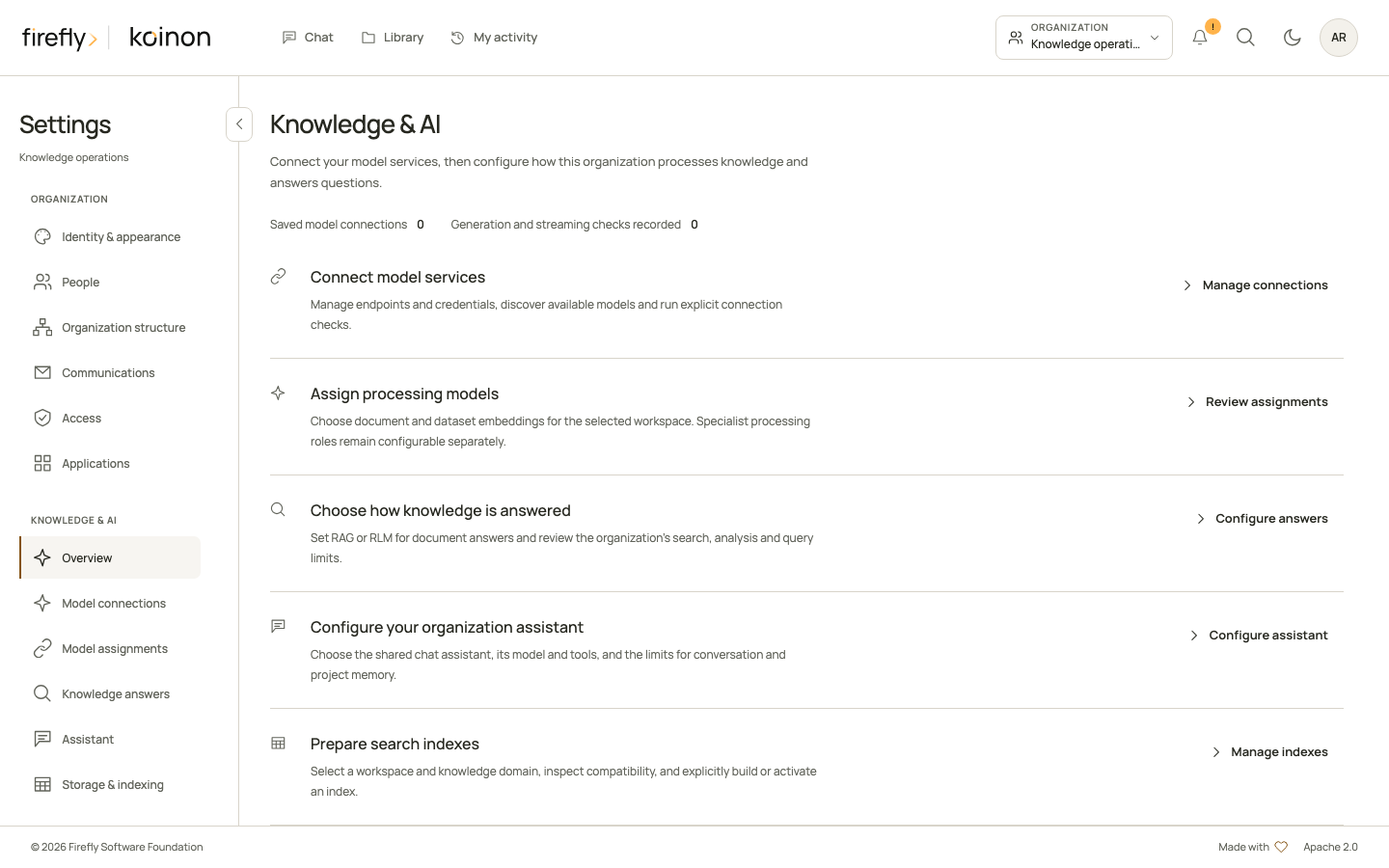
Controlled application screenshot with a fictional organization. No model connection has been configured.
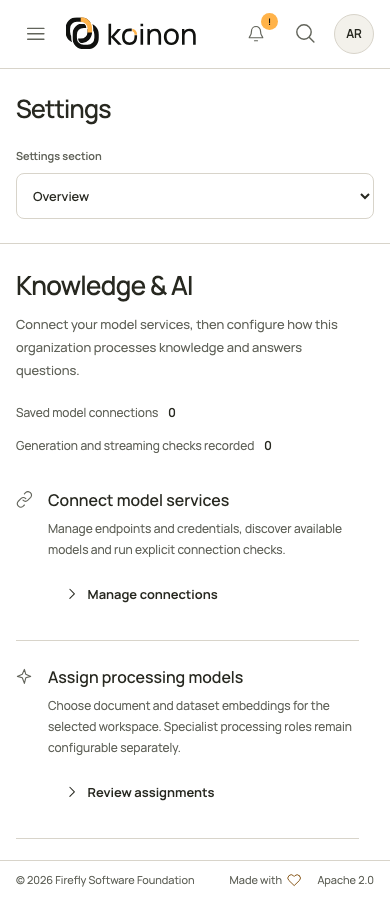
On mobile, choose a page using Settings section. Tasks remain available in the scrollable content area.
Initial setup
- Deploy database, identity integration and API using the operations guide.
- Bootstrap the organization and canonical administrator through the audited deployment command. Identity-provider login alone grants no product membership.
- Create spaces and recognizable folders, then grant the smallest useful roles and scopes.
- Configure storage, search/vector and model prerequisites. Validate them before importing knowledge.
- Import a small fictional document and dataset. Verify processing, retrieval, schema, query evidence and failure recovery before onboarding the team.
- Configure an agent, validate its provider/model and test with an end-user account.
People and access
| Role | Intended work |
|---|---|
| Viewer | Browse knowledge, search and ask agents |
| Analyst | Viewer work and governed dataset questions |
| Editor | Maintain knowledge and submit imports |
| Operator | Configure providers/agents/sources/indexes, manage jobs and inspect audit |
| Administrator | Operator work, membership and identity/settings policy |
Memberships can apply organization-wide or to an authorized space. The last organization administrator cannot be removed. Revocation is checked on subsequent protected operations, including existing sessions. An operator cannot grant membership or change identity authority. The role table describes server permissions, not an assurance that every role has a matching Settings page in the management application. A token is further restricted by its selected scopes, expiry and resources; it cannot exceed the user's current memberships.
Invite someone or change access
In Settings, open Access to manage People & access. Search existing people by name before assigning a role. Choose the organization or a workspace as the scope. Filters and pages come from the server; changing the scope or filters returns to the first page. A person may hold several roles, so removing one assignment may leave access through another.
Use the separate People and Organization structure sections for photos, job titles, departments, teams and reporting lines. These fields do not grant access. People and organization explains profile ownership, directory privacy, corporate mappings and all three SDKs.
For someone new, choose Invite person when a directory connection and email delivery prerequisites are available. Select the verified directory recipient, role, scope and expiry, review the generated communication, then send. Sending queues the invitation; provider acceptance and inbox delivery are different outcomes. The recipient signs in with that existing organization account and explicitly accepts or declines. Follow communications and invitations for readiness, resend rules and delivery history.
Create legacy invitation link is a separate workflow. It creates a private bearer link with a role, scope and expiry. The default lifetime is 24 hours; the maximum is seven days. Copy its secret when it is shown once. This action does not send email or provision an identity-provider account. Someone holding the link can sign in through the configured provider and accept it. Revoking a pending invitation prevents redemption; after acceptance, manage the resulting membership separately. Neither workflow silently replaces an existing assignment in the same scope.
Corporate access
Corporate connections preserve the deployment's canonical issuer and subject. Keycloak can broker an external directory while preserving those identities. Matching email addresses never merge accounts or grant access.
An explicit group mapping associates a directory group with a product role and optional workspace. Directory-managed grants remain separate from manual roles. Edit the mapping or upstream group to change a managed grant; manual membership operations cannot change it. Keep a manual organization administrator for recovery.
Connection activation requires a fresh sign-in by the initiating administrator, a complete authorized directory observation and the protected broker configuration. A saved connection or discovered group is insufficient. Changes invalidate the proof; disabling a connection removes its managed authority immediately. Normal group changes take effect when the bounded observation expires and refreshes. Failed or incomplete refreshes cannot retain expired managed access.
Corporate management screens and external Entra ID/Google Workspace activation are still under qualification. The current native Keycloak proof uses an isolated local realm. Deployment operators must supply directory permissions, encryption material and approved provider origins before activating a real connection.
Knowledge model assignments
Providers and agents are separate from the model roles used by document and dataset processing. In Model assignments, choose an organization default or an explicit workspace override, then assign the role described by the server. A disabled workspace override blocks fallback to the organization default. Embedding roles are shown first. Expand Advanced processing models for document answering, RLM analysis, SQL generation and other processing roles; the selected method can require these roles.
Generative roles may use the current chat agent only when the role descriptor permits it and the operation has an active agent context. Embedding roles require an explicit provider, model, dimensions and approved existing space. Do not guess an embedding space or substitute a different model for indexed knowledge. An incompatible change requires reindexing; removing and recreating an assignment does not bypass that requirement.
Organization chat and memory
Open Assistant and find Organization chat. Choose an organization-wide agent and save the central setting. Creating an agent alone does not make it the organization default. Choosing No agent intentionally leaves chat unavailable. A configured default can still be unavailable when its provider, model, validation or current permissions no longer qualify.
The same panel configures total history messages, history tokens and the allowance for other chats in a personal project. Project messages count toward the total, and deployment limits remain an upper bound. Allowing personal project memory does not turn it on for every project: the owner must enable it in the relevant chat project. Only that owner's eligible conversations with the same knowledge scope contribute; private files remain in their original conversation. See conversation memory before changing these limits.
Memory helps interpret a question. It never replaces current source retrieval. The knowledge-only response policy explains exact source excerpts, verified dataset values, insufficient-evidence responses and the immutable output receipt.
Knowledge approval
Dataset questions may retain execution, result and audit evidence. Canonical query credentials carry read/execute authority and cannot automatically create knowledge-base examples, including when the caller is an administrator.
Native automatic draft learning is disabled by default. An explicitly enabled autolearn_enabled policy also requires explicit example-author authority; query-read authority alone is insufficient. Authorized proposals retain PROPOSED status. Draft and rejected examples are excluded from lexical/vector grounding and versioned indexing until an authorized explicit approval makes them eligible. Approval computes the compatible embedding before changing review state, then publishes the active vector in the same transaction as the approval. Provider failures, a changed source or an active-index change leave the draft unapproved. Approval also compares a private database row version alongside source and review state. A rejection committed while embedding is in flight wins even if the example was already rejected; stale approval returns a conflict. The private version adds no public response field or schema column, and a fresh explicit reapproval remains supported. Existing drafts and vectors are preserved; they are not silently approved, deleted or backfilled.
Connections and parameters
Settings should present prerequisites and observed states. Model credentials are write-only; responses report whether they are configured. They are encrypted using an external master key and never stored in browser settings. Provider addresses require a deployment-managed host allowlist.
Database roles, identity endpoints, storage roots and extension installation remain deployment authority. Migration credentials and administrator secrets do not belong in organization settings. Distinguish deployment-managed parameters from tenant-level provider and agent configuration.
pgvector and pg_vectorsearch are separate adapters. Their extensions, dimensions, indexes and query parameters require validation against the selected provider. An installed extension does not establish that every retrieval or query path works.
Unsupported connections and missing credentials need setup guidance. Never report them as connected or create a successful placeholder import. The qualification record identifies the provider/deployment boundary actually exercised.
Review sources, storage and processing
In Source processing, enter a source-name filter and submit it, then page through the results. Details opens the current Library resource. Add files opens the Library upload workflow, where a valid destination, intake mode and current write permissions are still required. The source list is not a connector-creation wizard. Other source integrations remain a deployment task. Use the ECM integration guide for that separate integration boundary.
Use Storage & indexing for the guided index lifecycle: select a knowledge space and type, review a model plan, build separately and activate explicitly after inspection. Expand Deployment observations to read file-store, search-index and datasource observations. Refresh deployment observations reads the descriptor again; it does not migrate a bucket, install an extension or rebuild an index. A recent Checked time can accompany Not checked for a configured cloud store. Interpret the reason and availability together, following configuration observations. The same lifecycle is available through typed APIs and SDKs, with the same revision, idempotency and recovery rules.
Use Operations for the returned processing jobs and current progress. A permitted Stop action requests cancellation; it does not prove that an external operation has physically stopped. For a durable file batch, inspect its batch/item state and use the native action exposed by that workflow. Do not infer a safe retry from a browser disconnect or an unknown provider outcome. The bulk intake guide explains submission keys, reconciliation and cancellation.
After any correction, reopen the affected Library resource and check its processing and availability. Configuration, queued work and searchable knowledge are separate states. If investigation requires database roles, storage IAM, worker flags or physical index provisioning, hand it to the deployment operator rather than granting a broader user role.
Operate and recover
Activity presents observed processing state and recoverable errors. Audit records authority changes and operations. Retry refers to persisted work and its original scope. Back up database, identity state, source storage and encryption material with an explicit retention policy. Practice restore into a separate environment.
Make a configuration change deliberately
Use the configuration lifecycle walkthrough for a complete provider/model change, reviewed embedding build and activation, rollback checks or email eligibility review. It keeps saved configuration separate from the actual operation and its evidence.
Read the current configuration and scope first. Change the smallest relevant setting, save once, then reload it to confirm the stored value. Where a page uses an expected revision, a conflict means another change must be reviewed; read the new revision rather than repeatedly submitting the old form. API clients must make that decision explicitly too.
Next, perform the operation that needs the setting. A successful save is not a successful model request, import, index build or email delivery. Check the resulting task or answer and its audit. Keep the previous configuration and the affected revision in your change record. Storage moves, embedding changes and identity migrations require their dedicated procedures; changing a field is not a data migration.
| Symptom | Check first | Next step |
|---|---|---|
| Chat says it is unavailable | Central organization agent and its current provider/model status | Review Assistant, then guided AI setup. |
| Provider is listed but an operation fails | Endpoint, protocol, chosen model and the operation's role assignment | Run the relevant provider check and test that specific workflow. Discovery alone is insufficient. |
| Files remain queued | Staging receipts, bulk consumer opt-in, worker process and recorded job outcome | Follow worker roles and durable staging. Do not upload an uncertain original again. |
| Health shows unknown or expired observations | Evidence basis, observation time and coverage | Use the diagnosis sequence. Unknown is not a successful check. |
| An invitation did not reach an inbox | Communications readiness and the delivery record's actual status | Follow delivery history; avoid resending an unknown outcome. |
| A changed setting appears to have no effect | Organization, workspace override and the admitted run's recorded policy | Start a new bounded operation. Existing runs retain their admitted configuration and evidence. |
Copyright 2026 Firefly Software Foundation. Licensed under Apache-2.0. Made with <3.