Connect Claude to koinon
Connect Claude to your organization's koinon repository to find document passages, inspect datasets and trace answers to their sources. Use your deployment's exact URL and your own authorized identity. A connector registration identifies an application; it does not grant that application organization membership.
Choose the connection
| Connection | Use it for | Credential and account page |
|---|---|---|
| Remote HTTPS MCP | An operator-hosted endpoint reachable by Claude's service | OAuth sign-in and consent; review under Authorized applications |
| Branded desktop MCPB | Claude Desktop reaching the configured koinon endpoint from your computer | A scoped personal API token; review and revoke under API tokens |
The server supports retrieval, governed dataset queries and reviewed knowledge creation, updates and file uploads. Knowledge changes use an embedded MCP Apps review: you inspect the exact content and destination, then explicitly approve or cancel. A host that cannot display this review can retrieve knowledge and perform permitted user-requested catalog organization, but cannot complete content/file publication. See external-agent management for the dedicated folder, metadata, archive and restore tools. See knowledge management inside an MCP conversation.
Connect the remote endpoint
Add a custom connector
Start in Customize, then Connectors.
- Name
- koinon
- Remote MCP server URL
https://knowledge.example.org/mcpExample only. Use your operator's reachable HTTPS URL.- Authentication
- Sign in now or sign in when needed
- OAuth client
- Use your own OAuth clientUse the pre-registered client ID and protected secret supplied by your operator.
- Callback
- Register the exact callback Claude displaysA callback from another connector is not interchangeable.
Finish with Add, choose Connect, then enable koinon for the intended conversation.
In koinon, open your avatar menu, select Authorized applications, then Connect an app. Copy the deployment's full MCP URL and select the registered client for your organization. An organization administrator can register the application under Settings, in Applications; they provide any confidential secret directly to Claude's protected configuration. A URL such as https://knowledge.example.org/mcp is a placeholder, not a hosted koinon service. A listener-derived endpoint marked local_only is usable from the local computer; it does not establish reachability from Claude cloud. The desktop bridge can use a suitable endpoint reachable from your computer.
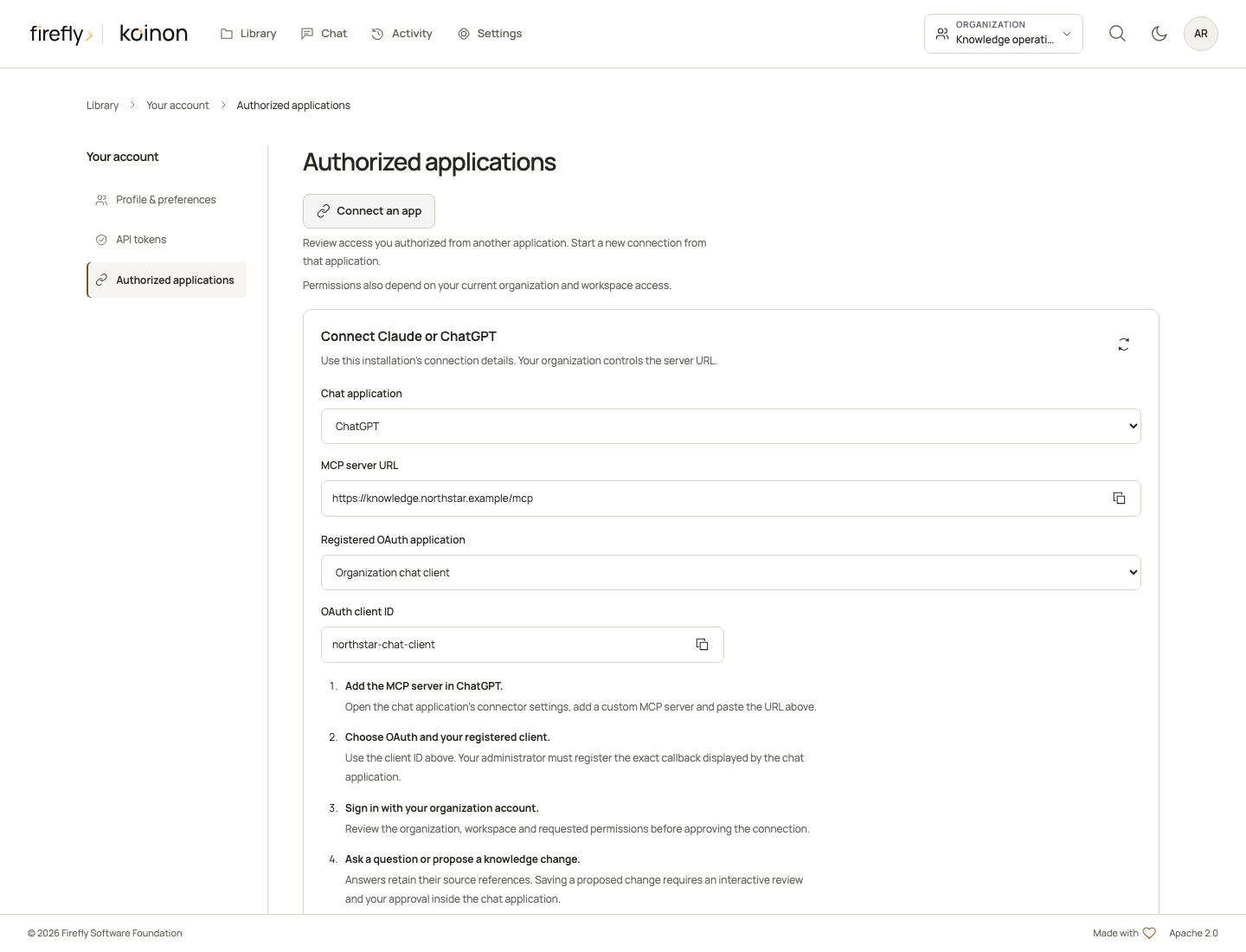
Claude's remote connection originates from Anthropic infrastructure, including when using Claude Desktop. Your operator must provide network reachability; a URL that works only through your laptop's VPN is insufficient. See Anthropic's remote-connector documentation.
- Open Customize, select Connectors and add a custom connector. For an organization-managed Claude account, its owner may first need to add the connector in organization settings.
- Name it koinon, enter the operator's
/mcpURL and review the detected authentication. - Select sign-in and Use your own OAuth client. Enter the operator's client ID and, when required, its confidential-client secret in Claude's protected configuration. Have the operator register the exact callback shown by Claude.
- Finish adding the connector and choose Connect. Enable it for the intended conversation.
These steps follow the current official Claude connector flow. koinon currently supports pre-registration; it does not implement Claude's published-identity registration or automatic dynamic registration. If your client does not expose a compatible pre-registered-client option, stop at setup and report that limitation to your operator.
The client ID is not your koinon token. The optional client secret authenticates the registered application; each user still signs in and consents separately. Do not substitute a model API key or paste a personal API token into an OAuth client-secret field.
Administrator reference: registration is separate from user consent
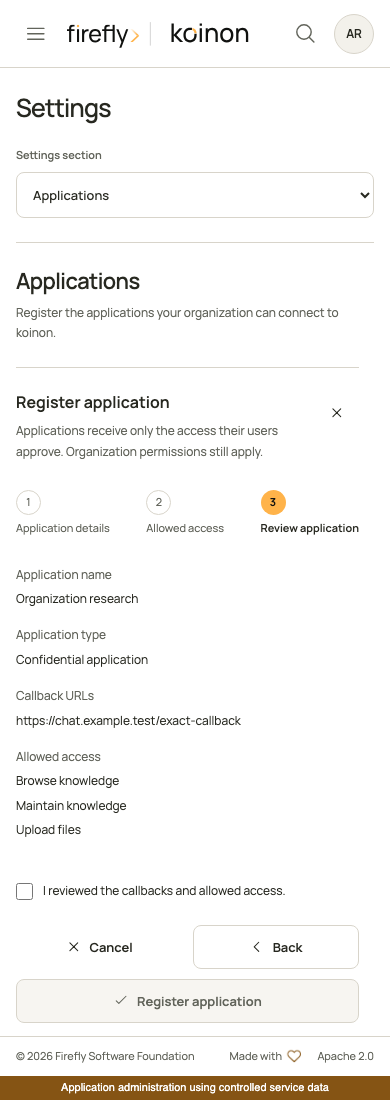
Read application registration for the operator workflow. Each user still signs in and reviews their own access.
Check the consent screen
Sign in with the existing organization identity provider. On koinon's connection page, verify the signed-in account name and avatar, application name, requested permissions, organization and selected space. Cancel denies the request; Connect authorizes only the displayed access.
A browsing connection needs catalog:read. Document search additionally needs knowledge:search; dataset queries need query:execute; inspecting your existing answer audits uses chat:use. Staging and approving text or file changes additionally require catalog:write and ingest:write. The operator must permit these scopes for the registered client, and your current role must also permit them. See MCP authentication for the exact deployment contract.
For user-requested folder, tag and metadata organization, use catalog:read and catalog:write with the current resource permissions. Your personal activity summary additionally needs activity:read. The organization-wide health tools require a separate unbounded administrator PAT with audit:read; they are not exposed to workspace-bound OAuth. The operation walkthrough explains these boundaries and the current timestamp checks.
OAuth permission to access a space is not permission to publish a conclusion. No account-linking choice authorizes an assistant to invent evidence or approve knowledge changes on your behalf.
Verify retrieval in a conversation
Start with a scope check:
Use the koinon connector only. Call
koinon_contextand tell me which organization and space I can access. Do not infer access from a name in this prompt.
Then ask a concrete evidence question:
In the selected space, find the service-renewal policy. Use
koinon_search, inspect the relevant passages withkoinon_fetch, and cite the returned source and version identifiers. Explain any missing evidence.
For datasets:
Find the authorized dataset with
koinon_list, inspectkoinon_dataset_schema, then usekoinon_queryto answer my question. Show the recorded SQL, source identity and limits; do not change data.
The assistant obtains organization and asset IDs from authorized responses. koinon_fetch with kind="document" takes the catalog document ID and returns its canonical current extraction; a catalog source folder ID is not interchangeable with a document ID. Curated knowledge can be fetched using kind="knowledge_item" and an exact version. Use koinon_provenance for lineage or the exact dataset/table/snapshot tuple.
koinon_search retrieves evidence with answer generation disabled. Claude writes its own response from the returned data. That response is not automatically a koinon conversation or stored answer audit. koinon_answer_audit reads an existing run owned by the authenticated user; it cannot manufacture an audit for a Claude chat. Keep missing historical provenance explicitly unknown.
Approve knowledge changes inside the conversation
Ask Claude to propose a specific change, for example:
Propose an update to the service-renewal policy using the sources we just retrieved. Include their koinon read receipt IDs. Show the exact before/after content and destination for my review; do not approve it for me.
koinon_stage_knowledge creates a private, credential-bound proposal. The embedded review shows the change, supporting evidence and destination. Read it, select the explicit approval checkbox, then choose Approve. Cancel leaves repository knowledge unchanged. For files, koinon_prepare_file_upload opens the embedded file picker: select the actual file, wait for its bytes and digest to be verified, then review and approve ingestion.
The server delivers its private one-use review nonce only to the component, outside model-visible content. Account-linking consent, a request to draft a change and an assistant's own tool call cannot replace this review. The proposal remains labeled external and unverified; its recorded ancestry does not establish that Claude interpreted the evidence correctly.
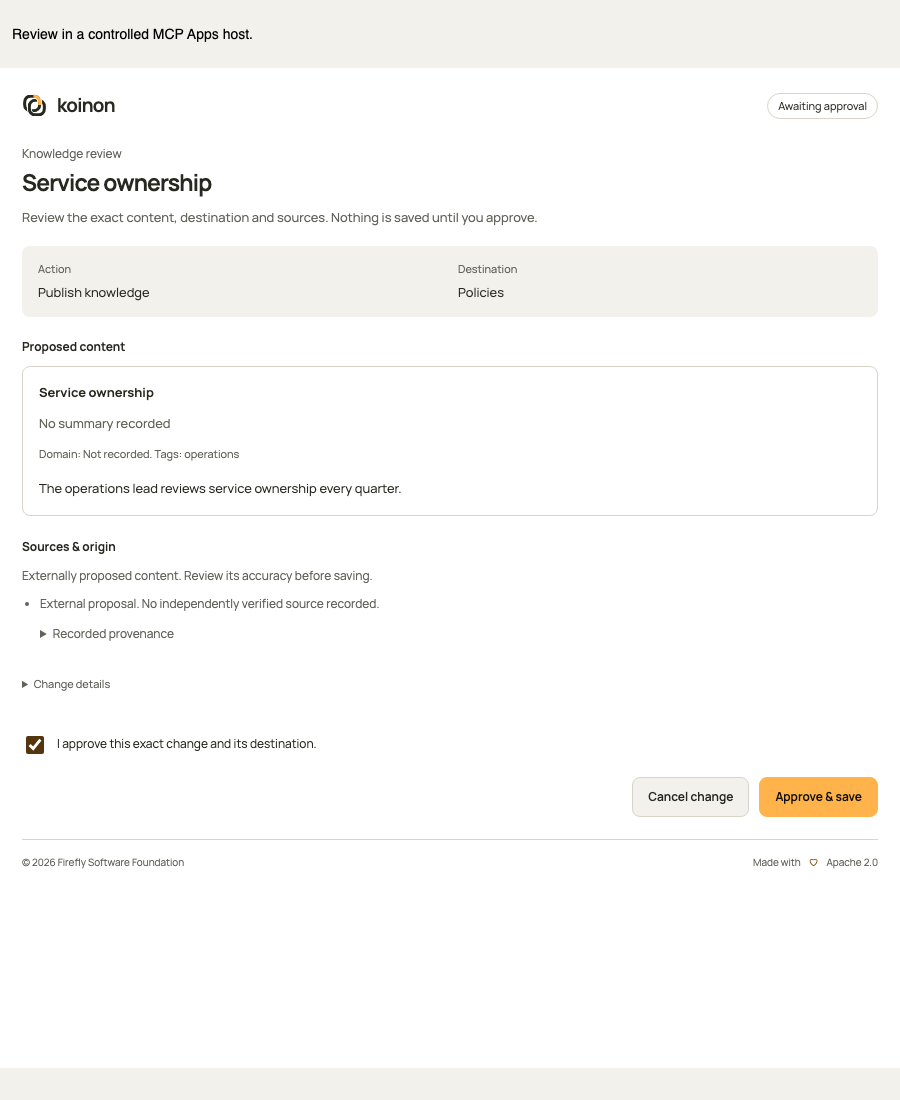
This requires a Claude host that implements MCP Apps, including model-hidden component metadata and app-only actions. If the review is unavailable, leave knowledge unchanged and explain the limitation inside the conversation. Do not redirect to another approval page or bypass the review with a generic write action. Actual Claude rendering and account-linking remain external acceptance checks; local protocol tests do not establish them.
Install the desktop extension instead
Obtain the branded firefly-koinon 26.11.9 MCPB and its checksum from a trusted distribution. Verify the archive before installation and confirm that your desktop host supports the extension format and required MCP capabilities.
In Claude Desktop, open the extension manager, choose its advanced installation option and select the .mcpb. Review firefly koinon, then enter MCP endpoint and Personal access token. Enable the extension. Anthropic documents this local installation flow and protected sensitive configuration in its desktop MCP guide.
The bridge requires host-provided Node.js 22+, forwards the remote server's tool catalog and sends your token only to the configured endpoint. Standard MCPB installation requires HTTPS; a listener-derived loopback HTTP URL needs the explicit development-only environment override described in the desktop guide. It does not supply OAuth, a database or a model credential. Knowledge-management tools come from the remote server, and their review UI still requires a compatible host. Its install preview is explanatory artwork, not an installed-Claude screenshot. See the desktop extension guide for build, privacy and package details.
Use a personal token scoped to the required organization, workspace and required operations; include write scopes only when you intend to manage knowledge. The desktop bridge runs locally, so the configured endpoint must be reachable from that computer. It still requires the enabled server and HTTPS. Installing the separate koinon-evidence skill provides workflow instructions; it neither installs the connection nor grants access.
Review, reconnect or disconnect
For OAuth, open your koinon avatar menu and select Authorized applications. Find the Claude connection, review its organization, space, permissions, expiry and last recorded activity, then revoke it when no longer needed. Reconnecting the same application to the same space replaces its previous active authorization with the newly approved scopes. Other spaces remain separate. This release has no refresh-token flow; reconnect after expiry.
For the desktop PAT bridge, revoke the token under API tokens and remove or disable the extension in Claude. It is not an OAuth-authorized application. Removing a connector only in Claude does not notify koinon; revoke its server-side authorization or token as well.
If setup or a tool fails
| Symptom | Check |
|---|---|
| The remote connector cannot reach the URL | Public HTTPS reachability, the exact /mcp path and operator host/origin policy; use the local bridge for a suitable desktop-only network path |
| OAuth reports an unknown client or invalid callback | Pre-registered client ID, exact callback URL, PKCE S256 and resource configuration; do not guess callback URLs |
A tool returns 401 |
Expiry, revocation or incompatible credential; reconnect OAuth or replace the PAT through the user account |
| Search or query asks for additional authorization | Approve only the intended scope when your role and the registered client permit it; a foreign workspace or denied role cannot be repaired by adding scopes |
A tool returns 403 |
Current membership, scope, selected space and asset bounds; discovery of a tool name is not a grant |
| The response exceeds limits | Narrow the workspace, query, page or source range; the server rejects oversized output rather than silently omitting evidence |
| Upload or knowledge-update tools are absent | Check the deployed server version, permitted write scopes and MCP Apps support; leave the repository unchanged when in-chat review is unavailable |
Protocol, scope, revocation and native API tests use owned local fixtures. A completed Claude sign-in, real deployment call and accepted client screenshot are separate checks. This guide does not claim that those external steps have passed. Client navigation was checked against the linked official documentation on October 30, 2026; workspace policy and client versions may differ.
The plugin marketplace and profile guide explains GitHub distribution, canonical skills and deployment-specific OAuth metadata. Packages do not replace account authorization or supported human review.