Connect ChatGPT to koinon
Use koinon's remote MCP endpoint to retrieve organization knowledge from ChatGPT, inspect datasets and retain source references. Each user connects with their own identity and an explicitly scoped authorization. The remote connector is separate from the branded Claude Desktop MCPB; ChatGPT does not install that archive.
Prepare the connection
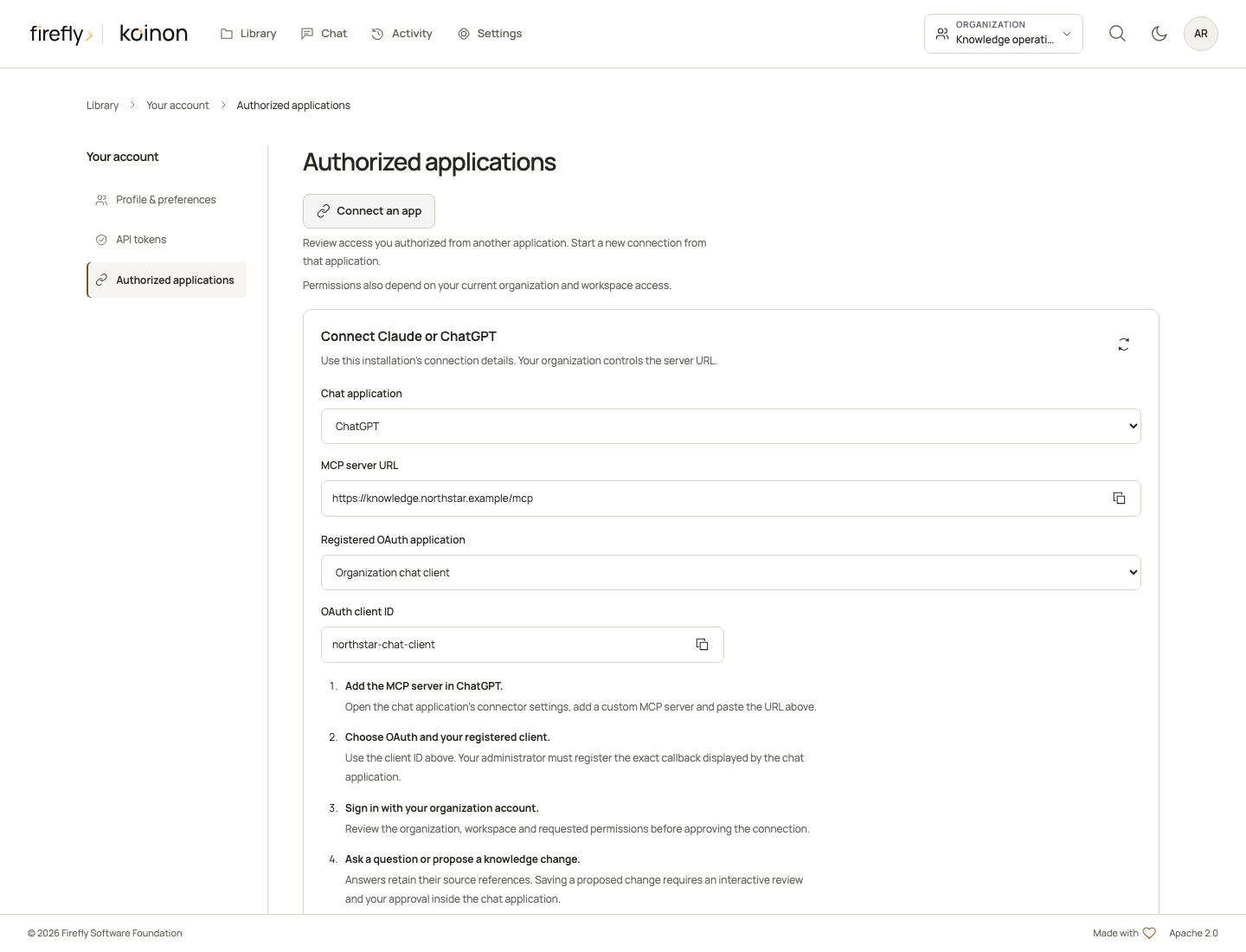
Open your koinon avatar menu, select Authorized applications, then Connect an app. The connection panel provides:
- The installation's exact MCP URL. A hosted ChatGPT connection requires a reachable HTTPS address, such as
https://knowledge.example.org/mcp. - The enabled OAuth client registrations for your current organization and their client IDs.
An organization administrator registers the application under Settings, in Applications, and supplies any confidential client secret through a protected channel. Confirm the intended organization, space and operations before connecting. Client registration does not grant membership or additional permissions.
The domain above is an example, not a supplied hosted service. The product can also display a listener-derived local endpoint marked local_only; that address is for the local computer and cannot serve ChatGPT cloud connections. Use a reachable HTTPS deployment URL for this connection. The server uses Streamable HTTP. Compatible legacy clients negotiate MCP Apps during initialization; modern clients can declare capabilities per request. Its public URL and OAuth resource must match exactly. Deployment, identity-provider login and client availability must be verified in your environment.
koinon currently supports OAuth authorization-code exchange with PKCE S256 and pre-registered clients. It does not advertise automatic dynamic registration, Client ID Metadata Documents, refresh tokens or machine-to-machine grants. Select the client's static OAuth configuration. OpenAI documents predefined clients and exact callback registration in its authentication guide. If your workspace exposes no compatible configuration, request operator support rather than selecting unauthenticated access.
Add the custom MCP server
Add custom MCP server
Start in ChatGPT Plugins.
- Name
- koinon
- Server URL
https://knowledge.example.org/mcpExample only. Use your operator's reachable HTTPS URL.- Authentication
- OAuthUse your pre-registered client's static credentials in the host's protected settings.
- Callback
- Register the exact callback ChatGPT displaysHave your operator allow that exact value before account linking.
Choose Create as a plugin, install it, then select @koinon in the conversation.
The current official web flow starts from ChatGPT Plugins: add a custom MCP server, enter its name and URL, configure OAuth, review the requested setup and create the plugin. Install the resulting plugin before invoking it with @ in a conversation. Workspace controls may restrict this capability. See OpenAI's current custom MCP setup.
Name the integration koinon and use the supplied /mcp URL. Enter its pre-registered OAuth client credentials in protected settings. Copy the exact callback shown by ChatGPT to your operator for registration; do not copy a callback from an unrelated example. koinon does not claim the newer stable-callback issuer-identification extension, so let ChatGPT choose the callback for the actual server configuration. OpenAI explains these callback requirements.
A personal API token cannot be substituted for an OAuth client secret. This ChatGPT flow uses OAuth; koinon's PAT option is for an MCP host that explicitly supports a bearer header. Never send a secret as a tool argument or include one in the server URL.
Administrator reference: registration is separate from user consent
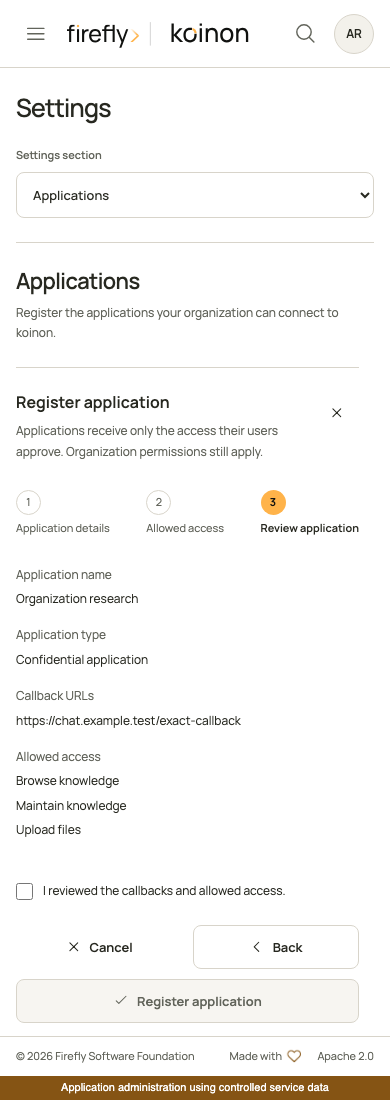
Read application registration for the operator workflow. Each user still signs in and reviews their own access.
Sign in and review access
When linking the account or invoking a tool that requires it, follow the sign-in flow to koinon. The existing organization identity provider authenticates you. Verify the account name/avatar, requesting application, readable permissions and selected organization and space before choosing Connect. Choose Cancel to deny the request.
The initial authorization can be limited to catalog:read. Search requires knowledge:search, queries require query:execute, and an existing-answer audit requires chat:use, in addition to catalog access. Reviewed text and file changes additionally require catalog:write and ingest:write. The tool metadata declares these requirements. A verified scope-only denial can ask the host to relink with the relevant scopes. Current role, organization, workspace and asset restrictions still apply; a scope upgrade cannot override them.
Ordinary folder, tag and metadata changes require catalog:write in addition to catalog access; they do not require content-publication approval. Your personal activity summary needs activity:read. Organization-wide platform health uses a separate administrator PAT with audit:read and is unavailable to workspace-bound OAuth connections. Follow the operation and permission walkthrough before requesting broader scopes.
The tool schemas may appear in discovery even when a particular operation is unavailable to your grant. Permission checks run at invocation. See MCP authentication for operator registration and Authorized applications for owner controls.
Retrieve and verify knowledge
Select @koinon in the conversation and start with:
Use only koinon for this knowledge request. Call
koinon_contextto identify my authorized organization and space. Then browse withkoinon_listif needed; do not infer IDs from names.
For document evidence:
Find the service-renewal policy with
koinon_search. Read the matching document passages withkoinon_fetchbefore answering. Cite the source IDs and versions that actually support the answer, and describe any gaps.
For structured data:
Inspect
koinon_dataset_schemafor the selected dataset, then callkoinon_queryfor the requested calculation. Include the recorded SQL, underlying source identity, snapshot information and any row limits. Do not change the dataset.
The complete MCP tool catalog distinguishes catalog entries, document IDs, curated versions, datasets and table snapshots. Pass IDs returned by authorized operations. koinon_fetch with kind="document" reads the current canonical extraction; kind="knowledge_item" can request an exact curated version. koinon_provenance reads lineage or the exact dataset/table/snapshot relationship. Never substitute a dataset's native ID for its canonical catalog ID.
Search returns evidence without generating a koinon answer. ChatGPT generates its response from those results; this does not create a koinon chat run. koinon_answer_audit can inspect an existing run owned by the authenticated user, not an arbitrary ChatGPT conversation. Retain missing provenance as unknown; a tool result or audit record is not a guarantee that the model interpreted it correctly.
Approve knowledge changes inside the conversation
Ask ChatGPT for the exact proposed change:
Propose a draft using the source passages we just retrieved. Include the koinon read receipt IDs, preserve the source references and show the destination and exact text for my review. Do not approve it for me.
koinon_stage_knowledge returns an embedded review. Inspect its destination, action, before/after content and evidence, select the explicit approval checkbox, then choose Approve or Cancel. koinon_prepare_file_upload opens a file picker in the conversation; the component computes the actual file's size and SHA-256, transfers bounded chunks and presents a verified review before ingestion. It does not ask the model to invent a file digest or fetch an arbitrary download URL.
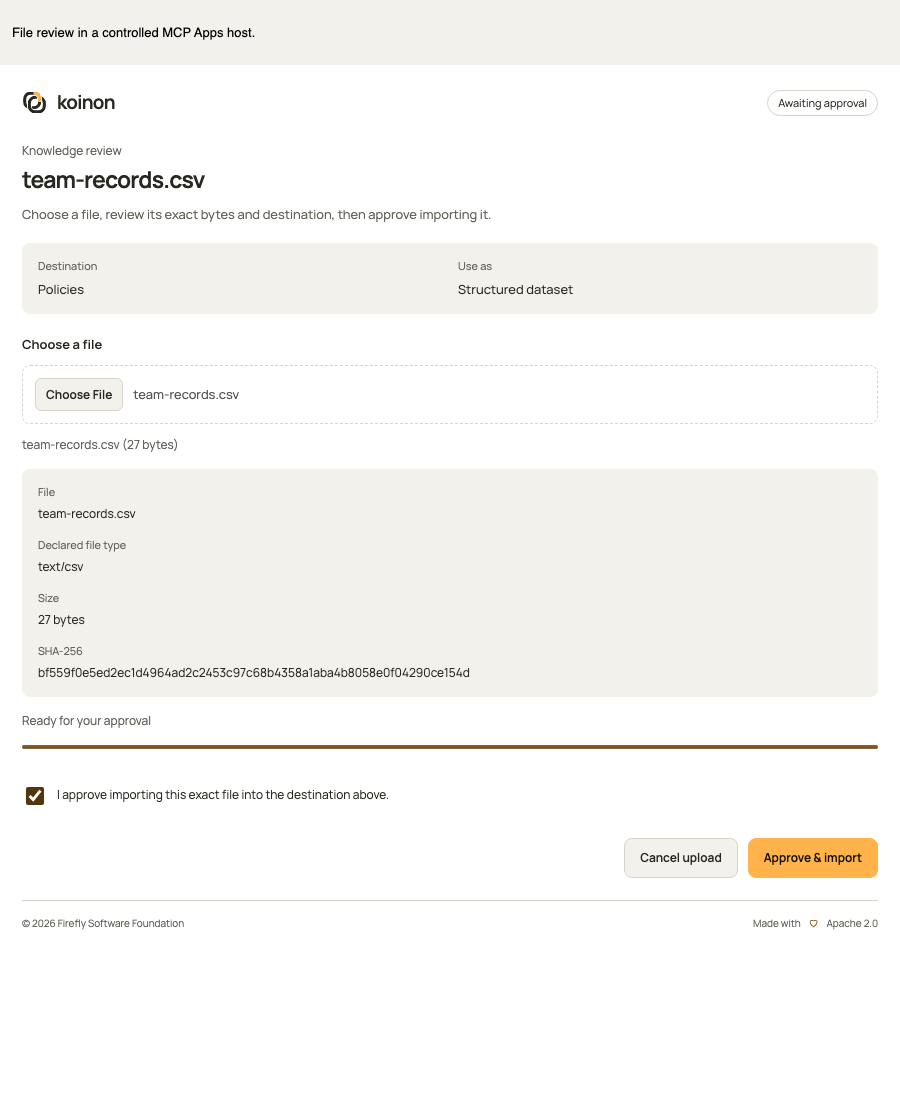
The implementation uses MCP Apps. A private nonce is delivered only to the component, outside model-visible content, and approval/cancellation actions are app-only. Account-linking consent is separate from the decision to save a particular proposal. The external assistant's prose remains an unverified external proposal, including when exact repository-source ancestry is available.
Read the complete workflow and limits, including unchanged-source checks, retries and incomplete ingestion. If the host cannot show the review, leave the proposed content/file publication unapplied and explain the limitation. Supported user-requested catalog organization remains separate; see external-agent management. No automatic browser approval redirect or autonomous confirmation tool is provided. Actual ChatGPT rendering and deployed account-linking must be tested separately from local SDK/protocol checks.
Disconnect and expiry
In koinon, open the avatar menu and select Authorized applications. Review the ChatGPT application's selected space, permissions and expiration, then choose Revoke access when appropriate. Revocation disables the associated credential; current membership changes also constrain the next governed operation. Removing the plugin in ChatGPT alone does not notify koinon.
Reconnecting the same application to the same space replaces its active grant with the newly approved access. It does not merge permissions or alter another space. This release does not issue refresh tokens; reconnect after expiry. Keep manually issued tokens under the separate API tokens page.
Troubleshooting and acceptance
| Symptom | Action |
|---|---|
| Custom MCP setup is unavailable | Ask the ChatGPT workspace administrator about current plugin permissions and availability |
| The URL fails discovery | Check HTTPS reachability, exact /mcp URL and operator configuration; a laptop-local address is not a reachable remote deployment |
| OAuth fails registration or callback checks | Use the static client provided by the operator and ChatGPT's exact displayed callback; koinon has no DCR or CIMD endpoint |
| Linking repeatedly asks for permissions | Check the registered client's allowed scopes and current user role; do not repeatedly widen access |
Tools return 401 or 403 |
Check expiry, revocation, current role and selected space; API JWTs and browser cookies are not direct MCP credentials |
| Results are too large | Narrow the query, source range or page; oversized evidence is rejected rather than silently truncated |
| An upload or update tool is absent | Check the deployed server version, permitted write scopes and MCP Apps support; leave the repository unchanged when in-chat review is unavailable |
Local tests cover official MCP protocol initialization/discovery, native scope enforcement, PKCE, owner-only consent, token isolation, expiry and revocation. They do not prove that an actual ChatGPT account completed OAuth or accepted a deployed server. Retain the real client connection result separately from package and protocol tests.
The official setup pages were checked on October 30, 2026. This guide describes their current web flow without assuming a particular subscription or workspace policy. The local MCPB and portable evidence skill remain separate artifacts; neither installs a ChatGPT OAuth connection.
The plugin marketplace and profile guide explains GitHub distribution, canonical skills and deployment-specific OAuth metadata. Packages do not replace account authorization or supported human review.