Follow a complete workflow
Choose the work you need to complete, then follow its steps through the resulting evidence. Your current organization, workspace roles and credential limits determine the actions available. A role name in this guide does not grant access or make every Settings page available.
| Your task | Start with | Finish by checking |
|---|---|---|
| Read knowledge or ask a dataset question | Reader and analyst | Authorized sources, recorded values and the answer's audit. |
| Import, update or curate knowledge | Knowledge editor | Processing, current availability and retained original versions. |
| Configure people, models and communications | Organization administrator | Saved configuration and the operation it enables, using an end-user account too. |
| Install or change protected infrastructure | Deployment operator | Migrations, grants, storage, workers and a representative functional exercise. |
| Connect an application or external agent | Integration owner | Its own authenticated read, permitted mutation and revocation checks. |
Read knowledge and inspect an answer
- Sign in to the intended installation. Open Library and choose a space you can access. Projects and folders organize that space and currently inherit its permissions; a project name does not establish a separate access policy. Private chat projects have a different purpose. Start with Library.
- Open a document or dataset and inspect its availability. A listed resource can still be processing, unavailable or awaiting an index. For a dataset, inspect the registered tables and schema before asking about a column. A filename is not its SQL table name.
- Open Chat, choose the intended knowledge scope and ask a bounded question. For a first check, use the fictional acceptance sources, whose answers you know independently. A dataset question also needs current query authority.
- Open Audit on the completed reply. Inspect the selected document passage or dataset snapshot, tool outcomes and executed SQL where relevant. Follow the citation to its recorded source. A successful stream or plausible sentence is not enough; Agents and chat explains the output evidence.
- Ask a question that the sources cannot answer. Expect an insufficient-evidence response rather than a general-knowledge substitute. If a stream disconnects, reconnect to the retained operation instead of starting another generation merely to recover its display.
- Use versions and lineage to distinguish the source used by an older answer from today's version. If you need an export or authenticated share, follow the separate review and confirmation workflow. A share grants no access to its sources, and private-derived answers have additional restrictions.
Keep personal conversation memory and private attachments separate from shared knowledge. Enabling memory for your chat project does not share another conversation or its files. Read conversation memory before approving remembered context in a share or publication.
Import and maintain knowledge
- Confirm the destination space, project, folder and current write authority. Choose document for passage retrieval or dataset for table processing. Review formats and effective limits before selecting files.
- Use Add knowledge, inspect the intake review and submit once. For durable intake, retain the batch identity and its current state. Acceptance of an upload or batch does not mean processing or indexing has finished.
- Inspect the resource's processing and availability. If the original was stored but its outcome could not be confirmed, open Library, Uploads and inspect that same batch. Signing in or reopening the panel does not submit it again. Follow bulk intake and same-original recovery before deciding on an offered action.
- Verify the original version, extracted parts or tables, and an independently known answer. Test a reader outside the source's space as well: the excluded source must not appear in their results.
- Make a supported metadata edit, move, archive or versioned replacement using the current revision. Reload after a conflict and review the new state. Protected installation roots cannot be moved or archived. A folder move does not grant a new person access. See Library maintenance and source history.
- After replacing content, ask again. Check that the new answer uses the replacement while the older answer retains its immutable evidence. Preserve failed or partial intake records; an uncertain original is not a reason to upload it again.
- To curate one completed assistant reply, choose Save as knowledge. Edit the title and body, select a permitted destination and request Review proposal. Inspect the server's before/after content and evidence, then make the separate confirmation. Draft is the default. Publishing requires its own explicit decision, and remembered context requires the separate unchecked consent. The curation walkthrough covers conflicts and pending outcomes.
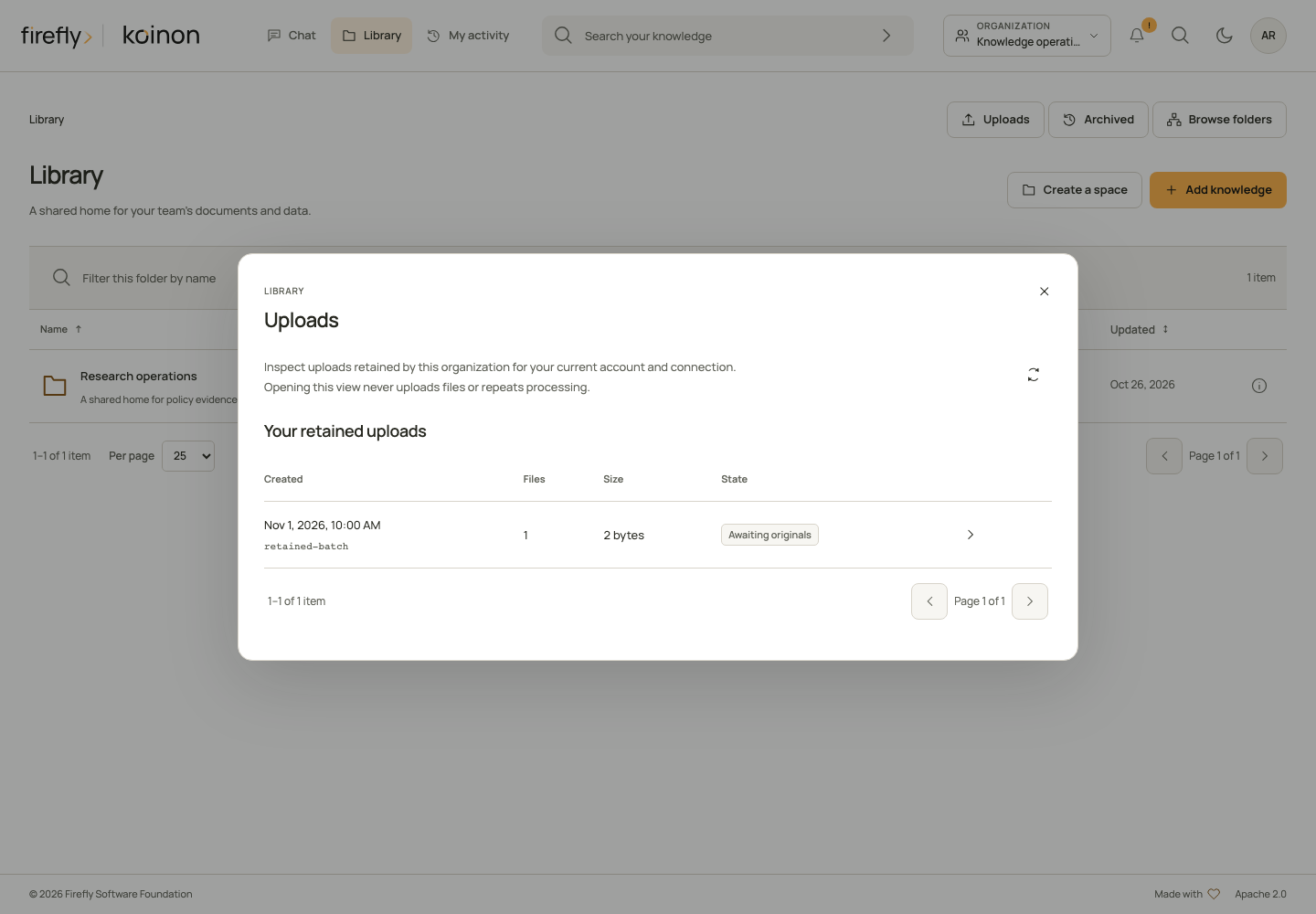
This is controlled example data from the recorded screenshot provenance. It illustrates the workflow, not a live deployment's recovery result.
Administer an organization
- Confirm current organization-wide administrator membership. Use the current organization; if several organizations are available, choose the intended one before opening your avatar menu and Settings. A workspace administrator does not automatically receive organization-wide Settings access. Use the setting map when locating a control.
- Review Access, people and identity separately. Names, departments and email addresses do not grant membership. Use the supported invitation or membership workflow; do not change an identity-provider subject to repair access. People and organization explains these boundaries.
- For a new organization, follow guided configuration. For an existing one, use the configuration lifecycle: capture the current provider, role assignments and active targets before changing them.
- Verify the organization's chat default and a small source-backed answer. Creating an agent alone does not select it for everyone. Check a permitted reader and a denied source, then inspect source and execution evidence.
- Open Communications to review the operator-verified sender, permitted channels, administrator schedules and delivery history. Before expecting email, establish recipient eligibility. An administrator can use an operator-approved delivery contact without enabling directory synchronization; invitations and ordinary recipient lanes keep their own directory requirements. A welcome-only contact is not recurring-summary authorization.
- Preview the actual HTML and plain-text email and review the next scheduled time. Saving a policy or previewing a message does not send it or establish delivery. Record provider acceptance and confirmed mailbox arrival separately. See communications.
- Use Platform health, processing outcomes and audit to investigate missing prerequisites. Unknown or expired observations are not successful checks. Recheck authority after a role change and verify that a revoked application can no longer read the affected content.
Operate the installation
- Complete first start with the reviewed database roles, migrations, encryption keys, identity configuration and public origin. A successful external sign-in does not by itself create product membership.
- Verify persistent final storage and independent bulk staging, then start the appropriate worker role and consumers. API readiness alone does not consume queued work.
- Establish the first administrators through the native audited initialization workflow. For ongoing administrator email, follow operator delivery contacts with a separate approved operator role. This is not a way to create users or grant membership.
- Hand organization configuration to its administrator and complete the document/dataset acceptance exercise together. Record the release, original identities, current permissions, active indexes and observed outcomes.
- Before upgrading, test the released migrations and scoped grants against an isolated restored copy. Preserve previous image and configuration references, and use backup and restore. A code rollback requires compatibility with the resulting schema; it is not permission to downgrade retained data.
Connect an application
Start with the complete Python, TypeScript or Java 21+ walkthrough. Keep its authentication setup, imports, request types and error handling together. Use the permission guide to select the required scopes and resource limits; a credential cannot exceed its owner's current access.
For MCP, follow the appropriate client connection guide and external-agent operations. Use the deployment's actual endpoint and registered authentication configuration. Package validation does not establish that a hosted client completed authorization, renders review UI or supports every management action. Publishing proposed knowledge still needs explicit human review in a supported flow.
Test an authenticated read, a permitted revision-checked mutation and a denied operation. For an unknown write outcome, inspect the retained operation before any explicit replay decision. Finally revoke the connection and verify the next protected operation fails. Record this client acceptance separately from source, SDK, package and deployment checks.
Keep an acceptance record
Use fictional inputs until this path works. Record what was actually checked; leave unavailable evidence explicit.
| Record | Include |
|---|---|
| Configuration | Release, organization/workspace, selected model roles and relevant revisions; no credentials. |
| Knowledge | Original/version IDs, processing outcome, active index and the independently expected result. |
| Authorization | Allowed actor and scope, excluded source, and the outcome after revocation. |
| Answer | Exact source or dataset snapshot, output audit and completed-stream reconnect outcome. |
| Communication | Recipient eligibility, preview language/sender, outbox status, provider acceptance and separately confirmed receipt. |
| Recovery | The same retained operation and original bytes, the reviewed decision and the observed result. |
Local tests and controlled screenshots document implementation behavior. They do not fill in untested provider, recipient, external-client or deployment outcomes.