Change providers, models and delivery configuration
Use this procedure after initial setup when an existing organization needs a different model, provider connection, embedding index or email policy. Change one dependency at a time and verify the operation it enables. A saved setting, a completed provider check and a successful user journey are different results.
For initial setup, follow Configure your corporate brain. To choose a complete user or administrator exercise, use workflows by role.
Identify the owner and affected scope
| Change | Where it belongs | What must remain explicit |
|---|---|---|
| Model endpoint, protocol, credential or declared model | Model connections | Approved origin, current connection and actual model capabilities. Secrets remain write-only. |
| Organization chat agent | Assistant, then Organization chat | The validated agent and the separately saved central default. |
| Processing model | Model assignments | Domain, role, organization default or workspace override and current revision. |
| Document RAG/RLM and retrieval policy | Knowledge answers | Organization-wide method, supported capabilities, bounded parameters and current revision. |
| Embedding model or dimensions | Storage & indexing, coordinated with Model assignments | Separate document/dataset targets, measured compatibility, physical index, coverage and explicit activation. |
| Sender selection, optional channels or administrator schedules | Communications | Operator-verified sender options, current recipient authority and the next scheduled time. |
| Database, storage, provider-host allowlist, transport credentials or public origin | Protected deployment configuration | Operator review, driver/TLS and storage procedures; these are not ordinary organization fields. |
The browser administration area requires organization administrator authority. An operator role may use permitted API operations without gaining every Settings page. Credential scopes and resource bounds still apply. Refer to administration permissions before changing a role to make a control appear.
1. Capture the current configuration
Read the intended organization and workspace first. Record the provider ID, model ID, selected agent, effective processing-role assignment and the revisions returned by the server. For each affected knowledge domain, record the actual native active target, its dimensions, coverage and embedding assignment.
Keep previous protected configuration and secret-version references in the deployment's change record. Do not copy credentials into screenshots, chat messages or the record itself. A provider response reports whether a credential exists; it does not return the credential for reuse.
Organization defaults and workspace overrides are separate records. A disabled override blocks fallback; it does not inherit the organization default silently. Record the effective choice before changing it. Document and structured embedding roles are also separate: changing one does not rebuild the other.
2. Prepare and check the replacement provider
Open Model connections and configure the approved endpoint, its actual protocol and model identifiers. If the host is not allowed, ask the deployment operator to review the allowlist; broadening a user role cannot bypass it. When replacing an endpoint or model used by retained indexes, prefer a separate connection so the existing serving configuration remains available while the replacement is checked.
Save the intended connection and run its offered checks. Discovery establishes that a model is listed. It does not establish streaming, tools, embeddings, vision or RLM behavior. Test the capability the intended workflow needs with a small explicit request. Check supported settings rather than copying options from a different model.
A changed connection or model invalidates earlier validation observations. It can also invalidate an index's recorded embedding fingerprint. Keep the previous provider configuration available while it serves current knowledge or is needed for the reviewed rollback plan. Existing agent runs do not silently switch to a changed model or scope; inspect an interrupted run instead of treating the edit as a repair of that run.
3. Change chat or generative processing roles
For chat, select the intended provider/model in Assistant, review its supported tools and settings, and validate the agent. Then save the intended default in Organization chat. Creating or editing an agent alone does not establish the organization's default.
For document or structured processing, open Model assignments, choose the role and its assignment scope, then review the model selection. current_agent is available only for generative roles whose descriptors permit it and when an operation has that agent context. Embeddings always need an explicit compatible selection.
Use the current expected revision where the operation requires one. A conflict means the current state must be read and reviewed again. Reload after saving, then start a new bounded operation and inspect its recorded policy and evidence. An admitted or historical run retains its own configuration lineage; today's selection does not rewrite it.
Start with RAG for a straightforward document exercise. Enable RLM only when its actual model, recorded-view, execution and evidence requirements have been checked. See knowledge behavior and the model-role catalog.
4. Build a compatible embedding target
An embedding change is an index lifecycle, not just a dropdown edit. KNOWLEDGE_EMBEDDING_REINDEX_REQUIRED means the proposed assignment is incompatible with retained indexed knowledge. Deleting and recreating the assignment does not bypass that check.
- In Storage & indexing, choose the authorized knowledge space and Documents or Datasets. Read the actual active native target separately from managed build records.
- Choose Plan a new index and request its explicit embedding check. This calls the provider and may incur usage. Review measured dimensions, storage dimensions, current assignment, coverage and warnings.
- Review Build this index, then submit once. Retain its target/job IDs and exact keyed request. Queued or building work is not a ready index.
- Refresh the retained record and wait for complete qualification, physical index and coverage evidence. Do not discard a failed or partial target to hide its outcome.
- Read the current target, active pointer and assignment revision again. Open the separate activation review, confirm once, then read back the native pointer and resulting model assignment.
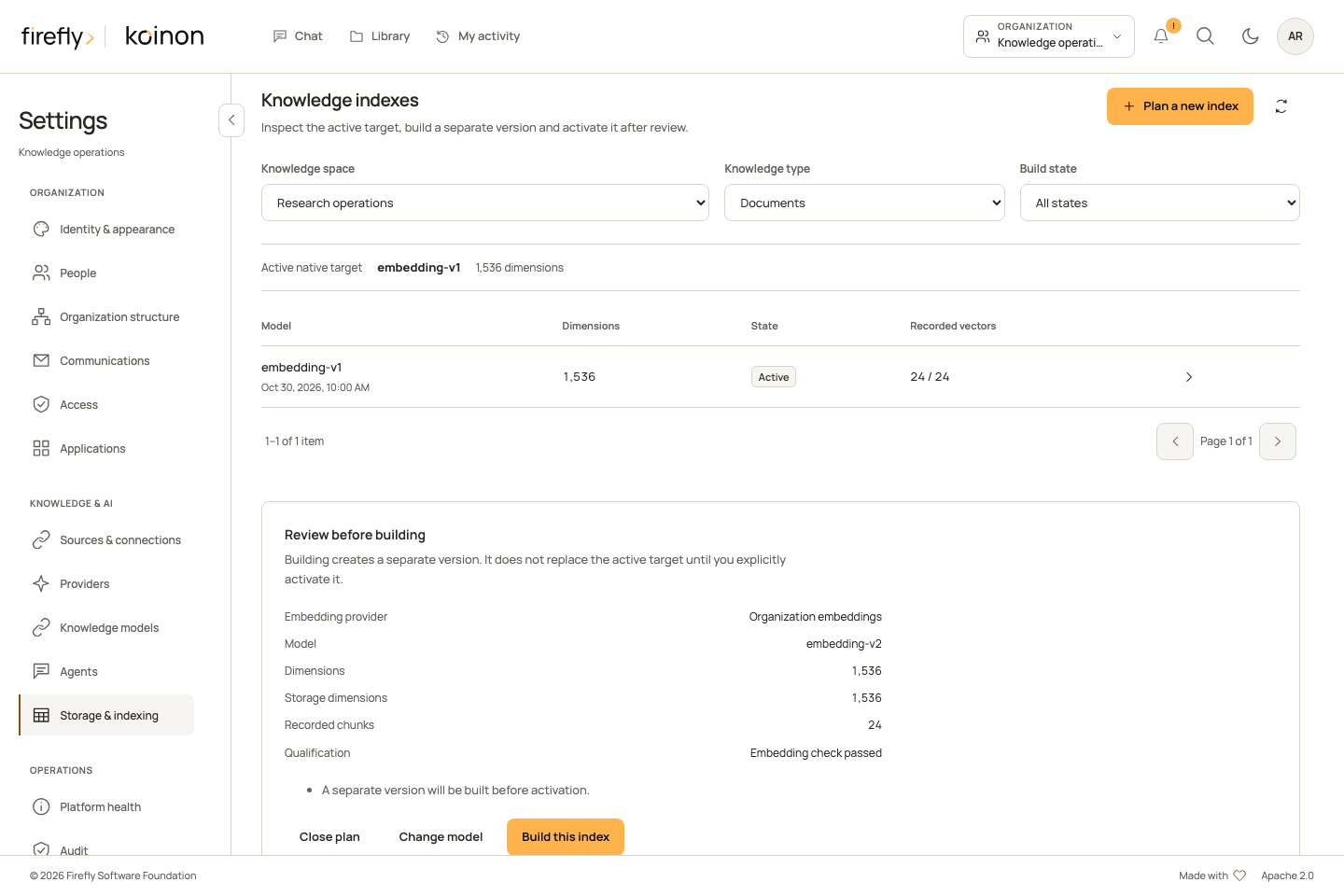
This controlled capture has recorded provenance. Its provider, dimensions and counts are illustrative; a real plan must obtain those observations from the selected deployment.
Repeat the procedure for the other domain if both document and dataset embeddings change. The complete index guide covers authority, typed requests, revisions, idempotency keys and recovery across separate datasources.
5. Verify the result and retain a rollback path
Use a small document and dataset with independently known values. Check processing and availability, then run the same question as an authorized reader. Inspect the actual selected passage or table snapshot, SQL where relevant and the output audit. Repeat a denied-source case. A ready/retired record or a successful activation response alone is not proof of current serving behavior.
| Situation | Review before acting |
|---|---|
| A generative model change needs reversal | Read the current revision and restore the intended prior assignment/default only if its provider still qualifies. Test a new operation afterward. |
| A completed index activation needs reversal | A qualified retained ready or retired target may be activated through a new authorized operation with current revisions. Its provider fingerprint, physical index and current coverage must still qualify; otherwise build a reviewed replacement. |
An index transition reports recovery_required |
Inspect the transition, then review Finish activation or Restore previous index for that unfinished transition. These recovery actions are not a general rollback switch after a completed activation. |
| A create/resume result is unknown | Inspect the saved target, job and exact action key. Only explicitly resubmit a permitted saved request after reviewing its possible effects. |
| A deployment image must be rolled back | Verify compatibility with the resulting schema and retained data through the operator recovery procedure. Do not downgrade the database automatically. |
Preserve previous targets and source history. Do not force native pointers, reset rows or give runtime roles DDL privileges to make an uncertain change look complete. Restore a credential's access only through its normal authorized process; configuration rollback does not undo revocation.
6. Configure email eligibility before schedules
First check Communications, Email service for the installed transport and its operator-verified sender options. Select only an approved sender under Policies. A saved policy or configured transport is not a successful provider request and does not establish an eligible recipient.
Directory synchronization is optional for sign-in, in-app notices, knowledge and chat. Email still needs an authoritative recipient lane:
- Current administrators can receive supported administrative emails through an operator-approved delivery contact, independently of a synchronization connection. It needs an approved immutable identity, a genuine signed binding and current authority. Sign-in does not renew its expiry.
- Ordinary users retain the existing directory-backed recipient lane. There is no general fallback that treats an arbitrary profile or sign-in email as verified delivery authority.
- Email invitations require the selected authoritative directory recipient. An operator contact is not an invitation identity or a membership grant.
- Bootstrap welcome contacts are welcome-only; they do not establish recurring-summary eligibility.
An operator provisions, revision-checks renewal or revokes a delivery contact using the native contact workflow. Pending sign-in, expired, revoked or ineligible contacts require their specific correction. Do not make a directory connection mandatory merely to hide a missing contact, and do not weaken its verification to make a message send.
Once eligibility is established, review administrator daily, weekly and monthly schedules and the recipient's optional preferences. Preview the next local/UTC time before saving. The current HTML/plain-text preview covers personal activity using a current directory-backed recipient or validated signed-in operator-approved administrator contact; it does not yet preview administrator-summary content. Where available, review its language, sender and full destination URLs. Previewing does not send. If an authorized operator needs a service check, the native diagnostic queues one explicitly keyed new event through the normal worker; keep that operation ID.
Inspect delivery history afterward. Accepted by email service and confirmed mailbox receipt are different observations. Preserve unknown outcomes and previously prepared messages; changing a provider, sender, template or address does not authorize replaying an old welcome or ambiguous submission. See communications for recipient actions, preferences and safe retry behavior.
Close the change record
Record the before/after revisions, retained operation IDs, active targets, tested actor/scope and the observed result. Keep provider qualification, processing, current retrieval, answer evidence, recipient eligibility and confirmed delivery as separate entries. Mark untested external-client or deployment paths explicitly rather than inferring them from a form save, passive health report or screenshot.