Architecture: follow one run through Weave
This page explains how Firefly Weave is built. You follow one run from the client's request to its durable result, then see which component, source module, and database table owns each responsibility. It is written for integration developers, administrators, and operators who need to reason about failures and trust boundaries, and for contributors who change the code. Reading it takes about 20 minutes. You do not run any command, and you do not need a platform.
Before you read. You should know what a workflow, a run, an action, a connector, an integration connection, and an activation are. The concepts page explains them with one example; the plain-language overview is a gentler start.
Some components on this page are new in 0.1.0a7: the public sign-in
settings endpoint, saved platforms shared by the CLI, Studio, and the desktop
app, Action configuration checks at publication, and the no-code tools for the
built-in weave-http@2.0.0 connector. An alpha6 or earlier platform does not
have them.
The big picture
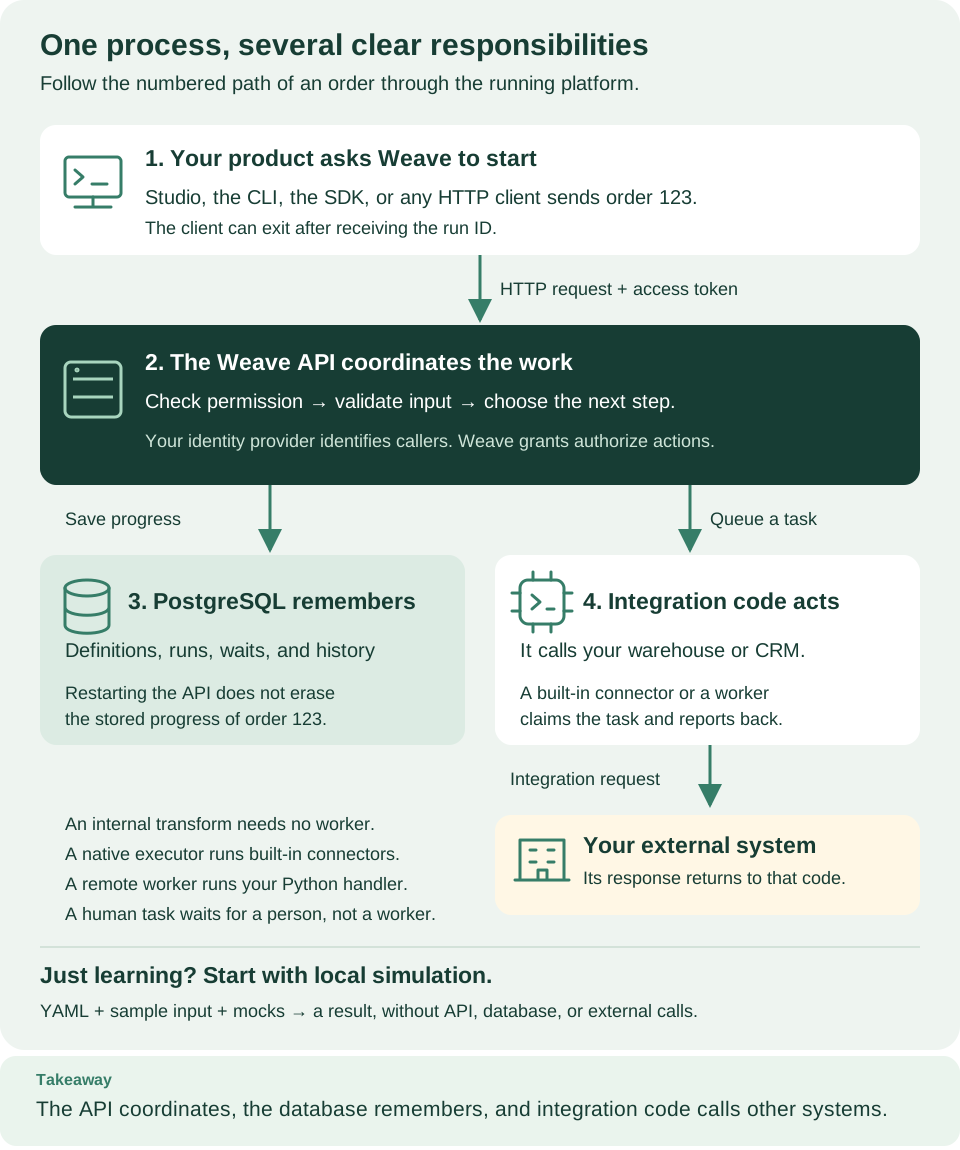
How to read this diagram: Follow the numbers. Your product asks the API to start a run (1). The API checks permission and coordinates the work (2), saves progress in PostgreSQL (3), and queues tasks that a built-in connector or your worker performs against your external systems (4). The note at the bottom is the local simulation path, which needs none of these services.
Five terms appear throughout this page:
| Term | What it means here |
|---|---|
| Platform | A running Weave API with its PostgreSQL database, its native executor, and any remote workers your team operates |
| Pure component | Code that computes only from its inputs: it opens no database, resolves no secret, and calls no provider. The compiler and the runtime kernel are pure; the services around them add authorization and persistence |
| Native executor | The server-side component that runs the connectors installed and enabled on the server, such as the built-in weave-http@2.0.0, under the same lease and completion contract as a remote worker |
| Lease fence | A generation number on a task claim. The API rejects a result from an attempt that is no longer current |
| Unit of work | One PostgreSQL transaction that carries the tenant scope; row-level security (RLS) limits what it can read and write |
Workflow AI and the Studio assistant
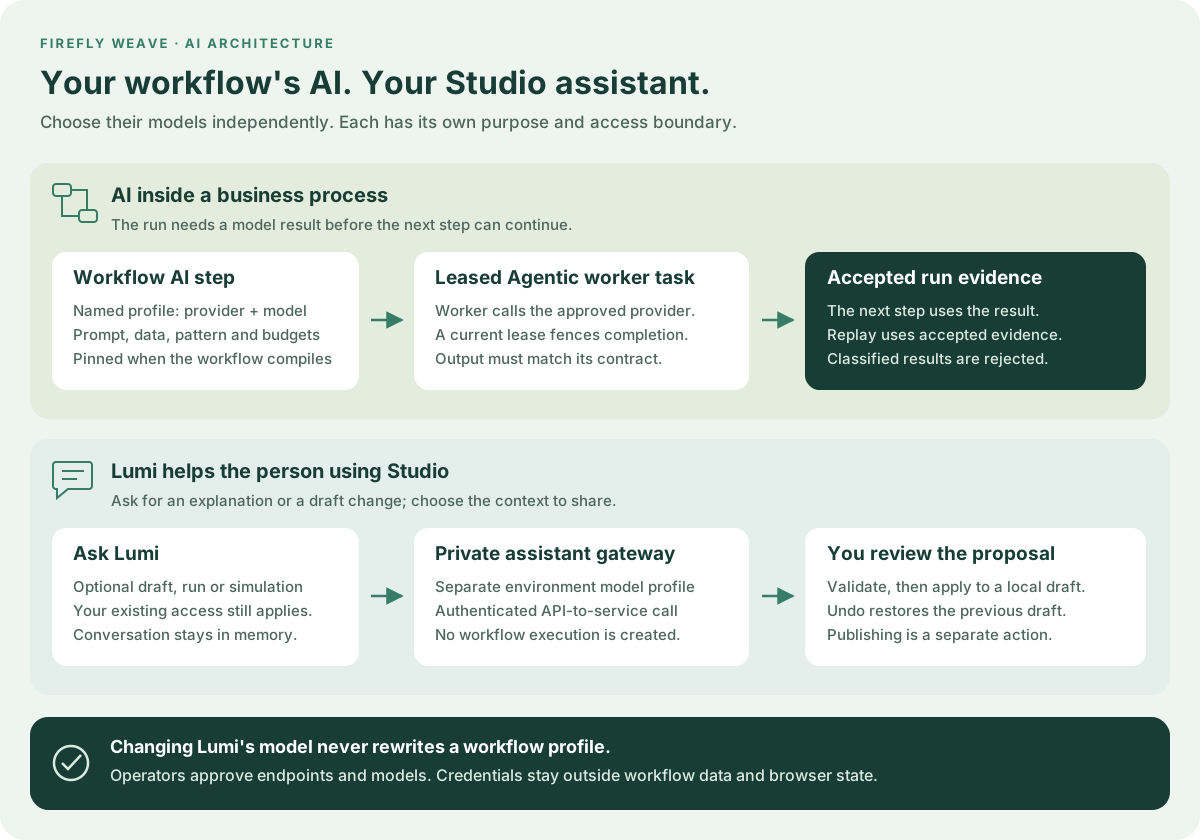
Read each lane from left to right. The upper lane is part of a durable business process: the compiler pins the workflow's model profile, an Agentic worker claims a task, and the runtime checks its result before continuing. The lower lane helps a person author or understand a process. Lumi uses a separate environment configuration and an authenticated private gateway. It does not create an execution or publish a definition. The person reviews and applies a proposed change to a local draft.
The AI worker guide explains deployment and profile budgets; the Lumi guide explains separate configuration and context sharing. Files follow a third boundary: PostgreSQL stores their chunks separately, while workflows and workers pass verified file references with current scope and task authority checks.
Follow one run through the system
The example. A published customer-check workflow has one step that calls an
HTTP Action. Before the request below, the platform already has:
- a tenant, project, and environment where your account holds a grant with the
run.startcapability. The local platform walkthrough creates them for you; the manual setup shows each underlying operation; - a connector release the native executor may use. On the local platform,
weave platform integrations enableprepares the built-in HTTP connector; elsewhere an operator follows the operator steps or the worker setup; - an activation of the workflow version. It pins the compiled artifact, the
integration connection revision for each connection slot, and the connector
release. Keep the activation's
id: a published definition version is not a run, and a run always starts from an activation.
The client sends POST /api/v1/tenants/{tenant}/projects/{project}/environments/{environment}/runs
with a bearer token, an Idempotency-Key header (1 to 200 characters), and this
body:
The UUID and the business input are illustrative: use your activation's id and
an input that matches its schema. The table follows the request through six
stages; the sections after it explain each component in more detail.
| Stage | Component and what it does | What is durable afterward, or where the boundary is |
|---|---|---|
| 1. Authenticate | The authentication filter verifies the token against the configured identity providers and resolves the local principal linked to it. The URL supplies the requested scope | A valid token alone grants no right to run anything in the project |
| 2. Admit | The run controller parses the request; the runtime and definition services check the current run.start grant, the activation's readiness, its pins, and the input |
A rejection creates no run. A missing Idempotency-Key, or one reused with a different body, is refused |
| 3. Decide | The pure runtime kernel evaluates the pinned workflow from the accepted start and returns the new state plus commands | It records what to do next; it does not call the HTTP destination |
| 4. Commit | One unit of work stores the run, the accepted event, the task intent, and its evidence | HTTP 201 returns the run id. The Action may still be queued |
| 5. Execute | The native executor claims the task with a fenced lease, resolves the connection's authorized settings and secrets, and calls the provider outside the claim transaction | The provider may accept the request before Weave records completion |
| 6. Settle | The executor reports its result with the lease generation; the runtime accepts a current result and advances the run in one transaction | The run's state and history now show the accepted completion |
Why stages 5 and 6 are separate. A lease fence rejects results from an attempt that is no longer current, but it cannot undo stage 5. If the process stops after the provider accepted the call and before stage 6, recovery needs an idempotent operation or an explicit reconciliation decision. Weave records external effects and accepted runtime facts separately instead of pretending that one HTTP request is a transaction across systems.
Where to look when a run does not finish
| What you see | Where it stopped | Where to look |
|---|---|---|
| The start request fails with an error such as 401, 403, 409, or 422 | Stage 1 or 2: identity, grant, idempotency, or input | API errors and identity failures |
| The run exists, but its Action stays queued | Stage 5: no admitted executor or worker is running or has capacity | Workers and the run's history |
| The run is suspended | A step needs an operator decision | Incident operations |
| The external system shows the effect, but the run did not complete | Between stages 5 and 6 | History, then reconcile through incident operations |
| A webhook or provider event was acknowledged, but no run started | Provider admission, a separate boundary | Provider sources |
The troubleshooting guide matches more symptoms to their boundary.
Clients, Studio, and sign-in
How clients connect and sign in
The CLI, the Python SDK, Studio, and the desktop app are all clients of the same
authenticated API. The CLI, Studio, and the desktop app share one list of saved
platforms, profiles.json, in your per-user configuration directory. A saved
platform holds the server address, the reviewed sign-in settings, and the chosen
workspace; it never holds a token.
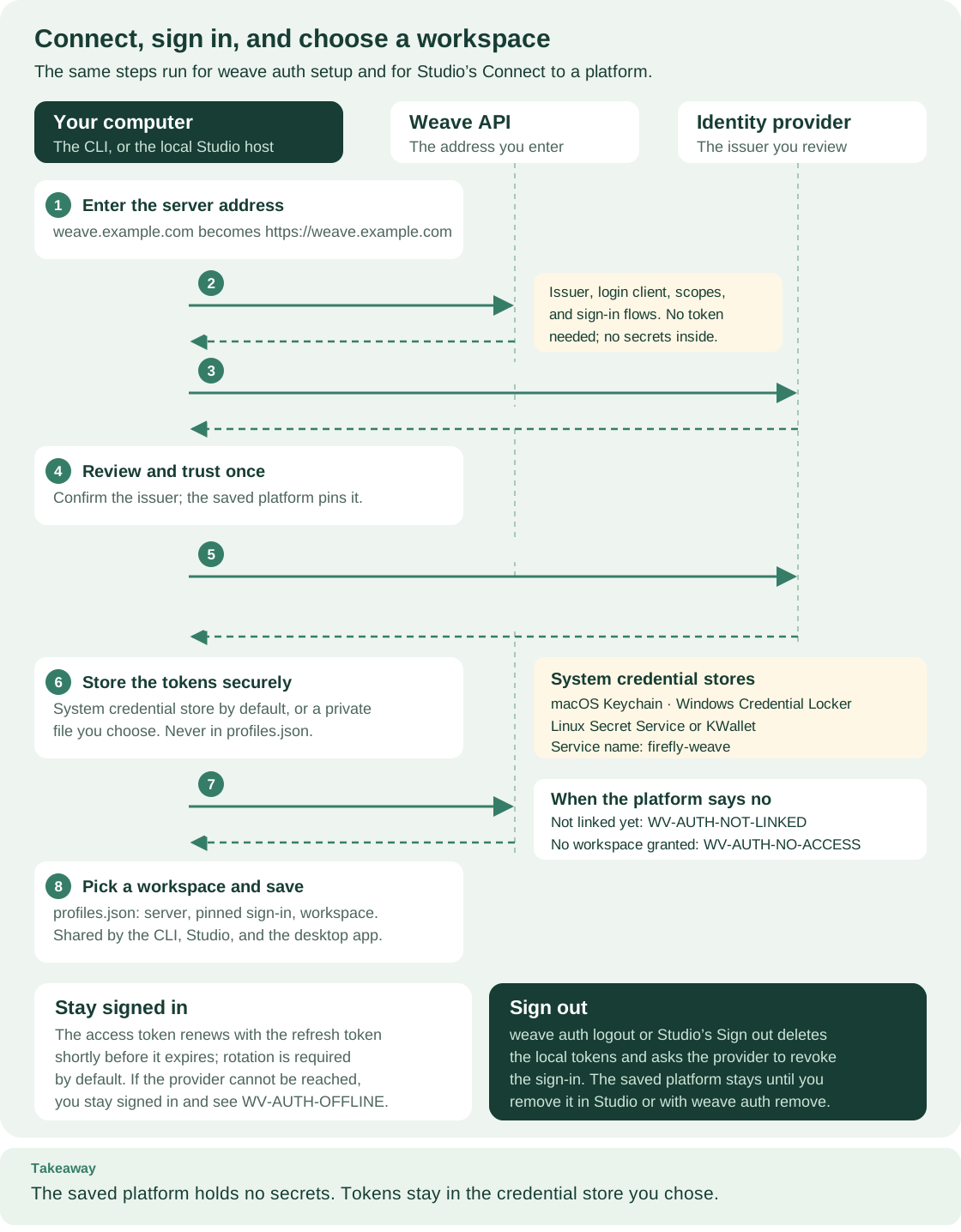
How to read this diagram: Follow the numbered arrows from your computer (left) to the Weave API (middle) and the identity provider (right). Steps 2 and 7 are the only calls to the API: the first reads public settings without a token, the second asks who you are with one. The footer covers renewal and sign-out.
The administrator decides what clients see. WEAVE_OIDC_PROVIDERS tells the API
which issuers and clients it trusts when it verifies a token.
WEAVE_CLIENT_SIGN_IN publishes the identity provider and public login client
that people should use, and the optional WEAVE_DISPLAY_NAME names the platform
while they connect. GET /api/v1/client-configuration returns those settings to
anyone, with no token and no secret, because a person needs them before signing
in. Clients treat them as a proposal: the person reviews the issuer once, and the
saved platform pins it. See
what clients read from the server
for the full contract and connect the CLI to a platform
for the steps.
Visual authoring, people, and email
Studio runs on your computer. Its Angular page talks only to
a small Python host on 127.0.0.1. In a browser, you pair the page with that host
by entering a one-time code from the terminal; the desktop app pairs itself.
Pairing grants nothing on any platform. The host reads the saved platforms, keeps
tokens in the operating system's credential store (or in the private credential
file that a platform saved with the CLI names), and forwards only supported
operations to the active platform. The browser page never receives a token.
Without an active platform, Studio works locally: the host validates workflows with the same compiler the CLI uses. Closing Studio does not stop a workflow, because execution state belongs to the platform's PostgreSQL database.
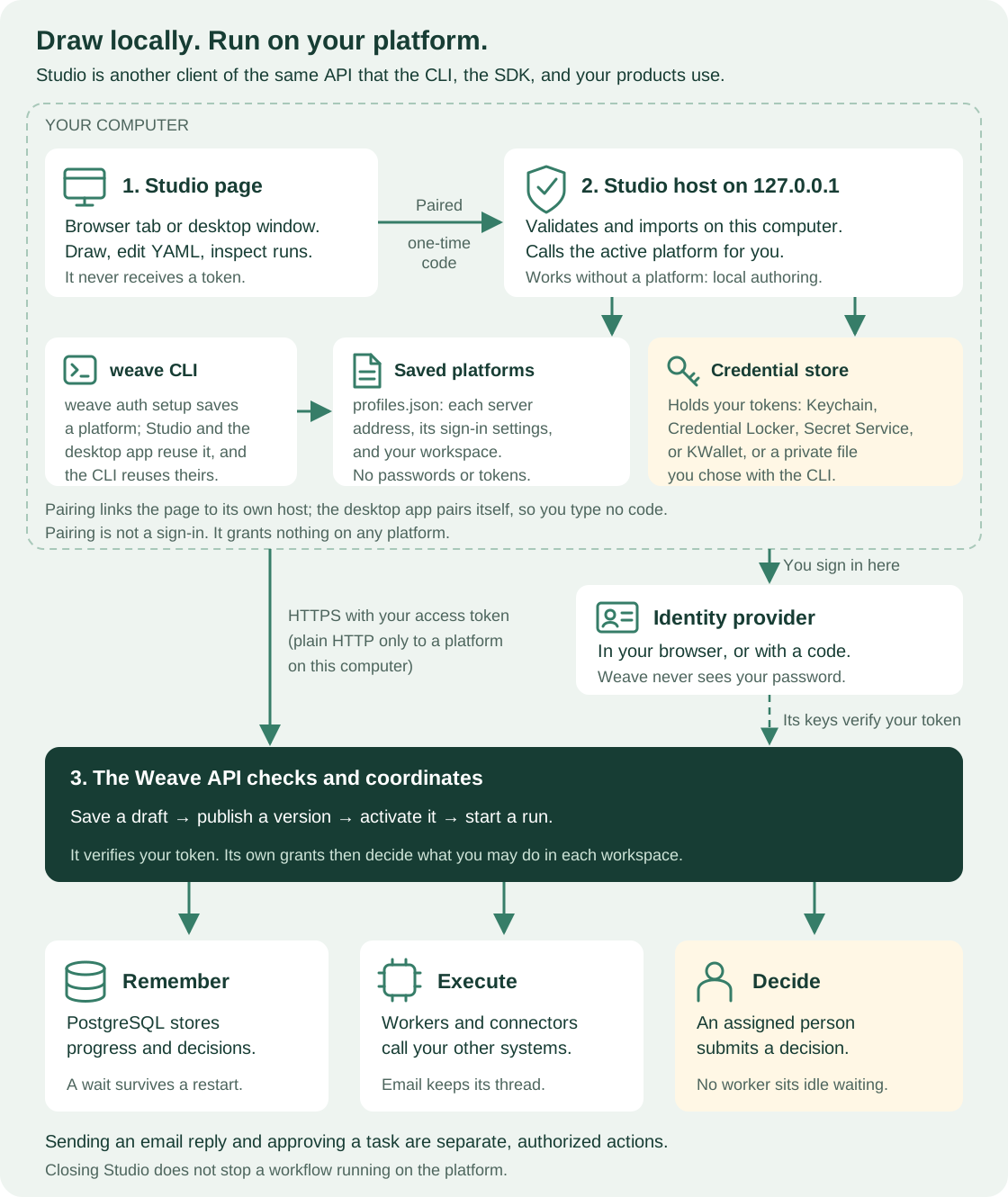
How to read this diagram: Everything inside the dashed box runs on your computer: the Studio page (1), its host (2), the CLI, the saved platforms, and the credential store. The page never calls your platform itself: the host, like the CLI, calls your platform's API (3) over HTTPS, or over plain HTTP only when that platform runs on your own computer. You sign in at the identity provider on the right. The three boxes at the bottom happen on the platform and keep going after you close Studio.
A human task records an assignment and a form in the database. A person claims the task and submits a decision through the authenticated API, and the runtime validates that decision before the process continues. An operator pause is different: it holds the whole run until an authorized resume.
Email supplies SMTP delivery and IMAP ingestion. Messages belong to conversations, and replies are matched by message identifiers and scoped correlation rules. Receiving an email never approves a human task by itself. Design the workflow to decide which incoming message starts a run or satisfies a wait, and require an authenticated task decision wherever approval is needed.
Inside the platform
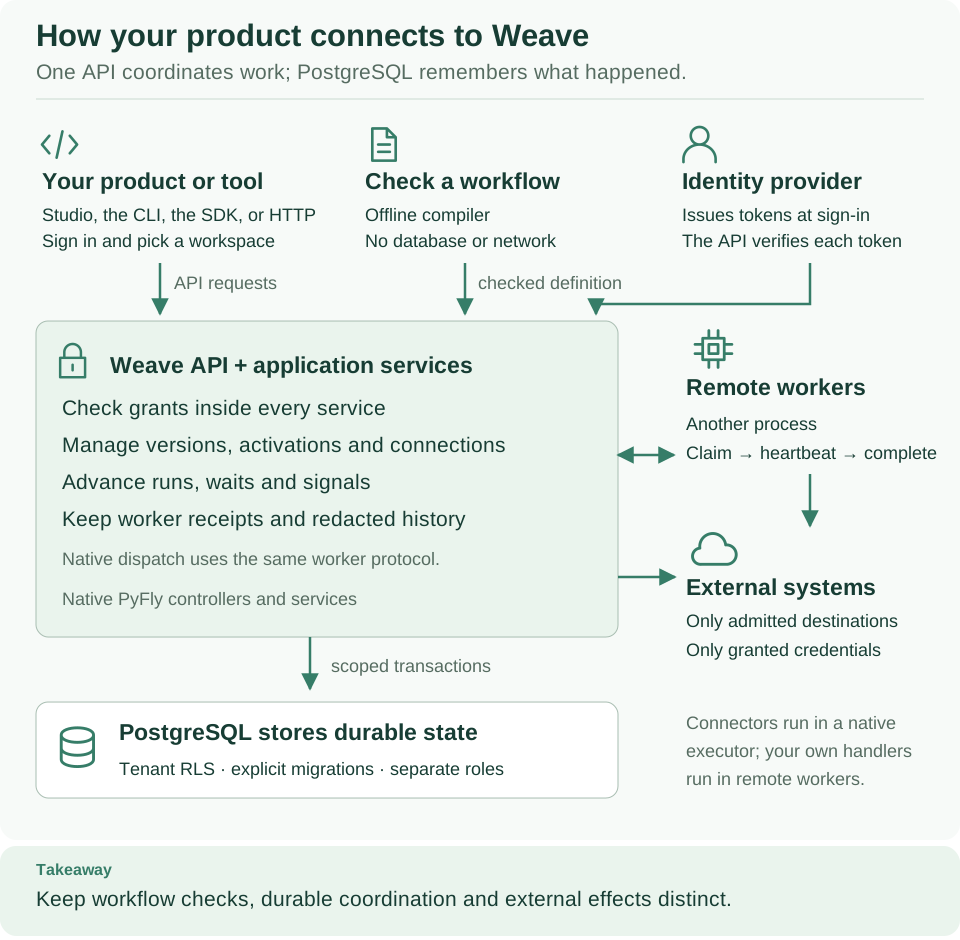
How to read this diagram: Read from the top. Your product or tool, the offline compiler, and the identity provider all feed the large API box below them. The API keeps durable state in PostgreSQL below it and exchanges tasks with remote workers on the right, while built-in connectors run in its native executor. External systems are reached only at admitted destinations, with granted credentials.
Weave is a native PyFly application: dependency injection, controllers, and request filters come from the framework. The composition root registers controllers and constructor-injected services, and the ASGI factory loads settings explicitly. Importing the compiler does not start that graph, so you can embed the compiler on its own. Host products can also call the typed SDK and the authenticated API, or embed services with an explicit actor, scope, audit context, and transaction.
Identity. The authentication filter
verifies tokens from the configured providers and resolves explicit local identity
links. A few paths need no bearer token: the published sign-in settings, the
health probes, signed webhooks and provider ingress endpoints (which verify the
sender by their own rules), and the interactive API documentation when it is
enabled. Services enforce scoped authorization even when they are called without
HTTP. The local platform uses Keycloak; a deployment can trust another OIDC
provider through WEAVE_OIDC_PROVIDERS. Real-provider checks cover local
Keycloak sign-in and Microsoft Entra ID application tokens in Azure
preproduction. Entra browser and device-code sign-in for people remain
unverified.
Persistence. The unit of work binds the tenant context inside a PostgreSQL transaction. Repositories use that transaction, and tenant RLS protects business data. Startup checks database roles and schema state, but migrations run only when an operator applies them. Identity and platform authorization state is kept apart from tenant business data.
Execution. The native dispatcher uses the worker SDK, provisioned releases, and local grants. Remote workers live in other processes but follow the same lease and completion contract. Connector execution resolves scoped credentials only after admission. That is a security boundary: a definition can never choose an arbitrary network destination or secret.
Compile, publish, activate, execute
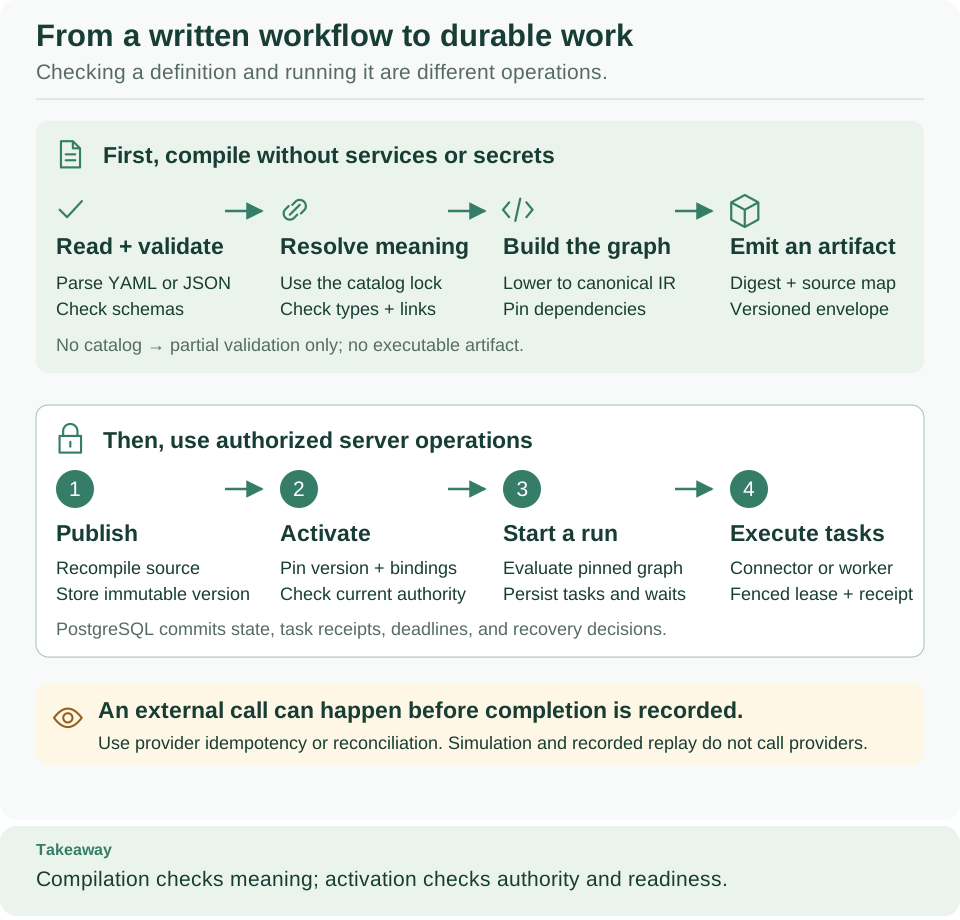
How to read this diagram: The top band runs on any computer, without services or secrets. The bottom band needs an authorized platform. Read each band from left to right; the warning at the bottom is the one gap that no check can close.
The compiler API parses within fixed bounds, validates schemas, analyzes expressions and dependencies against an immutable catalog, and lowers the workflow to a versioned intermediate representation (IR). The canonical executable bytes determine the artifact's digest; source maps and diagnostics keep the authoring context. Without a catalog, validation is partial and returns no executable artifact.
The definition service owns
immutable publication and scoped activation. Whenever it compiles a definition,
including at publication, it also runs the Action configuration checks that
installed connectors supply, keyed by the exact digest of each connector's
manifest. That is how an Action on the built-in weave-http@2.0.0 connector is
checked against its method, side effect, and schemas before it is stored, with a
pointer to the field to fix. Tenant data can never select or replace such a
check.
Compilation proves that a definition is valid. Activation separately checks the authority and resources needed to execute it. The activation request names the version, its artifact digest, and the environment. It binds each connection slot to a connection revision, each connector version to a release, worker-backed Actions to worker releases, and human-task assignments to their bindings. The resulting activation records connector execution pins with the Action, connector, and capability digests. A run uses its activation's pins; it never silently adopts a later revision.
The runtime kernel computes deterministic transitions. The runtime service and its repositories persist those transitions, task intents, and evidence. Worker leases fence accepted completions, and the recovery service advances waits, deadlines, and signals under explicit ownership.
Simulation uses mocks, and recorded replay checks the available evidence; neither calls a provider.
Worker and security boundaries
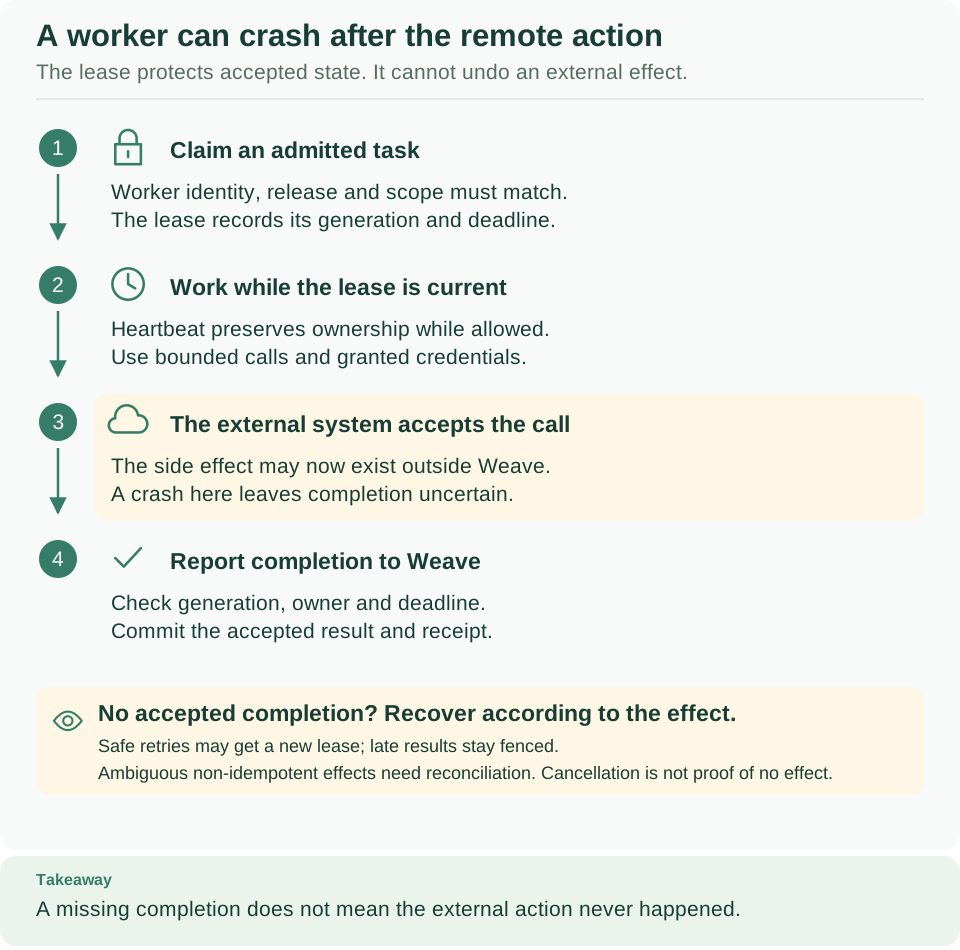
How to read this diagram: Read the four steps from top to bottom. Step 3 is highlighted because it is the crash window: the external system has accepted the call, but Weave has not yet recorded completion. The box below explains how recovery depends on the kind of effect.
The task service in leases owns lease and completion fences, and the worker SDK keeps the public contract. A worker can complete an external call and stop before its result is accepted, so retries need provider idempotency or reconciliation. Cancellation can also leave an external effect in flight. Recovery batch limits count the runs selected and the due timeout decisions in each pass; they are not a maximum number of changed database rows.
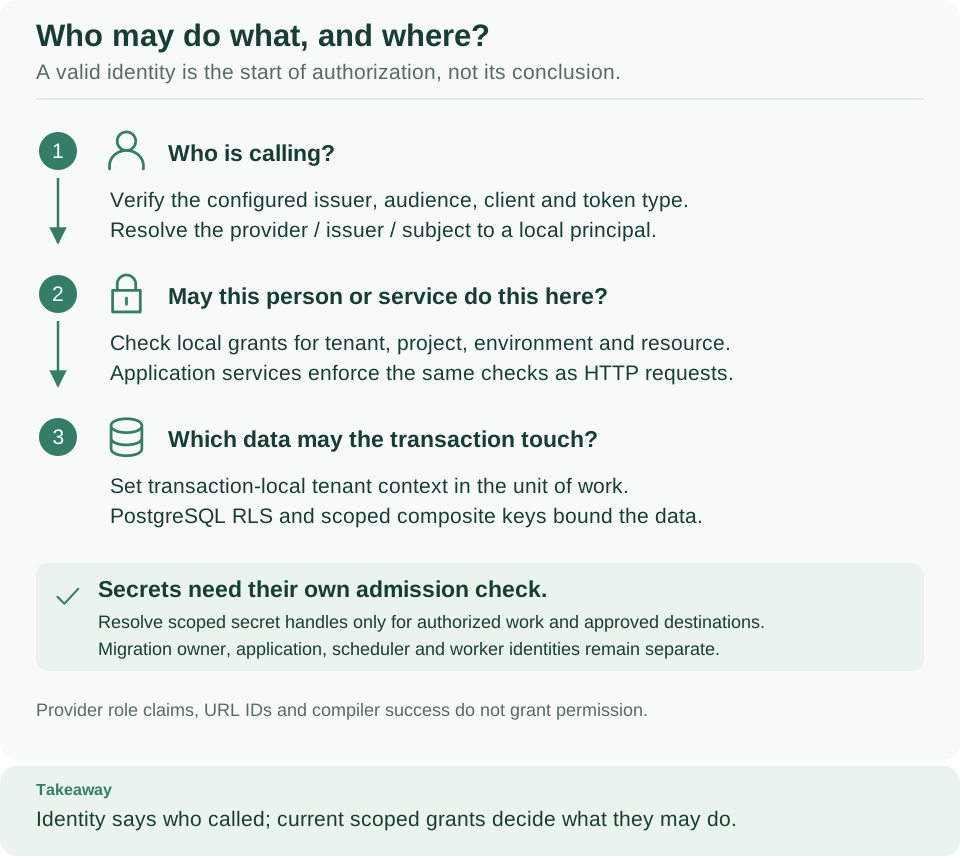
How to read this diagram: Each numbered question must pass before the next one is asked: who is calling, what they may do in this scope, and which data the transaction may touch. The green box adds a separate admission check for secrets.
Identity says who called; current scoped grants decide what they may do. Provider role claims, IDs in the URL, a worker's credentials, and a successful compilation grant nothing on their own. Read identity, authorization and secrets to configure the trusted providers, sign-in settings, and grants.
Connector ingress and outbound events
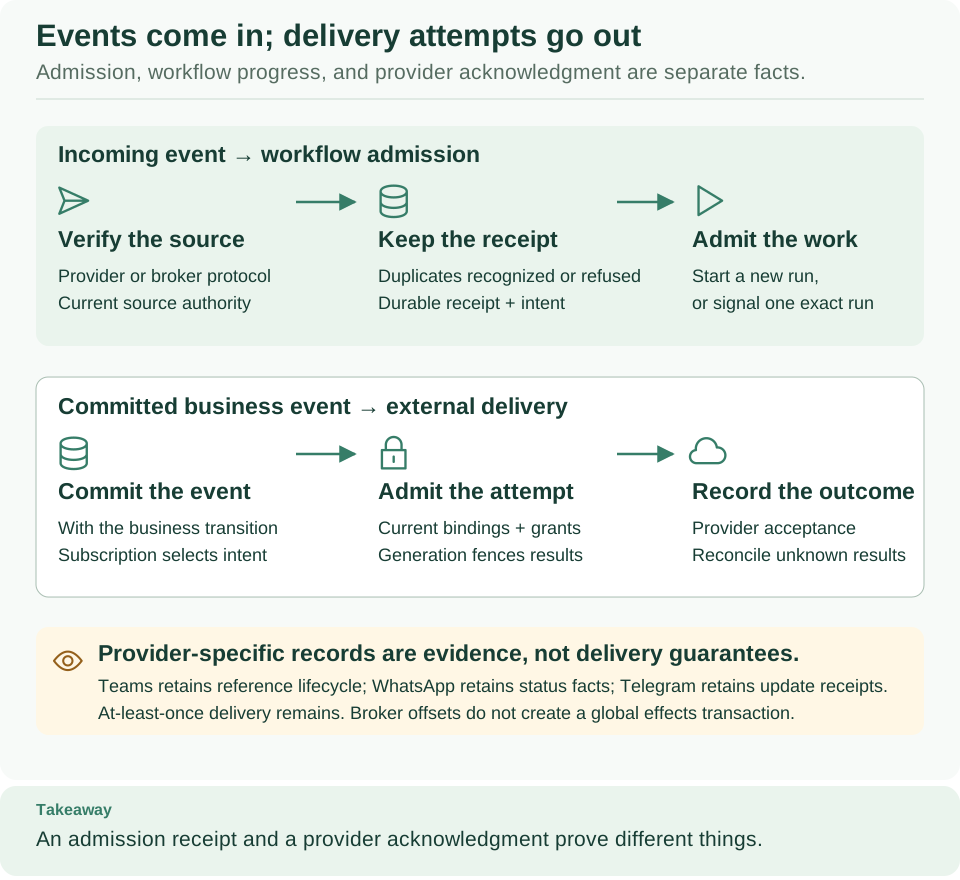
How to read this diagram: The top band is incoming work: a provider or broker event is verified, recorded, and turned into a run or a signal. The bottom band is outgoing delivery of a committed business event. Each box records its own fact, so an admission receipt and a provider acknowledgment prove different things.
Provider ingress records facts and intent for each source, and its dispatcher performs the authorized workflow admission. Outbox delivery and delivery attempts have their own transaction, lease, and acknowledgment boundaries. Kafka offsets are not global transactions that include every downstream effect. See provider sources, integration events, and Kafka.
Teams, WhatsApp, and Telegram connectors are implemented and tested locally. Their durable references, status facts, and receipts do not prove a live installation or delivery; the capability matrix lists what has been verified.
To call a REST API, you do not need to write a connector. An Action on the
built-in weave-http@2.0.0 connector describes one HTTPS operation, and its fixed
first-party code runs in the native executor. You can build that Action from flags
with weave connector http-action, import it from an OpenAPI document with
weave connector import-openapi --target builtin, or use Studio's
API action builder, which runs
the same builder and importer.
Call a REST API without code walks through the
command-line route. The importer's default target, package, generates a
connector package for review instead. Whatever you author, the destination and
credentials come only from the integration connection and the operator's network
and secret policy: an imported specification cannot grant destination trust or
secret access.
HTTP profiles define the exact request and response
rules, and how the call stays safe
lists the egress limits.
Durable state and relationships
The three diagrams below are selected views of real foreign keys, not a complete
schema export. Read each row from left to right: one parent table (white) has the
shown number of child rows (green). P stands for the tenant and project columns,
and E adds the environment. Keys keep their composite scope. Pins held in JSON
columns, such as artifact and release pins, are logical references, not foreign
keys, so a retention plan must account for them and for receipt guarantees too.
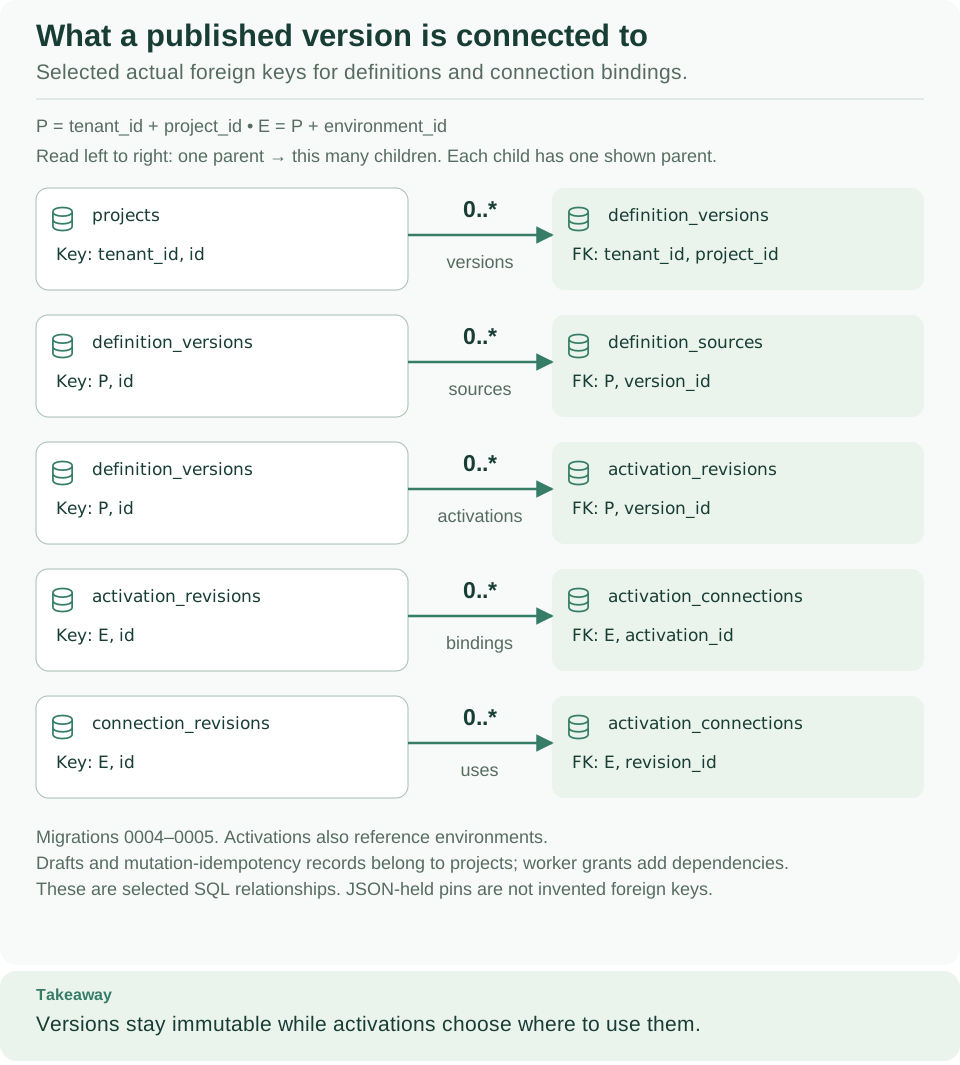
How to read this diagram: A published version belongs to a project, keeps its source, and can have several activations; each activation binds connection revisions. Versions never change, while activations decide where they are used.
These relationships come from the definition migration and the connection migration; the behavior lives in the definition service and the connection service. Draft revisions, retirements, worker grants, and idempotency records add further dependencies; leaving them out of the view does not make them disposable.
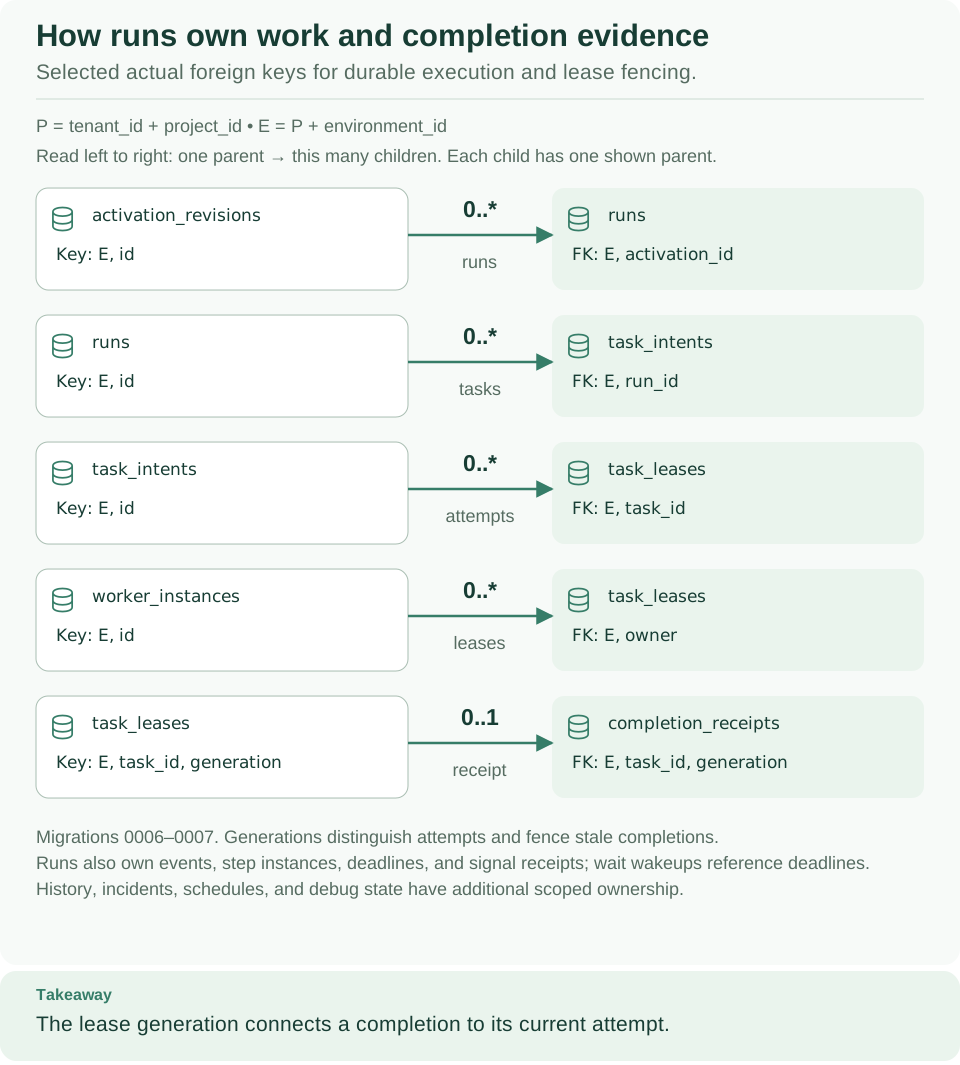
How to read this diagram: A run belongs to one activation and owns its task intents. Each attempt at a task is a lease with a generation, and at most one completion receipt matches a lease generation.
These relationships come from the runtime, workers, waits, and history evidence migrations. Events, step instances, deadlines, signals, incidents, schedules, and debug state keep their own ownership and completeness rules. See history and replay.
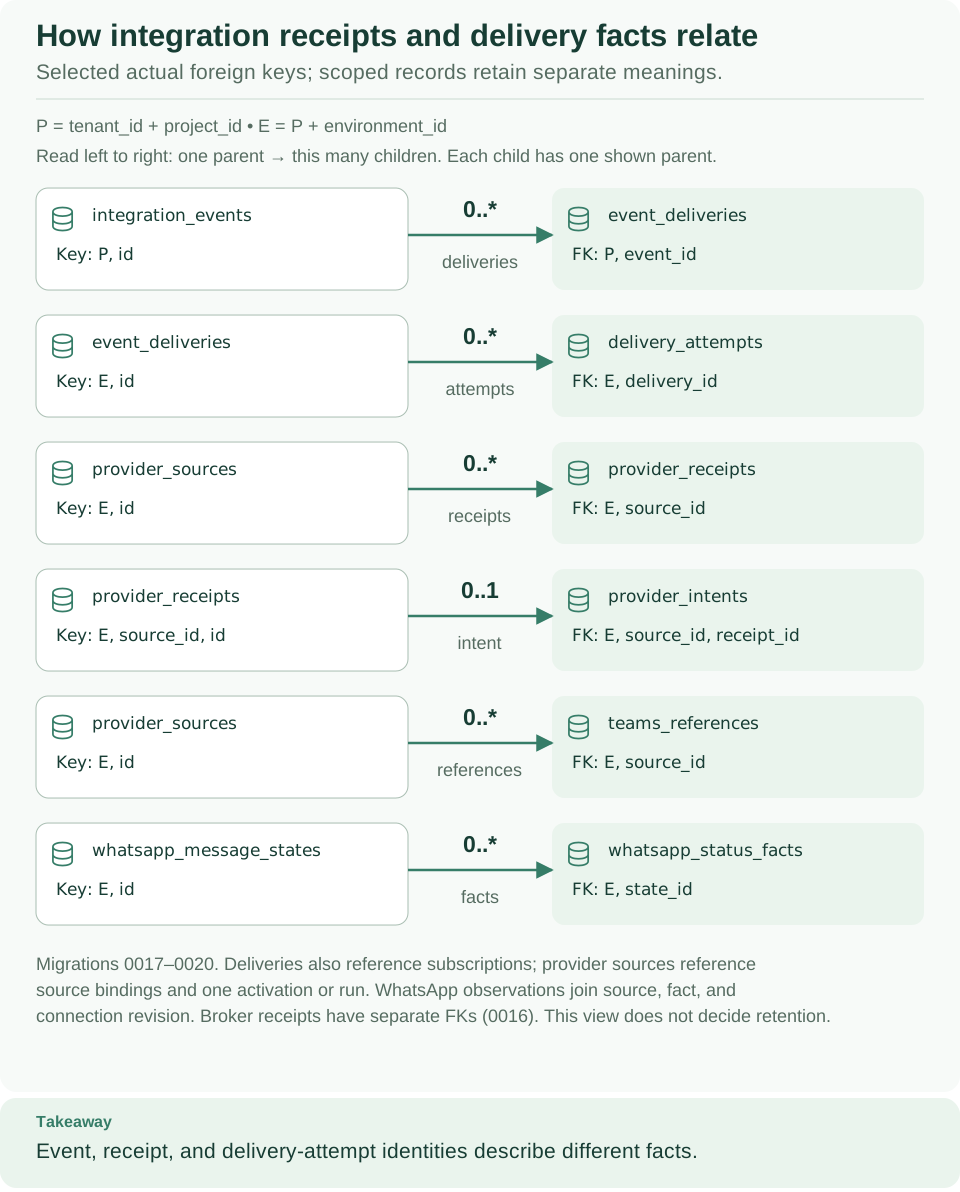
How to read this diagram: Outgoing events (top two rows) and incoming provider records (the rows below) are separate families. A delivery attempt, a provider receipt, and a status fact each describe a different event.
These relationships come from migrations 0016, 0017, 0018, 0019, and 0020. Outbox deliveries also reference subscriptions. Provider sources reference source bindings and exactly one activation or run target. WhatsApp observations link facts, sources, and connection revisions, and Teams lifecycle events and command receipts keep the history of reference fencing. Do not read this diagram as permission to purge those records; follow retention.
Deployment and verification boundary
The API, the native executor, and remote workers can run in separate processes; PostgreSQL owns the durable orchestration state they share. The API and the native executor run the same server artifact with separate authority, while the worker image has its own installed dependencies. The current container layout is described in deployment and configuration. To operate that state, read observability, retention, upgrades, and backup and restore.
External effects always need idempotency or reconciliation: lease fencing cannot undo a request that another system has already accepted.
Find the code for each responsibility
Next steps
- Integration developers: call a REST API without code, then build workers for anything a built-in connector cannot do.
- Administrators: choose your identity provider and grants, then give people the right access.
- Operators: manage executions and match a symptom to its boundary.
- Contributors: read contributing. The diagrams on this page are editable SVG; visual assets explains how to change and check them, and the capability matrix lists what has been verified.