Upgrade a platform safely
Use this page to move a running Weave platform to a new server artifact: migrate its database, check that retained work is still supported, and reopen traffic only after a real run succeeds. It is written for operators. You need a maintenance window, a verified recovery copy of the database, explicit migration credentials, and the exact new artifact. Plan for the downtime of your slowest step, usually the backup.
Starting an API never migrates its database. Weave uses explicit forward migrations, and it checks persisted requirements before it admits effect-producing work. Both Alembic's revision and Weave's own schema marker must match the installed artifact. Installing or upgrading the CLI, Studio, or the desktop app never migrates a platform.
| Version | Schema revision | What the upgrade involves |
|---|---|---|
| alpha4 | 0021_operations |
Earlier baseline |
| alpha5 | 0025_run_lifecycle |
New migrations for human tasks, email, run filters, and execution lifecycle state |
| alpha6 | 0025_run_lifecycle |
macOS packaging correction; no new migration |
| alpha7 | 0025_run_lifecycle |
No new migration; adds optional server settings for published sign-in and the executor build field, whose default image keeps existing executor configuration valid |
| alpha8 | 0028_files |
Adds decision-table artifacts, separate Lumi configuration, file metadata/chunks/retention, and new scoped file and assistant roles. Existing grants do not automatically gain these roles. |
| alpha9 | 0028_files |
No new schema migration. Adds guided AI configuration and renewable worker OAuth2 authentication. |
| alpha10 | 0028_files |
No new schema migration. Restores Lumi access through the Studio host; explicit selection supersedes pending canvas fitting, and initial empty fields no longer steal focus. |
| alpha11 | 0028_files |
Studio AI setup wizards and explicit same-execution shared AI context; no server behavior or schema change. Updating the local Studio host and assets does not require redeploying an alpha10 server. |
| alpha12 | 0030_worker_presence |
Adds scoped deployment Operations persistence, runner fencing and reconciliation, and worker presence/drain state. Explicitly migrate the server before using Operations; new roles are never granted automatically. Provider credentials stay on separately operated runners. |
| alpha13 | 0030_worker_presence |
No new schema migration. Workers retry explicit capacity rejections while they read task context or credentials, and an Agentic preparation timeout before provider execution counts as not started. Upgrade the Agentic and Files workers to 0.1.5 together with the server. |
| alpha14 | 0030_worker_presence |
No new schema migration. Adds the detached Docker development platform (weave platform up); existing foreground installations keep working and are never converted. The Agentic and Files workers 0.1.6 pin this server version. |
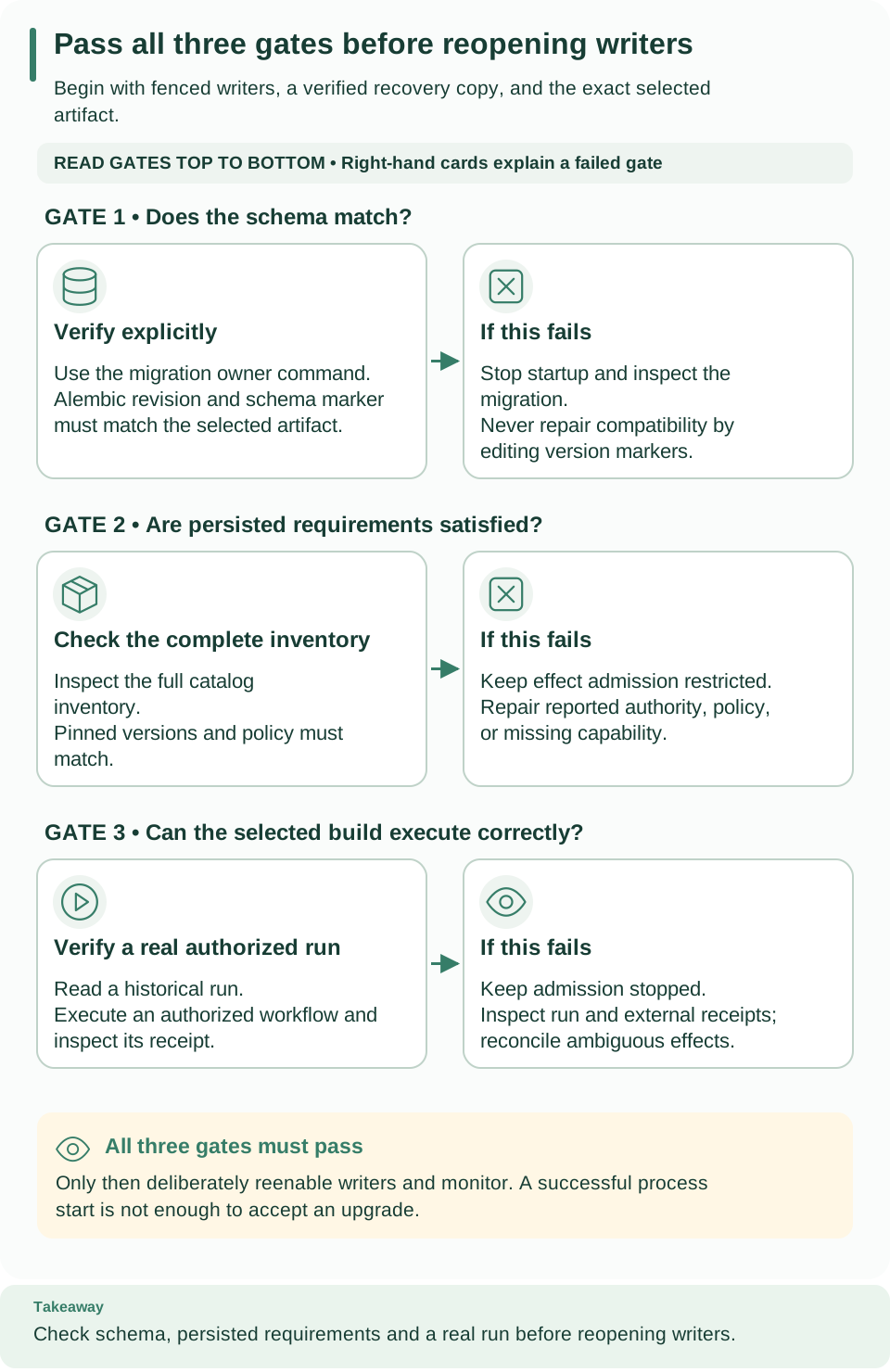
Read the three gates from top to bottom. Each left card says what to verify; the card on its right says what to do when it fails. A completed migration passes only the first gate: retained requirements and a real authorized run still need evidence before you reopen writers.
A local platform has no in-place upgrade
A local platform from weave platform has no in-place upgrade. It records
the CLI version and the checkout that created it. Every weave platform
command refuses another version with Use this installation's original
directory and matching CLI version., and a modified checkout with The source
checkout has changed. Restore its original content before resuming this
installation. Keep using the CLI and checkout that created it, or clone the new
release into a new directory and run weave platform setup there. That creates
a separate installation with its own data. The rest of this page applies to the
manual local installation and to deployments.
Understand the upgrade boundary
An upgrade has three independent checks:
- Schema. The new artifact can read the database schema.
- Retained requirements. Its installed capabilities satisfy every retained execution requirement. Workflows may still reference an older admitted worker release or connector version that the new deployment must keep supporting.
- Execution. Real work runs successfully after the restart.
A completed migration proves only the first. Use a maintenance window for the whole procedure. The local walkthrough can rehearse these steps, but its guarded restore helper is not a production backup system. For production, use a verified environment-specific backup and restore procedure, and account for external effects that happened after the backup.
Prepare the upgrade
- Record what runs today. Note the running wheel hash, dependency lock, image identities, schema revision, and private configuration locations. Keep the previous artifact.
- Stop every writer. Inventory APIs with schedulers, native executors, remote workers, provider dispatchers, broker consumers, and outbox dispatchers. Stop admission and fence them before database maintenance. For the manual local installation, follow step 1 of backup and restore; on Kubernetes, maintain the deployment deliberately.
- Make a recoverable copy. For the owned standalone installation, follow backup and restore. For other deployments, use the environment-specific verified recovery procedure. Preserve the source database and external effect receipts.
- Rehearse. Install the exact new artifact in a separate environment and rehearse the migration against a restored copy, with the same connector packages and operational policy as the target deployment.
- Provide explicit migration authority. Runtime application and scheduler credentials are separate nonowner identities and cannot replace it. The operations migration provisions narrowly privileged function ownership and rejects an unrecognized or privileged existing owner role.
Never run mixed schema versions against the same mutable database. The server performs exact schema checks, not rolling schema negotiation.
Apply packaged migrations
Run this stage in the operator terminal while writers are stopped. Select the new
installed interpreter, not whichever python or source checkout happens to be on
PATH. On a restored local rehearsal, the target URLs are in that attempt's
target.env; the original runtime.env still refers to the fenced source.
Confirm which database you selected before you migrate.
Load WEAVE_MIGRATION_DATABASE_URL from protected deployment configuration;
never print it or pass it to runtime containers. Then run:
# Apply the packaged migrations with the new artifact's own interpreter.
"$WEAVE_PYTHON" -I -m firefly_weave.persistence.migrations
Expected: Weave schema is current, printed only after both schema markers were
checked. WEAVE_PYTHON is the Python executable of the new installed
environment; "$WEAVE_PYTHON" -I -m firefly_weave.cli.main admin migrate runs
the same migration. Without WEAVE_MIGRATION_DATABASE_URL, or on any failure,
the command stops with Migration failed; verify PostgreSQL connectivity and
schema compatibility.
If you lower operational quotas at the initial migration, supply the same
WEAVE_OPERATIONS_POLICY JSON to the migration and to every runtime process.
Migrations are transactional and serialized. Investigate a failure against the retained database and protected logs; never change version rows to bypass it. Destructive downgrades are unsupported. Returning to an older runtime needs a compatible, separately restored database and reconciliation of any external effects since its backup.
The operational policy has a persisted fingerprint. Every replica must use the same policy as the database. Rerunning an already-current migration is not a policy update, and this release has no in-place policy-change operation: a mismatch leaves the runtime restricted. Never rewrite the fingerprint or counters by hand to force readiness.
Start and inspect compatibility
Remove the migration credentials from the runtime environment, then start the
new artifact with its application and execute-only catalog and scheduler
identities. The startup inventory needs catalog authority even when
WEAVE_SCHEDULER_ENABLED=false.
The application and catalog URLs must name the same database. They need the same driver, host, port, database, and query options; only their credentials differ. Use the same host spelling in both, even when several DNS aliases reach the same server. The catalog login keeps its execute-only scheduler authority, without business-table or column grants.
Compatibility checks examine retained runs, activations, worker releases, connector requirements, provider requirements, and the operational policy. Exact persisted versions and pins matter: an online worker is not a substitute for a compatible admitted release. Missing authority or an incomplete inventory never counts as a successful check.
Read the report from the CLI. Compatibility is a project-level operation, so
it uses the tenant and project of your saved platform's
workspace and ignores the environment. Reading needs status.read (the viewer
role) and a fresh scan needs compatibility.check (the operator role), granted
on the project or tenant; an environment-level grant does not cover them. The
viewer and operator grants that weave platform user and the first-run
helper create are on the environment, so ask a
tenant administrator for a project grant
first.
# Read the current report for the project of your saved workspace.
weave compatibility read --output json
# Ask the server for a fresh scan of the same project.
weave compatibility check --output json
Expected: one JSON report with policy, mode, complete, inspected,
checked_at, findings, and findings_truncated. A healthy upgrade reports
"mode": "ready", "complete": true, and no findings. In a script, use
explicit mode
instead: --base-url with the restarted API origin, --tenant and --project,
and a current WEAVE_ACCESS_TOKEN. For a standalone rehearsal, take the scope
IDs from first-run.json; never invent IDs or reuse an expired token.
Findings are filtered to the authorized project, with safe global inventory conditions retained; no other project's resource identifiers appear. A truncated or incomplete report is not evidence of full compatibility.
The server also rescans by itself. Each process requests a compatibility
rescan every 60 seconds. Automatic and explicit scans share one reservation, so
an automatic scan that would overlap is skipped instead of queued. A scan
classifies retained items in its own reserved execution slot, so a burst of API
requests cannot make it fail. A failed scan leaves the process restricted until
a later scan succeeds, and catalog cleanup must succeed before readiness
returns. A rescan that confirms a ready process keeps it ready while it releases
its catalog connection; if that cleanup fails, readiness is withdrawn. While the
process is restricted, refused changes answer HTTP 503 WV-COMPATIBILITY with
Retry-After set to the seconds until the next automatic rescan.
When a rescan withdraws readiness, the server logs the warning Compatibility
rescan withdrew readiness with the finding kinds and codes and the class of
any error the scan caught, such as CatalogError WV-OPERATION-CAPACITY. The
warning never includes error messages or connection details.
The capabilities response also reports the effective policy, fixed server ceilings, the supported worker convention, and a small readiness projection. An older server may omit this declaration; omission does not imply readiness.
| Finding | What to do |
|---|---|
authority_missing, inventory_incomplete |
Repair catalog connectivity or authority and rerun the scan |
policy_mismatch |
Restore the policy matching the database; never edit counters or fingerprints |
ir_unsupported, artifact_invalid |
Inspect the pinned definition and select a compatible artifact; preserve historical bytes |
action_unavailable, connector_unsupported, provider_requirement_unsupported |
Restore the exact required release or package, or use an explicit supported migration |
worker_protocol_unsupported |
Use a compatible worker and server convention; never relabel an existing release |
legacy_policy_blocked |
Inspect historical classification limits; preserve withheld evidence instead of bypassing policy |
operational_capacity_blocked, capacity_absent |
Inspect retained usage and admission requirements; use authorized maintenance where supported |
Restricted mode keeps the platform inspectable. Health and authorized inspection stay available while new effect-producing work is blocked. Issued terminal controls remain available within their reserved authority and capacity. Restricted mode never permits arbitrary execution, and you must not rewrite retained definitions to silence findings. See incident operations and retention for the supported controls.
Verify before admitting traffic
Perform these checks in order for each project and execution path:
- Readiness.
/health/readyanswers HTTP 200 on the replica that receives traffic. If it fails, keep effect-producing admission stopped and read the compatibility findings. - Compatibility. A complete report with
"mode": "ready", and a policy in the capabilities response that matches the intended deployment. A report truncated for response size cannot prove that every requirement was reviewed. - History. A known historical run and its durable output can still be read.
- Execution. Start the required admitted executor or worker and run a small authorized workflow. The deployment exercises show concrete remote and native checks for the local installation.
- External effects. Verify receiver or provider receipts and telemetry through their own interfaces, then reenable the remaining writers deliberately and watch recovery.
Do not infer provider delivery from API readiness alone. Keep the prior artifact, the source database, the backup, and protected migration evidence until the upgraded deployment and its recovery procedure have been verified.
After the upgrade: clients and sign-in
Saved platforms, weave auth setup, and published sign-in settings arrived in
0.1.0a7. Upgrading a server from alpha5 or alpha6 to 0.1.0a7 adds no migration:
the schema stays at 0025_run_lifecycle. After the upgrade, check these points:
- Publish sign-in settings with
WEAVE_CLIENT_SIGN_INand, optionally,WEAVE_DISPLAY_NAME, so people can connect by typing the server address; see publish sign-in settings. Without them, clients reportWV-CONNECT-NO-SIGN-IN. - Older connection files keep working.
--auth-config FILEstill works for sign-in and remote commands, andweave auth setup --auth-config FILEturns a file into a saved platform; see older connection files. - A server that predates published sign-in settings is reported to current
clients as
WV-CONNECT-INCOMPATIBLEwhen someone connects by address; people can still use a connection file until you upgrade it. - Saved platforms keep what each person reviewed. If you change the issuer or login client, people review the platform again, as described in What clients read from the server.
- Signing keys without
algare now accepted by key type. The built-in verifier uses a JWKS key that omitsalg, as Microsoft Entra ID publishes them, only for the allowed algorithm of its key type: an RSA key forRS256, a P-256 key forES256. Keys that declarealgare checked as before. Unit tests cover Entra-shaped keys, and Azure preproduction checks have verified real Entra application tokens. Human sign-in remains unverified, as Microsoft Entra ID explains. - Local Keycloak realms accept any loopback port. A local platform still has
no in-place upgrade, so set up
alpha7 from its own checkout. Its realm registers the port-free loopback
callbacks, and
weave platform startadds them to a retained realm that lacks them, printingUpdated the local Keycloak login client so browser sign-in accepts any loopback port.; see Browser sign-in is refused.
Upgrading the CLI or Studio never rewrites saved platforms it cannot read; such a
file is reported as WV-PROFILE-STORE.
If the upgrade fails
Keep the failed deployment's evidence and stop its writers before you choose a recovery path. A schema failure belongs to migration diagnosis; a compatibility finding belongs to the missing authority, policy, or pinned capability that the report names. Neither is repaired by editing version rows or weakening grants.
Starting the old wheel against a newly migrated database is not a supported rollback. Recover the old artifact with a separately restored compatible database, choose one active deployment, and reconcile effects that occurred after that backup before you resume work. See incident operations for ambiguous effects and backup and restore for the local source fencing behavior.
Next steps
- Make the recovery copy first with backup and restore.
- Check the server variables in configuration.
- Watch the upgraded platform with observability.