CLI reference
The weave command line covers the whole life of a workflow: you write and
check it on your computer, run a local platform, sign in to your team's
platform, publish and activate versions, start and inspect runs, and build
integrations. This reference explains each command family, its files, and
what its results and exit codes mean. Use it to look things up; to learn the
commands in order, follow the CLI tutorial.
The page goes from local work, which needs no platform, to platform work:
- Pick the command family for your goal.
- Work locally: starter project, validate, compile, and simulate, graphs, and exports.
- Run platforms: the local platform and Studio.
- Work with a platform: remote commands and sign-in.
- Build integrations: connectors and no-code HTTP Actions.
Some commands are new in 0.1.0a7. Saved platforms (weave auth setup,
profiles, use, remove, workspace, and --profile on remote commands),
weave platform user, integrations, and secret, weave connector
http-action and descriptor, the new import-openapi options, and the guided
connections create flags do not exist in an alpha6 or earlier CLI. Sections
that describe them say "new in 0.1.0a7". Run the command's --help to check
what your installed CLI offers.
Before you start: install, help, and conventions
Install. Start with CLI installation. The installer
includes local authoring, platform access, sign-in, OpenAPI import, and the
Studio host. Studio's browser assets are a matching ZIP that you install
explicitly by digest. If you install only the base firefly-weave wheel, local
authoring works; commands that call a platform also need the client extra.
Neither local authoring nor remote commands need the server or worker extras.
Local commands stay local. init, docs, workflow, and schema do not
start PyFly, read application configuration or credentials, discover providers,
or contact a service. They read only the files you name and write only the
exports or starter files you ask for. docs prints a link; only --open starts
a browser. connector http-action and import-openapi also fetch and send
nothing.
From a locked source checkout, prefix commands with
uv run --locked --no-editable, adding --extra client for commands that call
a platform.
Help.
weave --help, or bareweave, shows the grouped command list with its banner and exits successfully. Banners appear only in this root help, so JSON results stay machine-readable.weave help workflow compileshows nested help without running anything;weave workflow compile --helpdoes the same.weave --versionprints the installed version;weave version --output jsonadds the API and workflow language versions.
Output and exit codes. Most commands accept --output text|json; commands
that call a platform print JSON only. With JSON, standard output carries one
result document and nothing else; progress, prompts, and guidance go to
standard error. Exit codes mean the same thing everywhere:
| Exit | Meaning | Examples |
|---|---|---|
| 0 | The requested operation or check succeeded | A complete compilation; a successful partial validate; a remote call that succeeded |
| 1 | The request was understood, but the answer is no | An invalid definition, a strict warning, a rejected Action or import, a denied request, not signed in |
| 2 | Fix your command or local configuration | A wrong option, an unreadable file, an export target that exists, no platform selected |
| 3 | The platform, identity provider, or network failed | An unreachable server, a transport error, an unexpected answer |
Pick the command family
The groups follow weave --help. "Base package" commands work without a
platform; the others need the client extra and either a
saved platform or explicit mode, plus grants.
| Goal | Commands | Prerequisite and guide |
|---|---|---|
| Create a starter or find a guide | init DIRECTORY, docs [TOPIC] |
Base package; quickstart |
| Validate, compile, explain, simulate, or draw a local workflow | workflow validate, compile, explain, simulate, graph |
Base package and explicit files; authoring guide |
| Export the language schemas | schema export |
Base package |
| Describe an HTTP API without code, import OpenAPI, or build a connector package | connector http-action, import-openapi, descriptor, init, validate, test, package |
Base package; publishing needs a platform; no-code REST integration |
| Run durable workflows on your computer | platform doctor, up, setup, start, status, logs, demo, user, token, stop |
Matching checkout, uv, and local Docker; local platform |
| Run built-in HTTP connector Actions locally | platform integrations, platform secret (new in 0.1.0a7) |
A running local platform |
| Draw workflows and work with tasks in your browser | studio, studio install, studio configure |
The studio extra and a matching browser bundle; Studio |
| Connect to a platform, sign in, choose a workspace | auth setup, login, status, logout, profiles, use, remove, workspace |
client extra; connect the CLI |
| Publish and activate definitions | definitions (with drafts and activations), remote compile, validate, catalog |
Grants in the project; CLI tutorial |
| Create and test integration connections | connections |
connection.manage; no-code REST integration |
| Start, inspect, and manage runs | runs (with incidents and debug), run replay |
Grants in the environment; manage runs |
| Claim or complete human tasks | human-tasks, human-assignments, human-groups |
Human tasks |
| Transfer and inspect workflow files | files upload, download, list, read, delete |
file_manager to upload/manage; file_reader to read; file tutorial |
| Read or reply to email conversations | email |
An email connection; email workflow |
| Start runs from webhooks, schedules, or messages | triggers (with schedules), broker-triggers, provider-sources, provider-receipts |
trigger.manage; schedules, Kafka, provider sources |
| Send workflow events to other systems | subscriptions, deliveries, source-bindings, teams-references, whatsapp-statuses |
Outbound integration events |
| Register workers and their releases | workers (with releases), worker package, worker deploy |
Worker guide |
| Administer tenants, people, and grants | remote access create-tenant, create-project, create-environment, environment, grant, principals, members |
platform_admin for tenants, principals, and platform grants; tenant_admin for projects, environments, and members; create your team's workspace, People and access |
| Check compatibility and apply retention | compatibility, retention |
Compatibility and retention |
| Bootstrap or migrate a server installation | admin bootstrap, admin migrate |
Server operators only; standalone tutorial, upgrades |
Create a local starter project
weave init DIRECTORY [--output text|json] creates a starter workflow in the
directory you name. It works from any folder with the base package; you need no
source checkout, Docker, token, or platform.
# Create the starter in a new folder and work inside it.
weave init my-first-workflow
cd my-first-workflow
# Check the definition and compile it against the starter's empty catalog.
weave workflow validate workflow.yaml --catalog catalog.lock.json --strict
weave workflow compile workflow.yaml --catalog catalog.lock.json --strict --directory build
# Run the saved simulation request: no services, no durable run.
weave workflow simulate simulation.json --output json
Expected: validation and compilation succeed, and the simulation returns
"status":"succeeded" with the message Hello from Firefly Weave!. Nothing
starts a service or saves a durable run; for that, see the
platform overview.
| Starter file | Purpose |
|---|---|
workflow.yaml |
hello-weave@1.0.0, which returns its message input |
catalog.lock.json |
An explicitly empty catalog, for complete compilation |
input.json |
Sample message input |
simulation.json |
The compiled artifact, sample input, empty mocks, and a fixed virtual clock |
README.md |
Commands to run the starter and refresh the simulation after edits |
Simulation reads simulation.json, not your YAML. After you edit
workflow.yaml or input.json, recompile and refresh the simulation request
as the generated README shows; compiling into build alone does not rewrite it.
init refuses existing starter file names and unsafe symbolic links, keeps
unrelated files, and has no --force option: use another folder for another
starter. JSON success contains ok: true and the created file names. A failure
exits 2 with WV-CLI-INIT. The export safety rules
describe how files are written.
Find documentation from the CLI
weave docs [TOPIC] [--open] [--output text|json] prints a link to the
published documentation website.
Without a topic, it prints the documentation home. Printing needs no network;
viewing the page does.
# Print the link for a topic; nothing is opened.
weave docs platform
# Print the same kind of link as JSON, for scripts.
weave docs cli --output json
# Also open the link in your default browser.
weave docs quickstart --open
Expected: one URL per command; JSON output has a url field. If the browser
cannot start, --open exits 2: run the command again without it and copy the
link.
| Topic | Destination |
|---|---|
quickstart |
Quickstart |
platform |
Deploy, start, and use the platform |
cli |
This reference |
workers |
Worker guide |
deploy |
Deploy your first worker |
configuration |
Configuration |
local |
Local platform |
api |
API playground |
sdk |
Python SDK tutorial |
connectors |
Build a custom integration |
graphs |
Workflow graphs |
studio |
Studio |
human-tasks |
Human tasks |
email |
Email conversation workflow |
The website can describe a newer release than your installed CLI. Compare with
weave --version when you follow server setup steps.
Local workflow commands
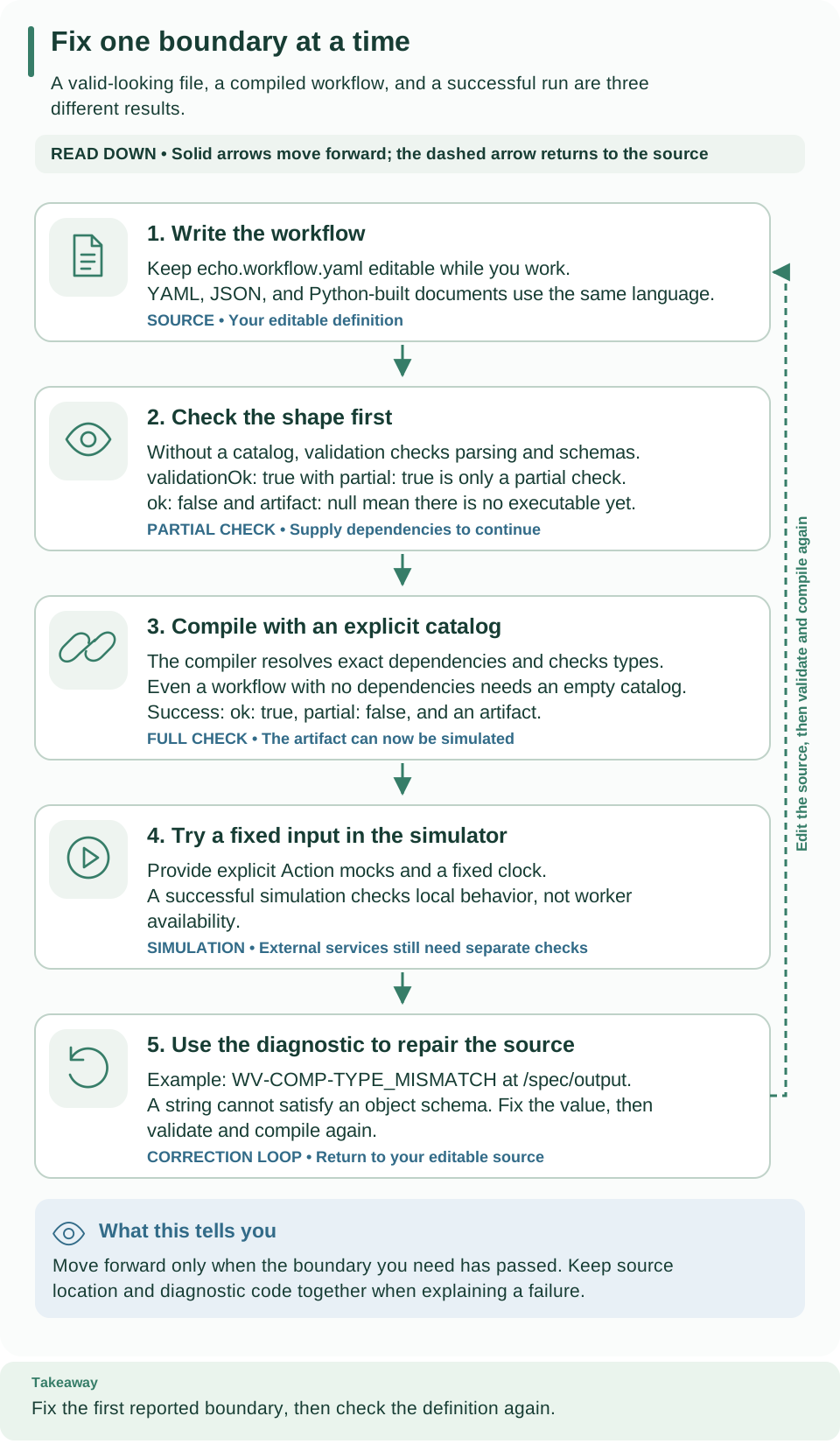
Read down: validation without a catalog is only a partial check; compiling with
an explicit catalog (even an empty one) produces the artifact that you can
simulate; a diagnostic sends you back to the source. With no catalog, a
successful validate exits 0, but compile and explain exit 1 because no
artifact exists. Open diagram at full size.
The authoring guide creates these files under
.local/tutorial. Run the following from the checkout root after its YAML and
empty-catalog steps:
# Show the installed package, API, and language versions.
weave version --output json
# Partial check: no catalog, so dependencies and types are not checked yet.
weave workflow validate .local/tutorial/echo.workflow.yaml --output json
# Complete compilation against an explicit (empty) catalog.
weave workflow compile .local/tutorial/echo.workflow.yaml \
--catalog .local/tutorial/empty-catalog.json --strict --output json
# Show the plan without executing it.
weave workflow explain .local/tutorial/echo.workflow.yaml \
--catalog .local/tutorial/empty-catalog.json
# Write the artifact, executable, and catalog lock; existing files are refused.
weave workflow compile .local/tutorial/echo.workflow.yaml \
--catalog .local/tutorial/empty-catalog.json --directory .local/tutorial/compiled
# Write one JSON Schema file per published contract.
weave schema export --directory .local/tutorial/schemas
Expected: validate reports a partial success, compile returns an artifact
because you supplied a catalog, and explain prints the plan. The last two
commands create files; choose a new output folder when you repeat them. To run
the echo plan without services, build the request described in
simulation and run
weave workflow simulate .local/tutorial/simulation-request.json --output json.
Options. workflow validate, compile, and explain take SOURCE, an
optional --catalog LOCK, --output text|json (default text), and
--strict. A .json source is read as strict JSON; other extensions use the
restricted YAML reader. Catalog locks are always strict JSON. Sources and
catalogs are limited to 1,048,576 bytes, and the parser also limits depth and
document size. An oversized source is invalid (exit 1); an oversized or
malformed catalog is a local configuration error (exit 2).
| Result | Exit | Meaning |
|---|---|---|
Complete compilation, or a successful partial validate |
0 | The requested checks passed |
Invalid definition, strict warning, or partial compile/explain |
1 | No executable result |
| Invocation, file, malformed catalog, or export failure | 2 | Fix your arguments or local configuration |
Partial and complete checks.
- Without a catalog, every workflow command validates only the source. The
result has
partial: true,validationOkfor those checks,ok: false, andartifact: null. Onlyvalidateexits 0 in that case;compileandexplainneed an executable and exit 1. Text output labels partial results. - An explicitly supplied empty catalog requests complete compilation; it is not the same as no catalog.
- Partial validation does not check dependencies, types, or data availability
(dominance), and
--strictcannot add those checks. With a catalog,--strictturns complete-analysis warnings into errors.
JSON output of all three commands is exactly CompileResult.to_bytes()
plus a newline: retained diagnostics, truncation metadata, the status, and the
optional artifact envelope, with no progress text. Invocation, file, catalog,
and export errors use the same envelope with one WV-CLI-* diagnostic and exit
2, and never include raw input values or exception text.
schema export --output json reports the folder and file names;
version --output json reports the package, API, and IR versions.
Keep credentials out of definitions. Artifacts contain your literals and
dependency declarations. Local compilation never resolves secret references or
copies environment credentials into its output. The human-readable explain
shows dependency names and digests, node and edge flow, source positions,
expression reads, and runtime guards, but never literal payloads; JSON
explain keeps the compiler envelope.
Workflow graph exports
weave workflow graph ARTIFACT [--format text|mermaid|svg] [--directory PATH]
reads a compiled artifact, checks its integrity, and draws the possible paths.
The default is a text graph on standard output; --directory writes
workflow.txt, workflow.mmd, or workflow.svg, and replacing an existing
file needs --force. --output json returns ok, format, content, and
files.
# Draw the compiled starter as SVG; no Action is executed.
weave workflow graph build/compiled-artifact.json --format svg --directory diagrams
Expected: Saved workflow.svg. Open it to explore the compiled flow; no actions
were executed. The graph shows static paths, not live run state. The graph tutorial has a complete
example.
Export safety and contracts
compile --directory DIR writes compiled-artifact.json, executable.json,
and catalog.lock.json, only after a complete, successful compilation. The
artifact contains source maps and diagnostics; the executable alone contains
the semantic IR. The lock is your validated catalog in canonical form,
including unused resources, so you can reuse it for other definitions.
schema export --directory DIR writes one <name>.schema.json file per
published contract: definitions, artifacts, catalogs, worker releases and
leases, completion acknowledgments, provider sources, and operational
responses. The schema profile describes the validation
limits. The catalog-lock schema describes definitions with SHA-256 digests,
task capabilities, adapter names, and bundled schemas; only CatalogLock and
CatalogSnapshot.from_lock check content hashes, which a generic JSON Schema
validator cannot.
How exports write files.
- Every export checks all target paths before writing anything. Existing files
are refused (
WV-CLI-EXPORT, exit 2) unless you pass--force; unrelated files stay untouched. - Symbolic links at the destination or target, and file-versus-folder
collisions, are refused even with
--force. - Each file is written to a temporary sibling first and then moved into place, without following the target's link. The set is not a transaction: a full disk or a permission error can leave some complete files behind.
- Partial or invalid compilations write no files.
Language boundaries
The schema profile lists the accepted and rejected JSON Schema vocabulary, local-only references, the four enforced formats, the regular-expression subset, and resource budgets. Compiler contracts specify expressions, branching, and source and semantic identity.
- No raw code, remote schemas, or environment or file-system expressions.
- Numbers are finite IEEE-754 values; integers must be within
[-9007199254740991, 9007199254740991]. NaN, infinities, invalid Unicode, duplicate mapping keys, and YAML aliases are rejected. - Use validated strings for money and exact decimals. Typed integer fields
reject floating-point forms, while embedded JSON Schema keeps its own integer
rule (
1.0is an integer). - A successful local compilation proves neither that a provider is available nor that you may deploy: publishing compiles again against the platform's authorized catalog.
History and replay. weave runs history and weave runs export read a
run's recorded facts from a platform. weave run replay --artifact
pinned-artifact.json --events history.json checks an exported history locally,
without executors. See history and replay.
Local platform commands
weave platform [--directory PATH] COMMAND runs a local development platform:
the API, PostgreSQL, and Keycloak on your computer. The default directory is
.local/platform, relative to your current folder; reuse the same absolute
path in every terminal. Follow the local platform guide
before setup. The Docker route combines the
initial steps in one up command.
| Command | Effect |
|---|---|
doctor [--source REPO] [--context NAME] |
Check the source version, uv, and local Docker without changing anything |
up [--source REPO] [--context NAME] [--subnet CIDR] [--username NAME] [--role ROLE ...] |
New in alpha14: prepare once and leave the API running in Docker; create the demo workspace and optionally a sign-in account; repeating preserves data and the account |
logs [--lines COUNT] |
Read the owned Docker API logs; default 100 lines, maximum 1,000 |
setup [--source REPO] [--context NAME] [--subnet CIDR] |
Build and install an isolated server, start its own dependencies, and set up identity; --subnet sets an unused private (RFC 1918) IPv4 Docker subnet when the default pools are exhausted |
start |
Resume the saved mode: detached API for a Docker installation, foreground API for a host installation |
status |
Show the saved stage, API and identity readiness, URLs, whether a first run is saved, and the sign-in command |
demo |
Create one authorized demo run; repeating it reuses the saved receipt |
user --username NAME [--role ROLE ...] |
New in 0.1.0a7: create a development sign-in account, a linked person, and roles in the demo workspace |
integrations enable |
New in 0.1.0a7: publish the installed weave-http@2.0.0 Connector, register this runtime as its local release, and grant a dedicated native principal |
integrations disable |
New in 0.1.0a7: stop running connector actions locally after the next restart; works without a running API |
integrations grant --connection REVISION_ID --access ACCESS |
New in 0.1.0a7: let the local release use one connection's secret handles; ACCESS is read or write, repeat --access for both |
secret set --handle HANDLE [--value-stdin] |
New in 0.1.0a7: create or replace a development secret value behind a handle |
secret list, secret remove --handle HANDLE |
New in 0.1.0a7: list handle names (never values), or delete one value |
token |
Refresh the verified host token in its private file and print only the path |
stop |
Stop the Docker API and dependencies; for host mode, stop the foreground API first. Data is kept |
Every command except start accepts --output json. Setup shows a spinner
only in an interactive terminal; set WEAVE_NO_ANIMATION=1 for plain progress
messages. Redirected output has no animation, and JSON output has no progress
messages. This family has no reset or delete command.
Status and sign-in. status also reports sign_in, the
weave auth setup http://127.0.0.1:PORT command for this platform,
integrations_enabled, and, once integrations are enabled,
connector_release_ids. The local API publishes its own sign-in settings, so
people connect with
weave auth setup.
user needs a completed setup, the demo workspace, and a running API.
- The username is 3 to 64 lowercase letters and digits, joined by single
.,_, or-. - The generated password is printed once and never saved, and an existing username is never reset.
- Without
--role, the person getsdeveloperon the demo project anddeployer,operator,viewer, andtask_participanton the demo environment. - Each
--rolereplaces those defaults:tenant_adminis granted on the tenant,developeron the project, and every other role on the environment. Creating connections needstenant_admin.
integrations and secret are for development only.
enableneeds the demo workspace and a running API; repeating it reuses what exists.- Run
platform startafterenableor changing secret handles. In foreground mode, first stop the API with Ctrl+C; a replaced value applies at its next use. In Docker mode, also runstartafter replacing or removing a value: the running container retains its previous secret snapshot until the restart succeeds. - Handles match
[a-z0-9][a-z0-9_.-]{0,63}.secret setreads the value from a hidden prompt, or from piped standard input with--value-stdin, never from arguments;--value-stdinrefuses a terminal. - Values are stored in owner-only files under the installation directory and granted only to the demo environment. Connections reference the handle, never the value.
- Only the declarative HTTP executor runs locally, under the usual egress
rules: origins listed on each connection (HTTPS, or HTTP with a "Not
encrypted" warning), and private addresses only for an origin approved with
weave platform up --allow-private-origin.
# Read a development value from a private file; it never appears in arguments or output.
weave platform secret set --handle pets-api-key --value-stdin < "$HOME/.weave-secrets/pets-api-key"
Expected: Handle: pets-api-key, followed by mode-specific restart instructions.
When the handle already had a value, the message starts with Replaced privately.
Foreground mode reads the replacement at its next use; Docker mode requires
platform start to refresh the mounted copy.
Studio commands
weave studio starts the Studio host on 127.0.0.1 and prints a one-time
pairing code that links your browser tab to it. Pairing grants no platform
access; the host reconnects to your active saved platform, or works locally
when none is selected. Install the matching browser bundle first with
studio install, or build it from source; see Studio.
Expected: Firefly Weave Studio · Platform: NAME (or Local authoring (no
platform selected)), then Open http://127.0.0.1:8766, a Pairing code:
line, and Enter this code in the browser. Press Ctrl+C to stop Studio.
| Option | Effect |
|---|---|
No --profile |
Use the active saved platform; work locally when none is active or the file cannot be read |
--profile NAME |
New in 0.1.0a7: use that saved platform and make it the active one |
--profile FILE |
Use a legacy Studio profile file: a value with a path separator or ending in .json, or an existing file when no saved platform has that name |
WEAVE_STUDIO_PROFILE |
Default for --profile (separate from WEAVE_PROFILE) |
--port PORT |
Loopback port, 1024 to 65535 (default 8766) |
--no-browser |
Print the address without opening a browser |
--assets DIRECTORY |
Development build folder that contains index.html |
--token-env VARIABLE |
Environment variable holding an access token; only with a legacy profile file that has no auth_config |
weave studio install --bundle FILE --sha256 HEX checks the matching Studio
ZIP against its published SHA-256 checksum and installs it; Node.js is not
needed. Expected: Studio installed at PATH. Start it with: weave studio.
weave studio configure writes a legacy profile file. New setups do not
need it: weave auth setup saves a platform that Studio, the CLI, and the
desktop app share. configure --auth-config FILE --output FILE builds the file
from a connection file. Optional flags are --name
(default My platform), --tenant, --project, --environment,
--credential-store native|file, and --credential-file FILE. It never
replaces an existing file. The profile is non-secret JSON of at most 64 KiB
with name (1 to 100 characters), base_url (an exact origin, HTTP only on
loopback), tenant_id, project_id, environment_id (each needs its parent),
auth_config, credential_store, and credential_file.
Remote authoring and operations
Commands that call a platform are thin adapters over the typed SDK and use the
canonical /api/v1/tenants/... paths. The public families are remote,
definitions (with drafts and activations), connections, runs (with
incidents and debug), workers (with releases), triggers (with
schedules), and the integration, human-work, email, and administration
families listed above. Install the client extra.
Choose the platform and workspace
Every public remote command takes the same options:
| Option | Environment variable | Meaning |
|---|---|---|
--profile NAME |
WEAVE_PROFILE |
New in 0.1.0a7: the saved platform to use (default: the active one) |
--base-url URL |
WEAVE_BASE_URL |
The API origin; selects explicit mode |
--tenant, --project, --environment |
WEAVE_TENANT_ID, WEAVE_PROJECT_ID, WEAVE_ENVIRONMENT_ID |
In profile mode, replace the saved workspace from that level down; in explicit mode, required as the operation needs them |
--auth-config FILE |
None | A connection file; selects explicit mode |
--credential-store, --credential-file |
None | Where the connection file's sign-in is kept |
--output json |
None | The only output format |
| None | WEAVE_ACCESS_TOKEN |
The token for explicit mode without --auth-config |
Without --base-url, WEAVE_BASE_URL, or --auth-config, a command uses a
saved platform with its sign-in and workspace. The connect guide explains
how a command chooses its platform,
including the precedence table.
Request conventions.
- A request body is an exact JSON object supplied with
--request FILE; the CLI never builds it from a YAML path. - Resource IDs are positional, revisions use
--revision, and changes that need one require--idempotency-key. - Lists take
--limitand--cursor. - Each command's
--helpshows its operation ID and required capability, such ascatalog.read: catalog.read. The API inventory lists them all, and the full API reference has every body schema.
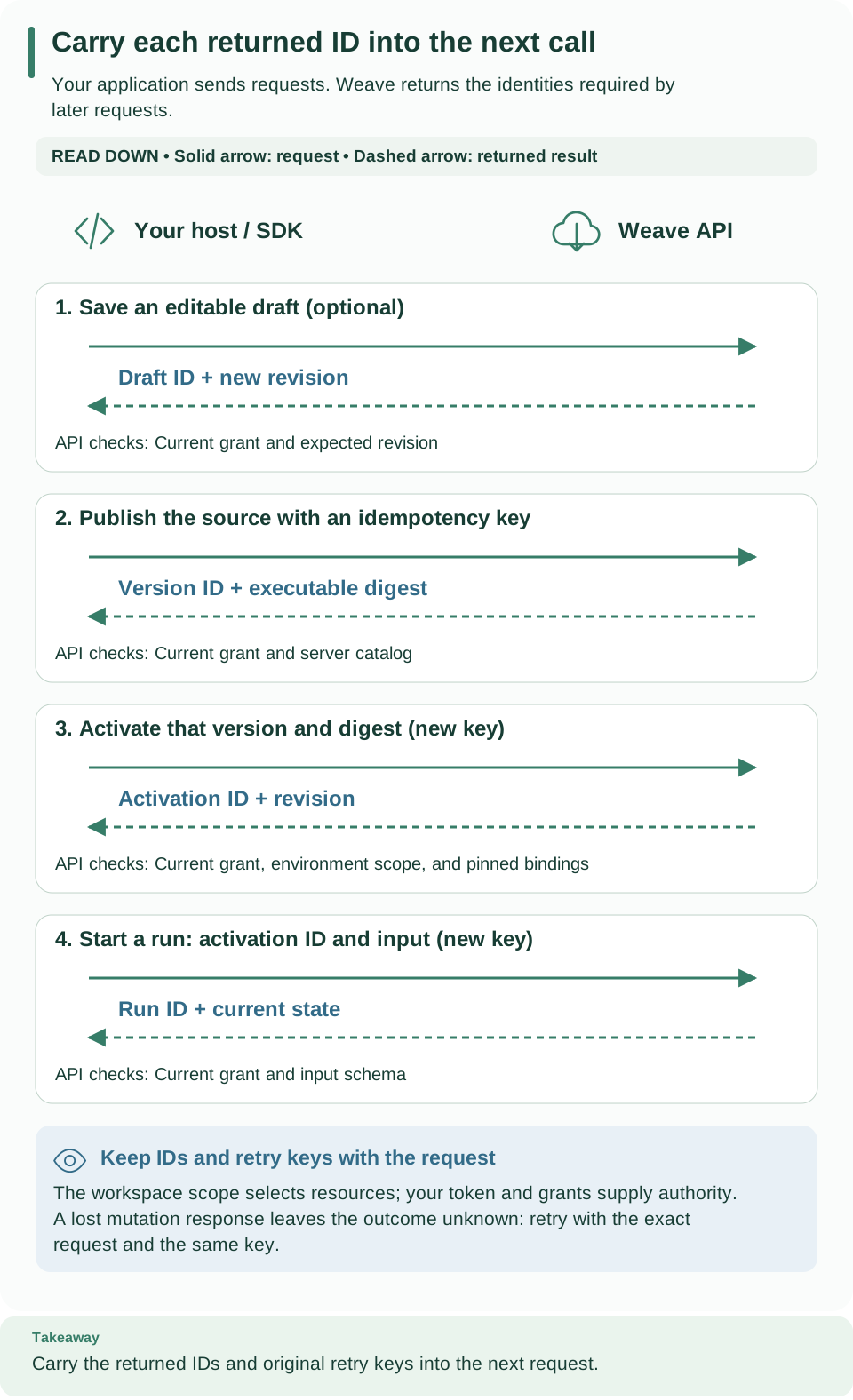
Follow the same sequence with remote commands: exact JSON request files go out, resource IDs come back. Keep each revision and idempotency key instead of treating every command as a new request. Open diagram at full size.
Construct a remote request file
-
Connect. Run
weave auth setuponce, so remote commands use your saved platform and workspace. For scripts, use explicit mode instead. Remote commands never read server environment files or create missing identities. -
Compile through the platform. Create
.local/tutorial/compiler-request.jsonas in the API example, then run:# Send the exact JSON request to the project's compiler; nothing is saved. weave remote compile --request .local/tutorial/compiler-request.json --output jsonExpected:
ok: trueand an artifact. -
Publish. Publishing takes a separate request with only
sourceandformat:# Build the publication request from the YAML file. python3 - <<'PYTHON' import json from pathlib import Path request = {"source": Path(".local/tutorial/echo.workflow.yaml").read_text(), "format": "yaml"} Path(".local/tutorial/publication.json").write_text(json.dumps(request)) PYTHON # Publish once; the key makes an exact retry safe. weave definitions publish --collection workflows \ --request .local/tutorial/publication.json \ --idempotency-key tutorial-echo-publish-1 --output jsonExpected: a version
id,name,version, anddigest. This changes the platform and needsdefinition.publish. Reuse the key only to retry this exact request; a changed source needs a new workflow version and a new key. The SDK example shows how the version becomes an activation and a run.
Other operation shapes
These are lookup examples, not a script to run in order. Each request file must hold that operation's JSON body, each variable must be a real ID from your workspace, and you need each operation's grant. Find the body schemas in the full API reference or the native OpenAPI export.
# Read the project catalog.
weave remote catalog --output json
# Read the language manifest: step kinds, operators, features, and limits.
weave remote language --output json
# Compile a request file through the platform.
weave remote compile --request compiler-request.json --output json
# Save a new draft, then a change to revision 1 of it.
weave definitions drafts save "$DRAFT_ID" --request draft-request.json --output json
weave definitions drafts save "$DRAFT_ID" --revision 1 --request changed-draft.json --output json
# Publish an Action definition.
weave definitions publish --collection actions --request publication.json \
--idempotency-key action-publication-1 --output json
# Create a connection from a raw request, or with the guided flags (new in 0.1.0a7).
weave connections create --request connection.json --output json
weave connections create --name todos --api-url https://jsonplaceholder.typicode.com --auth none --output json
# Check a connection's configuration.
weave connections test "$CONNECTION_ID" --output json
# Read run history and replay it on the platform.
weave runs history "$RUN_ID" --limit 50 --output json
weave runs replay "$RUN_ID" --output json
# Send a command to a debug session at revision 1.
weave runs debug command "$SESSION_ID" --revision 1 --request debug-command.json --output json
Guided connections create (new in 0.1.0a7). For the built-in
weave-http@2.0.0 connector, flags replace the request file:
| Flag | Meaning |
|---|---|
--name |
The connection name, such as todos |
--api-url |
The called API's origin, https:// or http:// (not encrypted, with a warning); base paths go in the Action, and --base-url still selects the platform |
--auth |
How the API authenticates: none (default), api-key, basic, bearer, or machine-token |
--auth-header |
The header that carries the API key (api-key) |
--client-id, --token-endpoint, --scope |
OAuth client settings (machine-token); --scope is repeatable |
--secret SLOT=HANDLE |
Repeatable. Slots are api_key, username and password, token, or client_secret, depending on --auth; each maps to an operator's secret handle, never to the value |
--allow ORIGIN |
Repeatable: another literal HTTPS or HTTP origin to allow |
--connector-version-id |
Skip looking up the published connector |
- The API origin, and the token endpoint for a machine token, are allowed automatically.
- An
http://API address is accepted. After the JSON result, the command printsNot encrypted: requests to http://… travel in plain text.on standard error;connections readandconnections testprint the same line for such a connection, and the test result carries"encrypted": false. - The request is checked locally first: invalid settings exit 2 with
WV-CONNECTION-INPUTand pointed diagnostics. - Without
--connector-version-id, the command looks up the publishedweave-http@2.0.0in the project and exits 1 withWV-CONNECTION-CONNECTORwhen it is missing. - Guided flags cannot be combined with
--request. Creating connections needsconnection.manage, which thetenant_adminrole grants. connections test IDno longer needs a request file: without--request, it sends an empty request.
Results. Remote JSON output is one result or problem on standard output,
with diagnostics on standard error. Exit 1 also covers an incomplete or
inconsistent replay, and exit 3 a contract failure. Changes are never retried
automatically. Compiler answers keep exact source locations; filename is your
label, not a server path.
Compatibility commands with an environment URL
The singular families run (cancel, retry, history, export),
incident, and schedule predate saved platforms and remain for
compatibility. They take --environment-url (or WEAVE_ENVIRONMENT_URL), the
full environment URL, and read WEAVE_ACCESS_TOKEN; they do not use saved
platforms. Prefer runs, runs incidents, and triggers schedules.
weave run replay runs locally and needs no platform.
Login and secure persistence
Remote commands authenticate in one of two ways:
- Saved platforms (new in 0.1.0a7; the default).
weave auth setupreads the server's public sign-in settings, signs you in, and saves a named platform with your workspace. Credentials stay in the operating system's credential store and renew automatically. - Explicit mode.
--base-urlorWEAVE_BASE_URLwith a host-managedWEAVE_ACCESS_TOKEN, which is never renewed, or a connection file passed with--auth-config FILE, whose sign-in is kept in the credential store. Nothing is saved as a platform.
The connect guide walks through both, with real transcripts and troubleshooting. Apart from the public sign-in settings, the CLI never reads the server's environment, configuration files, or database.
Auth commands
| Command | Options | Effect |
|---|---|---|
auth setup [SERVER] |
--name, --provider ID, --auth-config FILE, --flow (auto, browser, device), --no-browser, --no-login, --tenant, --project, --environment, --skip-workspace, --yes, --replace, --credential-store (native, file), --credential-file PATH, --output (text, json) |
Server, review, sign in, workspace; saves the platform and makes it active |
auth login |
--profile NAME, --flow (auto, browser, device, pkce), --switch-account, --no-browser, --output |
Sign in to the platform |
auth status |
--profile NAME, --all, --check, --output |
Show the sign-in state; exit 1 when not signed in and not renewable |
auth logout |
--profile NAME, --revoke/--no-revoke, --output |
Remove local credentials; revokes at the provider by default |
auth profiles |
--output |
List saved platforms; * marks the active one; never reads credentials |
auth use NAME |
--output |
Make a saved platform the active one |
auth remove NAME |
--keep-credentials, --yes, --output |
Forget a platform; signs out of it first unless --keep-credentials |
auth workspace |
--profile NAME, --tenant, --project, --environment, --clear, --output |
Choose or clear the workspace remote commands use |
login, status, and logout also accept --auth-config FILE, plus
--credential-store and --credential-file, which are a usage error without
it; see connection files. Bare weave auth prints this
group's help and exits 0. Commands that take --profile also read
WEAVE_PROFILE; without either, they act on the active platform. Platform
names ignore letter case.
- Flows.
auto(the default) uses the browser when one can open on this computer: not over SSH (SSH_CONNECTIONorSSH_TTY), withDISPLAYorWAYLAND_DISPLAYon Linux, and with a runnable browser. Otherwise it uses a code on another device. With--no-browser,autoprefers a code.browseris PKCE S256 with a callback on127.0.0.1(or[::1]) and a random port;pkceis an alias accepted bylogin.deviceis the OAuth device authorization grant. A flow the administrator does not allow fails withWV-AUTH-FLOW(exit 2) before the identity provider is contacted. --switch-accountaddsprompt=loginto a browser sign-in so the provider asks for an account again. With--flow deviceon a platform that allows the browser, it fails withWV-AUTH-INPUT. On a code-only platform it uses a code and explains how to pick the account.--no-browserprints the sign-in address on standard error instead of opening it.- Setup names and replacement.
--nametakes 1 to 64 letters, digits, spaces, dots, hyphens, or underscores, starting with a letter or digit. The default is a unique name derived from the server's display name or host, numbered when taken, so a rerun without--namecreates a new platform (for exampleacme-weave-2).--replaceoverwrites the platform with the same name; without--name, that is the unnumbered suggestion. When the sign-in settings and credential store are unchanged, the existing sign-in is kept; otherwise the replaced platform's local credentials are removed without revocation. - Setup review.
--yesconfirms the identity provider without asking.--provider IDselects an option when the server offers several. The review refuses to save when the provider offers none of the allowed methods (WV-CONNECT-PROVIDER). - Workspace flags must come as a set of three. A partial set fails with
WV-AUTH-INPUTnaming the missing flag. A workspace that is not in the account's list fails withWV-AUTH-WORKSPACE(exit 1).--skip-workspaceand--no-loginleave the choice forweave auth workspace. status --checkcontacts the platform and renews the sign-in if needed. It adds the account'sidentity, theworkspacesit can use,workspace_available, andnotice: WV-AUTH-NO-ACCESSwhen there are none.--alllists every platform and reads each one's credentials, which may ask to unlock the credential store; it cannot be combined with--check.logoutreportsremote_revocationasconfirmed,unconfirmed(no revocation endpoint or no answer), ornot_requested. The platform and its workspace stay saved.removeasks first unless--yes; outside a terminal it fails withWV-AUTH-INPUT. If the stored credentials cannot be removed, the platform is kept (WV-AUTH-STORE) unless you pass--keep-credentials.
Questions and output. Prompts appear only when standard input and standard
error are terminals and the output is text. Otherwise a missing answer fails
with WV-AUTH-INPUT (exit 2), and the JSON flag field names what to pass.
With --output json, standard output carries exactly one JSON document;
prompts, the sign-in address, the code, and guidance go to standard error.
| Command | JSON result fields |
|---|---|
setup |
profile, server, active, authenticated, account, workspace, saved (profiles_file, credentials), next; notice when the account has no workspace |
login, status |
profile, server, active, display_name, provider_id, provider_name, identity_provider, source, account, workspace, credentials, authenticated, state, expires_at, refresh_available, reauthentication_required |
status --all, profiles |
A list of the same objects; profiles has no sign-in fields, and status --all adds error_code when a credential store cannot be read |
logout |
profile, server, logged_out, remote_revocation, account |
use |
profile, server, active |
remove |
profile, removed, credentials (removed or kept), remote_revocation, active |
workspace |
profile, server, workspace |
| Any failure | code and message, plus context such as flag, profile, saved, authenticated, or account |
state is signed_in, expired, signed_out, or in_progress. account is
an unverified display hint taken from the ID token, which helps administrators
link you; it never grants access.
| Exit | Meaning |
|---|---|
| 0 | Success, including status while the sign-in is valid or renewable, and setup for an account without a workspace |
| 1 | Not signed in, denied, cancelled (Ctrl+C or a declined question), WV-AUTH-NOT-LINKED, WV-AUTH-NO-ACCESS from workspace, or a platform refusal |
| 2 | Input, usage, or local configuration, such as WV-AUTH-INPUT, WV-AUTH-FLOW, WV-AUTH-STORE, WV-PROFILE-*, or a rejected address |
| 3 | The server, the identity provider, or the network, such as WV-CONNECT-UNREACHABLE or WV-AUTH-OFFLINE |
Ctrl+C prints Cancelled. and what was already saved, exits 1 with
WV-AUTH-CANCELLED, and never prints a traceback. A cancelled sign-in stores no
credentials.
Saved platforms file
A saved platform (the CLI also calls it a profile) is a non-secret record of
one platform, shared by the CLI, Studio, and the desktop app. Saved platforms
live in profiles.json:
| Operating system | Folder |
|---|---|
| macOS | ~/Library/Application Support/Firefly Weave |
| Windows | %APPDATA%\Firefly Weave |
| Linux and others | $XDG_CONFIG_HOME/firefly-weave (default ~/.config/firefly-weave) |
| Any | An absolute WEAVE_CONFIG_HOME replaces the folder |
- Each platform holds the server origin, the reviewed sign-in settings (the fields of a connection file), the allowed flows, the workspace IDs and names, an account hint, and the credential store choice. It never holds tokens.
- On POSIX, the folder is 0700 and the file 0600; symbolic links are refused,
and changes are atomic under
profiles.json.lock. - The file holds at most 64 platforms and 1 MiB. A damaged file fails with
WV-PROFILE-STOREand is never rewritten automatically.
Credential stores
The native store is the default. It accepts only macOS Keychain, Windows
Credential Locker, Linux Secret Service, and KWallet, under the service name
firefly-weave, and fails closed with WV-AUTH-STORE when none is available.
The record key is the SHA-256 binding of the provider ID, issuer, client ID,
server origin, and account (the platform name), so every platform has its own
record. On POSIX, cooperating processes lock through files in
~/.weave-credential-locks. The Windows and Linux stores are covered by unit
tests only.
The explicit file store is for macOS and Linux. Pass
--credential-store file --credential-file /absolute/private/session.json to
auth setup, or on every --auth-config invocation. Its folder must already
exist, belong to you with mode 0700, and be reached without symbolic links. An
existing record must be a 0600 regular file that you own, with a single link.
Neither store's tokens are printed. Sign-in addresses and codes go to standard
error; tokens, refresh tokens, and the PKCE verifier never do. Fresh lifecycle
UUIDs and the shared cross-process lock fence renewal, sign-out, and a late
sign-in completion, as described in
SDK credential lifecycle. A renewal that
provably never reached the provider keeps the previous sign-in and fails with
WV-AUTH-OFFLINE (exit 3).
Connection files
A connection file is the exact LoginConfig JSON, at most 64 KiB; unknown
fields are rejected. Operators hand it out when the server publishes no sign-in
settings. weave auth setup --auth-config FILE saves it as a platform, and the
same fields describe the login object of every saved platform.
| Field | Default | Rule |
|---|---|---|
provider_id |
Required | 1 to 200 characters; the server's provider ID |
issuer |
Required | Exact issuer; HTTPS, no query |
client_id |
Required | Public login client, 1 to 200 characters |
target |
Required | Exact API origin without a path |
account |
Required | Local label, 1 to 200 characters, part of the credential key; setup replaces it with the platform name |
scopes |
["openid", "profile", "email"] |
1 to 32 scopes of visible ASCII characters |
trusted_endpoint_origins |
[] |
Extra exact origins that provider endpoints and code verification addresses may use |
allow_loopback_http |
false |
Allows http:// for the issuer, target, and endpoints on localhost, 127.0.0.1, or ::1 only |
timeout |
10 |
Seconds per provider request, at most 60 |
login_timeout |
300 |
Seconds a sign-in may wait, at most 900 |
require_refresh_rotation |
true |
Each renewal must return a new refresh token |
The default scopes may need adjusting for a provider's registered client. The
local platform's Keycloak announces its weave-cli client with ["openid"].
Using the file directly (explicit mode). With --auth-config, login,
status, and logout keep the behavior they had in alpha6: JSON output only,
the same keys plus identity (login), refresh_available, and state, and the
same exit codes. --output text, --profile, --all, or --check with
--auth-config is a usage error. --flow auto selects device authorization
when the provider advertises it, and device instructions print
Open URI and enter CODE on standard error. Revocation happens only with an
explicit --revoke.
# Explicit mode with a connection file: sign in, inspect, and sign out with revocation.
weave auth login --auth-config login.json --flow auto --output json
weave auth status --auth-config login.json --output json
weave auth logout --auth-config login.json --revoke --output json
Expected: "authenticated": true from login and status, then
"logged_out": true with a remote_revocation outcome. Every public remote
command also accepts --auth-config FILE with the same store options; its
server then defaults to the file's target, and --tenant is required.
Keycloak development login client
These settings apply to the pinned Keycloak 26.7.4 of the local platform:
- Port-free loopback callbacks. Browser sign-in listens on a random
loopback port, so the login client registers
http://127.0.0.1/callbackandhttp://[::1]/callback. Keycloak then accepts any port for those IP literals while the path stays exact (RFC 8252); an entry with an explicit:80matches port 80 only.weave platform startadds the port-free entries to retained local realms. - Template. The realm template keeps the older fixed callback too, enables
S256 and device authorization, disables password grants, and sets refresh
revocation with maximum reuse 0. It puts
preferred_usernamein the ID token only, so the CLI can show the account's name; access tokens are unchanged. - Existing realms. Realm import skips realms that already exist: apply these settings additively through trusted administration instead of resetting a retained realm.
- Tests. The test harness's localhost-cookie adjustment models a browser only; product token clients never relax cookie or TLS rules.
Trusted connector authoring
weave connector init TARGET --name NAME and weave connector validate METADATA
work in the base installation without executing package code.
weave connector test IDENTITY [--mode fixtures|native] executes an installed
native package that you select, and its optional fixture suite.
weave connector package PROJECT --directory OUTPUT builds a trusted local
project. All accept --output text|json; rejected operations exit 1, and
invalid CLI syntax exits 2. These tools add no tenant HTTP API. See
connector authoring for trust boundaries,
identities, dependencies, schema checks, and complete examples.
No-code HTTP actions and OpenAPI import
New in 0.1.0a7. These commands describe a REST API as reviewable Actions on
the built-in weave-http@2.0.0 connector, without Python code or a package.
They run locally; nothing is fetched or sent. Publish the result with
weave definitions publish --collection actions, then call it through a
connection created with the guided
connections create flags.
Call a REST API without code runs the whole
path on the local platform.
weave connector http-action --name NAME --method METHOD --path TEMPLATE builds
and checks one Action against the descriptor bundled with the CLI:
| Option | Rule |
|---|---|
--method METHOD |
get, head, post, put, patch, or delete. GET and HEAD become the read action with read_only; every other method becomes write with non_idempotent and is never retried |
--param LOCATION:NAME[:TYPE][:required] |
LOCATION is path, query, or header; TYPE is string (default), integer, or boolean; add [] for a query array. Path parameters are always required. Repeatable |
--status, --empty-status |
2xx statuses (default 200); each empty status must also be a --status. Repeatable |
--timeout, --string-max-length |
1 to 30 seconds (default 30); 1 to 4096 characters for strings (default 256) |
--response-sample, --response-schema, --body-sample, --body-schema |
JSON or YAML files. Samples only give types; their values never enter the Action |
--optional-body, --description, --version |
Let workflows omit the body; text shown to authors; SemVer (default 1.0.0) |
--auth-header HEADER |
The connection's API-key header, which is then refused as a parameter |
--output-dir DIRECTORY, --output FORMAT |
Write NAME.action.json (never overwritten); FORMAT is text (default) or json |
# Describe GET /todos/{id}; the sample's values are used only to infer the response types.
weave connector http-action --name get-todo --method get --path '/todos/{id}' \
  --param path:id:integer:required --response-sample todo.json \
  --description "Read one demo to-do item" --output-dir actions
Expected: HTTP action get-todo@1.0.0 is valid on weave-http@2.0.0., then
Wrote actions/get-todo.action.json. Review it, then publish it with weave definitions publish.,
and exit status 0. A warning WV-COMP-UNKNOWN_COMPATIBILITY /spec/outputSchema
line can follow: it means the response is validated at run time, and it does
not block the Action. A rejected Action prints HTTP action rejected; nothing
was written. with pointed diagnostics and exits 1. Protected headers, such as
authorization, cookie, host, and content-type, cannot be parameters
(WV-HTTP-ACTION-PROTECTED_HEADER).
weave connector import-openapi DOCUMENT reads a local JSON or YAML OpenAPI
document, or - for standard input (up to 8 MiB):
| Mode | Command | Result |
|---|---|---|
| Inventory | --list |
Every operation with a verdict and the reasons; exit 0 unless the document itself is invalid |
| Scaffold a policy | --init-policy FILE |
A policy to review; an existing FILE is never overwritten (exit 1) |
| Import | --policy FILE [--operation ID ...] [--directory DIR] |
Checks the reviewed operations (--operation defaults to the policy's); --directory names a new or empty folder for the files |
--target builtinwritesactions/NAME.action.json,connection.example.json(with handle placeholders), andprovenance.json. The default--target packagegenerates a connector package to build.--all-diagnosticsreports every failing operation instead of only the first.--format auto|json|yamlselects the parser.- Relaxations are explicit, and each one used is reported as a warning:
--default-string-max-length N,--numeric-formats,--ignore-response-headers,--json-media-only, and--upgrade-openapi-30. A policy can also hold them in itsrelaxationsobject. - Imports exit 0 when they pass, 1 when rejected, and 2 for invalid CLI syntax. See metadata import for the policy format.
weave connector descriptor ADAPTER prints an installed connector's manifest,
capabilities, and bindings from the selected platform, as JSON by default or
with --output text. It takes the usual platform options. With no platform
selected, or with --local, it prints the copy of weave-http-v2 bundled with
the CLI, marked "provenance": "local-copy". Publish the manifest that the
platform reports, so its digest matches the installed adapter.
Compatibility and retention
With a saved platform or explicit mode as above,
weave compatibility read --output json reads the project's current
compatibility report (status.read), and weave compatibility check --output json
requests a fresh check (compatibility.check).
Retention removes data. Applying a plan deletes eligible retained data in
the selected project; it is not part of any tutorial. Create a request file
containing {"target":"expired_debug","limit":100}, then:
# Ask the platform for an immutable plan and keep it.
weave retention plan --request retention-request.json --output json > retention-plan.json
# Read the plan ID from the saved answer.
PLAN_ID="$(python3 -c 'import json; print(json.load(open("retention-plan.json"))["id"])')"
# Show the stored plan on standard error, then apply it without another question.
weave retention apply --plan-id "$PLAN_ID" --output json
Expected: the stored plan on standard error, and only the final result or
problem on standard output. A failed plan read prevents the apply. A positional
plan ID still works, and conflicting positional and --plan-id values are
rejected before the platform is contacted. Only the plan's creator, with
current project maintenance grants, can read or apply it. See
retention.
Troubleshooting
| What you see | Why | What to do |
|---|---|---|
WV-CLI-CONFIG: No platform is selected. Run 'weave auth setup SERVER' to connect, or pass --base-url and --tenant. (exit 2) |
No active saved platform, and no explicit mode | Run weave auth setup SERVER, or weave auth use NAME; for scripts, use explicit mode |
WV-CLI-CONFIG: Invalid local configuration or request; install the client extra and check inputs (exit 2) |
The --request file does not match the operation's JSON body, or, in explicit mode, WEAVE_ACCESS_TOKEN is empty or the address is http:// but not loopback; or the client extra is missing |
Compare the request file with the operation's schema in the full API reference; export a current token, use https://, or install the client extra |
WV-CLI-USAGE (exit 2) |
An option is missing or invalid, such as --base-url without --tenant |
Read the command's --help |
WV-TRANSPORT (exit 3) |
The platform could not be reached; for a change, the outcome may be unknown | Check the address and network; read the resource before retrying a change with the same key |
WV-CLI-READ (exit 2) |
A file you named cannot be read | Check the path and its permissions |
WV-CLI-EXPORT (exit 2) |
An export target already exists or is unsafe | Choose a new folder, or pass --force to replace regular files |
WV-CLI-INIT (exit 2) |
The starter folder already holds starter files or is not writable | Use a new, empty folder |
A support code starting with WV-AUTH-, WV-CONNECT-, or WV-PROFILE- |
A sign-in or saved-platform problem | Look it up in If something goes wrong |
| HTTP 401, 403, 409, or 412 in a remote result | The platform refused the request | See When a request fails |
Next steps
- Learn the commands in order with the CLI tutorial.
- Connect to your team's platform with Connect the CLI to a platform.
- Call a REST API from a workflow with Call a REST API without code.
- Look up the HTTP operations behind each command in Use the HTTP API.