Compile workflows and read the results
The compiler checks a workflow, action, or connector definition and turns it into a fixed execution plan called an artifact. It never runs anything: no application startup, provider lookup, credential, database, network, or worker discovery. The same compiler runs in the CLI, in Studio's local host, and on the platform when you publish.
Who it is for. Anyone who needs to understand a compile result or a diagnostic, and integrators who embed the compiler in an editor, a pipeline, or a runtime. What you need. The echo file from workflow authoring for the examples, and a source checkout to run the Python one. Allow 10 minutes. For durable runs, follow the standalone tutorial or the local platform guide.
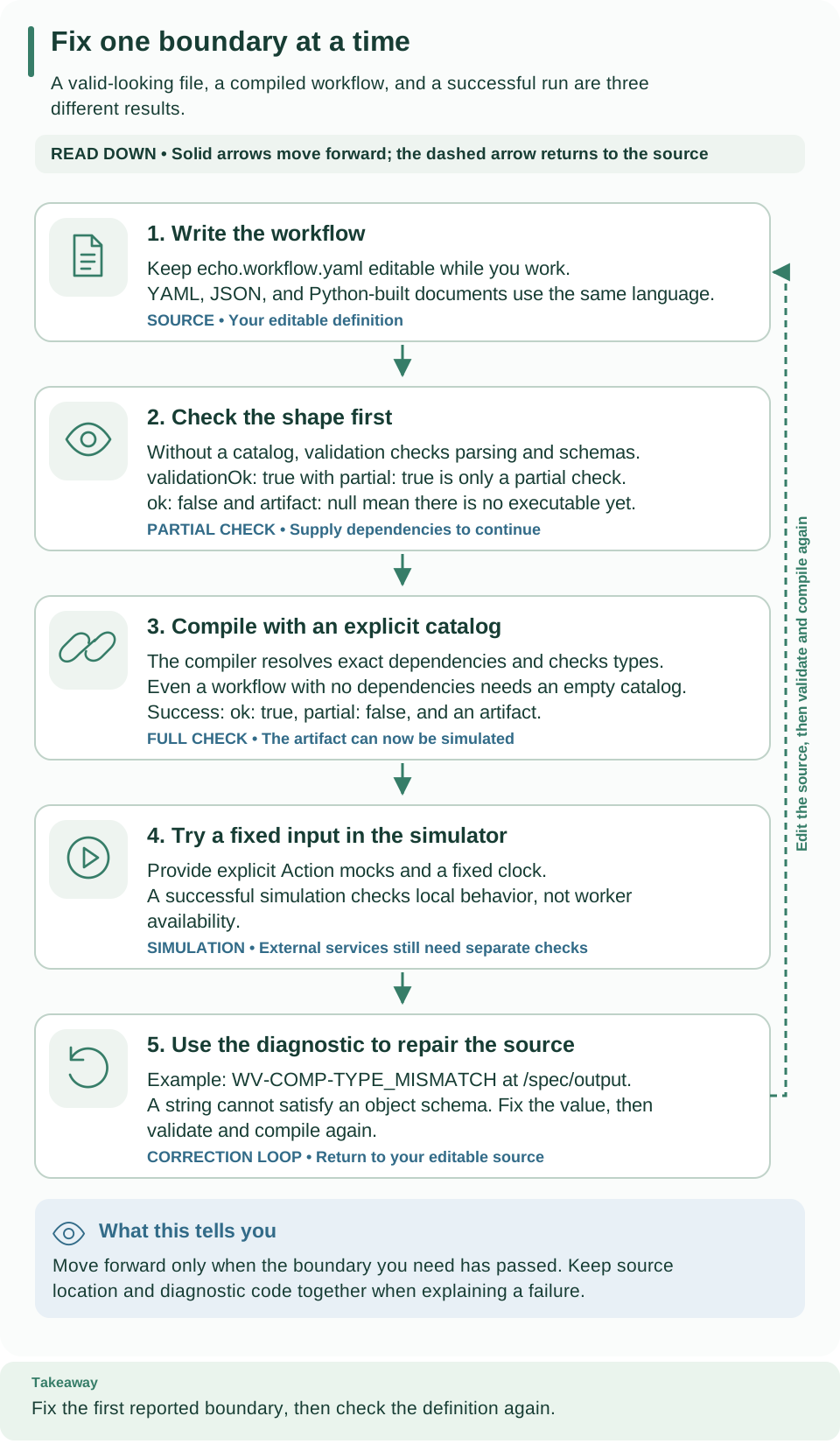
Start at the editable source and read down. The partial check establishes shape and schema validity; full compilation adds an explicit catalog and can produce an executable. The last card shows how an error code and its path lead you back to a source edit. Open diagram at full size
Choose the right check
| Entry point | Who calls it | Catalog | Produces an artifact | Use it to |
|---|---|---|---|---|
validate_source |
weave workflow validate, the API's compiler.validate |
None | Never | Check shape and schemas while a definition is incomplete |
validate_authoring |
Studio's live check, and Validate when Studio cannot compile on a platform | None (references stay pending) | Never | Also check data flow and types before actions are available |
compile_source |
weave workflow compile and explain, the API's compiler.compile, publication |
Explicit CatalogSnapshot |
Yes, when there are no errors | Produce the executable you simulate, publish, and activate |
import_artifact |
The simulator, replay, and runtime consumers | Locks inside the artifact | Returns the checked artifact | Re-check an artifact before trusting it |
validate_authoring is new in 0.1.0a7. An alpha6 or earlier Studio uses
validate_source.
Compile the tutorial file
-
Validate without a catalog. This is the quickest check and needs no dependencies:
# Check shape and schemas only; no dependencies are resolved.
weave workflow validate .local/tutorial/echo.workflow.yaml --output json
Expected: exit code
0,validationOk: true,partial: true,ok: false, andartifact: null.ok: falsemeans only that no executable was produced. -
Compile with an explicit catalog. Echo calls no action, so the empty catalog from the authoring guide is enough:
# Resolve dependencies, check types, and print the graph the runtime will follow.
weave workflow explain .local/tutorial/echo.workflow.yaml \
  --catalog .local/tutorial/empty-catalog.json
Expected:
Compilation passed:followed by a 64-character digest, then the@start,echo, and@endnodes with their source positions and edges. -
Do the same from Python. Embedders call the same functions. From the checkout root, save this as
compile_echo.pyand runuv run python compile_echo.py:from pathlib import Path from firefly_weave.compiler.api import compile_source, validate_source from firefly_weave.compiler.catalog import CatalogSnapshot path = Path(".local/tutorial/echo.workflow.yaml") source = path.read_text() partial = validate_source(source, format="yaml", filename=str(path)) print(partial.validation_ok, partial.partial, partial.ok) result = compile_source(source, format="yaml", filename=str(path), catalog=CatalogSnapshot.empty(), strict=True) for diagnostic in result.diagnostics: print(diagnostic.code, diagnostic.path, diagnostic.source) assert result.ok and result.artifact is not None print(result.artifact.digest)Expected:
True True False, then a 64-character digest. The first line says the source checks passed but produced no executable; the digest identifies the compiled executable.
An empty catalog works because echo only transforms data. A workflow that calls an action needs that action's exact contract in the catalog; see the onboarding example in workflow authoring.
Read a compile result
CompileResult exposes diagnostics, artifact, ok, validation_ok,
partial, error_count, omitted_count, schema_truncated, and truncated.
The CLI's --output json and the API return the same envelope with camelCase
names (validationOk, errorCount, omittedCount, schemaTruncated).
| Result | What it means | What an editor or script should do |
|---|---|---|
validation_ok=True, partial=True |
The available checks passed; no artifact exists | Show that the source checks passed; compilation is still required |
ok=True, artifact present |
Complete compilation produced an executable without errors | Allow simulation, or submit the source for publication |
| Error diagnostics | At least one check failed | Show each code, path, and source; keep the user's source editable |
truncated=True |
More diagnostics existed than the limit allows | Say that more problems exist; never present the list as complete |
ok is not readiness. It does not establish a live worker, a ready
connection, a compatible release, or permission to deploy.
Keep both locations. path is a JSON Pointer into the parsed definition,
such as /spec/output; source is the file line and column. Editors need the
source range; JSON-based tools need the path. Each diagnostic field is described
in definition contracts.
Strict mode turns warnings into errors. With strict=True (CLI --strict),
complete-analysis warnings such as WV-COMP-UNKNOWN_COMPATIBILITY (schema
compatibility could not be proved) and WV-COMP-REFERENCE_PRESENCE (a referenced
value might be missing) become errors. Strict mode does not add work to partial
validation.
to_bytes() serializes every retained diagnostic and the truncation metadata,
even when no artifact is produced.
How Studio checks your workflow as you edit
Studio's local host calls validate_authoring shortly after each change, and
when you select Validate without a platform connection that lets you compile.
It runs every validate_source
check, then data-flow, dominance, operand, and type analysis against an absent
catalog:
- Each reference to an action, connector, task capability, or adapter reports
WV-COMP-CATALOG_PENDINGatinfoseverity instead of an unknown-resource error. Studio shows these as notes, not failures. - The output of a pending reference stays unconstrained, so reading it raises no
error or uncertainty warning, and
coalescefallbacks after such a read are left to complete compilation. - Definite problems are still errors:
WV-COMP-UNAVAILABLE_REFERENCE(a step reads a step that has not run yet in its scope),WV-COMP-TYPE_MISMATCH, andWV-COMP-CONNECTIONfor a step that names an undeclared connection slot. - Pending notes only use diagnostic capacity that real findings leave free.
The result is always partial=True, artifact=None, and ok=False;
validation_ok counts error-severity findings only. When Studio is connected and
your account may compile, Validate compiles against the project catalog
instead. validate_source, the API's compiler.validate, and
weave workflow validate keep their partial behavior unchanged.
Entry point signatures
compile_source(source, *, format, catalog, filename=None, strict=False, ...) -> CompileResult
validate_source(source, *, format, filename=None, ...) -> CompileResult
validate_authoring(source, *, format, filename=None, ...) -> CompileResult
import_artifact(source, *, limits=ArtifactLimits()) -> CompiledArtifact
source is str, bytes, or a JSON object, and format is yaml, json, or
object. Workflow, action, and connector definitions use the same entry points.
compile_source requires an explicit immutable CatalogSnapshot; it raises
TypeError without one. The optional keywords are the separate resource policies
described in Limits. compile_source also accepts
action_validators: trusted checks keyed by the exact digest of an installed
connector manifest. The platform passes them when it compiles and publishes, so an
action that uses an installed connector, such as weave-http@2.0.0, gets that connector's
configuration checks (WV-COMP-CONFIG_CONTRACT and related codes). Tenant data can
never select or replace a check. action_validators is new in 0.1.0a7; alpha6
and earlier releases do not have it.
Partial validation cannot establish dependency resolution, type and dominance analysis, or local schema references that need an absent catalog. Neither missing dependencies nor a successful partial result produces an artifact.
Executable and source envelope
A CompiledArtifact owns canonical, immutable bytes. Its executable and
source_map accessors return fresh copies.
digestis the SHA-256 of the executable's RFC 8785 canonical bytes. It is the executable's identity.source_hashidentifies the original parsed source bytes, or the canonical object input. Comments, filenames, and formatting never change the digest.- The source map maps JSON Pointers to source ranges. Diagnostics and their original locations live in the same envelope, outside executable identity.
IR version. Executables use irVersion: weave/ir-v1alpha1, or
weave/ir-v1alpha2 when the workflow contains a human task. Workflows using
contains, notContains, in, notIn, startsWith, or endsWith select
weave/ir-v1alpha3, including workflows that also contain human tasks. Feature
selection reads expression syntax, never operator-shaped literal data. Existing
workflows retain their prior IR version and executable digest. Readers that do
not support v1alpha3 reject these artifacts; upgrade runtime readers before
activating them. The capabilities response advertises accepted IR versions.
Executables also define a sorted features list of the language features they
need (text.concat, text.join, flow.forEach, flow.callWorkflow,
ai.agent, ai.memory). It is omitted when empty, which it is for every
executable this version compiles, so existing digests do not change; a non-empty
list requires weave/ir-v1alpha4, which this version does not accept yet.
ir.py defines
every node, edge, control, join, guard, dependency, and executable field as a
strict Pydantic model, and export_schemas() publishes executable and
compiled-artifact with the other contracts.
Every executable carries its kind, source-free metadata, API and IR versions, guards, a schema table indexed by canonical SHA-256, and sorted exact dependency locks:
- Each lock has a kind, reference, digest, and one canonical normalized document.
- Action nodes refer to the action's digest. Implementation, retry, timeout, routing, connection, and side-effect policy stay in that locked document.
- Every resolved identity is kept, including task capabilities, adapters, and bundled schema resources. Adapter locks identify declarations, not installed code.
- Schema guards and signal nodes reference interned schemas instead of copying them into every step.
Action and connector executables keep their strict manifest spec and dependencies; they have no workflow graph.
Workflow graph contract for runtime consumers
weave workflow explain prints the graph the runtime follows. Save this
workflow, whose only step is a Decision (switch) with one case and a
default, as route.workflow.yaml:
apiVersion: weave/v1alpha1
kind: Workflow
metadata:
  name: route
  version: "1.0.0"
spec:
  inputSchema:
    type: object
    required: [urgent]
    additionalProperties: false
    properties:
      urgent: {type: boolean}
  outputSchema: {type: string}
  steps:
    - id: route
      kind: switch
      cases:
        - when: {ref: /input/urgent}
          steps: []
          output: {literal: fast}
      default:
        steps: []
        output: {literal: normal}
  output: {ref: /steps/route/output}
# Compile the decision workflow and print its nodes, source positions, and edges.
weave workflow explain route.workflow.yaml --catalog .local/tutorial/empty-catalog.json
Expected (the digest is shortened here, and the Runtime guards: lines that
follow the edges are omitted):
Compilation passed: dfd61f4d…
Resolved dependencies:
Flow and source positions:
  @start (start) route.workflow.yaml:7:3
  @end (end) route.workflow.yaml:24:11
    reads /steps/route/output
  @branch:route:0 (branch-output) route.workflow.yaml:20:19
  @branch:route:1 (branch-output) route.workflow.yaml:23:17
  @join:route (join) route.workflow.yaml:15:7
  route (switch) route.workflow.yaml:15:7
    reads /input/urgent
  @branch:route:0 -> @join:route (join branch=case:0)
  route -> @branch:route:0 (case branch=case:0)
  @branch:route:1 -> @join:route (join branch=default)
  route -> @branch:route:1 (default branch=default)
  @join:route -> @end (next)
  @start -> route (next)
Resolved dependencies: is empty because the workflow calls no action. Read the
flow as: start, decide, take one branch, join, end. The rules behind it:
- Entry and exit.
@startenters the first step, or@endfor an empty workflow.@endevaluates the workflow output. Sequential edges havekind: nextandbranch: null. - IDs. Your step IDs stay stable. Synthetic IDs start with
@, which step IDs cannot contain:@join:IDand@branch:ID:INDEX. - Decisions. Cases keep their declared order; the first true case wins,
otherwise the default runs.
caseanddefaultedges name their branch. A decision's join usesmode: selectedand forwards that branch's output. - Parallel. Branches are sorted by name, whatever their order in the source.
forkedges name the branches,concurrencycarries the declared cap, and the join usesmode: all, collecting every named branch output into the step's output object. - Branch outputs. Every branch has a
branch-outputnode, even an empty one. Its output expression runs in the branch's scope; an empty branch enters it directly. - Scope. A scope is an ordered list of owner and branch pairs. Values inside a branch stay private; a join publishes only the enclosing step's output.
- Ends that do not complete. A
failnode has no success edge. A branch that cannot complete has no edge to its join, and a join that cannot complete has no successor. Unreachable steps after a failure can remain in the node list, so follow the edges; never execute the node array in order. - Node payloads. Wait nodes carry the duration; signal nodes carry the name, timeout, and schema reference; transform and action nodes carry their expressions.
- Guards. Each guard keeps its semantic path and purpose. Consumers match a
node
path, the input, a branch output, or the workflow output, and validate it againstschemaRefusing the locked schema resources as the local bundle.
Instance keys
A node can run more than once in one run: once per loop iteration, or once per
agent turn or tool call. Each run of a node has an instance key: the node ID,
then one [index] per enclosing loop (outer loop first), then optional
#-separated activation segments, then an optional ~count for a loop's yield:
instance-key = node-id *("[" index "]") ["#" seg *("." seg)] ["~" count]
index        = "0" / (%x31-39 *DIGIT)     ; loop iteration, from 0
count        = %x31-39 *DIGIT             ; yield count, from 1
seg          = 1*(ALPHA / DIGIT)          ; turn, tool call, or review
Examples: send (no loop), send[3], send[3][0], support#2.1,
support[3]#2.1.review, and notify[1]~2. Indexes and counts have no leading
zeros and are at most 2^53 − 1. Node IDs never contain [, ], #, or ~.
A node ID is a step ID or a synthetic ID (@run, @start, @end, @legacy,
@join:<id>, @branch:<id>:<n>): an optional leading @, then an ASCII letter
or digit, then ASCII letters, digits, _, ., :, @ and - only. So
firefly_weave.contracts.instance_keys.node_of(key) returns the node ID by
cutting at the first separator; split_instance parses a whole key and
format_instance writes it back, and both reject any other spelling. API views
show node_id (the node ID), instance_key (the full key, or "" when it equals
the node ID), and iteration (the loop indexes); instance_view(key) returns all
three. INSTANCE_KEY_PATTERN is the same grammar as an unanchored regular
expression. Python checks a key with re.fullmatch(INSTANCE_KEY_PATTERN, key);
JavaScript (with the u flag) and JSON Schema pattern use the anchored form
^(?:...)$. API models declare key fields as InstanceKeyText (or
InstanceKeyTextOrEmpty where "" is allowed).
Import an artifact
import_artifact(bytes_or_text_or_object, *, limits=ArtifactLimits()) re-checks
an artifact before you trust it:
- Input size and the supported IR version.
- Strict model and schema invariants, and the executable, dependency, and schema hashes.
- Unique IDs, referenced nodes, edge kinds, joins, lexical scopes, branch completion, and acyclic control flow. A join accepts only its own branch-output edges; no other node merges predecessors. Unreachable tails after a failure may have zero predecessors.
- Reference closure: task capabilities, connectors, adapters, connection slots,
connector descriptors, and named schema resources must all resolve to the
supplied locks. Reference-shaped
const,default,enum, or example data is left alone.
A malformed import raises ValueError (including ParseFailure and Pydantic
validation errors). Import does not authenticate an artifact. It proves neither
who produced it nor that its source envelope is true, and it does not discover
providers or claim activation readiness. Publication always recompiles the
submitted source against the server's own catalog; a matching hash is not
authorization.
Limits
Each kind of input has its own policy, passed as a separate keyword:
| Policy | Governs | Defaults |
|---|---|---|
Limits |
Source, expressions, and runtime payloads | 1 MiB source and payload, 1,000 steps; see definition contracts |
SchemaLimits |
Author schemas | See schema profile limits |
DEFAULT_CONTRACT_LIMITS |
Weave's generated outer contracts | Author limits with a larger work budget |
ArtifactLimits |
The compiled artifact and its import | 33,554,432 bytes (32 MiB), 2,000,000 JSON value nodes, depth 128 |
max_parallel_concurrency |
The largest concurrency a parallel step may declare |
1,000 |
Limits are strict positive integers that source cannot raise. Artifact construction charges each fragment before adding it, then measures the whole envelope, including source maps and diagnostics, before serializing it. Shared schemas are interned, and each resolved dependency document appears once.
Import uses the same artifact policy, independently of the 1 MiB source limit, so
a multi-megabyte source map remains importable. If you compile with larger
artifact limits, import with the same ones. Workflows at the default 1,000 steps,
and with 9,991 expressions spread across them, compile and round-trip. Canonical
fixture bytes live in tests/fixtures/canonical/. These bounds do not promise
that every source under 1 MiB fits every downstream policy.
CLI and published catalog contract
The offline CLI commands call these entry points directly; workflow
command JSON is the canonical CompileResult envelope, not a second compiler.
CatalogLock in compiler.catalog publishes the strict lock shape and keeps
snapshot identity and digest validation; export_schemas() includes it as
catalog-lock.
Expressions. The supported forms are literal, ref, object, array, and
op. Operators are eq, ne, lt, lte, gt, gte, and, or, not,
exists, coalesce, contains, notContains, in, notIn, startsWith, and
endsWith. Function calls, code, imports, secret or environment
access, and remote references are not supported.
| Operators | Operands | Evaluation |
|---|---|---|
eq, ne, lt, lte, gt, gte |
Exactly two | Numeric comparisons never convert strings or Booleans |
contains, notContains |
Exactly two | Text substring search, or structural membership in the left-hand array |
in, notIn |
Exactly two | Structural membership in the right-hand array; a text container is invalid |
startsWith, endsWith |
Exactly two strings | Case-sensitive prefix or suffix match |
not |
Exactly one | Boolean negation |
exists |
Exactly one direct ref |
True when the referenced value is present |
and, or |
At least one | Lazy; keeps the difference between missing and null |
coalesce |
At least one | Returns the first present, non-null operand; null when all are exhausted |
Text matching is case-sensitive and performs no Unicode normalization. Empty
text matches every string; membership in an empty array is false. Array
membership uses JSON structural equality: object key order does not matter,
1 equals 1.0, and Booleans never equal numbers. A membership needle or array
element may be null; a null container or text operand fails with
WV-EXPR-TYPE. Missing references retain WV-EXPR-MISSING. Negated operators
negate a successful result, never an operand error.
The compiler rejects provably invalid operand types. Uncertain schema unions
produce WV-COMP-UNKNOWN_COMPATIBILITY and an operator_operands runtime guard;
strict compilation promotes that diagnostic to an error. All six operators
return a Boolean and accept exactly two operands. Evaluation shares a cumulative
work budget: structural membership comparisons charge max_document_nodes,
and compared string characters and object keys charge max_payload_bytes.
These additional work charges apply to the new operators; existing operator
limits and evaluation semantics remain unchanged. Exhaustion fails with
WV-EXPR-RESOURCE_LIMIT, including repeated searches of the same reference.
Numbers must be finite IEEE-754 values, and integers must stay within ±9,007,199,254,740,991. Validate exact decimal business amounts as strings. Schema number rules are in the schema profile.
Drafts, secrets, and incomplete edits
Publication and artifact import enforce the secret rules of the schema profile; complete compilation stays offline.
Drafts may be incomplete. A saved draft can contain unfinished graph or metadata edits, schema references that only declare a target, and bindings made only of references that would fail compilation. It does not need to be executable.
Drafts may not hold classified literals. A binding that mixes in a concrete literal still needs classification:
- A literal or configuration binding whose target cannot be resolved yet is
rejected with
WV-DRAFT-CLASSIFICATION. Keep editing it locally until the authorized catalog contract is available. - Known secret-marked literals and bindings are rejected by the same classifier that execution uses.
- Visible literal alternatives and operands are classified wherever they appear,
including
coalescefallbacks nested in objects or arrays. The check evaluates no references and executes no operators.
A reference-only draft stays editable, while an embedded classified literal can never be saved, published, or imported in an artifact. Arbitrary unannotated text is not classified. Safe ordinary artifacts keep their canonical digests.
Next steps
- Simulate a run: execute the artifact with mocks and a virtual clock.
- Author a workflow: make a type error on purpose and repair it.
- CLI reference: every offline workflow command and its exit codes.
- Embed the compiler or services: use these functions in your own application.
Troubleshooting
| What you see | Why | What to do |
|---|---|---|
ok: false after weave workflow validate with validationOk: true |
Partial validation never produces an artifact | Compile with --catalog |
WV-COMP-TYPE_MISMATCH at /spec/output |
An expression's type cannot satisfy the target schema | Change the expression or the schema; the authoring guide shows an example |
WV-COMP-UNAVAILABLE_REFERENCE |
An expression reads a step that has not run yet in its scope, or a value private to another branch | Read the step only after it runs, or read the decision or parallel step's output |
WV-COMP-UNKNOWN_ACTION (or _CONNECTOR, _TASK, _ADAPTER) |
The catalog does not contain that exact reference | Add the exact version to the catalog, or fix the reference |
WV-COMP-UNSUPPORTED_FEATURE |
The workflow or decision table uses a construct whose language feature this compiler does not compile yet; the message names the feature | Keep the document for a later version, or use the steps and operators this version compiles |
WV-COMP-CATALOG_PENDING notes in Studio |
Studio works without the catalog and checks references later | Nothing; connect and Validate against the project catalog |
WV-COMP-CONNECTION |
A step names a connection slot the workflow does not declare, omits a slot its action requires, or uses a slot declared for a different connector | Declare the slot in spec.connections with the action's exact connector, or fix the step's connection |
WV-COMP-CONFIG_CONTRACT |
An action's config does not fit its connector |
Fix the configuration; HTTP profiles lists the built-in HTTP rules |
WV-DRAFT-CLASSIFICATION when saving a draft |
A literal binding cannot be classified yet | Remove the literal or wait until its target contract is available |
WV-CLI-EXPORT on compile --directory |
Export refuses to overwrite files | Choose a new directory, or add --force deliberately |