Install an Operations runner
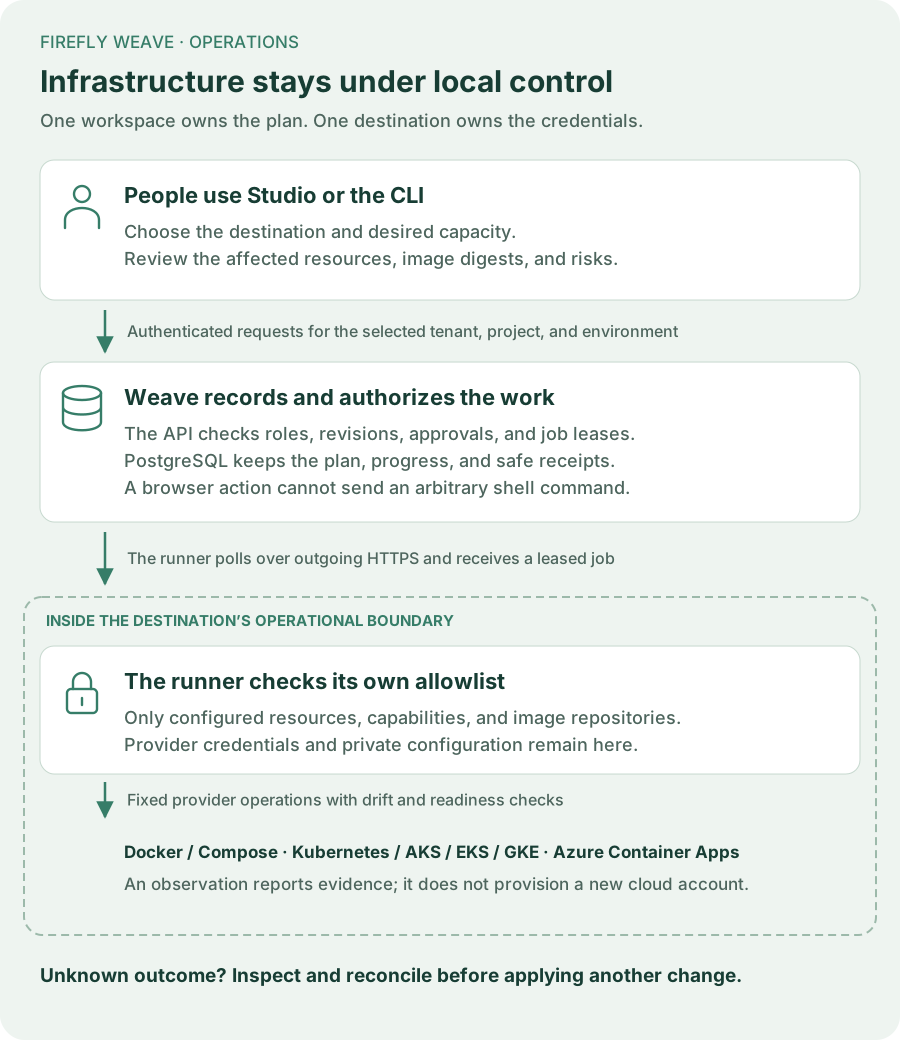
An Operations runner is a small process beside a container destination. It asks Weave for authorized work over an outgoing connection, checks its own local policy, and calls the destination's existing tools. Studio never runs provider commands or receives provider credentials.
Start with Manage container deployments to create the target and grant its dedicated application identity access. This page explains what to install on the runner host and how to configure each adapter.
1. Choose where the runner will live
Use a dedicated Linux or macOS host, VM, or container with network access to both the Weave API and the destination. The runner uses POSIX process ownership and file locks. Windows users can run it in a Linux VM or container; Studio and the ordinary CLI remain available on Windows.
Install the same Weave package version as the API, including its client extra.
Follow the CLI installation guide first.
The client extra supplies the HTTP and OAuth client used by the runner.
Install and authenticate the appropriate provider tool on that host:
| Destination | Local tool | What the pinned identity means |
|---|---|---|
| Docker Compose, including on-premises hosts | Docker CLI with Compose v2 | Docker daemon ID; boundary is a Compose project name |
| Kubernetes, including existing AKS, EKS, and GKE clusters | kubectl |
Namespace UID; boundary is that namespace |
| Azure Container Apps | Azure CLI with Container Apps support | Managed environment ARM resource ID; boundary is a resource group |
The cloud's name does not change the Kubernetes adapter. A namespace in an existing EKS or GKE cluster uses the same contracts and checks as another Kubernetes namespace. Creating a cloud account, cluster, network, or database remains an infrastructure provisioning step.
For Docker, use an explicitly named context. Access to a Docker socket grants substantial host authority: isolate the runner and keep its provider permissions within the destination it operates. For Kubernetes, grant only the namespace and resource permissions needed by the allowed deployments. API-component updates also require reading that namespace's horizontal pod autoscalers so the runner can reject a conflicting scaling policy.
2. Copy the destination's actual identity
Run the relevant read-only command on the runner host. Replace the illustrative names with your own context, namespace, subscription, and environment.
# Record the daemon identity, not just the context's display name.
docker --context team-runtime info --format '{{.ID}}'

# A namespace UID changes when someone deletes and recreates the namespace.
# That change must invalidate the old runner binding.
kubectl --context team-cluster get namespace weave \
  -o jsonpath='{.metadata.uid}'

# Register this environment resource ID as the ACA target's external identity.
az containerapp env show --subscription YOUR_SUBSCRIPTION_UUID \
  --resource-group team-weave --name team-environment --query id --output tsv
Register the target in Studio → Operations → Register target using that exact identity. Keep the returned target ID for the local setup wizard. Target registration records intent; an observation from the runner verifies access.
3. Prepare a dedicated Weave machine identity
The runner's Weave identity and provider identity serve different purposes. The first authorizes jobs in one Weave workspace; the second authorizes the local Docker, Kubernetes, or Azure command. Neither is a person's Studio login.
Create an application principal and link the verified machine identity using
People and access. Grant deployment_runner
with the target ID in its resource list. Use your identity provider's OAuth
client-credentials endpoint; this is not tied to Keycloak.
A private OAuth configuration file looks like this:
{
  "token_endpoint": "https://identity.example.com/oauth2/token",
  "client_id": "weave-operations-runner",
  "scope": "weave.operations",
  "client_secret_file": "/run/secrets/weave-runner-client-secret"
}
Use the actual scope accepted by your identity provider and Weave audience configuration. Mount the secret at the referenced path. Do not put its value in this file, a workflow, an image, or a Studio form. The client reads the secret again when acquiring a new token and renews tokens before expiry.
For an operator-managed short-lived token, use token_file instead of
oauth_file in the runner configuration. It is read again for every API request,
so your credential agent can rotate it. Supply exactly one method. The runner
does not fall back to an interactive profile or keychain.
4. Run the setup wizard
# Create a new private file. Setup never overwrites an existing configuration.
weave operations runner setup --output /opt/weave/private/runner.json

# Verify the local policy and read the provider, without claiming any jobs.
weave operations runner check --config /opt/weave/private/runner.json

# Start outgoing polling. Only authorized jobs matching this policy can run.
weave operations runner run --config /opt/weave/private/runner.json
The wizard asks for four groups of information: the Weave workspace, the pinned destination, allowed components and image repositories, and machine credentials. It starts with observation only. Enable mutation capabilities only when that host is ready to manage the specified resources.
Run the last command under your service supervisor or container restart policy.
Use a stable configuration and mount the required local files. Keep the process
in the foreground; the supervisor owns its lifecycle. --once is available for
diagnostics: it registers, claims at most one job, and exits. It does not wait
for a future job to arrive.
5. Understand the local policy
The API's approved plan is checked again against the runner's private policy. A target grant alone cannot expand that local allowlist. This Kubernetes example allows only one existing worker deployment:
{
  "base_url": "https://weave.example.com",
  "scope": {
    "tenant_id": "00000000-0000-0000-0000-000000000001",
    "project_id": "00000000-0000-0000-0000-000000000002",
    "environment_id": "00000000-0000-0000-0000-000000000003"
  },
  "oauth_file": "/opt/weave/private/oauth.json",
  "poll_seconds": 2,
  "destination": {
    "target_id": "00000000-0000-0000-0000-000000000004",
    "adapter": "kubernetes",
    "external_identity": "YOUR_NAMESPACE_UID",
    "boundary": "weave",
    "executable": "/usr/local/bin/kubectl",
    "context": "team-cluster",
    "capabilities": ["observe", "update", "scale_workers"],
    "components": [
      {
        "name": "integration-worker",
        "kind": "worker",
        "container": "worker",
        "configuration": "production",
        "max_replicas": 10,
        "max_cpu_millis": 4000,
        "max_memory_mib": 8192
      }
    ],
    "image_repositories": ["registry.example.com/weave/integration-worker"]
  }
}
Replace every illustrative ID. Image repositories are exact repository names,
not wildcards; plans must use immutable @sha256: images. A component's
configuration is an operator-owned alias, not a file path from the browser.
The runner does not accept shell commands, arbitrary Kubernetes manifests, or
credential values from a plan.
The default local ceilings are ten replicas, 4,000 CPU millicores, and 8,192 MiB per component. Lower them for smaller destinations. Raising desired capacity in Studio cannot bypass these ceilings. They are separate from workflow quotas, worker task slots, and provider account limits.
6. Prepare the selected adapter
Docker Compose
Set compose_file to an absolute operator-owned Compose file and lock_file to
an absolute private path shared by every runner process for this destination.
The file must contain exactly the services listed in components. Define
networks, mounts, configuration, and secrets locally; the API cannot add them.
Provision dependencies before using a plan, since changes use --no-deps.
The runner keeps a private <lock_file>.compose.json override alongside the
lock. Preserve it across restarts: it records the accepted images, resources,
labels, and replica counts, including services scaled to zero. Back up this
file with the local deployment configuration. Keep those files out of Git.
Before a mutation, the runner validates the rendered configuration, runs a Compose dry run, and rechecks the observation under the destination lock. It then applies only the named services and waits for container readiness. Add meaningful health checks to your Compose services; without one, a running process is the only readiness evidence Docker provides.
Kubernetes
The adapter manages existing deployments, not arbitrary resources. Each allowed deployment must have the matching local configuration alias in its pod template:
# This is part of the operator-owned Deployment, not a workflow definition.
spec:
  template:
    metadata:
      annotations:
        firefly.weave/configuration: production
Every patch tests the deployment UID and resource version. The runner asks the
API server to dry-run all patches before applying them, then checks the
admission result and rollout. API components must keep one replica and
Recreate; a matching horizontal pod autoscaler blocks the update. Maintain
that singleton rule in your cluster admission and operator policies too.
The adapter changes only the selected container's image/resources, replicas, and its ownership label. A worker scaling plan does not change the image. Objects already labeled as belonging to another Weave target are rejected.
Azure Container Apps
Set context to the subscription UUID, boundary to the resource group,
external_identity to the managed environment resource ID, lock_file to a
shared private path, and each component's container to its existing container
name. Use the Azure public cloud management endpoint.
Observation supports API, worker, and Lumi components. Configure new Azure
targets and runner policies with observe only. After environment-specific
acceptance, enable update for existing worker and Lumi apps in Single
revision mode. Keep scale_workers disabled in both policies for alpha12
Azure deployments. The implemented scaling path has not established an
all-revision physical shutdown guarantee.
The observation queries active revisions and sums their reported replicas;
ready_replicas counts replicas in healthy, provisioned active revisions. It
does not enumerate physical replicas belonging to inactive or historical
revisions. Even a settled stopped observation with zero replicas is therefore
an active-revision result, not proof that every previous process has exited.
Deactivating a revision and draining its replicas are separate checkpoints.
For updates, positive capacity sets both replica bounds to the reviewed value. Apps with custom scale rules and image updates at zero replicas are rejected. The adapter preserves the app's existing environment, mounts, and other template configuration while updating the requested fields. This update behavior does not make automatic scale-to-zero safe to enable.
API/scheduler upgrades and replacement of the runner itself require the Azure maintenance boundary. Single revision mode alone does not prove that API revisions cannot overlap during an upgrade.
Container Apps PATCH has no documented atomic resource-version precondition. The runner serializes its own operations and checks for drift immediately before writing, but external Azure operators still need to coordinate changes. See the official API contract.
7. Review a job's result
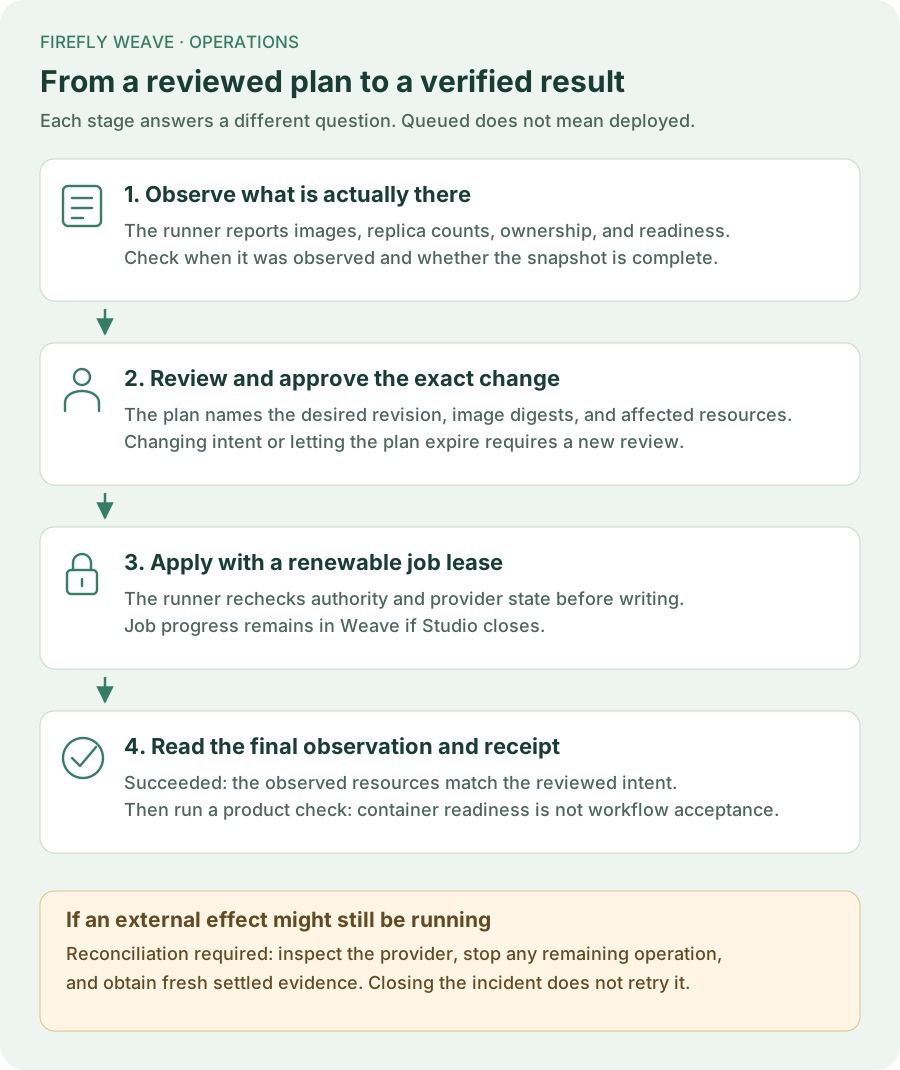
A queued job is not a completed deployment. Follow it until a terminal state and read its final observation. Provider readiness does not prove a workflow or AI model works: run the corresponding product acceptance check afterward.
If a runner loses authority or contact after an effect may have started, Weave keeps the job in Reconciliation required. Inspect the destination, stop any remaining external operation, request a fresh settled observation, and use the explicit reconciliation flow. It records the resolution; it does not roll back or automatically repeat the earlier change.
Pausing a worker and removing container replicas are different actions. Use Workers → Pause new tasks to let existing leases finish. Reducing container capacity can terminate tasks if those instances have not drained.