Write schemas that Weave accepts
A schema is the contract for a JSON value: which properties it has, which are required, and which types or bounds they must satisfy. Weave checks a value against its schema at every boundary where data enters or leaves a step. This page lists the JSON Schema rules Weave supports (its schema profile), how it treats secrets, and the limits that keep validation bounded.
Who it is for. Workflow authors and integration developers who write
inputSchema, outputSchema, payloadSchema, or formSchema by hand, and tool
builders who validate payloads in Python. In Studio, the schema designer writes
these rules for you; read this page when it reports a keyword it cannot edit.
What you need. Nothing to read the rules. To run the 5-minute example, the project's Python environment from a source checkout. For a complete YAML workflow, start with workflow authoring.
Where schemas apply
| Schema | Where you write it | What it checks |
|---|---|---|
inputSchema |
Workflow, action, connector action | Run input, or the input an action receives |
outputSchema |
Workflow, action, connector action | Run output, or the result an action returns |
payloadSchema |
Wait for signal step | The signal's payload |
formSchema |
Human task step | The data a person submits with a decision |
configSchema, authSchema |
Connector manifest | Integration connection settings and secret slots |
payload_schema |
Webhook trigger or Kafka broker trigger | The incoming payload before it starts a run or delivers a signal (HTTP and webhooks) |
All of them use the same bounded subset of JSON Schema Draft 2020-12. This is not a claim of complete Draft support. Validation imports no application, database, provider, or secret code and never retrieves a remote schema.
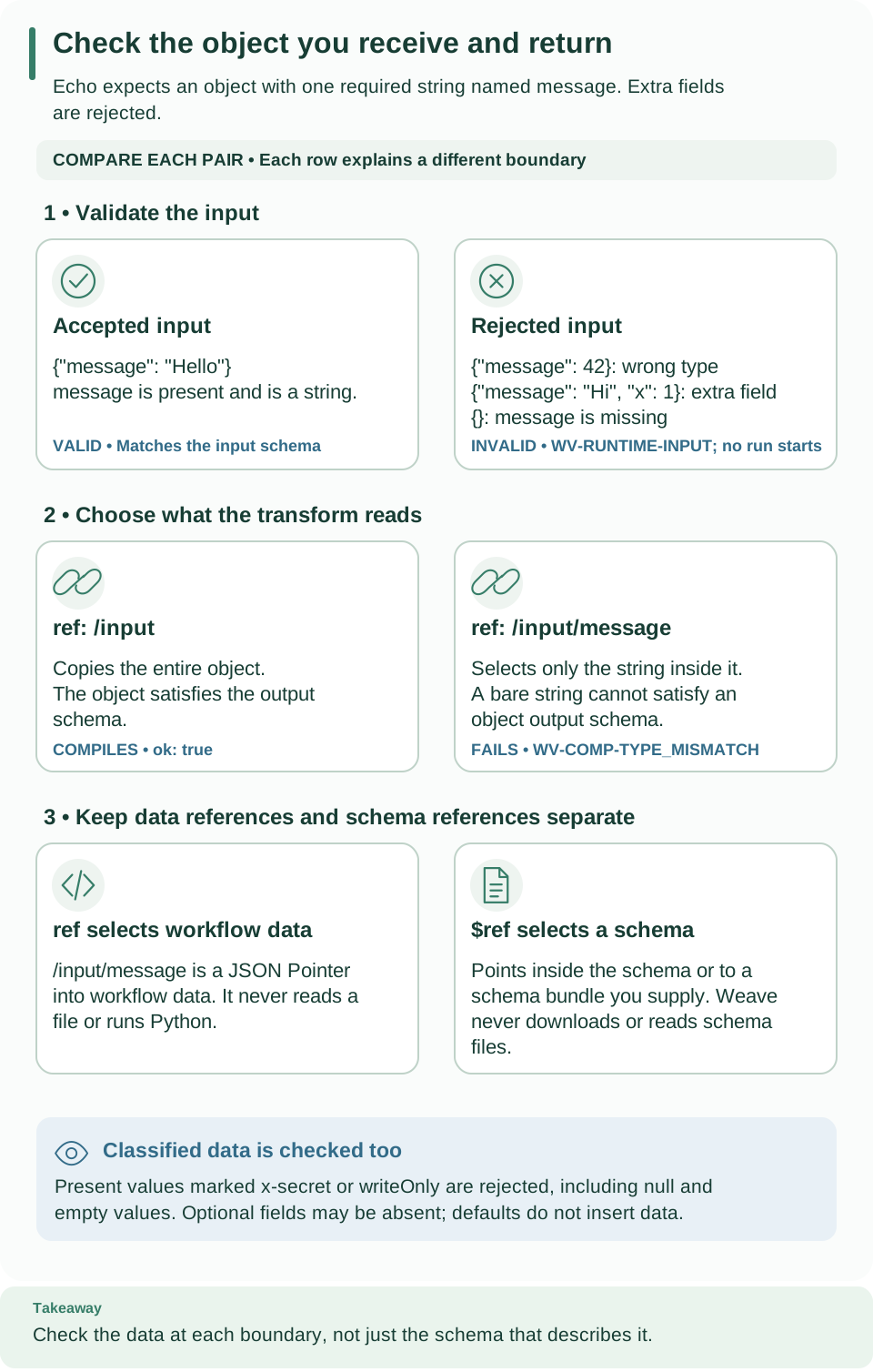
Compare each pair of cards from top to bottom: valid input, selected value, and reference system. Selecting a string from a valid input object changes the result type, while the output contract still expects an object. Open diagram at full size
Check a small schema
This example checks a schema, then one good and one bad value. It is the same
contract as the echo workflow's input: exactly one string property, message.
-
Save the script as
schema_check.py:from firefly_weave.compiler.schemas import validate_payload, validate_schema schema = { "type": "object", "properties": {"message": {"type": "string"}}, "required": ["message"], "additionalProperties": False, } assert validate_schema(schema, {}) == () assert validate_payload(schema, {"message": "Hello, Weave"}, {}) == () issues = validate_payload(schema, {"message": 42}, {}) print([(issue.code, issue.path) for issue in issues]) -
Run it from the checkout root:
# Validate the schema and two payloads with the checkout's Python environment.
uv run python schema_check.py
Expected:
[('WV-SCHEMA-INVALID_INSTANCE', '/message')]. The schema is valid, the first value passes, and the second fails at/messagebecause42is not a string. -
Read the arguments. The second argument of
validate_schemaand the third ofvalidate_payloadis a bundle: a mapping of local schema names to schema documents that$refmay point to.{}means no referenced schemas.
Three rules surprise most people:
propertiesconstrains a property only when it is present. Add it torequiredto make it mandatory.additionalProperties: falserejects properties you did not declare.defaultnever inserts a missing value; it is an annotation only.
A workflow expression reads data with ref; a schema points to another schema
with $ref. They are separate reference systems.
Design schemas in Studio
Studio's schema designer edits input, output, signal payload, and human task form
schemas field by field: name, type, required, label, help text, allowed values,
bounds, and nesting. Its types are Text, Number, Whole number,
Yes or no, Group of fields, List, and Any value. For text, it
offers the formats Date and time, Email address, Web address (URI),
and UUID. Reject fields that are not listed writes
additionalProperties: false.
The designer keeps keywords it cannot edit and lists them, so a hand-written schema survives a visual edit. The designer is new in 0.1.0a7; an alpha6 or earlier Studio does not have it. See Design schemas and Design forms and payloads with the schema designer.
Supported keywords
| Category | Keywords |
|---|---|
| Local resources | $schema, $id, $ref, $defs, $comment |
| Types and equality | type, enum, const |
| Numbers | minimum, maximum, exclusiveMinimum, exclusiveMaximum, multipleOf |
| Strings | minLength, maxLength, pattern, format |
| Objects | properties, patternProperties, additionalProperties, required, minProperties, maxProperties, propertyNames, dependentRequired, dependentSchemas |
| Arrays | items, prefixItems, minItems, maxItems, uniqueItems, contains, minContains, maxContains |
| Composition | allOf, anyOf, oneOf, not, if, then, else |
| Annotations | title, description, default, examples, deprecated, readOnly, writeOnly, x-secret |
Every other keyword is rejected. That includes $dynamicRef,
$dynamicAnchor, $recursiveRef, $recursiveAnchor, $anchor, $vocabulary,
unevaluatedItems, unevaluatedProperties, the content-encoding keywords, and
the legacy definitions. Unsupported keywords are looked for only where a schema
is expected, never inside literal values such as an enum entry.
Other rules:
- Boolean subschemas are supported; a root schema must be a JSON object.
- The only accepted
$schemaishttps://json-schema.org/draft/2020-12/schema. It is checked at every schema node, including bundled resources. - The formats
date-time,uuid,uri, andemailare checked. As in the Draft, a format applies only to strings. An unknown format is an error even when the value is not a string. x-secretmust be a Boolean. Diagnostics never show values, whether or not a field is marked.- Annotation contents are JSON data. A schema-shaped literal value stays data.
- Validation never changes the schemas, bundles, or payloads you pass in.
Integers follow the Draft in schemas, but not in definition fields. A user
schema accepts 1.0 for type: integer; typed definition fields such as
timeoutSeconds require an actual integer.
Local references
$ref can only point to a schema you supply. A reference is one of:
#or#/json/pointer: inside the same schema.NAMEorNAME#/json/pointer: a bundled resource, such astypes.jsonorcustomer-v1.schema.json.
Bundle names use ASCII letters, digits, underscores, hyphens, and nonempty
dot-separated parts. Slashes, backslashes, schemes, .., percent encoding, and
anchors are rejected. Pointer segments support RFC 6901 ~0 and ~1 escaping. A
pointer must target a real schema location, not an enum, const, or default
value that merely looks like a schema.
- A root
$idfollows the same naming rules; a bundled resource's$idmust equal its bundle key. Nested IDs, and root IDs that shadow a bundle resource, are rejected. - An unresolved reference is an error. There is no HTTP or filesystem retrieval: the resolver knows only the supplied resources.
- Every bundled resource is checked, including unused definitions.
- Cycles are rejected, including unused recursive
$defs.
Patterns
pattern and patternProperties use a bounded regular-expression subset with
search semantics: add ^ and $ to match a whole string.
Supported: literal Unicode characters, ., anchors, character classes and
ranges, alternation, capturing and noncapturing groups, ?, *, +, lazy
quantifiers, counted repetitions {n}, {n,}, {n,m}, escaped punctuation, and
\d, \D, \s, \S, \w, \W, \b, \B, \n, \r, \t, \f, \v.
Shorthand classes use ASCII semantics. Write hex or Unicode escapes as the literal
character instead.
Rejected before compilation: backreferences, lookaround, named groups, flags, atomic and possessive constructs, recursion and subroutines, backtracking verbs, fuzzy matching, and engine-specific escapes.
Patterns run with the timeout-enabled regex engine, never Python's unbounded
matcher; this also applies when additionalProperties decides which names
patternProperties already matched. Each match has a timeout, and all matches in
one validation share a time budget. The compile cost of counted repetitions is
estimated conservatively (pattern length times the maxima of every counted
repetition), so some complex patterns are rejected even though their real cost is
lower. Costs add up across a schema's patterns and are charged again when a
pattern is compiled at run time.
Durable secret classification
Mark a field as secret with x-secret: true or writeOnly: true. Weave then
refuses to store or execute any present value for it:
- Rejected values include
null,false, empty strings, empty objects and arrays, and strings that look like credential handles. TreatingwriteOnlythis strictly is a Weave execution rule. - An absent optional property is allowed, and a schema that declares one is valid. Defaults are never materialized.
- Marked
default,examples,const, andenumliterals are rejected before a catalog entry, source, or draft is saved. - Expressions that bind a known value to a marked target are rejected before the source is stored.
- Input and output checks follow pinned action and implementation contracts,
local references, arrays, and every composition or conditional branch. A
defaultin oneallOfbranch cannot bypass a marker in another. - When classification is ambiguous or runs out of budget, it fails closed within the schema, regex, and value limits.
The error is WV-SCHEMA-SECRET_VALUE. Its message contains no value, its path is
the root, and it never echoes submitted keys. When a worker returns output that
fails classification, its completion receipt has status rejected and reason
WV-SCHEMA-SECRET_VALUE, or WV-SCHEMA-CLASSIFICATION when the output could not
be classified.
Credentials belong in connection secret handles. Only the dedicated
secretRef field of an integration connection bypasses ordinary-value
classification, and it keeps its own schema, reference, and grant checks.
Explicitly authorized custom-worker credential leasing also remains available.
This is schema classification, not a secret detector or a protected payload store. Comments, descriptions, and unmarked text cannot be recognized reliably, so authors must mark sensitive fields. Confidential business data still needs operator-configured access, encryption, and retention controls; this release does not configure them.
Evidence projections hide classified values. The pure
operations.redaction.project returns available, value, and explicit omission
path and reason metadata. A classified or unclassifiable root is withheld; an
ordinary null and the literal [REDACTED] remain ordinary values.
project_operational_record keeps validated IDs, codes, actor identity, and
timing, and withholds free-form reasons, evidence or error text, payloads, and
payload fingerprints. Projections are evidence only and must never be passed back
to the runtime kernel as data. See history and replay and
simulation for the APIs that use them.
Limits
SchemaLimits is frozen operator configuration, passed only as a keyword
argument. Definitions cannot raise it, and it is separate from
Limits.max_expression_nodes. The defaults for author schemas are:
| Field | Default | What it measures |
|---|---|---|
max_schema_bytes |
1,048,576 | Compact UTF-8 JSON of the root schema plus the bundle |
max_schema_nodes |
10,000 | JSON containers and values in the root and bundle, excluding mapping keys |
max_schema_depth |
128 | Container nesting in the root and bundle |
max_expansion_nodes |
100,000 | Schema nodes visited after following references, counting repeats |
max_ref_depth |
64 | Longest path through schema children and references |
max_validation_work |
100,000 | Keyword calls, inspected entries, equality and uniqueness nodes, regex compilation cost and calls, and internal errors; also caps total regex compilation cost while preparing |
max_payload_bytes |
1,048,576 | Compact UTF-8 JSON size of the value |
max_document_nodes |
100,000 | Containers and scalars in the value, excluding mapping keys |
max_depth |
32 | Container nesting in the value |
max_diagnostics |
100 | Returned diagnostics, including any overflow marker |
max_pattern_length |
1,024 | Unicode code points in one pattern |
regex_timeout_seconds |
0.01 | Time for one match |
max_regex_seconds |
0.1 | Total matching time for one validation |
Generated platform contracts get more work budget. Weave's own outer
contracts use the public DEFAULT_CONTRACT_LIMITS: the same values except
max_validation_work=5,000,000, because their recursive step and expression
unions try several alternatives per node. With it, a 1,000-step workflow and a
shallow 9,991-expression workflow validate (about 439,000 and 901,000 work units).
Author schemas keep the 100,000 ceiling.
An explicit limits= replaces the default exactly, including a lower work limit.
To change other contract bounds while keeping the contract work budget, use
dataclasses.replace(DEFAULT_CONTRACT_LIMITS, ...). Passing
SchemaLimits(max_diagnostics=1) also selects that object's author work default;
limits are never raised or merged implicitly.
The limits are independent: a payload under the byte limit can still exceed the
work budget. Work is charged before each keyword runs. Reference graphs are
measured without expanding them into a tree, and cached subtrees cannot bypass a
bound. uniqueItems compares canonical JSON, and decimal multipleOf uses exact
ratios of the published decimal values. Cycles, unsafe integers, infinite or NaN
floats, Python-only values, and lone surrogates are rejected before Draft
validation. Any capacity failure returns WV-SCHEMA-RESOURCE_LIMIT.
Diagnostics
Every schema issue has stage schema, severity error, and a generic, safe
message. Values, constraint literals, format names, regular expressions, and
exception text are never included.
| Code | Meaning |
|---|---|
WV-SCHEMA-INVALID_SCHEMA |
The schema itself is malformed |
WV-SCHEMA-INVALID_INSTANCE |
A value does not satisfy the schema |
WV-SCHEMA-INVALID_FORMAT |
A string does not satisfy its declared format |
WV-SCHEMA-UNSUPPORTED_FORMAT |
The format is not one of the four checked formats |
WV-SCHEMA-UNSUPPORTED_KEYWORD |
The keyword is outside the profile |
WV-SCHEMA-UNSUPPORTED_DIALECT |
$schema is not Draft 2020-12 |
WV-SCHEMA-UNSUPPORTED_PATTERN |
The pattern uses unsupported syntax or exceeds its budget |
WV-SCHEMA-INVALID_REF |
A $ref or $id breaks the local reference rules |
WV-SCHEMA-RECURSIVE_REF |
References form a cycle |
WV-SCHEMA-RESOURCE_LIMIT |
A limit above was reached |
WV-SCHEMA-SECRET_VALUE |
A present value is governed by a secret marker |
WV-SCHEMA-DIAGNOSTICS_TRUNCATED |
More issues exist than max_diagnostics allows |
Paths. Schema errors point into the schema; value errors point into the
value. A property name appears in a path only when it is declared under
properties. Keys matched through additionalProperties or patternProperties
appear as *, even if an unrelated branch declares the same name. Errors found
only by the strict models have every string segment masked; array indexes stay.
Source line and column come from the compiler's source map, not from this module.
Ordering and truncation. Schema preparation returns its first error. Mappings
are copied in sorted key order before evaluation, so equivalent reordered
documents produce the same first error and the same capped set. Runtime issues are
then sorted by path and code. When one more issue would exceed the cap, the last
slot becomes WV-SCHEMA-DIAGNOSTICS_TRUNCATED, even when the cap is one; a result
exactly at the cap has no marker. The marker says issues were omitted, not how
many. The compiler result keeps this distinction alongside the parser's omission
count.
Python interfaces for tool builders
firefly_weave.compiler.schemas:
  validate_schema(schema, bundle, *, limits=SchemaLimits()) -> tuple[Diagnostic, ...]
  validate_payload(schema, value, bundle, *, limits=SchemaLimits()) -> tuple[Diagnostic, ...]
  validate_contract_payload(name, value, *, limits=DEFAULT_CONTRACT_LIMITS) -> tuple[Diagnostic, ...]
firefly_weave.contracts.schema_export:
  export_schemas(*, extra_models=None) -> dict[str, JsonObject]
  schema_snapshot(*, extra_models=None) -> bytes
export_schemas() returns fresh JSON Schemas for every public contract, keyed by
name, such as definition, workflow, action, connector, diagnostic,
catalog-lock, executable, and compiled-artifact, plus the runtime, worker,
provider, and operations contracts. They derive from the strict Pydantic models,
use camelCase names, declare Draft 2020-12, and have local IDs
NAME.schema.json. Export removes Pydantic's nonstandard discriminator
annotation (unions stay ordinary composition), keeps constraints applied after
value validators, and names internal string-constraint definitions by content, so
exports are reproducible. Literal const, default, and examples values are
never rewritten as schemas. schema_snapshot() returns the same set as RFC 8785
canonical bytes for release artifacts; it writes no files. To write them to disk,
run:
# Export every published schema into a new directory, one NAME.schema.json file each.
weave schema export --directory .local/schemas
Expected: Exported N schemas to … with one file per contract. The command
refuses existing files unless you add --force.
extra_models is a trusted mapping of unique lowercase names to Pydantic models
or TypeAdapters; it cannot overwrite core names. Exporting a trusted model does
not make an author-supplied schema trusted.
Shape checks are not schema checks. validate_contract_payload selects a
built-in contract by name, applies bounded validation, then its strict model. It
covers invariants plain Draft validators cannot express, such as retry ordering,
omission rules, strict integers, and safe numbers. It does not validate schemas
carried as data inside fields such as inputSchema: the compiler passes those to
validate_schema separately. Passing shape and schema checks does not authorize
publication or activation, and does not replace dependency and semantic analysis.
Next steps
- Read and write definition contracts: where each schema field sits in a workflow, action, or connector.
- Compiler: how schema diagnostics appear in a compile result.
- Choose and configure a workflow step: signal payloads and human task forms in Studio.
- Identity, authorization, and secrets: how operators grant the secret handles connections use.
Troubleshooting
| What you see | Why | What to do |
|---|---|---|
WV-SCHEMA-UNSUPPORTED_KEYWORD |
The keyword is outside the profile, for example unevaluatedProperties |
Use a supported keyword, such as additionalProperties: false |
WV-SCHEMA-INVALID_REF |
The $ref points outside the supplied schema or bundle, or uses a URL |
Bundle the referenced schema locally and refer to it by name |
WV-SCHEMA-UNSUPPORTED_PATTERN |
The pattern uses lookaround, a backreference, a flag, or too large a counted repetition | Rewrite it with the supported syntax and smaller repetition bounds |
WV-SCHEMA-SECRET_VALUE |
A value was supplied for a field marked x-secret or writeOnly |
Leave the field out and pass credentials through a connection secret handle |
A missing property is not filled from default |
Defaults are annotations only | Supply the value, or compute it with an expression such as coalesce |
1.0 passes type: integer in a schema but fails in timeoutSeconds |
User schemas follow the Draft; definition fields are strictly typed | Write 1 in definition fields |