Start runs on a schedule and pause with timers
Weave has two time-based features that are easy to confuse:
- A schedule starts a new run of an activation at future UTC calendar times, like a cron job.
- A Wait for time step (
wait) pauses an existing run until a stored deadline, then continues. Wait for signal steps and human tasks have deadlines too.
Both rely on the platform's scheduler, not on a timer in your worker or your computer.
Who it is for. Process designers who add waits, and developers and operators who create schedules. Schedules are managed with the CLI or the API; Studio does not create them. What you need. A platform from the local platform guide or the standalone setup, an activated workflow, and, if the workflow calls actions, admitted workers. Allow 15 minutes.
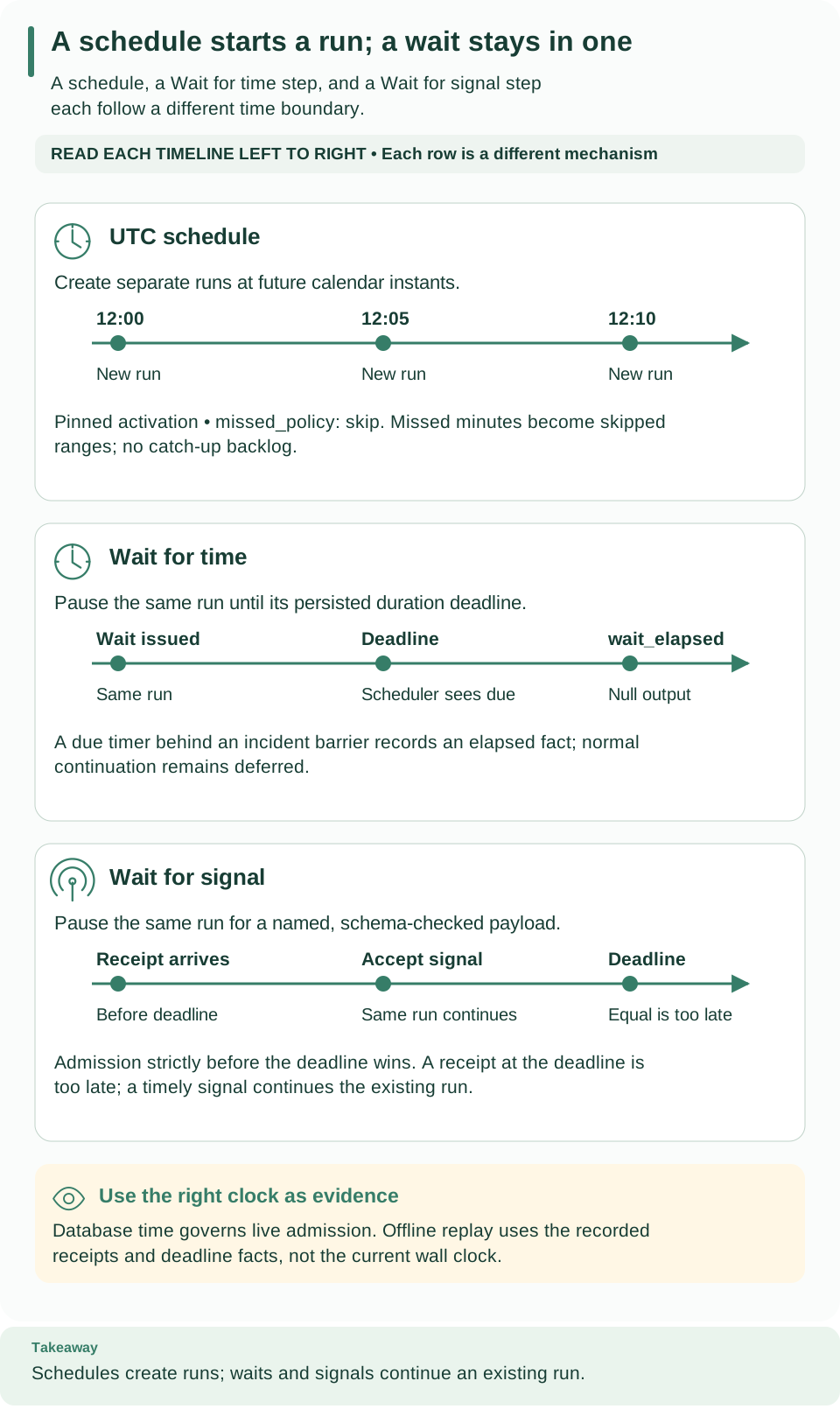
Read each timeline left to right. Calendar instants create separate runs, while duration and signal waits continue the same run. A signal must be accepted strictly before its deadline to win; arriving exactly at the deadline is too late. Open diagram at full size
Create a schedule
Run the commands with a saved platform and workspace from weave auth setup
(see how remote commands choose a platform).
Saved platforms are new in 0.1.0a7; with an alpha6 or earlier CLI, these
commands use explicit mode.
To save a schedule you need trigger.manage and run.start (the deployer and
operator roles); to read it and its history, run.read (the viewer role).
-
Find the activation ID. Use the
idfrom the activation response, not the workflow version ID. -
Write the request. Save this as
schedule.json, replacing the activation UUID andinputwith input that the workflow'sinputSchemaaccepts.*/5 * * * *means every five minutes on the UTC clock: -
Save the schedule:
# Create the schedule; the server checks the calendar, the input, and your grants.
weave triggers schedules save --request schedule.json --output json
Expected: a schedule with
id,revision(1),status,next_due_at,principal_id, andblocked_reason. Checkstatusandnext_due_atbefore expecting a run. SaveidasSCHEDULE_ID. -
Check its history after the next due time:
# Show occurrences: each started run, or each skipped range.
weave triggers schedules history "$SCHEDULE_ID" --limit 100 --output json
Expected: a
startedoccurrence with itsrun_id, or askippedrange when work was missed. Read the run separately to see whether it finished; a started occurrence means only that the run was created.
Change, disable, or delete a schedule
Every change needs the schedule's current revision, so two people cannot
overwrite each other. Read the schedule first, use the returned revision, and
after a conflict read it again and reconsider the change; never guess the next
revision.
# Read the current schedule and note its revision.
weave triggers schedules read "$SCHEDULE_ID" --output json
# Replace the schedule with an edited request that includes "id": SCHEDULE_ID.
weave triggers schedules save --request schedule-edit.json --revision "$SCHEDULE_REVISION" --output json
# Stop future firings; the schedule and its history are kept.
weave triggers schedules disable "$SCHEDULE_ID" --revision "$SCHEDULE_REVISION" --output json
# Resume from a fresh future time; missed occurrences are not replayed.
weave triggers schedules enable "$SCHEDULE_ID" --revision "$SCHEDULE_REVISION" --output json
# Delete the schedule; its revisions and history remain readable.
weave triggers schedules delete "$SCHEDULE_ID" --revision "$SCHEDULE_REVISION" --output json
These are separate operations, not a script: each successful change returns a
new revision, so read it again before the next one. List every schedule,
including deleted ones, with weave triggers schedules list --limit 100; pass
--cursor with the returned next_cursor for more.
Calendar rules
Schedules use a strict five-field cron grammar, always in UTC:
| Field | Range | Notes |
|---|---|---|
| Minute | 0–59 | |
| Hour | 0–23 | UTC |
| Day of month | 1–31 | At least one of day of month or day of week must be * |
| Month | 1–12 | |
| Day of week | 0–6 | Sunday is 0 |
Allowed in each field: *, numbers of at most two digits, ranges such as
9-17 that do not wrap around, lists of at most 32 terms, and positive steps on
* or on a range (*/15, 9-17/2). The whole expression has at most 256
characters.
Rejected: names (MON, JAN), macros (@daily), seconds or year fields,
?, L, W, #, random or hash syntax, time zones other than UTC, and
calendars that can never occur, such as 0 0 31 2 *.
The pure contracts.schedules.validate_calendar function owns this grammar, and
both the request model and the runtime calendar call it. Calendar math uses
PyFly 26.9.15's CronExpression, backed by croniter 6.2.4 and its 50-year search
limit; a schedule whose date range runs out is blocked safely.
Missed occurrences
The only missed_policy is skip. Schedules use the database's UTC clock. When
the scheduler looks at a schedule, it starts at most the occurrence in the current
minute, the half-open interval [instant, instant + 60 seconds), and a final
database-time check prevents a stale start after a readiness wait.
Older occurrences become one immutable skipped range per observed revision and
span; Weave never builds a backlog of catch-up runs. A clock that moves backward
never moves the schedule backward. An overloaded platform may skip minutes by
policy: a schedule is not a promise of exactly-once external effects or of
catch-up.
A capacity refusal (WV-OPERATION-CAPACITY or WV-REQUEST-CAPACITY) starts
nothing and doesn't block the schedule: it stays enabled, and the next scan
tries the same occurrence again with the same occurrence key, so the occurrence
starts at most one run. An occurrence still refused when its minute ends becomes
part of a skipped range.
Request, routes, and permissions
Save with POST /api/v1/tenants/{tenant}/projects/{project}/environments/{environment}/schedules.
| Field | Meaning |
|---|---|
cron |
The five-field UTC expression |
timezone |
Always UTC (the default) |
missed_policy |
Always skip (the default) |
activation_id |
The activation each run uses |
input |
The run input; checked against the workflow's input schema and secret rules |
id |
Optional; names the schedule to replace. When omitted, a new schedule is created |
| Route | Purpose | Needs |
|---|---|---|
POST /schedules |
Create, or update with If-Match: REVISION |
trigger.manage, run.start, a ready activation, valid input |
GET /schedules?cursor=…&limit=1..100 |
List, including deleted ones | run.read |
GET /schedules/{id} |
Read one | run.read |
GET /schedules/{id}/occurrences?limit=100 |
Started runs and skipped ranges, with observation times | run.read |
POST /schedules/{id}/disable, /enable, /delete |
Change state; each needs If-Match |
trigger.manage; enable also run.start |
Lists return items and an opaque next_cursor; pass it back as cursor.
Cursors are bound to your scope and the collection. Delete keeps revisions and
history (a tombstone). Enable creates a new revision with a fresh future cursor.
Whose authority runs the schedule. The person who saves or enables a revision becomes its execution principal; there is no principal selector. Every firing reloads that person's status and grants. A revoked or disabled owner blocks the schedule without consuming an occurrence; an authorized save or enable rebinds it with a fresh future cursor. Run creation, the occurrence record, skipped ranges, and cursor advancement commit together.
Older commands. The singular weave schedule family (save, list, show,
occurrences, disable, enable, delete) remains for the older unversioned
routes. It needs --environment-url (or WEAVE_ENVIRONMENT_URL) and
WEAVE_ACCESS_TOKEN, and uses --after instead of --cursor.
How the scheduler finds due work
A single loop owned by the API process handles recovery and schedules. Each cycle visits at most 16 tenants and one environment per tenant, using durable rotating cursors. Each turn takes separate pages of up to 10 due deadlines, 10 expired ready tasks, and 10 recoverable leases, then up to 10 due schedules. Each phase has at most five seconds, including connection acquisition, plus a four-second statement timeout and a one-second lock timeout, so one failure does not block the others. After a failure or restart, traversal resumes, and a failed turn consumes no occurrence.
How quickly a schedule fires depends on the number of tenants and environments and the poll interval. Weave does not promise that every tenant runs within one minute.
Waits and deadlines inside a run
Wait for time (wait) stores a deadline and continues with a null step
output when it is due. It uses the same kernel and deadline scanner as signals,
including nested branch capacity, cancellation, restarts, and the incident
barrier. If a wait elapses while the run is suspended by an incident, its deadline
is consumed once and the continuation waits until the incident is resolved;
branch capacity is not released early. Recovery reports count elapsed waits
separately from timeouts.
Order when several deadlines are due at once:
- The overall run timeout (
spec.timeoutSeconds) wins. - Then signal timeouts.
- Then elapsed duration waits, ordered by due time and node ID.
A signal accepted strictly before its deadline wins over that signal's timeout; one accepted at exactly the deadline does not. Durations never wake early.
What history records. The wait_elapsed event records node_id, the issued
deadline, the durable wait_id, the database observation time, the event ID,
and the accepted sequence. Signal events record their acceptance time and issued
deadline. Replay uses these recorded facts, never a live clock, and the
history and replay and simulation
APIs never contact external providers.
Delivery is at least once; external effects are not exactly once. Secret classification applies to stored schedule input and to workflow data.
Forward migration privileges
This section is for administrators who apply database migrations.
Revision 0011_schedules follows 0010_incidents; forward migrations keep
earlier history. Besides ordinary DDL, REFERENCES, and schema-version
permissions, this migration needs:
- Ownership, direct or inherited, of
wait_wakeups. - Permission to
SET ROLE weave_catalog_reader. - Schema
CREATE WITH GRANT OPTION.
Grant these deliberately; EXECUTE on weave_tenant_ids() alone is not enough.
A database owner or superuser deployment identity also works. Never give these
privileges to the API or scheduler login roles. The migration checks them before
changing anything and never grants role membership.
It adds weave_scheduler_tenants(integer), owned by the existing catalog reader
(not a superuser, no row-security bypass), with a fixed search path and pages 1 to
16. It returns tenant IDs and advances only its catalog cursor. Only
weave_scheduler can execute it, and that login has no direct access to tenant,
schedule, or run tables. The migration gives the function owner schema CREATE
only for the ownership transfer, then revokes it. Business tables keep forced
row-level security; environment rotation and every start use ordinary
tenant-bound transactions.
Next steps
- Choose and configure a workflow step: add Wait for time and Wait for signal in Studio.
- Simulate a workflow run: advance virtual time to test waits and timeouts without waiting.
- Recorded history and offline replay: read the facts a wait or schedule recorded.
- Upgrades: apply forward migrations safely.
Troubleshooting
| What you see | Why | What to do |
|---|---|---|
schedules save rejects the calendar |
The expression uses names, macros, a sixth field, ?/L/W/#, sets both day fields, or can never occur |
Rewrite it with numbers, ranges, lists, and steps; keep one day field * |
Status blocked |
The activation is not ready, the owner lost a grant, or the calendar ran out | Read blocked_reason, fix the cause, then save or enable again |
A skipped range instead of a run |
The scheduler did not observe the minute in time, or the platform refused the run for capacity until the minute ended | Expected under the skip policy; missed runs are never replayed |
HTTP 409 WV-SCHEDULE-REVISION |
Another change happened since you read the revision, you saved an existing id without --revision (or a new one with it), or the schedule is deleted |
Read the schedule again, then decide whether your change still applies |
HTTP 422 WV-SCHEDULE-RANGE |
The calendar has no future occurrence the calendar library can represent | Choose a calendar that occurs again in the future |
| A run stays waiting after its duration | No scheduler-enabled replica, or an incident barrier | Check that a scheduler is running, then the run's incidents |
| A signal arriving at the deadline is ignored | Signals must arrive strictly before the deadline | Send it earlier, or lengthen timeoutSeconds |