Prepare Google GKE and Artifact Registry
This guide connects your terminal to an existing GKE cluster and an existing Docker-format Artifact Registry repository, so that the shared guides can build, push, and deploy Weave. It configures client tools only; it creates no cloud infrastructure.
Who this is for: an operator signed in to gcloud with an approved identity
that already has cluster access and push access to the repository.
What you need first: Google Cloud CLI, kubectl, Docker, Python 3, and
gke-gcloud-auth-plugin. In the same terminal, load your local installation's
session.env as described in the
cloud deployment overview,
so that WEAVE_DOCKER_CONTEXT is set.
What you will have at the end: KUBECONFIG, WEAVE_KUBE_CONTEXT,
WEAVE_KUBE_NAMESPACE, and WEAVE_REGISTRY_PREFIX set in this terminal.
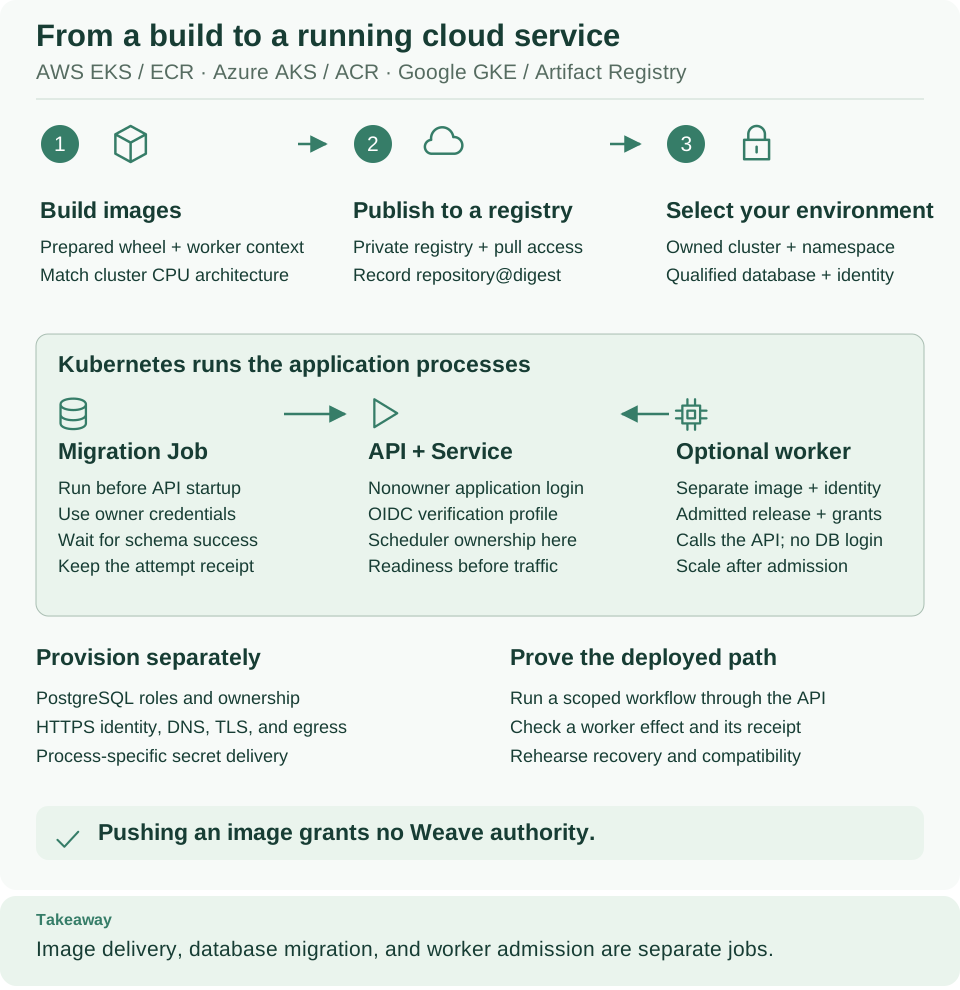
Artifact Registry sits at the image boundary (step 2 in the diagram) and GKE runs the green panel. The image-pull identity belongs to the cluster; your own sign-in and Weave's application identities have different jobs. Open diagram at full size
If you do not have infrastructure yet
Use the provider's GKE cluster creation guide to prepare an approved cluster with its network, node capacity, and access controls. Provision the registry and the intended namespace through the same infrastructure process, then return to step 1 with the real resource names. These resources cost money, and a provider quickstart is a learning baseline, not a production availability or security design for Weave.
1. Select the project and actual resource locations
Why: every later command depends on the right project, cluster, and repository. Replace the placeholders with your operator's resource inventory. The cluster location is a region for a regional cluster or a zone for a zonal cluster. The Artifact Registry location can differ; take it from the repository record.
# Inspect the authenticated account, target project, existing cluster, and Docker repository.
export WEAVE_GCP_PROJECT='your-existing-project-id'
export WEAVE_GKE_CLUSTER='your-existing-cluster'
export WEAVE_GKE_LOCATION='your-cluster-region-or-zone'
export WEAVE_AR_LOCATION='your-repository-location'
export WEAVE_AR_REPOSITORY='your-existing-docker-repository'
gcloud auth list --filter=status:ACTIVE --format='value(account)'
gcloud projects describe "$WEAVE_GCP_PROJECT" --format='value(projectId)'
gcloud container clusters describe "$WEAVE_GKE_CLUSTER" \
  --project "$WEAVE_GCP_PROJECT" --location "$WEAVE_GKE_LOCATION" \
  --format='yaml(name,location,status)'
gcloud artifacts repositories describe "$WEAVE_AR_REPOSITORY" \
  --project "$WEAVE_GCP_PROJECT" --location "$WEAVE_AR_LOCATION" \
  --format='yaml(name,format)'
Expected: the intended active account, the project ID, a cluster with status
RUNNING, and a repository with format DOCKER. Stop if the repository is
missing or uses another format. Every resource command names the project
explicitly instead of changing a global default. See
repository inspection.
2. Configure and explicitly select kubectl
Why: a separate, private kubeconfig keeps your other cluster connections
untouched. The GKE credential command needs container.clusters.get; applying
workloads also needs Kubernetes permissions. Confirm that the authentication
plugin is installed, then create the kubeconfig. See
GKE client configuration.
# Create a separate kubeconfig so the tutorial does not replace another cluster connection.
gke-gcloud-auth-plugin --version
umask 077
export WEAVE_PROVIDER_DIR="$HOME/weave-gcp-$(python3 -c 'from uuid import uuid4; print(uuid4().hex)')"
mkdir -m 700 "$WEAVE_PROVIDER_DIR"
export KUBECONFIG="$WEAVE_PROVIDER_DIR/kubeconfig"
gcloud container clusters get-credentials "$WEAVE_GKE_CLUSTER" \
  --project "$WEAVE_GCP_PROJECT" --location "$WEAVE_GKE_LOCATION"
kubectl config get-contexts
Expected: the plugin's version, then a context generated for the selected
project, location, and cluster. Copy that exact name into WEAVE_KUBE_CONTEXT
below. Credential retrieval can change the current context; the remaining
commands always name the selected one. Then name the namespace reserved for Weave
and check what you may do there:
# Select the exact context and namespace, then confirm access and the node CPU architecture.
export WEAVE_KUBE_CONTEXT='your-exact-context-name-from-the-list'
export WEAVE_KUBE_NAMESPACE='your-existing-namespace'
kubectl --context "$WEAVE_KUBE_CONTEXT" -n "$WEAVE_KUBE_NAMESPACE" auth can-i create deployments
kubectl --context "$WEAVE_KUBE_CONTEXT" -n "$WEAVE_KUBE_NAMESPACE" auth can-i create jobs
kubectl --context "$WEAVE_KUBE_CONTEXT" -n "$WEAVE_KUBE_NAMESPACE" auth can-i create secrets
kubectl --context "$WEAVE_KUBE_CONTEXT" get nodes -L kubernetes.io/arch
Expected: yes three times, then amd64 or arm64 node labels. Build for the
architecture of the nodes that will run Weave; ask the operator for the pool and
placement rules if your role cannot list nodes. A private endpoint needs an
approved network path from this terminal.
3. Configure the Docker credential helper
Why: Docker needs credentials for the exact Artifact Registry host before the shared guide can push. The command updates your local Docker credential-helper configuration; it neither creates the repository nor changes its permissions. See Artifact Registry Docker authentication.
# Register the credential helper for this exact registry host so Docker can push later.
export WEAVE_AR_HOST="$WEAVE_AR_LOCATION-docker.pkg.dev"
gcloud auth configure-docker "$WEAVE_AR_HOST"
export WEAVE_REGISTRY_PREFIX="$WEAVE_AR_HOST/$WEAVE_GCP_PROJECT/$WEAVE_AR_REPOSITORY"
Review the prompt and accept the named host. Expected: a confirmation that the
Docker configuration was updated, or that the entry already exists. The prefix is
the existing Docker repository; the shared guide appends /server and /worker
as image names. Run Docker as the same operating-system user that ran this
command, and keep WEAVE_DOCKER_CONTEXT from your local session.
Pushing and pulling are separate permissions. The build operator needs
repository writer access, such as roles/artifactregistry.writer. The GKE node
service account separately needs roles/artifactregistry.reader on the
repository; your own sign-in does not give it. For a registry in another project,
grant the read access in the registry's project. See
Artifact Registry permissions
and GKE node image-pull identity.
4. Choose supporting services deliberately
| Requirement | Google Cloud option | Weave boundary |
|---|---|---|
| PostgreSQL | Cloud SQL for PostgreSQL or separately operated PostgreSQL | Qualify the exact migrations, role attributes, and function ownership; local PostgreSQL tests do not certify Cloud SQL |
| Secret storage | Secret Manager through an operator-managed delivery mechanism | Delivering values into processes is not a Weave secret-provider implementation; this guide adds no native Secret Manager provider |
| Token issuer | Your compatible HTTPS OIDC/CIAM provider (configuration) | Verify issuer, audience, and JWKS, and create Weave identity links and grants; Google Cloud IAM permissions are separate |
Cloud SQL's administrative users are not unrestricted PostgreSQL superusers. Rehearse the selected package against the intended service and version with the database qualification gate. Keep migration ownership separate from runtime logins, and never run the local fixture setup script against Cloud SQL. See Cloud SQL users and roles.
If something goes wrong
| What you see | Why | What to do |
|---|---|---|
gke-gcloud-auth-plugin --version fails, or kubectl cannot find the plugin |
The authentication plugin is not installed | Install it, for example with gcloud components install gke-gcloud-auth-plugin, and retry |
get-credentials is denied |
Your identity lacks container.clusters.get in the project |
Ask for the permission, or check WEAVE_GCP_PROJECT |
kubectl reports Forbidden or auth can-i prints no |
Your identity has no Kubernetes role for that object in the namespace | Ask the cluster administrator for the namespace permissions |
kubectl times out |
The cluster endpoint is private and this terminal has no route to it | Use the approved network path |
The repository format is not DOCKER |
The repository stores another artifact format | Use a Docker-format repository |
docker push is denied |
Your identity lacks writer access on the repository | Ask for roles/artifactregistry.writer on that repository |
Pods later stay in ImagePullBackOff |
The node service account cannot read the repository | Grant it roles/artifactregistry.reader |
Continue with the shared deployment
Keep KUBECONFIG, WEAVE_KUBE_CONTEXT, WEAVE_KUBE_NAMESPACE, and
WEAVE_REGISTRY_PREFIX in this terminal, then:
- Return to the cloud deployment overview to pass the readiness gate, then build, push, and record the registry digests.
- Use the Kubernetes walkthrough for database qualification, the migration Job, the API rollout, and a verified run.
These provider commands neither publish a workflow nor admit a worker release. The CLI tutorial covers that separate application lifecycle.