Remote deployment, one stage at a time
Goal: understand the route from a working local installation to a Weave platform that your team uses on shared infrastructure. This page is the map; the linked chapters contain the commands for each stage.
Who this is for: administrators and operators. You need an operator account for your cloud infrastructure, and the help of your database administrator and identity provider administrator. Plan for several working sessions: most of the effort goes into infrastructure approvals and the database rehearsal, not into Weave commands.
What Weave provides, and what it does not. In this release, the application
is deployed with checked-in Kubernetes manifests. Running weave on your laptop
creates no cloud cluster: your cloud's infrastructure tooling supplies the
cluster, registry, database, and network.
Planning Microsoft Entra ID for people? Application tokens have been verified in Azure preproduction; human browser and device-code sign-in have not. Read the requirements before you choose your identity provider.
Before you open a cloud terminal
Complete the local platform walkthrough, or use an existing Weave platform to publish and run one workflow. That shows you what a working API looks like. Local object IDs and credentials belong to the local installation; the remote installation gets its own.
Then choose the scope of your first remote deployment:
| Scope | What you deploy | Follow |
|---|---|---|
| API first | The API, then one internal workflow run | Stages 1 to 5, then stage 7 |
| API plus no-code REST integrations | The API, with the built-in weave-http@2.0.0 connector running inside it; no worker image |
Stages 1 to 5, the built-in connector setup, then stage 7 |
| API plus workers | The API, then the workers that run your own code | All stages, in order |
| Worker only | Your worker, against a platform your team already operates | Worker setup and the Kubernetes worker section |
Add integrations only after the API, database, and identity checks pass.
The names in the deployment guides
| Name | What it does | What you supply |
|---|---|---|
| Cluster | Machines and a Kubernetes control plane that run containers | An existing EKS, AKS, or GKE cluster |
| Context | A named connection in your local kubectl configuration |
The exact context for that cluster |
| Namespace | A boundary for application objects inside the cluster | The namespace reserved for Weave |
| Registry | Storage from which cluster nodes download images | ECR, ACR, or Artifact Registry |
| Image digest | An immutable identifier for one published image | The digest returned after pushing |
| Migration Job | A short-lived process that creates or upgrades the schema | The packaged migration command and owner credentials |
| API Deployment | The long-running Weave HTTP service | Server image and runtime configuration |
| Worker Deployment | Your integration code, claiming tasks through the API | Worker image, release ID, scope, and credentials |
| Service / ingress | Internal routing / your controlled external entry point | Service routing plus approved HTTPS and DNS configuration |
| Published sign-in settings | What the API tells the CLI, Studio, and the desktop app about signing in | The identity provider and public login client people use |
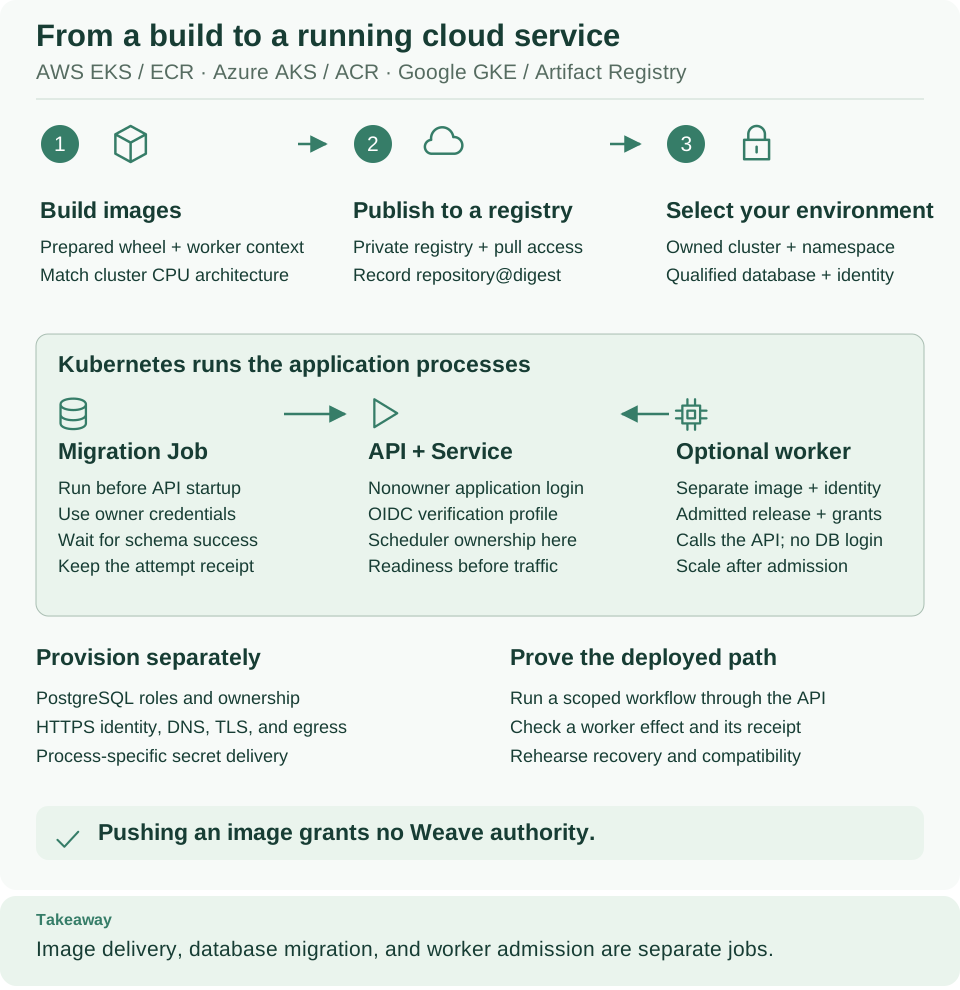
Read the top row as the delivery of images (build, publish, select the environment) and the green panel as the processes Kubernetes runs; the bottom rows list what you provision separately and how you prove the result. Open diagram at full size
Follow these stages
| Stage | Do this | Ready to continue when… |
|---|---|---|
| 1. Connect | Restore your local session, then follow exactly one provider chapter: AWS, Azure, or Google Cloud | You have the intended cluster context, namespace, and registry access |
| 2. Prepare dependencies | Pass the infrastructure readiness gate | Database migration permissions, runtime logins, identity, and network are ready |
| 3. Package | Build and push the images | Each required image has a recorded registry digest |
| 4. Install | Follow Kubernetes steps 1 to 5 | The migration Job succeeds and the API reports ready |
| 5. Prove one run | Verify identity and one workflow | An authorized request produces a saved successful run |
| 6. Add external work | Deploy a worker when your workflow needs one | An admitted worker completes the intended task |
| 7. Let people connect | Check the sign-in settings you published in Kubernetes step 5, make your own account a platform administrator, then link people and let them connect | A test person connects with weave auth setup or Studio and sees a workspace |
Do one stage at a time. In stage 1, replace your-* placeholders with values
from your actual cloud inventory. Later stages read variables and receipt files
that earlier stages produced; a guessed UUID or image digest will not work.
Two independent connections from your laptop
You use two tools, and their credentials and permissions are separate:
| Tool | Talks to | To do what | How it is set up |
|---|---|---|---|
kubectl |
The Kubernetes control plane | Manage processes: Jobs, Deployments, Secrets | The provider chapter writes a private kubeconfig |
weave |
The running Weave API | Manage workflows, runs, people, and integration connections | weave auth setup saves the platform and signs you in; see Connect the CLI to a platform |
These read-only commands make no deployment change:
# Inspect the Kubernetes target before any deployment command; nothing is applied.
kubectl config get-contexts
# Read worker packaging help; this changes nothing either.
weave worker package --help
# Print the link to the worker and container deployment guide; add --open to open a browser.
weave docs deploy
Expected: your kubeconfig contexts, the worker package options, and one
documentation URL.
A running container is not a usable platform. A successful rollout says only that a process started. The readiness, identity, grant, and first-run checks show that you can use it. Try the API explains how to enable Swagger on your own platform and send requests with a token; keep it behind your normal network and access controls.
What to save after deployment
Keep the selected package version, the image digests, the rendered manifests, the locations of private configuration, and the IDs returned by bootstrap and the first run. Keep credentials in your team's secret store. These records let another operator understand and maintain the installation.
For day-to-day operations, use configuration, observability, upgrades, and backup and restore. Scaling replicas, changing an image, and migrating the database are separate operations with different recovery needs.
What has been verified
The templates and examples are checked against Weave's implementation. They are not a completed deployment in your cloud account. Database ownership, identity, network access, recovery, and real integration delivery must be verified in the environment you choose. The local developer stack does not prove production availability.
Next steps
- Deploy on AWS, Azure, or Google Cloud: start stage 1.
- Identity, authorization and secrets: prepare the identity provider.
- Give people the right access: plan roles before people connect.