Send and receive WhatsApp messages
Use this guide to start a workflow from a WhatsApp Cloud API webhook, send text
or approved templates to allowed recipients, and track later delivery status. The
weave-whatsapp@1.0.0 connector admits authenticated incoming text and
delivery-status facts, and sends through native provider sources, receipts,
current connection authority, and the existing operation ledger.
- Who it is for: the operator who manages the Meta account and webhook, and the author who builds the workflows.
- What you need: an operator-managed WhatsApp Cloud API account with webhook configuration, a deployed platform with a native executor (the local platform never enables connector packages), a public HTTPS ingress, and a CLI connected to that platform.
- How long: about 15 minutes to study the offline fixtures; live setup depends on the Meta account work.
Begin with the offline fixture walkthrough: it explains the sample files and an out-of-order status example before you touch a live account.
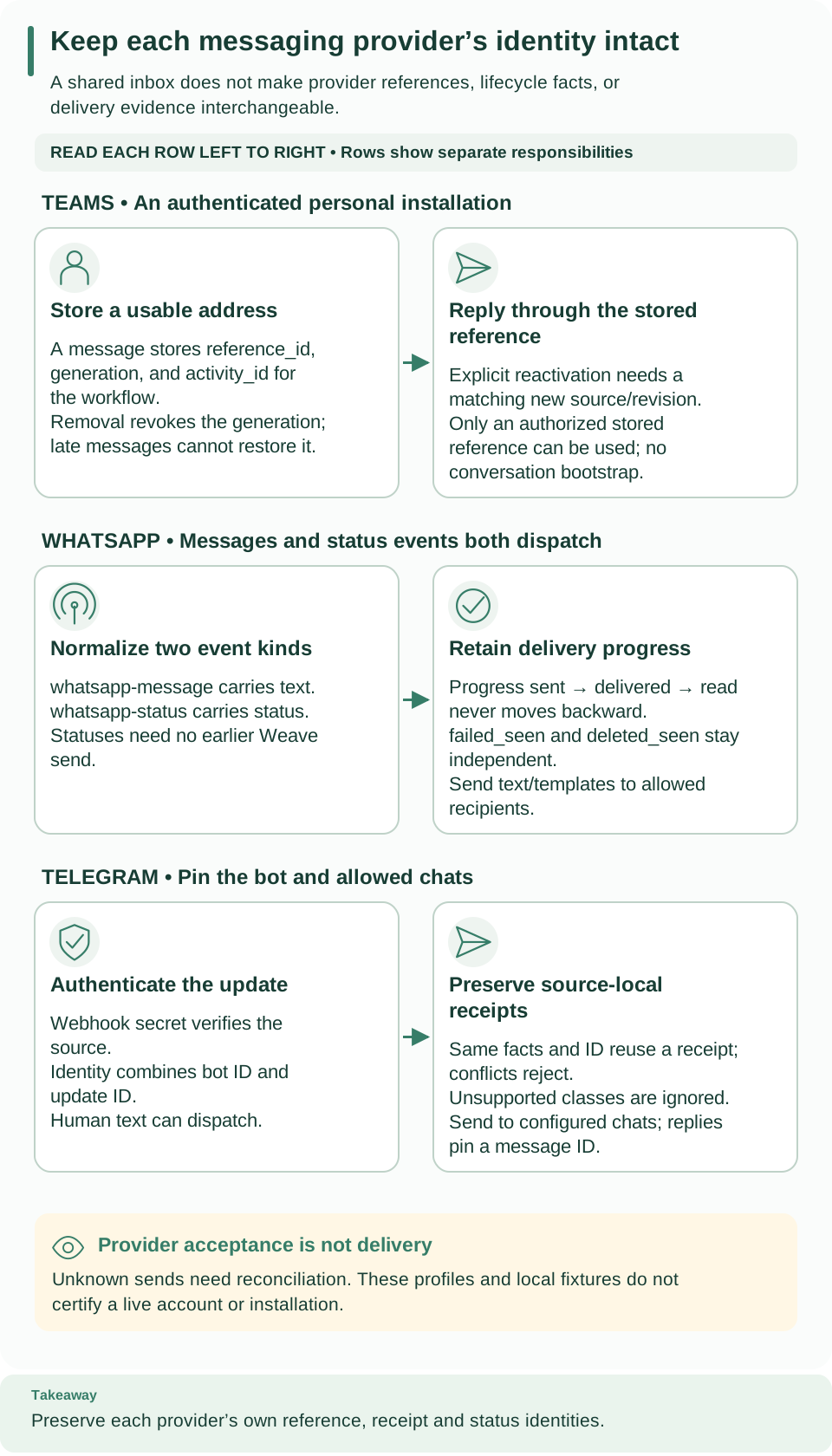
How to read this diagram: Follow the middle WhatsApp row from normalized message/status events to retained delivery progress. Both kinds can dispatch, but status carries delivery evidence rather than message text. Independent failure/deletion flags preserve out-of-order facts.
What the integration builds
There are two independent paths:
| Path | What happens |
|---|---|
| Inbound | Authenticated webhook events (messages and delivery statuses) start a workflow or signal a waiting run |
| Outbound | send-text or send-template Actions send to an explicitly allowed recipient |
Delivery-status webhooks report later provider facts. An outbound accepted
result is not a delivery-status result.
The checked-in profile and fixtures establish offline wire behavior. They do not certify current Meta account eligibility, template approval, commercial policy, or Graph version compatibility. No real message, account, or subscription was used.
Collect the connection values
| Connection field | Where the value comes from |
|---|---|
connector_version_id |
The published weave-whatsapp Connector response id |
app_id |
The operator's Meta application |
account_id |
The WhatsApp Business Account (WABA) identity |
phone_number_id |
The registered business phone asset ID, distinct from its phone number |
business_phone_number |
That asset's canonical digit-only phone number |
graph_version |
A version independently reviewed for this deployment; the fixture value is provisional |
recipient_allowlist |
Explicitly authorized digit-only recipient numbers |
approved_templates |
The account owner's reviewed name, locale, and body-parameter count |
connection.json is the
complete creation-request shape, including all three distinct secret handles.
Set up the integration
-
Provision the Meta assets (operator, outside Weave). Provision your Meta app, WABA, and registered business phone using current Meta instructions. Confirm webhook subscriptions and asset permissions with the account owner. Sending requires an appropriate access token; the historical Meta collection names
whatsapp_business_messaging. Recheck current requirements, the customer-service window, and template rules before live use. -
Store three distinct secret handles (operator).
accessToken,appSecret, andverifyToken. The verification token is operator-selected webhook verification material; it is not an app secret or access token. A webhook GET resolves onlyverifyToken, a POST onlyappSecret, and a send onlyaccessToken. Each resolution stays subject to current scope, source, binding, and connection authority. -
Enable the package (operator). Select the exact installed native declaration
firefly-weave:weave-whatsapp:firefly_weave.connectors.whatsapp:packageinWEAVE_CONNECTOR_PACKAGES. There is no Meta SDK extra. Disabled providers are not loaded by core scanning. -
Publish the Connector and create the connection. Publish the selected package's Connector manifest, copy
connection.jsoninto an operator-reviewed working file, replace its synthetic IDs and allowlist, and create it:# Create the connection revision from the reviewed request file. weave connections create --request whatsapp-connection.json --output jsonExpected: a connection revision; save its
id. Creation validates the local configuration; a token's presence proves no provider-side access. The publication and activation sequence explains the Weave IDs. -
Build the inbound workflow and its source. Publish and activate a workflow that accepts the complete
event-target.schema.json, and branch onevent_typebefore treatingtextas a message: status events have null text. Then create the source with the source request recipe, selecting the WhatsApp declaration and provider and copying this exact connection config intopolicy. Use the package's actual distribution version, adapter version, and shared provider schema digest; do not substitute one for another.# Create the inbound route from the generated request file. weave provider-sources create --request whatsapp-source.jsonExpected: a source; save its
idbefore configuring the provider callback. -
Configure Meta's callback (operator). Set it to
/provider-ingress/{source_id}on your public HTTPS ingress, with the configured verification token. Weave echoes a valid GET challenge and admits authenticated POSTs only after the entire transaction commits. Keep query strings and authentication headers out of reverse-proxy and access logs; Weave's native request logger uses the URL path, not challenge query data. -
Build the outbound Actions. Publish Actions selecting
send-textorsend-templatewithconfig: {}, the installed descriptor's schemas,sideEffect: non_idempotent, and the descriptor's timeout. Bind the connection and the admitted release at activation. -
Verify before going live. Check the current normative Meta documentation for the selected Graph version and account profile, then use explicitly authorized test recipients.
weave connections testcurrently reports failure without network access, because remote asset and token validation is unsupported.
The Graph version is mandatory and fixed per connection. v26.0 in synthetic
examples is provisional; no current WhatsApp compatibility or lifecycle date is
asserted. Only https://graph.facebook.com/{graph_version}/{phone_number_id}/messages
is permitted, and the connection's allowed_destinations must contain exactly
https://graph.facebook.com. The app, WABA, and phone mapping cannot come from
workflow input.
Send a message
These are complete Action inputs for the two send actions, not API requests to start a run:
Expected: {"message_id":"PROVIDER_MESSAGE_ID","acceptance":"accepted"}. Save
that message ID to read its delivery status.
send-textaccepts onlyrecipientandtext.send-templateaccepts the recipient, the configured name and locale, and ordered body-text parameters.- Recipients must exactly match the canonical digit-only allowlist. Templates must exactly match the configured approval assertion and parameter count.
- There are no arbitrary components, media, buttons, URL headers, account or subscription APIs, or template creation.
Local limits. 100 recipients and templates, 20 parameters, 4096 text characters, 1024 characters per parameter, an encoded request of at most 1 MiB, and a response of at most 64 KiB, subject to tighter invocation budgets. These are local conservative bounds, not statements about current provider quotas. The total invocation deadline includes authorization and secret resolution.
Failure handling. The adapter makes one POST, with no redirects, proxies, or automatic retries:
| Result | Outcome |
|---|---|
| Invalid input, a recipient outside the allowlist, or a template that differs from the approved list | not_started, WHATSAPP_INPUT |
| Explicit provider 4xx rejection other than 408 | failed, WHATSAPP_REJECTED |
| 429 rejection | failed, WHATSAPP_RATE_LIMIT |
| Timeout or cancellation after transmission may begin, 408 or 5xx, redirects, response limits, malformed success | unknown |
Credentials, text, provider error bodies, and diagnostic response headers are never ordinary outputs. An operation key is not provider idempotency. Retry decisions stay explicit and governed by the operation ledger; never replay an unknown POST automatically. A missing status fact alone does not prove that no send occurred.
Ingress and workflow mapping
- Signatures. POST signatures cover the exact raw bytes with HMAC-SHA256 and
appSecret, before JSON parsing. Missing, malformed, and repeated signatures fail; rewriting whitespace invalidates a signature. - Batches. Raw bodies are limited to 1 MiB and normalized batches to 100 events. All entries, changes, messages, and statuses are inspected. A mixed WABA or phone batch, a schema conflict, or a failed commit leaves no partial receipts or status projection and receives no success acknowledgment. Provider timestamps are occurrence facts, not a freshness authentication mechanism.
- Event kinds.
whatsapp-messageandwhatsapp-statusboth dispatch. Their required common envelope includesevent_type,installation_id,message_id,phone_number_id,peer_id,timestamp,text,status,error_codes, andfacts_digest. Messages havetextand a nullstatus; statuses have nulltext. Map/payloadto the shared example target schema, then branch onevent_type. Source creation checks both schemas, so a text-only mapping or target cannot silently discard status events. - What is ignored. Recognized statuses are
sent,delivered,read,failed, anddeletedin this offline compatibility profile. Unsupported message types or status names with a valid stable identity produce durable ignored receipts with a safe reason. Unsupported envelope categories or malformed required structures reject the whole batch. Self messages from the configured business number are ignored. - Authority. No sender identity conveys Weave authorization or adds an outbound recipient to the allowlist.
Status history
Each status identity includes the installation, message ID, status, and provider timestamp. Immutable facts never overwrite one another.
- Progress. Progress is monotonic only along
sent→delivered→read;failed_seenanddeleted_seenare separate flags. Read, sent, delivered creates three facts and ends with progressread. A failed fact after read leaves progressreadand setsfailed_seen. Deleted does not delete data or imply that it follows read in an ordering. - Continuity. The installation identity binds the tenant, project, and environment plus the app, WABA, and phone. Credential rotation, Graph version changes, and replacement sources keep that history.
- Duplicates. A repeated fact across two sources creates one fact and two source observations, but each source can dispatch its own workflow receipt. Disable the old source during cutover when duplicate workflow effects are undesirable. This is source-local at-least-once delivery, not global exactly-once execution.
- Unknown messages. Unknown message IDs may receive statuses even if Weave did not originate the send. A stored status is not a claim that Weave accepted the outbound operation.
Read delivery status
Reading needs current scoped run.read and the native package selected. Disabled
sources stay readable; an unselected or unavailable package fails safely.
Installation history can contain facts first observed through another source in
the same scope. IDs and cursors never grant cross-scope authority.
# Read the delivery state of one sent message; the workspace comes from your saved platform.
weave whatsapp-statuses read --source SOURCE_UUID --message-id wamid.out
# List the individual status facts behind that state, 50 per page.
weave whatsapp-statuses facts --source SOURCE_UUID --state-id STATE_UUID --limit 50
Expected: JSON on standard output with the delivery state, then a page of facts
with a cursor for the next page. Facts use scope-, source-, and state-bound cursors
and a maximum page size of 100. Both commands use your saved platform and
workspace; in scripts, use explicit mode
with --base-url, --tenant, --project, and --environment. Exit codes are 1
for an API denial or error, 2 for local usage or configuration, and 3 for a server
or transport failure.
The same reads exist in the API and SDK:
GET /api/v1/tenants/{tenant}/projects/{project}/environments/{environment}/provider-sources/{source}/whatsapp-statuses?message_id={wamid}
GET /api/v1/tenants/{tenant}/projects/{project}/environments/{environment}/provider-sources/{source}/whatsapp-statuses/{state_id}/facts
SDK: whatsapp_delivery_state(source_id, message_id) and
list_whatsapp_status_facts(source_id, state_id, limit=50, cursor=None). Source
and receipt lifecycle stays under weave provider-sources and
weave provider-receipts.
Retention. Status facts, observations, and deduplication evidence are kept by default. Disabling a source does not purge them, and ordinary roles have no delete privilege. The retention policy governs coordinated cleanup and preserves active, unknown-outcome, and deduplication references.
Troubleshoot
| What you see | Why | What to do |
|---|---|---|
| A webhook is acknowledged but nothing replies | The inbound commit succeeded; the run or the send did not | Inspect the provider receipt and its linked run separately |
A send ends unknown |
The message may have been accepted | Use incident reconciliation before another send |
WHATSAPP_INPUT; nothing was sent |
The recipient is not in recipient_allowlist, the template differs from approved_templates, or the input fails its schema |
Fix the input, or create a new connection revision with the reviewed values |
WHATSAPP_RATE_LIMIT |
Meta returned 429 | Wait before sending again; Weave never retries silently |
weave connections test fails |
Remote asset and token validation is unsupported | Use authorized test recipients for a live check |
Evidence boundary
Wire shapes derive from Meta's official sample pinned to 14703a3e1fdba9bcf75b2360b00817b6fcc9f79b and its official Postman webhook reference. The Postman text includes historical beta wording. Direct current normative Meta pages returned 429 during September 30 research. The current version and lifecycle, commercial rules, account permissions, and provider retry behavior remain live acceptance prerequisites. Local tests cannot certify those facts.
Next steps
- Branch on message or status events: Author workflows.
- Understand receipts and dispatch: Authenticated provider sources.
- Compare with the other messaging connectors: Teams and Telegram.