Back up and restore an owned local installation
Use this ordered recipe to rehearse recovery on your own laptop: you stop every
writer, take a complete logical backup, and restore it into a new, empty
database in the same PostgreSQL 17 cluster, then prove that the restored copy
serves the original run. It is written for operators. You need the
manual standalone installation with its private
WEAVE_WORK_DIR, WEAVE_LAUNCH_ID, WEAVE_DOCKER_CONTEXT, and WEAVE_PYTHON,
and a maintenance window: plan for about 30 minutes of downtime. The source, the
target, the archive, the credentials, and independent receiver receipts are all
kept.
This recipe covers the manual standalone installation only. The checked-in
helper accepts only the guarded local PostgreSQL ports 55433 and 55434 (the
standalone walkthrough selects 55434), the libc locale, the default
database-level access list, and the existing local provisioning administrator.
The local platform from weave platform setup picks free ports of its own, so
the helper refuses it, and weave platform has no backup command; its
stop keeps volumes and data. The helper also rejects other environments and
custom database-level access lists before it creates anything.
It is not a production backup system. It is not live failover, point-in-time recovery, an identity-provider or secret-provider backup, or a recovery point or recovery time guarantee. It does preserve and compare all schema, table, column, and function grants, owners, and policies. Production needs a procedure suited to its own storage, identities, encryption, and recovery objectives.
For a deployment, back up: PostgreSQL with your provider's tested
procedure; the protected runtime and migration credentials and
WEAVE_OPERATIONS_POLICY; your identity and secret providers through their own
procedures; and independent receipts of external effects. Restore into a new
database, keep one active deployment, and run the checks in
step 4.
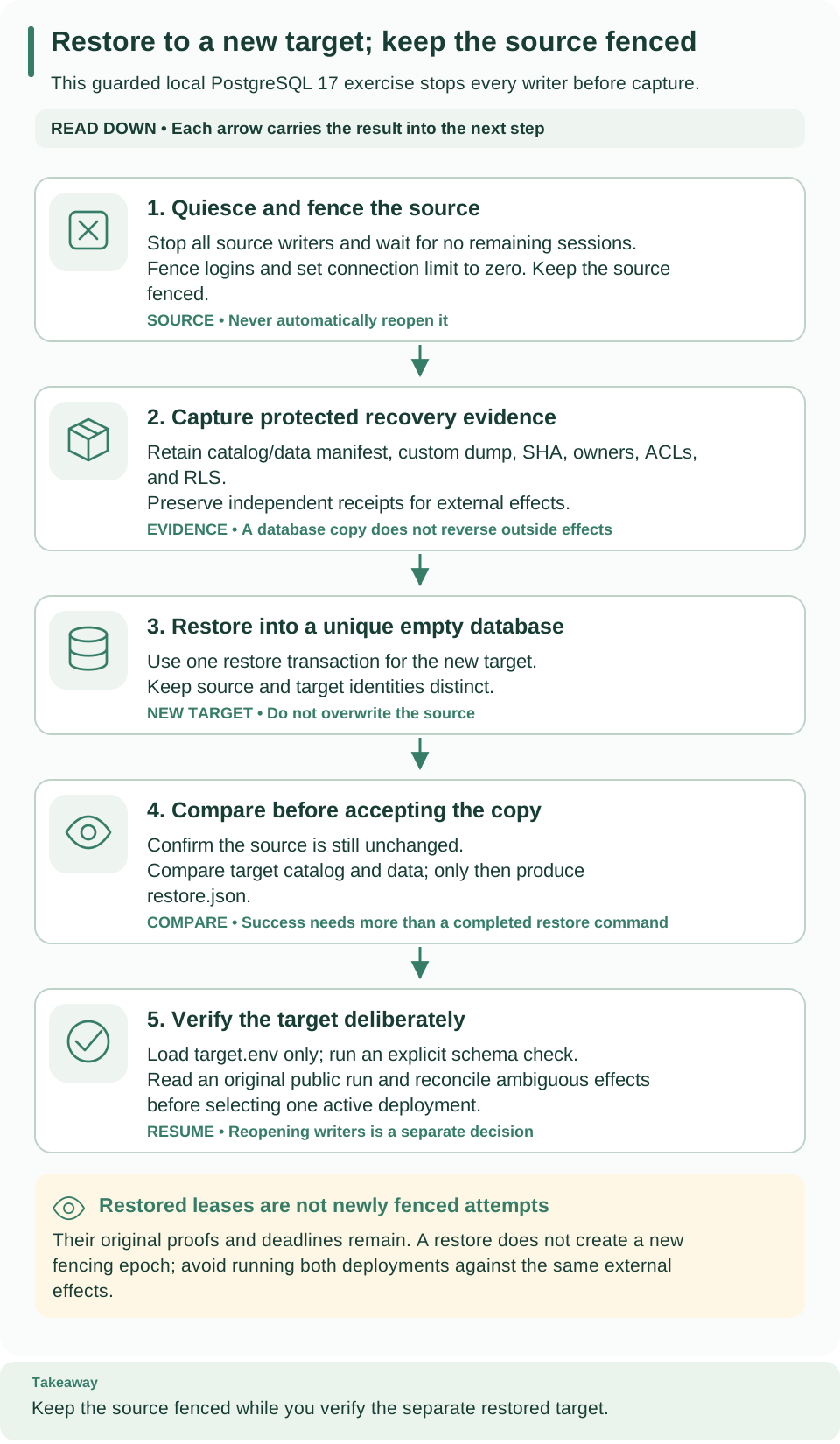
Read the five cards from top to bottom: fence the source (1), capture evidence (2), restore into a new database (3), compare (4), and verify the target (5). The helper writes its completion receipt after the catalog and data comparison; reading the original run back is your own later check. The source stays fenced throughout.
Before you begin
Two words matter here. Quiesced means every application writer is stopped before capture. Fenced means the helper then prevents ordinary logins from reconnecting to the source database. A successful exercise leaves the source fenced and starts only the restored target; it does not switch traffic or reopen the source afterward.
Run every command from the root of the standalone checkout, because
compose.yaml and scripts/restore_database.py are relative paths.
Terminals. Keep the standalone operator shell as terminal 1: it needs the
existing private work directory, Docker context and project, installed
interpreter, identity settings, and the selected WEAVE_API_PORT. Step 4 uses a
second terminal for the restored API, prepared with the standalone walkthrough's
printed cd and source .../session.env commands. PostgreSQL and Keycloak stay
running throughout.
| Item | Where it comes from | Why it is needed |
|---|---|---|
runtime.env |
Standalone runtime provisioning | Identifies the source database and its three authorities |
postgres.env |
Standalone PostgreSQL setup | Lets the helper reach the guarded control database |
first-run.json |
First successful public workflow | Supplies the scope, run ID, and expected output for the final comparison |
effects.sqlite |
Optional deployment receiver | Preserves independent external-effect receipts |
WEAVE_BACKUP_DIR |
A new, unique directory selected in step 2 | Holds the archive, manifests, restored credentials, and completion receipt |
If your installation uses another PostgreSQL port, the helper refuses it. Never change its guard or relabel an existing database to make the exercise run.
1. Stop and fence all source writers
Why: a restored copy shares the original lease proofs, generations, and absolute deadlines; it does not create a new fencing epoch. Anything still writing to the source would make the copy inconsistent.
Stop the foreground API and any other worker processes with Ctrl-C in their own terminals. You stop the writers here; the helper fences the database in step 3. Keep the idempotent effect receiver running: its receipt store is independent of the database and must survive the exercise. If the deployment guide created a remote worker, stop only the exact container named in its receipt:
# Stop only the remote worker recorded in the deployment receipt, if there is one.
python3 - <<'PY'
import json, os, subprocess
from pathlib import Path
receipt = Path(os.environ["WEAVE_WORK_DIR"]) / "worker-deployment.json"
if receipt.exists():
    value = json.loads(receipt.read_text())
    subprocess.run(value["stop_argv"], check=True)
print("Owned remote worker stop completed, if configured")
PY
Expected: Owned remote worker stop completed, if configured.
If you launched the API and native executor through Compose, stop those two services with the same complete configuration as the deployment guide:
# Stop the container API and native executor of this installation only.
docker --context "$WEAVE_DOCKER_CONTEXT" compose --project-name "$WEAVE_LAUNCH_ID" \
  --env-file "$WEAVE_WORK_DIR/postgres.env" --env-file "$WEAVE_WORK_DIR/identity.env" \
  -f compose.yaml -f compose.identity.yaml -f compose.runtime.yaml \
  -f compose.local-runtime.yaml stop api native-executor
Expected: Compose reports the api and native-executor containers as
stopped. Skip that optional command if you never generated the runtime env files
and image variables that the deployment guide requires. Every API, scheduler, provider
ingress, provider or outbox dispatcher, native executor, remote worker, and
broker consumer that points to the source must be stopped.
2. Reserve protected evidence and identify PostgreSQL
Why: the helper needs the existing control configuration and the exact PostgreSQL container, and it refuses configuration files that are not private.
Return to terminal 1. Load the existing control configuration; never regenerate or overwrite a retained secret file. The runtime receipt identifies the source database and its existing application and scheduler credentials.
# Load the control settings, choose a new backup directory, and find this installation's PostgreSQL container.
umask 077
set -a
source "$WEAVE_WORK_DIR/postgres.env"
set +a
export WEAVE_BACKUP_DIR="$WEAVE_WORK_DIR/backup-$(python3 -c 'from uuid import uuid4; print(uuid4().hex)')"
export WEAVE_POSTGRES_CONTAINER="$(docker --context "$WEAVE_DOCKER_CONTEXT" compose \
  --project-name "$WEAVE_LAUNCH_ID" --env-file "$WEAVE_WORK_DIR/postgres.env" \
  -f compose.yaml ps -q postgres)"
test -n "$WEAVE_POSTGRES_CONTAINER"
# Check that both private files are regular, owned by you, and not readable by others.
"$WEAVE_PYTHON" - <<'PY'
import os, stat
from pathlib import Path
root = Path(os.environ["WEAVE_WORK_DIR"])
for name in ("postgres.env", "runtime.env"):
    path = root / name
    info = path.lstat()
    assert stat.S_ISREG(info.st_mode) and not path.is_symlink()
    assert info.st_uid == os.getuid() and info.st_mode & 0o077 == 0
print("Existing private source configuration is ready")
PY
Expected: Existing private source configuration is ready. The backup
directory must not exist yet; the helper creates it with mode 0700 and writes
each file once with mode 0600. Its archive contains sensitive database contents,
including retained proof hashes and payloads, so protect it like the source
database.
3. Perform one owner-preserving restore
Why: this single command captures the source, restores it into a new database, and proves that both match before it declares success.
# Fence the source, dump it, restore into a new database, and compare catalog and data.
"$WEAVE_PYTHON" scripts/restore_database.py \
  --runtime "$WEAVE_WORK_DIR/runtime.env" --output "$WEAVE_BACKUP_DIR" \
  --context "$WEAVE_DOCKER_CONTEXT" --postgres-container "$WEAVE_POSTGRES_CONTAINER"
Expected: {"complete": true, "catalog_data_equal": true}. Keep the generated
restore.json as the completion evidence; a dump file alone does not prove that
a restore succeeded. The helper:
- Checks its inputs: the explicit local Docker socket context, the exact container and loopback port, the PostgreSQL guard, a PostgreSQL 17 server, and complete administrator authority.
- Fences the source: it verifies nonowner
NOSUPERUSERNOBYPASSRLSapplication and scheduler identities and no remaining source sessions, sets the source database's connection limit to zero, checks for a raced session, and leaves the source fenced. - Records a manifest: complete table counts and canonical data checksums; schema, table, and function owners; access lists, column grants, row-level security policies, fixed function search paths, sequence values, and role membership and privilege flags. Both schema markers are part of the table inventory.
- Dumps and restores: PostgreSQL 17
pg_dump --format=custom, an archive SHA-256 and inventory, a unique target created fromtemplate0and checked empty, thenpg_restore --single-transaction --exit-on-errorwith owners and access lists intact. - Compares: the restored manifest must equal the source, and the source
must not have changed during capture. Only then does it write
target.envand the completion receiptrestore.json.
What it never does. It dumps or restores no global roles, changes no existing
role, reconstructs no table, edits no lease, and drops no database. There is no
--clean, --no-owner, --no-acl, automatic migration before restore, or
cleanup shortcut. A failed run keeps its incomplete evidence and any database it
created; it never reopens the source or marks the target complete.
File in WEAVE_BACKUP_DIR |
Written when | Contents |
|---|---|---|
trial.json |
Right after fencing | Source and target database names, "source_fenced": true, the container, the source database's owner, encoding, and locale, and the server version |
before.json |
After fencing | Source catalog and data manifest |
source.dump, archive-inventory.txt |
After the dump | Custom-format archive and its pg_restore --list inventory |
restore.log |
During the restore | pg_restore output |
after.json |
After the restore | Target catalog and data manifest |
target.env |
Only after both comparisons pass | runtime.env with the three database URLs pointing at the new target |
restore.json |
Last | Completion receipt: complete, catalog_data_equal, the source and target names, "source_fenced": true, the archive SHA-256 and size, the duration, and the archive path kept inside the PostgreSQL container |
If the helper stops before completion
On any failure, the helper exits 1 with only Restore failed; inspect retained
private evidence. No source reopening or cleanup was performed. It does not
print the detailed reason; use the files it left behind to find the stage:
| What you find | What it means | What to do |
|---|---|---|
No new WEAVE_BACKUP_DIR |
The helper stopped before creating anything: a missing or wrong control setting from postgres.env, an unsupported port, a runtime file that is not this installation's, or a directory that already existed |
Check that terminal 1 loaded postgres.env and that the directory is new; nothing changed, so you can retry with a new directory |
The directory exists but has no trial.json |
A check before fencing failed: Docker context or container, PostgreSQL guard or version, administrator authority, a custom database access list, a locale provider other than libc, privileged runtime roles, or a writer still connected | Stop every writer and confirm the requirements in before you begin. The source is normally not fenced yet, except when a session raced with fencing |
trial.json without restore.json |
The source is fenced, and capture, restore, or comparison failed | Keep the archive, logs, and both databases; do not start the target as verified |
The source may already be fenced after a failure, so retrying application
startup against it is not a recovery action. Inspect the retained trial.json
and any completion receipt before you choose the active database, and always use
a new output directory for a deliberate retry.
4. Verify the schema and start only the restored target
Why: the helper proved that the data matches; this step proves that the restored database serves the original run through the API.
Keep all source writers stopped. In a dedicated target terminal, run the
standalone walkthrough's printed cd and source .../session.env commands. Set
WEAVE_BACKUP_DIR to the exact path from step 2 (print that nonsecret path in
terminal 1 if needed). Then load only the new target's runtime configuration,
check the schema, and start the API:
# Load only the restored target's settings, confirm its schema, then run its API in the foreground.
set -a
source "$WEAVE_BACKUP_DIR/target.env"
set +a
"$WEAVE_WORK_DIR/runtime/bin/python" -I -m firefly_weave.cli.main admin migrate
env -u WEAVE_MIGRATION_DATABASE_URL \
  "$WEAVE_WORK_DIR/runtime/bin/python" -I -m uvicorn \
  firefly_weave.main:create_application --factory --host 127.0.0.1 --port "${WEAVE_API_PORT:?Set the selected API port}"
Expected: Weave schema is current, followed by API startup. For a same-version
restore, the migration does nothing. A predecessor exercise instead restores a
genuine old artifact's database and then migrates it explicitly with the new
artifact; a repeated version string, or current rows stamped with an old
revision, is not evidence of predecessor compatibility.
In terminal 1, verify readiness and the original public run with a fresh host token; every identifier comes from the original first-run receipt:
# Read the original run from the restored API and compare it with the first-run receipt.
"$WEAVE_PYTHON" - <<'PY'
import asyncio, json, os
from pathlib import Path
import httpx
async def main():
    receipt = json.loads((Path(os.environ["WEAVE_WORK_DIR"]) / "first-run.json").read_text())
    base = "http://127.0.0.1:" + os.environ["WEAVE_API_PORT"]
    async with httpx.AsyncClient(timeout=10, trust_env=False) as client:
        ready = await client.get(base + "/health/ready")
        ready.raise_for_status()
        token = await client.post(os.environ["WEAVE_KEYCLOAK_TEST_URL"] + "/realms/weave/protocol/openid-connect/token",
            data={"grant_type": "client_credentials"}, auth=("weave-host", os.environ["WEAVE_HOST_SECRET"]))
        token.raise_for_status()
        scope = receipt["scope"]
        path = f"/api/v1/tenants/{scope['tenant_id']}/projects/{scope['project_id']}/environments/{scope['environment_id']}/runs/{receipt['run_id']}"
        response = await client.get(base + path,
            headers={"Authorization": "Bearer " + token.json()["access_token"]})
        response.raise_for_status()
        run = response.json()
        assert run["state"]["status"] == receipt["status"]
        assert run["state"]["output"] == receipt["output"]
        print("Restored public run and output match the original receipt")
asyncio.run(main())
PY
Expected: Restored public run and output match the original receipt. This
checks that an authenticated public read retrieves the preserved successful run,
beyond the catalog and data equality the helper already proved.
Readiness alone does not prove continuation. For an installation with active work, also resume signal and time waits, verify that safe retries use their original operation keys, require stale-proof fencing and explicit reconciliation for ambiguous non-idempotent effects, and inspect schedules, source bindings, outbox receipts, Teams reference fences, and WhatsApp status facts. Keep the independent receiver receipts, and compare preserved history separately from new recovery events.
5. Finish the exercise
Stop the target API with Ctrl-C. Keep both databases, the volumes, the archives, and the receipts. The source stays fenced until an explicit operational decision chooses the active deployment; the helper never reopens it for you. Identity-provider and secret-provider retention are separate responsibilities.
Next steps
- Use this recovery copy before a migration, as described in upgrades.
- Resolve runs with ambiguous effects through incident operations.
- Review restart behavior in local runtime.