Run AI steps with an Agentic worker
Use an AI task when a business process needs a model's answer before it continues. For example, a workflow can summarize a support request, then give that summary to a person for review. You define the expected result; Weave accepts the answer only if it satisfies that contract.
Use Lumi when you, the person using Studio, want an explanation or a proposed definition change. Lumi has separate configuration and does not execute workflow AI tasks.
The examples here use Weave 0.1.0a14 and the 0.1.6 Agentic worker package,
whose core dependency is
pinned to that Weave version. The catalog references below retain their own
1.0.0 definition and task versions.
Follow one AI task from authoring to completion
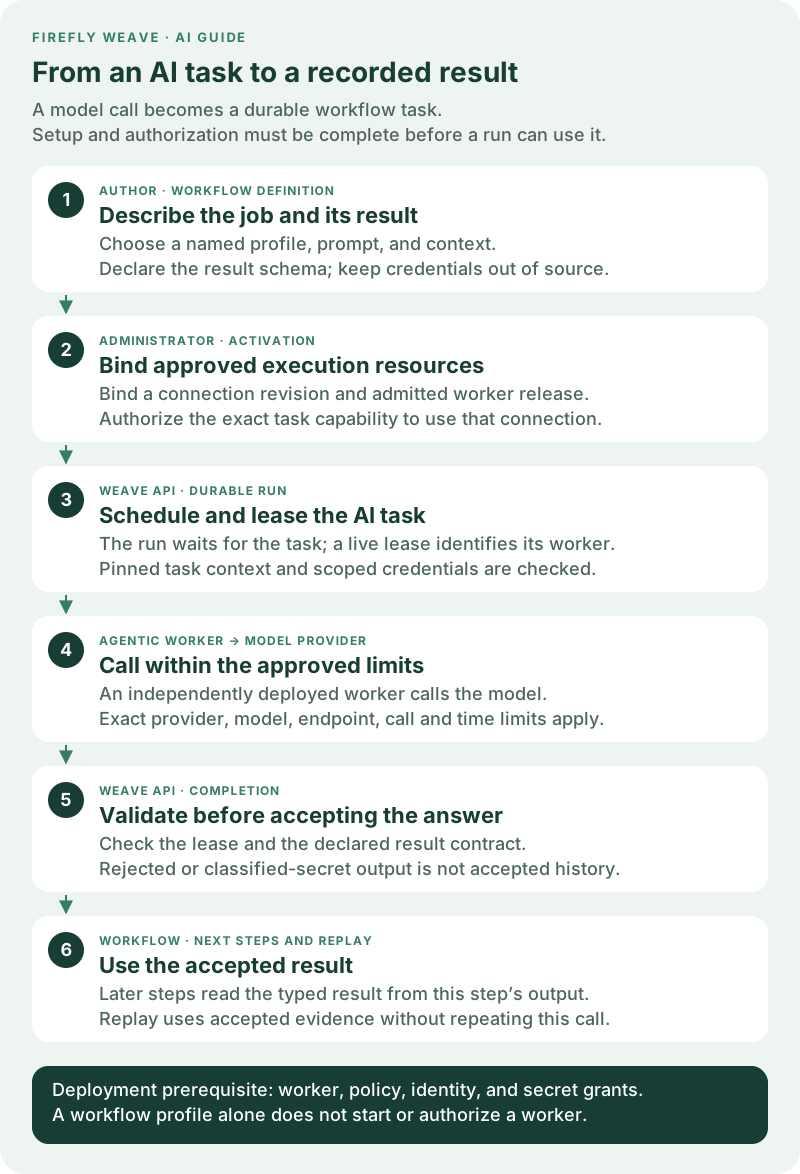
Open the workflow lifecycle diagram at full size. Read the numbered cards from top to bottom:
- The author describes the work. A step names a workflow AI profile and supplies a prompt and context. The profile specifies the provider, model, limits, and schema of the expected answer.
- The administrator makes execution possible. Published definitions, an admitted worker release, an authorized connection revision, and the appropriate grants must be available. Activation pins the execution resources.
- Weave creates a durable task. When the run reaches the AI step, it waits for a worker to claim a lease. The worker receives the pinned task context and requests credentials through the lease-scoped API.
- The worker calls the provider. An independently deployed Agentic process checks its operator policy and applies the configured call and time limits.
- Weave checks completion. A current lease and a valid result are required. A malformed answer cannot silently become successful workflow output.
- The run continues with accepted evidence. Later steps can use the answer. Replay uses that accepted result; it does not ask the model to generate it again.
The AI step resolves its named spec.llmProfiles entry at compilation. Its
canonical Action is weave-agentic-generate@1.0.0; the Action delegates to the
worker task capability weave-agentic.generate@1.0.0. These two identifiers serve
different purposes: select the Action in the workflow and grant the task
capability to the worker.
The Weave server never imports Agentic or contacts a model provider. The worker
source and locked environment are in workers/agentic. This independent Python
3.13 process uses Firefly Agentic 26.9.0, pinned to the verified v26.09.0 release
wheel and its SHA-256. Weave retains its Python 3.12 server requirement.
Agentic worker 0.1.5 uses the alpha13 SDK. Its installed task protocol was checked
against an unchanged alpha12 API, including recovery from explicit admission
capacity rejections before the model starts. That check used a simulated model.
A separate Azure acceptance completed one new workflow with gpt-4o-mini through
azure-chat: one model request returned the expected {"ok": true} result, and
replay was consistent. Replay did not verify authorization. The API, Lumi and
Operations services remained on alpha12 with schema 0030; no new Lumi call was
made. This verifies the tested deployment, not general compatibility between
different versions or providers. See alpha13 verification
for the exact scope and the separately retained alpha12 acceptance evidence.
Set up the responsibilities before authoring
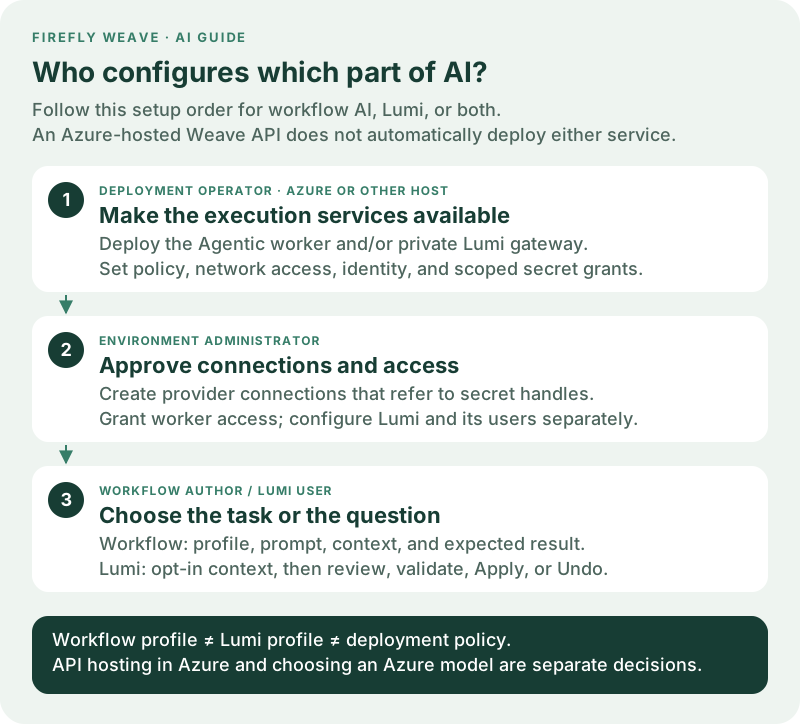
Open the configuration roles diagram at full size. One person can perform several roles, but each configuration still has a separate purpose and authorization boundary.
| Person | What they configure | What it makes possible |
|---|---|---|
| Deployment operator | Worker process, identity, exact model/endpoint policy, network access, and scoped secret grants | A trusted service can reach Weave and an approved model provider. |
| Environment administrator | Published Connector and Action, provider connection, worker release, worker grants, and activation bindings | The chosen worker can execute the exact task using the chosen connection revision. |
| Workflow author | Workflow AI profile, prompt, context, output schema, and connection slot | The definition describes what to ask and how later steps can use the answer. |
Secret provisioning is an operator step. A connection stores an apiKey
handle, not the API key itself. The operator maps that handle to a secret in
WEAVE_SECRET_GRANTS, scoped to the tenant, project, and environment. The API
loads that grant list at startup; adding or changing a grant requires an API
restart or deployment rollout. Mounted secret-file contents are resolved when
used, which is separate from changing the grant list. Follow
Give integrations their secrets
for the supported file and environment providers. Saving a handle in Studio does
not provision its secret or grant access to it.
Studio's New AI connection uses the standard OpenAI or Anthropic endpoint automatically. Advanced: custom endpoint is available for an approved proxy or compatible service. Azure requires the resource endpoint and API version from its administrator. Review shows the exact saved endpoint; hostname case and the default HTTPS port are normalized, while the base path and trailing slash are preserved. The worker or Lumi gateway must still allow that exact endpoint. Existing endpoint policies are not changed by saving a connection.
Saved · Not tested means that the connection configuration passed validation. It does not prove provider access, model availability, or worker/gateway readiness. Workflow AI profiles and Lumi settings remain separate and select their own model or Azure deployment using the approved connection.
Hosting Weave in Azure does not select an AI provider. The Azure operator still deploys the worker, supplies its configuration and token file, permits its network traffic, and sets up the API's secret grants. An Azure model endpoint is one provider choice; an Azure-hosted Weave API can also use another supported, explicitly approved provider. Worker deployment and model choice are independent. See deployment for service identity and worker release provisioning.
Author your first AI task
After the administrator has prepared the environment:
- Add an AI task in Studio and select the canonical AI Action from the connected catalog. If it is missing, the administrator must publish it first.
- Open Configure workflow AI profiles and create a named profile. The first
fields choose the provider, model and maximum response tokens. Describe the
expected result with the schema designer. Advanced model settings contains
optional generation controls, reasoning strategies and execution limits.
Start with the
nonereasoning pattern for a single structured answer. - Select that profile on the step. A name such as
summarizeris local to this workflow; it is not a provider credential or a Lumi setting. - Supply the prompt (the instruction) and context (the data to use). Map only the input or earlier step data needed for this task. The provider receives these values, so omit credentials and unnecessary sensitive data.
- Choose the connection slot. The slot declares the provider Connector; activation binds it to an authorized environment connection revision.
- Validate the workflow, resolve readiness problems, then publish and activate through the normal workflow process. Starting a run is a separate action.
Studio checks model settings against the same profile contract as the API before allowing you to continue. Errors such as a per-call timeout longer than the total step timeout must be corrected first. This is a configuration check, not proof that the selected model is approved or reachable. Expanding or collapsing advanced settings preserves edits; clearing an optional control omits that value. Lumi uses the same basic and advanced presentation for its separate profile.
The AI task inspector reference explains the
Studio controls. The following complete source example summarizes a supplied
text into a typed string result. gpt-4o illustrates an explicit model ID; replace
it with a model approved and available in your deployment, and update the
worker policy to match.
apiVersion: weave/v1alpha1
kind: Workflow
metadata:
  name: summarize-request
  version: 1.0.0
spec:
  inputSchema:
    type: object
    properties:
      text: {type: string}
    required: [text]
    additionalProperties: false
  outputSchema: {type: string}
  connections:
    ai-provider:
      connector: weave-agentic-provider@1.0.0
  llmProfiles:
    summarizer:
      provider: openai-chat
      model: gpt-4o
      options:
        max_tokens: 256
      reasoning:
        pattern: none
      maxCalls: 1
      timeoutSeconds: 60
      outputSchema: {type: string}
  steps:
    - id: summarize
      kind: llm
      uses: weave-agentic-generate@1.0.0
      profile: summarizer
      connection: ai-provider
      prompt:
        literal: Summarize the supplied text in one sentence.
      context:
        ref: /input/text
  output:
    ref: /steps/summarize/output/result
Here summarizer selects the profile, ai-provider selects the connection slot,
and /steps/summarize/output/result selects the validated model answer. The
step's full output also includes provider, model, and usage metadata. Compiling
this example requires the canonical Connector, Action, and worker task catalog;
a source-valid profile alone does not prove that a worker or credential is ready.
The compiler may report WV-COMP-UNKNOWN_COMPATIBILITY for the generic AI Action
input contract. Runtime validation of the pinned profile and answer still applies;
the example does not disable that validation.
The remaining sections walk the operator and administrator through that setup.
Install and export the catalog
From the repository root:
uv sync --project workers/agentic --locked --python 3.13
workers/agentic/.venv/bin/weave-agentic-worker --catalog > agentic-catalog.json
workers/agentic/.venv/bin/weave-agentic-worker --release-manifest > agentic-release.json
The catalog contains weave-agentic-provider@1.0.0, the worker Action
weave-agentic-generate@1.0.0, and the exact task capability. Complete these
operations in order:
- Register the worker release with its image digest and the exported task and credential capabilities. This makes the task available to the compiler.
- Publish the Connector and then the Action through the normal definition APIs.
Publishing the Action before admitting its task returns
WV-COMP-UNKNOWN_TASK. - Create the provider connection described below, then use the worker connection grant API to authorize the release and task capability for that exact revision.
- Activate the workflow with explicit worker-release and connection-revision pins.
A published definition, an admitted worker release, and a running worker are separate prerequisites. Completing one does not automatically complete the others.
The Action is non_idempotent and allows one attempt. A provider request can
incur charges even when its result is lost. Weave fences completion and preserves
accepted results for replay; it cannot promise exactly one provider request
after an ambiguous network failure.
Configure the provider connection
In Studio, open Settings → AI setup → New AI connection. The same action is
available from Connections and the AI task inspector. You need
connection.manage in the environment. If the provider Connector is not yet
published, the form explains the prerequisite; an author cannot bypass it.
Studio alpha11 guides this setup through three steps. Alpha10 presents the same fields in a single form.
- Provider: enter a Connection name that identifies the intended account or purpose, choose Provider, and select Continue. The model or Azure deployment name belongs in the workflow profile.
- Access: copy the exact operator-approved Provider endpoint. For Azure, also enter the explicit Azure API version. Enter the API key secret handle supplied by the operator, never the raw API key, then select Review connection. The Azure endpoint hint has no trailing slash; copy the approved endpoint exactly rather than inventing a different spelling.
- Review: check the name, provider, endpoint, API version when applicable, and secret handle. Back preserves these details so you can correct them. Select Create AI connection only when they are ready. Earlier steps do not create a connection or send a model request.
- Record the created connection and revision. Studio restricts allowed destinations to the endpoint's HTTPS origin, and the operator's worker policy must also permit the endpoint. The platform checked configuration, not live provider connectivity. Complete worker release and credential grants before binding it to an executable workflow.
For API clients, create a connection for the published provider Connector with this configuration:
Set secretRef.apiKey to the existing secret handle and add the endpoint's
origin, for example https://api.openai.com, to allowed_destinations. Azure
connections additionally require an explicit apiVersion, such as the version
approved for your deployment. The supported provider selectors are
openai-chat, openai-responses, azure-chat, azure-responses, and anthropic.
Model IDs and Azure deployment names are supplied explicitly.
The server validates this configuration without provider I/O. The generic connection test returns unsuccessful because this connection is executed by the remote worker; it does not claim to test provider credentials. A successful AI task is the end-to-end provider check.
Apply the worker's model and endpoint policy
Mount a policy file owned by the operator:
{
  "models": [{"provider": "openai-chat", "model": "gpt-4o"}],
  "endpoints": ["https://api.openai.com/v1"]
}
These are exact allowlists, with no wildcard model or endpoint selection. The model name above illustrates the format; use models available to your provider account. A workflow cannot set a provider URL, secret value, custom tool class, or arbitrary model settings. Every task must satisfy the deployment policy and its bound connection's destination list. Configure the worker's network policy to allow only those provider destinations and Weave.
The provider clients disable environment proxies, redirects, and automatic SDK
retries. Model options are checked by the pinned Agentic ModelOptions and
provider settings resolver. Unsupported options fail before credential lookup;
they are not silently dropped.
Start the worker
Provide these explicit deployment settings:
| Setting | Value |
|---|---|
WEAVE_API_URL |
Weave API origin |
WEAVE_ENVIRONMENT_URL |
Scoped /api/v1/tenants/.../projects/.../environments/... path |
WEAVE_WORKER_RELEASE_ID |
Admitted worker release UUID |
WEAVE_WORKER_TOKEN_FILE |
Mounted worker access-token file; use this or OAuth configuration, never both. |
WEAVE_WORKER_OAUTH_CONFIG_FILE |
Mounted client-credentials configuration JSON; alternative to the access-token file. |
WEAVE_AGENTIC_POLICY_FILE |
Mounted policy JSON file |
Choose exactly one authentication mode:
- Access-token file: the operator refreshes
WEAVE_WORKER_TOKEN_FILE; each HTTP request reads the current token. - OAuth client credentials: set
WEAVE_WORKER_OAUTH_CONFIG_FILEto an operator-owned JSON file with the four fields below. The worker obtains and renews its own short-lived access token from the configured identity provider.
{
  "token_endpoint": "https://login.microsoftonline.com/YOUR_TENANT_ID/oauth2/v2.0/token",
  "client_id": "YOUR_WORKER_APPLICATION_ID",
  "scope": "api://YOUR_WEAVE_API_APPLICATION_ID/.default",
  "client_secret_file": "/run/secrets/worker-client-secret"
}
This illustrates Microsoft Entra ID's client-credentials configuration. Use your
actual tenant, registered worker application, API scope, and mounted secret file.
The worker identity must already be trusted and linked to a Weave application
principal with the required grants; acquiring a token does not create authority.
This machine credential authenticates to Weave, while the provider
connection's apiKey authenticates to the model provider.
OAuth configuration is fixed when the worker starts. The client secret is read again on token acquisition, and a cached token is refreshed before its reported expiry. Acquisition is bounded to ten seconds, ignores environment proxies, does not follow redirects, and does not retry. Tokens are attached only to the configured HTTPS Weave API origin. A refused API request is not replayed after refresh, which avoids silently repeating a state-changing operation.
The worker principal needs only its task/credential grants. The worker registers
one instance with capacity one and drains on SIGTERM or SIGINT. Lease renewal
failure cancels the running model call. No database or administrator credentials
are needed.
Or build the independent image from the repository root:
Run it with the environment settings and read-only mounted policy and authentication files. The image runs as UID 65532; make those files readable by that UID. It uses the separate locked Python 3.13 environment and does not change the server image.
Reasoning, limits, and results
Model reasoning effort (options.reasoning) is separate from the orchestration
pattern (reasoning.pattern). The patterns are none, react,
chain_of_thought, plan_and_execute, reflexion, tree_of_thoughts, and
goal_decomposition. They run without user-defined tools or persistent memory.
Each invocation constructs a new agent; workflow and assistant configurations
must be authorized separately.
options.max_tokens limits each model response. maxCalls bounds all model
calls across a reasoning pattern and its final structured answer. timeoutSeconds
bounds the entire task handler, including connection and credential lookups.
The worker additionally rejects provider-reported output usage above
maxCalls * options.max_tokens. Provider-reported token limits are checked after
responses; they are not an exact advance guarantee of billed input tokens.
reasoning.maxSteps bounds pattern iteration; a shared call budget also bounds
patterns that fan out. Tree of thoughts uses two candidate branches.
After reasoning, one final call synthesizes the declared result through a structured output schema. This call uses the same request and time budget. Without a reasoning pattern, there is only the structured answer call. Any internal provider failure prevents completion, even if a pattern returns a partial result. The result must pass Weave's bounded schema validator.
The only completion payload is:
{
  "result": {"approved": true},
  "usage": {"requests": 2, "inputTokens": 120, "outputTokens": 40},
  "provider": "openai-chat",
  "model": "gpt-4o"
}
Raw reasoning traces, provider response objects, credentials, and exception text
are not returned or logged. The worker disables framework/provider content logs
and reports safe failure codes such as LLM_LIMIT, LLM_TIMEOUT, and
LLM_OUTPUT. Responses API storage is disabled.
Accepted results are durable workflow data. The profile's outputSchema is
part of the pinned result contract: a result containing an x-secret or
writeOnly value is rejected before its value or output hash enters history.
The run opens an incident with WV-SCHEMA-SECRET_VALUE. Manual reconciliation
uses the same profile contract; it cannot admit the rejected secret. Simulation
mocks also pass that contract before being stored, and history exports apply
the profile's classification defensively.
This guarantee applies to declared classifications. It does not detect undeclared sensitive text. Keep credentials in connection secret slots, and declare confidential result fields in the profile schema. Provider handling of prompts and responses still follows the operator's provider agreement.
Verify the worker
Tests execute real Agentic patterns with deterministic fake models, verify all five provider constructors, and exercise the real Weave SDK worker through mocked HTTP lease/context/credential/completion endpoints. These checks do not establish live model availability or provider account permissions. The platform integration tests additionally activate the canonical catalog, claim a real database-backed task, enforce the pinned credential grant, and verify completion, output guards, replay, and classified-result rejection.
A separate Azure preproduction check on alpha10 used real Microsoft Entra ID application tokens and an independently deployed Agentic worker to complete an Azure OpenAI workflow. Its accepted result replayed consistently. This verifies that configured deployment and model path; it does not certify other providers, models, environments, or interactive Entra sign-in for people.
Check readiness one layer at a time
| What you see | What to check next |
|---|---|
| The AI Action is missing from Studio | Publish the canonical Connector and Action in the connected catalog. |
| The profile or connection slot is invalid | Check the named llmProfiles entry, provider match, required options, and connection requirement. |
| A connection handle exists but credentials are unavailable | Ask the operator to check the exact environment-scoped secret grant and secret source; a new grant needs an API rollout. |
| Activation cannot bind a worker or connection | Check the admitted release, task capability, worker authority, and exact connection-revision grant. |
| The task waits without being claimed | Check that the independently deployed worker is running, authenticated, and has capacity for its admitted release. |
| The call fails with a safe LLM error | Check the allowed model/endpoint, provider access, output contract, and configured budgets. A generic connection test does not validate remote provider credentials. |
To pass results between AI steps in one workflow execution, follow Share context between AI steps. Context is explicit workflow data; it is not a persistent conversation shared by unrelated runs.
For assistance while editing, continue with Lumi. Enabling Lumi is a separate setup; it neither starts this worker nor changes any workflow profile.