Configure the server and its clients
Use this page to find which process reads which setting, how to change a setting safely, and where the CLI, Studio, and the desktop app keep their saved platforms and sign-ins. It is a reference for administrators and operators who run a Weave platform. You need a platform installed with the local platform guide, the manual standalone walkthrough, or a deployment guide. Read the section you need; each one stands on its own.
Settings are read once, when a process starts. Weave never watches a file or variable for changes. To apply a change, you restart or replace the process that reads the setting, then check readiness and run the operation the setting affects.
| You want to | Go to |
|---|---|
Change a setting of the local platform from weave platform |
The local platform manages its own settings |
| Know which private file a process needs | Choose the right configuration file |
| Look up a server environment variable | Server environment reference |
| Lower capacity limits for a project | Operational policy |
| Roll out a change without surprises | Apply a configuration change |
| Find where saved platforms and sign-ins live on a computer | Client configuration |
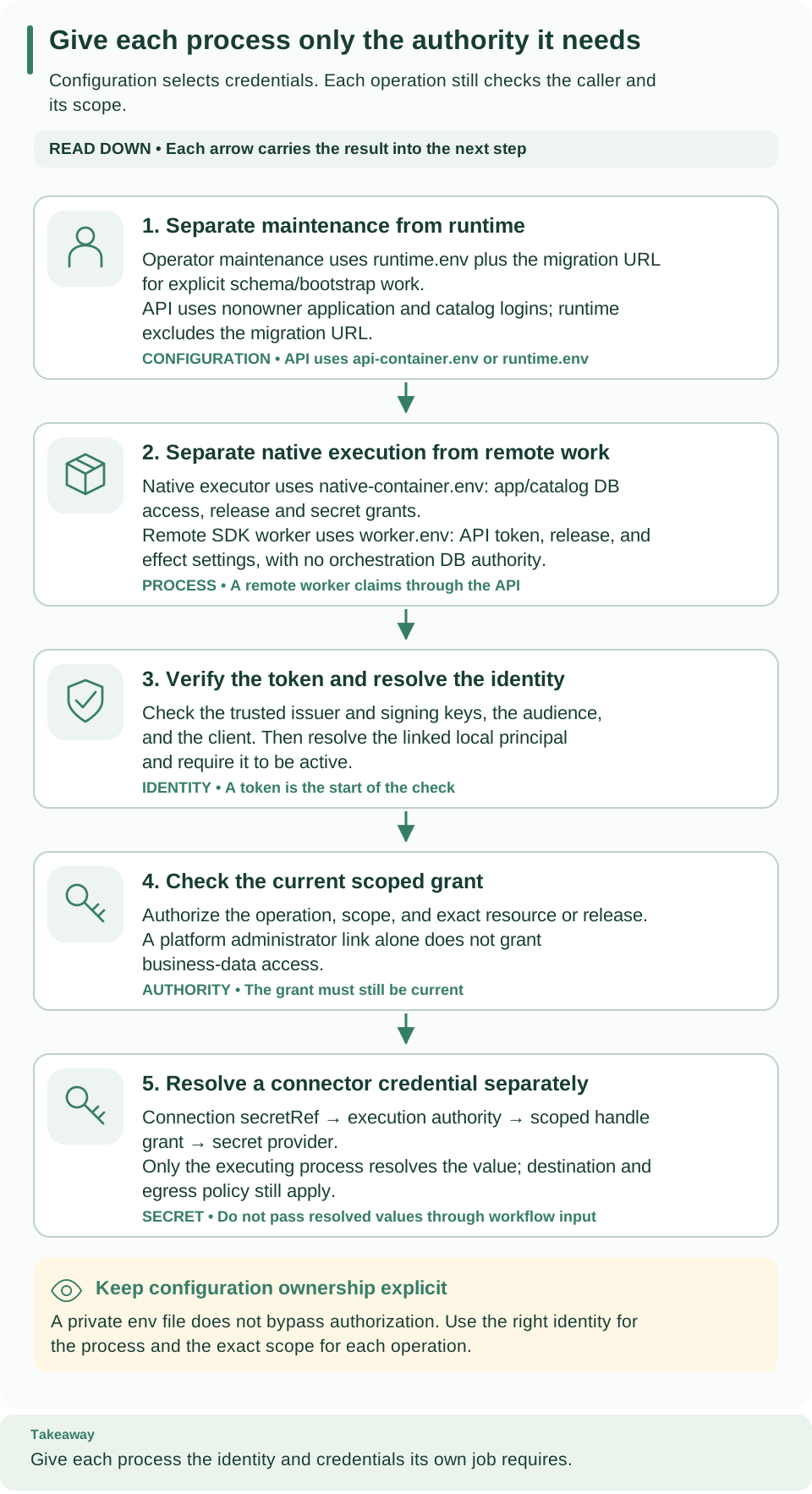
Read the cards from top to bottom. Cards 1 and 2 show which configuration each process receives: maintenance, the API, a native executor, or a remote worker. Cards 3 and 4 show the identity and grant checks that every request still passes, and card 5 follows a connector credential on its own path. Correct configuration alone never authorizes a request.
The local platform manages its own settings
weave platform start builds the API's environment itself. It ignores every
WEAVE_* variable in your shell (as well as DOCKER_*, COMPOSE_*, PYTHON*,
and PYFLY_* variables), so exporting a server variable before start has no
effect. Instead, start passes the API exactly these settings:
| Setting | Where start takes it from |
|---|---|
WEAVE_DATABASE_URL, WEAVE_SCHEDULER_DATABASE_URL, WEAVE_OIDC_PROVIDERS |
The installation's private runtime.env |
WEAVE_CLIENT_SIGN_IN |
runtime.env: the local Keycloak login client weave-cli |
WEAVE_DISPLAY_NAME |
Always Local Weave platform |
WEAVE_DOCS_ENABLED |
Always true, so /docs works on the local API |
WEAVE_SECRET_ROOT, WEAVE_SECRET_GRANTS |
Only after you store a value with weave platform secret set; handles are granted to the demo environment |
WEAVE_NATIVE_EXECUTORS, WEAVE_NATIVE_IMAGE_DIGEST |
Only after weave platform integrations enable, for the built-in HTTP connector |
To change what the local platform runs, use its commands: weave platform
integrations and weave platform secret, followed by a restart of start. The
local platform guide lists the
files in the installation directory. The local platform has no supported way to
set other server variables, such as WEAVE_TELEMETRY; use the
manual standalone walkthrough or a deployment when you
need them.
Choose the right configuration file
The manual standalone walkthrough and the deployment chapter write one private file per process. Give each process only its own file:
| File | Purpose | Who should receive it |
|---|---|---|
session.env |
Restores nonsecret paths, the Docker context and project, and the selected ports in another terminal | Every terminal of this installation |
postgres.env |
Starts the owned PostgreSQL service and identifies its provisioning database | Operator shell and PostgreSQL Compose setup |
identity.env |
Starts local Keycloak and contains its generated client credentials | Operator shell and identity Compose setup |
runtime.env |
Names the runtime database and its application, scheduler, and migration logins, plus token verification and published sign-in settings | Operator shell; remove the migration login before launching the API |
api-container.env |
Container-reachable database and identity settings | API container only |
native-container.env |
Database settings, the exact native release, and connector egress policy | Native executor container only |
worker.env |
Six API, token, release, and effect settings | Remote worker container only |
The first four files come from the standalone walkthrough; the last three come from deployment. Shell-sourceable setup files and Compose's raw container env files follow different quoting rules, so follow each file's generation recipe instead of copying one file into another process.
Load runtime.env after postgres.env. postgres.env contains a
provisioning WEAVE_DATABASE_URL; loading runtime.env second makes runtime
commands use the nonowner application login. Never pass the whole operator
environment to a remote worker.
Server environment reference
The server entry point loads these variables explicitly. Importing the compiler never loads a database, an identity provider, or a secret resolver. The authoritative models are Settings, OIDC provider configuration, and the broker policy.
How values are written. Lists and objects are JSON. Booleans accept true
or false in any letter case. An invalid value stops the API at startup, and
the error never echoes a secret value; see
Troubleshoot configuration for the messages.
Database and runtime
| Environment variable | Default / requirement | Consumer and meaning |
|---|---|---|
WEAVE_DATABASE_URL |
Required | Complete postgresql+asyncpg URL for the nonowner application login; secret |
WEAVE_MIGRATION_DATABASE_URL |
Only for migrations and bootstrap | Migration owner URL; remove it from runtime processes |
WEAVE_SCHEDULER_ENABLED |
true |
Boolean; this process owns recovery and scheduling |
WEAVE_SCHEDULER_DATABASE_URL |
Required for the startup compatibility inventory, including API-only processes | Separate execute-only catalog and scheduler URL; secret |
WEAVE_OPERATIONS_POLICY |
{}; at most 32 KiB |
JSON operational policy that can only lower fixed per-project ceilings |
WEAVE_TELEMETRY |
{}; at most 32 KiB |
Disabled-by-default OTLP HTTP/protobuf export; see observability |
WEAVE_DOCS_ENABLED |
false |
Boolean; serves /docs and /openapi.json without authentication |
Identity and sign-in
| Environment variable | Default / requirement | Consumer and meaning |
|---|---|---|
WEAVE_OIDC_PROVIDERS |
[] |
JSON array of explicit token verification profiles; no automatic discovery and no required vendor |
WEAVE_CLIENT_SIGN_IN |
[]; at most 8 entries and 32 KiB |
JSON array of published sign-in settings served without authentication at GET /api/v1/client-configuration; each entry names a configured provider and one of its human clients |
WEAVE_DISPLAY_NAME |
Absent | Platform name published with the sign-in settings; at most 100 printable characters; an empty value means absent |
Connectors, secrets, and network egress
| Environment variable | Default / requirement | Consumer and meaning |
|---|---|---|
WEAVE_CONNECTOR_PACKAGES |
[] |
JSON array selecting installed trusted connector entry points |
WEAVE_NATIVE_EXECUTORS |
[] |
JSON array of {scope, principal_id, release_id, task_types, capacity, build}; an empty list grants no executor authority. build is image (default) or local-development, which only a loopback local development platform accepts; see local development build |
WEAVE_NATIVE_IMAGE_DIGEST |
Absent | Admitted sha256: build identity for native execution |
WEAVE_SECRET_GRANTS |
[] |
JSON array of {scope, handle, provider, locator} granting one environment the right to resolve a secret handle; provider is file or env. Never put secret values here |
WEAVE_SECRET_ROOT |
Absent | Enables the file secret provider rooted at this path; each locator names a file under it |
WEAVE_PRIVATE_ORIGINS_FILE |
Absent | Absolute path to the read-only private-origin file that weave platform writes after consent. Each entry lets one purpose, such as http-connector or event-delivery, reach one exact origin at a private, loopback or CGNAT address inside its networks, over plain HTTP where the purpose allows it; entries show as "Development only". Public addresses need no entry. A file that is malformed, a symbolic link or writable by other users stops startup |
WEAVE_HTTP_PRIVATE_NETWORKS |
[] |
Legacy setting: at startup it maps, with a warning, to "Legacy setting" private-origin entries for HTTP connector actions and signed webhooks, with unchanged reach. Private, loopback and CGNAT destinations must fall inside these CIDRs; public addresses stay reachable over HTTP and HTTPS; link-local and metadata addresses (including 100.100.100.200) are always refused. An invalid value (such as a CIDR with host bits set) or more than 128 networks stops startup |
WEAVE_MAIL_PRIVATE_NETWORKS |
[] |
JSON array of operator-approved private CIDRs for SMTP and IMAP; connection metadata cannot grant its own network access |
WEAVE_MAIL_ALLOWED_PORTS |
[25,465,587,143,993] |
JSON array of allowed SMTP and IMAP destination ports |
WEAVE_MAIL_ALLOW_LOCAL_FIXTURE |
false |
Test-only plaintext loopback allowance; keep it false for deployed mail services |
WEAVE_POSTGRES_PRIVATE_NETWORKS |
[] |
JSON private-network allowance for PostgreSQL connector targets |
WEAVE_POSTGRES_PLAINTEXT_NETWORKS |
[] |
Explicit plaintext PostgreSQL network exception |
WEAVE_POSTGRES_CA_FILE |
Absent | Trusted CA file for PostgreSQL connector TLS |
WEAVE_POSTGRES_MAX_CONNECTIONS |
8, range 1–64 |
Connector connection bound |
WEAVE_BROKER_POLICY |
{} |
Broker profile; disabled until explicitly configured |
WEAVE_KAFKA_CONSUMER_ENABLED |
false |
Boolean; requires the enabled broker profile |
The env secret provider reads only variables named
WEAVE_CONNECTION_SECRET_*. A grant's locator names that variable. With the
file provider, the locator is a relative path under WEAVE_SECRET_ROOT; each
file holds one value of at most 64 KiB. An integration connection references the
handle, never the value; see Give integrations their secrets.
The Settings model also has scheduler poll, database timeout, and shutdown
timeout fields. from_env() exposes no environment variables for them, so do not
invent names by convention.
Separate authorities and processes
The runtime Compose overlay selects three distinct
env files with WEAVE_API_ENV_FILE, WEAVE_NATIVE_ENV_FILE, and
WEAVE_WORKER_ENV_FILE:
- The API needs its application database, identity configuration, and the separate catalog and scheduler authority for startup compatibility checks.
- A native executor additionally needs the exact release and build configuration and its granted secret handles.
- A remote worker needs only its API, identity, and effect settings, never orchestration database credentials.
Ports and hosts are separate values from issuers. Bare compose.yaml
defaults PostgreSQL to localhost 55432; the standalone walkthrough selects 55434
so its guarded backup and restore recipe can use the same installation. Keycloak
defaults to localhost 18080, and the standalone foreground API to port 8080. The
weave platform commands pick free ports of their own. See
deployment for container ports and networks. A host or port that
a container uses to reach JWKS or the database is a different value from the
exact token issuer; changing a network route must not silently change issuer
verification.
Local setup writes owner-only files and refuses
to replace them. Identity and secrets explains grants
and trust profiles. Connector-specific schemas and policies stay in their guides;
a validated configuration or a test_connection response does not establish
remote credentials, permissions, or delivery.
Operational policy
WEAVE_OPERATIONS_POLICY accepts the fields of
OperationsPolicy.
It bounds per-project retained and active work, pending messages, source records,
and logical storage.
- Values only lower limits. Omitted fields keep their defaults. Every value must be positive; zero does not mean unlimited.
- Logical bytes are not disk space. PostgreSQL indexes, WAL, backups, and storage overhead still need infrastructure capacity planning.
- Two capacity pools. The ordinary and control pools default to 4 GiB each. Control capacity is reserved for terminal and revocation operations; it does not add ordinary admission capacity. See retention for retained usage and cleanup.
Fixed runtime bounds. Ordinary admission bounds serialized state to 32 MiB and one transition to 64 MiB. These limits never prevent cancellation or a due terminal timeout for a supported historical run created under an earlier policy. Terminal controls keep the full durable state and history, fence outstanding work, and may return a bounded capacity acknowledgment instead of the state. They do not authorize further ordinary execution. Serialized byte limits are separate from process memory and database disk usage.
Request bodies. Each API process receives at most 16 request bodies and 128 MiB at a time. Ordinary traffic can use 12 receivers and 96 MiB; four receivers and 32 MiB stay reserved for control and inspection requests, and the pools never borrow from each other. The capabilities response reports the total and reserved control ceilings. When saturated, the API returns a bounded capacity error instead of queuing request bodies.
Every replica and the migration must use the same policy. The policy's fingerprint is checked against the database's policy metadata, and a mismatch keeps the API from becoming ready. A smaller policy is a deliberate configuration change, not a way to erase existing usage; follow upgrades before you apply one to an existing database.
For a new database provisioned with this policy, this value lowers the number of active runs and keeps every other default. It is not a live tuning command for a database that already exists:
# Lower the active-run ceiling for a database you are about to provision.
export WEAVE_OPERATIONS_POLICY='{"runs_active":500}'
Expected: no output. Supply the same value to the migration and to every replica, then inspect capabilities and compatibility through the authorized API to confirm the policy that each replica observes.
Apply a configuration change
- Find the process that reads the setting. Use the tables above. For
example, changing
worker.envcannot change the API's authorization policy. - Check the value against its model. Lists and objects are JSON; booleans
are
trueorfalse. - Update the protected configuration through its normal lifecycle. Generated local setup files are creation receipts; do not rerun setup scripts to rotate or replace them.
- Restart or replace the process. Restart the foreground process, or replace its container with the new configuration. Restarting an existing container does not reread its Compose env file. Keep the previous configuration for diagnosis, and follow deployment to stop the right scope.
- Verify. Expected:
/health/readyanswers HTTP 200, the authorized compatibility and capabilities responses show the intended policy, and the operation that depends on the setting succeeds. Readiness alone does not test a remote connector credential or a collector endpoint.
If the API stops at startup, read Troubleshoot configuration. If it starts but stays restricted, inspect catalog authority and policy consistency as described in upgrades. Never replace application credentials with the migration owner to get past either failure.
Client configuration (CLI, Studio, desktop)
Saved platforms are new in 0.1.0a7. weave auth setup, the shared
profiles.json, and published sign-in settings arrived in that release. Alpha6
and earlier clients use the older connection files.
Clients keep two kinds of state, in two different places. A saved platform (the CLI also calls it a profile) is nonsecret: the server address, the identity provider and login client the person reviewed, the allowed sign-in methods, the chosen workspace, and the last account name. Credentials are the access and refresh tokens; they live only in the operating system's credential store, or in a private file that the person names explicitly. People type their passwords only on the identity provider's own sign-in page, never into a Weave client.
The CLI (weave auth), the Studio host (weave studio), and the desktop app
share the same saved platforms: a platform saved with weave auth setup appears
in Studio, and the reverse. To create one, follow
Connect the CLI to a platform or the
Studio guide. Administrators publish
what these clients read as described in
identity setup.
Where saved platforms live
| Operating system | Folder |
|---|---|
| macOS | ~/Library/Application Support/Firefly Weave |
| Windows | %APPDATA%\Firefly Weave |
| Linux and other systems | $XDG_CONFIG_HOME/firefly-weave, or ~/.config/firefly-weave when XDG_CONFIG_HOME is unset or not absolute |
Set WEAVE_CONFIG_HOME to an absolute folder to use another location, for
example a temporary folder in a test. A relative value is refused with
WV-PROFILE-STORE.
| File | Contents | Limit |
|---|---|---|
profiles.json |
Saved platforms and which one is active | 1 MiB and 64 platforms |
studio.json |
Studio's start preference: ask shows the first-run choice, local starts working locally |
16 KiB |
profiles.json.lock |
Empty lock file that serializes changes between processes | None |
The files are private and changed atomically. On macOS and Linux, the folder
must belong to you and is kept at mode 0700, and the files at mode 0600.
Clients create or tighten these modes and refuse symbolic and hard links. On
Windows, clients rely on the per-user profile's access control and refuse
symbolic links and junctions. Every change runs under the lock, waits at most 10
seconds for another process, and replaces the file atomically. A file that
cannot be read safely, is damaged, or comes from a newer version is reported as
WV-PROFILE-STORE and is never rewritten for you.
This is one saved platform from a local run, after sign-out, with the ports,
IDs, and the credential file path replaced by placeholders. That run kept its
credentials in a private file; with the default system store,
credential_store is native and credential_file is null. Nothing in the
file is secret:
{
  "version": 1,
  "active": "local",
  "profiles": {
    "local": {
      "name": "local",
      "login": {
        "provider_id": "local-keycloak",
        "issuer": "http://localhost:KEYCLOAK_PORT/realms/weave",
        "client_id": "weave-cli",
        "target": "http://127.0.0.1:API_PORT",
        "account": "local",
        "scopes": ["openid"],
        "trusted_endpoint_origins": [],
        "allow_loopback_http": true,
        "timeout": 10.0,
        "login_timeout": 300.0,
        "require_refresh_rotation": true
      },
      "source": "server",
      "display_name": "Local Weave platform",
      "provider_name": "Local Keycloak (development)",
      "flows": ["browser", "device"],
      "workspace": {
        "tenant_id": "TENANT_UUID",
        "project_id": "PROJECT_UUID",
        "environment_id": "ENVIRONMENT_UUID",
        "tenant_name": "first-run-SUFFIX",
        "project_name": "first-project",
        "environment_name": "local"
      },
      "account": null,
      "credential_store": "file",
      "credential_file": "/ABSOLUTE/PATH/TO/credentials/local.json",
      "created_at": "2026-10-02T09:29:43.131520Z",
      "updated_at": "2026-10-02T09:30:44.663669Z"
    }
  }
}
| Field | Meaning |
|---|---|
name |
1 to 64 letters, digits, spaces, dots, hyphens, or underscores, starting with a letter or digit; unique ignoring letter case |
login |
The pinned sign-in settings: target is the server origin, account equals name, and the rest comes from the reviewed sign-in option or connection file |
source |
server when the settings came from the server, file when imported from a connection file; manual is reserved |
display_name, provider_name |
The platform and provider names shown during the review |
flows |
Sign-in methods the administrator allowed at review time |
workspace |
The tenant, project, and environment that remote commands and Studio use; names are for display only |
account |
The last signed-in account hint (subject, display_name, issuer, provider_id); cleared at sign-out and never used for authorization |
credential_store, credential_file |
native, or file with an absolute credential_file path |
created_at, updated_at |
UTC timestamps |
Change these files only through weave auth commands or Studio. To review a
changed server again, run weave auth setup SERVER --name NAME --replace.
Client environment variables
| Variable | Read by | Meaning |
|---|---|---|
WEAVE_CONFIG_HOME |
The CLI and the Studio host, including the host the desktop app starts | Absolute folder for profiles.json and studio.json instead of the per-user default |
WEAVE_PROFILE |
weave auth login, status, logout, workspace, and remote commands |
Saved platform to use instead of the active one; same as --profile |
WEAVE_STUDIO_PROFILE |
weave studio |
A saved platform name, which becomes the active one, or the path of a legacy Studio profile file; same as --profile |
WEAVE_BASE_URL |
Remote commands | API origin; selects explicit mode, which ignores saved platforms; same as --base-url |
WEAVE_TENANT_ID, WEAVE_PROJECT_ID, WEAVE_ENVIRONMENT_ID |
Remote commands | Scope for explicit mode; with a saved platform, they replace the saved workspace from their level down |
WEAVE_ACCESS_TOKEN |
Remote commands in explicit mode without --auth-config |
A current bearer access token supplied by your team; it is never stored |
WEAVE_NO_ANIMATION |
CLI | Any nonempty value turns off progress animation |
Remote commands resolve their target in this order.
--base-url,WEAVE_BASE_URL, or--auth-configselect explicit mode: the API origin, the token or connection file, and--tenant,--project, and--environmentcome from flags and environment variables, as in alpha6 and earlier releases.- Otherwise the command uses a saved platform:
--profile, thenWEAVE_PROFILE, then the active one, for the server, the sign-in, and the workspace. - A
--profiletyped on the command line wins over an inheritedWEAVE_BASE_URL, and the scope variables inherited with it are ignored too. Typing both--profileand--base-urlis a usage error.
With nothing to resolve, the command exits 2 and prints WV-CLI-CONFIG with
No platform is selected. Run 'weave auth setup SERVER' to connect, or pass
--base-url and --tenant.
The connect guide
shows each mode with examples.
# Use a throwaway settings folder so this terminal never touches your saved platforms.
export WEAVE_CONFIG_HOME="$(mktemp -d)"
weave auth profiles
Expected: No saved platforms. Connect with: weave auth setup SERVER. Unset
WEAVE_CONFIG_HOME to return to your normal saved platforms.
Where credentials are stored
By default, credentials go to the operating system's credential store. Each
saved platform has one entry under the service name firefly-weave. The entry
name is a SHA-256 digest of the provider ID, issuer, login client, server, and
platform name, so a changed server or provider never reuses another platform's
tokens. Concurrent renewals from several processes are serialized: on macOS and
Linux through lock files in ~/.weave-credential-locks, kept at mode 0700,
and on Windows through a per-user named mutex.
| Operating system | Credential store |
|---|---|
| macOS | Keychain |
| Windows | Windows Credential Manager (Credential Locker) |
| Linux | Secret Service, such as GNOME Keyring, or KWallet, over D-Bus; it must be unlocked |
Native storage fails closed. If no supported store is available, for
example on a Linux server without an unlocked keyring, the CLI stops with
WV-AUTH-STORE and Studio says it cannot use this computer's credential store.
No client falls back to a plain file on its own.
The file store is explicit and available on macOS and Linux only. Choose it when you save the platform:
# Keep credentials in a private file instead of the system store (macOS and Linux only).
mkdir -m 700 -p "$HOME/.weave-credentials"
weave auth setup https://weave.example.com --credential-store file \
  --credential-file "$HOME/.weave-credentials/weave.json"
Expected: the setup summary shows Credentials: file: followed by the full
path. The folder must already exist, belong to you, and have mode 0700; the
file is created with mode 0600. On Windows, the CLI refuses the file store with
WV-AUTH-STORE. Studio's connection steps always save new platforms with the
system store, and they use the file store for platforms the CLI saved that way.
What has been verified. The end-to-end CLI journey ran on macOS against the local Keycloak 26.7.4 with the file store. It covered sign-in, silent renewal, revocation, and switching between saved platforms. Studio's opt-in browser test and a locally built macOS desktop app used the macOS Keychain. The system credential stores are covered by unit tests with simulated backends, including Windows locking. Windows Credential Manager and Linux Secret Service or KWallet have not been exercised on those systems. In the desktop app, sign-in with a code was verified on a locally built macOS app; browser sign-in from the app was not.
Older connection files
Two file formats from earlier alpha releases keep working:
- A login configuration (connection file) is the nonsecret
loginobject above as a standalone JSON file of at most 64 KiB. Pass it with--auth-config FILEtoweave auth login,status,logout, and remote commands, or import it into a saved platform withweave auth setup --auth-config FILE. Administrators hand it out when the server publishes no sign-in settings. - A Studio profile file, created by
weave studio configure, holdsname,base_url, the optionaltenant_id,project_id, andenvironment_id,auth_config,credential_store, andcredential_file, in at most 64 KiB. Open it withweave studio --profile FILE, or from the desktop app's Choose platform profile… menu item.
See connection files for every field and Use a connection file for the sign-in commands.
Troubleshoot configuration
| What you see | Why | What to do |
|---|---|---|
Startup fails with an error containing WEAVE_DATABASE_URL is required |
The process did not receive its env file | Check which file the process loads and how it is exported |
Startup fails with an error containing A complete PostgreSQL asyncpg URL is required |
A database URL lacks the postgresql+asyncpg driver, host, database, or user name |
Correct the URL in the protected configuration; never print it |
Startup fails with an error such as WEAVE_DOCS_ENABLED must be true or false |
A boolean variable has another value | Use true or false |
Startup fails with an error containing Invalid WEAVE_TELEMETRY configuration, Invalid WEAVE_OPERATIONS_POLICY configuration, Invalid WEAVE_CLIENT_SIGN_IN configuration, or Invalid WEAVE_DISPLAY_NAME configuration |
The JSON is malformed, too large, or breaks a field rule | Compare the value with observability, operational policy, or sign-in settings |
Startup fails with an error containing Kafka consumers require the enabled broker profile |
WEAVE_KAFKA_CONSUMER_ENABLED is true without an enabled WEAVE_BROKER_POLICY |
Enable the broker profile or turn the consumer off |
Startup fails with an error containing Invalid local development native execution configuration |
An executor uses "build": "local-development" outside a loopback local development platform, or mixes it with image |
Use the image build for every deployed executor |
| The API starts but readiness stays restricted | Policy fingerprint mismatch or missing catalog authority | Follow start and inspect compatibility |
A variable exported before weave platform start has no effect |
start ignores WEAVE_* variables from your shell |
See The local platform manages its own settings |
A remote command prints WV-CLI-CONFIG and No platform is selected. |
No saved platform is active and no --base-url was given |
Run weave auth setup SERVER, or use explicit mode |
WV-PROFILE-STORE |
profiles.json or its folder is not private, is damaged, is from a newer version, or WEAVE_CONFIG_HOME is relative |
Fix the folder ownership and modes, or move the file aside and connect again; clients never rewrite it for you |
WV-AUTH-STORE |
The system credential store is locked or unavailable, or the file store was requested on Windows | Unlock the keyring, or choose the file store on macOS or Linux |
Next steps
- Configure token verification and published sign-in settings in Identity, sign-in, and secrets.
- Give people access in People and access.
- Turn on metrics and traces in observability.
- Plan schema and policy changes with upgrades.