Remove expired debug sessions with a reviewed plan
Use this page to delete old debug sessions from one project through a plan you
review before anything is deleted. It is written for operators. You need a
running platform, the CLI with a saved platform
whose workspace is in the project, and the operator role on that project. The
procedure takes a few minutes.
Weave keeps most data on purpose. Workflow history, execution identities, and provider fences protect later retries and reconciliation. The maintenance API therefore supports exactly one deletion target today: expired debug sessions. It does not delete workflow history, deduplication receipts, provider sources, Teams references, WhatsApp status facts, catalog versions, or outbox history. Every plan lists those omitted resource classes and why they are kept.
A debug session is a server-side simulation started from Studio or with
weave runs debug create; it expires one hour after it was created
(server sessions). To delete a
finished run's content, archive and purge it one run at a time, as in
Permanently delete an archived run;
there is no bulk or scheduled run retention.
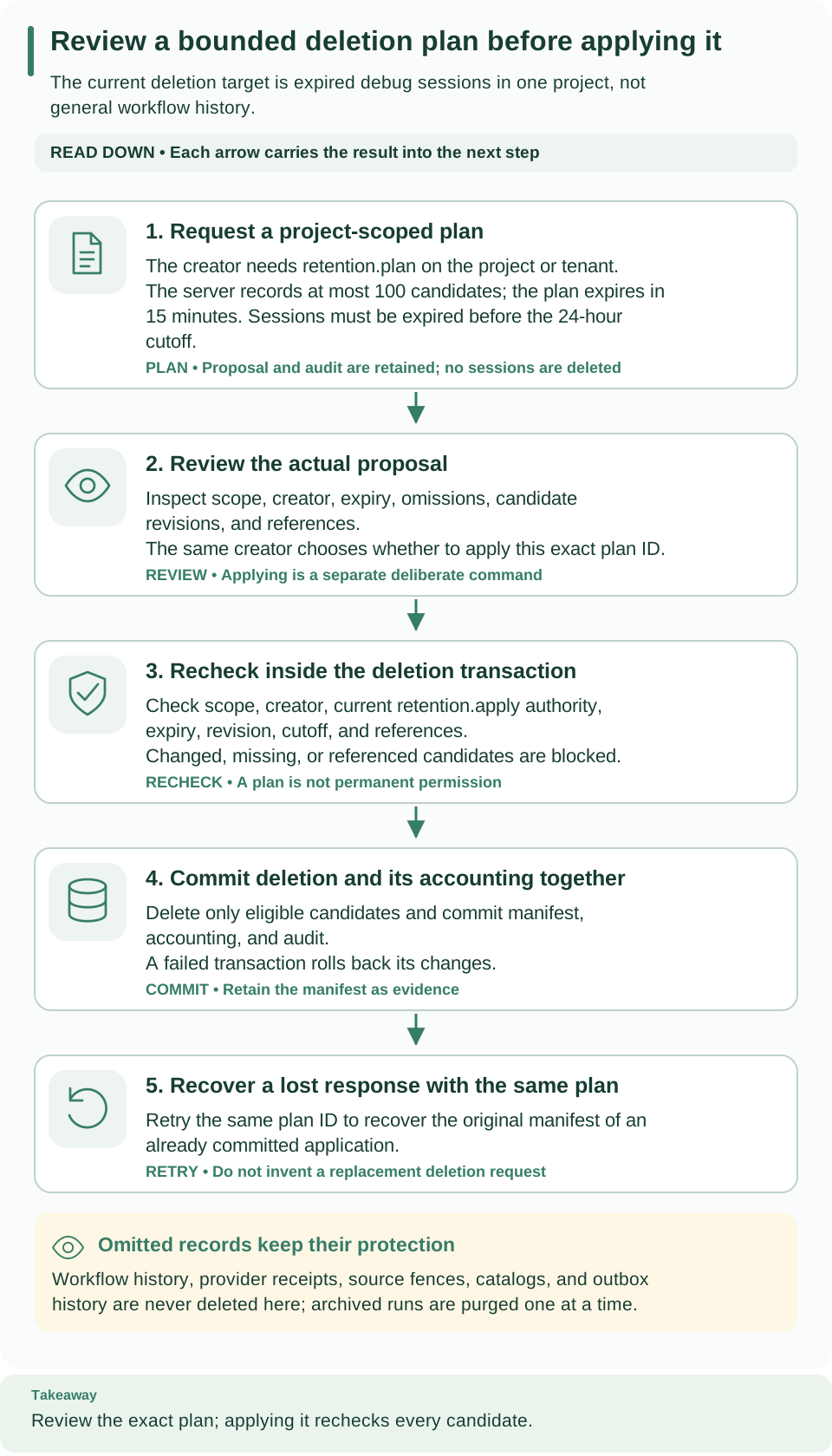
Read the five cards from top to bottom: you request a plan (1) and review it (2); applying it rechecks every candidate (3), commits the deletion with its accounting (4), and can be repeated to recover a lost response (5). Reviewing and applying stay two separate decisions.
Before you start
Check that this is the right tool. Use this procedure to remove eligible old debug sessions. It will not solve a quota exhausted by retained runs, provider receipts, or other omitted data. First identify the constrained resource with the capabilities and usage responses and the operational policy.
Check your authority. Retention is a project-level operation:
- Creating and reading a plan needs
retention.plan, and applying it needsretention.apply. Theoperatorrole has both. - The grant must be on the project or its tenant. An environment-level grant
does not cover project-level operations, and the
operatorgrant thatweave platform userand the first-run helper create is on the environment. A tenant administrator can grantoperatoron the project, as shown in People and access. - Only the identity that created a plan can read or apply it, and it must still be active and hold the grant when it does.
Check the target. The CLI uses the tenant and project of your saved
workspace and ignores its environment. To target another project, pass
--project, or use explicit mode
with --base-url, --tenant, --project, and a current WEAVE_ACCESS_TOKEN.
In the standalone walkthrough, the tenant and project IDs are in
first-run.json.
The sequence is plan → inspect → apply → inspect the result. Do not put the apply command in the same unattended copy-and-paste block as plan creation.
1. Create a plan
Why: a plan is an immutable proposal. Creating it stores its metadata and an audit record; it deletes nothing.
Write the request in your private working directory, as a new file named
retention-request.json:
Then, from that directory:
# Ask the server to propose eligible expired debug sessions in this project.
weave retention plan --request retention-request.json --output json
The path passed to --request is the file you just wrote, not a plan ID.
Expected: one JSON plan with id, policy, scope, principal_id,
created_at, cutoff, expires_at, candidates, omissions, complete, and
next_cursor. Each candidate has an id, a revision, and a reason. An empty candidates list is a valid result, especially on a new
installation: there is nothing to delete.
How candidates are chosen. The cutoff is 24 hours before the plan was
created; only sessions whose expiration is earlier than the cutoff are selected,
so live and recently expired sessions are excluded. A selected session that is
still referenced appears with the reason referenced and is not eligible for
deletion.
Plans are small and short-lived. Each plan holds at most 100 candidates and
expires after 15 minutes. When complete is false, request the next page by
passing the returned next_cursor as after:
Replace the placeholder with the returned UUID. Each page creates a separate immutable plan with its own creation time, cutoff, and expiry; pages are not one global database snapshot. A project can keep at most 10,000 plans, of which at most 100 unexpired, so create plans only for maintenance you intend to review.
2. Review the plan
Why: applying deletes data, so read the stored plan, not your memory of it.
Expected: the same plan, read back from the server. Replace PLAN_UUID with the
real id. Before you continue, confirm that:
scopeandprincipal_idname the project and the operator you intended;expires_atis still in the future;- every candidate you expect to delete has the reason
expired_debug.
3. Apply the reviewed plan
Why: applying asks the server to delete the eligible candidates of that exact plan, after checking each one again.
# Delete the eligible sessions of this reviewed plan; there is no extra confirmation.
weave retention apply --plan-id PLAN_UUID --output json
Expected: the command first prints the stored plan as JSON on standard error,
then applies it without asking again. Standard output carries only the final
result, a JSON object with plan_id, policy, deleted, and blocked. If the plan
cannot be read, nothing is applied.
The server rechecks everything in one transaction. It accepts a plan ID,
never caller-selected deletion IDs. In the same transaction as the deletion it
rechecks the scope, the creator and current authority, the plan's expiry, each
session's revision, the original cutoff, and retained references. A changed,
missing, or referenced candidate goes to blocked, while the other eligible
candidates are deleted. The result, the accounting changes, and the audit record
commit together; on failure, everything rolls back.
Applying again is safe. Repeating the apply of a committed plan, as its original creator, returns the original result. It selects no new candidates and deletes nothing more. A new maintenance attempt needs a new plan.
Never delete protected records directly with SQL to resolve a quota error. The omissions are intentional: removing a receipt or fence can make an old delivery look new. Retained workflow and provider data need a separately defined lifecycle; apart from purging one archived run at a time, this release has no purge for them.
Read the result and handle interruptions
| What you see | Why | What to do |
|---|---|---|
IDs in deleted |
Those eligible sessions were deleted in the committed transaction | Keep the result as maintenance evidence |
IDs in blocked |
A candidate changed, is referenced, or is no longer eligible | Inspect its state; never remove the guard with SQL |
| The plan is unavailable | Wrong scope or creator, an expired plan, or an unknown ID | Check the original plan and your current identity; create a new plan if needed |
| The response was lost after apply | The client cannot tell whether the transaction committed | Apply the same plan again as the same creator to recover the committed result |
| A capacity denial while planning | The project reached a plan or operational bound | Inspect retained usage; planning again will not free capacity |
WV-FORBIDDEN |
Your grant does not cover the project, or lacks retention.plan or retention.apply |
Ask for operator on the project or tenant |
WV-CLI-CONFIG asking for --project or a workspace |
The saved platform has no workspace, or the command cannot tell which project to use | Choose one with weave auth workspace, or pass --project |
Keep the same project scope throughout. A pagination cursor selects the next page of candidates; it is neither an authorization token nor a plan ID.
Capacity and storage
Operational policy bounds logical retained usage and active work. Ending a run or expiring a debug session can release active capacity while its retained bytes stay charged. Starting a debug session also reserves its bounded session capacity. The server's admission checks release expired reservations; the data of an expired session stays until eligible maintenance removes it.
Logical accounting is not disk usage. It measures serialized data and allocation metadata. It does not reclaim PostgreSQL files, indexes, WAL, or backups; manage physical storage and backup retention separately. Use observability for operational signals, and backup and restore before maintenance that needs a restorable copy.
API and SDK equivalents
All operations use /api/v1/tenants/{tenant}/projects/{project}/operations/retention:
| Action | Method and suffix | SDK method |
|---|---|---|
| Create plan | POST /plans |
plan_retention(RetentionRequest(...)) |
| Read plan | GET /plans/{id} |
read_retention_plan(id) |
| Apply plan | POST /plans/{id}/apply |
apply_retention(id) |
Use the typed SDK with a project scope. The CLI, the SDK, and HTTP share the same authorization and response contracts.
Next steps
- Check capacity limits in configuration.
- Make a restorable copy before larger maintenance with backup and restore.
- Review the remaining CLI options in the CLI reference.