Export Weave's OpenAPI document
An OpenAPI document describes an HTTP API's paths, request bodies, responses, and security requirements, so that client generators and API tools can use it. This page shows integration developers how to get the document that describes Weave's own API, for example to generate a client in another language. It takes about five minutes and needs no running platform.
Looking for the opposite direction? To call another company's API from a workflow, you import its OpenAPI document instead; see Call a REST API without code.
How the document is built
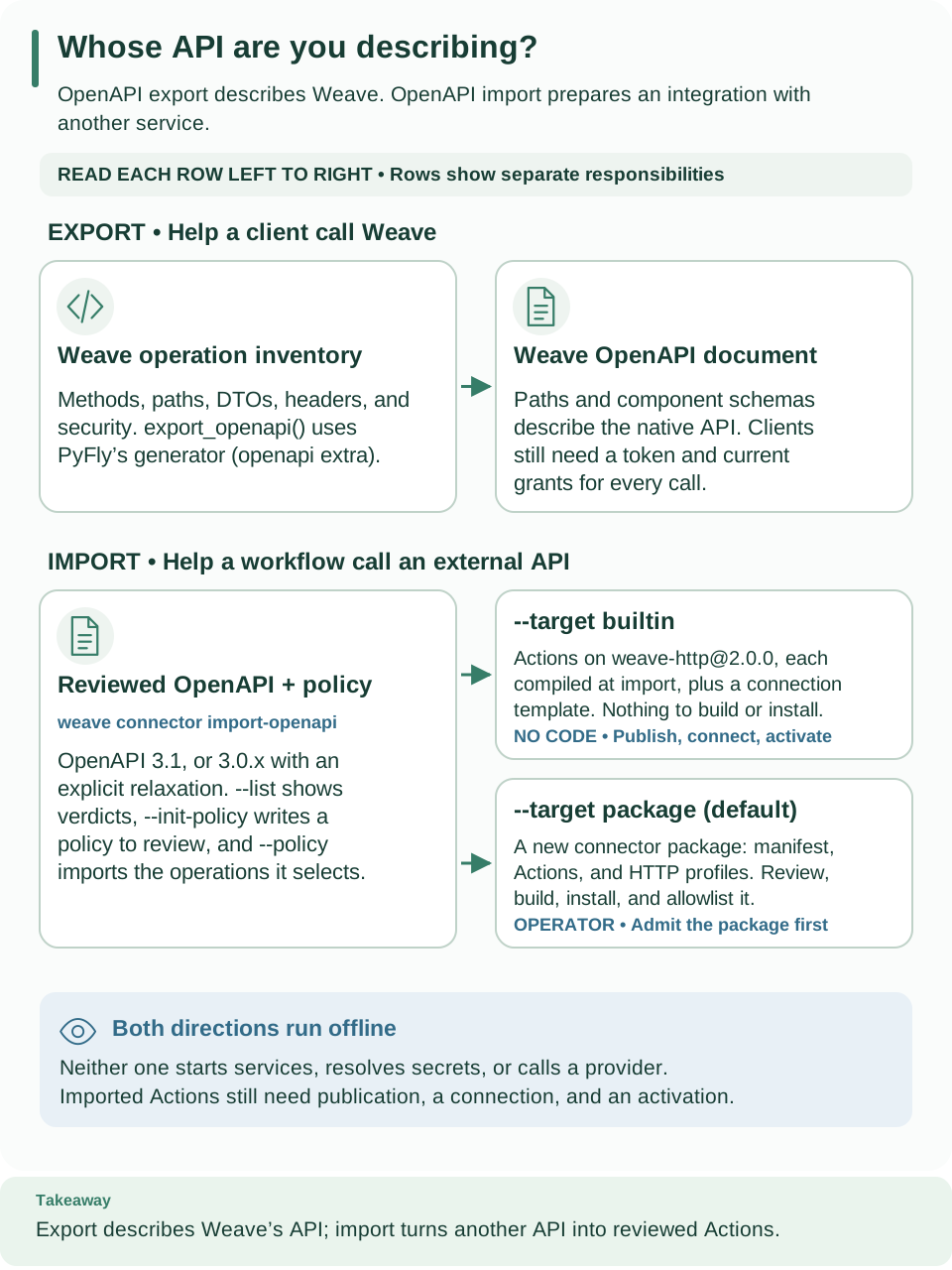
Follow the top EXPORT row from left to right: that is this page. The IMPORT row below it turns another service's OpenAPI document into reviewed Actions, either on the built-in HTTP connector (Call a REST API without code) or as a connector package (Import an OpenAPI document as a connector package). Open diagram at full size.
- The operation inventory declares each operation's method, path, request, success and error models, status, headers, and security. The platform checks its routes against this registry at startup, and a contract test checks the HTTP API inventory against it.
- The exporter turns that
inventory into PyFly
RouteMetadataand calls PyFly's publicOpenAPIGenerator. There is no second, documentation-only web stack. - When the platform starts, it checks that every route is covered and that no
two collide. The versioned
/api/v1paths and the older compatibility paths share the same handlers. - Security entries in the document describe how the platform enforces access; they do not replace that enforcement. Administrative roots, health probes, and signed or provider ingress keep their own authentication rules.
Get the document
Choose the source that fits:
| You want | Where | Notes |
|---|---|---|
| To read it without installing anything | The full API reference on the documentation site | Every operation and schema, plus a JSON download |
| The document of a running platform | /openapi.json and the Swagger UI at /docs on that platform |
Only when its operator sets WEAVE_DOCS_ENABLED=true (the default is false); API calls still need a token and grants. See the API playground |
| A file generated from your checkout | The steps below | Matches exactly the source you build from |
Export it from a source checkout
-
Install the
openapiextra. Run this from the root of a locked source checkout. Generating the document starts no application and opens no socket; it needs no database, credentials, or network access to a provider.uv syncremoves packages that the extras you name do not need, so add every other extra this checkout uses (for example--extra client) to the same command. -
Write the document to a file.
.localis ignored by Git:# Generate the native OpenAPI document and save it with sorted keys. mkdir -p .local/openapi uv run --locked --no-editable --extra openapi python -c 'import json; from firefly_weave.contracts.openapi import export_openapi; print(json.dumps(export_openapi(), sort_keys=True, indent=2))' > .local/openapi/weave-openapi.jsonExpected:
.local/openapi/weave-openapi.jsonholds an OpenAPI 3.1.0 document withpathsandcomponents.schemas. -
Inspect the operation you need. Check its operation ID and responses before you generate a client:
# Print the compiler operation's ID and the HTTP statuses it can return.
uv run --locked --no-editable --extra openapi python - <<'PYTHON'
import json
from pathlib import Path
api = json.loads(Path(".local/openapi/weave-openapi.json").read_text())
path = "/api/v1/tenants/{tenant}/projects/{project}/compiler/compile"
operation = api["paths"][path]["post"]
print(operation["operationId"])
print(sorted(operation["responses"]))
PYTHON
Expected:
compiler.compile, then['200', '401', '403', '404', '409', '412', '413', '422', '500']. The request schema includessourceandformat, and the responses describe both the compiler result and the errors. Each operation'sdescriptionnames its required capability.
A generated client is only a starting point. Every call still needs a current access token, grants in the scope, revision headers, and idempotency keys where the operation requires them. Use the HTTP API explains each of these.
Versions and what the document proves
- The document's
info.versionis the API version,1. It is separate from the package version (0.1.0a14) and from the workflow language version (weave/v1alpha1). - The exporter uses PyFly 26.9.15. The exact URL, SHA-256, and upstream provenance are in project metadata and the lockfile.
- The language and schema exporter (
weave schema export) and the workflow builder do not need PyFly. - Connection test, definition retirement, and activation retirement accept an empty body, so their request bodies are optional in the document. Every other operation uses the requiredness declared in the inventory.
- Contract tests check the wire fixtures, schema and discriminator resolution, operation coverage, and route parity. Generating the document does not prove how the platform authorizes or answers; the HTTP API, SDK, and CLI references describe that behavior.
Troubleshooting
| What you see | Why | What to do |
|---|---|---|
ImportError: OpenAPI generation requires the optional firefly-weave[openapi] dependency |
PyFly's generator is not installed in this environment | Run step 1, or add --extra openapi to uv run |
/openapi.json or /docs answers 401 on a running platform (404 when you send a valid token) |
The operator has not enabled the documentation pages, so they do not exist there | Ask the operator to set WEAVE_DOCS_ENABLED=true, or export the document locally |
Next steps
- Make a first request by hand with Use the HTTP API.
- Browse operations and schemas in the full API reference.
- Use the typed Python SDK instead of generating a Python client.