Deploy Weave on AWS, Azure, or Google Cloud
This guide moves the same artifacts you built and ran locally into a cloud account your organization already operates. You build images for the cluster's CPU architecture, push them to a private registry, and record their immutable digests. The Kubernetes walkthrough then installs them on EKS (AWS), AKS (Azure), or GKE (Google Cloud).
Who this is for: administrators and operators who can use the cloud account, the cluster, and the registry. The guide prepares and ships images; it does not create a cloud account, a cluster, or a production platform for you.
What you need first:
- A working local installation from the platform CLI walkthrough
or the manual setup. Its private directory contains
the prepared
release/imagesbuild context that this guide reuses. To publish sign-in settings for people, set up that local installation from the 0.1.0a7 release or later: an alpha6 or earlier installation builds a server image of that release, which has no/api/v1/client-configuration. - For a remote worker only: the
worker-contextdirectory from local worker packaging. - An understanding of publication, activation, and worker admission from the CLI tutorial. The cloud does not change them.
- Docker,
kubectl, Python 3, and your cloud's CLI, as listed in the provider chapter.
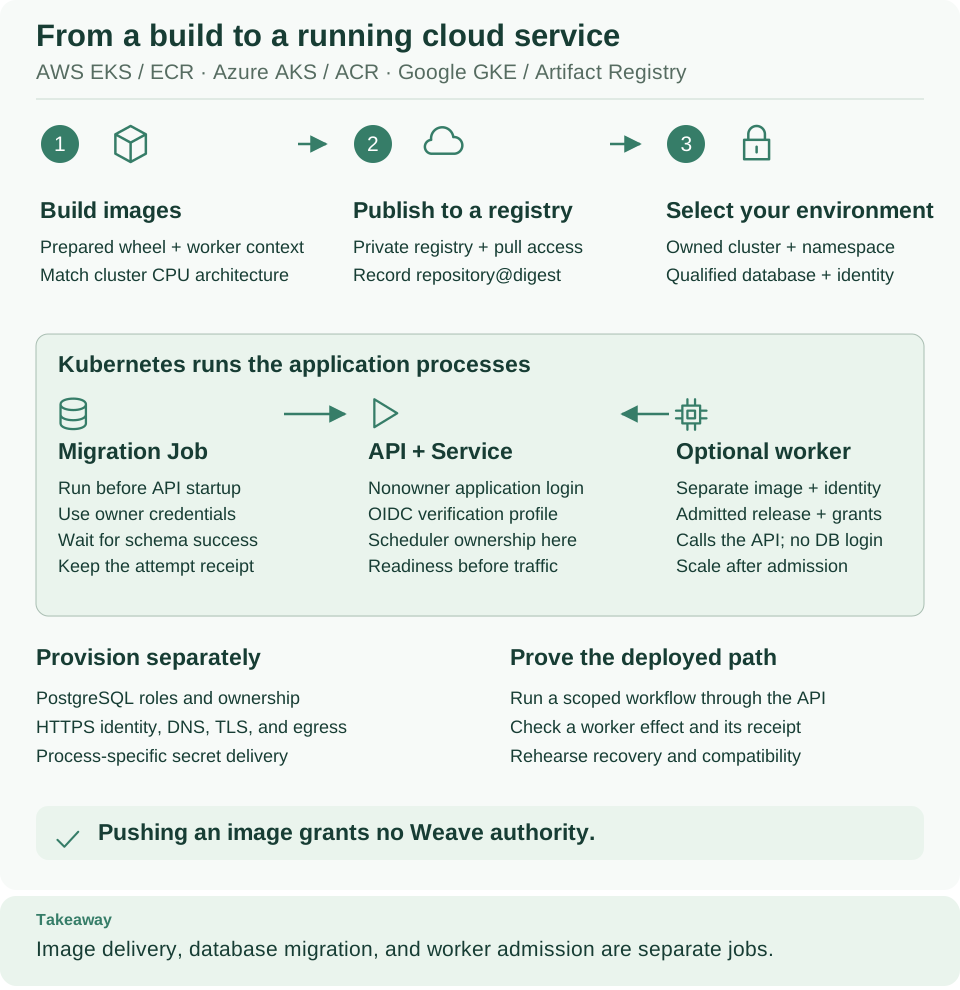
Read the top row as artifact delivery (build, publish, select the environment) and the green panel as what Kubernetes runs. Pushing an image grants no Weave authority: the API and workers still need verified identities, scoped grants, and an admitted release. Open diagram at full size
1. Choose the infrastructure route
Each local building block has a cloud counterpart that your organization provides:
| Topic | Local tutorial | Cloud recipe |
|---|---|---|
| Process manager | Compose and foreground Python | Kubernetes Deployments and explicit Jobs |
| Image location | Exact local Docker image ID | Private registry, pinned by registry digest |
| Durable state | Owned local PostgreSQL container | Qualified PostgreSQL installation with separate logins |
| Identity | Local Keycloak fixture | Your configured HTTPS OIDC/CIAM provider; Keycloak is optional |
| Runtime secrets | Private local files | Process-specific Kubernetes Secrets supplied by your secret-management system |
| Network | Selected local ports and host gateway | Private database access, cluster Service, controlled HTTPS ingress and egress |
| Deployment command | weave worker deploy --target compose |
Cloud CLI setup, then kubectl |
weave worker deploy supports local Compose only. It accepts no aws,
azure, or gcp target and does not manage Kubernetes. Kubernetes runs the
containers; Weave decides which workflows and tasks they may handle.
First restore the local session so this terminal knows the build context and the Docker engine you chose locally:
# Restore WEAVE_WORK_DIR, WEAVE_DOCKER_CONTEXT, and WEAVE_PYTHON from your local installation.
source /absolute/path/to/your-installation/session.env
# Confirm the prepared build context exists before you build cloud images.
test -f "$WEAVE_WORK_DIR/release/images/Dockerfile" && echo "Build context ready"
Expected: Build context ready. weave platform setup writes session.env to
its installation directory: .local/platform/ under the directory where you ran
it, unless you passed another --directory. The manual setup printed the path in
its step 2. If the test prints nothing, finish the local setup first.
Then follow exactly one provider chapter and come back to step 2 of this page:
Each chapter selects the cluster context and namespace, signs Docker in to the
registry, and checks image-pull permissions. It ends with KUBECONFIG,
WEAVE_KUBE_CONTEXT, WEAVE_KUBE_NAMESPACE, and WEAVE_REGISTRY_PREFIX set in
this terminal. Cloud resources cost money; create or keep them only through your
organization's approved process.
2. Pass the infrastructure readiness gate
Check every item before you apply any application manifest. Each one is something Weave needs but does not create:
- Cluster and namespace. You have an owned cluster and namespace. Its nodes can pull from the registry and reach the database, the identity provider, and the systems your workflows call.
- Database rehearsal. Your DBA has run the exact package's migrations against the chosen PostgreSQL service. Weave creates scoped roles and security-definer functions, and a managed service's administrator is not always an unrestricted superuser. Follow the database qualification procedure. Never bypass a failed role or ownership check, and never treat a local migration as evidence for the cloud service.
- Three database credentials. You have a migration owner, a nonowner application login, and a separate catalog/scheduler login, each in its own secret bundle.
- Token verification. You have an HTTPS identity issuer, its JWKS endpoint, the API audience, the client allowlist, and a verified subject for bootstrap; see identity setup. Permission to pull an image is not permission to call Weave.
- Sign-in for people (optional). To let people connect by typing only the server address, register a public login client and plan the published sign-in settings.
- HTTPS address. You have chosen the API's HTTPS origin and route. The
manifests create only an internal Service; they create no public DNS, TLS
certificate, or load balancer. A loopback
kubectl port-forwardis enough for the operator's first checks, but people sign in through HTTPS. - Operations. You have set resource requests and limits, backup and restore, logging, and egress policy. The sample runs one API replica that owns scheduling; test capacity and availability before you scale.
A Kubernetes Secret delivers a credential; it does not protect it. Your cloud secret store still provides access control, encryption, and rotation. This release does not synchronize AWS Secrets Manager, Azure Key Vault, or Google Secret Manager automatically: your infrastructure must place each process's values into its Secret.
3. Build images for the target architecture
Why: an image runs only on nodes with the CPU architecture it was built for, and your laptop's architecture says nothing about the cluster's. Read the nodes' architecture first:
# Read the node CPU architecture; the image must match the nodes that will run it.
kubectl --context "$WEAVE_KUBE_CONTEXT" get nodes \
  -o custom-columns=NAME:.metadata.name,ARCH:.status.nodeInfo.architecture
Expected: one row per node with amd64 or arm64. If your role cannot list
nodes, ask the operator for the node pool's architecture and placement rules. In
a cluster with mixed architectures, use matching node placement.
Build the API image. Set WEAVE_TARGET_PLATFORM to linux/amd64 or
linux/arm64 to match the nodes. The command builds a single-platform image, not
a multi-architecture index:
# Pick the platform that matches the nodes and a new, unique tag for this build.
export WEAVE_TARGET_PLATFORM=linux/amd64
export WEAVE_IMAGE_TAG="weave-$(date -u +%Y%m%dT%H%M%SZ)"
# Build the API image from the prepared release and keep its local image ID.
docker --context "$WEAVE_DOCKER_CONTEXT" build \
  --platform "$WEAVE_TARGET_PLATFORM" --target server \
  --iidfile "$WEAVE_WORK_DIR/cloud-server-image.id" \
  "$WEAVE_WORK_DIR/release/images"
Expected: the build finishes and cloud-server-image.id holds a sha256: image
ID. Use the teams-server or kafka-server target instead of server when you
need those optional runtime dependencies. Keep the package's build receipts.
Only if you deploy a remote worker, build its image for the same platform:
# Build the example worker image from the packaged worker context.
docker --context "$WEAVE_DOCKER_CONTEXT" build \
  --platform "$WEAVE_TARGET_PLATFORM" \
  --iidfile "$WEAVE_WORK_DIR/cloud-worker-image.id" \
  "$WEAVE_WORK_DIR/worker-context"
Expected: cloud-worker-image.id holds the worker's sha256: image ID. Building
the example worker does not implement your business integration: its manifest and
handler still need the effect-receiver contract explained in
the local worker exercise. For a new
build, use a new tag rather than overwrite an earlier build's identity files.
4. Push and record registry identities
Why: Kubernetes should pull an image by its registry digest, which never changes, rather than by a tag, which can be moved. After the provider chapter's registry sign-in, push the API image with the same local Docker context that built it, then save the digest the registry recorded:
# Tag and push the API image so cluster nodes can download it.
export WEAVE_SERVER_TAG="$WEAVE_REGISTRY_PREFIX/server:$WEAVE_IMAGE_TAG"
docker --context "$WEAVE_DOCKER_CONTEXT" tag \
  "$(cat "$WEAVE_WORK_DIR/cloud-server-image.id")" "$WEAVE_SERVER_TAG"
docker --context "$WEAVE_DOCKER_CONTEXT" push "$WEAVE_SERVER_TAG"
# Save the registry digests Docker now knows for this tag.
docker --context "$WEAVE_DOCKER_CONTEXT" image inspect \
  --format '{{json .RepoDigests}}' "$WEAVE_SERVER_TAG" \
  > "$WEAVE_WORK_DIR/cloud-server-digests.json"
Expected: the push ends with a digest: sha256:… line and the JSON file lists a
repository@sha256:… value. Only if you built a worker image, push it the
same way:
# Tag, push, and record the worker image; skip this block for an API-only rollout.
export WEAVE_WORKER_TAG="$WEAVE_REGISTRY_PREFIX/worker:$WEAVE_IMAGE_TAG"
docker --context "$WEAVE_DOCKER_CONTEXT" tag \
  "$(cat "$WEAVE_WORK_DIR/cloud-worker-image.id")" "$WEAVE_WORKER_TAG"
docker --context "$WEAVE_DOCKER_CONTEXT" push "$WEAVE_WORKER_TAG"
docker --context "$WEAVE_DOCKER_CONTEXT" image inspect \
  --format '{{json .RepoDigests}}' "$WEAVE_WORKER_TAG" \
  > "$WEAVE_WORK_DIR/cloud-worker-digests.json"
Now select exactly one digest per pushed image and save the references for the Kubernetes walkthrough. The helper skips the worker when you pushed none:
# Keep only digests from the selected repositories and save them as shell exports.
python3 - <<'PY'
import json, os, re, shlex
from pathlib import Path
root = Path(os.environ['WEAVE_WORK_DIR'])
lines = []
for kind in ('server', 'worker'):
    receipt = root / f'cloud-{kind}-digests.json'
    if kind == 'worker' and not receipt.exists():
        continue  # API-only rollout: no worker image was pushed.
    repository = os.environ['WEAVE_REGISTRY_PREFIX'] + '/' + kind
    candidates = json.loads(receipt.read_text())
    matches = [value for value in candidates if value.startswith(repository + '@sha256:')]
    assert len(matches) == 1, 'Inspect registry results before selecting an image'
    assert re.fullmatch(r'.+@sha256:[a-f0-9]{64}', matches[0])
    lines.append(f'export WEAVE_{kind.upper()}_IMAGE_REF={shlex.quote(matches[0])}')
with (root / 'cloud-images.env').open('x') as stream:
    stream.write('\n'.join(lines) + '\n')
print('Saved registry-pinned image references in cloud-images.env')
PY
source "$WEAVE_WORK_DIR/cloud-images.env"
Expected: Saved registry-pinned image references in cloud-images.env, and
WEAVE_SERVER_IMAGE_REF (plus WEAVE_WORKER_IMAGE_REF when you pushed a worker)
set in this terminal. If the helper stops, inspect the registry and select the
real repository@sha256:… reference yourself; never substitute a local image ID.
The helper refuses to overwrite an existing cloud-images.env, so a new build
keeps the earlier build's record intact.
Two different SHA-256 values describe one image. Record both:
| Identity | Used by | Where it comes from |
|---|---|---|
| Registry manifest digest | Kubernetes image:, to pull immutable content |
The push, saved in cloud-images.env |
| Image configuration ID | Release admission: the build identity a worker or native release is bound to | cloud-server-image.id or cloud-worker-image.id for that exact build |
They usually differ. A registry push is neither release admission nor runtime attestation. Admit the final cloud-platform build, not an earlier laptop build with the same handler name.
5. Deploy the application and prove an execution
Continue with the Kubernetes walkthrough and its checked-in manifest templates. In order, it:
- Renders the templates with your pinned image references into a private directory.
- Rehearses the database model and supplies separate migration and runtime Secrets.
- Runs the explicit migration Job and checks its result.
- Bootstraps a verified host identity and starts the API.
- Checks readiness, runs one public workflow, and lets people connect.
- Admits and authorizes a remote-worker release before it scales the worker up.
Then reuse the CLI workflow lifecycle with the cloud API address, a current token, and the cloud's own scope IDs. Never reuse a local tenant, activation, or worker ID because an environment has the same name.
6. Operate the deployment
Use observability for telemetry and durable evidence, backup and restore for ownership and fencing, and upgrades for schema and artifact acceptance. The local restore helper protects a local installation only; it does not automate a managed database restore.
Images, schemas, and external effects change independently. Rolling out a new image does not migrate the schema, and reverting an image does not undo a migration or an external effect. Keep database recovery points and test a compatible recovery path before you change a shared environment. When a readiness, identity, or admission check fails, stop at that stage and use its evidence; adding replicas does not fix it.
If something goes wrong
| What you see | Why | What to do |
|---|---|---|
Build context ready does not appear |
session.env was not loaded, or the local setup did not finish |
Load the right session.env, or finish the local setup |
A pod exits at once with exec format error |
The image architecture differs from the node's | Rebuild with the WEAVE_TARGET_PLATFORM that matches the nodes, then push and record the new digest |
A pod stays in ImagePullBackOff |
The nodes' pull identity cannot read the repository, or the reference is wrong | Check the pull permission in your provider chapter and the reference in cloud-images.env |
The digest helper stops with Inspect registry results before selecting an image |
No digest, or several, match the selected repository | Inspect the pushed image in the registry and select its repository@sha256:… reference |
The digest helper stops with FileExistsError for cloud-images.env |
An earlier build already recorded its references there | Keep that record: move the existing cloud-images.env to a folder named after the earlier build, then rerun the helper |
docker push is refused |
Docker is not signed in to this registry, or you lack push rights | Repeat the provider chapter's registry sign-in step |
For problems after the API starts, see the Kubernetes troubleshooting table and the general troubleshooting guide.
What has been verified
These manifests and commands are reference material, checked against Weave's code and against Kubernetes object shapes. They have not been run in customer AWS, Azure, or Google Cloud accounts. Before you call an installation production, pass the migration, identity, network, recovery, and real integration checks in that environment.
Next steps
- AWS, Azure, or Google Cloud: prepare the cluster and registry.
- Deploy on Kubernetes: migrate, start, and verify the API.
- Remote deployment map: see where you are in the whole route.