Understand Weave through one example
Imagine a customer-onboarding process. It receives an application, checks the customer in another system, waits for a reviewer, and sends a welcome message. Your product, a person in Studio, or an incoming event starts the process. Weave remembers where each case is, even when it waits for days or the server restarts.
This page explains the ideas that every other guide relies on. You do not need all of them for your first workflow: the quickstart uses only the first two sections. Come back when a tutorial introduces a new term. The glossary at the end collects the most important terms.
Coming from a BPM suite? Weave covers the core of business process management, but it is not a BPMN engine. Coming from BPM/BPMN translates the ideas you already know.
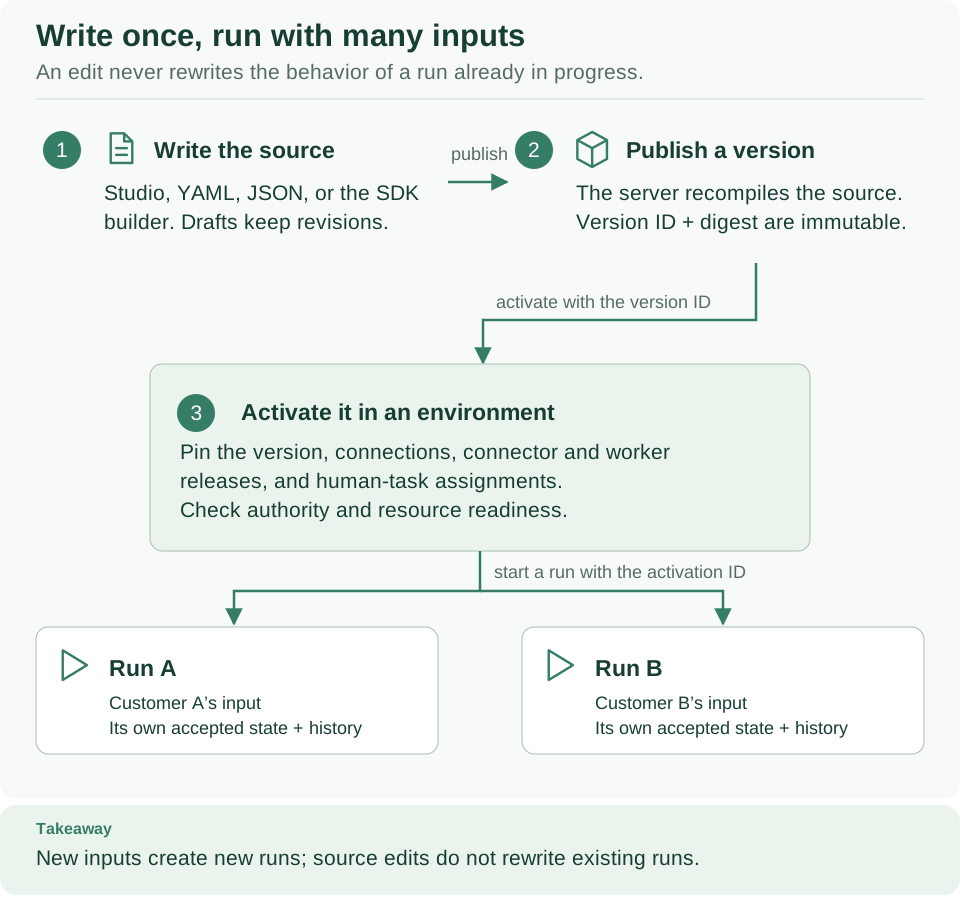
Follow the numbers: write the source (1), publish an immutable version (2), and activate it in an environment (3). Each input then starts its own run, such as Run A and Run B. An activation is reusable; each run carries the state of one case.
Definition, artifact, and run
A workflow is the versioned description of a process: its input and output, its steps, and the integrations it needs. You write it in YAML or JSON, generate it with the Python SDK, or draw it in Studio. Think of it as a recipe.
A run is one execution of that workflow with a particular input, like preparing the recipe for one order. One workflow version can have thousands of runs, each with its own state and history.
Between the two, the compiler checks the workflow and produces an artifact: a machine-readable form with a digest that identifies its executable content. Invalid schemas, unknown actions, and incompatible values are found here, before anything runs.
| Item | Onboarding example | When it changes |
|---|---|---|
| Workflow definition | "Check the customer, wait for approval, send a welcome message" | When an author edits the process |
| Compiled artifact | The checked steps and the exact versions they depend on | When the definition or its dependencies change |
| Published version | customer-onboarding@1.0.0, stored in a project |
Never: publishing again creates a new version |
| Activation | Version 1.0.0 with the test environment's connections, releases, and reviewers | When you activate again |
| Run | The onboarding of one customer | As that customer's case advances |
Editing a YAML file or a Studio draft never changes a run that is already in progress. Publish and activate a new version for new work; existing runs keep the version they started with.
The lifecycle, one step at a time
- Author: write the input schema, the steps, and the output schema.
- Validate: check the source. Without a catalog (the list of actions, connectors, schemas, and worker task contracts the workflow may use), the check is partial and produces no artifact.
- Compile: check the workflow against the catalog and produce the artifact.
- Simulate (optional): run the artifact with sample input and mocked results: on your computer with the CLI, or through a connected platform from Studio. Nothing external is called.
- Publish: store an immutable version in a project. You send the source, and the platform compiles it again before it records the version.
- Activate: select that version for an environment and bind what it needs there (see activation).
- Start a run: send an input to the activation.
- Observe: read the run's status, output, history, and any incidents. A run may finish at once, wait for an integration, or pause for a timer, a signal, or a person.
The quickstart covers steps 1–4 on your computer, and the CLI tutorial covers steps 5–8 on a platform. In Studio's designer, the same steps are the Validate and Simulate buttons, then the main button, which moves from Save draft to Publish…, Activate…, and Start run…; see Save, publish, activate and run.
A draft is optional: it saves work in progress on the platform before you publish (Save draft in Studio). Each save has a revision number. If two people edit the same revision, the second save is refused instead of silently overwriting the first person's change.
Workflow, steps, and integrations
A workflow is made of steps. Each step has an ID and a kind. Studio and this documentation use these names:
| Step (Studio name) | Kind in YAML | What it does |
|---|---|---|
| Call an action | action |
Calls a published Action and waits for its result |
| Transform | transform |
Computes a value from workflow data; no external call |
| Decision | switch |
Takes the first case whose condition is true, or the default path (Otherwise in Studio) |
| Parallel | parallel |
Runs named branches and continues when all of them finish |
| Wait for time | wait |
Pauses the run for a fixed duration |
| Wait for signal | signal |
Waits for a named external event, up to a timeout |
| Human task | humanTask |
Asks a person to decide, with a form |
| Fail | fail |
Ends the run as failed with a business error code |
The step reference explains every property, and definition contracts give the exact fields.
Calling another system involves several pieces, each with one responsibility:
| Concept | What it is | Example |
|---|---|---|
| Action | A published, versioned contract for one external call: input and output schemas, side effect, timeout, and retry policy | check-customer@1.0.0 takes a customer ID and returns an eligibility result |
| Connector | Trusted code that speaks one protocol, either built in or installed as a package | The built-in weave-http@2.0.0 calls JSON APIs over HTTPS |
| Integration connection | An environment resource with an endpoint, authentication settings, and secret handles (names of secrets, never their values). Each change creates a new revision | The test customer-service URL and the handle crm-api-key |
| Connection slot | A named requirement in the workflow (spec.connections), bound to an integration connection when you activate |
A slot crm that needs a weave-http@2.0.0 connection |
| Worker release | An admitted build of your own integration code and the task contracts it can run | A container image that implements check-customer |
| Worker | A running process that claims tasks and calls the external system | That container, running in your infrastructure |
| Activation | A published version pinned to one environment, with its connections, connector or worker releases, and human-task assignments | Version 1.0.0 in the test environment |
An Action is implemented either by a connector, which the platform's executor runs, or by a worker task, which your own process runs. For one call to a JSON API over HTTPS you can build the Action without code; see Call a REST API without code. A connection describes where and how to call; it is not the process that makes the call.
A Transform step never needs a worker, which is why the first tutorial can return a message without any integration.
Where your data lives
Weave organizes resources in a hierarchy:
Tenant: your organization or customer boundary
└── Project: one product or group of related workflows
    ├── Published definitions: versions shared by the project's environments
    ├── Environment: test
    │   └── Activations, connections, workers, and runs
    └── Environment: production
        └── Separately configured activations, connections, workers, and runs
A tenant, a project, and an environment together form a workspace: where you work when you use the CLI or Studio. The API reference calls the same three IDs a scope. With a saved platform, you choose your workspace once when you connect, and the CLI and Studio remember it. Knowing a workspace's IDs gives nobody access to it.
PostgreSQL stores definitions, run state, task leases, and receipts durably. Workers talk to the API and never need a database login. The architecture guide shows how the modules cooperate.
Platforms, sign-in, and permissions
A platform is a running Weave server: the one your team operates, or a local platform on your laptop. You connect to it by its server address.
Signing in answers "who are you?". You sign in at your organization's identity provider (an OIDC service such as Keycloak), in a browser or with a code on another device. Weave never sees your password. Weave then checks the token's signature, issuer, audience, and client, and finds the Weave principal (person or application record) that an administrator linked to that account.
Permissions answer "what may you do here?". Weave's own grants give a
principal roles in a tenant, project, or environment: developer to author and
publish, deployer to activate, operator to start and manage runs,
task_participant to complete human tasks, and so on. A role in your identity
provider never becomes a Weave role by itself. A successful sign-in without a
grant lets you do nothing. People and access
lists every role.
Two more terms appear in the Studio and CLI guides:
- A saved platform (the CLI also calls it a profile) records a platform's address, the sign-in settings you reviewed, and your workspace. The CLI, Studio, and the desktop app share it. It holds no password or token: tokens stay in your operating system's credential store, or in a private file you choose. See Connect the CLI to a platform.
- Pairing links a browser tab to the Studio host on your own computer with a one-time code. It is not a sign-in and grants nothing on any platform. See Pair the browser with the local host.
Saved platforms and weave auth setup are new in 0.1.0a7; alpha6 and
earlier clients sign in with a connection file instead.
Identity and secrets explains how an
administrator configures sign-in.
Tasks, leases, and retries
When a run reaches Call an action, Weave records a task: work that needs to be done. The executor or a worker claims it and receives a lease, a time-limited permission to perform that task. Heartbeats renew a valid lease. The completion carries proof of the lease, so a stale worker cannot complete a task after a newer attempt took over.
Weave retries an Action automatically only when all four of these hold:
- its retry policy (
retry.maxAttempts) allows another attempt; - its declared side effect (
read_only,idempotent, oridempotency_key) makes a repeat safe; - the failure was transient, such as a timeout or a worker that stopped;
- time remains in the Action's
timeoutSecondsbudget, which covers every attempt of that call.
Otherwise the run is suspended with an incident, and an operator decides what happens: retry safely, accept a result confirmed with the other system, or terminate the run. See incident operations.
Leases protect Weave's own state, but they cannot undo a request already sent to another system. Consider this sequence:
- The worker asks the customer service to create a record.
- The customer service creates it.
- The worker crashes before Weave receives the completion.
Weave cannot tell from the missing completion whether the record exists. For a safe retry, the other system should recognize a stable idempotency key and return the earlier result instead of creating a duplicate. Otherwise someone must reconcile the two systems. This is what at least once means: an external call may be delivered more than once, and Weave never promises exactly-once effects. The worker guide shows how a handler uses the operation key.
Waiting and reacting to events
| Mechanism | Use it when… | Example |
|---|---|---|
| Wait for time | The same run should continue after a duration | Wait ten minutes before checking again |
| Wait for signal | The same run needs an external value before a deadline | Receive a credit decision from another system |
| Human task | A person must decide, using a form | A reviewer approves or rejects the application |
| Schedule | New runs should start on a recurring UTC timetable | Process yesterday's orders each morning |
| Webhook trigger | A signed HTTP event should start a run or signal one | A payment provider reports a settled payment |
| Broker trigger | A Kafka record should start a run or signal one | An order event arrives on a topic |
| Email or messaging source | An email, or a Teams, WhatsApp, or Telegram message, should start a run or signal one | A customer replies to a confirmation email |
| Integration event subscription | Another system should hear about a committed Weave event | Notify your product when a run's status changes |
Waits, signals, and human tasks are stored with the run. Restarting the API does not lose them. A receipt records that Weave accepted an incoming event, so a retried delivery of the same event is recognized instead of starting a second run. Each receipt has its own deduplication scope: a receipt for one source does not promise that every external event happened only once.
Schedules and timers, HTTP and webhooks, Kafka, email, provider sources, and integration events explain each mechanism.
Debugging without confusing it with execution
Simulation runs a compiled workflow with explicit mock responses, on your computer with the CLI or through a connected platform from Studio. It never calls the customer service and saves no run. Recorded replay inspects the retained, redacted history of a real run without contacting anyone, and reports when that history is incomplete. An incident marks a run that needs an operator's decision, including some uncertain external outcomes.
Use authoring and simulation while you develop, history and replay to inspect a real run, and incident operations when a run needs help.
Coming from BPM/BPMN
Weave is a durable workflow orchestration and integration platform with human tasks. It does what you expect from the core of a BPM suite: model a process, run many cases of it, wait for people and events, call other systems, and monitor every case. It is not a BPMN engine. It does not import or export BPMN files, and a workflow is a structured tree of steps, not a free-form graph of sequence flows: a Decision or Parallel group always joins again before the next step.
Use this table to translate what you know:
| BPM or BPMN idea | In Weave | What to know |
|---|---|---|
| Process definition or model | Workflow, written in YAML or JSON or drawn in Studio | Compiled and versioned; a published version never changes |
| Deployment | Publish, then activation | Activation pins the version and its bindings for one environment |
| Process instance | Run | Use a business key to group the runs of one business case |
| Process variables, data objects | The workflow input and each step's output | Read them with references such as /input/amount or /steps/review/output; schemas check their shape |
| Start event | Start a run from Studio, the CLI, the API, or the SDK; or a webhook trigger, schedule, Kafka broker trigger, or email or messaging source | See Waiting and reacting to events |
| Service task | Call an action (action) |
Calls a published Action, run by a connector or a worker |
| Script task, business rule task | Transform (transform) |
Expressions only: literals, references, objects, arrays, and the operators eq, ne, lt, lte, gt, gte, and, or, not, exists, coalesce. There is no scripting language |
| User task | Human task (humanTask) |
A form schema, the allowed decisions (approve and reject by default), and optional due and expiry times |
| Lane, performer, candidate group | Assignment binding | Each environment maps the task's binding to people or a group (weave human-assignments, weave human-groups); bindings are managed with the CLI or the API, not in Studio |
| Exclusive gateway (XOR) | Decision (switch) |
Cases are tested in order; the first true case runs, otherwise the required default path, which Studio labels Otherwise. Each route declares an output |
| Parallel gateway (AND split and join) | Parallel (parallel) |
Named branches, at most concurrency at a time; the run continues when every branch has finished |
| Inclusive gateway (OR) | No single step | Use a Parallel whose branches each start with a Decision; a branch may have no steps |
| Event-based gateway | Not available | A Wait for signal waits for one named signal |
| Timer intermediate event | Wait for time (wait) |
A durable timer; nothing sleeps while it waits |
| Message intermediate catch event | Wait for signal (signal) |
A named signal whose payload must match a schema |
| Timer boundary event on a task | The timeout of a Wait for signal, the expiry of a Human task, or the workflow timeout | A timeout ends the whole run as timed out. It does not follow an alternative path. An Action's own timeoutSeconds does not end the run: it is the time budget for that call, retries included, and a call still unfinished when it runs out suspends the run with an incident |
| Error end event, terminate end event | Fail (fail) |
Ends the whole run as failed with your code and message, including any other parallel branches |
| Error boundary event | Not in the language | A failed Action retries when that is safe; otherwise the run is suspended with an incident for an operator. To branch on a business outcome, return it in the Action's output and test it with a Decision |
| Message throw or end event | Call an action, or an integration event subscription | A subscription notifies another system when a run's status changes |
| Call activity, subprocess | Call a workflow (callWorkflow) |
Defined in the workflow language, but this version does not compile or run it: the compiler reports WV-COMP-UNSUPPORTED_FEATURE. Until then, keep the part inside the same workflow, or make it a separate workflow that your product starts |
| Loop, multi-instance activity | Loop over items (forEach) |
Defined in the workflow language, but this version does not compile or run it: the compiler reports WV-COMP-UNSUPPORTED_FEATURE. Until then, use a Parallel with a fixed set of branches, or start one run per item |
| Compensation | Not in the language | Model compensating Actions as ordinary steps; Weave never undoes an external effect |
| Instance migration | Not available | A running run keeps its version; new runs use the new activation |
| Process monitoring, cockpit | Runs, history, and incidents in Studio and the CLI; logs, metrics, and traces | Studio draws a run's graph and marks its current step Now; see follow and manage runs, execution management, and observability |
Here is a small approval process in Weave. A reviewer has one day to decide. Approval ends the run successfully; rejection ends it as failed with a business code. In Studio, the Approval, then branch template starts from a similar shape: a Human task followed by a Decision.
apiVersion: weave/v1alpha1
kind: Workflow
metadata:
  name: expense-approval
  version: 1.0.0
spec:
  inputSchema:
    type: object
    properties:
      amount: {type: number}
    required: [amount]
    additionalProperties: false
  outputSchema:
    type: object
    properties:
      approved: {type: boolean}
    required: [approved]
    additionalProperties: false
  steps:
    # User task: a reviewer decides within one day, or the run times out.
    - id: review
      kind: humanTask
      assignment: reviewers
      title: {literal: Review this expense}
      context: {ref: /input}
      formSchema:
        type: object
        properties:
          note: {type: string}
        additionalProperties: false
      expirySeconds: 86400
    # Exclusive gateway: the first true case wins; otherwise the default runs.
    - id: route
      kind: switch
      cases:
        - when:
            op:
              name: eq
              args: [{ref: /steps/review/output/decision}, {literal: approve}]
          steps: []
          output: {literal: {approved: true}}
      default:
        steps:
          # Error end event: the whole run ends as failed with this code.
          - id: rejected
            kind: fail
            code: expense.rejected
            message: The reviewer rejected this expense.
        output: {literal: {approved: false}}
  output: {ref: /steps/route/output}
This definition compiles with an empty catalog. In the simulator, its three paths end like this:
| What the reviewer does | Run status | Run output |
|---|---|---|
Chooses approve |
succeeded |
{"approved": true} |
Chooses reject |
failed |
{"code": "expense.rejected", "message": "The reviewer rejected this expense."} |
| Nothing for one day | timed_out |
none |
On a platform, the activation must bind the reviewers assignment to real
people; human tasks walks through it.
Glossary
| Term | Meaning |
|---|---|
| Action | A published, versioned contract for one external call, implemented by a connector or a worker task |
| Activation | A published workflow version pinned to an environment with its connections, releases, and assignments |
| Connection slot | A named requirement in a workflow, bound to an integration connection at activation |
| Connector | Trusted code for one protocol: built in, such as weave-http@2.0.0, or an installed package |
| Incident | A recorded problem that suspends a run until an operator decides |
| Integration connection | An environment resource with an endpoint, authentication settings, and secret handles |
| Local authoring | Using Studio or the CLI on your own computer, without a platform |
| Pairing | Linking a browser tab to the local Studio host; not a sign-in |
| Platform | A running Weave server that your team uses, or your local one |
| Run | One execution of an activated workflow version |
| Saved platform | The non-secret record of a platform, its sign-in settings, and your workspace, shared by Studio, the CLI, and the desktop app |
| Sign in | Authenticating at your identity provider |
| Step | One node of a workflow; one of eight kinds |
| Workflow | A versioned process definition: steps, data, connection slots, and timeouts |
| Workspace | The tenant, project, and environment you work in |
Next steps
- Write and simulate your first workflow: put the first two sections into practice on your computer.
- Start here: follow the ordered path for your role.
- Studio step reference: configure each of the eight steps.
- Human tasks: bind the approval example's
reviewersassignment to real people.