Embed authoring and orchestration in your product
Use this page when your own product creates workflows or integration Actions, for example a form-based process editor or an "add an API call" screen, and then hands them to a Weave platform. It is for integration developers who already know the Python SDK. You will build a workflow and a no-code HTTP Action in Python, check them locally, and choose how your product talks to the platform.
You need Python 3.12 or later and the base firefly-weave package. The
compiler, the workflow builder, and the HTTP Action builder work without PyFly,
a server, network access, a database, or secret providers. Running anything
durably needs a platform, as described in
Choose an execution boundary.
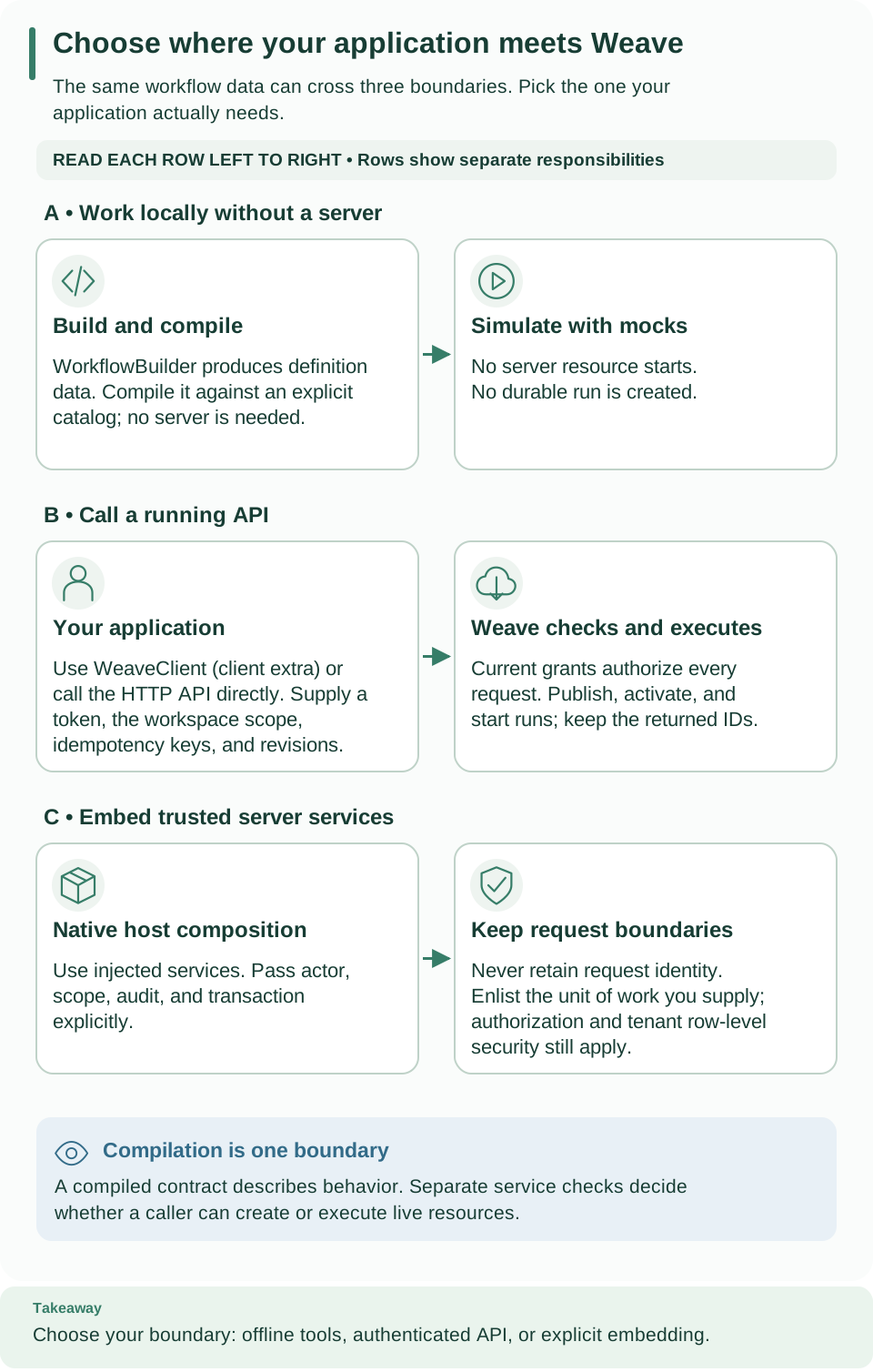
Start with row A: the local builder used in the next section. Rows B and C show the two ways to reach durable execution, through the remote API or inside your own server. Read each row from left to right and keep its identity and transaction requirements. Open diagram at full size.
Build the same workflow without YAML
The authoring guide writes an echo
workflow in YAML. This complete example builds the same behavior in Python,
compiles it, and simulates one input:
from datetime import UTC, datetime
from firefly_weave.compiler.api import compile_source
from firefly_weave.compiler.catalog import CatalogSnapshot
from firefly_weave.contracts.definitions import TransformStep, RefExpression
from firefly_weave.operations.debug.simulator import Simulator
from firefly_weave.sdk.builder import WorkflowBuilder

schema = {
    "type": "object",
    "properties": {"message": {"type": "string"}},
    "required": ["message"],
    "additionalProperties": False,
}
builder = WorkflowBuilder(
    "echo", "1.0.0", input_schema=schema, output_schema=schema,
    output=RefExpression(ref="/steps/echo/output"),
)
builder = builder.add_step(TransformStep(
    id="echo", kind="transform", value=RefExpression(ref="/input"),
))
result = compile_source(builder.to_document(), format="object",
                        catalog=CatalogSnapshot.empty(), strict=True)
assert result.ok and result.artifact is not None
view = Simulator(result.artifact, mocks={}, input={"message": "Hello, Weave"},
                 now=datetime(2026, 1, 1, tzinfo=UTC)).continue_until_breakpoint()
assert view.status == "succeeded"
print(view.variables["output"])
Expected: {'message': 'Hello, Weave'}. Three separate things happened: the
builder created definition data, the compiler checked it, and the simulator
evaluated it. None of them created a durable run; the
standalone tutorial and the
SDK lifecycle example
take that next step.
How the builder behaves.
- Every update returns a new builder; keep the returned value.
to_document()andto_definition()return fresh, validated values. - Nested Decision (switch) and Parallel branches, schemas, expressions, connection slots, and timeouts use the same models as a parsed YAML file.
- The builder checks that each model is valid. Only complete compilation checks dependencies, types, data availability, and budgets, so always compile.
- Python functions never become steps; the builder produces data only. Never put credentials in authoring literals.
Generate a no-code HTTP Action
Since 0.1.0a7, your product can describe one REST call and get a reviewed
Action for the built-in weave-http@2.0.0 connector, with no Python code to
deploy. This is the same builder that weave connector http-action and Studio's
API action builder use. An alpha6 or earlier package does not have it.
from firefly_weave.sdk.http_actions import author_http_action

result = author_http_action({
    "name": "get-todo",
    "method": "GET",
    "pathTemplate": "/todos/{id}",
    "parameters": [{"name": "id", "location": "path", "type": "integer", "required": True}],
    # Field names and types are inferred from the sample; its values never enter the Action.
    "responseSample": {"id": 1, "title": "Buy milk", "completed": False},
    "description": "Read one demo to-do item",
})
for diagnostic in result.diagnostics:
    print(diagnostic.severity, diagnostic.code, diagnostic.path)
assert result.ok and result.action is not None
print(result.action["metadata"], result.action["spec"]["connection"])
Expected: one warning WV-COMP-UNKNOWN_COMPATIBILITY /spec/outputSchema line,
then {'name': 'get-todo', 'version': '1.0.0'} {'connector': 'weave-http@2.0.0'}.
The warning means the response is validated at run time; it does not block
the Action. author_http_action takes a dictionary and never raises for
invalid fields in it: it returns ok: false with diagnostics whose codes start
with WV-HTTP-ACTION- or WV-COMP- and point at the field to fix.
methodis uppercase:GET,HEAD,POST,PUT,PATCH, orDELETE. The side effect follows from it and cannot be chosen: GET and HEAD are read-only, every other method is a non-idempotent write that runs once.- Use either a sample or a JSON Schema for the response (
responseSampleorresponseSchema) and for the body (bodySampleorbodySchema), not both. - The result is checked and compiled against the connector descriptor bundled
with the package. Publish
result.actionwithclient.publish("actions", json.dumps(result.action), "json", idempotency_key=...)orweave definitions publish --collection actions.
To call the API, a workflow also needs an integration connection that names the API's HTTPS origin and its secret handles, never the secret values. Call a REST API without code walks through the operator setup, the connection, and a first run.
Choose an execution boundary
Your product reaches durable execution in one of two ways (rows B and C of the diagram).
Remote API (recommended). Your product calls the platform through the Python SDK or the HTTP API. With it you can discover catalogs, edit and retire drafts, publish workflows, Actions, and Connectors, create connection revisions, activate pinned versions, and operate runs.
- Give your product its own provisioned identity, linked in Weave and granted only the roles it needs; see Give people the right access.
- Worker credentials do not authorize authoring.
- There is no privileged UI-only path, and your product never needs access to the orchestration database.
In-process service composition (only for the trusted server application). Use this only when you own and deploy the Weave server application itself. Two terms first: a unit of work (UoW) is the transaction boundary of one operation, and row-level security (RLS) restricts database rows to the authorized tenant.
- In-process code uses the native
@serviceapplication graph, with constructor injection and explicit actor, scope, audit context, and transaction ports. - Singleton services never keep a request's actor, database session, or a person's credentials.
- A transaction you supply is enlisted, but it does not supply an identity or grant permission. Keep the authorization and RLS boundaries; do not build alternative service factories.
- Compiling never establishes execution authority or credential availability.
Effects and evidence
- Simulation and replay have no effects. In a simulation, connector and worker Actions need mocks. Replay checks recorded evidence and reports incomplete prefixes and redactions explicitly.
- Durable execution is at least once. Idempotency keys and receipt fences describe which facts were accepted. Neither an SDK retry nor a historical acknowledgment proves that an external effect happened exactly once.
- Integrations sit at clear boundaries. Use the built-in HTTP connector (no-code or from an OpenAPI import), SQL, Kafka, the outbox, Teams, WhatsApp, or Telegram connectors, or your own worker. The capability matrix states what each one supports and how it was verified.
Next steps
- Publish, activate, and run what you built with the SDK lifecycle example.
- Plan which responsibilities stay in your product with host integration.
- Let an operator prepare the HTTP connector with Call a REST API without code.