Author, check, and simulate a workflow
A workflow is a versioned process definition: the data it accepts, the steps
it runs, and the result it returns. This lab writes a small echo workflow in
YAML, then teaches the authoring loop you will use for every workflow: validate
the document, compile it against a catalog, read a diagnostic, repair it, and
simulate a run, all on your own computer. Given {"message": "Hello, Weave"},
echo returns that same object.
It is for anyone who writes workflow definitions as files: developers, and analysts who prefer text to drawing. If you prefer to draw, the same checks run in Studio. Coming from a BPM suite? Coming from BPM/BPMN maps its ideas to Weave.
New to Weave? The quickstart builds the same echo workflow more briefly. This lab adds partial validation, a deliberate type error, and its repair.
Before you start, you need:
- The installed CLI and Python 3.12 or later.
- A working directory. Reuse the one from the quickstart, or
create
.local/tutorial/in a directory of your choice.
No API, database, token, or worker is needed: every step below runs offline. If you use a source checkout, select its CLI with the quickstart's shell function. Only the optional external Action example at the end needs repository files. The Python snippet below uses only the standard library, so it does not import packages from the CLI's isolated environment.
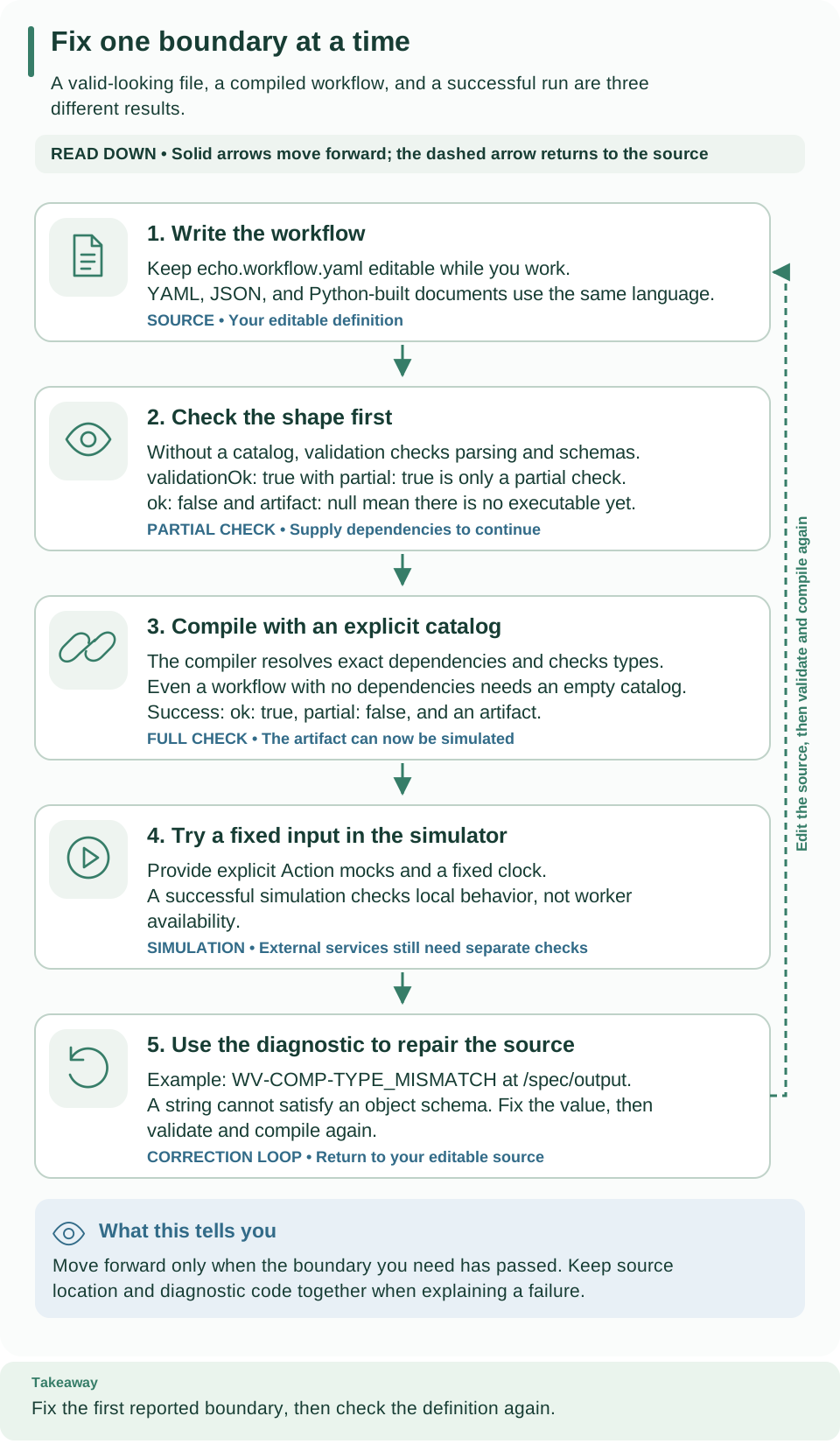
Read down through source, partial validation, full compilation, and simulation. Partial validation can pass without an artifact; compilation needs an explicit catalog. The final card explains how a diagnostic sends you back to a concrete source edit. Open the diagram at full size.
1. Write the input and output contract
Save this as .local/tutorial/echo.workflow.yaml:
apiVersion: weave/v1alpha1
kind: Workflow
metadata:
  name: echo
  version: "1.0.0"
spec:
  inputSchema:
    type: object
    required: [message]
    additionalProperties: false
    properties:
      message: {type: string}
  outputSchema:
    type: object
    required: [message]
    additionalProperties: false
    properties:
      message: {type: string}
  steps:
    - id: echo
      kind: transform
      value: {ref: /input}
  output: {ref: /steps/echo/output}
Read this from the outside in:
apiVersionselects the workflow language;metadata.versionidentifies your workflow version. Changing one does not change the other.inputSchemaaccepts an object with a required stringmessageand rejects extra properties.outputSchemapromises the same shape to callers.stepsruns in order. Atransformevaluates a data expression without an external call. The step IDechogives later expressions a stable name to read.{ref: /input}reads the complete run input. The finaloutputreads the transform's result at/steps/echo/output.
A ref is a JSON Pointer into workflow data, not a Python expression or a URL.
For example, /input/message reads only the string. {literal: "Hello"} would
produce a fixed string. Neither expression reads environment variables or files.
See compiler expression forms
and schema rules before adding more complex values.
Other kinds of steps
Echo uses only a transform. A workflow can combine these step kinds; Studio
shows each one under the label in the first column:
| Studio label | YAML kind |
What it does |
|---|---|---|
| Call an action | action |
Calls a published Action, run by a connector or a worker |
| Transform | transform |
Computes a value from workflow data, with no external call |
| Decision | switch |
Follows the first case whose condition is true, or the default path (Otherwise) |
| Parallel | parallel |
Runs named branches, up to a set concurrency |
| Wait for time | wait |
Continues after a fixed duration, on a durable timer |
| Wait for signal | signal |
Waits, up to a timeout, for a named external message |
| Human task | humanTask |
Asks an assigned person to choose a decision and fill in a form |
| Fail | fail |
Stops with a business error code and a message |
The Studio step reference describes every field.
2. Validate the document
Validation checks the document's shape and schemas before you invest in dependencies:
# Check the language shape only; no catalog is given, so no artifact is produced.
weave workflow validate .local/tutorial/echo.workflow.yaml --output json
Expect exit code 0, validationOk: true, partial: true, ok: false, and
artifact: null. This is a successful partial validation: it checks the
language shape and schemas without resolving dependencies. ok: false here does
not mean your YAML failed; it means no executable artifact was produced.
3. Compile with an explicit catalog
A catalog is a snapshot of dependency contracts available to the compiler.
Echo calls no Actions, so save an explicitly empty catalog as .local/tutorial/empty-catalog.json:
# Compile against the empty catalog and export the artifact, then show the execution plan.
weave workflow compile .local/tutorial/echo.workflow.yaml --catalog .local/tutorial/empty-catalog.json \
  --strict --directory .local/tutorial/compiled --output json
weave workflow explain .local/tutorial/echo.workflow.yaml --catalog .local/tutorial/empty-catalog.json
Expect ok: true, partial: false, and an artifact. The .local/tutorial/compiled directory
contains compiled-artifact.json, executable.json, and catalog.lock.json.
The first file includes the executable plus diagnostics and source locations;
use it for simulation. explain shows the start, echo, and end nodes and how
they connect. Compilation checks references and data types; it executes no steps.
Export refuses existing target files. For another attempt, choose a fresh
--directory, or deliberately use --force to replace those exports.
If compilation fails, inspect each diagnostic's code, path, and source span
before proceeding. Compiler results explains these
fields. A successful compile does not provision runtime dependencies.
Make a type error, then repair it
Change the transform's value from {ref: /input} to
{ref: /input/message} and compile again without exporting:
# Compile without --directory, so the earlier export stays untouched.
weave workflow compile .local/tutorial/echo.workflow.yaml \
  --catalog .local/tutorial/empty-catalog.json --strict --output json
Expect exit code 1, ok: false, and WV-COMP-TYPE_MISMATCH at /spec/output.
The transform now returns a string, but outputSchema promises an object. The
YAML is structurally valid, so partial validation alone does not catch this
relationship. Restore {ref: /input} and recompile; expect success again. Your
previously exported artifact remains the original valid workflow because this
exercise did not export a replacement.
4. Simulate one input
Build a simulation request from the exported artifact. Save the following as
.local/tutorial/make-simulation.py and run it with Python 3.12 or later:
import json
from pathlib import Path

request = {
    "artifact": json.loads(Path(".local/tutorial/compiled/compiled-artifact.json").read_text()),
    "mocks": {},
    "input": {"message": "Hello, Weave"},
    "now": "2026-01-01T00:00:00Z",
}
Path(".local/tutorial/simulation-request.json").write_text(json.dumps(request))
# Write the simulation request, then run it in memory with no external effects.
python3 .local/tutorial/make-simulation.py
weave workflow simulate .local/tutorial/simulation-request.json --output json
Expect status: "succeeded" and variables.output equal to
{"message": "Hello, Weave"}. mocks is empty because a transform needs no
external result. now initializes the simulator's virtual clock; simulation
never calls a live worker or provider. To explore breakpoints, signals, and
mocked Actions, continue with simulation.
Try changing input in make-simulation.py to {"message": 5}, then run both
commands again.
Expect exit code 1 and WV-DEBUG-REQUEST with the message Invalid or
over-budget simulation request.: the simulator refuses input that does not
satisfy inputSchema before it runs any step. The message does not name the
field, so check the input against the schema first. Restore the string and
regenerate the request before continuing. This check protects the workflow's contract independently of
whether the source compiled.
5. Publish and activate for durable execution
Simulation runs in memory and leaves nothing behind. To create a durable run that the platform remembers, your workflow goes through these stages:
| Stage | What you create | Why it is separate |
|---|---|---|
| Draft, optionally | An editable, revisioned source document | An editor can save work before it compiles |
| Publish | An immutable workflow version | The server recompiles against its authorized catalog |
| Activate | An environment-specific version and dependency binding | Future runs pin this selected artifact and its dependencies |
| Start | A durable run with schema-valid input | History records execution of the pinned activation |
The CLI tutorial performs these operations one at a time against your team's platform or a local platform. You need permission to publish in your project and to activate and run in your environment.
The echo workflow needs no connection or worker release. When you add an Action
that calls an external system, the activation must pin what runs it and bind
any required connection revisions before a run can use it. What runs it is
either a worker release, admitted and with a running instance, or, for a
connector Action such as one on the built-in HTTP connector, an executor release
listed in connector_release_ids.
Workers, Call a REST API without code,
and host integration cover that next layer.
To change behavior, publish a new version and activate it for new runs. Existing runs keep their original pins. Retiring authoring state keeps historical revisions; it does not delete runtime evidence.
Read an external Action example next
The customer onboarding definition
calls onboarding.check-customer@1.0.0, waits for a customer-approved signal,
and combines their Boolean results. Its Action
and catalog lock are teaching fixtures for dependency resolution. Run this from
the repository root:
# Compile against a catalog lock that declares the Action the workflow calls.
weave workflow compile examples/definitions/customer-onboarding.workflow.yaml \
  --catalog tests/fixtures/catalog/onboarding.lock.json --strict --output json
Expected: ok: true and no diagnostics. A successful result proves the fixture
contracts compile. It does not install the external implementation, create an
activation, or make this a runnable deployment. Use explicit mocks to explore it
offline with the simulator. Credentials belong in
authorized connection secret references, never in ordinary workflow input,
literals, or output.
What you learned
- Validation checks the document's shape; compilation also resolves dependencies and data types against an explicit catalog and produces an artifact.
- A diagnostic names a
codeand apath; fix the source at that path and compile again. - Simulation runs the compiled artifact in memory with mocked results, so you can test behavior before publishing.
Next, publish and run the workflow with the CLI tutorial, draw one in Studio, or read the compiler reference for every expression form and diagnostic.