Troubleshoot a Weave platform
Use this page when something on a running platform does not work and you need to find out where it fails before you change anything. It is written for operators and administrators. You need access to the terminals or containers that run the platform, and a saved platform or token to make authorized requests. Most diagnoses take a few minutes once you know which stage failed.
Diagnose with safe evidence. Start from the safe support code, the server-issued request ID, and the current scope. Never paste provider response bodies, tokens, connection strings, or private environment files into logs or reports. For durable evidence, use history and replay and incident operations.
Start with the right guide
Many problems have a dedicated troubleshooting section closer to the task:
| Where the problem shows up | Go to |
|---|---|
| Connecting or signing in from the CLI | Connect the CLI: if something goes wrong |
| Studio connection, pairing, or editor | Fix a connection problem and when a step does not work |
| The desktop app | Desktop: if something goes wrong |
The local platform from weave platform |
Local platform troubleshooting |
| Identity provider, sign-in settings, or access denials | Troubleshoot sign-in and access |
| A REST API called without code | Call a REST API without code: troubleshoot |
| The API stops at startup with a configuration error | Troubleshoot configuration |
| Metrics or traces are missing | Observability |
| A run is stuck, failed, or has an uncertain external effect | Incident operations |
Use the rest of this page when you do not know yet which stage fails.
Locate the failing stage first
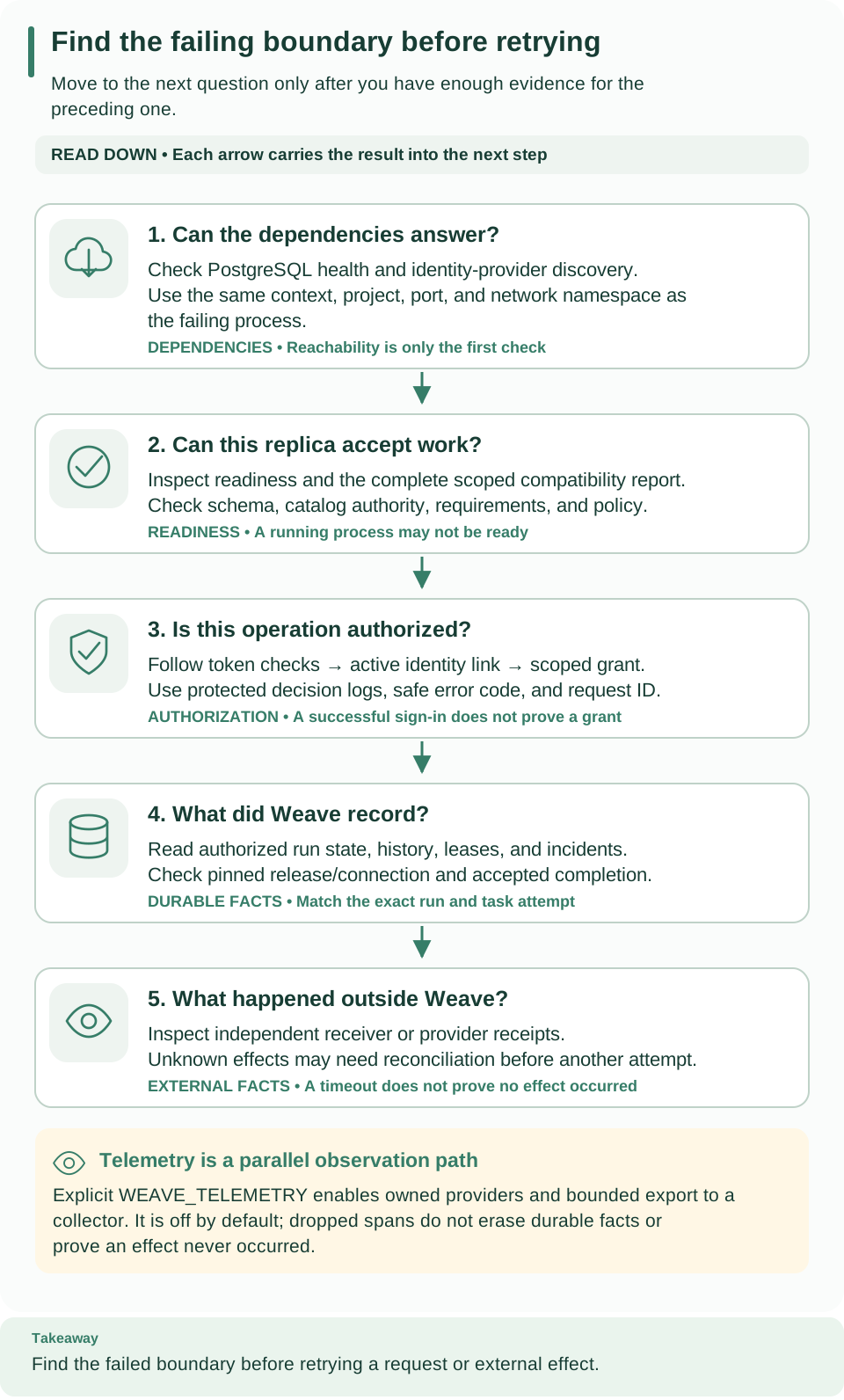
Begin at the first card you have not verified and work down. The numbered stages below follow the same order: card 1 is stage 1, card 2 covers stages 2 and 3, and cards 3 to 5 are stages 4 to 6. A successful earlier stage does not prove a later one: readiness does not establish authorization, task completion, or provider delivery.
Work through these stages in order, without rerunning provisioning:
- Dependencies. PostgreSQL and the identity provider (Keycloak on a local installation) are running, under the expected Docker context and project when you started them with Docker, and answer their health and discovery checks.
- API startup. The API terminal or container log shows no startup error. A schema rejection needs explicit migration diagnosis; a database authority rejection needs the correct nonowner runtime configuration.
- Readiness.
/health/readyanswers on the port of the API you actually started. A reserved port is not evidence of a running API. - Identity and scope. Tell a failure to obtain a token apart from a Weave denial, then check the identity link and the grants for the exact scope IDs.
- Execution. When admission succeeds but a run does not complete, inspect the run, its pinned release and connection, worker state, and incident history.
- External result. Inspect independent receiver or provider receipts before you decide whether a timed-out effect is safe to retry.
Check stages 1 to 3 on the local platform
# Read the saved stage and probe API and identity readiness; nothing is changed.
weave platform status
Expected: Api ready: True and Identity ready: True. Run it from the same
checkout; if you chose a custom installation directory, pass it before the
command, as in weave platform --directory DIR status.
Api ready: False means the API terminal stopped or is still starting; read that
terminal first. For other messages, see the
local platform troubleshooting table.
Check stages 1 to 3 on the standalone installation
From the repository root, in the standalone operator terminal, this read-only command lists only the selected local supporting services. It needs the original standalone environment and does not create a replacement project:
# List this installation's PostgreSQL and Keycloak containers and their state.
docker --context "$WEAVE_DOCKER_CONTEXT" compose --project-name "$WEAVE_LAUNCH_ID" \
  --env-file "$WEAVE_WORK_DIR/postgres.env" --env-file "$WEAVE_WORK_DIR/identity.env" \
  -f compose.yaml -f compose.identity.yaml ps
Expected: the postgres and keycloak services are running. Then repeat the
standalone PostgreSQL health and Keycloak discovery checks, and check readiness
from the same terminal:
# Probe readiness of the foreground API without sending credentials.
"$WEAVE_PYTHON" - <<'PY'
import os, httpx
url = "http://127.0.0.1:" + os.environ["WEAVE_API_PORT"] + "/health/ready"
try:
    response = httpx.get(url, timeout=5, trust_env=False)
except httpx.HTTPError:
    raise SystemExit("API readiness endpoint is unreachable; check the selected port and API process") from None
print("Readiness HTTP status:", response.status_code)
PY
Expected: Readiness HTTP status: 200. The foreground API uses
WEAVE_API_PORT; the optional container API uses WEAVE_CONTAINER_API_PORT. An
unreachable endpoint points first to startup or routing; a status other than 200
from the intended API calls for its startup and compatibility diagnostics. Do not
publish a full environment dump to explain either case.
Match the symptom to its boundary
| What you see | Why | What to do |
|---|---|---|
| Validation succeeds but no artifact exists | partial validation without a catalog is expected |
Compile with the catalog input and read the compiler diagnostics |
| Native OpenAPI or remote client import fails | The base compiler intentionally omits runtime dependencies | Install the openapi or client extra from the locked framework provenance |
| The server rejects the schema | Startup never migrates or repairs an incompatible database | Install the packaged migrations and run them with explicit migration authority; see upgrades |
| Readiness stays restricted | Scheduler catalog credentials, the compatibility report, the policy fingerprint, or retained requirements block it; disabling the scheduler does not bypass the startup inventory | Follow start and inspect compatibility |
| Readiness drops for about a minute, then returns | A periodic compatibility rescan could not finish and withdrew readiness until the next rescan | Read the Compatibility rescan withdrew readiness warning for the finding codes and error class; see start and inspect compatibility |
| Work admission reaches capacity | Admission limits are separate from physical disk space | Inspect the authorized usage and capabilities response, retained records, and configured limits; read retention before maintenance |
| The collector receives no telemetry | Export is disabled by default and needs an exact signal URL | Check WEAVE_TELEMETRY, the URL, collector TLS and authentication, and the network namespace; see observability |
A remote command prints WV-CLI-CONFIG |
No saved platform is selected and no --base-url was given |
Run weave auth setup SERVER; see configuration |
| A verified token receives a denial | Authentication and authorization are separate | Check the exact issuer, audience, client, and token purpose, then the identity link and active scope grants; see identity |
| A Keycloak template change has no effect | Realm import skips retained realms | Apply the change additively to the existing realm; do not reset it |
| A workflow cannot activate | Compilation does not provision execution resources | Check the connection revisions, worker or connector releases, grants, and the pinned catalog |
| A worker completion is rejected as stale | The lease generation, heartbeat, or deadline moved on | Read the recovery history; never retry a completion with fabricated authority |
| A provider receipt is ignored or conflicting | Deduplication is source-local, and conflicting facts are not a new event | Compare the source identity, the recognized update class, and the receipt facts |
| A provider send times out | The effect may be unknown, and an automatic retry can duplicate it | Establish whether dispatch occurred and what the connector's outcome contract says; see incident operations |
| Replay reports incomplete evidence | Redacted or omitted historical payloads, or a retained event prefix | Keep the result as incomplete; never convert it into a successful replay |
| Setup says output already exists | Setup scripts refuse to replace earlier output | Reuse a complete existing configuration, or investigate the retained attempt |
| A worker container exits after a short successful run | The example has a finite invocation and no automatic restart policy | Check token lifetime, drain budget, and exit state; follow restart |
| A worker cannot reach the API or receiver | Host loopback is not container loopback; the generated worker deployment adds no Linux host-gateway mapping | Check the API bind address, the receiver terminal, and the container-visible host address |
| A container runs but no task completes | Container liveness is not worker readiness | Check the admitted release, the current scoped worker grant, the activation pin, and the actual run state |
| A restart ignores a changed env file | Docker restart and up --no-recreate do not load changed env files |
Replace the container deliberately; see apply a configuration change |
| A restored installation rejects old source connections | The restore helper deliberately leaves the source fenced | Check trial.json and restore.json, and select only the intended restored target; see backup and restore |
| A local test backend is missing | Requested backend gates fail instead of silently skipping | Check the fixture prerequisites and the explicit context, ports, and owned resources |
For connector-specific admission and outcome rules, read Teams, WhatsApp, Telegram, Kafka, PostgreSQL, and HTTP and webhooks. For fenced recovery into a separate database, use backup and restore, and keep the original database and private recovery evidence until the restored service has been verified.
Collect a useful incident report
Record:
- the installed artifact version or hash;
- the safe support code and the server-issued request ID;
- the operation, the affected scope and run IDs, and the approximate time;
- which stage failed, whether the request was accepted, whether an external effect may have happened, and which durable evidence you inspected.
Keep detailed receipts and logs in protected storage, and share only what the authorized scope may see.
Do not turn uncertainty into a destructive reset. Recreating a realm, deleting a volume, editing schema markers, or fabricating a successful completion removes evidence without establishing the cause. Use the procedure for the failed boundary, preserve partial state, and repeat the smallest relevant verification after the correction.
Next steps
- Resolve uncertain runs deliberately with incident operations.
- Turn on metrics and traces with observability.
- Check compatibility after a change with upgrades.