Implement and operate a worker
A worker is a process that asks Weave for a task, calls your business code, and reports a result. For example, a customer-onboarding workflow can ask your worker to create a customer in an internal billing system. The worker implements that operation; Weave remembers where the overall process is and what comes next.
This guide is for developers who write the business code and for the operators
who run it. It explains the checked-in worker example
and its manifest: the contracts, the
handler, and what happens to one task. The commands that build, admit, and start
the worker are in Deploy your first worker, which
builds on the manual local setup. Running main.py alone is not
a complete deployment.
Do you need a worker? Many steps do not:
| The step needs to… | Use | Guide |
|---|---|---|
| Compute, decide, wait, or ask a person | A built-in step; it runs inside Weave | Workflow authoring |
| Call one JSON-over-HTTPS operation | An Action on the built-in weave-http@2.0.0 connector; no code |
Call a REST API without code |
| Run your own code, or a protocol the built-in connector cannot express | A remote worker | This guide |
| Ship trusted connector code that the platform runs itself | A connector package | Author a connector |
First, separate the people from the running processes
BPM means business process management. In Weave, a workflow describes the business process and the engine coordinates its steps. A worker performs a particular job within that process, much like the implementation behind a BPM service task. An operator is a person or application responsible for running and supporting the process. Coming from BPM/BPMN maps other BPM terms.
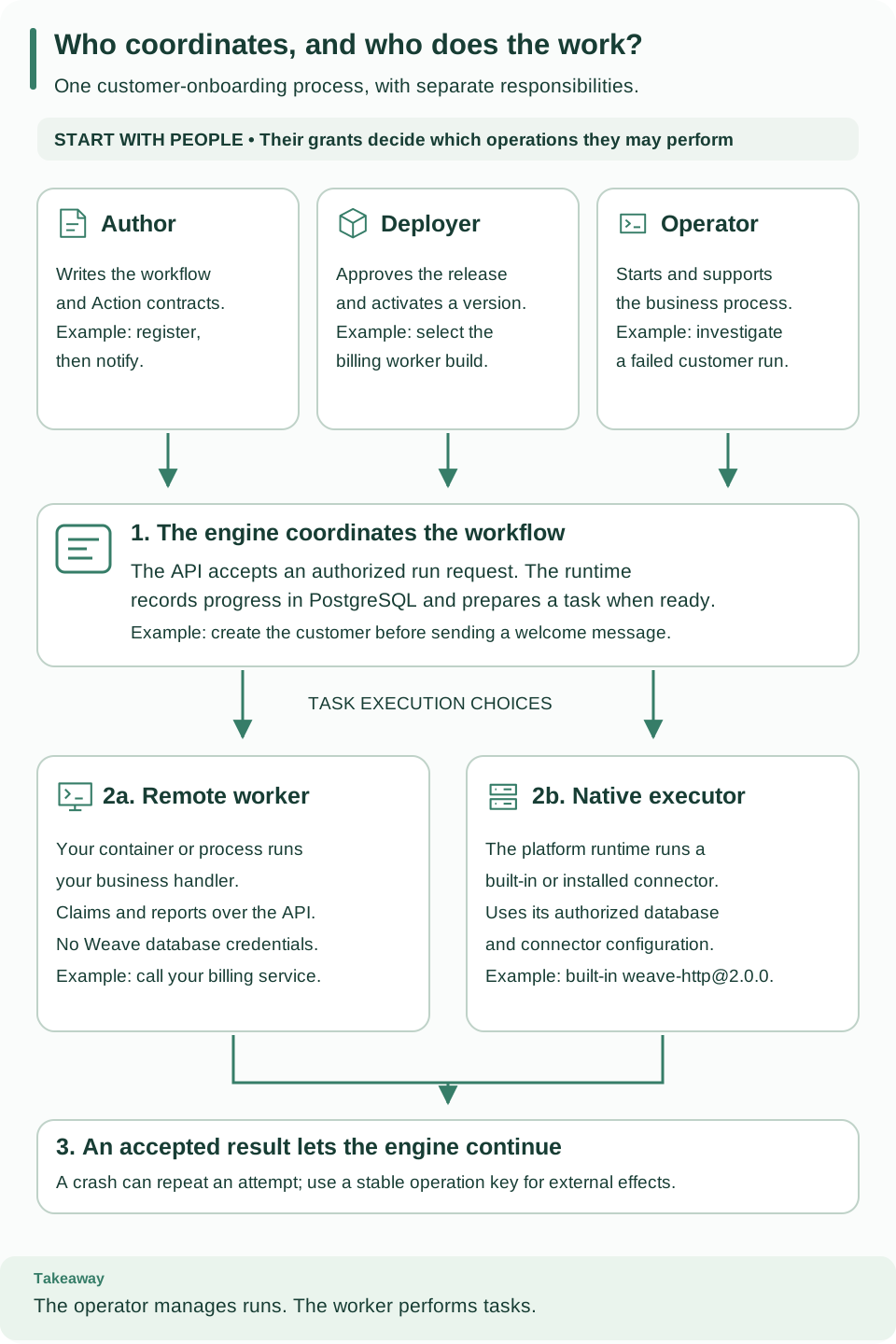
Read the people row first, then follow the numbered path from a run request to a completed task. The two execution choices explain where your business code runs. Open the diagram at full size.
| Name | What it does | Customer-onboarding example |
|---|---|---|
| Workflow author | Defines and validates the business process | Write the order of registration and notification steps |
| Deployer | Admits a worker release and activates a workflow in an environment | Approve the exact billing worker image for production |
| Operator | Starts, signals, cancels, or safely retries runs within granted scope | Investigate a failed registration and resolve its incident |
| Workflow engine | Records progress and decides which step is ready next | Wait for registration to finish before sending the notification |
| Remote worker | Claims tasks over the API and runs your handler | Call the billing service from your own container or network |
| Native executor | Executes configured connector code inside the platform runtime | Use an installed HTTP connector with an authorized connection |
The names above describe responsibilities. Weave also has explicit authorization
roles: developer for authoring, deployer for activation, operator for run
operations, viewer for run/status reads, and worker for task execution. Grant
the roles a principal actually needs; they do not inherit one another. For
example, a support application often needs both viewer and operator. The
worker role cannot publish workflows or approve its own release. Identity-provider
roles do not automatically become Weave permissions. See
identity and grants.
Here, “operator” is an operational responsibility and an authorization role. It does not mean a Kubernetes Operator controller. The Kubernetes guide describes the available manifests.
Choose how a step will execute
Pure calculations and control flow run in the engine. An installed connector, such as the built-in HTTP connector, runs an integration through a configured native executor. Write a remote worker when you want to own the handler, its dependencies, or its deployment boundary.
A remote worker needs an API connection and a scoped worker identity. It does not need the Weave database credentials. A native executor is part of the trusted platform runtime and needs its configured database and connector authority. Both follow the task/lease rules below, but they have different deployment and secret access boundaries.
For this tutorial, choose the remote-worker path. You will create one handler, package its exact capability, authorize a release, and start one process. The deployment walkthrough supplies the complete build, authorization, start, verification, and stop commands.
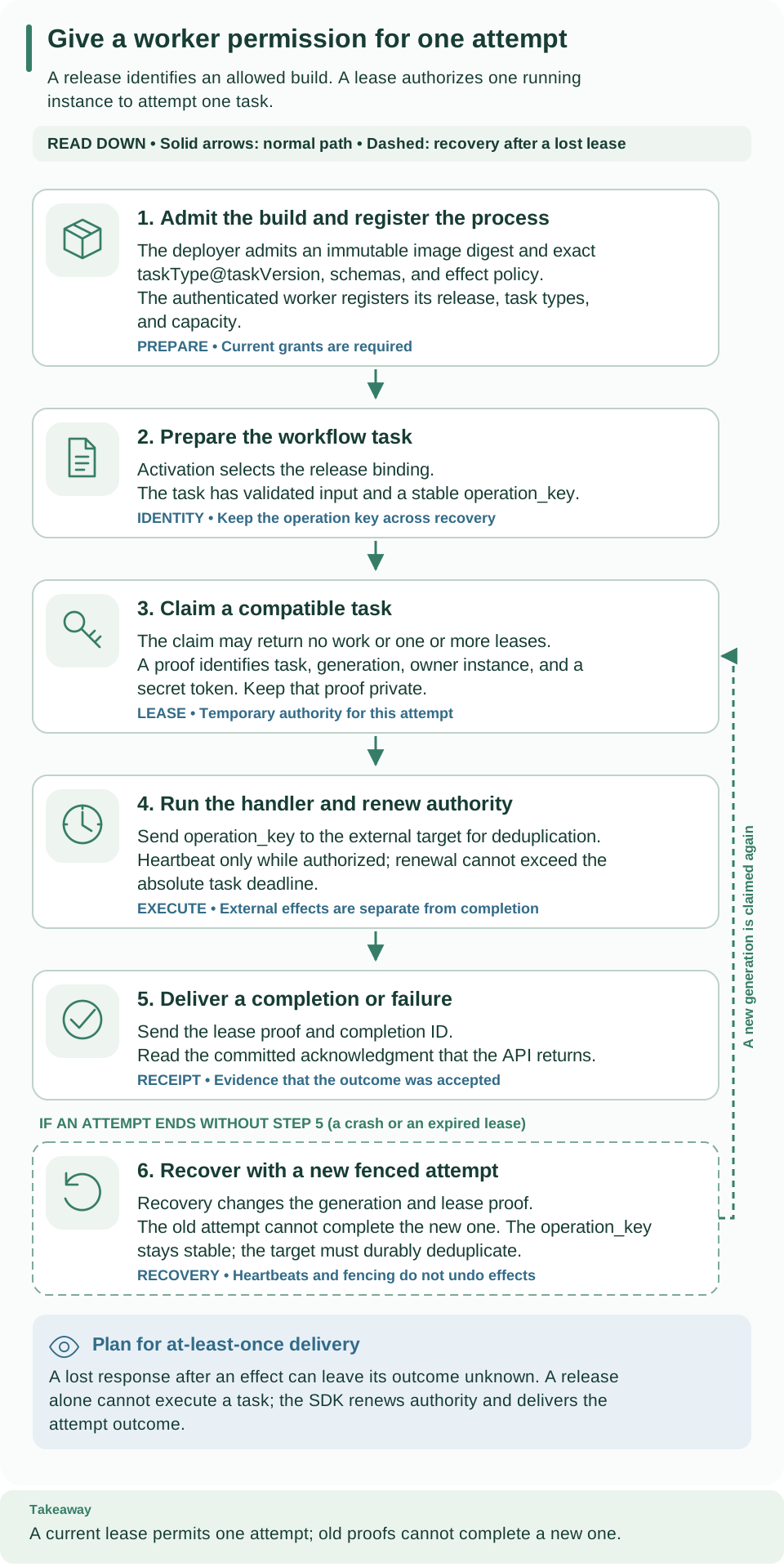
Read down from release admission and registration through claim, execution, completion, and recovery. A release, instance, and lease identify the allowed build, running process, and authorized attempt. Open the diagram at full size.
1. Define the work before implementing it
An Action is the reusable workflow-facing contract. A task capability is
the worker-facing contract that implements it. This example uses the exact
capability example-record@1.0.0:
| Contract field | Example value | Meaning |
|---|---|---|
taskType / taskVersion |
example-record / 1.0.0 |
Exact handler identity |
| Input | {"customer": "demo"} |
Required string, no extra properties |
| Output | {"receipt": "accepted", "customer": "demo"} |
Required receipt constant and customer string |
timeoutSeconds |
180 |
Absolute task execution budget |
sideEffect |
idempotency_key |
The external target must support deduplication by operation key |
The published Action names this capability in its implementation. The workflow
calls the Action by name/version. The admitted release declares the same schemas
and policy. All three must agree; a similarly named handler does not satisfy a
different version's contract.
See the workflow-to-handler connection
A workflow references an Action, not a Python function or a container name. This is the workflow used by the admission example, shown in YAML so you can follow the link:
apiVersion: weave/v1alpha1
kind: Workflow
metadata:
  name: worker-first-run
  version: 1.0.0
spec:
  # Validate the customer's identifier before any task can execute.
  inputSchema:
    type: object
    properties:
      customer: {type: string}
    required: [customer]
    additionalProperties: false
  outputSchema:
    type: object
    properties:
      receipt: {const: accepted}
      customer: {type: string}
    required: [receipt, customer]
    additionalProperties: false
  steps:
    - id: record
      kind: action
      # Resolve this published Action version; do not name the handler here.
      uses: record-customer@1.0.0
      with: {ref: /input}
  # Return the result only after the worker's completion is accepted.
  output: {ref: /steps/record/output}
The published record-customer@1.0.0 Action declares
implementation.kind: worker, taskType: example-record, and
taskVersion: 1.0.0. The manifest and SDK handler map declare
example-record@1.0.0. Activation pins that task type to an admitted release.
This is why publishing YAML alone cannot start a worker: publication defines
behavior, activation selects its authorized implementation, and a running worker
provides execution capacity.
The deployment script publishes both complete definitions and creates the activation; this YAML is an explanation of that workflow, not a substitute for the remaining setup. Whether you submit definitions through the CLI, API, or Python SDK, the same Action and release bindings apply.
2. Implement one handler
The example handler receives a TaskLease.
Its input is the validated task input. It posts that input to WEAVE_EFFECT_URL
and sends lease.operation_key as the target's Idempotency-Key. It returns the
target's JSON response, which must satisfy the output contract above.
The essential wiring inside an already authenticated process is:
from firefly_weave.sdk.worker import Worker

# transport is the authenticated WorkerTransport created after registration.
# record is an async function accepting one TaskLease and returning JSON.
worker = Worker(transport, {"example-record@1.0.0": record}, concurrency=1)
await worker.run()
This is a wiring excerpt; use the complete example for authentication,
registration, and shutdown. Worker handles claims, heartbeats, and completion
delivery around the handler. A lease is temporary permission to execute one
task attempt. Its generation changes when recovery issues a new attempt; an old
generation cannot complete the new one. Never print the lease's secret proof.
Keep credentials outside business inputs, logs, and returned results. The API validates results against the pinned schemas; it rejects present secret-classified values rather than storing a masked successful output.
3. Admit the release, then register an instance
A release identifies an immutable build and its allowed capabilities. An instance is one running process of that release. A deployer admits the release before a worker can register; a worker cannot grant itself new capabilities. The deployment guide walks through the commands in this order:
- Build the image and record its actual immutable image digest.
- Provision the worker's verified identity and scoped grants, admit the manifest, and retain the returned release ID.
- Activate the workflow with the matching worker release binding.
- Start the process with the environment below. It registers its instance and claims only compatible, authorized tasks.
| Variable used by the example | Source |
|---|---|
WEAVE_API_URL |
The deployed API origin |
WEAVE_ENVIRONMENT_URL |
The scoped API path for the selected environment |
WEAVE_TOKEN_URL |
The configured identity provider's token endpoint |
WEAVE_WORKER_SECRET |
The separately provisioned weave-worker client credential |
WEAVE_WORKER_RELEASE_ID |
The admitted release ID |
WEAVE_EFFECT_URL |
The external receiver with durable idempotency support |
Pass only worker configuration. The example explicitly refuses database and
administrator environment variables. The checked-in example uses a development client named weave-worker and an
OAuth client-credentials exchange. For your deployment, configure token acquisition
for your CIAM and the API
trusted provider profile;
the Worker SDK takes an authenticated transport rather than choosing a provider.
It obtains one access token per invocation
and stops claiming early enough to drain its declared 180-second tasks; a
supervisor can restart it with fresh credentials. It is not an indefinitely
refreshing token client.
4. Observe one task through completion
Start a workflow that calls the published Action. Inspect its run history and worker status through the API. In Studio, Workers lists the workers in the selected environment with their Status, such as Active, and their Capacity. Use the API playground to authenticate and select your environment, then the full API reference for worker registration and run/history reads. A worker token is for execution; use a separately granted operator/viewer identity to inspect runs. You should see a task claim, then a completion receipt, followed by the workflow's next step. No claim may simply mean no compatible work exists; check the Action identity, activation release pins, and current grants before changing the handler.
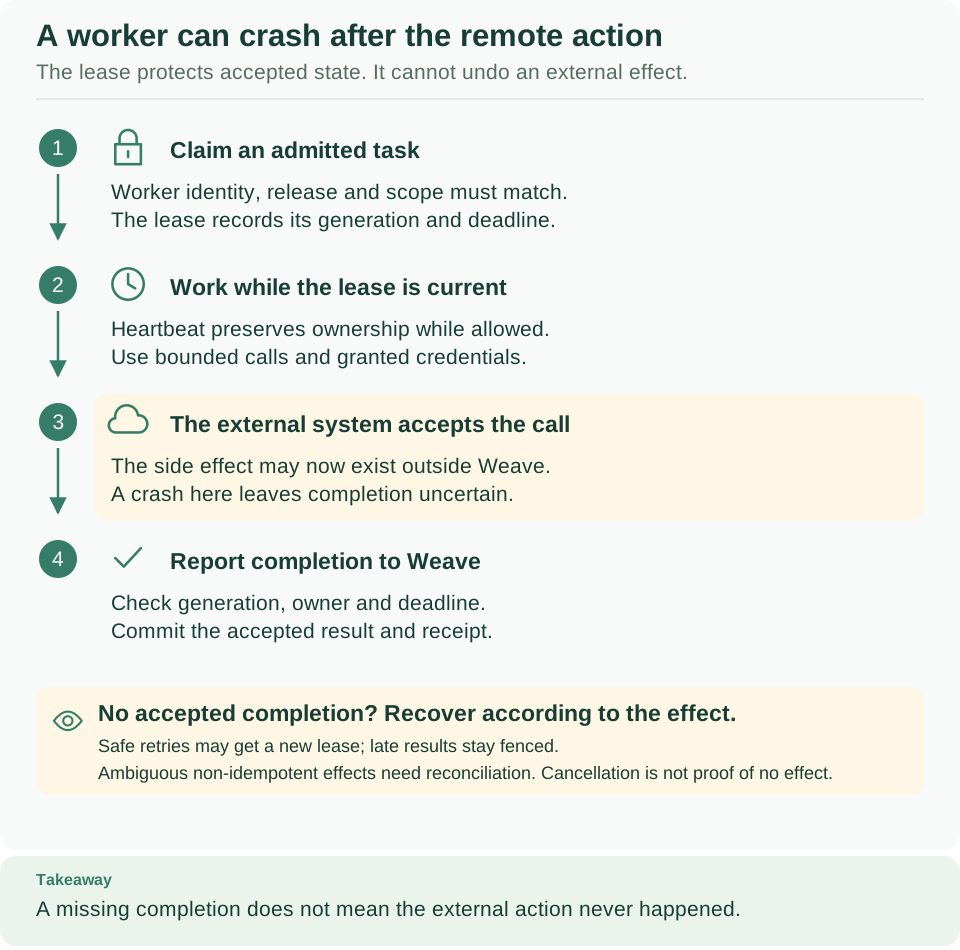
Follow the external effect separately from the completion receipt. A crash between them explains why the target needs the same operation key after recovery. Open diagram at full size
See worker protocol for release admission, claims, capacity, fencing, rejected classified outputs and current wire models. Native connectors use this same task/lease model; they do not grant themselves access to arbitrary connection secrets or destinations.
Containers and recovery
The deployment guide walks through packaging a worker, building its image, provisioning its identity and grants, admitting its release, and launching it with Compose. The worker uses a separate dependency closure and receives API credentials rather than orchestration database access. Server, Teams, and Kafka images use their own locked closures. API and native executor processes receive separate private environment files.
At least one runtime replica must own recovery. Every runtime replica also needs execute-only catalog authority for startup compatibility checks, even when its background scheduler is disabled. This requirement does not apply to remote worker-only processes.
A crash after an external effect and before the accepted completion can cause a new lease and another invocation. Use supported provider idempotency or independent reconciliation. Heartbeats and lease fencing do not roll back external effects; cancellation may leave an operation in flight. Inspect the durable run and incident state after a restart, and preserve the original operation identity when an authorized safe retry is appropriate.
What you learned
- A workflow calls an Action; the Action names a task capability; an admitted release implements it; a running instance claims its tasks.
- A lease permits one attempt, and its operation key lets the external system deduplicate a repeated call after a crash.
- A worker needs only API access and its own scoped identity, never database credentials.
Next, build, admit, and start this worker with Deploy your first worker, or read the worker protocol for the exact wire contracts.