Who does what, from a business process to a completed run
Use this page when you plan how your team will work with Weave. It explains which people are involved, which Weave roles each of them needs, and who acts at each stage of a workflow's life. It takes about ten minutes; read Start here first if Weave is new to you.
Suppose your product approves customer orders. It checks the customer in another system, waits for a manager's approval, and sends a message. Those steps may finish in seconds or take several days. Business process management (BPM) means making that sequence explicit, knowing where each order is, and handling delays and failures without losing the process.
In Weave, you describe the process as a workflow. The platform remembers the progress of every run (one order). Built-in connectors or your own workers perform the external calls. People design, configure, and operate all of this; a worker is software, not a person assigned to watch the process.
1. Separate the process from the code that does a task
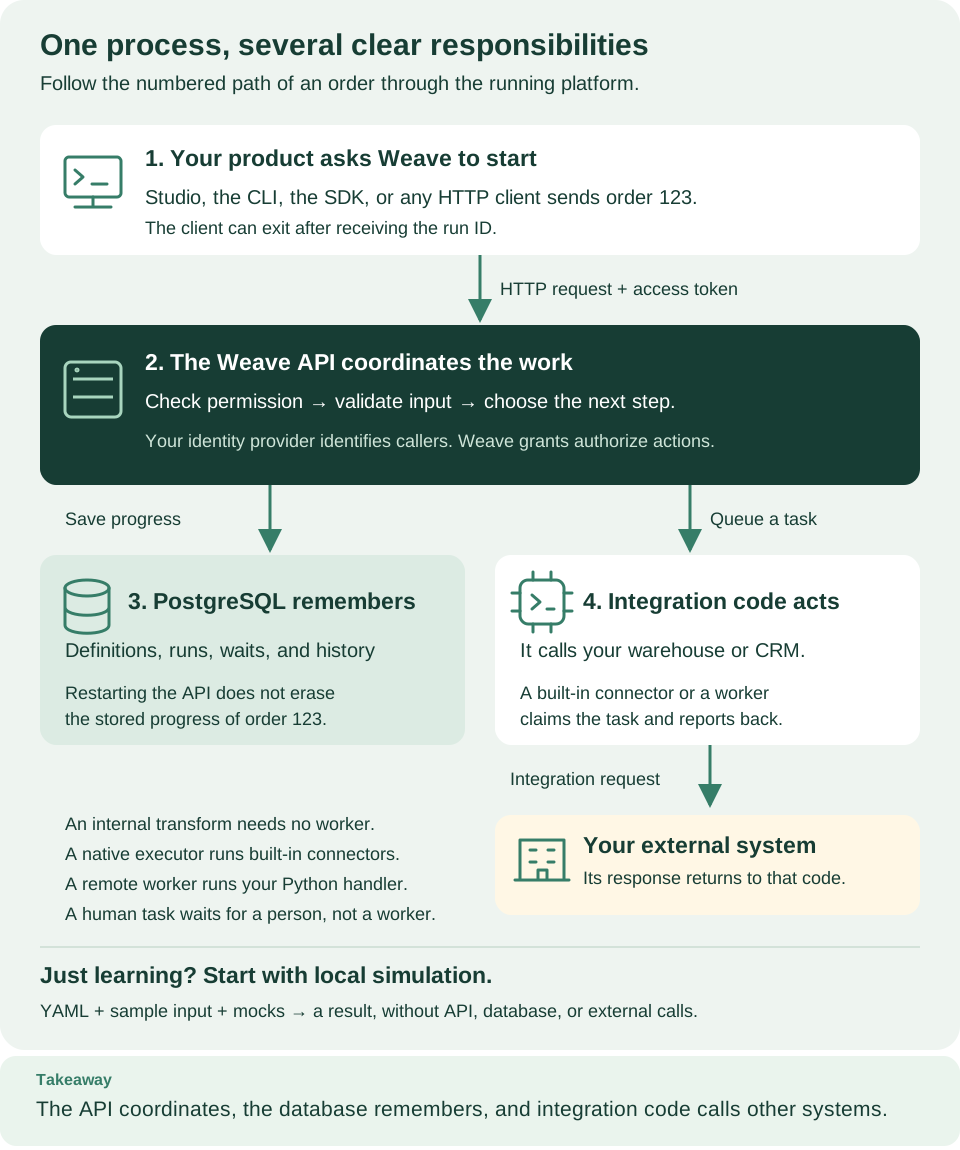
Read the numbered boxes in order. Your product starts a run through the API (1). Weave checks permission, saves progress in PostgreSQL (2, 3), and decides the next step. When a step calls another system, a connector or worker performs the call and reports the result (4). The product can read the progress later; it does not keep its request open while it waits. Open diagram at full size
| In the order example | Weave concept | What it does |
|---|---|---|
| "Check the customer, wait for approval, then notify" | Workflow | Describes the steps, data, and decisions, in YAML or JSON or drawn in Studio |
| One customer's order | Run | Records one execution of an activated workflow version |
| "Check this customer" | Call an action step, Action, and task | The step calls a reusable Action; the task records this particular piece of work |
| Calling the customer service's REST API | Built-in HTTP connector | Calls a JSON API over HTTPS from a reviewed Action, with no code |
| Python code that calls an internal system | Worker | Claims the task, runs your handler, and reports the result |
| "Is the order large?" | Decision step | Takes one route based on the data |
| "Wait until the warehouse confirms" | Wait for signal step | Waits durably until your product sends the named signal, or the timeout ends the run |
| "Ask a manager to approve" | Human task step | Assigns a form and the allowed decisions to eligible people |
A signal is an event from a system; it never completes a human task. People complete human tasks in Studio's My tasks or through the task API. The step reference describes every step, and the capability matrix records the current limits.
2. Know which roles your team needs
The documentation talks about three kinds of people:
- An administrator installs and configures the platform, connects it to your identity provider, and gives people access.
- An operator keeps runs healthy, resolves incidents, and upgrades, backs up, and monitors the platform.
- A person is anyone who signs in to use Weave: a process designer, a developer, or a reviewer who approves tasks.
Each of them needs Weave roles, granted in a tenant, project, or environment. Roles are additive: an administrator is not automatically a workflow author, and an author cannot start runs unless you grant that too.
| Responsibility | Typical work | Weave roles to grant | Start here |
|---|---|---|---|
| Process designer | Draw or write workflows, validate, simulate, publish | developer in the project |
Studio or the quickstart |
| Integration developer | Build Actions and connectors, create connections, write workers | developer; tenant_admin to create integration connections |
REST without code and workers |
| Product developer | Start runs, show progress, and send signals from your product | An application identity with operator and viewer in the environment |
Python SDK tutorial or API playground |
| Deployer | Admit releases, activate versions with their connections, configure triggers | deployer in the environment |
Publish and run with the CLI and worker deployment |
| Reviewer | Claim assigned tasks, fill in forms, record decisions | task_participant; task_manager to manage assignments |
Human tasks |
| Administrator | Install the platform, configure sign-in, link people, grant roles | platform_admin for identities and tenants; tenant_admin for projects, environments, grants, and connections |
Local platform, identity, people and access |
| Operator | Inspect, pause, resume, retry, or cancel runs; resolve incidents; maintain the platform | operator and viewer; execution_manager to permanently delete run content |
Execution management and incident operations |
On a local platform, weave platform user creates a development person with a
practical starting set: developer on the demo project, and deployer,
operator, viewer, and task_participant on the demo environment. That
person can author, publish, activate, run, inspect runs, and complete tasks, but
cannot create integration connections without tenant_admin. See
Create a person who can sign in
and the full role table in People and access.
"Operator" means a person or automation, not a Kubernetes Operator. The deployment guides use explicit CLI, Compose, and Kubernetes procedures; Weave does not ship a Kubernetes Operator controller.
3. Follow a workflow through its lifecycle
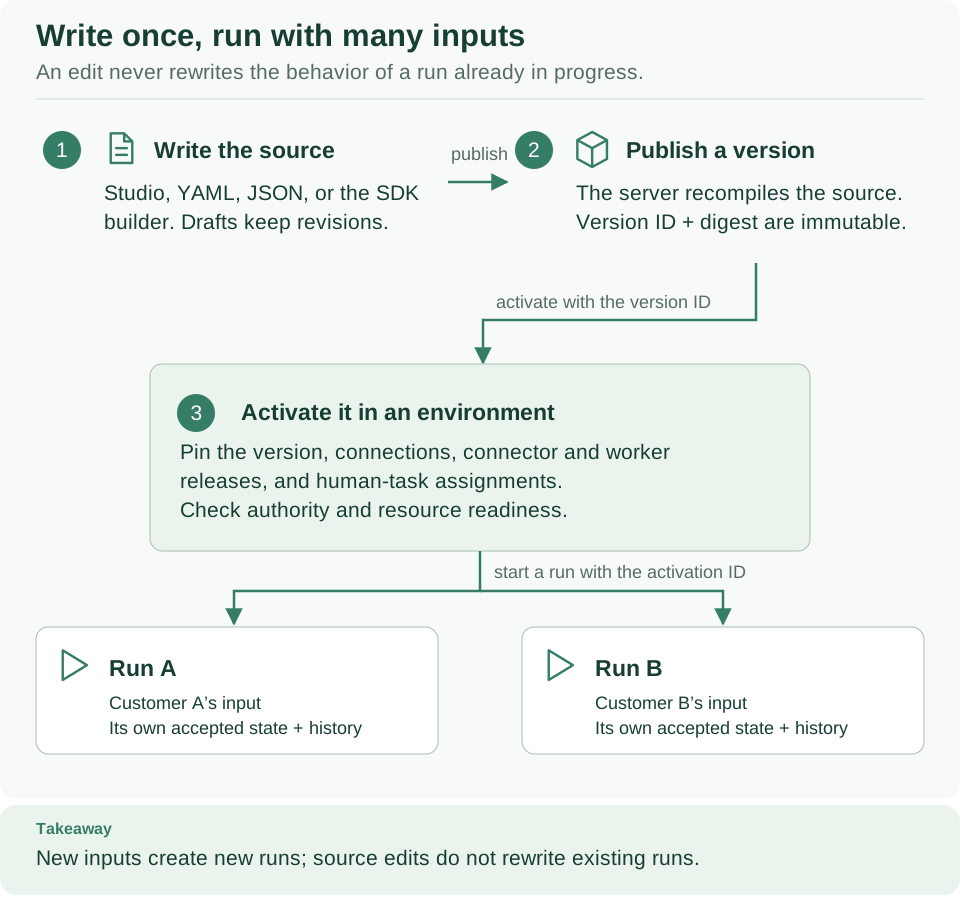
Read the diagram from top to bottom: a source becomes an immutable version, an activation pins it to an environment, and each input becomes its own run. The steps below add who performs each stage. Open diagram at full size
- Write and check (process designer). Draw the workflow in Studio or write it as YAML, validate it, and simulate it with mocked results. Nothing external is called.
- Publish (process designer,
developer). Save an immutable version. The platform compiles it again and returns the version ID and digest. - Prepare execution (integration developer, administrator, deployer). Make each integration runnable: publish its Actions, make the built-in HTTP connector or your worker release available and admitted, create the integration connections it uses, and bind human-task assignments to real people. A workflow made only of Transforms and Decisions needs none of this.
- Activate (deployer,
deployer). Pin the version to an environment with a connection for each slot, its connector or worker releases, and its assignments. Publishing alone never starts anything. - Start (operator, product, or trigger;
operator). Send an input to the activation. Each start creates a run with its own ID. Reuse the same idempotency key when you retry the same request, so it does not start twice. - Observe and respond (operator and reviewers). Read the run's state and history, complete human tasks, send a signal when a run waits for one, and resolve incidents when a run is suspended.
The CLI tutorial performs this sequence step by step. In Studio, the designer's main button moves through the stages: Save draft, Publish…, Activate…, and Start run…. The Python tutorial does the same from application code, and the API reference lists every request.
4. Understand what happens when a worker stops
The platform stores task state in PostgreSQL. A worker claims a task for a limited time (a lease), renews the lease while it works, and reports the result. A stopped worker does not erase the run. When its lease expires, the task can be retried if its Action's retry policy and side effect allow it; otherwise the run is suspended with an incident for an operator.
An external service may have accepted a request just before the worker stopped. Repeating that request can repeat its effect. Design handlers to use the other system's idempotency mechanism, or an explicit reconciliation procedure. Weave rejects completion reports from stale leases, but it cannot undo a payment or a message that another system already accepted.
The worker walkthrough explains a handler's responsibilities, and the worker protocol describes leases, receipts, and the HTTP contract. Read both before adding worker replicas or assuming that a failed request is safe to repeat.
Next steps
- Follow the path for your role in Start here.
- Learn the vocabulary, including a BPM translation table, in concepts.
- Give your team access with People and access.
- Keep the IDs the platform returns (version, activation, run). Workflow names and invented UUIDs never replace them, and knowing an ID never grants access.