Build a custom integration, one boundary at a time
You will scaffold a small Python connector, call it from a YAML workflow, build the equivalent workflow in Python, and prepare it for a native executor. Then you will add an inbound webhook that starts a workflow. The connector echoes an object, so learning the extension contract does not require a vendor account.
- Who it is for: integration developers who extend Weave with Python, and the operator who will install and enable the result.
- What you need: the offline workflow tutorial completed,
a source checkout that matches your CLI, such as the release clone in
Start a local platform,
and the environment and
python_sdk/weave_sdkshell functions from Python SDK step 2. Steps 6 and 7 reuse the SDK tutorial'sclient,scope,sdk-messageactivation, andrun_message.py, so finish the Python SDK tutorial first. Building and the installed tests need the authoring toolsbuild, PyFly, and pytest; the source checkout's development group andclientextra provide them. - Where each part runs: steps 1 to 5 run on your computer with no server. Step 6 needs a deployed platform with a native executor image, because the local platform runs only the built-in HTTP connector. Live events in steps 7 and 8 need a platform you can connect to.
- How long: about 30 minutes for the local steps.
Only calling a JSON API over HTTPS? You may not need code at all: see Call a REST API without code.
1. Pick the direction before writing code
| Situation | Extension point | What it does |
|---|---|---|
| A workflow calls a JSON API over HTTPS | The built-in HTTP connector, no code | Call a REST API without code |
| A workflow calls a service the HTTP profile cannot express | Outbound connector adapter | Implements a named Connector operation |
| Your application sends events and can sign Weave's envelope | Signed webhook trigger | Starts an activation or signals a run |
| A vendor defines its own signature and event format | Provider verifier and provider source | Authenticates and normalizes events into the durable inbox |
| A workflow needs your Python business logic | Remote worker task | Executes an admitted task capability in your process |
An Action is the reusable contract a workflow calls. It can select a connector operation or a remote task. An inbound event is configured as a trigger/source; it does not become an outbound Action simply because both use HTTP.
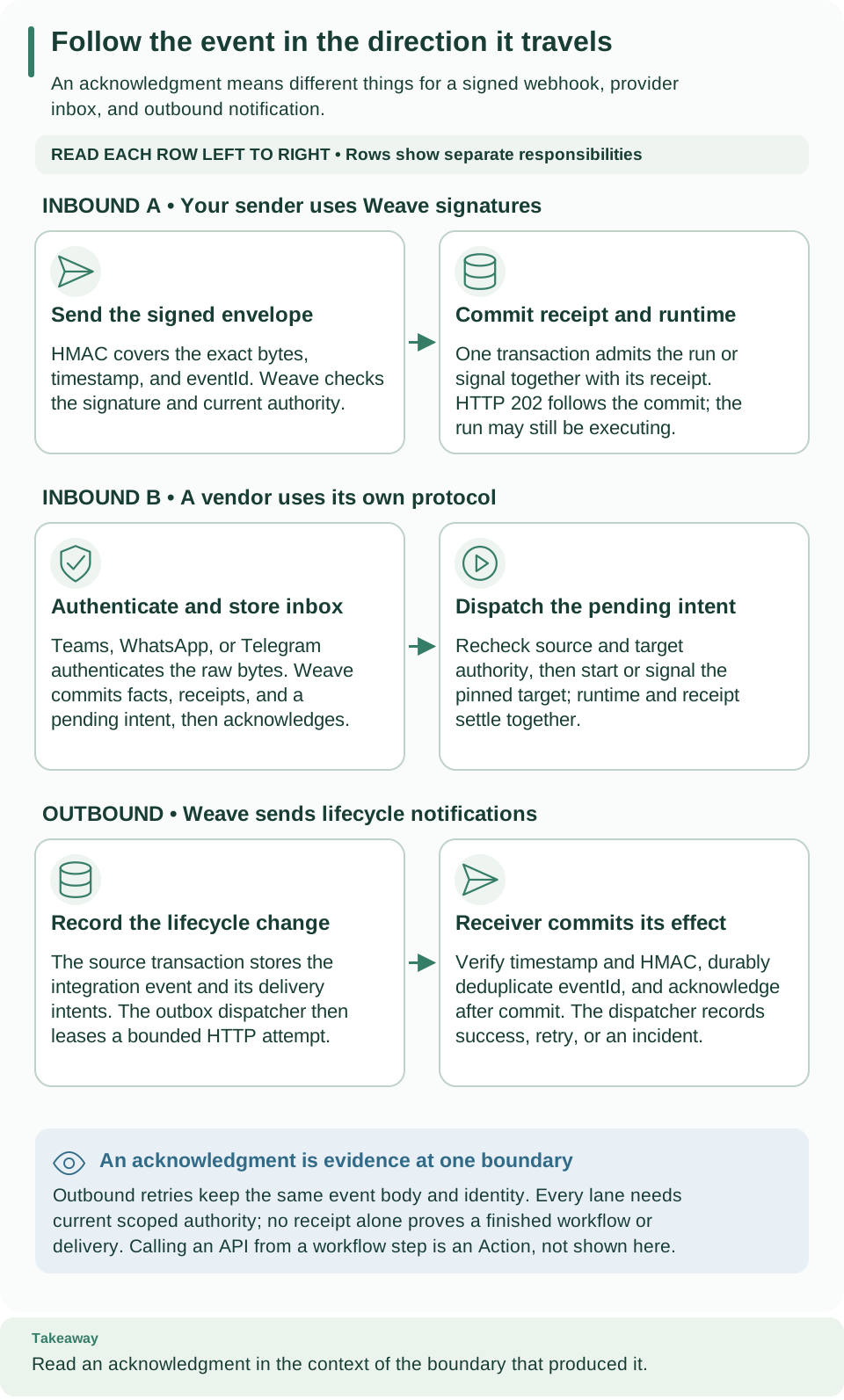
Read each row left to right. The first two rows bring events into Weave; the bottom row sends lifecycle notifications outward. Calling an outbound connector Action is a separate workflow step, introduced below. One integration may support both inbound events and outbound Actions, with separate contracts and authority.
2. Generate your first outbound connector
From the repository root, run:
# A new directory avoids overwriting a connector you have already edited.
mkdir -p .local/connector-tutorial
weave_sdk connector init .local/connector-tutorial/acme-echo --name acme-echo --output json
weave_sdk connector validate .local/connector-tutorial/acme-echo/connector.json --output json
Expected: {"directory": ..., "mode": "scaffold"}, then a validation result with
"mode": "offline-data" and the manifest and package digests; both exit 0. The
name acme-echo identifies your example; weave- package names are reserved. On
a second attempt, keep your existing directory or choose a new name: the
scaffolder refuses a nonempty target with WV-CONNECTOR-INVALID.
Open the generated files before changing anything:
File beneath acme-echo/ |
Responsibility |
|---|---|
src/acme_echo/__init__.py |
The Echo Python service and exported package declaration |
connector.json |
Reviewable package metadata, Connector manifest, capabilities, and bindings |
src/acme_echo/connector.json |
The identical metadata included in the installed wheel |
examples/action.json |
The workflow-facing Action selecting the echo operation |
src/acme_echo/conformance.py |
Offline checks for success, bounds, deadline, cancellation, and classified data |
tests/test_conformance.py |
Pytest entry point for those checks |
pyproject.toml |
Distribution identity, dependencies, wheel contents, and discovery entry point |
README.md |
Short notes on reviewing, building, and testing the package |
examples/provider_verifier.py |
A deliberately unregistered, fail-closed design example |
Validation reads the declaration as data. It does not import your service, install a package, contact a provider, or prove that Python execution works.
3. Understand the adapter you will change
The generated Echo.execute follows this order. This is a reading excerpt from
the generated class; keep its existing imports, decorator, test_connection,
and package declaration:
async def execute(self, input: JsonObject, context: ActionContext) -> JsonValue:
    # Reject an expired attempt before beginning any work.
    if context.attempt_deadline <= datetime.now(UTC):
        raise ConnectorFailure("DEADLINE_EXCEEDED", "not_started")
    if context.authorize is not None:
        await context.authorize()
    if context.invocation.action != "echo":
        raise ConnectorFailure("INVALID_ACTION", "not_started")
    if validate_payload(context.invocation.input_schema, input, {}):
        raise ConnectorFailure("INVALID_INPUT", "not_started")
    canonical = FrozenDocument.from_value(input)
    # Bound the response too: a small request must not create unbounded output.
    if len(canonical.canonical) > min(context.invocation.max_request_bytes, context.invocation.max_response_bytes):
        raise ConnectorFailure("PAYLOAD_TOO_LARGE", "not_started")
    return canonical.value
input is the Action input. context.invocation carries the pinned operation,
configuration, connection, schemas, and byte limits. context.attempt_deadline
is the attempt's absolute deadline. The result must satisfy the Action's output
schema. The echo returns an independent JSON object; it does not contact a service.
For a real adapter, replace the echo operation with bounded I/O and keep these
checks. Read credentials through await context.credentials("slot-name") using
a declared secret slot; do not put tokens in YAML input. Preserve cancellation
and distinguish a known failure from an unknown delivery outcome. A connection's
allowed_destinations is policy data: your transport must enforce it. Reuse the
HTTP profile implementation or
OpenAPI importer when they cover your API.
The echo scaffold does not add a secure HTTP transport to arbitrary custom code.
The generated class has PyFly's @service decorator. That lets the host's native
container construct it and inject dependencies. The exported ConnectorPackage
connects the metadata to this exact service class. Tenant YAML cannot select a
Python module or instantiate an arbitrary class.
4. Call the connector from YAML
Save .local/connector-tutorial/echo.workflow.yaml:
apiVersion: weave/v1alpha1
kind: Workflow
metadata:
  name: custom-echo
  version: 1.0.0
spec:
  inputSchema: {type: object}
  outputSchema: {type: object}
  connections:
    echo: # A logical slot; deployment supplies the actual connection revision.
      connector: acme-echo@1.0.0
  steps:
    - id: call
      kind: action
      uses: acme-echo-echo@1.0.0 # The generated Action, not a Python class name.
      connection: echo
      with: {ref: /input}
  output: {ref: /steps/call/output}
Three names have separate jobs:
| Name | Meaning |
|---|---|
acme-echo@1.0.0 |
Connector contract with an echo operation |
acme-echo-echo@1.0.0 |
Generated Action selecting that operation |
echo |
Local workflow slot that will bind a connection revision |
The generated Action also declares sideEffect: read_only, a one-second timeout,
object input/output schemas, and an empty fixed operation config. If you later
add a write, change its side-effect contract and the matching capability;
renaming an echo function does not make it safe to retry a payment.
Now save .local/connector-tutorial/check_workflow.py:
import json
from pathlib import Path

from firefly_weave.compiler.api import compile_source
from firefly_weave.compiler.catalog import CatalogSnapshot
from firefly_weave.contracts.definitions import ActionDefinition
from firefly_weave.sdk.connectors import validate

root = Path(__file__).parent
metadata = validate(root / "acme-echo/connector.json").model
# Read the generated Action instead of retyping its operation and schemas.
action = ActionDefinition.model_validate_json((root / "acme-echo/examples/action.json").read_text())
catalog = CatalogSnapshot.from_definitions(
    [metadata.manifest, action],
    tasks=metadata.capabilities,
    adapters=[metadata.manifest.spec.adapter],
)
result = compile_source((root / "echo.workflow.yaml").read_text(), format="yaml", catalog=catalog)
if not result.ok or result.artifact is None:
    for diagnostic in result.diagnostics:
        print(diagnostic.code, diagnostic.path)
    raise SystemExit("Correct the workflow or catalog")
print("Custom connector workflow compiled:", result.artifact.digest)
# This checks all declared dependencies without installing or executing the adapter.
python_sdk .local/connector-tutorial/check_workflow.py
Expected: Custom connector workflow compiled: and a digest. This establishes
that the workflow, Action, Connector, and capability contracts agree. It does
not prove that an installed executor can claim and execute the task.
5. Express that same connector call in Python
Create .local/connector-tutorial/build_workflow.py. Reuse the catalog from the
previous script by importing it from the same directory:
from firefly_weave.compiler.api import compile_source
from firefly_weave.contracts.definitions import ActionStep, ConnectionRequirement, RefExpression
from firefly_weave.sdk.builder import WorkflowBuilder
from check_workflow import catalog, result as yaml_result

builder = WorkflowBuilder(
    "custom-echo", "1.0.0",
    input_schema={"type": "object"},
    output_schema={"type": "object"},
    output=RefExpression(ref="/steps/call/output"),
).with_connection(
    "echo", ConnectionRequirement(connector="acme-echo@1.0.0"),
).add_step(
    # model_validate accepts the canonical `with` field, a Python reserved word.
    ActionStep.model_validate({
        "id": "call", "kind": "action", "uses": "acme-echo-echo@1.0.0",
        "connection": "echo", "with": {"ref": "/input"},
    })
)
result = compile_source(builder.to_document(), format="object", catalog=catalog)
assert result.ok and result.artifact is not None
assert result.artifact.digest == yaml_result.artifact.digest
print("Python and YAML select the same connector call")
# Importing check_workflow runs its local check first, then this script compares digests.
python_sdk .local/connector-tutorial/build_workflow.py
Expected: the earlier compile message followed by
Python and YAML select the same connector call. Use json.dumps(builder.to_document())
with client.publish(..., "json", ...) to send this definition from Python, as
shown in the SDK tutorial.
You do not call Echo.execute directly to create a durable workflow run.
6. Package, discover, and admit it
There are three gates between compiled YAML and live execution: the installed package, the published contracts, and the environment's execution permissions. This step needs a deployed platform and an operator; the local platform cannot run connector packages.
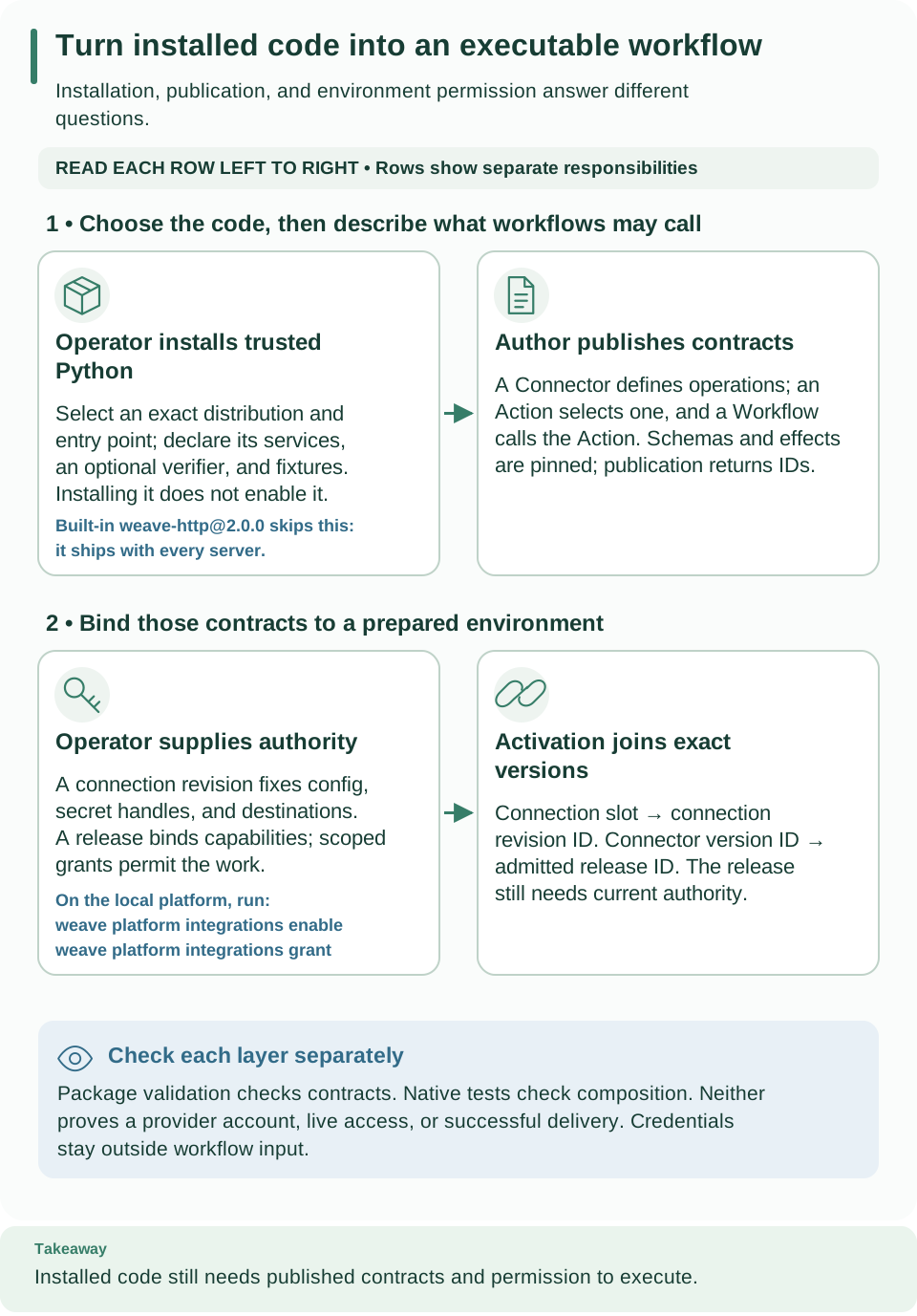
Read the top row from installed package to published contracts, then the bottom row from environment authority to activation. The stages carry different exact identities; completing one does not replace the others.
Build and test the installed Python
When you change connector.json, update its packaged copy together. Keep their
content identical. The binding's manifest digest must match the canonical
manifest; validate after changing schemas, operations, or capabilities.
# package validates both copies, then runs the selected local project's build backend.
weave_sdk connector package .local/connector-tutorial/acme-echo \
  --directory .local/connector-tutorial/dist --output json
Expected: a wheel and source distribution in the new dist directory. The build
can acquire isolated build requirements. The output directory must be absent or
empty. Review the generated dependencies and use your matching Weave release
artifact; this command runs trusted build code.
Install the wheel in a separate operator test environment containing its reviewed dependencies. For example, after activating that environment:
# Use your package installer to install this tutorial's built wheel.
python -m pip install .local/connector-tutorial/dist/acme_echo-1.0.0-py3-none-any.whl
# These commands must use the interpreter into which the wheel was installed.
python -m pytest .local/connector-tutorial/acme-echo/tests/test_conformance.py
weave connector test 'acme-echo:acme-echo:acme_echo:package' --output json
weave connector test 'acme-echo:acme-echo:acme_echo:package' --mode native --output json
Expected: passing pytest checks, installed-fixture-contract for the default
command, and installed-native-contract for native mode. Both report
live_provider_verification: false. Fixtures exercise local contracts; they do
not certify a real service.
The exact discovery string is:
| Part | Example | Comes from |
|---|---|---|
| Distribution | acme-echo |
project.name in pyproject.toml |
| Entry-point name | acme-echo |
The key in project.entry-points."firefly_weave.connectors" |
| Module | acme_echo |
The module containing your exported declaration |
| Attribute | package |
The ConnectorPackage object in that module |
The operator enables that installed identity on the relevant server/native executor deployment:
# Apply in the operator's process configuration, then restart that deployment.
export WEAVE_CONNECTOR_PACKAGES='["acme-echo:acme-echo:acme_echo:package"]'
This is an allowlist, not a package installer. Merely installing a wheel does not enable it; merely setting this variable in your authoring terminal does not configure a remote server.
Prepare the environment's execution permissions
Before the publication snippet below, the operator must:
- Build the immutable native executor image containing the reviewed package.
- Admit its actual image digest with the package's exact
capabilitiesandbindingsas the release'sconnector_bindings. Retain the returned release ID. - Grant the executor identity registration/claim/heartbeat/completion authority
for that release and the exact task reference
weave-connector-acme-echo-echo@1.0.0. - Configure the matching native executor scope, principal, release, image digest, task types, and capacity. Keep a scheduler-enabled runtime for recovery.
Use the native admission example and native dispatcher configuration for these operator steps. That example is specifically HTTP: replace its capability, binding, and connection with this package's declarations. Do not reuse its HTTP capability or invent an image digest.
For an adapter that reads secrets, the release additionally declares its
credential_capabilities, an administrator grants the exact
release/capability/connection revision, and the operator grants each secret
handle. The echo requests no credentials and needs no destination. Neither
installation nor release admission grants arbitrary secret access.
Publish and bind from your Python application
Prefer the CLI? From package to an executable workflow
runs the same publication, connection, and activation with weave commands.
This is an excerpt inside an authenticated async with WeaveClient(...) as client
from SDK step 6,
which also defines scope. It needs definition publication, connection
management and binding, activation, and run-start authority. Set WEAVE_CONNECTOR_RELEASE_ID to the operator's returned
release UUID. Run the excerpt once, save the printed connection ID, and reconcile
existing resources before repeating after an interrupted request.
import json
import os
from pathlib import Path
from uuid import UUID
from firefly_weave.contracts.catalog import ActivationRequest
from firefly_weave.contracts.connectors import ConnectionRequest
from firefly_weave.contracts.runtime import StartRunRequest
from firefly_weave.sdk.connectors import validate

root = Path(".local/connector-tutorial")
metadata = validate(root / "acme-echo/connector.json").model
connector = await client.publish(
    "connectors", metadata.manifest.model_dump_json(by_alias=True), "json",
    idempotency_key="custom-echo-connector-1",
)
await client.publish(
    "actions", (root / "acme-echo/examples/action.json").read_text(), "json",
    idempotency_key="custom-echo-action-1",
)
connection = await client.create_connection(
    # An empty connection is intentional: local echo has no endpoint or credentials.
    ConnectionRequest(name="custom-echo", connector_version_id=connector.id, config={}),
)
print("connection_revision_id:", connection.id)
version = await client.publish(
    "workflows", (root / "echo.workflow.yaml").read_text(), "yaml",
    idempotency_key="custom-echo-workflow-1",
)
activation = await client.activate(
    ActivationRequest(
        version_id=version.id, artifact_digest=version.digest, scope=scope,
        connection_revision_ids={"echo": connection.id},
        # The map key is a published Connector UUID, not its name or connection UUID.
        connector_release_ids={connector.id: UUID(os.environ["WEAVE_CONNECTOR_RELEASE_ID"])},
    ),
    idempotency_key="custom-echo-activation-1",
)
run = await client.start_run(
    StartRunRequest(activation_id=activation.id, input={"message": "Hello, connector"}),
    idempotency_key="custom-echo-run-1",
)
print("run_id:", run.id)
Read the run as in the SDK polling example. Expected final status: succeeded,
with {"message": "Hello, connector"} as the output. If it waits for a task,
check the executor and exact release pins before editing YAML.
The published Connector must equal the installed one byte for byte, so publish
the same connector.json the operator built. A 0.1.0a7 or later CLI can
also read the installed descriptor from the platform with weave connector
descriptor acme-echo --output json; its source field is the exact publication
source.
7. Bring events in with a signed webhook
Use this route when you control the sender. It is a complete inbound contract
already provided by Weave, so your custom application needs only to sign and send
an envelope. It can target the sdk-message activation from the SDK tutorial;
that target has no outbound adapter dependency.
Have the operator provision the signing-secret handle tutorial-events-key in
the same scope and give the sender the matching material through secure
configuration. A handle is a lookup name, not the key bytes. The creating
identity needs trigger.manage and run.start. Set WEAVE_ACTIVATION_ID to the
SDK tutorial's printed activation UUID.
Save .local/sdk-tutorial/create_trigger.py alongside run_message.py:
import asyncio
import os
from uuid import UUID
from firefly_weave.sdk.client import WeaveClient
from firefly_weave.triggers.models import TriggerRequest
from run_message import access_token, scope

async def main():
    async with WeaveClient(os.environ["WEAVE_BASE_URL"], access_token, scope) as client:
        trigger = await client.create_trigger(TriggerRequest(
            name="tutorial-events", kind="run",
            activation_id=UUID(os.environ["WEAVE_ACTIVATION_ID"]),
            secret_ref="tutorial-events-key", # The API resolves this scoped handle.
            payload_schema={
                "type": "object", "properties": {"message": {"type": "string"}},
                "required": ["message"], "additionalProperties": False,
            },
            max_body_bytes=4096, tolerance_seconds=300,
        ))
        print("trigger_id:", trigger.id)

asyncio.run(main())
# Creation returns a new immutable trigger; retain its ID instead of recreating on delivery retries.
python_sdk .local/sdk-tutorial/create_trigger.py
Set WEAVE_TRIGGER_ID to the printed UUID. Configure WEAVE_WEBHOOK_SECRET in
the sender's environment from the approved secret source, without logging it.
Save .local/sdk-tutorial/send_event.py:
import asyncio
import hashlib
import hmac
import json
import os
import time
from uuid import UUID
import httpx

async def main():
    # Keep the same event ID and exact bytes for retries of this delivery.
    raw = json.dumps({
        "eventId": "tutorial-message-1", "payload": {"message": "Hello from a webhook"},
    }, separators=(",", ":")).encode("utf-8")
    timestamp = str(int(time.time()))
    signature = hmac.new(
        os.environ["WEAVE_WEBHOOK_SECRET"].encode("utf-8"),
        timestamp.encode("ascii") + b"." + raw,
        hashlib.sha256,
    ).hexdigest()
    trigger_id = UUID(os.environ["WEAVE_TRIGGER_ID"])
    async with httpx.AsyncClient(timeout=10, trust_env=False, follow_redirects=False) as client:
        response = await client.post(
            os.environ["WEAVE_BASE_URL"].rstrip("/") + f"/webhooks/{trigger_id}",
            content=raw, # Re-serializing with json= could change the signed bytes.
            headers={"Content-Type": "application/json", "X-Weave-Timestamp": timestamp,
                     "X-Weave-Signature": signature},
        )
        if response.status_code != 202:
            raise SystemExit(f"Webhook rejected with HTTP {response.status_code}")
        print("run_id:", response.json()["run_id"])

asyncio.run(main())
# The ingress signature authenticates this request; it does not use your CLI bearer token.
python_sdk .local/sdk-tutorial/send_event.py
Expected: HTTP 202 and a run ID. Read that run to verify the final output. Sending the same signed event and exact body again returns the same receipt/run identity. Use a new event ID for a genuinely new event. You may refresh the timestamp and signature while retaining the original body for a retry outside the time window. Changing the body while reusing the event ID conflicts.
For a waiting workflow, create a kind="signal" trigger with its run_id and
signal name instead of activation_id. See the
full signed webhook contract.
8. Add a custom provider's own inbound protocol
Choose this extension only when the sender has a protocol you cannot change,
such as vendor-specific signatures, challenges, installation IDs, or event
batches. The generated examples/provider_verifier.py is not an implementation:
it raises NotImplementedError and is excluded from discovery.
A real provider package adds a second PyFly @service class implementing
ProviderVerifier:
| Method | Your responsibility | Return value |
|---|---|---|
verify(source, raw_body, headers, received_at) |
Authenticate exact bytes, validate installation policy, then normalize stable events | (tuple_of_ProviderEvent, ProviderIngressResponse) |
challenge(source, query) |
Authenticate the provider's separate challenge protocol | ProviderIngressResponse |
Optional validate_source(request, connection) |
Pure, no-I/O checks of source creation policy | Raise on mismatch |
Optional persist(tx, source, events) |
Local protocol state for new events, in the inbox transaction | No remote I/O or workflow starts |
Inject ProviderCredentials when the verifier needs scoped credentials. Its
resolve(source) checks the source, owner, and connection binding; do not turn a
sender ID into a Weave principal or scope. Verify the signature before parsing.
Use the canonical parser for strict JSON. The controller bounds bodies to 1 MiB
and batches to 100 events; your provider can impose smaller limits.
After authentication, normalization produces ordinary typed data. This small normalization-only example is runnable offline; it deliberately does not accept HTTP or claim to verify a provider:
from firefly_weave.contracts.providers import ProviderEvent, ProviderIngressResponse

# These fields must come from an already authenticated provider event.
event = ProviderEvent(
    event_id="message-123", kind="message", account_id="tutorial-account",
    payload={"message": "Hello from the provider"},
)
ack = ProviderIngressResponse(status_code=200, body='{"ok":true}')
print(event.kind, event.payload["message"], ack.status_code)
Expected: message Hello from the provider 200. Use the provider's stable event
ID, not a freshly generated UUID on each retry. Lifecycle events can use
disposition="ignore" with a safe reason; they still need valid schemas.
Connect the verifier to your package in this order:
- Add
provider,verifier_service(for exampleacme_echo:InboundVerifier),event_schemas, and optionallydispatch_event_kindsto both metadata copies. Each event kind maps to its normalized payload schema. - Pass the exact class as
verifier_service_type=InboundVerifierinConnectorPackage(...). A metadata string alone does not register a service. - Extend the connection config/auth schemas for the provider's installation policy and secret handles. Recalculate affected manifest bindings, validate, package, install, and allowlist the reviewed build.
- Test signature rejection, account mismatch, challenge authentication, replay, conflicting identity, schema/secret rejection, cancellation, and batch limits.
- Create an environment connection and a compatible Workflow activation. Create
a
ProviderSourceRequestthat pins the installed distribution version, adapter version, connection revision, policy, target, and schema digest.
The provider-source creation example
shows the complete Python DTO generator. Replace its built-in package import
with your installed package. Compute its schema_digest with
provider_schema_digest(metadata.event_schemas, metadata.dispatch_event_kinds);
do not hash just one schema or omit dispatch capabilities. The source mapping
{"ref": "/payload"} passes the normalized event payload to the workflow.
Creation needs trigger.manage, connection.manage, connection.bind, and the
target's run.start or run.signal authority.
Configure the provider callback as /provider-ingress/SOURCE_ID, outside
/api/v1. Read receipts separately from runs: pending means accepted into the
inbox, dispatched means handed to the runtime, and the resulting run can still
fail or wait. A scheduler-enabled dispatcher is required to advance pending
receipts. The provider acknowledgment is sent after durable admission commits.
For a complete implementation you can inspect and test, read the test-only inbox package alongside its verifier class. It demonstrates the native extension and transaction boundaries. Its synthetic signature protocol, fixed challenge, failure switches, and fixture database table are test machinery; implement your provider's real protocol before deployment.
Troubleshoot at the boundary that failed
| What you see | Why | What to do |
|---|---|---|
connector validate fails |
The two metadata copies differ, the manifest digest drifted, or a schema is invalid | Keep connector.json and its packaged copy identical; check operations, capabilities, and schemas |
| The installed test cannot find the package | Another interpreter, a missing distribution, or a wrong identity | Use the interpreter the wheel was installed into and the exact four-part identity |
| The service fails during startup | The class is not a native @service, the declaration names another class, or a constructor dependency is missing |
Check @service, the exact class in ConnectorPackage, and host-provided dependencies |
| Workflow compilation cannot find the Action | The catalog lacks a definition | Include the generated Action, Connector, adapter, and capabilities in the catalog |
| Activation rejects the bindings | Different kinds of IDs were mixed | Use the connection revision UUID, the Connector version UUID, and the admitted release UUID each in its own place |
| The task is never claimed | The executor cannot run it | Check the native executor scope, current grants, capacity, image digest, and exact task reference |
| The webhook returns 401 | The signature does not verify | Check the key, the timestamp, the exact bytes, and the header names |
| Provider source creation rejects the mapping | A dispatchable event does not fit the target | Make every dispatchable event payload schema fit the target input schema |
A provider receipt stays pending |
Nothing dispatches it | Run a healthy scheduler-enabled dispatcher with current source-owner authority |
| An external write times out | Delivery may be unknown | Inspect the evidence and the provider state before any retry |
Offline compilation and local fixture success do not establish live provider verification.
What you learned and next steps
You separated the four extension points, scaffolded and changed a connector, proved that YAML and Python select the same call, walked the three gates to live execution, and received events through a signed webhook and a provider verifier. Next:
- Keep the connector authoring reference for complete package rules.
- Read the provider-source reference for admission and delivery semantics.
- Run custom business logic in your own process with a worker instead of a connector.