Set up identity, sign-in, and secrets
Use this page to connect Weave to your organization's identity provider, let people sign in from the CLI, Studio, and the desktop app, and give integrations the secrets they need. It is written for the administrator of a platform. You need a running Weave API (from the local platform guide, the standalone walkthrough, or a deployment guide) and administrator access to your identity provider. Configuring a new provider takes about an hour; the local platform does all of it for you.
Three ideas run through the whole page.
- Your identity provider proves who is calling. Weave verifies the access
token it issues; it never stores passwords. Keycloak is included for local
development only and is not required in production. Configure any
compatible OIDC/CIAM provider through
WEAVE_OIDC_PROVIDERS; the API can trust several explicit provider profiles at once. - Weave decides what the caller may do. A verified identity must be linked to an active Weave principal, and local role bindings grant capabilities within a tenant, project, environment, or resource. Role names inside a provider token are only claims: a worker never becomes a workflow author because its token contains a role string.
- Integration secrets travel on their own path. A connection names a secret by handle, and only the executing process resolves the value.
Published sign-in settings and saved platforms are new in 0.1.0a7. Steps 3, 4, and 6 below, and the sections on what clients read and enforce, need a server and clients at 0.1.0a7 or later. An alpha6 or earlier server publishes no sign-in settings, so its people sign in with a connection file.
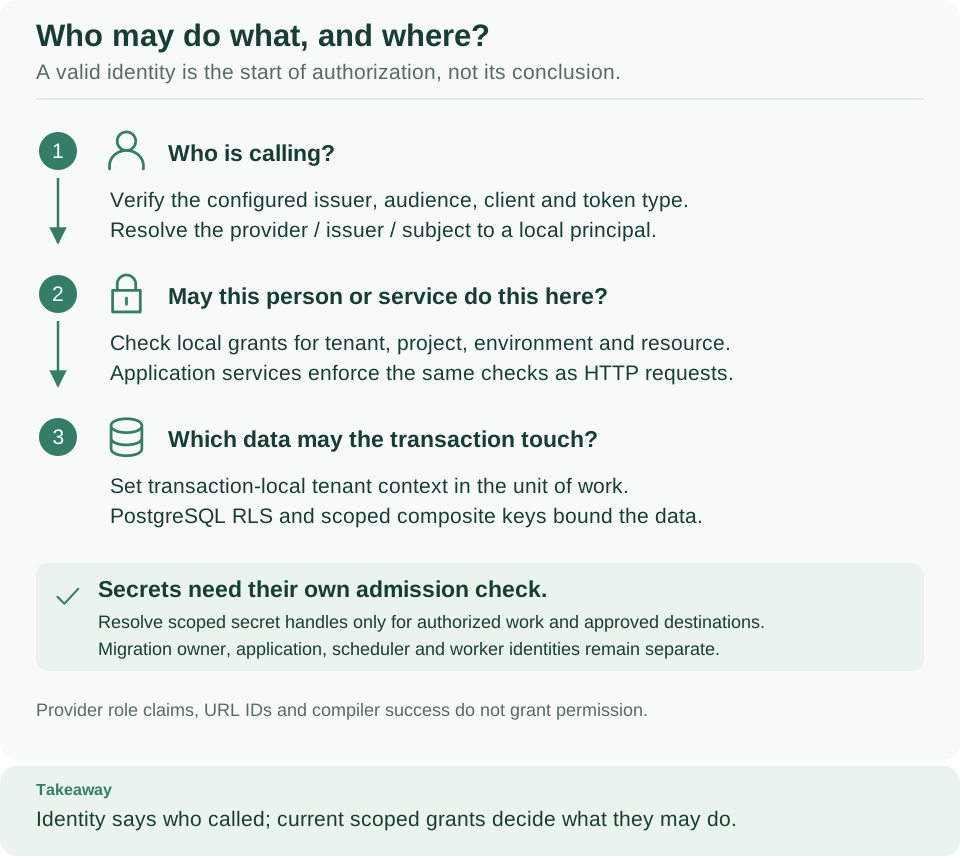
Follow the numbers: Weave first checks who is calling (1), then whether that principal may perform the operation in this scope (2), and finally limits which data the database transaction can touch (3). The green box is the separate check for secrets.
| You want to | Go to |
|---|---|
| Understand why a valid token can still be refused | Configure token verification |
| Connect your organization's identity provider | Use your own identity provider |
| Let people connect by typing only the server address | Step 3: publish sign-in settings |
| Know what clients read and what they enforce | What clients read from the server and trust boundaries |
| Check the status of Keycloak, Microsoft Entra ID, or another provider | Provider notes |
| Give an integration an API key or password | Give integrations their secrets |
| Fix a sign-in or access problem | Troubleshoot sign-in and access |
Configure token verification
A successful request passes three checks, in this order:
- The token is valid for this API. Its signature, issuer, audience, client, and token class match a configured provider profile.
- Its verified identity is linked to an active Weave principal.
- That principal has a grant covering this operation in this scope.
These checks explain why a valid provider token can still be denied by Weave. The provider never runs workflows or stores Weave grants.
| Term | Where it comes from | What it means |
|---|---|---|
| Issuer | Trusted provider configuration | Exact authority named in the signed token |
| Subject | Verified token sub or trusted provider administration |
Stable identity within that issuer; not a username |
| Client | Verified client claim, azp by default |
Application that requested the token, such as weave-host |
| Principal ID | Weave bootstrap or principal creation receipt | Local identity to which Weave grants are attached |
| Scope IDs | Tenant, project, and environment creation responses | Resources within which a grant is valid |
| Release ID | Worker release admission response | Exact admitted implementation that a worker may execute |
To create principals, link identities, and grant roles such as developer,
operator, viewer, and tenant_admin, follow
People and access.
Its administration screens and commands use the same authorization boundary.
Each WEAVE_OIDC_PROVIDERS entry is an explicit trust profile. It supplies
provider_id, the exact issuer, the trusted jwks_uri, the API audience,
and a map from client IDs to actor kinds (human or application). By default
it allows RS256 and requires the signed payload's typ to be Bearer, using
azp for the client identity. A JOSE header typ=JWT alone does not establish
an access token. HTTPS is required except for explicitly enabled localhost
development endpoints. For local development, weave platform setup (or
setup-runtime.py in the standalone walkthrough) writes this profile into
runtime.env. For another provider, take the trusted values from that
provider's administration, never from an unverified token's URL claims.
Signing keys come only from the configured JWKS URL. Retrieval has bounded
response, cache, and refresh behavior. A key that declares alg is used only
when that algorithm is allowed. A key without alg, as Microsoft Entra ID
publishes them, is used only for the allowed algorithm of its key type: RSA keys
for RS256, and P-256 elliptic-curve keys for ES256. Keys whose use is not
sig are ignored. Each usable key needs a unique kid,
otherwise the whole key set is refused. Because signatures are verified
locally, Weave cannot see a revocation at the identity provider before the token
expires, but disabling a principal or removing a grant in Weave takes effect at
the next identity resolution. Do not keep a resolved principal across operations, or share
request tokens or state in singleton services.
Use your own identity provider
You do not need to run Keycloak next to your chosen CIAM. The local setup commands provision Keycloak so that a laptop exercise is repeatable; a deployed API reads the provider profiles you supply instead.
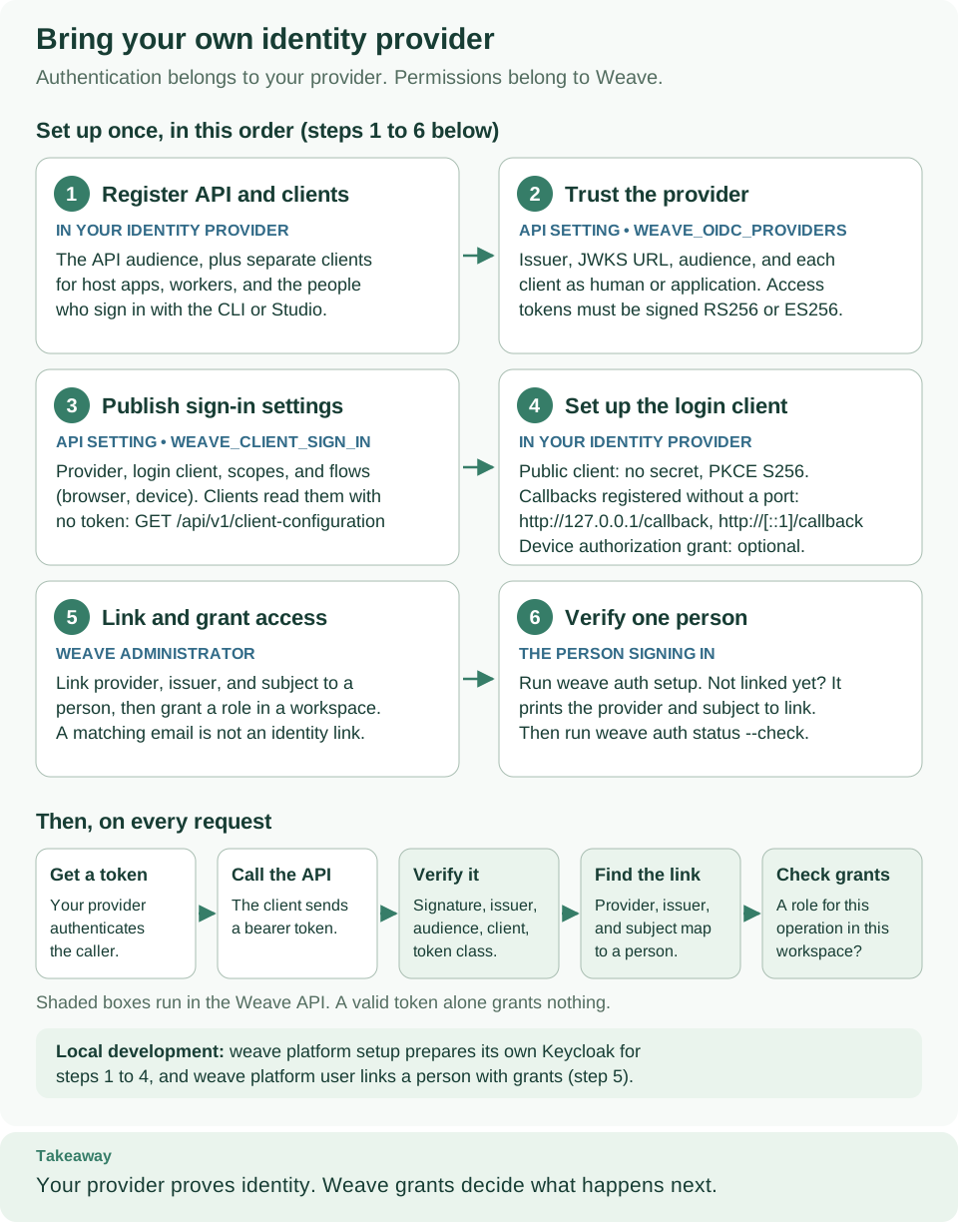
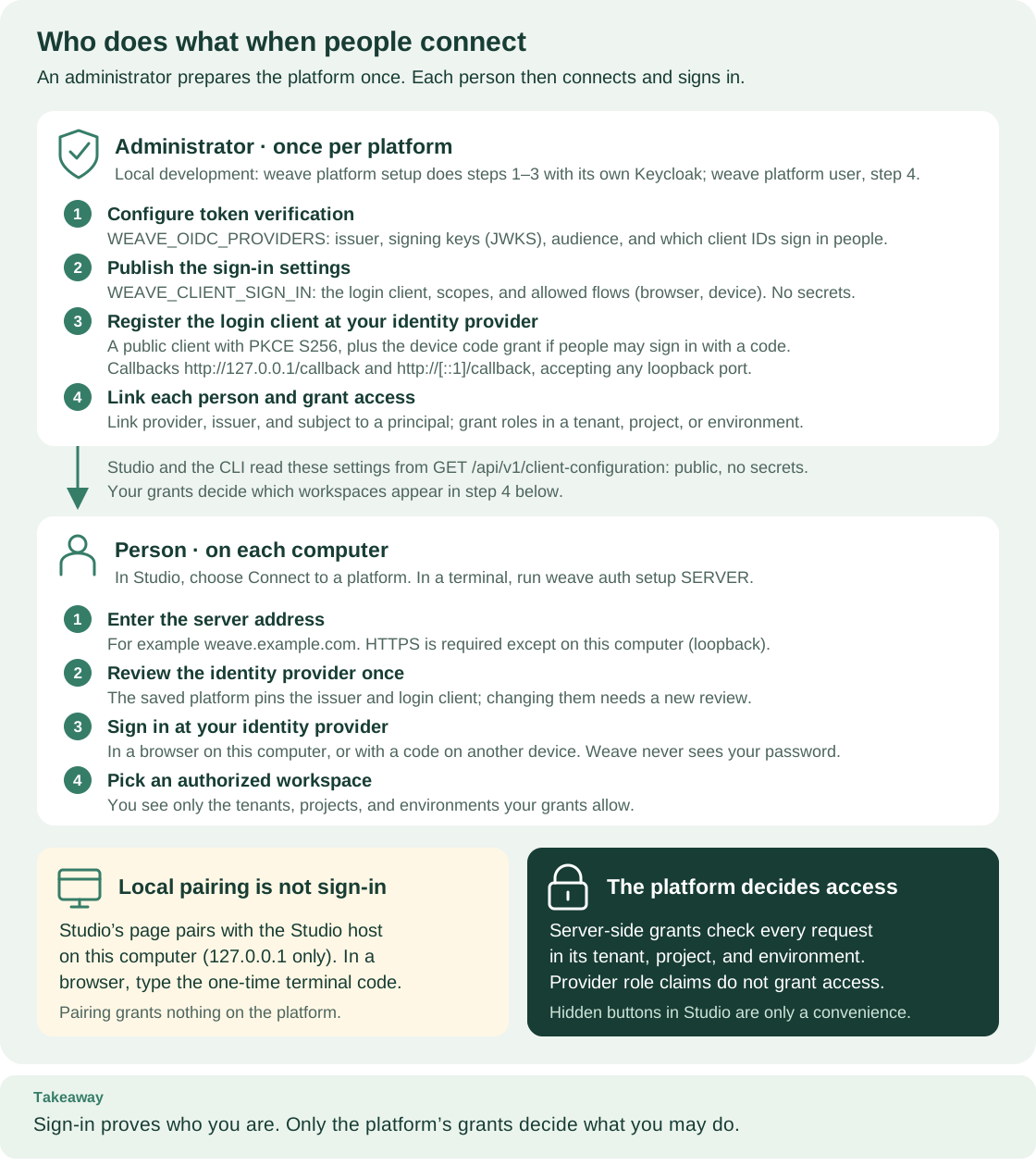
The six numbered cards are steps 1 to 6 below, in the same order; the label under each title says where the step happens or who does it. The bottom row is what then happens on every request: the shaded boxes run in the Weave API, and a valid token alone grants nothing. Open diagram at full size. For the same setup seen from each person's side, open the sign-in roles diagram. Its administrator steps 1 to 4 are steps 2 to 5 on this page.
Letting people sign in takes three separate settings. Keep them apart when you configure, review, or troubleshoot sign-in:
| Setting | Who configures it | What it controls | Step |
|---|---|---|---|
Server token verification, WEAVE_OIDC_PROVIDERS |
Weave operator | Which issuers, signing keys, audiences, and clients the API trusts when it verifies an access token | Step 2 |
Published sign-in settings, WEAVE_CLIENT_SIGN_IN and WEAVE_DISPLAY_NAME |
Weave operator | Which identity provider and public login client the CLI, Studio, and the desktop app propose when someone connects by server address | Step 3 |
| Public login client registration | Identity provider administrator | How people sign in: PKCE, the optional device grant, loopback callbacks, scopes, and refresh tokens | Step 4 |
None of these settings grants access. A person who signs in still needs a linked Weave principal and role bindings (step 5).
Follow steps 1 to 6 in order for a new deployment.
1. Register the API and its clients
Why: the API's audience and each client's identity are what step 2 trusts.
In your provider's administration console, register the Weave API audience and the applications that call it. Use a distinct registration for each kind of caller: your host application, remote workers, and the public login client that people use from the CLI, Studio, and the desktop app (step 4 lists what the login client needs).
Record the exact issuer, the trusted JWKS URL, the audience, the client IDs, and the names of the signed access-token claims. Use the provider's documented access-token contract; an ID token is not a substitute.
What the built-in verifier accepts: signed JWT access tokens using RS256 or
ES256, carrying iss, sub, aud, exp, an allowed client claim, and a
signed payload claim and value that identify the token class. The JWKS signing
key needs a matching kid, and either an allowed alg or a key type that
matches an allowed algorithm.
2. Configure the API's trust profile
Why: the API verifies every request against this profile, and trusts nothing else.
The following is an illustrative profile, not a preset for a named provider.
Replace every URL, audience, and client ID. It assumes your provider issues a
client_id claim and token_use=access; choose the actual claim names and
values from its verified access-token contract.
[
  {
    "provider_id": "organization-ciam",
    "issuer": "https://identity.example/",
    "jwks_uri": "https://identity.example/.well-known/jwks.json",
    "audience": "weave-api",
    "clients": {
      "weave-host": "application",
      "weave-worker": "application",
      "weave-cli": "human"
    },
    "algorithms": ["RS256"],
    "client_claim": "client_id",
    "token_class_claim": "token_use",
    "token_class_value": "access",
    "local_development": false
  }
]
Save the completed array as oidc-providers.json in your private deployment
configuration directory. For an API launched from a shell, load it before you
start the server:
# Point to the reviewed configuration; this file contains trust metadata, not tokens.
export WEAVE_OIDC_PROVIDERS="$(cat oidc-providers.json)"
# Start the API using the remaining database and runtime settings from your deployment guide.
Expected: the variable holds your JSON array. The API reads it at startup and refuses to start if an entry is invalid.
For containers or Kubernetes, pass the same JSON as the WEAVE_OIDC_PROVIDERS
value through your deployment configuration; see the
Kubernetes API setup.
Roll out a new configuration deliberately. An empty array trusts no external
provider. Add one explicit entry per issuer you need; never derive endpoints from
an incoming token.
| Setting | Why it matters |
|---|---|
provider_id |
Local name used by identity links, bootstrap, and published sign-in settings; keep it stable |
issuer, jwks_uri |
Whose tokens and signing keys the API trusts; use exact trusted values without query or fragment |
audience |
Identifies tokens intended for this API |
clients and client_claim |
Restrict callers and classify each one as human or application; the public login client must be human |
algorithms |
Allowed signing algorithms: RS256 (default), ES256, or both |
token_class_claim, token_class_value |
Enforce the provider's signed token-purpose policy; defaults typ and Bearer |
header_type |
Optional additional JOSE header check; it does not replace the payload policy |
local_development |
Allows plain HTTP for a localhost or 127.0.0.1 issuer and JWKS URL; keep it false in deployments |
clock_skew_seconds, cache_seconds, refresh_seconds, timeout_seconds |
Optional tuning: defaults 10 (at most 60), 300 (at most 3600), 5 (at most 60), and 5 (at most 15) seconds |
3. Publish sign-in settings for people
Why: this optional step is what makes connecting simple. When the API
publishes sign-in settings, a person connects by typing only the server address:
weave auth setup weave.example.com in the CLI, or Connect to a platform in
Studio or the desktop app. Without them, the server answers with an empty
sign_in list, clients report WV-CONNECT-NO-SIGN-IN, and you must hand out a
connection file instead (see connection files).
Use the login client ID you registered in step 1, and finish step 4 before
people connect.
Two environment variables control what the API publishes:
WEAVE_CLIENT_SIGN_INis a JSON array with one entry per identity provider people may use, up to 8 entries and 32 KiB in total.WEAVE_DISPLAY_NAMEis an optional platform name that people see while they connect, such asContoso workflows.
Each WEAVE_CLIENT_SIGN_IN entry accepts exactly these fields:
| Field | Required | Validation | Meaning for clients |
|---|---|---|---|
provider_id |
Yes | Must equal the provider_id of exactly one WEAVE_OIDC_PROVIDERS entry; each provider may appear once |
Selects the provider whose issuer is published |
display_name |
Yes | 1 to 100 printable characters, no leading or trailing spaces, no control characters | The name people choose from, such as Contoso (Microsoft Entra ID) |
client_id |
Yes | 1 to 200 printable characters; the provider's clients map must classify it as human |
The public login client people sign in with |
scopes |
Yes | 1 to 32 unique scopes, each 1 to 200 visible ASCII characters without spaces | Requested exactly as listed |
trusted_endpoint_origins |
No, default [] |
Up to 8 unique exact origins such as https://login.example, with no path, query, or user name; http only for a loopback host when the provider is local_development |
Extra origins the provider may use besides the issuer origin, such as a device verification page |
flows |
No, default ["browser", "device"] |
One or both of browser and device, each at most once |
Sign-in methods clients offer; browser is the authorization code flow with PKCE |
require_refresh_rotation |
No, default true |
Boolean | Clients accept a renewal only when the provider returns a new refresh token |
The entry has no issuer field. The API publishes the matching provider's
issuer and derives allow_loopback_http from its local_development value,
so the published issuer is always the one the server verifies. Any other key,
including issuer, client_secret, or jwks_uri, is rejected. No field can
hold a secret.
Validation happens at startup. The API refuses to start when an entry is
invalid, and the startup error contains Invalid WEAVE_CLIENT_SIGN_IN
configuration without echoing any value. A value that is not a JSON array of
known fields, or that exceeds the limits, reports only that message. A
well-formed entry that breaks a rule adds the rule after a colon:
provider_id must name exactly one OIDC provider, each provider may appear
once, client_id must be a human client of the provider, or labels, scopes,
flows, and endpoint origins must be publishable. An unset variable means [];
an empty string is invalid. WEAVE_DISPLAY_NAME must be at most 100 printable
characters without leading or trailing spaces, or the startup error contains
Invalid WEAVE_DISPLAY_NAME configuration. An empty value means unset.
Local Keycloak (development). weave platform setup writes this line into
the platform's private runtime.env, and weave platform start passes it to the
API together with WEAVE_DISPLAY_NAME="Local Weave platform":
WEAVE_CLIENT_SIGN_IN='[{"provider_id":"local-keycloak","display_name":"Local Keycloak (development)","client_id":"weave-cli","scopes":["openid"]}]'
The API adds the issuer of the local-keycloak provider,
http://localhost:KEYCLOAK_PORT/realms/weave, where the port varies per
installation, and publishes allow_loopback_http: true because that provider is
local_development.
Microsoft Entra ID human sign-in (illustrative, not verified). This shape follows the
requirements in Microsoft Entra ID. It has
not been run against a Microsoft tenant. Replace every YOUR_* placeholder and
check the human sign-in requirements in that section before you rely on it:
[
  {
    "provider_id": "contoso-entra",
    "display_name": "Contoso (Microsoft Entra ID)",
    "client_id": "YOUR_LOGIN_CLIENT_ID",
    "scopes": ["openid", "profile", "offline_access", "api://YOUR_API_APP_ID/weave.access"],
    "trusted_endpoint_origins": ["https://microsoft.com"]
  }
]
Save the array as client-sign-in.json next to oidc-providers.json, then load
both before you start the API:
# Publish nonsecret sign-in settings; the matching provider must already be in WEAVE_OIDC_PROVIDERS.
export WEAVE_CLIENT_SIGN_IN="$(cat client-sign-in.json)"
# Optional platform name shown while people connect.
export WEAVE_DISPLAY_NAME="Contoso workflows"
Expected: no output. On the next start, the API publishes one sign-in option per entry, or refuses to start with one of the messages above.
Restricting flows steers clients; it does not disable a grant. Clients
refuse a method the server does not list (WV-AUTH-FLOW). A saved platform keeps
the methods it was reviewed with until the person reviews it again. To remove the
device flow for everyone, also disable the device grant on the login client at
your identity provider.
4. Register the public login client
Why: people sign in through a public client. The CLI, Studio, and the desktop app cannot keep a client secret, so the login client has none.
Register it at your identity provider with these settings, then list its client
ID as human in WEAVE_OIDC_PROVIDERS and use it in WEAVE_CLIENT_SIGN_IN.
| Requirement | Why Weave needs it |
|---|---|
| Public client, no client secret | Desktop and terminal clients cannot protect a secret |
Authorization code flow with PKCE, method S256 |
Browser sign-in sends code_challenge_method=S256 and a random state; it never uses password or implicit grants |
Redirect URIs http://127.0.0.1/callback and http://[::1]/callback, registered without a port |
Browser sign-in listens on a random free loopback port and uses http://127.0.0.1:PORT/callback (or [::1] when IPv4 loopback is unavailable); the provider must accept any port for a port-free loopback entry (RFC 8252, section 7.3) |
| Device authorization grant, optional | Sign-in with a code on another device; leave it disabled and publish "flows": ["browser"] if you do not want it |
| Scopes that produce an access token for your API audience | The access token must carry the aud, client claim, and token-class claim that step 2 verifies; add openid so the ID token gives people a readable account name |
| Refresh tokens, rotated on every use | Clients renew silently; with require_refresh_rotation: true a renewal that returns no new refresh token ends the session, and the person signs in again |
Token responses with token_type Bearer and a positive expires_in |
Clients refuse a token response without them |
| Optional revocation endpoint | weave auth logout asks the provider to revoke the refresh token; without the endpoint, sign-out removes local credentials and reports remote_revocation: "unconfirmed" |
Refresh-token rotation. By default, clients require a new refresh token on
every renewal, store it in place of the old one, and never send the old one
again. If your provider does not rotate refresh tokens, set
"require_refresh_rotation": false in that WEAVE_CLIENT_SIGN_IN entry; clients
then keep using the previous refresh token when the provider returns none. A
renewal that fails after the request reached the provider leaves the platform
needing a new sign-in rather than retrying with a token that may already be
used. A renewal that never reached the provider keeps the stored credential and
reports WV-AUTH-OFFLINE.
5. Link identities and grant roles
Why: a verified identity grants nothing until it is linked to a Weave principal that has role bindings.
Obtain a real access token through your provider's approved flow and verify it against the profile before provisioning. Link the exact provider ID, issuer, and verified subject to a local Weave principal:
- A new installation starts with the bootstrap procedure in the deployment guide, which links only the initial administrator. Then provision the tenant, project, environment, and scoped grants through the administrative API.
- Each additional person needs a
humanprincipal, an identity link, and role bindings. Create them with the CLI'sweave remote access principalsandweave remote access memberscommands, the Studio People and access settings, or the SDK'sMembersClient, as described in People and access. That guide also shows how to use the account details a person sees after signing in to an account the platform does not recognize yet. - Hosts and workers follow the worker administration recipe for worker principals and release admission.
Registering a client at your CIAM alone does not create a Weave identity link. Changing providers does not transfer identity links either: an email address shared by two providers is not proof that both subjects should inherit the same authority. Provision the intended links and test access before retiring the previous provider.
6. Verify one person end to end
Why: one successful test account proves that all three settings and the grants fit together. Host applications and workers obtain tokens through the provider's approved flow and pass them as bearer tokens; people use the published sign-in settings, which you check here.
# Read what clients will see; no token is sent and the answer contains no secret.
curl -fsS https://weave.example.com/api/v1/client-configuration
Expected: one JSON object with "service": "firefly-weave" and one sign_in
entry per published provider, each with its issuer and client_id. An empty
sign_in list means step 3 is not applied to this API process.
# Connect as the test person: review the identity provider, sign in, and choose a workspace.
weave auth setup https://weave.example.com
Expected: four steps on the terminal, Step 1 of 4 · Server through
Step 4 of 4 · Workspace. The platform is saved and the person is signed in
either way. If step 5 is not done yet, the command exits 1 with You signed in,
but this platform does not recognize your account yet. followed by the identity
provider, provider ID, and subject to use for the link. If the identity is linked
but has no grant, the command exits 0 and reports that the account has no access
to any workspace yet.
After you link the identity and grant a role, have the person choose the workspace and check the connection:
# Pick the workspace the new grant allows, then confirm the sign-in with the platform.
weave auth workspace
weave auth status --check
Expected: weave auth status --check prints the platform, server, identity
provider, signed in as with the account name, and the chosen workspace, and
exits 0.
Also check that a linked principal without the required grant cannot execute an operation. Use the API playground or the Python SDK tutorial to verify an allowed operation in your intended scope. A valid token establishes identity; it does not grant access to every project.
If your provider uses a different token contract
Microsoft Entra ID and other CIAM products need a profile matched to their actual tenant, access-token format, and application registration. Existing claim normalizers do not automatically configure or certify those deployments.
Opaque tokens, introspection-only validation, or JWTs without a usable signed
token-class claim need a verifier integration;
changing the issuer URL alone is not enough. The asynchronous
AccessTokenVerifier port accepts a custom verifier in the application
composition, with the same verified-identity and local-grant boundaries. This is
an integration task, not a built-in environment switch, and no guide covers it
yet: the port is AccessTokenVerifier in the
provider ports, and the API
collects its verifiers through VerifierSet in
access/authentication.py.
What clients read from the server
GET /api/v1/client-configuration is a public operation
(client_configuration.read): GET and HEAD on that exact path need no token,
and the answer holds only nonsecret values. The local platform answers like this
(the Keycloak port varies per installation):
{
  "service": "firefly-weave",
  "configuration_version": 1,
  "api_version": "weave/api-v1",
  "display_name": "Local Weave platform",
  "sign_in": [
    {
      "provider_id": "local-keycloak",
      "display_name": "Local Keycloak (development)",
      "issuer": "http://localhost:KEYCLOAK_PORT/realms/weave",
      "client_id": "weave-cli",
      "scopes": ["openid"],
      "trusted_endpoint_origins": [],
      "allow_loopback_http": true,
      "flows": ["browser", "device"],
      "require_refresh_rotation": true
    }
  ]
}
| Field | Value |
|---|---|
service, configuration_version, api_version |
Always firefly-weave, 1, and weave/api-v1; clients refuse other values with WV-CONNECT-INCOMPATIBLE |
display_name |
WEAVE_DISPLAY_NAME, or null |
sign_in |
One option per WEAVE_CLIENT_SIGN_IN entry, at most 8; empty when nothing is published |
sign_in[].issuer |
The matching WEAVE_OIDC_PROVIDERS issuer; never taken from the request |
sign_in[].allow_loopback_http |
true only for a local_development provider |
Other sign_in[] fields |
As configured in step 3, with defaults filled in |
The document never contains a JWKS URI, audience, claim settings, application clients, providers you did not list, tokens, or secrets.
Clients treat the document as a proposal. The CLI (weave auth setup),
Studio, and the desktop app handle it the same way:
- They normalize the address the person typed and read the document, as described in trust boundaries.
- They run OIDC discovery at the issuer with the same checks that sign-in
uses, and show which methods work. Studio checks every published option; the
CLI checks the option the person picks (
--providerwhen there are several). - They show the identity provider origin and ask the person to trust it once:
the CLI asks
[y/N](or takes--yes), and Studio shows I trust this server and identity provider. - They save a platform profile that pins the server, provider ID, issuer, login client, scopes, trusted origins, refresh rule, and allowed methods. Later sign-ins use the pinned values and do not reread the document.
Changed settings need a new review. Studio reads the document again when it
saves a reviewed platform. If the issuer or login client no longer match what the
person reviewed, it refuses with WV-PROFILE-CHANGED: Studio says "The server's
sign-in settings changed." and offers Review again. Existing saved platforms
keep their pinned values; nothing silently replaces them. Changes to scopes,
trusted origins, allowed methods, or the refresh rule also reach a saved platform
only when the person reviews it again. After any change, tell people to review
the platform again: in the CLI with weave auth setup SERVER --name NAME
--replace, and in Studio by connecting to the server again under the same name.
When the issuer or login client changed, Studio keeps that name for the old
settings and asks for another one. To reuse the name, remove the old platform
first: in Settings → Platforms, open the actions menu on its row, choose
its remove item, such as "Remove staging", and confirm with Remove platform.
Trust boundaries for sign-in
These rules are enforced by the client code, and they do not depend on what a server or identity provider announces:
- Issuer exact match. The discovery document at
ISSUER/.well-known/openid-configurationmust name exactly the pinned issuer, or sign-in stops withWV-AUTH-TRUST. A callback that carries anissparameter must carry the same issuer. - Endpoint origins. The authorization, token, device authorization, and
revocation endpoints, and the device verification address, must be on the
issuer origin or on a reviewed
trusted_endpoint_originsentry. Anything else stops withWV-AUTH-TRUST. - No redirects and no environment proxies. Reading the client configuration,
calling the identity provider, and calling the API never follow redirects. A
server address that redirects is refused with
WV-CONNECT-REDIRECT, which shows only the target origin. These requests ignoreHTTP_PROXY,HTTPS_PROXY,SSL_CERT_FILE, andSSL_CERT_DIR. - Public certificate authorities. TLS certificates are checked against the
public certificate authority bundle installed with the client's Python
environment (
certifi). A server whose certificate comes from a private certificate authority fails withWV-CONNECT-TLS; an identity provider with such a certificate fails the provider check withWV-CONNECT-PROVIDER. The API's own JWKS download uses the same bundle. - Bounded responses. The client configuration and each identity provider response are limited to 64 KiB, compressed responses are refused, and requests time out after 10 seconds. Waiting for a person to finish signing in stops after 300 seconds.
- Fixed paths only. Clients and the Studio host read
/api/v1/client-configurationon the server origin and the discovery document under the issuer, then only endpoints that passed the origin check. The Studio page in the browser sends the host only the address the person typed. It never chooses a path for the host to fetch and never sends requests to the identity provider or the API itself; it only opens the sign-in page for the person. - Address screening. A typed address must use HTTPS. Plain HTTP is accepted
only for
localhost,127.0.0.1, and[::1], and is otherwise refused withWV-CONNECT-INSECURE. A path, query, fragment, or user name is refused (WV-CONNECT-ADDRESS), as are shorthand, octal, and hexadecimal IPv4 forms. Link-local addresses (169.254.0.0/16,fe80::/10), unspecified, multicast, and broadcast addresses, and known cloud metadata endpoints are blocked, including their IPv4-mapped, 6to4, and NAT64 forms (WV-CONNECT-BLOCKED). Private ranges such as10.0.0.0/8stay allowed for corporate deployments. Screening applies to the typed address; host names are not resolved and screened in advance. - API at the origin root. The server address is an origin. An API published under a path prefix cannot be reached by these clients.
- Plain HTTP sign-in is for local development only. Clients honor
allow_loopback_httponly when the server address itself is a loopback address. Signing in to a platform whose provider is notlocal_developmentthroughhttp://127.0.0.1(for example a port forward) fails withWV-CONNECT-PROVIDER; use the platform's HTTPS address.
Authorization stays on the server. Published settings and saved profiles
grant nothing. Every API request is verified against WEAVE_OIDC_PROVIDERS,
resolved to a linked active principal, and checked against current grants. Hidden
buttons in Studio are a convenience, not a control. The account name and subject
that clients display come from the ID token without signature verification; they
are kept only when the token names the pinned issuer and login client, and they
are never used for authorization.
Provider notes
| Provider | Server verification | Published sign-in | Status |
|---|---|---|---|
Local Keycloak 26.7.4 from weave platform setup |
Written to runtime.env |
Written to runtime.env; display name set by weave platform start |
Verified locally: browser sign-in with PKCE and the device flow, silent renewal with refresh-token rotation, revocation at sign-out, an unlinked account, and an account without grants |
| Microsoft Entra ID | Tenant-specific v2 profile | Illustrative human sign-in entry in step 3 | Application tokens verified in Azure preproduction for a host application and independent worker; human browser/device sign-in remains unverified |
| Other OIDC providers | Profile built from the provider's access-token contract | Built from the checklist below | Not verified |
Local Keycloak (development)
weave platform setup creates a local Keycloak 26.7.4 realm, the
WEAVE_OIDC_PROVIDERS profile, and the published sign-in entry. The API port
and Keycloak port vary per installation. This administrator and person journey
was run end to end against the local platform:
# Prepare the platform once, then keep the API running in this terminal.
weave platform setup
weave platform start
Expected: setup ends with Stage: ready and prints the next commands, and start keeps the API in the foreground. Run them from the matching
source checkout described in the local platform guide.
If the local realm was retained without the port-free loopback callbacks, start
adds them and prints Updated the local Keycloak login client so browser sign-in
accepts any loopback port.
# In another terminal: create the demo workspace, then one development person.
weave platform demo
weave platform user --username alice
Expected: user prints Username: alice, a generated password that is shown
only once, the granted roles, and the next command, weave auth setup
http://127.0.0.1:API_PORT. The account exists only in this local Keycloak.
# Find the API address, then connect as that person.
weave platform status
weave auth setup
http://127.0.0.1:API_PORT
Expected: weave platform status shows Sign in: weave auth setup
http://127.0.0.1:API_PORT with your port. Setup prints the four steps and opens
the local Keycloak sign-in page. After you sign in with the generated password,
it reports Signed in as alice. and selects the demo workspace, the only one
this person can use.
What the realm template configures. The public weave-cli login client has
S256 PKCE, the device grant, and port-free loopback callbacks
(http://127.0.0.1/callback and http://[::1]/callback); Keycloak accepts a
random loopback port only for entries registered without a port. The template
disables password and implicit grants and adds preferred_username to the ID
token so people see their account name. Realm import skips retained realms, so
changing the template does not reconcile existing clients or rotate secrets. The
one exception is weave platform start, which adds the port-free loopback
callbacks to a retained local realm. Apply other changes through deliberate,
additive administration of a realm you own. See
local runtime setup and the
Keycloak development login client.
A retained realm imported from an earlier template lacks the ID-token
preferred_username mapper, so clients show the account's subject instead of
its name. Add the mapper through Keycloak administration if you keep such a
realm. If browser sign-in is refused on a retained realm that weave platform
start could not update, sign in with a code instead: weave auth login --flow
device.
Microsoft Entra ID (human sign-in not verified)
Signing keys without alg are accepted by key type. Microsoft's published
signing keys for a tenant's v2 jwks_uri do not declare alg. The built-in
verifier uses such an RSA key for RS256 only, which is what Entra signs
access tokens with. Azure preproduction checks have verified real Entra
application tokens for a host application and an independent Agentic worker,
including the configured audience, client mapping, identity links, and scoped
grants.
Application-token verification does not establish browser or device-code sign-in for people. The following human sign-in configuration remains unverified against a Microsoft tenant:
- Use the tenant-specific v2 issuer.
- The issuer is
https://login.microsoftonline.com/YOUR_TENANT_ID/v2.0, and thejwks_uriishttps://login.microsoftonline.com/YOUR_TENANT_ID/discovery/v2.0/keys. - The multi-tenant
commonandorganizationsdocuments name a{tenantid}placeholder issuer, so they never match exactly.
- The issuer is
- Register two applications. One represents the API and one is the public
login client.
- API registration:
- Expose a scope, for example
weave.access, under the application ID URIapi://YOUR_API_APP_ID. - Set the requested access-token version to 2, so tokens carry the v2
issuer and the
azpclaim. - Version 1 tokens use another issuer and identify the client with
appidinstead.
- Expose a scope, for example
- Login client registration:
- Use the Mobile and desktop applications platform with the redirect
URI
http://127.0.0.1/callback. - Enable Allow public client flows if you publish the device flow.
- Grant it the API scope.
- Use the Mobile and desktop applications platform with the redirect
URI
- API registration:
- Match the server profile to v2 access tokens.
audienceis the API's application (client) ID.client_claimisazp, with the login client ID mapped tohuman.- Entra access tokens carry no payload
typclaim, so the defaulttoken_class_claim: "typ"andtoken_class_value: "Bearer"reject them. Choose a signed claim that every accepted token carries, such asverwith the value2.0. - Because v2 ID tokens also carry
ver, keep the API and login client registrations separate so the audience check rejects ID tokens.
- Publish these scopes:
openid,offline_access(without it, Entra issues no refresh token and people sign in again when the access token expires), andapi://YOUR_API_APP_ID/weave.access. Addprofilefor a readable account name. - List
https://microsoft.comintrusted_endpoint_origins. Entra's device flow sends people to a verification page on that origin, which differs from the issuer origin. Check theverification_uriyour tenant returns and list its exact origin. - Expect unconfirmed revocation. Entra's discovery document advertises no
revocation_endpoint, soweave auth logoutremoves local credentials and reportsremote_revocation: "unconfirmed". - Confirm the subject before linking. Entra subjects are pairwise per
application. The subject in a person's account details comes from the ID token
and may differ from the
subof the API access token that Weave links.
This illustrative WEAVE_OIDC_PROVIDERS entry follows items 1 to 3 and pairs
with the sign-in entry in step 3. It
passes the API's startup validation; it has not yet been run against a Microsoft
tenant:
[
  {
    "provider_id": "contoso-entra",
    "issuer": "https://login.microsoftonline.com/YOUR_TENANT_ID/v2.0",
    "jwks_uri": "https://login.microsoftonline.com/YOUR_TENANT_ID/discovery/v2.0/keys",
    "audience": "YOUR_API_APP_ID",
    "clients": {"YOUR_LOGIN_CLIENT_ID": "human"},
    "algorithms": ["RS256"],
    "client_claim": "azp",
    "token_class_claim": "ver",
    "token_class_value": "2.0",
    "local_development": false
  }
]
Other OIDC providers
Use this checklist with your provider's documentation. A provider that meets it is still not verified until you complete step 6 with it:
ISSUER/.well-known/openid-configurationreturns anissueridentical to the configured issuer, character for character, including any trailing slash.- Discovery advertises
authorization_endpointandtoken_endpoint. Every advertised endpoint, and the device verification address, is on the issuer origin or on an origin you list intrusted_endpoint_origins. - When discovery lists
code_challenge_methods_supported,response_types_supported, orgrant_types_supported, the lists includeS256,code, andauthorization_code; otherwise clients do not offer browser sign-in. Code sign-in also needs adevice_authorization_endpointand, when grant types are listed, the device code grant. - Discovery and token responses are under 64 KiB, are not compressed, and are not redirects. TLS certificates chain to a public certificate authority.
- The public login client meets every requirement in step 4.
- Access tokens are JWTs signed with RS256 or ES256 and carry
iss,sub,aud,exp, a client claim, and a signed token-class claim that yourWEAVE_OIDC_PROVIDERSentry checks. JWKS keys declarekid, and either an allowedalgor a key type that matches one. - With
openidin the scopes, the ID token'saudcontains the login client ID. Itssubandpreferred_username,email, ornamegive people a readable account hint.
Bootstrap and grant deliberately
The standalone walkthrough performs this order for a
new local installation; the local platform's weave platform setup and demo
do the same for you:
- Start Keycloak and verify discovery. A running container does not yet prove that the realm can issue the expected token.
- Obtain and verify a
weave-hosttoken, then bootstrap its exact subject. Keep the private bootstrap receipt: it identifies the administrator created here. - Create the tenant, project, and environment and assign the host's scoped
roles. The first-run helper records those IDs in
first-run.json. - If you add remote workers, follow
worker deployment.
It verifies the separate
weave-workertoken, creates and links a worker principal through the authorized administration service, and admits and grants a specific release and task type. - Verify one allowed operation in the intended scope. Inspect denials using their safe error code and request ID; holding a token is only the first check.
Bootstrap is a one-time maintenance step. The bootstrap command requires migration-owner authority and the exact verified provider subject, not an email, user name, or client ID. It links a platform administrator; it does not mint a credential or grant business-data access. Keep service identity credentials and receipts in the private work directory. An identity link is retained state: never rerun bootstrap or linking with made-up subjects to work around an authorization failure. Services enforce authorization even when called in process.
The database enforces tenant boundaries too. The unit of work sets a
transaction-local weave.tenant_id for PostgreSQL row-level security, and scoped
foreign keys and service checks keep finer boundaries. Migration authority owns
the schema; ordinary application sessions reject superuser, BYPASSRLS, and
table-owner credentials. Scheduler authority is provisioned separately and does
not imply read access to business tables. Never give a remote worker either
database login.
Provider portability
| Boundary | Current support | What remains deployment-specific |
|---|---|---|
AccessTokenVerifier |
Verified-identity port; built-in OIDC verifier for JWKS keys that declare an allowed alg, or that omit alg and match the key type of an allowed algorithm (RSA for RS256, P-256 for ES256) |
Signature, issuer, audience, client, and token-purpose policy |
ClaimsMapper |
Keycloak, generic, and Entra claim profiles; not wired into the built-in verifier | Exact provider claim shape and allowed mapping |
PrincipalResolver and identity links |
Explicit local-principal mapping | Provisioning lifecycle and scope grants |
| Published sign-in settings | Any provider listed in WEAVE_OIDC_PROVIDERS that meets the login-client checklist |
Provider registration, scopes, and device verification origins |
| Entra and other CIAM products | Entra application tokens verified in Azure preproduction; configuration guidance for human sign-in and other CIAM | Entra human browser/device sign-in and other providers remain unverified; no Entra group-overage expansion |
An embedded verifier or resolver must keep these contracts. A generic mapper is not proof that a provider's ID token is safe as an API access token, or that its roles should grant local administration. See host integration.
Give integrations their secrets
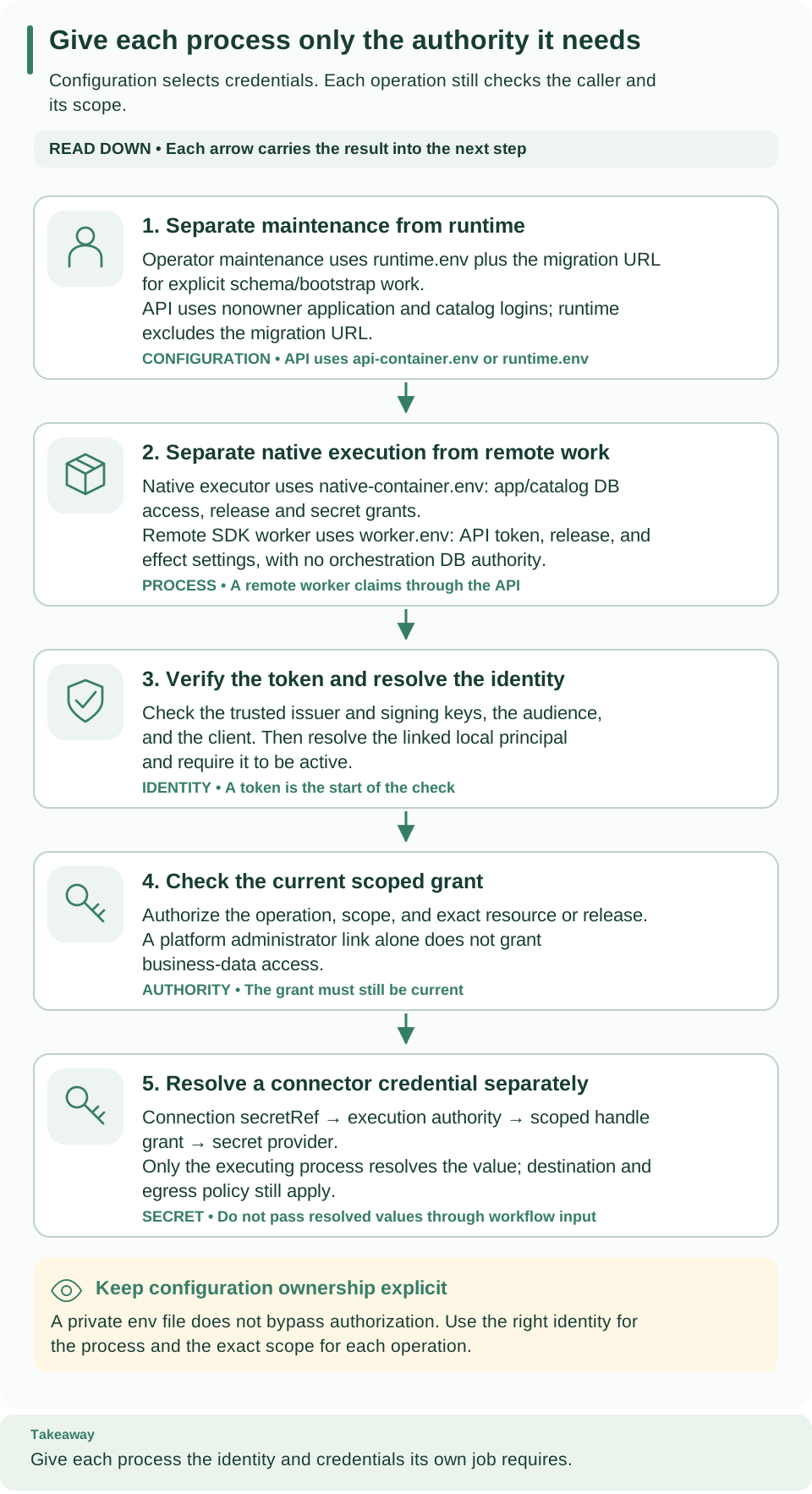
Cards 1 and 2 separate maintenance, API, native-executor, and remote-worker credentials. Cards 3 and 4 are the identity and grant checks. Card 5 follows a scoped secret handle to the executing process: a bearer token is never a connector credential.
There are three different credential paths; keep them separate even when one person operates all three.
- The operator's migration credential permits schema and bootstrap maintenance.
- A host's or worker's identity-provider credential obtains an API access token. People's own sign-ins stay in their operating system's credential store; see client configuration.
- A connector credential, such as an API key or a password, authenticates to
an external system. An integration connection names it by handle in a
secretRef; the handle is a name, not the value.
To let an integration use a credential:
- Store the value where the executing process can resolve it.
- On the local platform, run
weave platform secret set --handle HANDLE. It reads the value from a hidden prompt (or piped input with--value-stdin), never prints it, and grants the handle to the demo environment after the next API restart. - On a shared platform, configure a secret provider in the executing process:
WEAVE_SECRET_ROOTfor mounted files orWEAVE_CONNECTION_SECRET_*variables, and oneWEAVE_SECRET_GRANTSentry per environment and handle. See the server environment reference.
- On the local platform, run
- Create the integration connection with the handle. In the CLI, pass
--secret SLOT=HANDLEtoweave connections create(for example--secret api_key=pets-api-key). In Studio, select New connection in Connections and enter the handle name in the secret's handle field, such as "API key handle", never the secret itself. The connector's guide lists its destination policy; for REST APIs see Call a REST API without code. - Grant the executor release access to that connection. On the local
platform, run
weave platform integrations grant --connection REVISION_ID
   --access read
; on a shared platform, useweave workers grantas described in Prepare an environment once. - Activate the workflow against those exact revisions, then verify the connector's actual result. A configuration validation or connection check cannot establish that the external system accepted or delivered anything.
Environment and mounted-file secret providers resolve credentials only under the relevant authority; provider standing-source requirements and worker lease-bound requirements differ. Follow the exact connector guide rather than sharing one universal token.
Never place credential values in definitions, workflow literals, task results, logs, metrics, trace labels, error messages, or public examples. Secret-classified ordinary durable payload values are rejected; this does not erase secret-bearing historical rows in an older deployment. Read redaction is not storage encryption, and explicit egress and destination policy still applies after credentials resolve.
Provider acceptance is not delivery. Lease fencing, current grants, and reference revocation protect admission and state; they cannot undo a remote effect already sent. See security reporting and capability limits.
Troubleshoot sign-in and access
Work through the boundaries in order. If getting a token fails, check the provider's client flow and credential. If Weave denies an acquired token, check the exact issuer, audience, client mapping, token purpose, and key freshness before you inspect the identity link. If the identity resolves but an operation is forbidden, compare the operation, scope IDs, and resource or release references with current grants. Keep bearer tokens, provider response bodies, and credentials out of diagnostic reports.
People see these support codes while connecting; the connect guide covers the ones a person can fix alone.
| What you see | Why | What to do |
|---|---|---|
WV-CONNECT-NO-SIGN-IN |
The API publishes no sign-in settings | Apply step 3 and restart the API, or hand out a connection file |
WV-CONNECT-PROVIDER with the detail WV-AUTH-TRUST (the CLI adds that the provider's settings are not trusted) |
The provider's discovery issuer differs from the published issuer, or an endpoint is on an origin missing from trusted_endpoint_origins |
Correct the issuer in WEAVE_OIDC_PROVIDERS, or add the exact origin to trusted_endpoint_origins |
WV-CONNECT-PROVIDER with another detail, such as WV-AUTH-PROVIDER |
The provider's discovery document could not be read | Check the issuer address, the network route, and the certificate |
WV-CONNECT-TLS |
The server certificate does not chain to a public certificate authority, or its host name does not match | Serve the API with a publicly trusted certificate for that host name |
WV-CONNECT-INCOMPATIBLE |
The server predates published sign-in settings or runs another wire version | Upgrade the server, or hand out a connection file |
WV-AUTH-FLOW |
The person asked for a sign-in method that flows does not allow |
Use an allowed method, or change flows and have the person review the platform again |
WV-AUTH-NOT-LINKED |
Sign-in worked, but the identity has no Weave principal yet | Link it with the details the person shares, as described in People and access |
WV-AUTH-NO-ACCESS |
The principal is linked but has no grant in any environment | Grant a role in the intended workspace |
WV-PROFILE-CHANGED |
The published issuer or login client changed after the person's review | The person reviews the platform again |
HTTP 401 with WV-UNAUTHENTICATED for a token the provider issued |
Issuer, audience, client mapping, token class, or signing key does not match the profile, or the identity is not linked | Compare the token's claims with step 2 and check the identity link; for Entra, see Microsoft Entra ID (human sign-in not verified) |
HTTP 403 with WV-FORBIDDEN |
The identity is linked, but no grant covers that operation in that scope | Grant the role at the right level; an environment grant does not cover project-level operations such as retention and compatibility |
Changes take effect at different times. A changed local grant applies at the next identity resolution. A changed Keycloak template does not update an existing realm, and a rotated client secret does not update an existing worker container's environment. Coordinate provider changes with an explicit process replacement, and keep a way to verify the intended identity before admitting new work.
Next steps
- Give people their roles in People and access.
- Have each person connect with Connect the CLI to a platform or the Studio guide.
- Look up every server variable in configuration.
- Connect a REST API with a secret in Call a REST API without code.