Lumi assistant
Lumi is an optional Studio assistant for explaining and drafting Weave definitions. It returns text and source proposals for review. It cannot publish, activate, run, delete, upload, or modify resources. Proposals still need the normal compiler and permission checks before a person applies them.
Lumi has its own configuration per environment. It never reads a workflow's
llmProfiles, and changing an LLM step does not change the assistant.
The Studio AI setup examples and named provider-connection selection shown here use Weave 0.1.0a14. Use the matching 0.1.6 Agentic worker package for the independently deployed Lumi gateway.
Follow a question through review
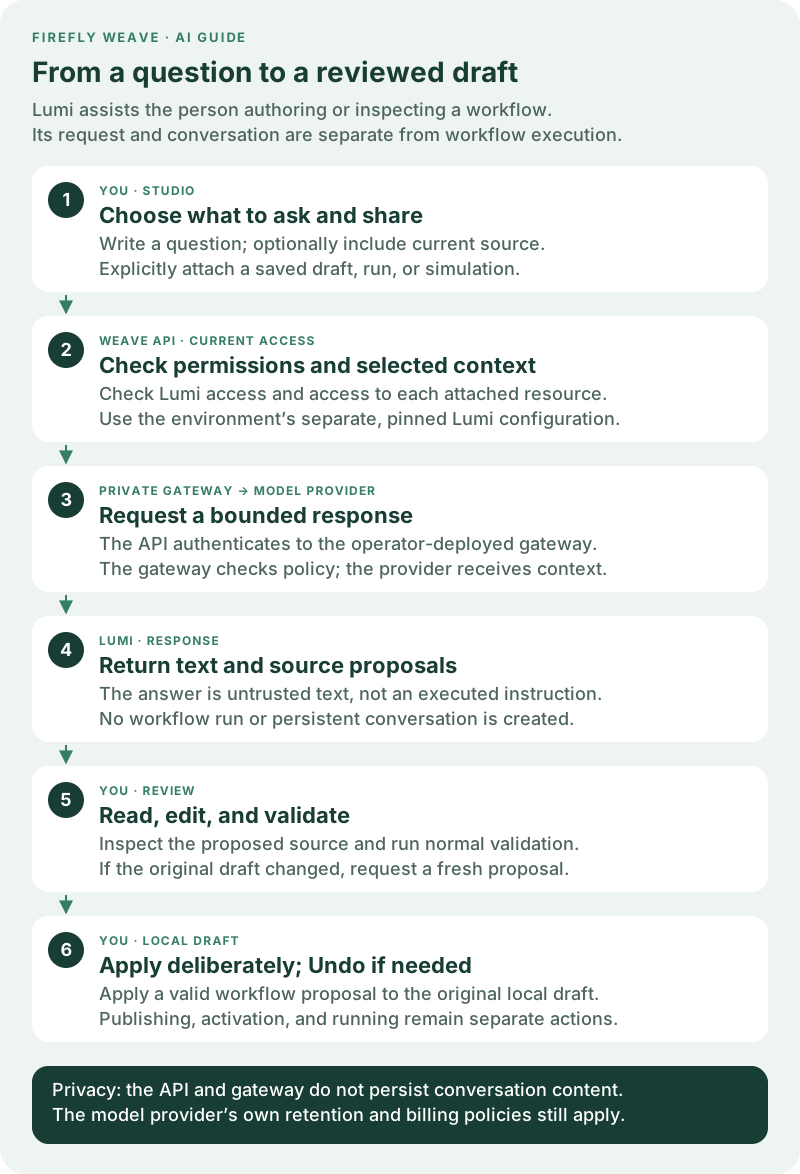
Open the Lumi review diagram at full size. The person stays in control of both what is shared and what changes:
- Choose a question and context. You can ask a general authoring question without attaching a resource. Include source or a saved resource only when the explanation needs it.
- Weave checks access. Lumi permission does not grant permission to read another person's draft, run, or simulation. The API checks each attachment.
- The private gateway calls the configured model. The API uses the environment's Lumi profile and pinned connection. The gateway independently enforces the operator's provider, model, endpoint, and execution limits.
- Read the reply. It may contain an explanation, proposed source, and follow-up questions. A proposal is a suggestion, not an executed command.
- Review and validate. Open the proposed source, edit it if needed, and use the normal compiler validation before applying it.
- Apply deliberately. A valid workflow proposal can replace the original unchanged local draft and offers Undo. Saving, publishing, activating, and running remain separate actions with their normal permissions.
For example, ask “Explain which path this decision takes when the amount is above the limit,” and include the current source. Inspect the explanation against your conditions. If Lumi proposes a change, review both the condition and its branch output before validating and applying it. Validation checks the definition; it does not prove that a suggested business rule is the one you intended.
Keep the three configurations separate
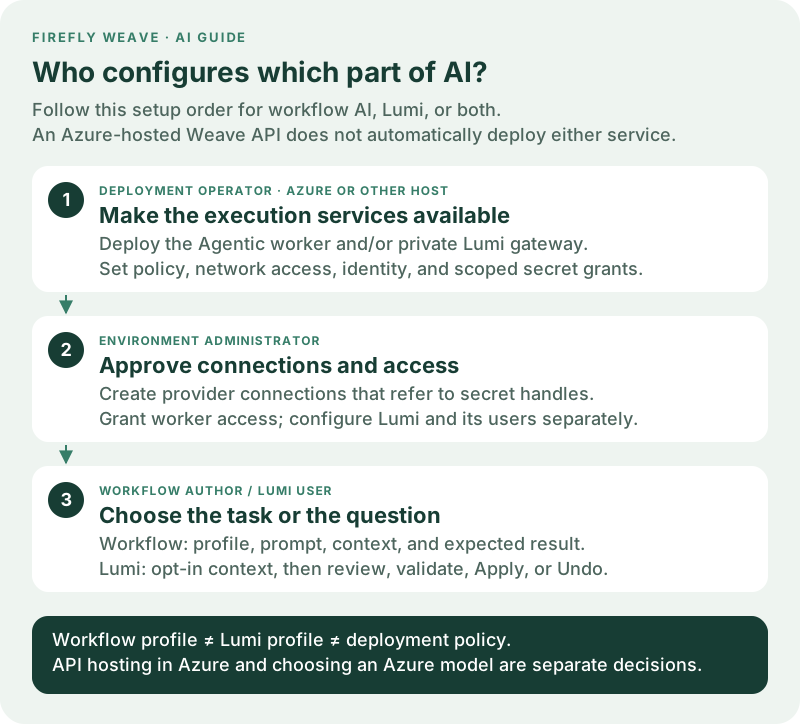
Open the configuration roles diagram at full size. These settings may use the same approved provider, but they are not inherited from one another:
| Configuration | Who maintains it | Purpose |
|---|---|---|
Workflow spec.llmProfiles |
Workflow author | Defines a model task inside a durable workflow run. |
| Environment Lumi configuration | Administrator with lumi.manage |
Selects the assistant's model profile and pinned provider connection. |
| Deployment policy and services | Deployment operator | Starts the worker or gateway, restricts destinations/models, and provisions secrets and service identity. |
To enable Lumi from a new deployment, the operator deploys the private gateway and configures the API first. The administrator then prepares the provider connection, grants access, and saves the environment's Lumi configuration. Users can ask questions only after those layers are ready. Saving settings in Studio does not deploy a gateway, create an API key, or start a workflow worker.
On Azure, the cloud operator is still responsible for these service settings, private connectivity, TLS, mounted secrets, and allowed provider egress. Hosting Weave in Azure does not automatically choose an Azure model or enable Lumi. The AI worker guide explains the shared operator/administrator handoff.
Use Lumi in Studio
- Connect Studio to the intended environment and select Ask Lumi when assistance is available there. Check the environment before sharing context.
- Type your question. Context is opt-in: check Include current source to share the current local draft, including unsaved source edits, or select an available saved draft, run, or simulation attachment. The selected provider receives that included source and authorized context.
- Send the request and read the plain-text answer. If a proposed draft is useful, open it, review its source, and make any corrections you need.
- Select Validate proposal. Address diagnostics before applying. A valid workflow proposal offers Apply to local draft only while the original local draft and source revision remain unchanged. If either changed, ask again against the current draft.
- Apply the reviewed change, then inspect the local workflow. Use Undo if you want to restore the previous draft. Applying does not save to the platform, publish, activate, or run the workflow. Other valid proposal kinds offer Save reviewed draft file for review in their normal authoring tools.
New conversation clears the current exchange. Conversations remain in memory and clear when the workspace, identity, or sign-in session changes. They are not workflow history. Managers can open Lumi settings to configure the enabled flag, pinned connection revision, and model profile separately from workflow AI profiles. Studio supplies the fixed reply schema from the canonical contract; changing a workflow's AI profile does not configure Lumi.
Explain Operations records
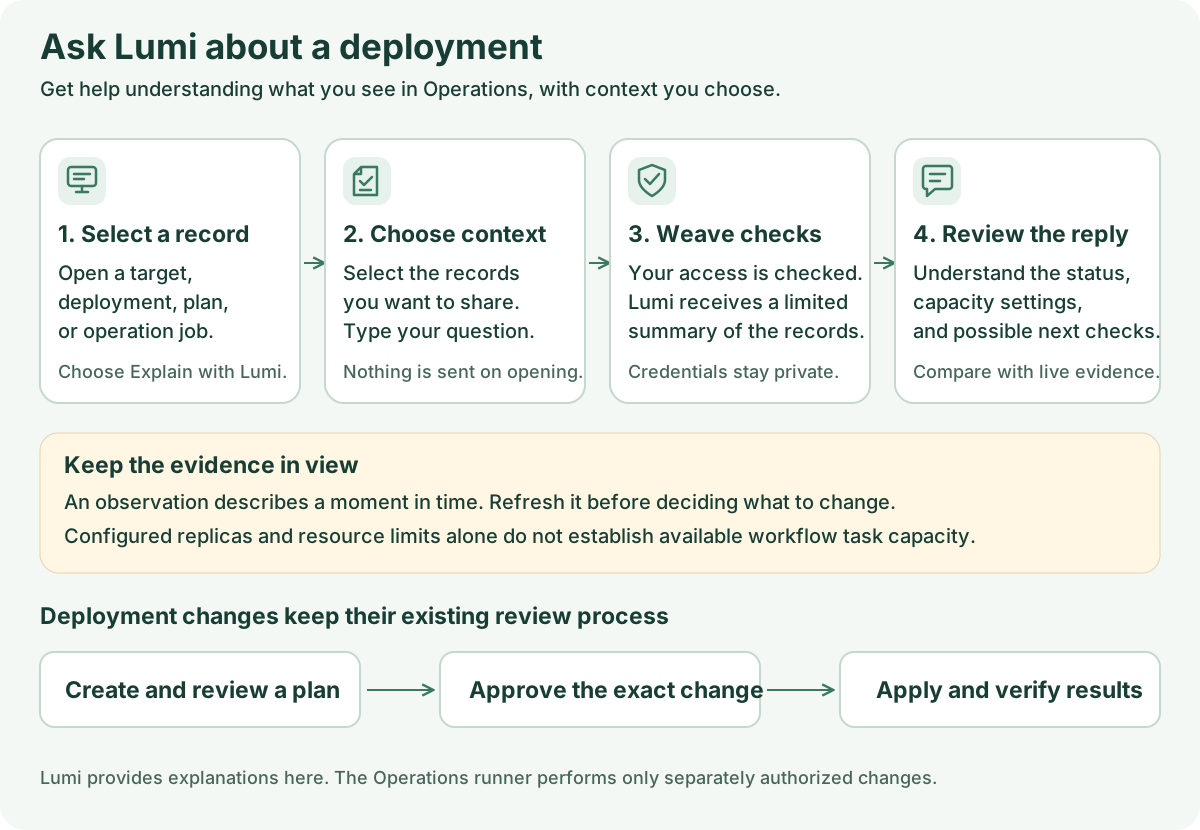
Open a target, desired deployment, plan, or operation in Operations, then select Explain with Lumi. This opens the attachment choices without sending anything. Check the saved records to include, enter a question, and send it. For example: “Explain the difference between these desired replicas and this observation, and tell me whether the observation is still fresh.”
Lumi receives a bounded summary of the selected records: adapter and permitted
capabilities, image digests, replica counts, CPU and memory limits, ownership,
freshness, plan risks, and safe operation receipt codes. Provider configuration,
registry addresses, external resource identities, local paths, credentials, and
raw logs are excluded. Each record requires deployment.read on its target in
addition to lumi.use; access is checked again before the reply is released.
Operations replies are explanations only. They do not offer draft proposals, create plans, approve changes, or run operations. Replica and resource counts describe saved deployment records, not available worker task slots or current cloud state. Changing the selected record or environment clears the selected context and conversation. To change a deployment, return to its normal review, approval, and apply controls.
Deploy the private gateway
The Weave API remains on its existing Python runtime. The model gateway uses the
independently built Python 3.13 Agentic worker image described in
AI workers, with the weave-lumi-gateway entry point. It reuses the
same bounded FireflyAgent executor and tested provider adapters. It does not
register a worker, create a workflow run, or store conversations.
Set these gateway environment variables:
| Variable | Purpose |
|---|---|
WEAVE_LUMI_POLICY_FILE |
Mounted JSON file listing exact permitted provider/model pairs and provider endpoints; same shape as the AI worker policy. |
WEAVE_LUMI_GATEWAY_TOKEN_FILE |
Mounted service token shared only with the API deployment. |
WEAVE_LUMI_GATEWAY_PORT |
Internal listener port; defaults to 8090. |
Run the gateway behind a private TLS ingress. Its only route is POST /v1/lumi.
Restrict ingress to the API service and configure ingress request/body limits and
idle timeouts for the selected model budget. The container itself speaks HTTP on
its private listener; never expose that listener directly to browsers or the
public network. Disable request/response body capture at the ingress and APM
layers. The process disables access and provider/framework content logs.
Configure the API using operator-owned settings, not a browser-provided URL:
{
  "endpoint": "https://lumi-gateway.internal.example/v1/lumi",
  "token_file": "/run/secrets/lumi-gateway-token",
  "max_concurrency": 4
}
Supply that JSON as WEAVE_LUMI_GATEWAY. The API requires HTTPS, does not follow
redirects, ignores proxy environment variables, and performs no automatic retry.
Both processes reread the mounted service token for every request, allowing
rotation. Deploy overlapping rotation changes carefully: the token file contains
one active token, so mismatched deployments fail closed.
Configure an environment
Grant lumi_manager to the administrator and lumi_user to assistant users at
the intended project or environment scope. Existing viewer/developer roles do not
implicitly grant access to models. A manager also needs connection.manage to
select a provider connection.
Publish the Agentic provider connector and create a connection as described in
AI workers. Configure an operator-approved apiKey secret handle
and exact provider origin. Lumi pins one immutable connection revision. This is
an explicit delegation: users with lumi.use can spend that connection's model
budget through Lumi, but do not gain credential.lease, connection management,
or access to other resources.
The connection's handle must already have an operator-provisioned scoped
secret grant. The API reads WEAVE_SECRET_GRANTS at startup; adding or changing
that grant list requires an API restart or deployment rollout. A manager saving
a connection or Lumi configuration cannot create that grant from the browser.
See Give integrations their secrets.
The operator also supplies WEAVE_LUMI_GATEWAY when starting the API. This is
separate from the administrator's editable environment Lumi configuration.
Save the settings in Studio
- Open Settings → AI setup → Configure Lumi, or open Lumi settings from the assistant. These settings belong to the current environment.
- The Model → Connection → Review wizard keeps changes local until Save Lumi settings. Choose the provider, an explicit model, and maximum response length. For Azure, supply the Azure deployment name. Expand Advanced model settings to change generation controls, reasoning, call limits, or time limits. Studio supplies the fixed reply schema and checks incompatible settings before you continue. This local validation does not contact the provider. Select Continue to connection.
- Choose Provider connection. The list displays the connection name and revision and filters for the selected provider. Lumi pins the exact revision, so a later connection revision does not silently change the assistant.
- If needed, select New AI connection and follow the provider connection steps. Use Refresh connections to reload available choices.
- Select Review settings, check the model and pinned connection, then select Save Lumi settings. Back preserves your draft. Use a simple request without attachments to confirm the complete path, as described below.
A workflow AI profile never fills these fields automatically. Likewise, a saved Lumi profile does not change a workflow's model or authorize its worker.
Configure through the API
Use these API operations under the environment URL:
| Method and path | Capability | Behavior |
|---|---|---|
GET /lumi/configuration |
lumi.manage |
Read the pinned connection, profile, enabled flag, and revision. |
PUT /lumi/configuration |
lumi.manage |
Create without If-Match; subsequent changes require the current revision. |
GET /lumi/status |
lumi.use |
Read availability, provider, model, and revision; no connection details. |
POST /lumi/ask |
lumi.use |
Await one private, bounded response. |
Configuration contains enabled, connection_revision_id, and profile. The
profile uses the same strictly bounded options as workflow LLM steps, but its
outputSchema must equal the published LUMI_REPLY_SCHEMA from
firefly_weave.contracts.lumi. The model returns only answer, proposals, and
followUps. Each proposal contains title, kind, format, and source.
An ask request contains a message, up to sixteen prior user/assistant messages, and up to four explicit attachments:
{
  "message": "Explain the failed step and suggest a draft fix.",
  "history": [],
  "attachments": [
    {"kind": "run", "id": "00000000-0000-0000-0000-000000000001"}
  ]
}
To share an unsaved local definition, explicitly include draft: {"format": "yaml",
"source": "..."} (or format: "json"). Source is untrusted text and may be
syntactically incomplete. No URL or file path is fetched from it, and it grants
no access to referenced resources. Its UTF-8 content is limited to 256 KiB; inline
source and authorized resource attachments share the same 256 KiB context budget.
Attachments name existing draft, run, or simulation resources. The server
reads them with the caller's current permissions: catalog admission for drafts,
redacted recorded history for runs (at most twenty events), and creator-scoped,
unexpired simulation inspection. Simulation context contains status, active
node identifiers, and diagnostics rather than variables. A Lumi grant alone
cannot attach an unread resource. The gateway also receives the current public
authoring schemas. It receives no general resource-query tool.
Privacy and bounds
Conversation history exists only in the current UI identity/environment session and the in-flight request. The API and gateway do not persist prompts, replies, reasoning traces, or model calls in workflow history. Studio clears its temporary conversation when identity or environment changes. All replies and proposed source are untrusted text/code, never rendered as HTML or automatically executed.
The API resolves only the pinned connection's scoped secret handle and forwards the credential to the trusted gateway over TLS. The gateway must therefore be operated as a credential-bearing service. It independently checks an exact provider/model/endpoint policy, rejects expired invocation envelopes, and owns no persistent conversation or model session. Provider account retention policies still apply; Responses API storage is explicitly disabled.
Each process limits concurrent model requests. Model call count, reasoning steps, per-response output tokens, and total time use the AI worker's shared limits. The API body limit is 512 KiB, attached-resource and inline-source context is bounded to 256 KiB, and gateway requests/responses are capped at 1 MiB. The API rechecks the caller's Lumi and attachment permissions and configuration revision before returning a reply. Disabling or changing configuration discards an in-flight response.
HTTP disconnects cancel and await owned model work. Cancellation or an ambiguous network failure can still incur provider cost; the API deliberately does not retry or replay a request. Operators should also apply provider-side quotas and network egress controls. No live-provider availability is implied by local tests.
Confirm setup without sharing sensitive source
First ask a simple authoring question with no source or attachments, such as “What is the difference between a workflow input and a step output?” A successful reply verifies that this user's current access, environment configuration, gateway, credential, policy, and provider can complete that request. It does not prove future model availability or the correctness of every proposed definition. Then try an explicitly selected, nonsensitive draft and practice reviewing, validating, applying, and undoing one proposed workflow change.
A separate Azure preproduction check on alpha10 completed a real Azure OpenAI request through the Lumi gateway. Installed alpha10 Studio was also used at desktop and narrow widths to read back Lumi configuration using an application identity. These checks do not establish interactive Entra sign-in for people or prove that every generated proposal is correct.
| Problem | Responsible next step |
|---|---|
| Lumi is unavailable | The administrator checks the environment configuration and lumi.use grant; the operator checks that the API has a configured gateway. |
| Configuration cannot use a connection | The administrator checks its immutable revision and provider; the operator checks the exact scoped secret grant. |
| A request is refused or fails | Check current permissions, gateway connectivity/service token, exact model/endpoint policy, provider access, and configured limits. Do not copy keys into a prompt to work around it. |
| A resource cannot be attached | Obtain ordinary read access to that resource; Lumi access alone is insufficient. |
| A proposal cannot be applied | Resolve validation errors or ask again against the changed local draft. Applying to a different or newer draft is deliberately refused. |
Lumi has no arbitrary tools, provider plug-ins, or resource-query access. Its supported adapters and bounded reasoning patterns are the ones documented in AI workers. Extending a prompt does not grant the assistant new platform capabilities.