Deploy your first worker, step by step
This guide adds a remote worker to your running local platform and proves that it completes a business task. You package a handler and its manifest into an image, let the platform admit exactly that image, start it with Docker Compose, and run a workflow through it. An optional second exercise runs a built-in connector and a second API replica in containers.
Who this is for: integration developers and operators who need their own code to call another system, and who want to learn the artifact and authorization lifecycle before deploying to the cloud.
Do you need a worker? Many integrations do not:
| You want to | Use | Start here |
|---|---|---|
| Call one JSON-over-HTTPS operation, such as reading a record or creating a ticket | An Action on the built-in weave-http@2.0.0 connector: no code and no image |
Call a REST API without code |
| Run your own code, or a protocol the built-in connector cannot express, in a separate process | A remote worker | This guide |
| Ship trusted connector code that the platform runs itself | A connector package | Author a connector |
| Run the platform in a cloud account | Cloud deployment | Deploy on AWS, Azure, or Google Cloud |
What you need first:
- The manual local setup, completed through its first
public run. This guide uses its
WEAVE_WORK_DIR,WEAVE_PYTHON,WEAVE_DOCKER_CONTEXT, andWEAVE_LAUNCH_ID, its freshreleasedirectory, its terminals, and its running PostgreSQL and Keycloak services. The platform CLI walkthrough runs built-in HTTP connector actions without this guide, in its step 8. - Docker Compose 2.30 or later and a local Docker context with a Unix endpoint.
weave worker deploydoes not support remote Docker endpoints or a Docker socket inside the API. - Keycloak serves here as the reproducible local identity fixture, not as a production requirement. For your own identity provider, configure token verification and identity links through identity and secrets, and adapt the example token requests and client names.
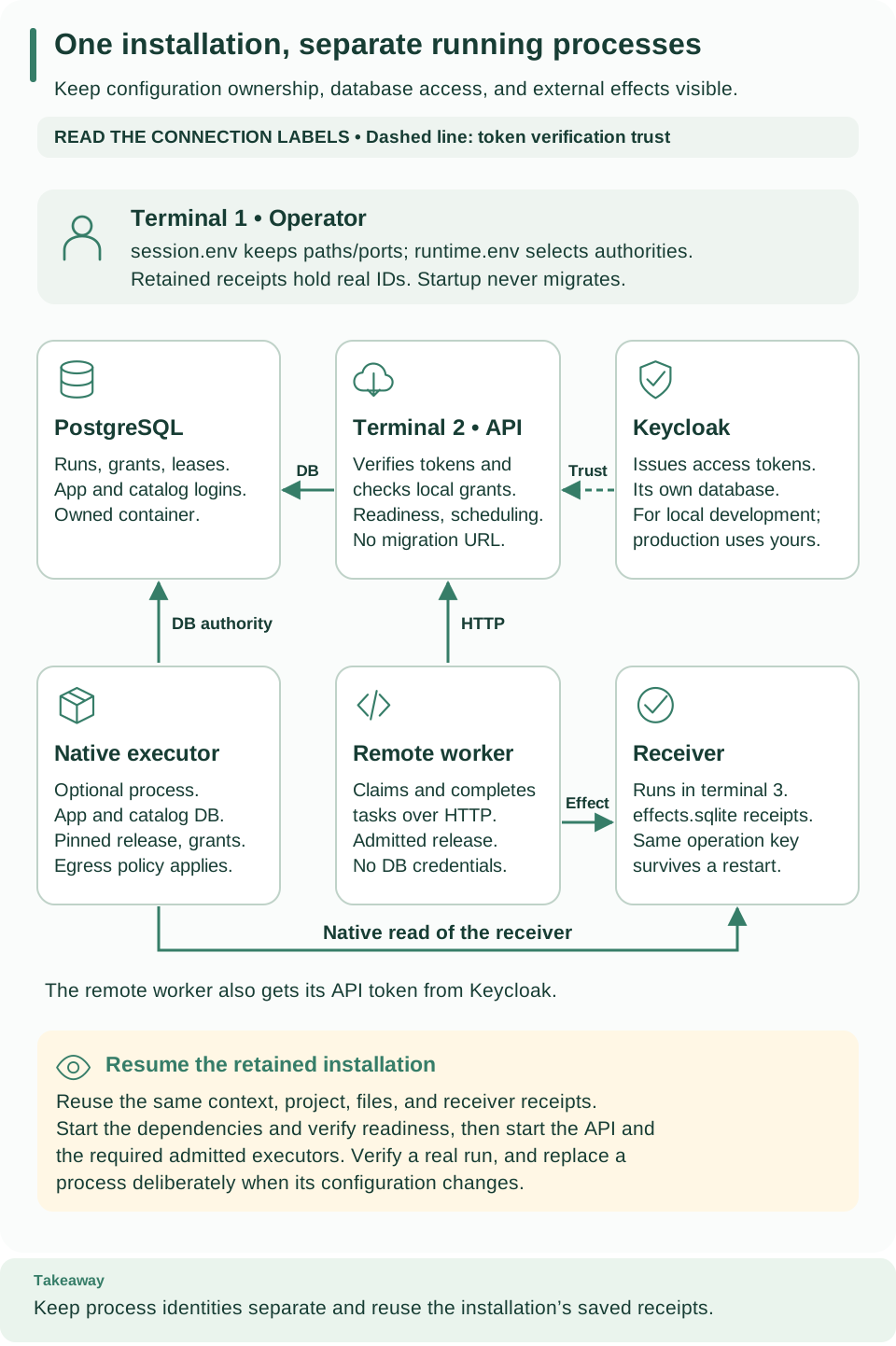
Start with the operator card (terminal 1), then follow the labeled connections. The API uses PostgreSQL and trusts tokens issued by Keycloak (the dashed line). The remote worker reaches the API over HTTP and sends its effect to the receiver; the optional native executor has database authority and reads the receiver directly. The lower callout explains how to resume the same retained installation.
Understand what “deploy a worker” means
There are two separate installations: the platform, which stores workflows and coordinates runs, and your worker, which performs one or more business tasks. Starting a worker container does not start the platform, and publishing a workflow does not start a worker container.
The worker guide explains the engine, remote workers,
native executors, and operator responsibilities. In this guide you prepare a
deployment. The setup identity holds several explicit grants: the operator role
alone cannot create principals, assign grants, admit a release, or publish
definitions.
Work through these checkpoints in order:
- Prepare code: package the handler and its manifest, then build the image.
- Authorize the build: link the worker identity, admit the image and its capability contract, and grant that identity access to the exact release and tasks.
- Connect the workflow: publish its Action and workflow, then activate them with the selected release binding. The admission script does this for you.
- Start capacity: launch the worker process. It registers and polls for work.
- Prove a business result: start a run and confirm the accepted receipt.
- Stop or restart: use the saved deployment receipt to target that worker.
Each section gives its inputs, the command, and the expected result. Keep the generated receipts: they carry real IDs from one step to the next.
Choose the deployment you need
This guide extends a local platform that is already running. To start the API
and database for the first time, begin with the platform overview
and the manual local setup: weave worker deploy does
not install or start those services. Only the remote-worker stages are required:
| Stage in this guide | Required for the remote-worker exercise? | Checkpoint |
|---|---|---|
| Build the server image | Only for the optional container/native exercise or cloud packaging | Exact server image ID and wheel hash |
| Package and build the worker | Yes | Exact worker image ID and validated manifest |
| Provision worker identity and release | Yes | Private principal and release receipts |
| Start receiver and configure routing | Yes | API and receiver are ready; private worker configuration exists |
| Deploy and run the worker workflow | Yes | Saved run succeeds with the accepted customer receipt |
| Run API/native containers | Optional follow-up | Native workflow succeeds through the container API |
weave worker deploy --target compose targets a selected local Docker engine
only. For AWS, Azure, Google Cloud, or Kubernetes, continue with
cloud deployment once you know this lifecycle.
What you will run
The manual setup leaves a foreground API connected to PostgreSQL and Keycloak. This guide adds a containerized remote worker and proves that it completes a task against a small local HTTP receiver. The optional native-executor exercise then runs a built-in HTTP connector inside a container.
| Component | Job in this exercise | How it runs |
|---|---|---|
| PostgreSQL | Stores definitions, runs, leases, grants, and recovery state | Existing Compose service from the manual setup |
| Local identity fixture (Keycloak) | Issues separate host and worker access tokens for this exercise | Existing Compose service; production uses your configured identity provider |
| Foreground API | Accepts authorized requests and schedules durable work | Terminal 2 from the manual setup |
| Remote worker | Claims example-record@1.0.0 tasks through HTTP and calls the receiver |
New container in its own worker project |
| Effect receiver | Records one result per operation key in effects.sqlite |
New foreground process in terminal 3 |
| Container API and native executor | Optional second API replica and built-in weave-http@1.0.0 read execution |
Later Compose exercise |
Use three terminals. Run build, provisioning, deployment, and verification
commands in terminal 1, from the repository root. Keep terminal 2 for API
output and terminal 3 for the receiver. In each new terminal, run the cd and
source .../session.env commands that the manual setup printed. They restore the
repository, WEAVE_WORK_DIR, WEAVE_PYTHON, and the selected ports; shell
variables do not carry over between terminals otherwise. session.env holds
paths and ports, not credentials, so terminal 1 must still have the runtime and
identity environment from the manual setup loaded.
The two exercises prove different paths. The remote worker returns
{"receipt":"accepted","customer":"demo"}; the native connector returns
{"status":200,"body":{"ready":true}}. Neither needs a real provider account.
Run this sequence once per installation. The commands create retained images, containers, and private receipts. For an existing deployment, use the stop and restart instructions instead of rerunning identity provisioning or overwriting receipts.
A local sha256: image ID identifies local image bytes. It is not a registry
manifest digest, a signature, a live-provider certification, or a runtime
attestation. Release admission and current scoped grants remain explicit steps.
Build the server from the prepared wheel
Skip this section if you only want the remote-worker exercise; continue with Prepare a worker context. Return here before the optional API/native container exercise or cloud packaging.
The build context already exists at $WEAVE_WORK_DIR/release/images: the manual
setup's preparation step created it. WEAVE_SERVER_IMAGE will hold the exact
image ID that Docker returns, not a tag you invent. The optional native exercise
uses this image; the remote worker gets its own image in the next section.
How the images are built. The preparation step built one wheel and one sdist
and exported separate base, worker, server, Teams, and Kafka dependency closures
from uv.lock. The Python and uv base images are pinned by digest. Every image
installs hash-locked dependencies, then the exact wheel with --no-deps; no
editable checkout or source bind mount is involved.
# Build the API container from the prepared package and confirm its embedded wheel identity.
docker --context "$WEAVE_DOCKER_CONTEXT" build --target server \
  --iidfile "$WEAVE_WORK_DIR/server-image.id" \
  "$WEAVE_WORK_DIR/release/images"
export WEAVE_SERVER_IMAGE="$(cat "$WEAVE_WORK_DIR/server-image.id")"
docker --context "$WEAVE_DOCKER_CONTEXT" image inspect \
  --format '{{.Id}} {{.Config.User}}' "$WEAVE_SERVER_IMAGE"
docker --context "$WEAVE_DOCKER_CONTEXT" run --name "$WEAVE_LAUNCH_ID-server-inventory" \
  --network none --read-only --entrypoint python "$WEAVE_SERVER_IMAGE" -I -c \
  'import json, pathlib; print(json.loads(pathlib.Path("/opt/weave/build.json").read_text())["wheel_sha256"])'
Expected: the inspect command prints the selected image ID and 65532:65532
(the non-root user). The inventory command prints the same wheel SHA-256 as
release/release.json and exits; its stopped container remains. Use the
teams-server or kafka-server target instead when you need those integrations.
The worker Dockerfile installs its own worker closure and does not inherit the
server environment.
Prepare a worker context
Three terms matter here:
- A worker manifest declares the task names, versions, input and output schemas, and side-effect rules that the worker promises to implement.
- The Python entrypoint implements those tasks.
- A release, admitted in the next section, binds that declaration to one exact image. Building an image does not, by itself, authorize it to claim work.
The example manifest declares example-record@1.0.0. Its entrypoint needs an
owned HTTP effect endpoint that accepts Idempotency-Key, keeps receipts, and
returns {"receipt":"accepted","customer":"..."}. Your own worker ships its own
handler and matching manifest. Packaging validates the declarations and file
policy without importing or running the handler.
# Package the handler and its manifest, then build the worker image that will be admitted.
export WEAVE_WHEEL_NAME="$(python3 -c 'import json,os; print(json.load(open(os.environ["WEAVE_WORK_DIR"]+"/release/release.json"))["wheel"])')"
"$WEAVE_PYTHON" -I -m firefly_weave.cli.main worker package \
  --manifest examples/worker/manifest.json --entrypoint examples/worker/main.py \
  --wheel "$WEAVE_WORK_DIR/release/artifacts/$WEAVE_WHEEL_NAME" \
  --requirements "$WEAVE_WORK_DIR/release/images/worker-requirements.txt" \
  --output "$WEAVE_WORK_DIR/worker-context" --format json
docker --context "$WEAVE_DOCKER_CONTEXT" build \
  --iidfile "$WEAVE_WORK_DIR/worker-image.id" "$WEAVE_WORK_DIR/worker-context"
export WEAVE_WORKER_IMAGE="$(cat "$WEAVE_WORK_DIR/worker-image.id")"
docker --context "$WEAVE_DOCKER_CONTEXT" image inspect \
  --format '{{.Id}} {{.Config.User}}' "$WEAVE_WORKER_IMAGE"
Expected: the package JSON records the wheel and canonical manifest hashes, and
the image runs as non-root UID/GID 65532. The context contains only the selected
wheel, the locked requirements, the entrypoint, the manifest, generated build
files, and legal notices. Packaging stops before writing a complete context when
it finds input symlinks, archive escapes or duplicate entries, unlocked
requirements, invalid schemas, or an existing output directory. A context without
its build.json completion marker comes from an incomplete attempt.
Provision authority and private worker configuration
Why: a worker may claim tasks only as a linked Weave principal with a grant for one admitted release. Two example scripts set this up:
provision_worker.pyverifies real host and worker tokens, resolves the already-linked host identity, and calls the native administration service (AccessService.create_principalandlink_identity). It uses the nonowner application database login and normal service authorization: no raw SQL, no fabricated identity, and no automatic image authority.admit_worker.pyuses the public API to admit the release, grant the worker, publish the Action and workflow, and activate them.
Platform administrators can also create and link principals through the public
API, with weave remote access principals create and link or with
Settings → People and access in Studio; see
People and access. This exercise uses the script
because it checks the worker's own token before it links it.
These files pass real identifiers between steps:
File under WEAVE_WORK_DIR |
Producer | What the next step reads |
|---|---|---|
first-run.json |
The manual setup's first run | Existing tenant, project, and environment IDs |
worker-principal.json |
provision_worker.py below |
Verified local worker principal ID |
worker-release.json |
admit_worker.py below |
Release ID, activation ID, and environment API path |
worker-deployment.json |
worker deploy later |
Exact container, image, Docker context, and stop command |
Never replace these IDs with a client name such as weave-worker. The client
name identifies the local identity fixture's OAuth client; the UUIDs identify
Weave resources. With another identity provider the client identifier differs,
but the verified identity must still be linked to the intended Weave principal.
In terminal 1, with runtime and identity configuration loaded, select the host-reachable API origin and run once for this fresh runtime database:
# Link the worker identity and grant its release access to the scope created by the first run.
export WEAVE_API_URL="http://127.0.0.1:$WEAVE_API_PORT"
"$WEAVE_PYTHON" examples/provision_worker.py --provider local-keycloak \
  --output "$WEAVE_WORK_DIR/worker-principal.json"
"$WEAVE_PYTHON" examples/admit_worker.py \
  --scope-receipt "$WEAVE_WORK_DIR/first-run.json" \
  --principal-receipt "$WEAVE_WORK_DIR/worker-principal.json" \
  --manifest "$WEAVE_WORK_DIR/worker-context/manifest.json" \
  --image "$WEAVE_WORKER_IMAGE" --output "$WEAVE_WORK_DIR/worker-release.json"
Expected: Verified worker identity linked; private receipt written, then
Release admitted, worker grant assigned, workflow activated. The second script
obtains a fresh host token, admits the exact release, grants the worker role
only for the current environment, release, and task, publishes the matching
Action and workflow, and activates them. Every ID comes from a real response, and
the worker receives no authoring grant. Never rerun identity linking for a worker
that is already linked; a failed attempt keeps its partial state for inspection.
Start the receiver and expose the local API to the worker
Why: the worker needs an external system to call. The example receiver stands
in for it and keeps a durable receipt per operation. In terminal 3, run the
printed cd and source .../session.env commands from the manual setup, then
start it:
# Leave this terminal running: the receiver stands in for the external system called by the worker.
python3 examples/idempotent_receiver.py --database "$WEAVE_WORK_DIR/effects.sqlite" \
  --host 0.0.0.0 --port 8090
Expected: Local idempotent receiver ready. Its SQLite receipts survive receiver,
API, and worker restarts. A repeated operation key with the same body returns the
original receipt, and a conflicting body is rejected. This is a local
demonstration target, not a certified production receiver.
Keep the receiver on an isolated development network. Binding to 0.0.0.0
makes it reachable through every network interface of the host, and it has no
authentication. Never expose it as a public service.
Make the API reachable from containers. The API listens on loopback only, and
the worker container cannot reach the host's loopback. In terminal 2, stop the
foreground API with Ctrl-C; that terminal already has the session and runtime
settings. In a replacement terminal, first run the printed cd and
source .../session.env commands, then load runtime.env with
set -a; source "$WEAVE_WORK_DIR/runtime.env"; set +a. Restart the API on all
interfaces:
# Restart the API on the selected interface so the tutorial worker container can reach it.
env -u WEAVE_MIGRATION_DATABASE_URL \
  "$WEAVE_WORK_DIR/runtime/bin/python" -I -m uvicorn \
  firefly_weave.main:create_application --factory --host 0.0.0.0 \
  --port "${WEAVE_API_PORT:?Set the selected API port}"
Expected: Uvicorn reports that it is running on 0.0.0.0 and the selected port.
The API still requires normal bearer authorization. Return to terminal 1 and
check both endpoints before you continue:
# Check both host services, then use host.docker.internal for requests originating inside the worker.
"$WEAVE_PYTHON" - <<'PY'
import os, httpx
for url in ("http://127.0.0.1:8090/health", "http://127.0.0.1:" + os.environ["WEAVE_API_PORT"] + "/health/ready"):
    assert httpx.get(url, timeout=3, trust_env=False).status_code == 200
print("API and effect receiver are ready")
PY
export WEAVE_API_URL="http://host.docker.internal:$WEAVE_API_PORT"
export WEAVE_TOKEN_URL="http://host.docker.internal:$WEAVE_KEYCLOAK_PORT/realms/weave/protocol/openid-connect/token"
export WEAVE_EFFECT_URL=http://host.docker.internal:8090/effect
export WEAVE_ENVIRONMENT_URL="$(python3 -c 'import json,os; print(json.load(open(os.environ["WEAVE_WORK_DIR"]+"/worker-release.json"))["environment_url"])')"
export WEAVE_WORKER_RELEASE_ID="$(python3 -c 'import json,os; print(json.load(open(os.environ["WEAVE_WORK_DIR"]+"/worker-release.json"))["release_id"])')"
Expected: API and effect receiver are ready, and the five variables set.
These URLs are used inside the worker container, while the readiness checks
above run on the host. host.docker.internal must already resolve in your Docker
runtime: the generated worker deployment adds no host-gateway mapping. On a Linux
runtime without that name, replace the host in WEAVE_API_URL, WEAVE_TOKEN_URL,
and WEAVE_EFFECT_URL with an explicit, reachable host address before you create
worker.env. The configured Keycloak issuer stays the same when its token
endpoint is reached through a host gateway. Outside local development, use
trusted HTTPS origins.
The example needs these environment values in a new owner-only file:
| Variable | Required value |
|---|---|
WEAVE_API_URL |
API origin reachable from the container |
WEAVE_TOKEN_URL |
Trusted machine-token endpoint reachable from the container |
WEAVE_WORKER_SECRET |
From the existing identity.env; credential for this tutorial’s local weave-worker OAuth client |
WEAVE_ENVIRONMENT_URL |
Environment API path assembled from actual scope IDs |
WEAVE_WORKER_RELEASE_ID |
ID returned by release admission |
WEAVE_EFFECT_URL |
Owned idempotent receiver endpoint |
The worker receives no database URL, PostgreSQL credential, migration credential, or identity administrator secret. With these six values set in terminal 1, create the file without printing or copying any other environment variable:
# Save only the worker settings in a private file and restore the host-facing API URL afterward.
python3 - <<'PY'
import os
from pathlib import Path
keys = ("WEAVE_API_URL", "WEAVE_TOKEN_URL", "WEAVE_WORKER_SECRET",
        "WEAVE_ENVIRONMENT_URL", "WEAVE_WORKER_RELEASE_ID", "WEAVE_EFFECT_URL")
values = {key: os.environ[key] for key in keys}
assert all(value and "\n" not in value and "\r" not in value for value in values.values())
path = Path(os.environ["WEAVE_WORK_DIR"]) / "worker.env"
with os.fdopen(os.open(path, os.O_WRONLY | os.O_CREAT | os.O_EXCL, 0o600), "w") as stream:
    stream.write("".join(key + "=" + value + "\n" for key, value in values.items()))
print("Owner-only worker configuration created")
PY
export WEAVE_API_URL="http://127.0.0.1:$WEAVE_API_PORT"
Expected: Owner-only worker configuration created. The final export restores
terminal 1's host-side API origin for later commands; it does not change the
container-reachable URL saved in worker.env, which the worker reads when its
container is created.
localhost inside a container is that container. Configure reachable, trusted
origins explicitly. The example's Keycloak trust settings and the worker's
container routing must describe the same issuer: never change the issuer claim to
work around connectivity. Production identity uses HTTPS.
Deploy only the verified worker image
Why: weave worker deploy starts exactly the image you admitted, with the
private six-value configuration you wrote, and records what it started. Keep
umask 077 in terminal 1 so the redirected deployment receipt is private, and
leave the API and receiver running throughout this step.
# Deploy the selected image, then inspect the exact container recorded in its deployment receipt.
"$WEAVE_PYTHON" -I -m firefly_weave.cli.main worker deploy --target compose \
  --image "$WEAVE_WORKER_IMAGE" --project "$WEAVE_LAUNCH_ID-worker" \
  --context "$WEAVE_DOCKER_CONTEXT" --directory "$WEAVE_WORK_DIR/worker-context" \
  --env-file "$WEAVE_WORK_DIR/worker.env" --format json \
  > "$WEAVE_WORK_DIR/worker-deployment.json"
python3 - <<'PY'
import json, os, subprocess
from pathlib import Path
receipt = json.loads((Path(os.environ["WEAVE_WORK_DIR"]) / "worker-deployment.json").read_text())
subprocess.run(["docker", "--context", receipt["context"], "inspect", "--format",
                "{{.State.Status}} {{.Image}}", receipt["container_id"]], check=True)
PY
Expected: the receipt identifies the exact container and image and includes a
stop_argv array, and docker inspect prints running and the image ID.
What the deploy command guarantees:
- It inspects the local context and image and verifies the wheel and manifest labels.
- It refuses a project name that already exists.
- It creates the container with a unique ownership nonce and
--no-recreate, then starts only that newly created, verified container. It never starts, replaces, or stops a container it does not own. - It never pulls or builds an image, and the env file's contents never appear in its result. Raw env-file mode keeps literal dollar signs and quotes in credentials.
A running container shows that the process is alive, not that the release is
ready. Confirm that the instance registered through the public workers API, then
submit a workflow pinned to the release. A registration or token error makes the
worker exit safely; inspect only protected logs.
Prove a business result. Start the activated worker workflow and wait for its actual output:
# Start one integration run and poll until the worker result has been accepted by the API.
"$WEAVE_PYTHON" - <<'PY'
import asyncio, json, os
from pathlib import Path
from uuid import uuid4
import httpx
root = Path(os.environ["WEAVE_WORK_DIR"])
receipt = json.loads((root / "worker-release.json").read_text())
async def main():
    async with httpx.AsyncClient(timeout=10, trust_env=False) as identity:
        response = await identity.post(os.environ["WEAVE_KEYCLOAK_TEST_URL"] + "/realms/weave/protocol/openid-connect/token",
            data={"grant_type": "client_credentials"}, auth=("weave-host", os.environ["WEAVE_HOST_SECRET"]))
        response.raise_for_status()
        token = response.json()["access_token"]
    async with httpx.AsyncClient(base_url="http://127.0.0.1:" + os.environ["WEAVE_API_PORT"],
            timeout=10, trust_env=False, headers={"Authorization": "Bearer " + token}) as client:
        response = await client.post(receipt["environment_url"] + "/runs",
            json={"activation_id": receipt["activation_id"], "input": {"customer": "demo"}},
            headers={"Idempotency-Key": str(uuid4())})
        response.raise_for_status()
        run_id = response.json()["id"]
        async with asyncio.timeout(60):
            while True:
                response = await client.get(receipt["environment_url"] + "/runs/" + run_id)
                response.raise_for_status()
                run = response.json()
                if run["state"]["status"] == "succeeded":
                    assert run["state"]["output"] == {"receipt": "accepted", "customer": "demo"}
                    print(json.dumps({"run_id": run_id, "status": "succeeded", "output": run["state"]["output"]}))
                    break
                await asyncio.sleep(0.25)
asyncio.run(main())
PY
Expected: one JSON line with the real run ID, "status": "succeeded", and the
accepted customer receipt as output. A failure or timeout means the worker is not
ready: inspect the public run and incident state and the protected worker logs.
Never manufacture a completion or clear an incident to make the walkthrough pass.
The example worker has a finite lifetime. It stops claiming before its startup token expires and drains before it exits. A supervisor may start a new invocation afterward; that is not transparent token refresh. Its task budget is 180 seconds with a 30-second credential margin. Read the worker protocol before you change that budget.
Configure and run the API and native executor containers
This optional exercise follows the remote-worker exercise. It reuses the verified worker principal but admits a separate native release. A native executor runs built-in connector code inside a Weave server process; unlike the remote worker, it needs application and catalog database authority. Here it runs in its own container from the server image, with native execution configured and background scheduling disabled, next to a second API container that keeps scheduling enabled.
This exercise uses the older built-in weave-http@1.0.0 connector, because its
target is the local receiver at a plain-HTTP private address, which the explicit
private-network allowance below permits. For new REST integrations, use
weave-http@2.0.0, which takes HTTPS origins and, with a "Not encrypted"
warning, http:// ones; see
Call a REST API without code.
Keep the receiver on port 8090 running. The recipe admits a native read-only HTTP
capability, grants the worker principal only that release and task, pins the
connection, and activates a workflow that reads the receiver's /health endpoint.
It sends no message to any provider.
# Prepare separate API and native-executor credentials, validate Compose, and start those processes.
export WEAVE_API_URL="http://127.0.0.1:$WEAVE_API_PORT"
"$WEAVE_PYTHON" examples/admit_native.py \
  --scope-receipt "$WEAVE_WORK_DIR/first-run.json" \
  --principal-receipt "$WEAVE_WORK_DIR/worker-principal.json" \
  --manifest examples/host_product/http-manifest.json \
  --image "$WEAVE_SERVER_IMAGE" --output "$WEAVE_WORK_DIR/native-release.json"
export WEAVE_API_ENV_FILE="$WEAVE_WORK_DIR/api-container.env"
export WEAVE_NATIVE_ENV_FILE="$WEAVE_WORK_DIR/native-container.env"
export WEAVE_WORKER_ENV_FILE="$WEAVE_WORK_DIR/worker.env"
"$WEAVE_PYTHON" - <<'PY'
import json, os, shlex
from pathlib import Path
from sqlalchemy import make_url
root = Path(os.environ["WEAVE_WORK_DIR"])
runtime = dict(line.split("=", 1) for line in (root / "runtime.env").read_text().splitlines())
runtime = {key: shlex.split(value)[0] for key, value in runtime.items()}
providers = json.loads(runtime["WEAVE_OIDC_PROVIDERS"])
for provider in providers:
    provider["jwks_uri"] = "http://127.0.0.1:8080/realms/weave/protocol/openid-connect/certs"
def database(key):
    return make_url(runtime[key]).set(host="postgres", port=5432).render_as_string(hide_password=False)
api = {"WEAVE_DATABASE_URL": database("WEAVE_DATABASE_URL"),
       "WEAVE_SCHEDULER_DATABASE_URL": database("WEAVE_SCHEDULER_DATABASE_URL"),
       "WEAVE_OIDC_PROVIDERS": json.dumps(providers, separators=(",", ":"))}
receipt = json.loads((root / "native-release.json").read_text())
native = {"WEAVE_DATABASE_URL": database("WEAVE_DATABASE_URL"),
          "WEAVE_SCHEDULER_DATABASE_URL": database("WEAVE_SCHEDULER_DATABASE_URL"),
          "WEAVE_SCHEDULER_ENABLED": "false", "WEAVE_NATIVE_IMAGE_DIGEST": os.environ["WEAVE_SERVER_IMAGE"],
          "WEAVE_NATIVE_EXECUTORS": json.dumps([receipt["executor"]], separators=(",", ":")),
          "WEAVE_HTTP_PRIVATE_NETWORKS": '["0.0.0.0/0"]'}
for name, values in (("WEAVE_API_ENV_FILE", api), ("WEAVE_NATIVE_ENV_FILE", native)):
    with os.fdopen(os.open(os.environ[name], os.O_WRONLY | os.O_CREAT | os.O_EXCL, 0o600), "w") as stream:
        stream.write("\n".join(key + "=" + value for key, value in values.items()) + "\n")
print("Private nonowner API and native executor configuration written")
PY

docker --context "$WEAVE_DOCKER_CONTEXT" compose --project-name "$WEAVE_LAUNCH_ID" \
  --env-file "$WEAVE_WORK_DIR/postgres.env" --env-file "$WEAVE_WORK_DIR/identity.env" \
  -f compose.yaml -f compose.identity.yaml -f compose.runtime.yaml \
  -f compose.local-runtime.yaml config --quiet
docker --context "$WEAVE_DOCKER_CONTEXT" compose --project-name "$WEAVE_LAUNCH_ID" \
  --env-file "$WEAVE_WORK_DIR/postgres.env" --env-file "$WEAVE_WORK_DIR/identity.env" \
  -f compose.yaml -f compose.identity.yaml -f compose.runtime.yaml \
  -f compose.local-runtime.yaml up --detach --no-recreate --no-build --pull never api native-executor
Expected: Native read release, scoped authority, connection and workflow
prepared and Private nonowner API and native executor configuration written,
then Compose reports the api and native-executor containers as started.
How the containers reach Keycloak. The local identity fixture shares
Keycloak's network namespace with the API container:
compose.local-runtime.yaml uses network_mode: service:keycloak, so the JWKS
endpoint stays on trusted HTTP loopback port 8080 inside that namespace, and
the token issuer stays WEAVE_KEYCLOAK_TEST_URL followed by /realms/weave. The
manual setup reserved WEAVE_CONTAINER_API_PORT for this container API's port
8000; it is a second API replica next to the foreground API on WEAVE_API_PORT.
The normal runtime Compose file works with separately reachable HTTPS identity
endpoints and needs no such override.
Because this local API shares Keycloak's network lifecycle, stop the API before you replace its Keycloak container, then start a new API in the new namespace. Keeping an API attached to an old namespace is not a valid upgrade procedure. Never weaken trusted endpoint validation or change an issuer claim to work around container routing.
The native executor's egress is wide open for this exercise only. Its
WEAVE_HTTP_PRIVATE_NETWORKS value, ["0.0.0.0/0"], allows every IPv4 range so
that it can reach the demonstration receiver. Outside
this exercise, narrow WEAVE_HTTP_PRIVATE_NETWORKS and use trusted HTTPS
destinations. The executor receives no migration credential and no Docker socket;
its authority comes from the worker principal, its current grants, and the
immutable release and connection pins.
Wait for the container API to become ready, then run the native workflow through it:
# Wait for the container API, submit the native integration, and verify the saved output.
"$WEAVE_PYTHON" - <<'PY'
import asyncio, json, os
from pathlib import Path
from uuid import uuid4
import httpx
async def main():
    base = "http://127.0.0.1:" + os.environ.get("WEAVE_CONTAINER_API_PORT", "8081")
    receipt = json.loads((Path(os.environ["WEAVE_WORK_DIR"]) / "native-release.json").read_text())
    async with httpx.AsyncClient(timeout=5, trust_env=False) as client:
        async with asyncio.timeout(60):
            while True:
                try:
                    response = await client.get(base + "/health/ready")
                    if response.status_code == 200:
                        break
                except httpx.HTTPError:
                    pass
                await asyncio.sleep(.5)
        response = await client.post(os.environ["WEAVE_KEYCLOAK_TEST_URL"] + "/realms/weave/protocol/openid-connect/token",
            data={"grant_type": "client_credentials"}, auth=("weave-host", os.environ["WEAVE_HOST_SECRET"]))
        response.raise_for_status()
        headers = {"Authorization": "Bearer " + response.json()["access_token"]}
        response = await client.post(base + receipt["environment_url"] + "/runs",
            headers={**headers, "Idempotency-Key": str(uuid4())},
            json={"activation_id": receipt["activation_id"], "input": {}})
        response.raise_for_status()
        run_id = response.json()["id"]
        async with asyncio.timeout(60):
            while True:
                response = await client.get(base + receipt["environment_url"] + "/runs/" + run_id, headers=headers)
                response.raise_for_status()
                run = response.json()
                if run["state"]["status"] == "succeeded":
                    assert run["state"]["output"] == {"status": 200, "body": {"ready": True}}
                    print(json.dumps({"run_id": run_id, "status": "succeeded", "output": run["state"]["output"]}))
                    break
                await asyncio.sleep(.25)
asyncio.run(main())
PY
Expected: one JSON line with the real run ID, "status": "succeeded", and the
output {"status": 200, "body": {"ready": true}}. Startup never migrates the
database: apply packaged migrations with the separate migration identity before
you select a new runtime artifact. The API and native containers run the same
package bytes but have separate runtime configurations and authority.
Stop the intended scope
Stop in this order: task producers and workers first, then the API, then PostgreSQL and Keycloak last. Keep the receiver and its SQLite receipt file through any recovery check: they are the evidence that an external effect already happened. Stop a foreground process with Ctrl-C in its own terminal.
To stop only the deployed worker, execute the exact argv from its receipt:
# Stop only the worker identified by its deployment receipt; retain its container and data.
python3 - <<'PY'
import json, os, subprocess
from pathlib import Path
receipt = json.loads((Path(os.environ["WEAVE_WORK_DIR"]) / "worker-deployment.json").read_text())
subprocess.run(receipt["stop_argv"], check=True)
PY
Expected: Docker prints the container ID, and the worker container is stopped,
not removed (the receipt's command is docker stop --time 30 for that ID). The
30-second stop grace is a hard outer bound; a task may outlive it, and lease
fencing, idempotency, and incident reconciliation govern recovery.
Stopping a process never undoes a request an external system already accepted.
To stop the container API and native executor of this installation, use the explicitly selected runtime Compose project:
# Stop API and native execution before stopping the database and identity dependencies.
docker --context "$WEAVE_DOCKER_CONTEXT" compose --project-name "$WEAVE_LAUNCH_ID" \
  --env-file "$WEAVE_WORK_DIR/postgres.env" --env-file "$WEAVE_WORK_DIR/identity.env" \
  -f compose.yaml -f compose.identity.yaml -f compose.runtime.yaml \
  -f compose.local-runtime.yaml stop --timeout 30 api native-executor
Stop PostgreSQL and Keycloak with the manual setup's stop step only after every writer has stopped. Keep volumes and secret files. Follow the backup and restore procedure before maintenance that needs a restorable copy.
Restart a stopped local deployment
With unchanged configuration, restart in this order:
- Start the existing PostgreSQL and Keycloak services with the manual setup's resume steps and repeat their readiness checks.
- Start the receiver with the same
effects.sqlitepath. - Restart the foreground API with the
0.0.0.0command above. - For the optional container API and native executor, reuse the same complete
Compose invocation and environment files from their startup step. An
up --no-recreatedoes not apply edited environment files to existing containers.
Restart the worker deliberately. The example exits before its access token expires, and its deployment has no automatic restart policy. To start another invocation of the same stopped container, first check that its recorded image and project still match. In terminal 1:
# Check the retained worker's identity and image before restarting that same container.
python3 - <<'PY'
import json, os, subprocess
from pathlib import Path
receipt = json.loads((Path(os.environ["WEAVE_WORK_DIR"]) / "worker-deployment.json").read_text())
docker = ["docker", "--context", receipt["context"]]
container = json.loads(subprocess.check_output(docker + ["inspect", receipt["container_id"]]))[0]
assert container["Id"] == receipt["container_id"]
assert container["Image"] == receipt["image"]
assert container["Config"]["Labels"]["com.docker.compose.project"] == receipt["project"]
assert container["State"]["Status"] == "exited", "Inspect the current container state before starting it"
subprocess.run(docker + ["start", receipt["container_id"]], check=True)
PY
Expected: Docker starts the container. The new invocation obtains a fresh token and registers a new worker instance under the existing release and grants. Repeat the workflow check to confirm that it claims and completes tasks.
Rerunning worker deploy for the same project is refused on purpose. Changed
image bytes, credentials, or release requirements need a deliberate new
deployment, not another invocation of an old container. See upgrades
for schema or artifact changes.
If something goes wrong
| What you see | Why | What to do |
|---|---|---|
worker package stops before writing a context |
An input symlink, an unlocked requirement, an invalid schema, or an existing output directory | Fix the reported input, or choose a new --output directory |
worker deploy refuses to start |
The Compose project already exists, or the image or its labels do not match the packaged context | Choose a new --project for a new deployment, or restart the existing container |
provision_worker.py or admit_worker.py fails |
A missing secret or runtime variable in terminal 1, an API that is not ready, or a worker identity that is already linked | Reload the runtime and identity environment, check the API, and inspect the partial receipt before you retry |
| The worker cannot reach the API or receiver | Host loopback is not container loopback, or host.docker.internal does not resolve |
Restart the API on 0.0.0.0 and use a container-reachable host address in worker.env |
| The container runs but no task completes | The release, the scoped worker grant, or the activation pin is missing | Check worker-release.json, the grants, and the run's state; a running container is not a ready worker |
| The worker container exits after a short successful run | The example's finite lifetime and no restart policy | Restart the same container |
| A restart ignores a changed env file | Existing containers keep their configuration | Create a new deployment with the changed configuration |
The troubleshooting guide maps more symptoms to the boundary that causes them.
Next steps
- Build workers: write your own handler and manifest.
- Call a REST API without code: integrate an HTTPS API without a worker.
- Deploy on AWS, Azure, or Google Cloud: move the same artifacts to a cluster.
- Worker protocol: leases, fencing, and token drain in detail.