Read and write definition contracts
A definition is a versioned YAML or JSON document that describes a workflow, an action, or a connector. Its contract is the set of rules that say which fields it may contain and what they mean. This page is the precise lookup for those rules: document shape, expressions, step kinds, actions, connectors, value limits, and diagnostics.
Who it is for. Integration developers who write definitions by hand and tool builders who generate them. Process designers who draw in Studio do not need it: Studio writes these documents for you, and its Source tab shows the result.
What you need. Nothing to read the reference. To run the 5-minute example, the project's Python environment from a source checkout (see Install the current source). For a guided first workflow, start with the quickstart and workflow authoring instead.
How a definition is checked
A definition passes four separate checks before it does real work. Each answers a different question, and passing one never implies the next:
| Question | Who checks it | Example of a failure |
|---|---|---|
| Is the document well shaped? | load_definition: required fields, step kinds, strict types |
durationSeconds: "10" is a string where an integer is required |
| Is the source valid so far? | validate_source: parsing plus checks that need no catalog |
An unsupported schema keyword or expression shape |
| Can this exact set of dependencies become executable? | compile_source: resolves an explicit catalog, checks expressions and types |
A missing action version, or a reference to an unavailable step output |
| May it run here, now? | Publication, activation, and the runtime: scoped grants, ready resources, run input | A revoked grant, an unavailable integration connection, or invalid run input |
A catalog is the explicit, immutable set of definitions and capabilities the compiler resolves references against. A workflow with no external dependencies compiles against an empty catalog. A successful compilation does not establish a worker, connection, credential, or permission; partial validation never returns an artifact, even when its checks pass.
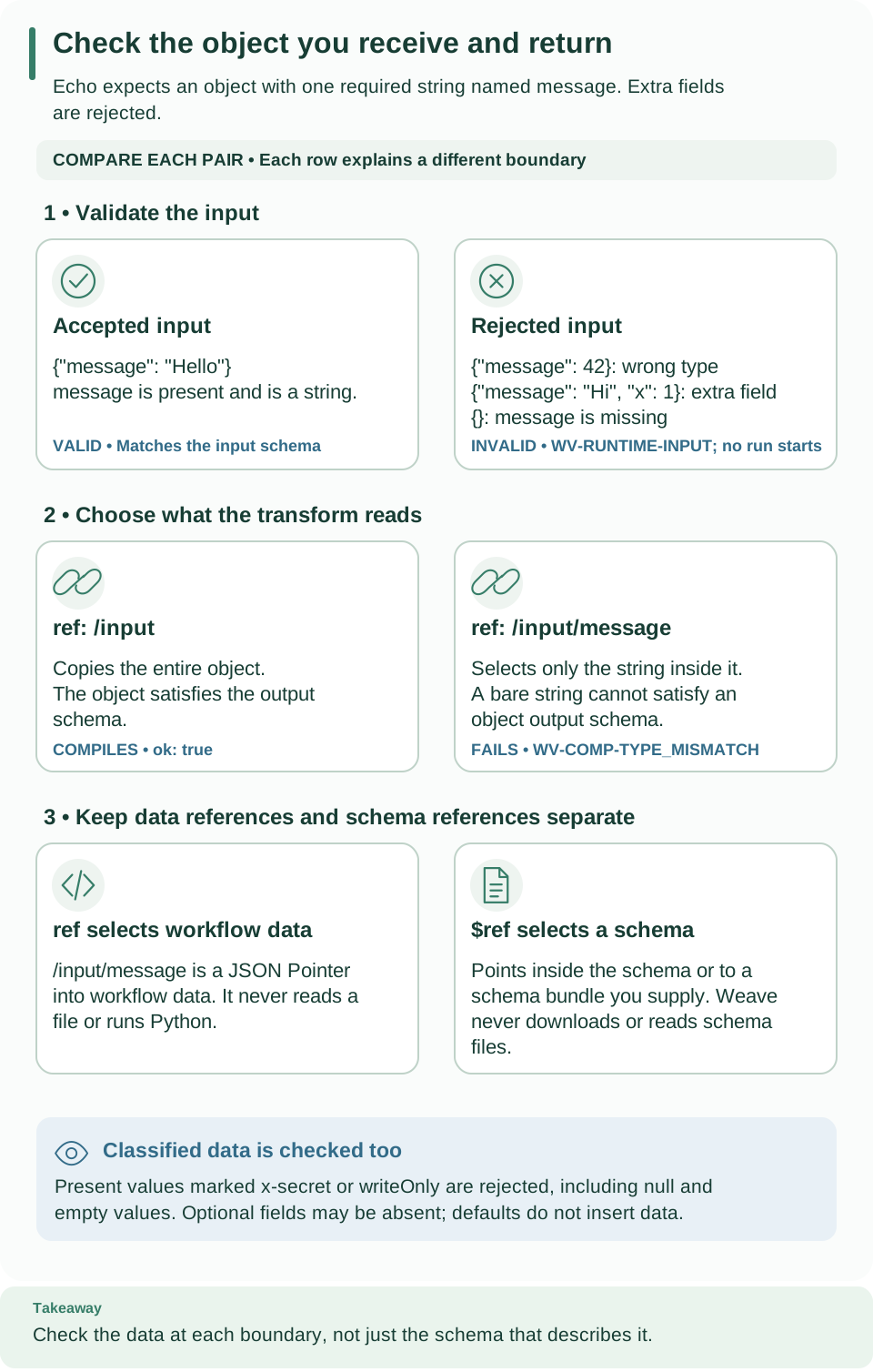
Read the three rows from top to bottom: accepted and rejected input, reading the
whole object versus one string, and data references (ref) versus schema
references ($ref). The definition's shape and the values its schemas accept are
separate checks.
Open diagram at full size
Try the checks locally
This example shows that the three offline checks give three different answers for the same document. It needs no server, provider, or network.
-
Save the script. It builds a workflow that returns its string input unchanged, then loads, validates, and compiles it. Save it as
contract_checks.py:from firefly_weave.compiler.api import compile_source, validate_source from firefly_weave.compiler.catalog import CatalogSnapshot from firefly_weave.contracts.definitions import load_definition document = { "apiVersion": "weave/v1alpha1", "kind": "Workflow", "metadata": {"name": "echo", "version": "1.0.0"}, "spec": { "inputSchema": {"type": "string"}, "outputSchema": {"type": "string"}, "steps": [], "output": {"ref": "/input"}, }, } model = load_definition(document) partial = validate_source(document, format="object") compiled = compile_source( document, format="object", catalog=CatalogSnapshot.from_definitions([]) ) print(model.kind) print(partial.validation_ok, partial.partial, partial.artifact is None) print(compiled.ok, compiled.artifact is not None) -
Run it from the checkout root. Use the project environment so the import resolves to this source tree:
Expected:
The first line comes from shape validation, the second from partial validation (passed, partial, no artifact), and the third from complete compilation (passed, artifact present).
-
Read what the document says.
{"ref": "/input"}is an expression that reads the run input;{"literal": "/input"}would return that string instead.spec.outputis required even whenstepsis empty. The schema describes permitted input; it is not the input. A run of this workflow accepts"hello", while{"text": "hello"}fails runtime input validation.
If the import fails, run uv sync --locked from the checkout root, then try
again. If the output differs, compare your document with the one above field by
field: every field name is case-sensitive.
Document shape
Every definition has four top-level fields:
| Field | Value |
|---|---|
apiVersion |
Always weave/v1alpha1, the workflow language version |
kind |
Workflow, Action, or Connector |
metadata |
{name, version}. Names allow letters, digits, dots, underscores, and hyphens. Versions follow SemVer 2.0, including prerelease and build identifiers |
spec |
The kind-specific fields described below |
References to other definitions are exact name@version strings, such as
onboarding.check-customer@1.0.0. Unknown fields are rejected.
Wire names are camelCase. Documents use the published camelCase field names
(inputSchema, timeoutSeconds). Python model attributes are snake_case, but
snake_case keys in a document are rejected. Serialize Python models with
model_dump(by_alias=True) or model_dump_json(by_alias=True).
Some fields may be omitted but never set to null. These are the workflow's
timeoutSeconds and callable (and its allowedCallers), an action's
connection and routing, an action step's connection, and a call step's
onFailure and businessKey. When present they must have their declared type;
an explicit null is rejected. Both serializers preserve the omission, and the
Python model shows an omitted field as None.
load_definition checks shape only. It does not parse source text, validate the
embedded JSON Schemas, resolve dependencies, compile, or authorize anything. The
contracts package imports no PyFly application, provider, network, database, or
secret code.
Expressions
An expression computes a value from workflow data. Every expression is an object with exactly one of these keys:
| Form | Meaning | Example |
|---|---|---|
literal |
A fixed JSON value | {literal: "Ready for review"} |
ref |
A JSON Pointer (RFC 6901) into workflow data; the empty pointer reads the root | {ref: /input/customerId} |
object |
An object whose fields are expressions | {object: {customerId: {ref: /input/customerId}}} |
array |
A list whose items are expressions | {array: [{ref: /input/a}, {literal: 1}]} |
op |
An operator with expression arguments: {op: {name, args}} |
{op: {name: eq, args: [{ref: /input/urgent}, {literal: true}]}} |
Operators are eq, ne, lt, lte, gt, gte, and, or, not, exists,
coalesce, contains, notContains, in, notIn, startsWith, endsWith,
concat, and join. concat joins one or more strings, numbers, or Booleans
into one string; join takes a list of such values and a separator string. Numbers
are written as JavaScript writes them (2.0 becomes 2, 1e21 stays 1e+21).
There are no function calls, scripts, environment variables, or
file access. The compiler checks arity, types, and scope; the
compiler reference
explains evaluation rules.
In Studio, the property editor writes these same forms, which it calls Value
(literal), Data (ref), Fields (object), List (array), and
Formula (op). See
Decide where a value comes from.
An action input whose schema lists fields is edited field by field instead, with
Value, Data, or Formula on each row; Studio still stores the result
as one of these expressions (see
Map the input).
Steps
Every step has an id and a kind. The kind decides which other fields are
allowed. The Studio column shows the name the step picker uses; the BPMN column
helps if you know process modeling from another tool:
kind |
Studio name | Closest BPMN idea | Other fields |
|---|---|---|---|
action |
Call an action | Service task | Required uses (exact action reference) and with (input expression); optional connection slot name |
llm |
AI task | Service task | Required uses (exact AI action reference), profile (an llmProfiles entry), prompt and context expressions, and connection slot name |
transform |
Transform | Script or business rule task (expressions only) | Required value expression |
decisionTable |
Decision table | Business rule task | Required uses (exact decision table reference) and with (input expression) |
switch |
Decision | Exclusive gateway | Nonempty cases: [{when, steps, output}] and required default: {steps, output} (the Otherwise path in Studio); the first true case wins |
parallel |
Parallel | Parallel gateway (split and join) | Nonempty branches: {name: {steps, output}} and a positive integer concurrency; every branch completes before the step continues |
wait |
Wait for time | Timer intermediate event | Required positive integer durationSeconds |
signal |
Wait for signal | Message intermediate event | Required name, positive integer timeoutSeconds, and a payloadSchema object |
humanTask |
Human task | User task | Required assignment (the name of an assignment bound at activation), title and context expressions, and formSchema; decisions defaults to approve, reject (1 to 32 unique names); optional positive dueSeconds and expirySeconds |
fail |
Fail | Error end event | Required business-error code (a name such as customer-not-found) and a nonempty message |
forEach |
Loop over items | Multi-instance subprocess | Required items (an expression that gives a list) and body: {steps, output}; optional concurrency (default 1), maxItems (default 1000), and collect (all, the default, or nonNull). The defaults are written into the stored document |
callWorkflow |
Call a workflow | Call activity | Required uses (exact workflow reference) and with (input expression); optional mode (wait, the default, or detach), onFailure (stop or continue, only with wait), and businessKey expression |
Weave is not a BPMN engine and does not import BPMN files. Loops and calls to other workflows are part of the language; compensation is not.
New language constructs. forEach, callWorkflow, concat, and join
each need a language feature: flow.forEach, flow.callWorkflow, text.concat,
and text.join. Their document shape is final, so load_definition accepts
them, but this version of the compiler reports WV-COMP-UNSUPPORTED_FEATURE at
each use instead of compiling it. A platform runs a construct only when its
language manifest lists the feature. Step IDs can never
contain [, #, or ~, which keeps
instance keys unambiguous.
Branches may contain zero steps, but each must declare its output. The compiler,
not the shape check, enforces unique step IDs, unique signal names, branch scope,
output compatibility, and concurrency budgets.
Human tasks need an environment assignment binding at activation, and
completing one requires the current claim and task permission. A workflow with a
human task compiles to IR version weave/ir-v1alpha2; other workflows keep
weave/ir-v1alpha1. Follow the human-task walkthrough
before activating one.
Retry and timeout belong to the action, not the step. In Studio,
Call an action creates an action step whose uses selects a published
action version. That action's implementation selects the worker task or
connector operation. Retry policy and action timeout are fields of the action
definition; they are not legal on a workflow step.
Workflow spec
| Field | Required | Meaning |
|---|---|---|
inputSchema |
Yes | JSON Schema for the run input (schema profile) |
outputSchema |
Yes | JSON Schema for the run output |
steps |
Yes | The ordered list of steps; may be empty |
output |
Yes | Expression that computes the run output |
timeoutSeconds |
No | Positive whole-run timeout; omit it for no workflow-wide timeout |
connections |
No (default {}) |
Connection slots: named requirements {connector: <exact ref>, required: <bool>}; required defaults to true. Each slot is bound to an integration connection at activation |
callable |
No | Lets other workflows call this exact version with callWorkflow: {} allows any workflow in the project, and {allowedCallers: [order-intake]} allows only the named workflows (1 to 100 unique names). Studio will write it from a Called by a workflow trigger; the manifest marks the field pending until then |
A callable workflow, and a loop over a list that builds text for each item:
# notify-customer@1.0.0 accepts calls from order-intake only.
spec:
  callable:
    allowedCallers: [order-intake]
---
# One reminder per invoice, four at a time, collected in invoice order.
- id: notify
  kind: forEach
  items: {ref: /input/invoices}
  concurrency: 4
  body:
    steps:
      - id: subject
        kind: transform
        value:
          op:
            name: concat
            args: [{literal: "Invoice "}, {ref: /item/number}, {literal: " is overdue"}]
    output: {ref: /steps/subject/output}
The full examples are in examples/language.
Actions
An action is a published, versioned definition of one external call. Its
spec contains:
| Field | Required | Meaning |
|---|---|---|
implementation |
Yes | Either {kind: worker, taskType, taskVersion} or {kind: connector, uses: <exact connector ref>, action: <descriptor action name>, config: {...}}; config is optional and is checked against that connector action's configSchema |
sideEffect |
Yes | read_only, idempotent, idempotency_key, or non_idempotent |
timeoutSeconds |
Yes | Positive timeout for one attempt |
inputSchema, outputSchema |
Yes | JSON Schemas for the action's input and output |
retry |
No | Defaults to maxAttempts: 1, initialDelaySeconds: 1, maxDelaySeconds: 30; attempts include the first one, and the maximum delay cannot be smaller than the initial delay |
connection |
No | The connection requirement, same shape as a workflow slot |
routing |
No | {queue} selects a named worker queue |
The declared side effect governs retries. It decides whether automatic and operator retries are allowed. It does not prove that the external system really is idempotent.
Connectors
A connector is trusted code that knows a protocol, such as the built-in
weave-http@2.0.0. Its published manifest is a Connector definition whose
spec requires:
adapter: the installed adapter identity.configSchemaandauthSchema: what an integration connection supplies.compatibility: {apiVersion: weave/v1alpha1}.actions: a nonempty map of named action descriptors. Each requiresinputSchema,outputSchema,sideEffect, andtimeoutSeconds, may declare aconfigSchemafor the action'sconfig, and uses the same retry defaults as an action.limits: positive integersmaxRequestBytes,maxResponseBytes, andmaxTimeoutSeconds. These published I/O bounds are separate from the operator's compiler budgets.
Manifests contain no Python source or import paths. To build one, see Author a connector; to call a REST API without writing one, see Call a REST API without code.
Language manifest
The language manifest lists every step kind, operator, and workflow field the
language defines, the features each one needs, the features the platform runs,
and the language limits. Studio will read it to decide what to offer. Read it with
weave remote language or GET /api/v1/tenants/{tenant}/projects/{project}/language
(language.read, capability catalog.read); Studio's local host serves the same
document at /studio/contracts/language, and weave schema export writes its
schema as language-manifest.schema.json.
| Field | Meaning |
|---|---|
version, language_version |
weave/language-manifest-v1 and weave/v1alpha1 |
ir_versions |
The executable IR versions the platform accepts |
features |
The language features the platform runs; empty in this version |
limits |
max_loop_items, default_loop_max_items, max_loop_depth, max_concurrency, max_run_iterations, max_call_depth |
step_kinds, operators, workflow_fields |
One entry each, with the feature it needs (if any) and studio: ready when Studio edits it, pending until then |
Values and budgets
Definitions and payloads use plain JSON values: null, Boolean, integer, float, string, list, and object with string keys. Models reject:
- Infinite or NaN floats.
- Integers outside
[-9007199254740991, 9007199254740991]. - Lone Unicode surrogates, bytes, and Python-only objects.
This applies to schema and literal fields and to numeric definition fields. Models are frozen Pydantic models, but nested lists and dictionaries remain ordinary JSON containers, so immutability is shallow.
The operator's Limits() defaults bound compilation:
| Limit | Default | What it measures |
|---|---|---|
max_source_bytes / max_payload_bytes |
1,048,576 | Source and payload size in bytes |
max_steps |
1,000 | Steps in one definition |
max_depth |
32 | Nesting depth |
max_document_nodes |
100,000 | Parsed values, including the root, containers, and scalars (mapping keys excluded) |
max_expression_nodes |
10,000 | Expression nodes, counted by the compiler stage that owns expressions |
max_diagnostics |
100 | Diagnostics returned per result |
Definitions cannot change these budgets. Building a model alone does not apply them; the compiler does.
Diagnostics
Every problem the compiler reports is a diagnostic with these fields:
| Field | Meaning |
|---|---|
code |
Stable identifier, such as WV-COMP-TYPE_MISMATCH |
severity |
error, warning, or info |
stage |
parse, schema, resolution, semantic, lowering, or evaluation |
message |
Safe, plain-language explanation; never contains submitted values |
path |
JSON Pointer into the parsed definition, such as /spec/output |
source |
Optional source range: optional file, required 1-based line and column, optional paired endLine and endColumn (the end never precedes the start) |
related |
Other locations, each with path, optional source, and optional message |
hint |
Optional next step |
suggestedEdit |
Optional {path, value} fix; since 0.1.0a7, Studio's Apply suggested edit applies it |
The compiler sorts, truncates, maps sources, and redacts diagnostics; the models
only define their shape. When the parser stops early, its result keeps the capped
diagnostics, an omitted_count of issues left out, and truncated (true when
omitted_count is greater than zero). Compiler and CLI results keep this
metadata. YAML source ranges recognize CR, LF, CRLF, NEL, line separator, and
paragraph separator as line breaks; JSON recognizes CR, LF, and CRLF only.
Packages and project checks
The base package contains the offline compiler and depends on no PyFly code. Optional extras add the rest:
| Extra | Adds |
|---|---|
client |
Authenticated remote CLI and SDK operations (HTTP client, credential store) |
studio |
The Studio local host |
server |
The API: PyFly web, security, relational data, PostgreSQL, OIDC, scheduling, migrations |
worker |
Remote workers: PyFly client and telemetry |
integration |
PostgreSQL, HTTP, and Kafka clients for integration tests |
kafka |
The Kafka client for broker triggers and the Kafka connector |
teams |
The Microsoft Teams provider |
openapi |
PyFly base only, for offline native OpenAPI generation |
Every extra that needs PyFly pins the published PyFly 26.9.15 wheel by direct
URL and SHA-256, and uv.lock records the artifact and its dependencies. See
runtime version and lifecycle.
contracts.openapi.create_openapi_generator returns the native OpenAPI generator
with Weave's constraint policy; base compiler and schema exports remain PyFly-free.
See native OpenAPI. Provider specifics stay outside
the contracts package.
For contributors, make check runs strict source coverage, the documentation
link and SVG checks, a strict documentation build, Ruff lint and format checks,
strict mypy, unit and contract tests, and release packaging checks. Integration
tests never skip silently: a named real-backend test fails clearly when its
backend is absent. The integration and e2e pytest markers are registered.
Next steps
- Author a workflow: validate, compile, and simulate the echo workflow step by step.
- Schema profile: the JSON Schema rules for
inputSchema,outputSchema,payloadSchema, andformSchema. - Compiler: results, artifacts, and how to read a diagnostic.
- Choose and configure a workflow step: the same steps as Studio presents them.
Troubleshooting
| What you see | Why | What to do |
|---|---|---|
| A field is rejected although it looks right | Field names are camelCase and case-sensitive; snake_case keys are rejected | Use the published name, such as timeoutSeconds |
null is rejected for an optional field |
Optional fields may be omitted but not set to null | Remove the field |
A step's retry or timeoutSeconds is rejected |
Retry and per-attempt timeout belong to the action definition | Move them to the action; use spec.timeoutSeconds for a workflow-wide timeout |
WV-COMP-UNSUPPORTED_FEATURE |
The document uses forEach, callWorkflow, concat, or join, which this version of the compiler does not compile yet |
Keep the document for a later version, or replace the construct with the steps the compiler supports |
onFailure is rejected on a call step |
onFailure applies only when the call waits for its result |
Remove onFailure, or set mode: wait |
| Partial validation passes, but there is no artifact | Partial validation never produces one | Compile with an explicit catalog |
| Compilation passes, but the run fails to start | Compilation proves no worker, connection, or permission | Check the activation's bindings and your grants |