Integrate Weave into a host product
A host product is your application: for example, a customer portal that lets users author workflows and start runs. Weave stores and executes the workflows; your host supplies the user experience and a verified identity for each request.
This guide is for architects and developers who plan how a product uses Weave. It helps you choose where your product calls Weave, how identity and scope work, and which integration to add next. It contains no new commands: the runnable path is the Python SDK tutorial, which publishes a workflow, activates it, and reads a real execution result.
Before you start, you need a platform to call: your team's API, or a development server from the local platform guide with its demo run. The SDK tutorial covers both. To try requests by hand first, use the API playground.
What your first integration should accomplish
Imagine a customer portal with a Start onboarding button and a page showing progress. Your first milestone is the small echo workflow from the SDK tutorial: one button starts it, and your product displays its returned output. Once that works, add business steps without changing who owns the workflow's durable state.
| Responsibility | Owner | Example in the portal |
|---|---|---|
| Screens and business context | Your host product | Collect the customer request and display its run ID |
| Sign-in and token acquisition | Your configured identity provider and host | Obtain an access token intended for this Weave API |
| Workflow versions and execution history | Weave | Keep the exact version used by each run and record its progress |
| Custom business code | Your admitted worker | Perform the task named by an Action and return its result |
| Reusable calls to another system | A connector in the native executor, such as the built-in HTTP connector | Apply a connection's approved configuration to a request |
| Deployment, permissions, and recovery | Your platform operator | Configure the CIAM, grant scope access, deploy workers, and investigate incidents |
The operator is the person or automation responsible for the installation. It is not another Python SDK that your product must run. Your application usually needs only API access; worker and connector deployment are separate operational decisions.
1. Choose where your host calls Weave
Choose the boundary that fits the host. All three approaches share the same language and contracts; they do not share implicit administrative authority.
| Approach | Use it for | Host responsibility |
|---|---|---|
| Pure compiler and immutable builder | Authoring tools, validation and previews | Supply definitions/catalogs; preserve diagnostics; no server resources are started |
| Typed SDK or native HTTP API | A separate host application or service | Obtain a verified access token, provision local identity/grants, choose scope and manage revision/idempotency contracts |
| In-process native services | A trusted Python application composition | Preserve constructor injection, explicit actor/scope/audit/UoW and service authorization; do not retain request state in singletons |
For the portal above, start with the typed client or HTTP API. It lets the product and Weave run in separate processes. Add local authoring if users need to generate or check definitions before publication. In-process composition is an advanced integration choice; use the embedding reference to understand its request and transaction responsibilities.
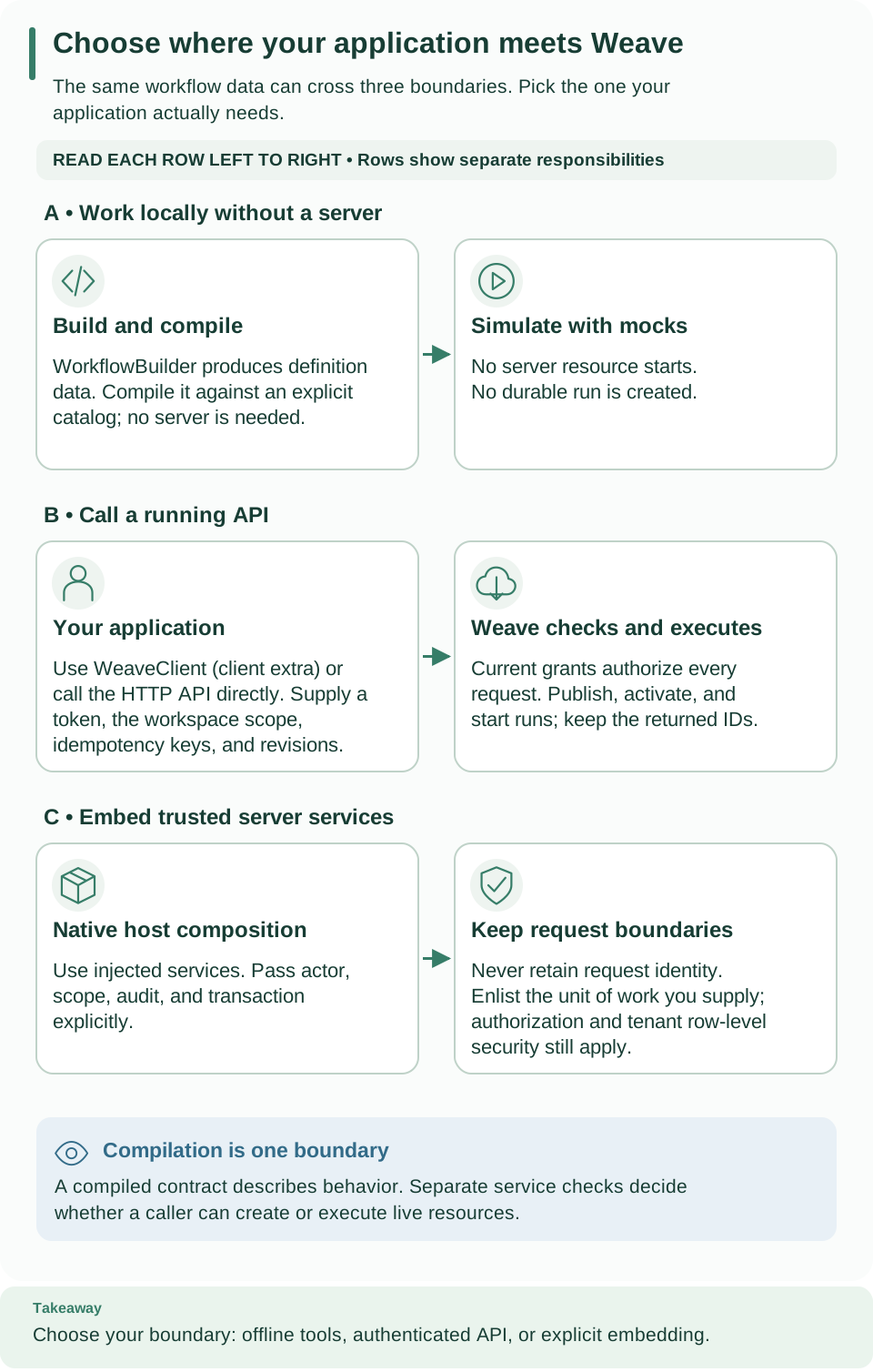
Compare the three rows: local authoring, remote API calls, and trusted in-process services. Read each row left to right to see what your host supplies and what Weave does. Choose a boundary before configuring identity or adding lifecycle operations. Open the diagram at full size.
2. Connect identity and scope
The embedding reference includes a runnable pure
builder example. The SDK reference shows the typed remote
client, token callback and errors. Use the API reference
and native OpenAPI export for canonical requests.
Remote SDK/CLI dependencies come from the client extra; the pure compiler does
not require the server, database or identity provider.
A principal is the local Weave identity associated with a verified token.
A grant permits that principal to perform a capability, such as run.start,
in a tenant/project/environment. A token proves identity; local grants determine
what that identity can do. UUIDs in a Scope select resources and confer no rights.
Have an administrator provision this mapping before testing SDK calls.
Start by reading the catalog and compiling echo. A successful artifact proves the host can reach the API with its project authority. If this fails, check token expiry and local grants before adding publication or workers.
A host must not bypass domain services by writing orchestration tables. A provided transaction is enlisted under the existing UoW contract, while local authorization and transaction-local tenant context remain mandatory. Services must not capture a request's actor, database session or token in long-lived state.
Standalone deployments configure their own compatible OIDC/CIAM provider; only the local development recipe provisions Keycloak. An embedding host can implement the provider-neutral verifier/resolver ports, but must preserve verified-token and explicit local-principal semantics. Identity and secrets explains what is implemented and what has not been verified with another CIAM.
3. Add the authoring and run lifecycle
Use the typed SDK lifecycle example for a concrete implementation. In a host UI, each action has a distinct purpose:
| Host action | Weave operation | Store in your host state |
|---|---|---|
| Save edit | save_draft |
Draft ID and returned revision |
| Release workflow | publish |
Immutable version ID and digest |
| Make version available | activate |
Activation ID, environment, and revision |
| Execute for a user | start_run |
Run ID and the chosen idempotency key |
| Show progress | read_run, history |
Cursor if you fetch history in pages |
| Respond to a waiting workflow | signal |
Event ID, signal name, and payload |
The first three rows are authoring and deployment activities. They normally happen when you release a workflow version. The final three are runtime activities: each customer request starts or follows a run of an already prepared activation. You do not need to republish the same definition for every customer.
For an HTTP integration, use the API playground to inspect one authenticated request, then use the full endpoint reference for request bodies and headers. The Python SDK wraps those same operations in typed methods; it does not create a different execution model.
For an updated draft, send its last observed revision. If another editor changed it, reload and reconcile rather than overwriting. Publication recompiles against the server catalog; the host cannot use a local artifact to bypass that check. Existing runs keep their original activation even after a new version is released.
Handle uncertain transport results separately from domain rejection. An SDK retry cannot prove an external request had no effect. Preserve idempotency keys and revision expectations, inspect receipts/history and reconcile unknown outcomes.
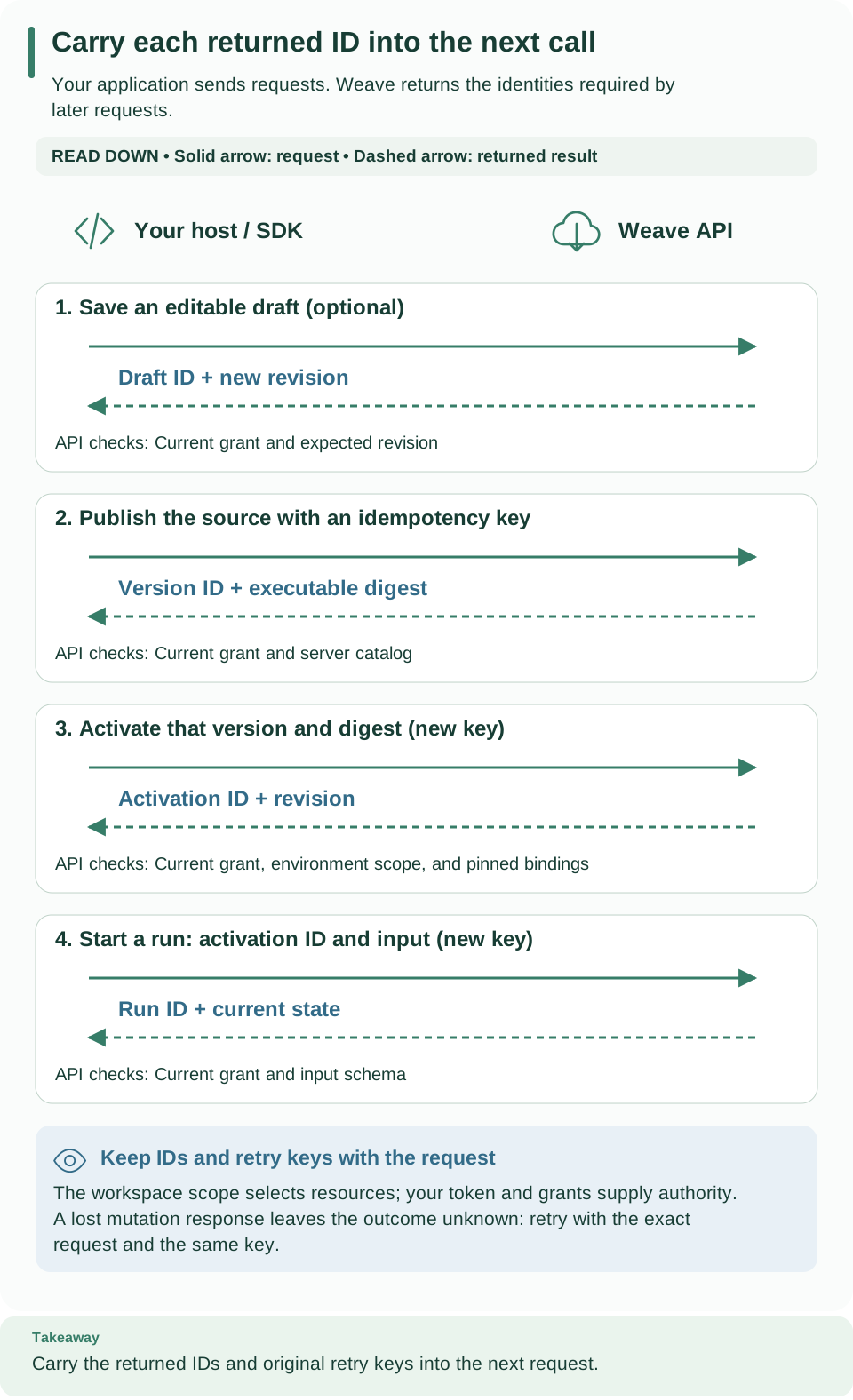
Follow requests downward; dashed arrows return the identities needed by later calls. Each operation has its own authorization check. For the same lifecycle from a terminal, use the CLI tutorial. Open the diagram at full size.
4. Add one business integration at a time
After the echo run succeeds, choose the next boundary by what the step does:
| The step needs to… | Add | Complete guide |
|---|---|---|
| Compute with workflow data | A built-in transform or control-flow step | Workflow authoring |
| Run application-specific Python code | An Action contract and admitted worker handler | Workers |
| Call one JSON-over-HTTPS operation of another system | An Action on the built-in weave-http@2.0.0 connector and a connection |
Call a REST API without code |
| Ask a person to approve or decide | A human task with a form and decisions | Human tasks |
| Call an external system through a reusable adapter | A Connector contract, implementation, and environment connection | Build a custom integration |
| Start when an external event arrives | An authenticated ingress route targeting an activation | Signed webhook walkthrough |
| Pause for a decision from your product | A signal wait and an authorized signal request |
Schedules, timers, and waits |
Keep the returned run ID in your product's business record. Show progress from Weave's run state and history, and let an authorized operator investigate failed or suspended work. A worker retry may encounter an external effect that already happened; implement the operation-key deduplication described in the worker guide. The product should not infer success merely because a start request was accepted.
Optional: read a larger integration fixture
This guide's runnable path is the SDK echo example above. After it works, read
the host fixture to see how a larger
application could read customer data through HTTP, invoke example-record@1.0.0
on a remote worker, wait for approval, and inspect the result. This is an optional
code-reading example, not the next command in the tutorial.
Its prepare operation publishes connector/Action contracts, admits releases,
creates a connection, and creates an activation and signed webhook trigger.
Those mutations require deployer authority. The fixture's state JSON initially
needs scope containing tenant_id, project_id, and environment_id; prepare
replaces that file with resource IDs used by later operations.
Deploy your first worker does not provision
everything this fixture requires. In particular,
its receiver implements /health and /effect, while this fixture needs a
customer service exposing /customer. Running the fixture would additionally
require an operator to supply:
- That customer service and its approved origin as
WEAVE_EXTERNAL_ORIGIN. - The
http-tokenandwebhook-keysecret handles, actual secret-provider values, and the corresponding resolution grants. The sender needs the matching webhook signing material inWEAVE_WEBHOOK_SECRET. - Actual image identities in
WEAVE_NATIVE_IMAGE_DIGESTandWEAVE_WORKER_IMAGE_DIGEST, plus executor/worker authority for the new release IDs created byprepareand the required connection credential grants. - A current
WEAVE_ACCESS_TOKEN, the host-facingWEAVE_API_URL, and a private state file. The release grants from the worker deployment guide do not automatically cover newly admitted releases.
There is no complete provisioning recipe for those additional fixture dependencies in this guide. Use the worker deployment and identity/secret contracts as background when designing your own integration. The table below is a reading map for the fixture's operations, not a ready-to-run command sequence.
| Fixture operation | Inputs beyond its state file | Expected progression |
|---|---|---|
prepare |
API/token, native and worker image digests, external origin | Saves activation, trigger, and admitted release IDs |
trigger |
API/token and webhook signing secret | Returns the receipt for the submitted event |
approve --run-id … |
Run ID waiting for approval | Sends the approved signal with a Boolean payload |
inspect --run-id … |
Run ID | Reads current durable state |
The compiler's customer-onboarding YAML is a separate teaching example. Its
catalog lock does not provision the implementations used by this host fixture.
For worker handler behavior and restart semantics, continue with workers.
Next steps
- Run the echo lifecycle from Python with the SDK tutorial.
- Give your product's service identity, and its users, the smallest roles they need with People and access.
- Inspect and repair runs your product started with execution management.