Deploy Weave on an existing Kubernetes cluster
This walkthrough installs the Weave API on a cluster your organization already runs. You render the manifests with an exact server image, migrate the database with an explicit Job, start the API, run one workflow, and let people connect. Adding a remote worker is optional and comes last.
Who this is for: administrators and operators with access to the cluster, the database administrator (DBA), and the identity provider's administrator.
What you need first: complete the cloud deployment overview for AWS EKS, Azure AKS, or Google GKE. It leaves a pushed, digest-pinned server image and the cluster context, namespace, and registry selected in your terminal. The same manifests work on any of the three providers.
Rehearse the migrations before you choose a database service. This page is a starting point, not evidence that every managed PostgreSQL service accepts Weave's ownership model. The database check in step 2 is an acceptance gate: stop there if it fails.
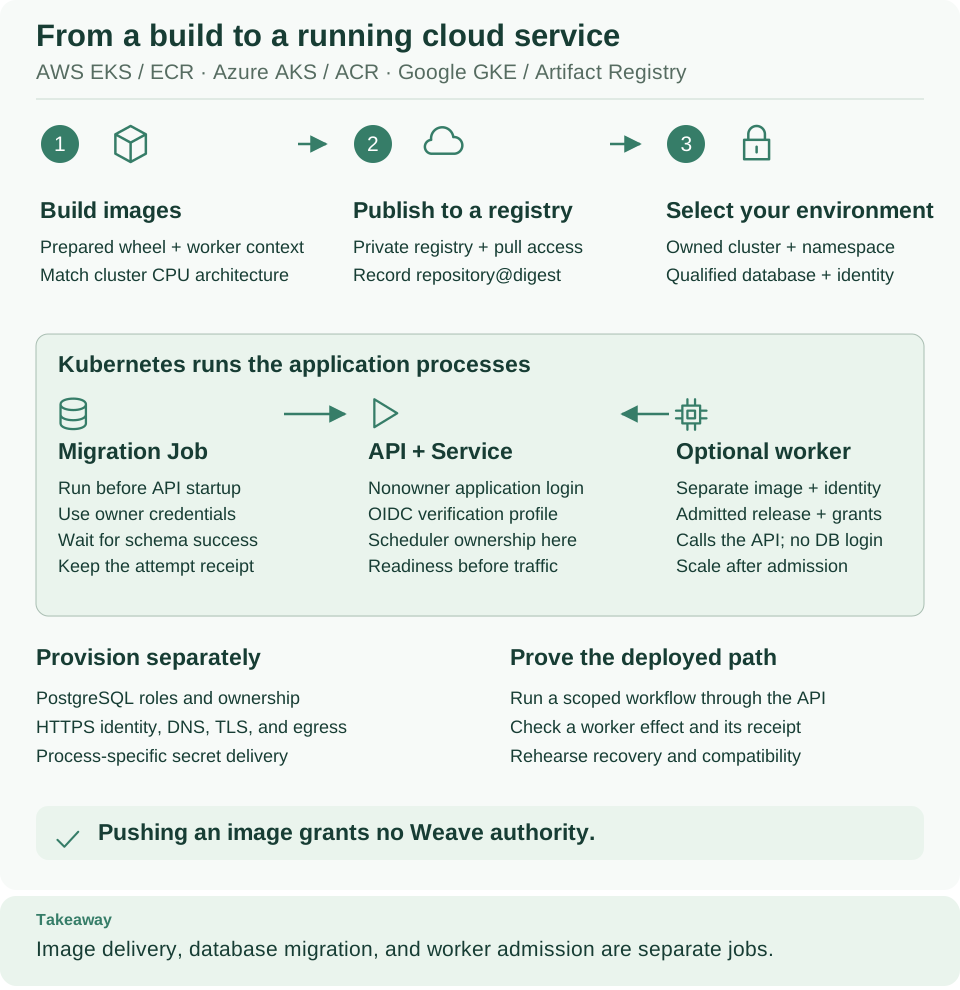
Read the green panel from left to right: the migration Job runs first with owner credentials, then the API starts with nonowner logins and owns scheduling, and the optional worker reaches only the API. The migration owner belongs to the Job and the bootstrap operator, never to a running process. Open diagram at full size
1. Prepare the owned environment
Why: every command below names the cluster and namespace explicitly, so a different current context can never receive these objects. Run the commands from the repository root:
# Check required selections and create a private directory for this deployment's manifests and receipts.
: "${WEAVE_KUBE_CONTEXT:?Set the context from your provider chapter}"
: "${WEAVE_KUBE_NAMESPACE:?Set your existing authorized namespace}"
export WEAVE_CLOUD_DIR="$HOME/weave-cloud-$(python3 -c 'from uuid import uuid4; print(uuid4().hex)')"
umask 077
mkdir "$WEAVE_CLOUD_DIR"
kubectl --context "$WEAVE_KUBE_CONTEXT" -n "$WEAVE_KUBE_NAMESPACE" get deployments
Expected: no error, and either No resources found or the namespace's existing
Deployments. If you arrived here without a provider chapter, set
WEAVE_KUBE_CONTEXT and WEAVE_KUBE_NAMESPACE to the existing authorized names
first. Keep WEAVE_CLOUD_DIR: it holds the rendered manifests and every receipt
from now on.
Check that each prerequisite is ready before you continue:
| Prerequisite | Acceptance evidence before proceeding |
|---|---|
| Registry image | Exact published server image reference registry/repository@sha256:…, built from the prepared wheel and correct dependency closure; nodes can pull it |
| PostgreSQL | Dedicated database, tested driver/TLS configuration, explicit migration owner and resulting nonowner runtime identities |
| HTTPS OIDC/CIAM provider | Registered clients; expected issuer, JWKS URI, audience, subjects, and access-token claims verified using identity setup |
| Network | API and Job reach the database; API reaches the HTTPS JWKS endpoint; workers reach the API, the token endpoint, and the intended effect receiver |
| Operator environment | An installed Weave Python (server and client extras) named by WEAVE_PYTHON, which can reach the database for the deliberate bootstrap |
| Recovery | Environment-specific restorable backup and independent external-effect receipts |
Each process receives its own Kubernetes Secret, so no process holds more authority than its job needs:
| Secret | Read by | Keys | Never contains |
|---|---|---|---|
weave-migration |
Migration Job (migrate.yaml) |
WEAVE_MIGRATION_DATABASE_URL, WEAVE_OPERATIONS_POLICY |
Runtime logins |
weave-api-runtime |
API Deployment (api.yaml) |
WEAVE_DATABASE_URL, WEAVE_SCHEDULER_DATABASE_URL, WEAVE_OIDC_PROVIDERS, WEAVE_OPERATIONS_POLICY, plus any optional keys you wire in |
The migration owner URL |
weave-worker-runtime |
Worker Deployment (worker.yaml) |
The six worker settings in step 7 | Any database URL |
Configure registry pull access through your cluster's identity integration or a namespace pull secret before you apply manifests. The samples grant no cloud IAM permissions. They also provision no identity provider, database, ingress, secret operator, network policy, or telemetry collector. Choose each one deliberately, and allow only the traffic in the prerequisite table.
2. Prove the database authority model
Do not run scripts/setup-runtime.py against a managed database. Its guard
accepts only the local control fixture, and it provisions a fresh local database.
Production provisioning belongs to the DBA.
The migration identity must own what it creates. It must own the new
database and schema objects and be able to run the packaged role creation, policy
creation, grants, and ALTER FUNCTION … OWNER TO … statements. Permission to
create tables is not enough. The migrations create the application and scheduler
group roles (weave_app, weave_scheduler) and narrow owners such as
weave_catalog_reader, weave_trigger_reader, and weave_retention_owner.
Precreated roles can fail the migration. Revision 0021_operations accepts
an existing weave_retention_owner only with its exact migration-defined comment,
no login or elevated flags, NOINHERIT, and no memberships that grant the role.
A role precreated with convenient broad memberships fails this check.
Managed PostgreSQL administrators are not always PostgreSQL superusers. Have the DBA run the unmodified packaged migrations on a new, disposable owned rehearsal database with the same provider, version, and privileges you intend to deploy. Keep the result and inspect role and function ownership. This guide supplies no provider-independent privileged bootstrap SQL, because that SQL would assume permissions the managed service may not allow. If the rehearsal fails, stop here and resolve the provider's ownership contract. Do not edit migration markers, remove row-level security, or give the runtime login owner privileges.
After the successful migration in step 4 creates the packaged roles, the DBA creates the two runtime logins. This is a new-login example for psql, not an idempotent production provisioning script. Choose unique names, run it only in the selected database, and set passwords with protected interactive prompts or your secret provisioning system:
-- Create separate application and scheduler logins; neither receives owner or superuser privileges.
CREATE ROLE weave_api_login LOGIN INHERIT NOSUPERUSER NOCREATEDB NOCREATEROLE NOBYPASSRLS;
GRANT weave_app TO weave_api_login;
CREATE ROLE weave_catalog_login LOGIN INHERIT NOSUPERUSER NOCREATEDB NOCREATEROLE NOBYPASSRLS;
GRANT weave_scheduler TO weave_catalog_login;
\password weave_api_login
\password weave_catalog_login
The migration already creates the table and function grants; do not duplicate
them with GRANT ALL. The scheduler login must have no weave_app,
catalog-owner, or retention-owner membership and no direct grants on business
tables or columns. It needs schema usage, the packaged scheduler and catalog
function execution grants, and schema marker reads. If the DBA removed the
default database CONNECT privilege, grant it explicitly to these two logins on
the selected database.
Build the two runtime URLs from the same parts. Both are
postgresql+asyncpg URLs with identical driver, host spelling, port, database,
and query options; only the credentials differ. Use the provider's tested TLS
configuration with the packaged asyncpg driver. The samples assume the needed
public certificate authorities are already in the image; mount any extra CA
material and adapt the URLs before the rehearsal. The application login must not
own public tables or hold superuser or BYPASSRLS authority. Startup checks
these boundaries and always requires catalog compatibility authority.
Sources: packaged migration entry point, operations migration, and catalog authority checks.
3. Render the exact manifests
Why: the templates contain placeholders, and Kubernetes must pull the exact
image you tested. source "$WEAVE_WORK_DIR/cloud-images.env" from the cloud
overview sets WEAVE_SERVER_IMAGE_REF to the registry digest reference of your
push. A Docker image ID is not the registry manifest digest this reference needs;
see Kubernetes image names.
# Fill the templates with the exact server image digest and a unique migration Job name.
export WEAVE_MIGRATION_JOB="weave-migrate-$(python3 -c 'from uuid import uuid4; print(uuid4().hex[:12])')"
python3 - <<'PY'
import os, re
from pathlib import Path
image = os.environ["WEAVE_SERVER_IMAGE_REF"]
assert re.fullmatch(r"[A-Za-z0-9][A-Za-z0-9._:/-]*@sha256:[0-9a-f]{64}", image), "Use the real registry digest reference"
job = os.environ["WEAVE_MIGRATION_JOB"]
assert re.fullmatch(r"weave-migrate-[a-z0-9-]{1,40}", job)
root = Path(os.environ["WEAVE_CLOUD_DIR"])
for name in ("api.yaml", "migrate.yaml"):
    text = (Path("deploy/kubernetes") / name).read_text()
    text = text.replace("__WEAVE_SERVER_IMAGE__", image).replace("__WEAVE_MIGRATION_JOB__", job)
    with (root / name).open("x") as stream:
        stream.write(text)
print("Rendered API and unique migration Job manifests")
PY
Expected: Rendered API and unique migration Job manifests, and api.yaml and
migrate.yaml in WEAVE_CLOUD_DIR. Review both files and the
template inventory before you apply them.
What api.yaml sets up:
- One API replica with scheduling enabled and the
Recreaterollout strategy. - A private
ClusterIPService namedweave-apion port 8000. - Non-root UID/GID 65532, a read-only root filesystem, and a bounded writable
/tmp. - A startup probe on
/health/liveand a readiness probe on/health/ready. There is no liveness probe, so a restart never hides a persistent compatibility failure. A failing readiness probe removes the pod from the Service endpoints, which also affects inspection through that Service; see Kubernetes probe behavior. - Resource requests and limits that are starting values to measure against your workload, not capacity guarantees.
Recreate is a rollout strategy, not a database fence. Before an upgrade,
stop every other writer and follow upgrade acceptance; never let
two schema versions write during a migration. See
Kubernetes Deployment strategies.
4. Supply only migration authority and run the Job
Why: only the Job needs owner credentials, and only while it runs. Have your
secret system create a new mode-0600 file at $WEAVE_CLOUD_DIR/migration.env
with exactly these keys:
| Key | Value |
|---|---|
WEAVE_MIGRATION_DATABASE_URL |
Owner URL for the selected target database |
WEAVE_OPERATIONS_POLICY |
Exact intended JSON policy; {} keeps defaults |
Write raw KEY=value lines: JSON on one line, no export, no shell quotes, and no
multiline values. Do not source this file as a shell script. The Kubernetes Secret
made from it is a deployment credential: restrict its RBAC access and configure
your cluster's encryption at rest and secret lifecycle. The Job reads only the two
named keys; see Kubernetes Secret environment injection.
# Provide only migration credentials to the Job, validate its manifest, then wait for completion.
kubectl --context "$WEAVE_KUBE_CONTEXT" -n "$WEAVE_KUBE_NAMESPACE" create secret generic weave-migration \
  --from-env-file="$WEAVE_CLOUD_DIR/migration.env"
kubectl --context "$WEAVE_KUBE_CONTEXT" -n "$WEAVE_KUBE_NAMESPACE" apply \
  --dry-run=server -f "$WEAVE_CLOUD_DIR/migrate.yaml"
kubectl --context "$WEAVE_KUBE_CONTEXT" -n "$WEAVE_KUBE_NAMESPACE" apply -f "$WEAVE_CLOUD_DIR/migrate.yaml"
kubectl --context "$WEAVE_KUBE_CONTEXT" -n "$WEAVE_KUBE_NAMESPACE" wait \
  --for=condition=complete --timeout=900s "job/$WEAVE_MIGRATION_JOB"
kubectl --context "$WEAVE_KUBE_CONTEXT" -n "$WEAVE_KUBE_NAMESPACE" logs "job/$WEAVE_MIGRATION_JOB"
Expected: the Job completes and its log ends with Weave schema is current. The
image runs python -I -m firefly_weave.cli.main admin migrate. A timeout or a
failed Job is not success: inspect its protected events and logs and keep the
attempt. The Job never retries and is never deleted automatically. After you fix
the cause, retry deliberately with a new unique Job name. Creating a Secret with a
name that already exists is refused; use your credential lifecycle instead of
replacing it blindly.
Now have the DBA create and check the runtime logins from step 2.
Link the first administrator identity. Bootstrap links one verified identity as platform administrator. Run it once, from a protected operator environment, with the same selected package. Set these variables first:
| Variable | Value |
|---|---|
WEAVE_MIGRATION_DATABASE_URL |
The owner URL, from your secret system; bootstrap refuses to run without it |
WEAVE_PROVIDER_ID |
The provider_id you will use in WEAVE_OIDC_PROVIDERS in step 5 |
WEAVE_ISSUER |
The exact HTTPS issuer of that provider |
WEAVE_HOST_SUBJECT |
The sub claim of a verified access token for the host application |
Read the host subject before the API exists. The token helper in step 6
checks API readiness first, so it cannot supply this value yet. With Keycloak, run
the token helper from standalone step 3
on its own, with WEAVE_WORK_DIR="$WEAVE_CLOUD_DIR", WEAVE_OIDC_PROVIDERS
(your provider first in the array), and WEAVE_HOST_SECRET set. It needs only
the identity provider. Then export WEAVE_HOST_SUBJECT from the subject field
of $WEAVE_CLOUD_DIR/host-token.json. With another provider, request a
client-credentials token for the host application and read its verified sub
claim.
# Link the verified identity once; the receipt records the real local principal for subsequent grants.
"$WEAVE_PYTHON" -I -m firefly_weave.cli.main admin bootstrap \
  --provider "$WEAVE_PROVIDER_ID" --issuer "$WEAVE_ISSUER" \
  --subject "$WEAVE_HOST_SUBJECT" --kind application \
  --output "$WEAVE_CLOUD_DIR/bootstrap.json"
Expected: Identity linked; private receipt written, and a private
bootstrap.json with the new principal_id. The subject is the verified token's
sub value, never a guessed client ID or email; in the local Keycloak example it
is a service-account UUID. Bootstrap creates an administrator link only: it issues
no token and grants no business scope. Remove the migration credentials from the
operator environment when you finish this stage. An existing installation keeps
its identity links; do not repeat bootstrap there.
5. Start the API with runtime credentials
Why: the API needs only nonowner database logins and the identity providers it
trusts. Have your secret system create a separate mode-0600 file
$WEAVE_CLOUD_DIR/api.env:
| Key | Value |
|---|---|
WEAVE_DATABASE_URL |
Verified nonowner application URL |
WEAVE_SCHEDULER_DATABASE_URL |
Separate execute-only catalog URL for the same database |
WEAVE_OIDC_PROVIDERS |
JSON array with your exact trusted HTTPS provider configuration |
WEAVE_OPERATIONS_POLICY |
Same JSON policy used by the migration Job |
For the OIDC array, replace these illustrative values with your provider's
registration. The example assumes an RS256 access token with client_id and
token_use=access claims; use the claim contract your provider actually issues:
[{
  "provider_id": "organization-ciam",
  "issuer": "https://identity.example/",
  "jwks_uri": "https://identity.example/.well-known/jwks.json",
  "audience": "weave-api",
  "clients": {"weave-host": "application", "weave-worker": "application", "weave-cli": "human"},
  "algorithms": ["RS256"],
  "client_claim": "client_id",
  "token_class_claim": "token_use",
  "token_class_value": "access",
  "local_development": false
}]
identity.example is a placeholder, not a real provider. The provider_id must
match the one you used for bootstrap. Verify the audience, clients, subject, and
token-purpose claims with provider setup
before you start the API. Neither Kubernetes workload identity nor a cloud IAM
login becomes a Weave principal by itself, and no identity-provider administrator
secret belongs in api.env.
Optionally publish sign-in settings for people. To let people connect the
CLI, Studio, or the desktop app by typing only the API's address, add
WEAVE_CLIENT_SIGN_IN and, optionally, WEAVE_DISPLAY_NAME to api.env. The
entry names the provider above and its human login client; the API publishes
that provider's issuer itself. This illustrative entry assumes the weave-cli
client meets the login client requirements:
[{
  "provider_id": "organization-ciam",
  "display_name": "Example Corp sign-in",
  "client_id": "weave-cli",
  "scopes": ["openid", "profile", "offline_access"]
}]
Published sign-in settings are new in 0.1.0a7. Build the server image from a 0.1.0a7 or later installation to use them. An alpha6 or earlier server publishes no sign-in settings, so people connect with a connection file instead.
The rendered api.yaml passes only the keys it lists to the container. Add one
entry per new key under the container's env, next to WEAVE_OIDC_PROVIDERS:
            - name: WEAVE_CLIENT_SIGN_IN
              valueFrom:
                secretKeyRef:
                  name: weave-api-runtime
                  key: WEAVE_CLIENT_SIGN_IN
            - name: WEAVE_DISPLAY_NAME
              valueFrom:
                secretKeyRef:
                  name: weave-api-runtime
                  key: WEAVE_DISPLAY_NAME
Write each value on one line of api.env, such as
WEAVE_DISPLAY_NAME=Example Corp workflows, without surrounding quotes:
--from-env-file keeps quotes as part of the value. The values are not secret,
but keeping them in the same Secret gives the API environment one reviewed
source. Leave out the WEAVE_DISPLAY_NAME entry if you do not set that key: a
referenced key that is missing from the Secret prevents the pod from starting. An
invalid WEAVE_CLIENT_SIGN_IN stops the API at startup with
Invalid WEAVE_CLIENT_SIGN_IN configuration; the
field rules list
every check.
Now create the Secret and start the API:
# Start the API with runtime credentials and wait for Kubernetes to report a successful rollout.
kubectl --context "$WEAVE_KUBE_CONTEXT" -n "$WEAVE_KUBE_NAMESPACE" create secret generic weave-api-runtime \
  --from-env-file="$WEAVE_CLOUD_DIR/api.env"
kubectl --context "$WEAVE_KUBE_CONTEXT" -n "$WEAVE_KUBE_NAMESPACE" apply \
  --dry-run=server -f "$WEAVE_CLOUD_DIR/api.yaml"
kubectl --context "$WEAVE_KUBE_CONTEXT" -n "$WEAVE_KUBE_NAMESPACE" apply -f "$WEAVE_CLOUD_DIR/api.yaml"
kubectl --context "$WEAVE_KUBE_CONTEXT" -n "$WEAVE_KUBE_NAMESPACE" rollout status deployment/weave-api --timeout=300s
Expected: deployment "weave-api" successfully rolled out. A rollout that does
not finish usually means readiness is failing; see
If something goes wrong.
Reach the API for the first checks. For an operator-only first run, open another terminal, restore the same context and namespace values, and keep this loopback tunnel running:
# Keep this terminal open: it forwards a loopback port to the API for initial verification.
kubectl --context "$WEAVE_KUBE_CONTEXT" -n "$WEAVE_KUBE_NAMESPACE" port-forward \
  --address 127.0.0.1 service/weave-api 8080:8000
Expected: Forwarding from 127.0.0.1:8080 -> 8000. Choose another free local
port if 8080 is taken, and set WEAVE_API_URL in the operator terminal to the
matching http://127.0.0.1:PORT.
The tunnel is not your production endpoint. Before remote clients use the
API, configure an ingress or Gateway with trusted HTTPS, DNS, certificate
renewal, and network controls, routed to weave-api:8000. Annotations and TLS
setup depend on your provider and controller, so this repository ships no
universal ingress manifest. People sign in only through that HTTPS address:
clients refuse sign-in through a plain-HTTP port forward unless the provider is a
local development provider. Set WEAVE_API_URL to the HTTPS origin for the
remote checks.
6. Verify identity and one public workflow
Why: a running pod proves only that a process started. This step proves that the API verifies a real token and runs a workflow end to end.
The helper below is written for a Keycloak realm: it requests a token from the
realm's /protocol/openid-connect/token endpoint under the configured issuer,
with the weave-host client. With another provider, obtain the host token
through that provider's client-credentials flow instead, and save it in the same
host-token.json shape: access_token and subject. Load these values in the
operator terminal from your protected secret system first:
| Variable | Value |
|---|---|
WEAVE_OIDC_PROVIDERS |
The exact JSON the API uses |
WEAVE_PROVIDER_ID |
The provider used for bootstrap |
WEAVE_HOST_SECRET |
The weave-host client's credential |
WEAVE_HOST_SUBJECT |
The bootstrapped subject from step 4 |
WEAVE_API_URL |
The tunnel or HTTPS origin from step 5 |
The helper checks API readiness before it requests a token, verifies the intended subject, and atomically creates or refreshes a private token receipt. Save it in the private directory and run the first workflow:
# Check API readiness, refresh the host token privately, then create and verify the first workflow run.
cat > "$WEAVE_CLOUD_DIR/refresh-token.py" <<'PYTOKEN'
import asyncio, json, os, stat, tempfile
from pathlib import Path
import httpx
from firefly_weave.access.oidc import OIDCVerifier, ProviderConfig
async def main():
    profiles = [ProviderConfig.model_validate(p) for p in json.loads(os.environ["WEAVE_OIDC_PROVIDERS"])]
    config, = [p for p in profiles if p.provider_id == os.environ["WEAVE_PROVIDER_ID"]]
    async with httpx.AsyncClient(timeout=10, trust_env=False) as client:
        ready = await client.get(os.environ["WEAVE_API_URL"].rstrip("/") + "/health/ready")
        if ready.status_code != 200:
            raise SystemExit("Selected API is not ready; inspect its compatibility report")
        response = await client.post(config.issuer + "/protocol/openid-connect/token",
            data={"grant_type":"client_credentials"}, auth=("weave-host", os.environ["WEAVE_HOST_SECRET"]))
        if response.status_code != 200:
            raise SystemExit("Host token acquisition failed; inspect the protected provider configuration")
        token = response.json()["access_token"]
    identity = await OIDCVerifier(config).verify(token)
    assert identity.client_id == "weave-host" and identity.subject == os.environ["WEAVE_HOST_SUBJECT"]
    root = Path(os.environ["WEAVE_CLOUD_DIR"])
    destination = root / "host-token.json"
    try:
        prior = destination.lstat()
    except FileNotFoundError:
        pass
    else:
        assert stat.S_ISREG(prior.st_mode) and prior.st_uid == os.getuid() and prior.st_mode & 0o077 == 0
        assert json.loads(destination.read_text())["subject"] == identity.subject
    with tempfile.NamedTemporaryFile(mode="w", dir=root, delete=False) as stream:
        json.dump({"access_token": token, "subject": identity.subject}, stream)
        temporary = Path(stream.name)
    temporary.replace(destination)
    print("API ready; verified host token saved privately")
asyncio.run(main())
PYTOKEN
"$WEAVE_PYTHON" "$WEAVE_CLOUD_DIR/refresh-token.py" &&
"$WEAVE_PYTHON" examples/first_run.py --api-url "$WEAVE_API_URL" \
  --token-file "$WEAVE_CLOUD_DIR/host-token.json" \
  --bootstrap-receipt "$WEAVE_CLOUD_DIR/bootstrap.json" \
  --output "$WEAVE_CLOUD_DIR/first-run.json"
Expected: API ready; verified host token saved privately, then one JSON line
with a real run ID, "status": "succeeded", and
"output": {"message": "Hello, Weave"}. The && skips the first run when the
token refresh fails.
Run the first-run helper only once. It creates a new tenant, project, and
environment with explicit grants, publishes a workflow, activates it, and reads
the durable outcome. Its environment is named local even on Kubernetes; that is
an example name, not a statement about the deployment. Keep its IDs in
first-run.json. To renew the token later, rerun only refresh-token.py, which
refuses to replace a receipt for a different subject.
Continue with the cloud CLI handoff to inspect this scope, publish changes, compare versions, and operate runs from the terminal. For later operations, use CLI remote commands rather than repeating provisioning.
A successful constant-output run verifies the API path. It does not exercise a remote worker, a connector, real provider delivery, or your restore procedure.
Let people connect to the new platform
People use the published sign-in settings from step 5 and the HTTPS address of your ingress. Check these three things in order before a person starts work.
First, check that the API publishes sign-in settings. Read the public sign-in document; it needs no token and holds no secrets:
# Read what clients will see when someone connects by address.
curl -fsS "$WEAVE_API_URL/api/v1/client-configuration"
Expected: one JSON object with "service": "firefly-weave" and a sign_in entry
naming your provider's issuer and client_id. An empty sign_in list means
WEAVE_CLIENT_SIGN_IN did not reach the container: check the env entries you
added to api.yaml and replace the API pods.
Second, link and grant the person. Create a principal, link the person's verified identity, and grant roles, as described in People and access. Creating principals needs platform administrator authority. On a new platform only the host application bootstrapped in step 4 has it, so start by making your own account a platform administrator, as described next.
Make your own account a platform administrator
Why: the host application is an automation identity. Give the people who administer the platform their own accounts, so every change is recorded under a person and the host credential stays with automation. Do this once, from the operator terminal of step 6. Nothing in this subsection has been run against a cluster; it follows the API contracts.
- Get your own account's provider ID, issuer, and subject: sign in once with
weave auth setup https://weave.example.com. Weave does not recognize you yet, so it prints the details to share, as described in Find the provider ID, issuer, and subject. Confirm the subject in your identity provider's administration. -
Use the host token in explicit mode. These commands also need
--tenant; pass the tenant from step 6, which the CLI requires even though these platform-level operations do not use it:# Act as the bootstrapped host application for the next commands only. export WEAVE_ACCESS_TOKEN="$(python3 -c 'import json,os; print(json.load(open(os.environ["WEAVE_CLOUD_DIR"]+"/host-token.json"))["access_token"])')" # Reuse the tenant that the first-run helper created. export WEAVE_FIRST_TENANT_ID="$(python3 -c 'import json,os; print(json.load(open(os.environ["WEAVE_CLOUD_DIR"]+"/first-run.json"))["scope"]["tenant_id"])')"Expected: no output. If the token expired, rerun
refresh-token.pyfirst. -
Create a
humanprincipal for yourself and link your verified identity:# Create the principal; keep the returned id. printf '%s\n' '{"kind":"human"}' > admin-person.json weave remote access principals create --base-url "$WEAVE_API_URL" \ --tenant "$WEAVE_FIRST_TENANT_ID" --request admin-person.json # Paste the returned id. printf 'Your principal UUID: '; read -r WEAVE_ADMIN_PRINCIPAL_ID export WEAVE_ADMIN_PRINCIPAL_ID # identity-link.json holds your provider_id, issuer, and subject from item 1. weave remote access principals link "$WEAVE_ADMIN_PRINCIPAL_ID" \ --base-url "$WEAVE_API_URL" --tenant "$WEAVE_FIRST_TENANT_ID" \ --request identity-link.jsonExpected:
{"active": true, "id": "PRINCIPAL_UUID", "kind": "human"}, then one JSON object echoingprincipal_id,provider_id,issuer, andsubject. Theidentity-link.jsonshape is shown in People and access. -
Grant
platform_admin. It is the only role with no workspace, so itsscopeisnull:# Write the platform-wide grant request from the principal id. python3 -c 'import json,os; print(json.dumps({"principal_id": os.environ["WEAVE_ADMIN_PRINCIPAL_ID"], "grant": {"role": "platform_admin", "scope": None}}))' > admin-grant.json # Grant it with the host application's platform administrator authority. weave remote access grant --base-url "$WEAVE_API_URL" \ --tenant "$WEAVE_FIRST_TENANT_ID" --request admin-grant.json # Stop acting as the host application. unset WEAVE_ACCESS_TOKENExpected: one JSON object with an
id. -
Run
weave auth status --checkon your saved platform. Platform administrators can now create tenants and principals with the CLI steps in People and access and in Studio's Settings → People and access.platform_admindoes not include workflow roles, and it covers no workspace: to see a workspace, also grant yourselftenant_adminand the roles you work with, or create your team's workspace.
Third, let the person connect. In the CLI, the person runs
weave auth setup https://weave.example.com with your HTTPS address; in Studio
or the desktop app, they select Connect to a platform. Both save the
platform, sign the person in, and remember the chosen workspace; see
Connect the CLI to a platform and the
Studio guide.
Expected: the CLI ends with Platform 'NAME' is set up and active. Check the
whole path once with a test account, as described in
Verify one person end to end.
7. Add a remote worker only when required
Run built-in HTTP connector actions without a worker
You may not need a worker at all. An Action on the built-in weave-http@2.0.0
connector calls one JSON-over-HTTPS operation, and the API process runs it as a
native executor: no worker image is involved. The operator steps are in
Call a REST API without code,
and the variables in native dispatcher setup.
The authoring commands for these Actions are new in 0.1.0a7. On Kubernetes,
keep these points in mind:
- Wire the variables into
api.yaml. Addenventries, as in step 5, forWEAVE_NATIVE_EXECUTORSandWEAVE_NATIVE_IMAGE_DIGEST. When connections use secret handles, also addWEAVE_SECRET_GRANTSand the values it points to:WEAVE_CONNECTION_SECRET_*variables for theenvprovider, orWEAVE_SECRET_ROOTwith a mounted secret volume for thefileprovider. - Use the image configuration ID. The executor release and
WEAVE_NATIVE_IMAGE_DIGESTname the server image's configuration ID fromcloud-server-image.id, not the registry digest. - Register before you restart. Register the release and grant the executor's principal before you replace the API pods: the executor checks them at startup, and a failed check keeps the API from becoming ready.
- Allow the egress. The connector calls public destinations over HTTPS, or
over HTTP with a "Not encrypted" warning. A private, loopback or CGNAT address
needs a range in
WEAVE_HTTP_PRIVATE_NETWORKS, and Kubernetes service names are always refused. Your network policy must allow the destinations.
This path has not been run on Kubernetes; it follows the code and the local platform's verified run.
Deploy the remote worker
Why a worker: when a task needs your own code or a protocol the built-in
connector cannot express, a remote worker claims that task through the API. The
optional worker manifest starts with
replicas: 0, so nothing runs until you scale it deliberately.
Package, build, and push your worker with its own locked closure, as in
deployment and the
cloud overview. Keep
the canonical manifest, the wheel hash, and the published image identity
together. Release admission binds the implementation to an explicit sha256:
identity; an image pull is neither release admission nor runtime attestation.
Record how your admitted identity maps to the pushed artifact.
Admit the example worker. For the included example-record@1.0.0 worker,
first create its separate worker principal, admit and grant the exact release and
task in the intended scope, and activate the workflow. Prepare the protected
operator environment:
- Load the cloud API's
WEAVE_DATABASE_URL,WEAVE_SCHEDULER_DATABASE_URL, andWEAVE_OIDC_PROVIDERS. Do not source the local exercise'sruntime.env. - Keep the
WEAVE_PROVIDER_IDfrom step 6 andWEAVE_API_URLset to the cloud API origin. - Set
WEAVE_KEYCLOAK_TEST_URLto your HTTPS Keycloak base URL. The name is historical:admit_worker.pyappends/realms/weave, so the helpers need theweaverealm with theweave-hostandweave-workerclients. - Load
WEAVE_HOST_SECRETandWEAVE_WORKER_SECRETprivately from your secret system. - Keep
WEAVE_WORK_DIRpointing to the local build receipts from the cloud overview;WEAVE_CLOUD_DIRholds the cloud scope and administration receipts.
Identity linking uses the nonowner application database login and normal administrator authorization. None of this operator configuration is copied into the worker. Run this once for an unlinked worker identity in the cloud database:
# Create the worker identity and admit its exact build for the environment returned by the first run.
"$WEAVE_PYTHON" examples/provision_worker.py --provider "$WEAVE_PROVIDER_ID" \
  --output "$WEAVE_CLOUD_DIR/worker-principal.json" &&
"$WEAVE_PYTHON" examples/admit_worker.py \
  --scope-receipt "$WEAVE_CLOUD_DIR/first-run.json" \
  --principal-receipt "$WEAVE_CLOUD_DIR/worker-principal.json" \
  --manifest "$WEAVE_WORK_DIR/worker-context/manifest.json" \
  --image "$(cat "$WEAVE_WORK_DIR/cloud-worker-image.id")" \
  --output "$WEAVE_CLOUD_DIR/worker-release.json"
Expected: Verified worker identity linked; private receipt written, then
Release admitted, worker grant assigned, workflow activated. The image identity
comes from the final cloud-platform build, and every resource ID comes from the
cloud receipts. The && stops admission if identity linking fails. Both helpers
keep partial state on failure: inspect it before you continue, and never repeat
identity linking for an identity that is already linked.
Configure the worker. Provide an owned receiver that implements the example's
durable Idempotency-Key contract and expected receipt body. The unauthenticated
local demonstration receiver is not a production internet service. The worker pod
needs these six values:
| Key | Source |
|---|---|
WEAVE_API_URL |
API origin reachable from the worker pod |
WEAVE_TOKEN_URL |
Trusted HTTPS Keycloak token endpoint |
WEAVE_WORKER_SECRET |
Worker client credential from the secret system |
WEAVE_ENVIRONMENT_URL |
Real environment API path from the admission receipt |
WEAVE_WORKER_RELEASE_ID |
Actual admitted release UUID |
WEAVE_EFFECT_URL |
Owned reachable effect receiver endpoint |
Set the three URLs so the worker pod can reach them, keeping the same cloud API
and identity provider, and keep WEAVE_WORKER_SECRET loaded privately. The
helper reads the two Weave identifiers from the admission receipt and writes a new
owner-only file without printing the credential:
# Write only the worker's required settings to an owner-readable file; no database login is needed.
python3 - <<'PY'
import json, os
from pathlib import Path
root = Path(os.environ["WEAVE_CLOUD_DIR"])
receipt = json.loads((root / "worker-release.json").read_text())
values = {key: os.environ[key] for key in (
    "WEAVE_API_URL", "WEAVE_TOKEN_URL", "WEAVE_WORKER_SECRET", "WEAVE_EFFECT_URL"
)}
values["WEAVE_ENVIRONMENT_URL"] = receipt["environment_url"]
values["WEAVE_WORKER_RELEASE_ID"] = receipt["release_id"]
assert all(value and "\n" not in value and "\r" not in value for value in values.values())
with os.fdopen(os.open(root / "worker.env", os.O_WRONLY | os.O_CREAT | os.O_EXCL, 0o600), "w") as stream:
    stream.write("".join(f"{key}={value}\n" for key, value in values.items()))
print("Private cloud worker configuration written")
PY
Expected: Private cloud worker configuration written. Now render the worker
manifest with WEAVE_WORKER_IMAGE_REF from cloud-images.env, create its
Secret, and apply it. The Deployment still has zero replicas:
# Pin the worker image and supply its private API credentials before applying the Deployment.
python3 - <<'PY'
import os, re
from pathlib import Path
image = os.environ["WEAVE_WORKER_IMAGE_REF"]
assert re.fullmatch(r"[A-Za-z0-9][A-Za-z0-9._:/-]*@sha256:[0-9a-f]{64}", image)
text = Path("deploy/kubernetes/worker.yaml").read_text().replace("__WEAVE_WORKER_IMAGE__", image)
with (Path(os.environ["WEAVE_CLOUD_DIR"]) / "worker.yaml").open("x") as stream:
    stream.write(text)
PY
kubectl --context "$WEAVE_KUBE_CONTEXT" -n "$WEAVE_KUBE_NAMESPACE" create secret generic weave-worker-runtime \
  --from-env-file="$WEAVE_CLOUD_DIR/worker.env"
kubectl --context "$WEAVE_KUBE_CONTEXT" -n "$WEAVE_KUBE_NAMESPACE" apply \
  --dry-run=server -f "$WEAVE_CLOUD_DIR/worker.yaml"
kubectl --context "$WEAVE_KUBE_CONTEXT" -n "$WEAVE_KUBE_NAMESPACE" apply -f "$WEAVE_CLOUD_DIR/worker.yaml"
Expected: deployment.apps/weave-worker created (or configured) with no pods
yet. After you confirm the release, grants, activation, and receiver, start one
worker deliberately:
# Start one admitted worker after configuration and identity checks have passed.
kubectl --context "$WEAVE_KUBE_CONTEXT" -n "$WEAVE_KUBE_NAMESPACE" scale deployment/weave-worker --replicas=1
Prove it with a real task. Start the activated workflow through the public run API and check the independent receiver's receipt. The worker has no HTTP health endpoint, so a running pod is not a readiness claim.
The example worker restarts by design. It stops claiming before its token expires, drains, and exits; Kubernetes then starts a new invocation, which gets a new token and a new instance. A running invocation never refreshes its token. The 240-second termination grace covers the declared 180-second task budget plus a credential margin, but lease fencing and reconciliation still govern interrupted effects. A connector package that needs a native executor runs in a server process with application and catalog credentials and an admitted native release; this remote-worker manifest cannot stand in for that authority.
8. Maintain the deployment deliberately
Keep the exact manifests, image references, Job names, and first-run evidence.
Rotate configuration through the consuming pods. Coordinate provider and database changes, replace the right Secret through your authorized lifecycle, then replace the pods that read it. A running process does not see a changed Secret value in its environment. Use the configuration ownership rules to choose the process.
Upgrade in this order:
- Stop ingress producers and every worker and dispatcher.
- Scale the API down and confirm that the old pods and their database sessions have stopped. A Deployment strategy or a desired count of zero alone does not prove that no writer remains.
- Back up and rehearse the selected artifact, then run a new migration Job.
- Start the API, require complete compatibility, and verify the retained history plus a new authorized run before you resume writers.
Use upgrades, observability, and troubleshooting. The guarded local restore helper does not restore RDS, Azure Database for PostgreSQL, or Cloud SQL. Use your tested provider recovery procedure, keeping one active deployment and preserving receipts.
If something goes wrong
| What you see | Why | What to do |
|---|---|---|
| The migration Job fails or times out | The migration identity cannot create roles, policies, or function owners on this service, or the database is unreachable | Read the Job log, keep the attempt, and repeat the rehearsal with the DBA; retry with a new Job name |
rollout status does not finish |
The readiness probe fails: database logins, catalog compatibility, or identity configuration | Read the pod log and the readiness response; check the logins and WEAVE_OIDC_PROVIDERS; see upgrades for compatibility |
| The pod reports a missing Secret key | api.yaml references a key that weave-api-runtime does not contain |
Add the key to api.env and recreate the Secret, or remove the env entry |
The API stops at startup with Invalid WEAVE_CLIENT_SIGN_IN configuration |
An entry breaks a rule, such as naming a provider or client that is not configured | Fix the entry using the field rules |
refresh-token.py prints Host token acquisition failed |
Wrong client credential, token endpoint, or issuer | Check WEAVE_HOST_SECRET and the issuer; for a non-Keycloak provider, obtain the token through its own flow |
| A verified token is denied | The identity is not linked or has no grant in that scope | Check the bootstrap receipt and grants; authentication and authorization are separate |
client-configuration shows an empty sign_in list |
WEAVE_CLIENT_SIGN_IN is not in the container environment |
Add the env entry to api.yaml, then replace the API pods |
| People cannot sign in through the port forward | Clients sign in only through HTTPS for a non-development provider | Use the ingress's HTTPS address |
| The worker pod runs but no task completes | Release admission, worker grant, or activation pin is missing, or the API or receiver is unreachable from the pod | Check the admission receipt, grants, and the three URLs in worker.env |
The troubleshooting guide maps more symptoms to the boundary that causes them.
What has been verified
These manifests are statically reviewable examples. Kubernetes admission, cloud IAM, managed-database migration compatibility, TLS, load behavior, and restore acceptance must be verified in the environment you operate. The sign-in wiring in step 5 and the built-in connector setup in step 7 have not been run on a cluster.
Next steps
- Give people the right access: link identities and grant roles.
- Publish and run with the CLI: work with the new scope.
- Call a REST API without code: add integrations without a worker.
- Observability and upgrades: keep the installation healthy.