Prepare Azure AKS and ACR
This guide connects your terminal to an existing AKS cluster and an existing Azure Container Registry (ACR), so that the shared guides can build, push, and deploy Weave. It selects resources and configures client tools; it creates no cluster.
Who this is for: an operator signed in to Azure CLI with an approved identity, with access to the cluster, push rights on the registry, and a network path to the Kubernetes API endpoint.
What you need first: Azure CLI, kubectl, Docker, Python 3, and the
authentication tooling your cluster requires, including kubelogin for a cluster
integrated with Microsoft Entra ID. In the same terminal, load your local
installation's session.env as described in the
cloud deployment overview,
so that WEAVE_DOCKER_CONTEXT is set.
What you will have at the end: KUBECONFIG, WEAVE_KUBE_CONTEXT,
WEAVE_KUBE_NAMESPACE, and WEAVE_REGISTRY_PREFIX set in this terminal.
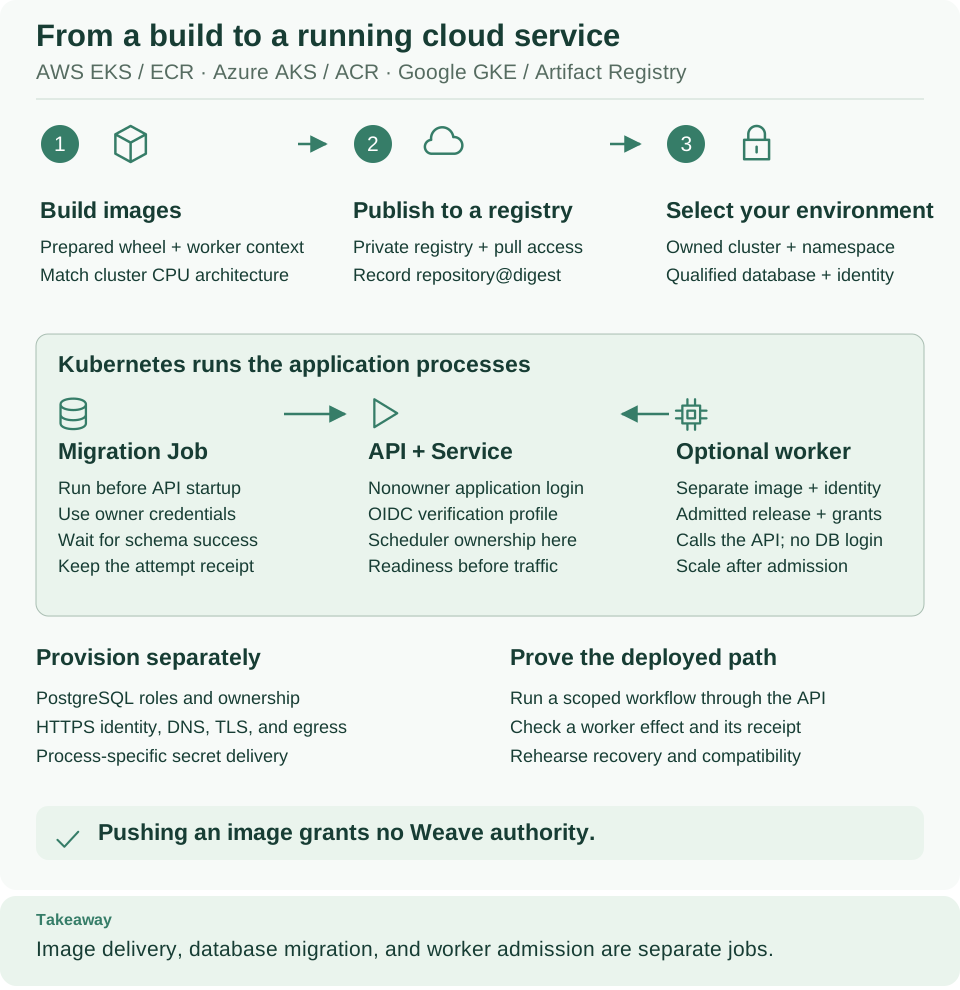
ACR sits at the image boundary (step 2 in the diagram) and AKS runs the green panel. Registry push access, node pull access, and Weave application grants are three separate permissions. Open diagram at full size
If you do not have infrastructure yet
Use the provider's Azure cluster creation tutorial to prepare an approved cluster with its network, node capacity, and access controls. Provision the registry and the intended namespace through the same infrastructure process, then return to step 1 with the real resource names. These resources cost money, and a provider quickstart is a learning baseline, not a production availability or security design for Weave.
1. Select the subscription and inspect resources
Why: every later command depends on the right subscription, cluster, and registry. Replace the placeholders with values from the existing deployment inventory. The resource group below contains the cluster; ACR is selected by its existing registry name in the same subscription.
# Select the intended subscription and verify the existing cluster and registry names.
export WEAVE_AZURE_SUBSCRIPTION='your-subscription-id'
export WEAVE_AZURE_RESOURCE_GROUP='your-cluster-resource-group'
export WEAVE_AKS_CLUSTER='your-existing-cluster'
export WEAVE_ACR_NAME='your-existing-registry-name'
az account set --subscription "$WEAVE_AZURE_SUBSCRIPTION"
az account show --query '{subscription:id,tenant:tenantId,name:name}' --output json
az aks show --resource-group "$WEAVE_AZURE_RESOURCE_GROUP" --name "$WEAVE_AKS_CLUSTER" \
  --query '{name:name,location:location,state:provisioningState}' --output json
az acr show --name "$WEAVE_ACR_NAME" \
  --query '{id:id,location:location,loginServer:loginServer}' --output json
Expected: the intended subscription and tenant, the cluster with provisioning
state Succeeded, and the registry with its loginServer. Check the names and
regions against the operator's inventory. The returned loginServer is
authoritative: use it instead of building a host name from a guessed suffix. See
the ACR CLI reference.
2. Configure and explicitly select kubectl
Why: a separate, private kubeconfig keeps your other cluster connections untouched. Use ordinary cluster-user credentials. Retrieving them needs permission to obtain AKS user credentials; Kubernetes authorization is a separate check. Follow the AKS credential command for your cluster's authentication mode.
# Save ordinary cluster-user credentials in a private kubeconfig for this installation.
umask 077
export WEAVE_PROVIDER_DIR="$HOME/weave-azure-$(python3 -c 'from uuid import uuid4; print(uuid4().hex)')"
mkdir -m 700 "$WEAVE_PROVIDER_DIR"
export KUBECONFIG="$WEAVE_PROVIDER_DIR/kubeconfig"
az aks get-credentials --resource-group "$WEAVE_AZURE_RESOURCE_GROUP" \
  --name "$WEAVE_AKS_CLUSTER" --file "$KUBECONFIG"
kubectl config get-contexts
Expected: a context for this AKS cluster. Copy its exact name into
WEAVE_KUBE_CONTEXT below. Then name the namespace reserved for Weave and check
what you may do there:
# Select the exact context and namespace, then confirm access and the node CPU architecture.
export WEAVE_KUBE_CONTEXT='your-exact-context-name-from-the-list'
export WEAVE_KUBE_NAMESPACE='your-existing-namespace'
kubectl --context "$WEAVE_KUBE_CONTEXT" -n "$WEAVE_KUBE_NAMESPACE" auth can-i create deployments
kubectl --context "$WEAVE_KUBE_CONTEXT" -n "$WEAVE_KUBE_NAMESPACE" auth can-i create jobs
kubectl --context "$WEAVE_KUBE_CONTEXT" -n "$WEAVE_KUBE_NAMESPACE" auth can-i create secrets
kubectl --context "$WEAVE_KUBE_CONTEXT" get nodes -L kubernetes.io/arch
Expected: yes three times, then the intended Linux node pool's amd64 or
arm64 labels. Use that architecture and placement in the shared image and
deployment steps. If your role cannot list nodes, ask the operator for the pool
architecture. A private cluster endpoint needs a network route from this terminal.
3. Authenticate Docker and verify pull authority
Why: az acr login signs Docker in to the registry with your Azure identity,
so the shared guide can push images. Setting DOCKER_CONTEXT makes it use the
Docker engine you selected locally. Signing in deploys nothing. See
ACR authentication.
# Let Docker authenticate to the registry using your Azure identity; cluster pull access is separate.
: "${WEAVE_DOCKER_CONTEXT:?Load your local session.env as described in the cloud overview}"
export WEAVE_ACR_LOGIN_SERVER="$(az acr show --name "$WEAVE_ACR_NAME" --query loginServer --output tsv)"
DOCKER_CONTEXT="$WEAVE_DOCKER_CONTEXT" az acr login --name "$WEAVE_ACR_NAME"
export WEAVE_REGISTRY_PREFIX="$WEAVE_ACR_LOGIN_SERVER/weave"
Expected: Login Succeeded. The shared build-and-push guide creates the
weave/server repository, and weave/worker when you push a worker, with their
first authorized pushes.
Pushing and pulling are separate permissions. The operator needs push rights;
the AKS kubelet identity separately needs pull rights. With conventional registry
RBAC these are commonly AcrPush and AcrPull. A registry that uses repository
ABAC needs the matching repository writer and reader permissions instead, and
az aks --attach-acr does not support ABAC-enabled registries: the platform
administrator must assign the repository reader role. This guide changes no IAM
assignment. See AKS–ACR integration and its ABAC limitation.
4. Choose supporting services deliberately
| Requirement | Azure option | Weave boundary |
|---|---|---|
| PostgreSQL | Azure Database for PostgreSQL Flexible Server or separately operated PostgreSQL | Rehearse the exact migrations and role ownership; local PostgreSQL evidence does not certify Flexible Server |
| Secret storage | Azure Key Vault with an operator-managed delivery mechanism | Delivering values into processes is not a Weave secret-provider implementation; this guide installs no native Key Vault provider |
| Token issuer | Your compatible HTTPS OIDC/CIAM provider (configuration) | Verify the actual token contract, identity links, and grants; AKS access alone does not authorize Weave |
Flexible Server's azure_pg_admin role is restricted. Pass the
database qualification gate
before you choose it: the migration identity must satisfy the packaged role
attributes, grants, policy creation, and function ownership without weakening
row-level security. Never run the local fixture setup script there. See
Azure PostgreSQL access control.
Microsoft Entra ID as the identity provider for people is not verified. Using Entra ID to manage access to AKS is separate from using it to sign people in to Weave. Azure preproduction checks have verified real Entra application tokens for a host application and an independent worker. They do not verify interactive human sign-in or qualify this AKS recipe. Read Microsoft Entra ID (human sign-in not verified) before you plan Weave sign-in with it.
Container Apps Operations and maintenance
Azure Container Apps is a separate deployment route from the AKS recipe above.
Its Operations adapter works with an existing managed environment and resource
group; follow runner setup. Begin
with observe only. Enable update only after acceptance in that environment,
and leave scale_workers disabled in both the registered target and local
runner policy.
Active-revision capacity is not a physical process inventory. The alpha12 adapter reports replicas of active revisions. Inactive historical revisions are outside that observation, so zero observed replicas, a stopped latest revision, or Single revision mode cannot establish that all older replicas have exited. Before a schema migration or runner replacement, inventory every revision of each API, worker or runner app being stopped, and verify that all of those revisions have zero physical replicas. Do not start a replacement owner while any older instance may still be running.
Follow the platform upgrade procedure with that provider-specific boundary. Fence every database writer and active task owner, then capture active-work and retained-run state again after the affected replicas have drained. Remote workers may remain running only when evidence proves that they hold no active task ownership and have no database write access; prevent them from acquiring new work during maintenance. Run the exact new artifact's explicit migration job while database writers and task acquisition remain fenced. Keep its exact execution identity and successful schema-check result: both Alembic's revision and Weave's schema marker must match the new artifact before it serves traffic. A successful image build, job submission, or old migration execution is not that receipt. Do not restart the older runtime against the migrated database.
After starting the new artifact, verify live/readiness endpoints, a fresh complete compatibility report, retained-run continuity, and real execution before accepting the environment. See the capability verification for the alpha13 worker checks, separate live AI acceptance and historical alpha12 delivery table. The accepted Azure deployment used Agentic 0.1.5 and the alpha13 SDK against the unchanged alpha12 API, Lumi and Operations services with schema 0030. One new Azure OpenAI workflow succeeded with a consistent replay; authorization was not verified by replay. The earlier suspended AI run and successful HTTP and Lumi evidence were preserved, with no new Lumi call. This acceptance applies to that exact deployment, not arbitrary mixed versions.
If something goes wrong
| What you see | Why | What to do |
|---|---|---|
az aks show or az acr show reports that the resource was not found |
Wrong subscription, resource group, or name | Check az account show and the operator's inventory |
kubectl asks for kubelogin or fails to get a token |
The cluster uses Microsoft Entra ID authentication | Install kubelogin, then run kubelogin convert-kubeconfig -l azurecli to reuse your Azure CLI sign-in |
kubectl reports Forbidden or auth can-i prints no |
Your identity has no Kubernetes role for that object in the namespace | Ask the cluster administrator for the namespace permissions |
kubectl times out |
The cluster endpoint is private and this terminal has no route to it | Use the approved network path |
az acr login cannot reach Docker |
The selected Docker engine is not running | Start the engine behind WEAVE_DOCKER_CONTEXT and retry |
Pods later stay in ImagePullBackOff |
The kubelet identity cannot pull from the registry | Assign AcrPull, or the repository reader role for an ABAC registry |
Continue with the shared deployment
Keep KUBECONFIG, WEAVE_KUBE_CONTEXT, WEAVE_KUBE_NAMESPACE, and
WEAVE_REGISTRY_PREFIX in this terminal, then:
- Return to the cloud deployment overview to pass the readiness gate, then build, push, and record the registry digests.
- Use the Kubernetes walkthrough for database qualification, the migration Job, the API rollout, and a verified run.
These provider commands neither publish a workflow nor admit a worker release. The CLI tutorial covers that separate application lifecycle.