
Firefly Weave
Define a business process, connect its steps to other systems and to people, and follow every case.






Read the documentation · Start the platform · CLI reference · Meet Lumi
Weave is a durable workflow orchestration and integration platform with human tasks, built on PyFly. You describe a business process once, as a workflow: draw it in Studio, or write it in YAML, JSON, or the Python SDK. Weave checks the definition, runs each case of it, stores its progress in PostgreSQL, and keeps the history of every step.
For example, your product accepts an order. Weave asks another system to check the customer, waits for a manager's approval, and sends a notification. It remembers where each order is, even when an approval takes days or the server restarts. Your product starts the process and reads its status through an API.
Coming from a BPM suite? Weave covers the core of business process management, but it is not a BPMN engine. Coming from BPM/BPMN maps service tasks, user tasks, gateways, and timers to Weave steps.
What you get
The v0.1.0a14 alpha release provides the API, CLI, Python SDK, and Studio visual workspace, with human-task inboxes, email conversations, execution management, and administration of people and access. Run Weave as a standalone service or embed it in another product.
New in 0.1.0a11: configure AI provider connections, Lumi, and workflow AI profiles through guided setup with review before saving. Explicitly select earlier AI results as shared context within one execution. See the illustrated AI workflow guide and Lumi guide.
Included capabilities:
- Files across workflows. Upload through the API, CLI, Python SDK or Studio, pass verified references between steps, and attach documents to human tasks. File workers connect FTP/FTPS/SFTP, SharePoint/OneDrive and Google Drive.
- Decision rules and AI tasks. Versioned decision tables and workflow model profiles use the same compiler and durable task protocol. An independent Firefly Agentic worker executes the configured provider, model and pattern.
- Lumi in Studio. Ask for help with a workflow, run or simulation; choose what context to share, review proposed source and explicitly apply it to a local draft. Lumi uses its own model configuration.
- A clearer editor. Decision and parallel lanes, immediate valid edits with Undo, guided human tasks, and action version selection keep changes visible.
Read the capability matrix for tested boundaries and live-provider checks that remain environment-specific.
Studio runs in your browser from the installed CLI or as a desktop app. The macOS desktop bundles are ad-hoc signed, not Developer ID signed or notarized, so macOS may ask you to approve them; do not use the alpha5 macOS installers, which were damaged. The browser installation is the fallback on every system.
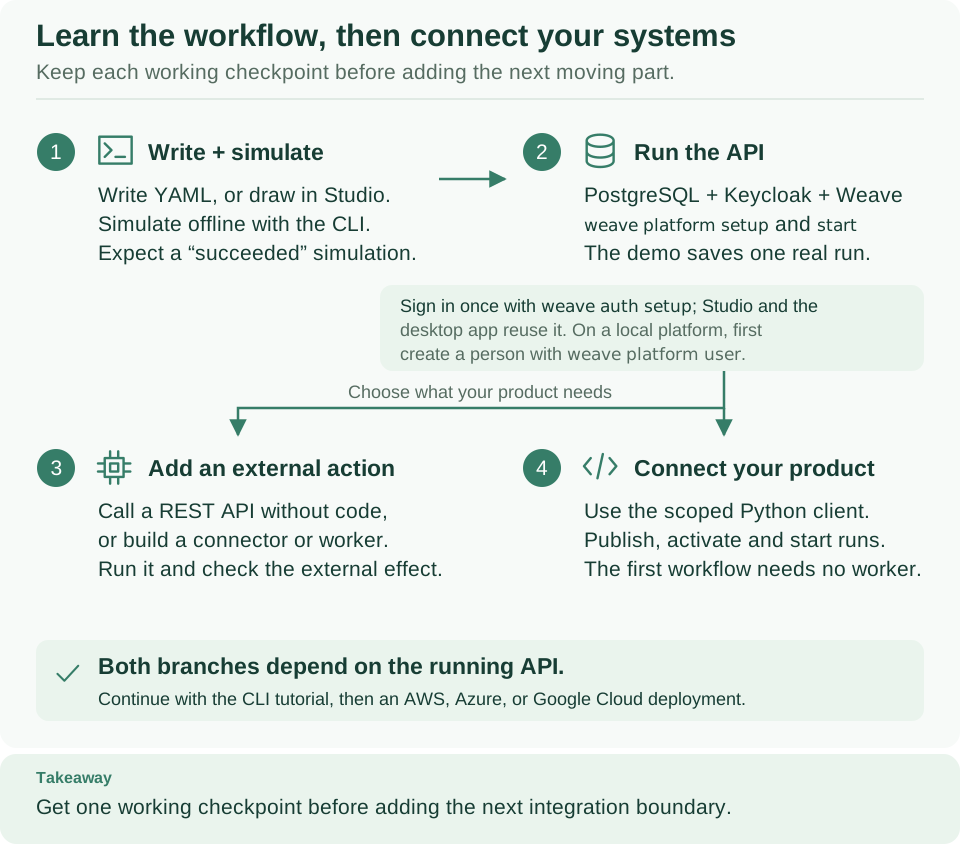
Start at step 1 and keep each working checkpoint before you add the next part.
After the platform runs (step 2) and you have signed in once, choose step 3 to
call another system, without code or with your own connector or worker, or step 4
to connect your product. Your team already runs a platform? Skip step 2 and
connect with weave auth setup and its server address.
Choose your starting point
You do not need a platform to try the workflow language. Choose the row that matches what you want to do today:
| I want to… | Start here | What I will have at the end |
|---|---|---|
| Try a workflow on my laptop | Install the CLI, then write your first workflow | A validated workflow and a successful local simulation; no server or Docker |
| Draw a process and work on approvals | Studio, then human tasks | A visual workflow and, once connected, assigned tasks and recorded decisions |
| Use my team's Weave platform | Install the CLI, then connect the CLI or Studio with its server address | A saved platform, your own sign-in, and a workspace that the CLI and Studio share |
| Run the platform myself | Start a local platform | PostgreSQL, a local identity provider, a running API, and a saved run |
| Call a REST API from a workflow | Call a REST API without code | A published Action on the built-in HTTP connector, run from a workflow |
| Give people access | People and access | People linked to their sign-in accounts, with scoped Weave roles |
Installing the CLI gives you a client. Running a platform adds the services that store and execute workflows. A worker adds a process that runs your own integration code. Each has its own guide, so you can stop at the result you need. Start here gives an ordered path for each role.
Install and discover the CLI
On macOS, Linux, or WSL, install Python 3.12 or newer with venv support,
then run this block in Bash or Zsh. It installs the pinned v0.1.0a14 alpha
into your user account without sudo, Git, or Docker:
(
  # Stop if downloading the installer fails.
  set -o pipefail
  curl --proto '=https' --tlsv1.2 -fsSL \
    https://github.com/fireflyframework/firefly-weave/releases/download/v0.1.0a14/install.sh \
    | sh -s -- --version v0.1.0a14
)
Expected: Installed Firefly Weave 0.1.0a14: followed by the command's path. Then
make the default command directory available in this terminal and look around:
# Make the installed command available in this terminal.
export PATH="$HOME/.local/bin:$PATH"
# Show the version and the command overview.
weave --version
weave
# Read the help of one command family, and find the platform guide.
weave help workflow
weave docs platform
Expected: Firefly Weave 0.1.0a14, the command overview, the workflow
commands, and the address of the platform guide. You do not need to learn every
command first: help explains each family and its next steps. The
installation guide covers choosing Python, a permanent
PATH, upgrades, removal, and troubleshooting. The installation includes the API
client, OpenAPI import, and the Studio host; it starts no platform and does not
download Studio's browser application.
Create a working example
Choose a new directory and run:
# Create an offline starter project, then simulate its workflow.
weave init hello-weave
cd hello-weave
weave workflow simulate simulation.json --output json
Expected: status: "succeeded" and the output {"message": "Hello from Firefly
Weave!"}. The generated README.md explains each file and how to validate,
compile, and simulate again after you edit. weave init never overwrites
existing files and starts no services. The
first-workflow tutorial explains a definition line by line.
Start your own local platform
You also need uv, a running local Docker engine with Compose 2.30 or newer, and
a source checkout that matches your CLI, because it holds the platform's
Compose files and setup helpers. Clone the tag that matches the CLI:
# Keep the platform files at the same version as the CLI.
git clone --branch v0.1.0a14 --single-branch https://github.com/fireflyframework/firefly-weave.git
cd firefly-weave

# Check prerequisites, then start a persistent Docker platform and a sign-in account.
weave platform doctor
weave platform up --username developer

# Confirm readiness and copy the printed sign-in command.
weave platform status
Expected: the API and Keycloak are ready, the example workflow succeeded, and
up prints a generated password once. Docker keeps the API running after you
close the terminal. Follow the printed weave auth setup command, sign in with
your new account, then run weave studio.
The Docker development guide explains each
step, the architecture, stopping and resuming, and administrator roles. Existing
foreground installations continue to use weave platform start; see the
individual setup steps. For a shared
installation, start with the deployment map.
Continue when you need more
- Call another system: call a REST API without code, build a custom integration, or run an integration worker for your own code.
- Add workflows to your product: follow the host integration guide.
- Deploy beyond your laptop: follow cloud deployment, then the setup for AWS, Azure, or Google Cloud, and the shared Kubernetes walkthrough.
- Find a specific task or diagram: open the documentation home or the visual guide.
What can I build with it?
- Business processes: versioned workflows with typed inputs and outputs, decisions, parallel branches, timers, signals, schedules, and human approvals.
- Integrations: REST calls without code on the built-in HTTP connector, webhooks, PostgreSQL, Kafka, and packaged connectors. The OpenAPI importer turns supported operations into Actions or connector packages that you review and publish.
- Messaging and email workflows: Teams personal-bot text, WhatsApp Cloud API text, templates, and statuses, Telegram webhook text, and email conversations.
- Product features: manage definitions and runs from your own product through Weave's API or Python SDK.
- Operations: inspect run history, simulate with mocks, resolve incidents, and manage workers, identity, retention, backup, and restore.
The capability matrix gives the precise scope. Salesforce, SAP, and Oracle have no bundled named adapters; you can call their supported HTTP interfaces through reviewed HTTP Actions or connector packages.
How the pieces fit together
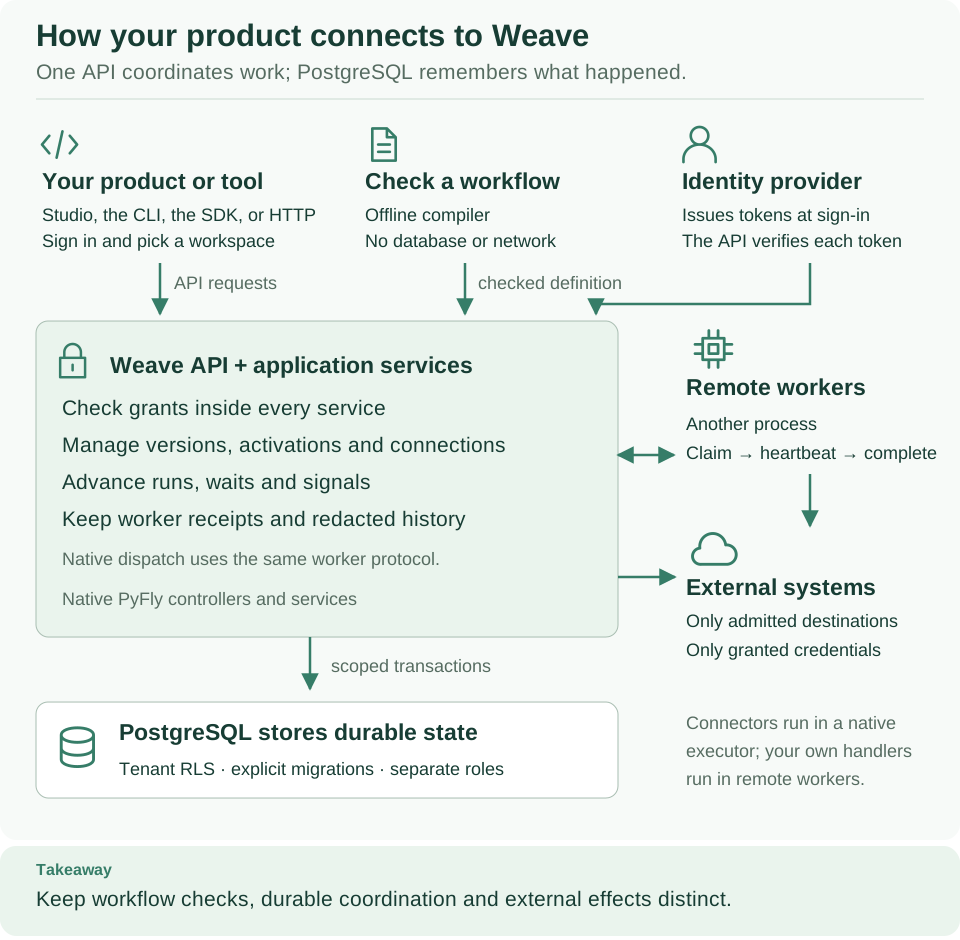
Read the top row first: your product or tool sends requests, the offline compiler checks workflows, and the identity provider issues the tokens the API verifies. Everything then passes through the Weave API, which stores state in PostgreSQL and reaches external systems through connectors or remote workers.
Your application sends requests to the Weave API. Your identity provider signs people and applications in; Weave verifies their tokens and uses its own grants to decide what each caller may do. PostgreSQL keeps workflow versions, runs, and task state. Built-in connectors run inside the platform's executor; your own integration code runs in workers, separate processes that ask Weave for a task, perform it, and report the result without database credentials.
Use your organization's compatible OIDC or CIAM provider by configuring its issuer, signing keys, audience, and access-token claims. Keycloak is included for local development; it is not a production requirement. Your platform can publish its non-secret sign-in settings, so people connect the CLI, Studio, or the desktop app by typing only the server address; their tokens stay in each computer's credential store. Follow identity provider setup for configuration, published sign-in settings, identity linking, and scoped roles.
Native PyFly controllers and services implement the API. See architecture for the components, a narrated execution path, and the detailed diagrams.
Current release and limits
The recommended installation is v0.1.0a14, an alpha release. Download packages and checksums from GitHub Releases. The documentation on a branch describes the source on that branch; a release tag preserves the documentation and code of that release.
External work is delivered at least once. If a worker crashes after another system accepted a request, that effect may already have happened. Use that system's idempotency support or an explicit reconciliation process; the worker guide explains this with an example.
Messaging integrations have local protocol and backend verification; live account setup and delivery still need validation in your environment. Sign-in from the CLI, and from Studio in an opt-in browser test, has been verified end to end only against the local platform's Keycloak 26.7.4, and sign-in with a code from a locally built macOS desktop app against the same platform; browser sign-in from the desktop app and the DMG have not been verified. Credential storage on Windows and Linux is not verified.
Azure preproduction checks on alpha10 verified Microsoft Entra ID application tokens for a host application and an independent Agentic worker. An Azure OpenAI workflow completed through that worker with consistent replay, and Lumi returned a response through its separate gateway. An HTTP workflow also completed after the alpha10 deployment, and five existing run states were unchanged. These checks do not verify Entra browser or device-code sign-in for people, other identity providers, or general provider availability. See the capability matrix for the verified scope.
Meet Lumi
Lumi is Weave's firefly guide. Translucent mint wings, a forest-green body, and a warm amber lantern bring Weave's colors to life. The lantern represents a clear next step through a complex process.
You will find Lumi throughout the documentation and in Studio. Open the Ask Lumi panel for assistance, and configure its model separately from workflow AI tasks. In diagrams, the Takeaway band highlights the main idea to remember before moving on. Start with the visual guide to explore the platform together.
Contribute and learn more
- Documentation and architecture.
- Contributing, source attribution, and visual assets.
- Security reporting and changelog.
Firefly Weave is part of the Firefly Framework ecosystem and is licensed under Apache License 2.0. See NOTICE for attribution and dependency boundaries.