Receive and reply to Microsoft Teams messages
Use this guide to start a workflow from a text message sent to a Teams personal
bot, and to reply from that workflow. The optional weave-teams@1.0.0 connector
receives authenticated Bot Framework activities, stores a conversation
reference, and sends text back through that stored reference.
- Who it is for: the operator who registers the bot and enables the package, and the author who builds the reply workflow.
- What you need: an Azure Bot registration with a personal Teams installation,
a deployed platform with the
teamsextra (the local platform never enables connector packages), a public HTTPS ingress, and a CLI connected to the platform. - How long: plan for the Azure and Teams provisioning first; the Weave steps take about 30 minutes once the installation facts are known.
A local fixture is not evidence of Teams delivery: follow the checkpoints below before testing with an actual account.
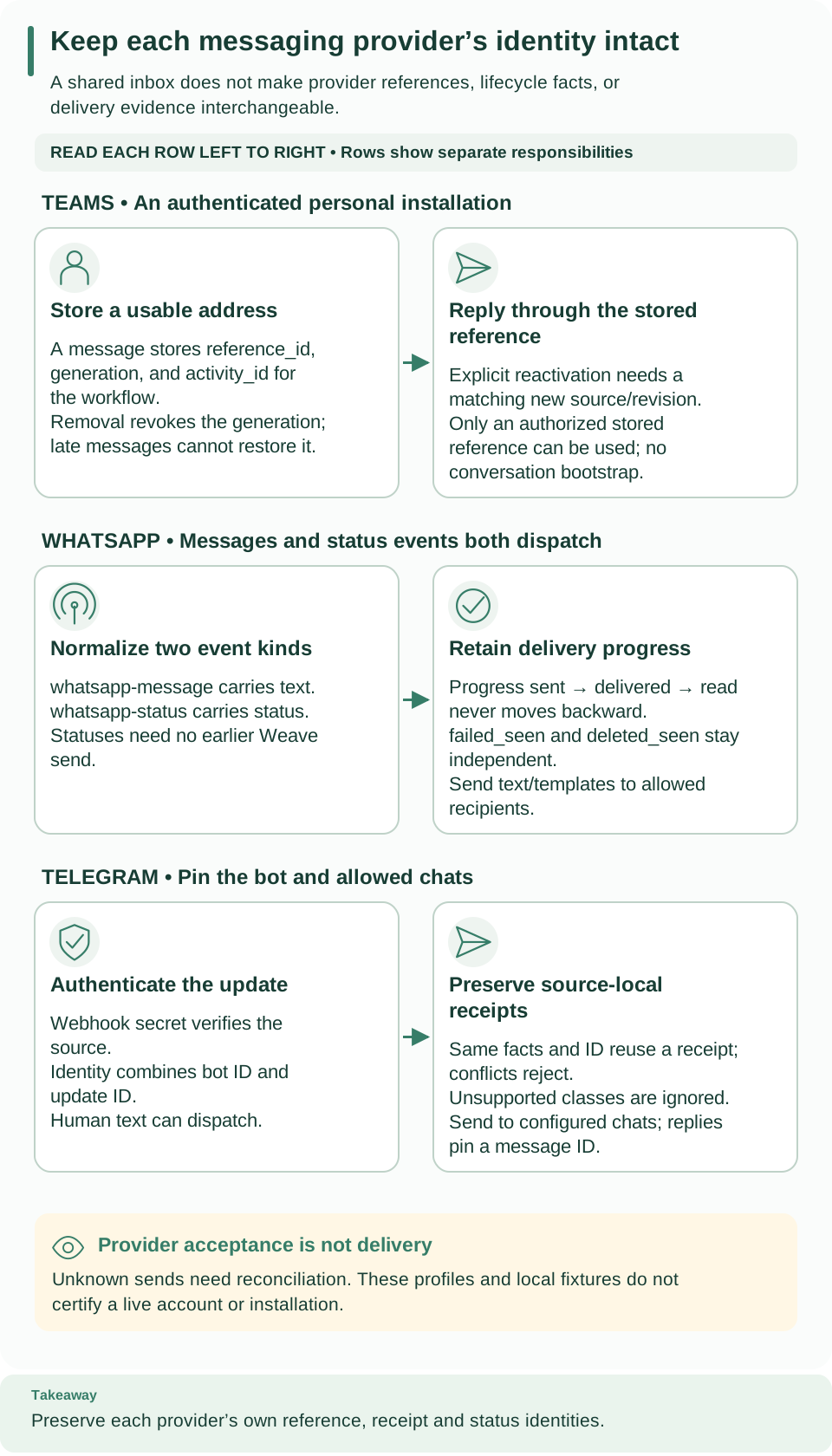
How to read this diagram: Follow the top Teams row from storing an authenticated address to replying through that reference. The reference ID and generation are server-owned authority facts; the other rows show why WhatsApp or Telegram identifiers cannot substitute for them.
How the message and the reply connect
| Part | What it does |
|---|---|
| Provider source (inbound) | Authenticates a Bot Framework activity, stores a conversation reference, and starts the pinned workflow |
| Reference | A server-issued UUID plus a generation number. It is not the provider's conversation ID, and callers cannot invent one to send |
| Reply Action (outbound) | Uses a stored reference to address one text message |
The connector supports reply and proactive text to a stored, authenticated reference for one explicitly configured personal installation per immutable connection and source. It does not create conversations, provision accounts, send Graph messages, or implement channels or groups, SSO, skills, invoke, streaming, attachments, or cards.
Before you start
Provision the bot (operator, outside Weave). Provision an Azure Bot resource
with a supported single-tenant Entra registration, enable the Teams channel, set
its HTTPS messaging endpoint to /provider-ingress/{source_id} (you get the ID in
step 4), publish a Teams app manifest with personal scope and the bot app ID, and
install it under tenant policy. See Microsoft's
manual Bot provisioning
and proactive messaging requirements.
No automation here creates those resources.
Enable the package (operator). Install the exact reviewed Weave wheel with the
server,teams extras, and select
firefly-weave:weave-teams:firefly_weave.connectors.teams:package in
WEAVE_CONNECTOR_PACKAGES. Installing the optional SDK alone does not enable it,
and missing extras fail startup when the package is selected. The package's
distribution version is the installed firefly-weave version; the adapter and
task behavior is pinned separately at 1.0.0. Native services share the
application's existing PyFly container.
Collect the installation facts. Gather the bot client and registration tenant UUIDs from the operator's app registration, and the customer tenant UUID from the intended installation. Obtain the conversation, bot, user, and service URL facts from a separately authenticated installation record. This profile cannot discover an installation from an email address or bootstrap unknown conversation IDs.
Build the message-and-reply flow
The publication sequence explains the Connector version, connection revision, release, and activation IDs each step returns.
-
Publish the Connector and create the connection. Publish the installed
package.descriptor.manifest, then create a connection with the exact policy fields in Connection fields and a scopedclient_secrethandle:# Create the connection revision from the reviewed request file. weave connections create --request teams-personal.json --output jsonExpected: a connection revision; save its
id. Confirm the operator-approved service and token origins in itsallowed_destinations. -
Publish the reply Action and the workflow. Publish a connector Action named
teams-reply@1.0.0forweave-teams@1.0.0actionreply, with the installed descriptor's input and output schemas,config: {},sideEffect: non_idempotent, and a 30-second timeout. Then publishreply.workflow.yaml, which callsteams-reply@1.0.0through the slotteamsand shows the input mapping. -
Admit, grant, and activate. Register a native worker release with the descriptor's exact capabilities and bindings, explicitly grant its credential capability against the connection revision (
weave workers grant), bind the connection slotteamsat activation, and save the activationid. No chat user's identity supplies execution authority. -
Create the provider source. Use that connection revision and activation; the source recipe shows every request field. Use the Teams declaration, provider
teams, packagefirefly-weave, the actual package and adapter versions, and the schema digest fromprovider_schema_digest, and copy every connection config field intopolicy.# Create the inbound route from the generated request file. weave provider-sources create --request teams-source.jsonExpected: a source with its
id. -
Point the bot at Weave and test. Set the bot messaging endpoint to the source's public
/provider-ingress/SOURCE_IDURL. After an authorized real message, inspect the provider receipt and its linked run withweave provider-receipts listandweave runs read. A 202 response confirms the inbound commit, not that the reply Action succeeded.
The reply Action's input
A verified message produces reference_id, generation, activity_id, text,
and bounded protocol facts. The reply receives only the first four:
{
  "reference_id": "00000000-0000-4000-8000-000000000001",
  "generation": 1,
  "activity_id": "ORIGINAL_ACTIVITY_ID",
  "text": "Message received."
}
Take reference_id, generation, and activity_id from the authenticated
normalized event; the UUID above is only a shape example. For the proactive
send action, omit activity_id and use a still-authorized stored reference.
Expected: {"id":"PROVIDER_ACTIVITY_ID","status":"accepted"}. If the reference is
revoked or its generation is stale, use the explicit
reference lifecycle; resending the same
input cannot recreate authority. For other failures, inspect
provider receipts
and run incidents.
Both actions restore the scoped reference and check the current lease, connection, source, and reference authority before token acquisition and again before the single POST. No workflow input can choose a service URL, token endpoint, tenant, audience, scope, or credential handle.
Connection fields
The IDs are external installation facts obtained by the operator; they never become Weave principal grants.
| Field | Meaning |
|---|---|
cloud |
public (default) |
account_id |
Canonical bot app (client) UUID |
registration_tenant |
Canonical Entra registration tenant UUID |
tenant_id, allowed_tenants |
The exact Teams customer tenant, and the explicit list of permitted tenant UUIDs |
conversation_id |
One installed personal conversation ID |
bot_id, user_id |
The exact bot and personal-user channel account IDs |
installation_generation |
Positive integer, initially 1 |
A complete connection request has this shape. All UUIDs and channel IDs are illustrative: replace them with the published Connector version ID and the authenticated installation facts, and replace the service origin with the one approved for that installation.
{
  "name": "teams-personal",
  "connector_version_id": "00000000-0000-4000-8000-000000000001",
  "config": {
    "cloud": "public",
    "account_id": "00000000-0000-4000-8000-000000000002",
    "registration_tenant": "00000000-0000-4000-8000-000000000003",
    "tenant_id": "00000000-0000-4000-8000-000000000004",
    "allowed_tenants": ["00000000-0000-4000-8000-000000000004"],
    "conversation_id": "INSTALLATION_CONVERSATION_ID",
    "bot_id": "INSTALLATION_BOT_CHANNEL_ID",
    "user_id": "INSTALLATION_USER_CHANNEL_ID",
    "installation_generation": 1
  },
  "secretRef": {"client_secret": "teams-client-secret"},
  "allowed_destinations": ["https://login.microsoftonline.com", "https://connector.example.test"]
}
connector.example.testis a non-routable documentation placeholder, not a Microsoft service recommendation. The complete authenticated service URL is stored later in the reference; the connection allowlist contains its origin only.secretRef.client_secretnames an operator-granted secret handle.allowed_destinationscontains literal HTTPS origins forlogin.microsoftonline.comand the selected Bot Connector service. Do not place secrets in config, source policy, Action input, or workflow output.weave connections testvalidates the configuration only; success does not certify credentials, the installation, or delivery.
The provider source copies all policy fields exactly from that immutable
connection revision, and pins
provider_schema_digest(package.metadata.model.event_schemas, package.metadata.model.dispatch_event_kinds).
Only message is dispatchable. Lifecycle events are durably ignored by workflow
dispatch while updating references transactionally. The mapping is checked
against every dispatchable schema. A source requires current source-owner,
connection-binding, and target authority.
Ingress. The authenticated serviceurl claim must exactly match the activity
serviceUrl, including its base path. IDs are encoded as individual URL
components. Ingress uses fixed Microsoft JWKS metadata and public PyFly async
validation; it makes no OAuth grant or send. The HTTP 202 acknowledgment follows
the reference and receipt transaction commit, and a commit failure is not
acknowledged.
Revocation and explicit reactivation
References stay fenced across source replacements and connection revisions.
- Removal revokes. A bot removal or uninstall revokes the current generation. Late message or add events cannot reactivate it and receive a typed denial; exact already committed duplicates may safely acknowledge. Provider timestamps do not establish ordering, so a delayed, previously unseen removal may conservatively revoke a reactivated generation.
- Manage references with
weave teams-references read|list|revoke|reactivate, the typed SDK methodsread_teams_reference,list_teams_references,revoke_teams_reference, andreactivate_teams_reference, or the API at/api/v1/tenants/{tenant}/projects/{project}/environments/{environment}/teams-referencesand/{identifier}, with/revokeor/reactivatefor POST transitions. The core routes stay documented when Teams is disabled and return unavailable (409). Optional Teams modules and SDKs load only for the exact selected entry point. - Requests. Revoke takes
expected_generation. Reactivate takesexpected_generation,source_id, andrequest_id(a UUID idempotency identity). Both require currenttrigger.manage,connection.manage, andconnection.bind. - Rules. Revoke reduces authority and stays possible after disabling the old source. Reactivation requires a separately created immutable connection and source pinning exactly the next generation, full current owner, binding, and target authority, and the unchanged previously authenticated address. A conflicting expected generation or idempotency content fails closed. Reactivation neither installs a bot nor verifies a new provider account.
Once a final reference check authorizes transmission, a concurrent revocation cannot recall already authorized or in-flight bytes. No cross-system atomic revocation guarantee is made. Connection or source disablement and grant revocation also deny new sends.
Authentication and outcome limits
- Tokens. The single-tenant client-secret profile uses one public
OAuth2Client.client_credentialsacquisition per invocation, a tenant-fixed token endpoint, explicit POST client authentication, and the scopehttps://api.botframework.com/.default. There is no cross-invocation token cache or refresh-token grant. - Transport. Each OAuth client owns and closes its transport; JWKS uses application-owned borrowed async fetchers with bounded per-audience validators (at most 128), exact endpoint equality, and deadlines. Both use bounded egress without ambient proxies or redirects.
- Outcomes. The send result is only
{id, status: accepted}: provider acceptance and correlation, not delivery. A timeout or disconnect after a POST may beunknownand is not retried automatically. HTTP 429 is a rejected outcome; there are no hidden retries. SDK errors, token responses, and provider bodies are never copied into task errors or output. - Workers. Remote worker credentials alone do not grant Teams reference access; the connector requires the native lease-bound reference callback.
Pins and backups. PyFly is pinned to the published 26.9.15 wheel, SHA-256
c712b314cbaaaaec9aa7ec7f256fb8a31e6faf228e3bd52715356fd689c8943b. The Microsoft
Agents hosting core and activity packages are pinned to 1.7.0. Migration
0019_teams_references follows 0018_provider_inbox; backups must preserve the
reference fence, lifecycle evidence, administrative receipts, and provider inbox
together.
What has been verified
Fixture and local PostgreSQL verification is separate from live Azure and Teams certification. Live acceptance still requires an explicitly authorized test tenant, bot, personal installation, and destination. Local wire fixtures do not establish Azure provisioning, tenant policy, real service URL and token shapes, delivery, throttle timing, or production restart behavior.
Troubleshoot
| What you see | Why | What to do |
|---|---|---|
| The bot endpoint gets no 202 | The activity failed authentication, the serviceurl claim did not match, or the commit failed |
Check the source ID in the endpoint, the bot registration, and the provider receipts |
| A 202, but no reply | The inbound commit succeeded; the run or the reply Action did not | Read the receipt's linked run and its incidents |
| The reply is denied for the reference | The reference was revoked or its generation is stale | Follow revocation and reactivation; resending the same input does not help |
A send ends unknown |
The POST may have reached Teams | Check the conversation before sending again; see incident operations |
Next steps
- Wait for an approval before replying: Human tasks and approvals.
- Understand receipts and dispatch: Authenticated provider sources.
- Compare with the other messaging connectors: WhatsApp and Telegram.