Import an OpenAPI document as a connector package
Use this guide to turn selected operations of an OpenAPI document into a connector package you can review, build, and install: a named connector with its own manifest, version, and wheel, running on the same native HTTP executor as the built-in connector. Your first result is local files; you need no API account and no Weave server.
- Who it is for: integration developers who prepare the package, and the operator who installs and enables it.
- What you need: the CLI, or the source checkout for the
bundled example. Building needs the Python
buildtool; see Author a trusted connector package. - How long: about 10 minutes for the local example.
Most teams do not need a package. When you only want to call the API from a
workflow, import to the built-in connector instead (--target builtin): you get
Actions only, with no build, installation, or allowlist. See
Import operations from an OpenAPI document.
Choose a package when you want the API to have its own connector identity and
release.
The importer improved in 0.1.0a7. It adds YAML input, --list,
--init-policy, explicit relaxations, the OpenAPI 3.0 upgrade,
--target builtin, documents up to 8 MiB, and --all-diagnostics. With an
alpha6 or earlier CLI, import-openapi reads OpenAPI 3.1 JSON of at most 1 MiB,
requires --operation, writes only the package target, and stops at the first
error.
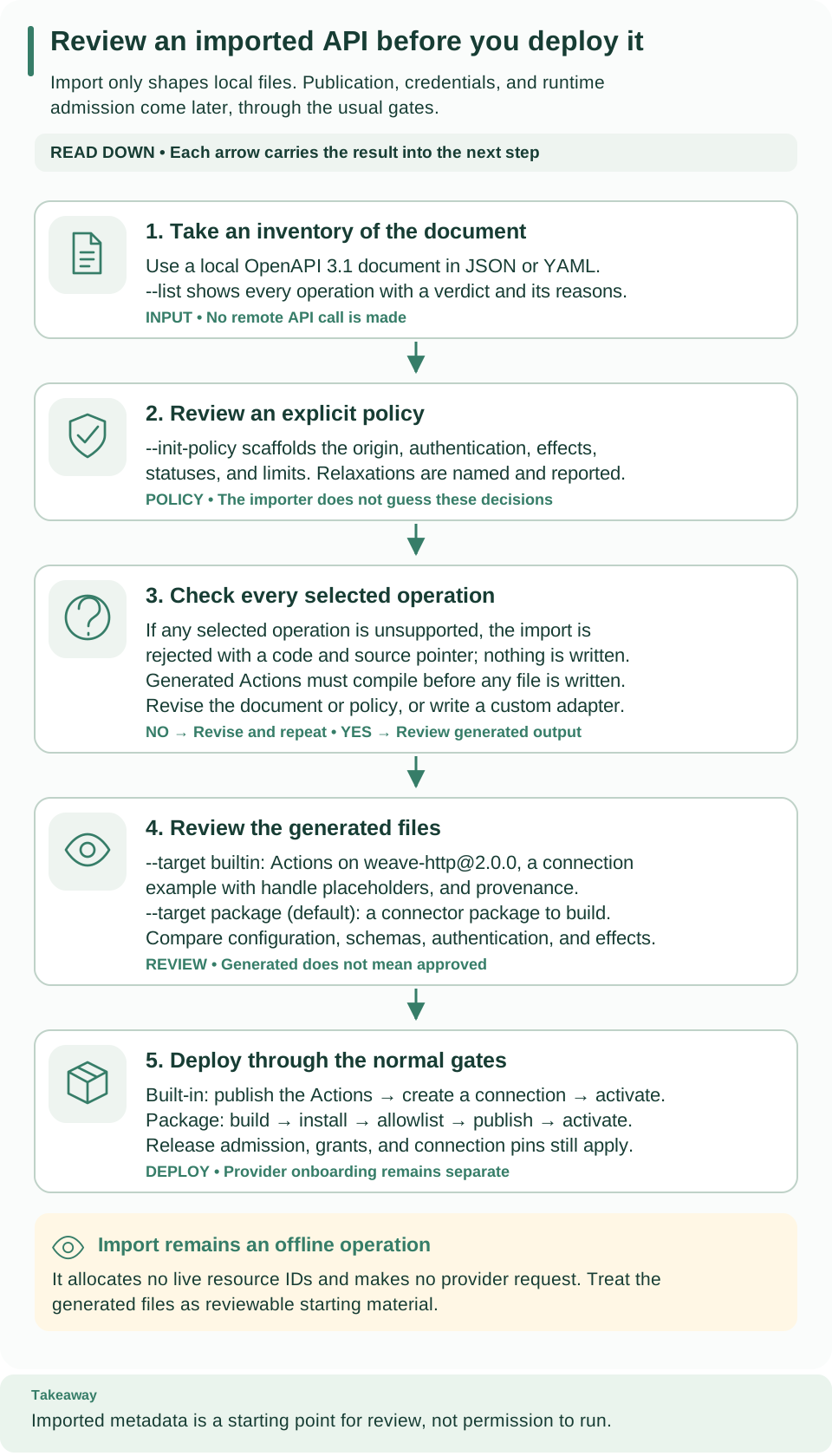
How to read this diagram: Read down from the inventory and the reviewed policy to the check of every selected operation. A rejection sends you back to the document or the policy; success produces files to review before publication, a connection, and an activation allocate live IDs.
Choose the integration approach
Import fits a service that supplies an OpenAPI contract whose selected operations fit this page's supported subset. It generates HTTP operation definitions, not vendor onboarding, account permissions, webhook verification, or a certified vendor SDK.
- Obtain the service's document through its approved distribution channel and review it locally. The importer never downloads it.
- A Salesforce, SAP, or other product label does not make unsupported OAuth, OData, GraphQL, or schema features work automatically.
- Use custom package authoring when an operation needs a protocol-specific implementation.
Try the local inventory example
This example is a Python script included in the source repository. It contains
its own small OpenAPI document and policy, so no download or account is needed.
From the repository root, use uv run to select the locked dependencies
explicitly; the standalone CLI installer does not expose its Python packages to
your system's python3:
# Import the bundled example document into a new directory; nothing is sent anywhere.
uv run --locked --no-editable --extra openapi python examples/openapi/import_connector.py ./inventory-http
# Check the generated package declaration without executing any of its code.
uv run --locked --no-editable --extra openapi weave connector validate ./inventory-http/connector.json --output json
Expected: Review the generated package at inventory-http. No request was sent.,
then a JSON validation result with "mode": "offline-data" and the manifest and
package digests. The target directory must not already contain files.
Inspect these files before building anything:
| File | What to check |
|---|---|
connector.json |
The package metadata, the Connector manifest, and its capabilities and bindings |
examples/get-item.action.json |
The generated Action: method, path, parameters, side effect, and schemas |
import-provenance.json |
The source and policy digests and the generated-to-source pointer map |
src/inventory_http/__init__.py |
The fixed native wrapper; imported text never becomes code |
The example selects getItem, renames it get-item, and fixes the service origin
and the /v1/items/{id} path. Invocation input is {"path":{"id":"item-123"}}.
Its hypothetical response is {"status":200,"body":{"name":"Widget"}}.
Import your own document
-
Take an inventory. It lists every operation with a verdict and the reasons it does not import as is:
Expected: a line such as
1 of 1 operations import as is., then one line per operation starting withyesornoand, forno, the diagnostic codes. The verdicts describe the built-in target;--output jsonadds each reason's message, hint, and source line. -
Scaffold a policy and review it. The policy holds every decision a person must make: selection, Action names, side effects, server, accepted statuses, authentication, and relaxations.
# Write a policy file for review; an existing file is never overwritten.
weave connector import-openapi api.yaml --init-policy policy.json
Expected:
Wrote policy.json. Review names, statuses and auth before importing with --policy.Add--operation ID(repeatable) to choose operations, and--nameto set the policy name, which also names the generated connector package. The relaxation flags in Allow only the relaxations you accept are recorded in the policy. -
Check the import without writing files. A diagnostic's source pointer tells you which operation or schema needs attention. An unsupported feature requires an explicit contract or profile decision, not deleting constraints until import passes.
# Run the import and print the result; nothing is written without --directory.
weave connector import-openapi api.yaml --policy policy.json
Expected:
OpenAPI import passed (1 actions, target package); review before publishing.Add--all-diagnosticsto see every failing operation instead of the first, and--output jsonfor the full result. -
Write the package. Only now does the importer write files, into an absent or empty directory:
# Write the reviewed package project.
weave connector import-openapi api.yaml --policy policy.json --directory reviewed-package
Expected: the same message, and a project containing
connector.json,pyproject.toml,README.md,import-provenance.json, one example Action per operation underexamples/, and the Python sources undersrc/.
Exit codes are 0 for success, 1 for a rejected document or policy, and 2 for
invalid command usage. --operation is optional when you import with a policy;
when given, it must list exactly the policy's operations.
A minimal policy is:
{
  "name": "acme-items", "version": "1.0.0", "auth": {"kind": "none"},
  "operations": {
    "getItem": {
      "name": "get-item", "sideEffect": "read_only",
      "server": "https://api.example.test/v1", "statuses": [200]
    }
  },
  "timeoutSeconds": 30, "maxRequestBytes": 1048576, "maxResponseBytes": 1048576
}
Selection, Action names, side effects, server URL, and accepted success statuses
are explicit decisions. A policy cannot downgrade the operation's declared
security. All selected operations share one origin and one authentication
profile. Review the fixed connection config under the generated Connector's
configSchema.const; copy that exact object when you create the connection, and
supply only the required secret handles separately. A machine-token endpoint and
its scopes are also fixed nonsecret policy.
Use the importer from Python
The SDK runs the same import in your own tooling:
from pathlib import Path
import json
from firefly_weave.sdk.openapi_import import import_openapi
from firefly_weave.sdk.connectors import scaffold_import

result = import_openapi(
    Path("api.json").read_bytes(), ["getItem"],
    json.loads(Path("policy.json").read_text()),
)
if not result.ok:
    for diagnostic in result.diagnostics:
        print(diagnostic.code, diagnostic.path)
else:
    scaffold_import(Path("reviewed-package"), result)
Pass source_format="yaml" for a YAML document, target="builtin" for Actions
on the built-in connector (write them with
firefly_weave.sdk.connectors.scaffold_builtin instead of scaffold_import), and
all_diagnostics=True to collect every failure.
The offline scaffold example
includes a complete small source document and policy.
Supported subset
Documents and references
- Versions. OpenAPI
3.1.0and3.1.1import directly. A3.0.xdocument imports only with theupgradeOpenapi30relaxation (--upgrade-openapi-30), which rewritesnullable, booleanexclusiveMinimum/exclusiveMaximum, and schemaexample. - Formats. JSON or YAML.
--format autopicks by file extension, then by a leading{or[. - Methods. GET, HEAD, POST, PUT, PATCH, and DELETE.
- References. Local structural
#/...pointers with RFC 6901~0and~1. No remote or file references, separate files, URI anchors, rebasing IDs, cycles, or dynamic references. Nested schema definitions work through document-relative schema pointers. Ref sibling constraints are kept. Non-schema references must target the matching named component collection. - Schemas. Selected schemas are lowered to self-contained Draft 2020-12 schemas and validated with the existing bounded profile. There is no schema inference from examples.
The absent or default OAS dialect, https://spec.openapis.org/oas/3.1/dialect/base,
and explicit Draft 2020-12 are accepted, only for this supported keyword
intersection. Other dialects, the OpenAPI 3.0 keyword nullable (rewritten only
by the 3.0 upgrade), discriminator, XML, and content-encoding features, and
unknown schema keywords fail. Null unions
are supported for JSON bodies and responses; parameters use the narrower profile
below. Secret-marked literals fail before annotations are discarded. Defaults are
never materialized.
Operations and parameters
Operation parameters replace matching path parameters by (in, name). Path
templates contain complete {name} segments; names must match required path
parameters. Server selection uses the operation, then the path, then the
document, and must exactly match the policy. Servers must be literal HTTPS, with
no variables, user information, query, or fragment. Relative or default servers
are not imported.
| Input | Supported serialization |
|---|---|
| Path | Required string, integer, or boolean; simple, explode false; one percent-encoded segment |
| Query | String, integer, or boolean form scalar, or a bounded homogeneous scalar array using repeated keys |
| Header | Nonprotected scalar; simple, explode false; no controls or non-ASCII field values |
| Body | Optional or required explicit application/json schema; absent for GET and HEAD |
- Strings and arrays. Parameter strings require
maxLength <= 4096(or thedefaultStringMaxLengthrelaxation); arrays requiremaxItems <= 100and bounded scalar items. - Numeric formats.
int32,int64,float, anddoublefail unless you allow thenumericFormatsrelaxation, which turns integer formats into bounds and drops the floating-point ones. - Rejected parameters. Objects, nullable or composed parameters,
floating-point parameters, cookie parameters,
allowReserved,allowEmptyValue, content parameters, and other serialization styles. - Input groups.
path,query,headers, andbody; unknown group or parameter names fail. Optional absent groups stay absent. Empty query arrays are omitted.
Responses
Each selected 2xx response must have an explicit application/json schema, or
absent content for an empty body. HEAD, 204, and 205 require empty responses.
There is no wildcard or default success schema and no response links. Other
media types fail unless the jsonMediaOnly relaxation drops them beside
application/json; response headers fail unless ignoreResponseHeaders imports
the body only. The output is {status, body} with status-specific validation;
undeclared success statuses fail. No partial deployable artifacts are returned
when any selected operation fails.
Authentication and failure boundaries
Security inherits from the document unless an operation overrides it;
security: [] disables inheritance. Anonymous access, or one requirement
containing one scheme, is supported. OR and AND combinations, optional-auth
alternatives, and non-OAuth role lists fail. Header API key, basic, bearer, and
OAuth client credentials use the HTTP profile auth slots.
Query and cookie API keys, interactive OAuth, refresh-token storage, mutual TLS,
and OpenID Connect discovery are not implemented.
Every operation requires read_only or non_idempotent. Read-only additionally
requires GET or HEAD; POST query endpoints are conservative non-idempotent
operations. The package target keeps a non_idempotent GET; the built-in target
requires the side effect to follow the method. There are no inferred idempotency
claims or automatic retries. A lost or invalid acknowledgment after a
non-idempotent dispatch remains unknown.
Budgets
- Document size. A document up to 1 MiB (100,000 JSON nodes, depth 32) is
checked as a whole. A larger document, up to 8 MiB, is first checked for
credentials as a whole, then pruned to the selected operations and the
components they reference, with a
WV-IMPORT-PRUNEDwarning. - Operations. The importer indexes at most 1,000 operations and selects at most 100, with 64 parameters and 20 accepted statuses each.
- References. Structural references are capped at 10,000, chain depth 64, and aggregate traversal and expansion work 100,000. Existing schema limits remain stricter where applicable.
- Output. Aggregate generated JSON is at most 1 MiB. Requests and responses are at most 1 MiB, URLs 16 KiB, headers 32 KiB, and the attempt timeout 30 seconds. The policy may lower the request, response, and timeout limits.
JSON validity and budgets, duplicate IDs and path ambiguities, unsafe,
unresolved, or cyclic structural references, credential-bearing metadata, and
security-reference existence are checked across the document, including unused
definitions, unless it was pruned. Other unsupported executable semantics are
checked on the selected closure; an unused unsupported operation is not
represented as supported. Literal examples and defaults are not interpreted as
reference structures. Errors keep canonical value-free codes, source pointers,
and raw source ranges. The import stops at the first error unless you pass
--all-diagnostics. The full list of codes is in
Import diagnostics.
What is never copied. Prose and example values are not copied into artifacts. Known credential fields, URL user information and credential query parameters, and classified schema literals are rejected. This is not a detector for arbitrary secrets hidden in prose or business data, so source documents must already be appropriate for local authoring. Provenance records digests and safe operation locations rather than raw source text.
Review, build, and install
After review, the package follows the same path as any trusted connector package:
- Review. The generated wrapper is fixed native code that injects the shared HTTP profile service; all imported operation text stays JSON. The package uses the package manifest, capability, and digest checks.
- Build. Run
weave connector package reviewed-package --directory dist. - Install and allowlist. Install the reviewed wheel as an operator
deployment operation, allowlist its exact entry point, and run
weave connector
    test ID --mode native
. Native testing proves composition only; generated scaffolds do not declare a fake live conformance test. - Publish and activate. Follow package publication and activation. Keep the Connector version IDs, connection revision IDs, worker release IDs, and the resulting activation ID from those API responses; the importer cannot allocate them.
Scaffolding anchors every directory component with no-follow handles, rejects symlinked ancestors and concurrent directory or file replacement, and writes the build declaration last. An interrupted scaffold has an incomplete marker and cannot be packaged.
Existing publication, connection, and worker-release operations consume these generated definitions; there is no tenant installation API or import HTTP route. The clean installed acceptance fixture separately builds and installs a generated package, verifies native singleton composition, compiles its Actions, and executes read and write wire contracts against an owned TLS fixture with a dropped write acknowledgment. That is contract testing, not live provider verification.
The versioned normative reference is OpenAPI 3.1.1; the restrictions above are explicit Weave subset choices. Future GraphQL support needs parsed selected-operation and schema contracts, because GET or POST does not classify its effect. Future OData support needs an explicit protocol version, ETags, CSRF, and provider semantics. No GraphQL, OData, SAP, or Oracle adapter is shipped by this importer.
Next steps
- Skip the package and import Actions on the built-in connector: Call a REST API without code.
- Build, test, and enable the package: Author a trusted connector package.
- Look up the request and response rules the generated Actions follow: HTTP profile v2 reference.