Understand the local runtime: PostgreSQL, Keycloak, and the API
A local Weave installation runs three things on your computer: PostgreSQL, which stores every workflow, run, and grant; Keycloak, the development identity provider people and processes sign in with; and the Weave API, which verifies tokens, checks grants, and runs workflows. This page explains how those pieces fit together: which process may do what, how people sign in, how connector actions run locally, and how to stop and restart without losing data.
Who it is for. Administrators and operators who run a local or standalone platform and need to know why it behaves as it does. Set it up first with one of two guides; this page explains, it does not repeat their commands:
| Guide | Use it when |
|---|---|
| Start a local platform in small steps | You want the quickest route: weave platform runs each stage with one command |
| Set up a local platform manually | You operate Weave and want to run and control every underlying command |
For containers and workers, continue with deployment. Reading this page takes about 15 minutes.
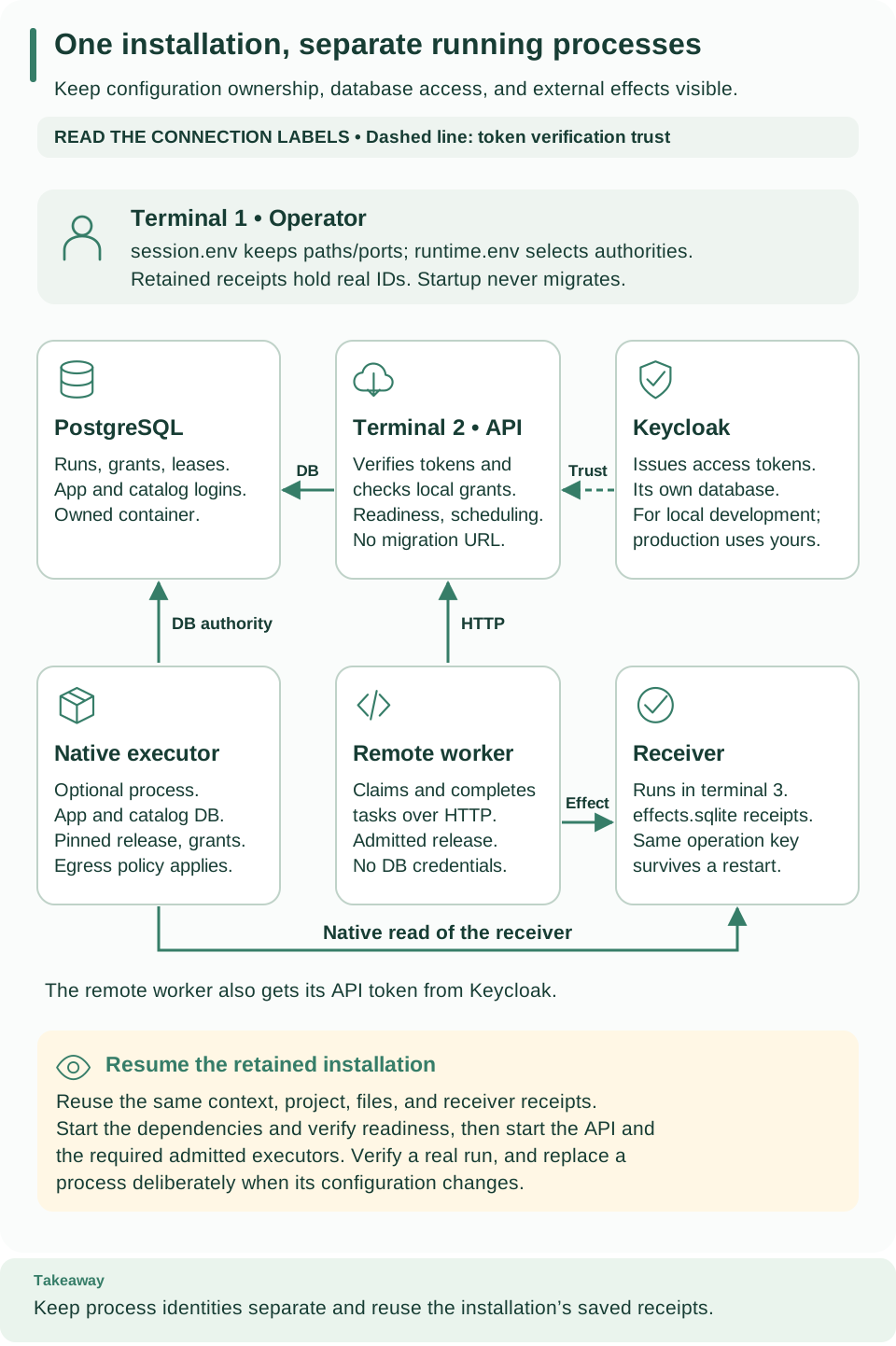
PostgreSQL, the API, and Keycloak form the top row: the API reads and writes PostgreSQL and trusts tokens that Keycloak issues (dashed line). The bottom row adds optional processes: the native executor, a remote worker, and the example receiver. To restart, reuse the existing files and receipts; provisioning a new database is a different operation. Open diagram at full size
Components and startup order
- PostgreSQL stores Weave's durable state.
- Keycloak authenticates callers and keeps identities in its own PostgreSQL
service (
keycloak-db). - The Weave API verifies tokens, resolves local grants, and schedules work against its runtime database. Starting it never migrates the database.
- Workers and native executors are added only when a workflow needs to call something outside the API's built-in behavior.
Both guides follow the same order, and each stage depends on the one before:
- Reserve one Docker context and project, a private work directory, and a set of ports.
- Generate local PostgreSQL and identity secrets, start those services, and check PostgreSQL health and Keycloak discovery.
- Provision a fresh runtime database with separate application and scheduler logins, and apply its schema.
- Verify and bootstrap the host identity, then launch the API.
- Check readiness, grant business scope, and publish, activate, and run a workflow.
- Add an admitted worker when a workflow needs one; see deployment.
A failure usually points at an earlier stage. Getting a token needs a ready realm, authorization needs an identity link plus grants, and API readiness needs the current schema and catalog compatibility authority.
Private configuration and database authorities
Files. The setup writes private files that belong in protected local storage,
never in source control. The manual guide also saves session.env, which holds
only non-secret paths, the Docker context and project, and the selected ports;
its printed cd and source commands bring a new terminal back to the same
installation. It loads no runtime or identity secrets. The setup scripts refuse
to replace an existing secret file, so reuse the configuration you already have.
Network. The development services publish their ports on loopback only. Container JWKS routing and the token issuer are separate settings: use the documented Compose configuration instead of changing the issuer to match a container hostname.
Database identities. setup-runtime.py checks the task-owned control backend,
then creates a fresh runtime database with a generated login that inherits the
non-owner weave_app role, and an execute-only scheduler login. Its private
output ($WEAVE_WORK_DIR/runtime.env in the manual guide) holds separate
application, scheduler, and migration URLs. The API refuses to start as a
superuser, a role that bypasses row-level security, or the owner of public
tables.
| Authority | Used for | Local source |
|---|---|---|
| Provisioning administrator | Creating the runtime database and its logins | The control URL in postgres.env |
| Migration owner | Applying the schema and the explicit bootstrap | WEAVE_MIGRATION_DATABASE_URL in runtime.env |
| Application login | Authorized API and business operations under row-level security | WEAVE_DATABASE_URL in runtime.env |
| Catalog and scheduler login | Bounded scheduler and compatibility functions | WEAVE_SCHEDULER_DATABASE_URL in runtime.env |
| Worker principal | Claiming only granted task and release work, through the API | A verified identity link and scoped grants; no database login |
In an operator shell, load runtime.env after any provisioning file: both may
define a database URL, but only the runtime application URL belongs to the API
process. The manual guide's launch command removes the migration credentials
from the API process explicitly.
Production is different. Production must use external secrets and HTTPS issuer and JWKS endpoints. Development HTTP is accepted only for explicitly configured localhost endpoints.
Explicit migrations
Migrations run only when you ask. With the installed interpreter and private configuration from the manual guide:
# Load the runtime authorities, then apply forward migrations with the migration owner.
set -a
source "$WEAVE_WORK_DIR/runtime.env"
set +a
"$WEAVE_PYTHON" -I -m firefly_weave.cli.main admin migrate
Expected: the database reaches the schema version this build expects. The
command requires WEAVE_MIGRATION_DATABASE_URL.
Alembic is the migration authority. 0001_boot adopts a compatible initial
database, 0002_access creates identity and access state, and
0003_access_audit adds structured audit payloads without backfilling history.
A legacy version row is kept as a compatibility sentinel; startup checks it
together with Alembic's revision. There is no destructive downgrade or reset, and
migration files ship inside the installed wheel. Published alpha4 expects
0021_operations; alpha5, alpha6, and alpha7 expect 0025_run_lifecycle.
Alpha9 retains schema 0028_files, which added decision tables, Lumi configuration, and
file transfers and retention. See
upgrades for compatibility checks and the
forward-migration procedure.
Identity bootstrap and scope grants
A fresh installation has no Weave identities. Bootstrap links one existing
identity-provider account as platform administrator; follow
verified identity bootstrap
in the manual guide (weave platform setup does this for you).
- The administrator supplies the exact trusted provider subject, never an email, username, or client ID. Keycloak service-account subjects are user UUIDs; take one from the trusted administration interface or a verified access token.
- Bootstrap writes a private receipt and an audit record. It mints no Weave password, key, or token, needs the migration table-owner identity, and refuses application-role sessions.
- Platform administration is not business access. It does not include reading business data or authoring workflows; grant those explicitly.
Provisioning routes are POST /admin/tenants, POST /admin/grants,
POST /api/v1/tenants/{tenant}/projects, and
POST /api/v1/tenants/{tenant}/projects/{project}/environments; reading an
environment needs status.read. Requests send Authorization: Bearer with a
Keycloak token. Every route except the exact health probes needs a linked,
active principal, and an authenticated request for an unknown route returns 404.
Services check roles again internally. weave-host is an application actor and
weave-worker resolves to its separately provisioned worker principal; neither
is treated as a person.
Grants cannot escalate. Tenant administrators cannot delegate outside the
tenant, project, environment, or resource they administer. Host products can
receive developer, deployer, and operator grants; workers cannot gain
authoring behavior, even from a mistaken developer grant. See
Give people the right access for the roles.
The development Keycloak realm
The realm template configures Keycloak for local development:
- No password or implicit grants. The public
weave-clisign-in client allows PKCE (S256) and device authorization. - Redirect addresses.
http://127.0.0.1:18555/callback, plus the port-free loopback callbackshttp://127.0.0.1/callbackandhttp://[::1]/callback. Browser sign-in listens on a random loopback port, and Keycloak 26.7.4 accepts any port only for loopback entries registered without one; an entry with an explicit:80matches port 80 only. - Claims. A
preferred_usernamemapper on the ID token and userinfo lets clients show the account's username; access tokens are unchanged. Audience and subject mappers are explicit, and the API-client role mapper is restricted toweave-api. Provider roles describe claims only: local scope grants decide what someone may do. - Empty at start. The template begins with no users, no provider role assignments, and no Weave scope grants.
Existing realms are not updated. Startup import skips a realm that already exists, so editing the template changes neither a retained realm nor its secrets. Inspect the existing client flows, subject, audience, and role mappers before accepting a realm, and make intentional changes through the Keycloak administrator API. Never run an overriding import or reset a realm as setup.
The one automatic change is additive and only on weave platform
installations: weave platform start reads the retained weave-cli client and
appends the two port-free loopback callbacks when they are missing, without
removing or rewriting other entries. For a manual installation, make the same
change through the administrator API. The generated temporary bootstrap
administrator service account stays local and retained; remove or replace it only
through an explicitly authorized lifecycle operation. Its secret is never passed
to the Weave runtime or the request verifier.
Sign-in settings for people
Published sign-in settings are new in 0.1.0a7, as are the weave auth setup
and Studio connection steps that read them. An alpha6 or earlier API publishes
none, so its clients sign in with a
connection file.
setup-runtime.py writes WEAVE_CLIENT_SIGN_IN to runtime.env. It tells the
API which public sign-in client people use:
[{"provider_id": "local-keycloak", "display_name": "Local Keycloak (development)", "client_id": "weave-cli", "scopes": ["openid"]}]
The API publishes these settings, without secrets and without requiring
authentication, at GET /api/v1/client-configuration. weave auth setup,
Studio, and other clients read them to offer sign-in, so a person types only the
server address.
- Validation. Each entry must name a configured identity provider and one of
that provider's
humanclients, or startup fails with "Invalid WEAVE_CLIENT_SIGN_IN configuration". No field can hold a client secret. - Trust comes from the server's provider. The issuer and loopback trust come from the matching provider configuration, never from this setting.
- Flows. Browser sign-in and device codes are both offered by default.
- Display name.
weave platform startpassesWEAVE_CLIENT_SIGN_INfromruntime.envand setsWEAVE_DISPLAY_NAME="Local Weave platform", the name clients show for the server. The manual launch command loadsruntime.envtoo, so it publishes the same sign-in option without a display name.
The realm starts with no people. On a weave platform installation,
weave platform user --username NAME creates one development account in the
owned Keycloak with a generated password printed once, creates and links a person
(a human principal), and grants roles in the demo workspace; see
Create a person who can sign in.
It never resets an existing account. On a manual installation, create the account
through Keycloak administration and link it with the
people and access commands.
Signing in with the local Keycloak was verified against the real Keycloak 26.7.4 sign-in pages, with PKCE and with the device code flow. Microsoft Entra ID application tokens have separately been verified in Azure preproduction; Entra browser and device-code sign-in for people remain unverified. Other identity providers need their own configuration and acceptance checks; see Use your own identity provider.
Connector actions on a local platform
New in 0.1.0a7. A weave platform installation can run the built-in
weave-http@2.0.0 connector in the demo environment without a container image:
weave platform integrations enablepublishes the connector's manifest, registers the installed runtime's content identity as the release, and grants a dedicated native principal.weave platform secret set --handle NAMEstores a development secret value in the installation's privatesecrets/directory, granted by handle to the demo environment only.weave platform startconfigures one executor with thelocal-developmentbuild and grants the stored handles.weave platform integrations grantlets the local release read one integration connection's secret handles.
The rules for that build are in Local development build, and the commands in Run built-in HTTP connector actions.
Token verification and key rotation
The API verifies every bearer token itself, offline, against the provider's published keys (JWKS).
- Fetching keys. Only configured URLs are used, with no redirects, ambient proxies, or token-selected discovery. Defaults: 5-second timeout, 300-second freshness, 5-second refresh cooldown, at most 64 accepted keys, a 256 KiB response, and a 32 KiB token.
- Outages. Known keys keep working only until their original freshness deadline; failures never extend it. Unknown key IDs share one coordinated refresh and cooldown, so a key rotated inside the cooldown may be denied until the next refresh.
- What a Keycloak token must carry. The signed payload claim
typ=Bearer, the configured issuer, audience, and client, a nonempty subject, and an expiry, signed with RS256 by default. The JOSE headertyp=JWTalone does not mark an access token. - Revocation. Disabling a principal or removing a grant applies on the next request, regardless of the token's expiry. Offline verification cannot see a revocation at the provider before the token expires; that would need a future introspection integration. Principals passed to a service are request-time snapshots; resolve again for a new operation.
Other providers need a matching trust profile; Microsoft Entra ID application tokens have been verified in Azure preproduction; human sign-in still needs its own acceptance checks.
Tenant isolation and compatibility inventory
Row-level security (RLS) means PostgreSQL itself filters which rows a transaction may read or change. Weave also checks scope in its services and uses scoped foreign keys so related records stay in the same tenant, project, and environment.
- Tenant tables use forced RLS and composite scoped foreign keys. Each unit of
work sets
weave.tenant_idfor its transaction with a parameterizedset_config; commit, error, and cancellation reset it. Authentication separately setsweave.principal_idso it can list only that principal's role bindings. - Identity and platform tables are global authorization state, never business
data.
weave_appreads and updates them only through checked application services, and the audit table is insert-only. - The scheduler login can use the schema and execute explicitly granted catalog
functions, with no direct business-table reads. Scheduler functions are owned by
weave_catalog_reader, and compatibility inventory functions byweave_retention_owner. Function ownership, fixed search paths, explicit grants, and dedicated RLS policies are part of the migration contract. The runtime never uses the migration owner's credentials. - New business migrations must add forced RLS, scoped foreign keys, and explicit application grants.
Compatibility checks always run. Startup needs scheduler catalog authority for
the compatibility inventory even when WEAVE_SCHEDULER_ENABLED=false. Missing
authority, an incomplete inventory, or an incompatible stored requirement keeps
readiness restricted and blocks new work with effects. Read the scoped
compatibility report and follow the upgrade guide
before admitting work.
Contributor-only backend checks and their fixtures are in contributing. Those tests use fresh guarded databases and separate application and migration identities, and they certify no external provider account or production infrastructure.
Stop and restart the same installation
On a weave platform installation, press Ctrl-C in the API's terminal, then
run weave platform stop to stop only this installation's dependencies. Later,
weave platform start resumes them and runs the API again without migrating or
provisioning anything. See
Stop and come back later.
On a manual installation, stop in this order:
- Stop foreground workers and the API with Ctrl-C in their terminals.
- If you added runtime containers, stop the exact worker, API, and native services first; see Stop the intended scope.
- From the original operator terminal, with the same context, project, and variables loaded, stop the supporting services:
# Stop this installation's PostgreSQL and Keycloak services; all data and volumes are kept.
docker --context "$WEAVE_DOCKER_CONTEXT" compose --project-name "$WEAVE_LAUNCH_ID" \
  --env-file "$WEAVE_WORK_DIR/postgres.env" --env-file "$WEAVE_WORK_DIR/identity.env" \
  -f compose.yaml -f compose.identity.yaml stop --timeout 30
Expected: the services stop; every database, role, and volume is retained. Deleting databases or volumes is a separate, destructive operation. After a failed startup or shutdown, telemetry and connection-pool cleanup are attempted independently and never delete stored data.
To resume, reuse the manual guide's up --detach --no-recreate --wait command
with the same project and files, check PostgreSQL and Keycloak readiness again,
then relaunch the API with its existing runtime configuration (see
Resume this installation later).
Do not rerun setup-runtime.py: it creates a different, fresh runtime
database instead of reopening yours. Do not rerun bootstrap or first-run
provisioning just to restart a process.
After a backup and restore, the original
database may be fenced; follow the restore procedure's selected target
configuration instead of restarting with the original runtime.env.
Telemetry and authorization audit
Telemetry. Weave registers native PyFly beans for its OpenTelemetry
providers. Export is off by default and turns on only through explicit
WEAVE_TELEMETRY configuration; ambient OTLP endpoint variables do not enable
it. See observability for collector setup,
limits, and troubleshooting.
Authorization audit. Decisions are JSON messages on the weave.authorization
logger, which is explicitly enabled at INFO while the root logger stays at
WARNING.
AuditContextcarries immutable UUID operation, request, and run correlation. Each request gets a server-generated request ID, returned inX-Weave-Request-IDand passed to services ascontext=; incoming request-ID values are never copied. Background callers build their own context and pass any known run UUID.- Successful administrative changes store the scope, the verified actor reference
(or
nullwhen unavailable), the capability, the correlation, and the relevant binding or identity details inaccess_audit.event. Older rows staynull; no historical identity is invented. - Shipping and retaining decision logs is the deployment owner's job.
Runtime version and lifecycle
The checked-in Compose services use local development identity and network settings. They demonstrate the startup journey only; production needs explicit HTTPS identity, managed secrets, deliberate network exposure, backups, and process supervision, none of which the local setup scripts provision.
The locked framework is the published PyFly 26.9.15; the exact wheel hash and
upstream commit are in the project metadata. The API
package version is 0.1.0a14; a checkout of main can carry unreleased changes
on top of it. Validate readiness, an authorized workflow, and your
backup and restore procedure in the
environment you intend to operate.
The setup helper supports only a guarded local test control database and localhost Keycloak profiles; it is not a production provisioning tool. Wait for the owned PostgreSQL and Keycloak services to be healthy before running it. It creates and migrates a new, retained runtime database with separate identities. For an existing runtime database, apply forward migrations explicitly and plan backups; startup never does it for you.
Next steps
- Configuration: every server variable.
- Set up identity, sign-in, and secrets: your own identity provider and secret handles.
- Give people the right access: roles and identity links.
- Implement and operate a worker and capabilities and limits.
Troubleshooting
| What you see | Why | What to do |
|---|---|---|
| No token can be obtained | The realm is not ready, or the client is wrong | Check Keycloak discovery, then the weave-cli client |
| Requests are denied although sign-in succeeded | The identity is not linked to a Weave person, or has no grants | Link the subject and grant a role; see people and access |
| Startup fails with "Invalid WEAVE_CLIENT_SIGN_IN configuration" | An entry names an unknown provider or a client that is not human |
Match provider_id and client_id to the configured provider |
| Browser sign-in is refused by Keycloak | A retained realm lacks the port-free loopback callbacks | Restart with weave platform start, or add them through the administrator API; see Browser sign-in is refused |
| Readiness stays restricted | Missing scheduler catalog authority, or an incompatible stored requirement | Read the compatibility report and follow the upgrade guide |
| Startup fails with "Weave schema check failed; verify database and run explicit migrations" | The database is unreachable, its schema is not migrated, or the API was given a superuser, row-security bypass, or table-owner login | Check the database, run admin migrate with the migration owner, and give the API only the application URL from runtime.env |
A rerun of setup-runtime.py shows an empty platform |
It created a new runtime database | Point the API back at your original runtime.env; never rerun setup to restart |
See troubleshooting for the full symptom map.