Publish, activate, and run a workflow from the CLI
This tutorial turns the offline echo workflow from the
quickstart into a real, saved run on a Weave platform, using
only weave commands. You send each lifecycle request yourself, keep the ID it
returns, and pass that ID to the next request. It is for developers and
operators who want to understand what publishing, activating, and running
actually do. You do not write a Python application.
Result: a saved run whose output is {"message": "Hello from the CLI"}. To
get there you publish a version, activate it in an environment, and start one
run: three separate API operations.
Before you start, you need:
- The two files the quickstart or the
authoring lab created:
.local/tutorial/echo.workflow.yamland.local/tutorial/empty-catalog.json. - A running platform: the local platform, a manual installation, your team's server, or a cloud installation from the Kubernetes guide.
- An identity with the
developerrole on the project and thedeployer,operator, andviewerroles on the environment. Signing in or holding a token is not enough: your administrator grants these roles in the tenant, project, and environment you use. python3, which the small request-building snippets use.
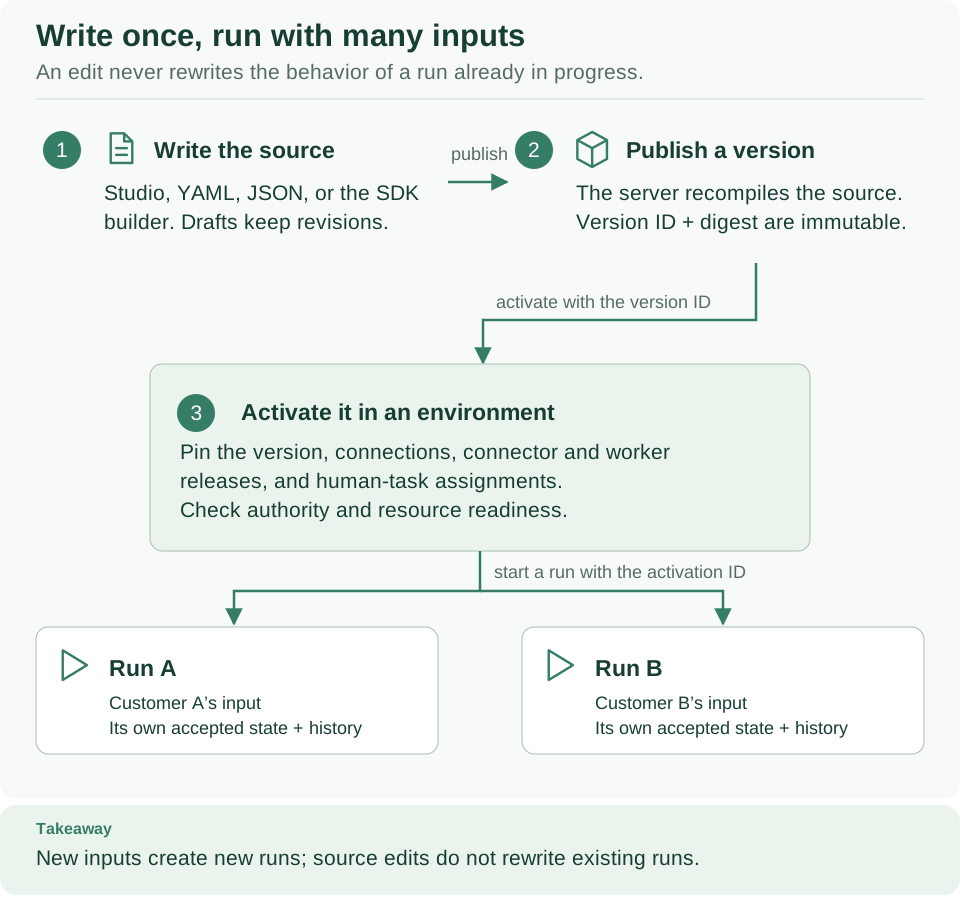
Read the arrows as the resource IDs carried between commands. Publication creates a version; activation makes that version available in an environment; starting creates a run. The sections below perform those operations one at a time. Open diagram at full size.
1. Know what each command does
| Task | Command examples | What it changes |
|---|---|---|
| Local authoring | workflow validate, compile, explain, simulate |
Local files and computed results only |
| Authenticated API client | definitions publish, definitions activations create, runs start |
Scoped server resources |
| Privileged administration | admin migrate, admin bootstrap |
Database schema or initial identity mapping; explicit owner credentials |
| Worker packaging/deployment | worker package, worker deploy |
Artifacts or an explicitly selected local Compose deployment |
weave workflow compile does not publish anything. weave definitions publish
does not start a worker. weave worker deploy does not provision a database, an
identity provider, or a cloud cluster. Keeping these operations separate lets a
product author workflows without receiving infrastructure administrator access.
Help is hierarchical: weave definitions --help lists a command family, and
weave definitions activations create --help shows one operation. weave help
definitions opens the same family help.
2. Point the CLI at your platform
Choose the subsection that matches your platform. Each one ends with the same check: a read of the project catalog, which proves that the API is reachable, that your credentials are accepted, and that you can read the project. It does not prove permission for every change you make later.
| Your platform | Follow |
|---|---|
Your team's server, or the local platform where you signed in as a person with weave auth setup |
Use these commands with an existing API |
| The local platform, using its host token | Use the local platform's host token |
| A manual installation | Use a manual installation |
| An installation from the Kubernetes guide | Use these commands with a cloud installation |
Every option keeps this exercise's request and response files in a private
directory named by WEAVE_CLI_DIR. They contain workflow data and real resource
IDs. Repeating a step replaces its files, so copy a completed exercise before you
change it.
Use these commands with an existing API
Use this subsection when another team operates Weave, or when you signed in to
your local platform as the person
created by weave platform user. First complete
Connect the CLI to a platform, including its read-only
catalog request. Do not load a local installation's session.env or
runtime.env files.
Ask your administrator to confirm the roles listed at the top of this page. The
exercise creates cli-echo@1.0.0 in the selected project; use a project meant
for practice if someone else already published that name and version. On the
local platform, the default roles of weave platform user are enough.
Stay in the directory where you completed the quickstart.
Its two .local/tutorial files are the only local files you need; you do not
need a source checkout or server configuration. Create the private working
directory:
# Keep new files owner-only; requests and responses hold real IDs.
umask 077
export WEAVE_CLI_DIR="$PWD/.local/cli-tutorial"
mkdir -p "$WEAVE_CLI_DIR"
Expected: no output.
If you connected with weave auth setup (recommended), remote commands use
your active saved platform, its sign-in, and its workspace. Section 4 builds the
activation request from the three workspace IDs, so read them from the saved
platform:
# An exported WEAVE_BASE_URL would switch remote commands to explicit mode; use the saved platform instead.
unset WEAVE_BASE_URL WEAVE_ACCESS_TOKEN
# Save the active platform's status; its workspace object holds the three IDs.
weave auth status --output json > "$WEAVE_CLI_DIR/platform.json"
export WEAVE_TENANT_ID="$(python3 -c 'import json,os; print(json.load(open(os.environ["WEAVE_CLI_DIR"]+"/platform.json"))["workspace"]["tenant_id"])')"
export WEAVE_PROJECT_ID="$(python3 -c 'import json,os; print(json.load(open(os.environ["WEAVE_CLI_DIR"]+"/platform.json"))["workspace"]["project_id"])')"
export WEAVE_ENVIRONMENT_ID="$(python3 -c 'import json,os; print(json.load(open(os.environ["WEAVE_CLI_DIR"]+"/platform.json"))["workspace"]["environment_id"])')"
# Read the catalog through the saved platform.
weave remote catalog --output json
Expected: three UUIDs in the variables and a JSON catalog with exit status 0.
The variables equal your saved workspace, so remote commands keep using it. If
python3 fails with a NoneType error, no workspace is selected: choose one
with weave auth workspace and repeat these commands. Continue with
section 3.
If you use a supplied access token, keep WEAVE_BASE_URL,
WEAVE_TENANT_ID, WEAVE_PROJECT_ID, WEAVE_ENVIRONMENT_ID, and
WEAVE_ACCESS_TOKEN set as in the connect guide's
explicit mode, and continue
with section 3. When the token expires, obtain a new one through your team's
approved process.
If your operator gave you a connection file, save it as a platform with
weave auth setup --auth-config FILE, as described in
Use a connection file, and follow the
saved-platform path above. With an alpha6 or earlier CLI, which has no
weave auth setup, sign in with weave auth login --auth-config FILE, set
WEAVE_BASE_URL and the three scope variables as for a supplied token (without
WEAVE_ACCESS_TOKEN), and add --auth-config FILE to every definitions,
runs, and remote command in sections 3 to 5.
Use the local platform's host token
Use this subsection when you started the local platform
with weave platform and want to act as its host application instead of a
person. weave platform demo already granted that host identity the roles this
exercise needs in the demo workspace. This path also works with an alpha6 or
earlier CLI.
Open a terminal in the platform checkout while the API runs in another terminal:
# Restore the installation's paths and ports (WEAVE_WORK_DIR, WEAVE_API_URL); this file holds no secrets.
source .local/platform/session.env
# Renew the verified host token in its private file; the command prints the file's path, never the token.
weave platform token
# Keep this exercise's files inside the private installation directory.
umask 077
export WEAVE_CLI_DIR="$WEAVE_WORK_DIR/cli-tutorial"
mkdir -p "$WEAVE_CLI_DIR"
# Explicit mode: the API address, the host token, and the demo workspace saved by platform demo.
export WEAVE_BASE_URL="$WEAVE_API_URL"
export WEAVE_ACCESS_TOKEN="$(python3 -c 'import json,os; print(json.load(open(os.environ["WEAVE_WORK_DIR"]+"/host-token.json"))["access_token"])')"
export WEAVE_TENANT_ID="$(python3 -c 'import json,os; print(json.load(open(os.environ["WEAVE_WORK_DIR"]+"/first-run.json"))["scope"]["tenant_id"])')"
export WEAVE_PROJECT_ID="$(python3 -c 'import json,os; print(json.load(open(os.environ["WEAVE_WORK_DIR"]+"/first-run.json"))["scope"]["project_id"])')"
export WEAVE_ENVIRONMENT_ID="$(python3 -c 'import json,os; print(json.load(open(os.environ["WEAVE_WORK_DIR"]+"/first-run.json"))["scope"]["environment_id"])')"
weave remote catalog --output json > "$WEAVE_CLI_DIR/catalog.json"
Expected: Token file: followed by the path of host-token.json, Message:
Verified token saved privately; never share its contents., then no further
output and exit status 0; the catalog is in catalog.json. If you chose a
custom installation directory, source that directory's session.env and run
weave platform --directory /absolute/path/to/it token instead.
The host token expires after a while. When a command returns 401, run
weave platform token again and repeat the WEAVE_ACCESS_TOKEN line. Return
to the directory that holds your quickstart files before section 3.
Use a manual installation
Use this subsection with an installation you created by following
Set up a local platform manually. In the terminal you use for
client commands, run the cd and source .../session.env commands that the
manual guide printed in its step 2. If the installation is stopped, first follow
its resume procedure. Then load
the identity and runtime settings and renew the host token:
# Load the private settings the token helper needs, then renew the host token.
set -a
source "$WEAVE_WORK_DIR/identity.env"
source "$WEAVE_WORK_DIR/runtime.env"
set +a
"$WEAVE_PYTHON" "$WEAVE_WORK_DIR/refresh-token.py"
Expected: Verified host token saved privately. Stop if the refresh fails.
Define a shell function that runs the CLI from the installation's own server environment, so the client and the API have the same version:
# This function applies only to this terminal and takes precedence over an installed weave command.
weave() { "$WEAVE_PYTHON" -I -m firefly_weave.cli.main "$@"; }
weave version --output json
Expected: a JSON document with the installed Weave version. The function does not reinstall the CLI or change other terminals. Now configure the client from the saved first-run receipt:
# Keep this exercise's files inside the private installation directory.
umask 077
export WEAVE_CLI_DIR="$WEAVE_WORK_DIR/cli-tutorial"
mkdir -p "$WEAVE_CLI_DIR"
# Explicit mode: the API address, the host token, and the workspace created by the first run.
export WEAVE_BASE_URL="http://127.0.0.1:$WEAVE_API_PORT"
export WEAVE_ACCESS_TOKEN="$(python3 -c 'import json,os; print(json.load(open(os.environ["WEAVE_WORK_DIR"]+"/host-token.json"))["access_token"])')"
export WEAVE_TENANT_ID="$(python3 -c 'import json,os; print(json.load(open(os.environ["WEAVE_WORK_DIR"]+"/first-run.json"))["scope"]["tenant_id"])')"
export WEAVE_PROJECT_ID="$(python3 -c 'import json,os; print(json.load(open(os.environ["WEAVE_WORK_DIR"]+"/first-run.json"))["scope"]["project_id"])')"
export WEAVE_ENVIRONMENT_ID="$(python3 -c 'import json,os; print(json.load(open(os.environ["WEAVE_WORK_DIR"]+"/first-run.json"))["scope"]["environment_id"])')"
weave remote catalog --output json > "$WEAVE_CLI_DIR/catalog.json"
Expected: no output and exit status 0. The manual guide's step 5 granted this
host identity the developer, deployer, operator, and viewer roles used
below. If you saved a replacement first-run receipt, use that file's path in
every command above.
Use these commands with a cloud installation
After completing the Kubernetes acceptance steps,
use its verified token and saved cloud workspace. Do not load the local
runtime.env or first-run.json: they would select the wrong installation.
Keep the same checkout and the quickstart's YAML. Select the installed matching
client with WEAVE_PYTHON, and set WEAVE_API_URL to the actual HTTPS API
origin, or to the operator-only loopback tunnel described in the Kubernetes
guide.
# Run the CLI from the matching installed client in this terminal only.
weave() { "$WEAVE_PYTHON" -I -m firefly_weave.cli.main "$@"; }
# Keep this exercise's files next to the cloud installation's private receipts.
umask 077
export WEAVE_CLI_DIR="$WEAVE_CLOUD_DIR/cli-tutorial"
mkdir -p "$WEAVE_CLI_DIR"
# Explicit mode: the cloud API, its verified host token, and the workspace created by its first run.
export WEAVE_BASE_URL="$WEAVE_API_URL"
export WEAVE_ACCESS_TOKEN="$(python3 -c 'import json,os; print(json.load(open(os.environ["WEAVE_CLOUD_DIR"]+"/host-token.json"))["access_token"])')"
export WEAVE_TENANT_ID="$(python3 -c 'import json,os; print(json.load(open(os.environ["WEAVE_CLOUD_DIR"]+"/first-run.json"))["scope"]["tenant_id"])')"
export WEAVE_PROJECT_ID="$(python3 -c 'import json,os; print(json.load(open(os.environ["WEAVE_CLOUD_DIR"]+"/first-run.json"))["scope"]["project_id"])')"
export WEAVE_ENVIRONMENT_ID="$(python3 -c 'import json,os; print(json.load(open(os.environ["WEAVE_CLOUD_DIR"]+"/first-run.json"))["scope"]["environment_id"])')"
weave remote catalog --output json > "$WEAVE_CLI_DIR/catalog.json"
Expected: no output and exit status 0. The requests in sections 3 to 6 are
identical; the API address, identity, and resource IDs select the remote
environment. When the token expires, repeat the cloud guide's verified token
renewal and reload WEAVE_ACCESS_TOKEN. A cloud provider's IAM sign-in does not
provide a Weave access token. For a new installation, create the scope and
grants first; never copy a local UUID into a cloud request.
3. Validate locally, then publish
Return to the directory where you ran the quickstart and confirm that its files are there:
# Both files come from the quickstart; this prints nothing when they exist.
test -f .local/tutorial/echo.workflow.yaml && test -f .local/tutorial/empty-catalog.json
Expected: no output and exit status 0. If you ran the quickstart elsewhere, change to that directory for sections 3 to 6, or copy its two files into these paths. The platform is selected by your saved platform or your environment variables, not by your working directory.
Check the source with the CLI before you send it anywhere:
# Complete validation and the execution plan; neither command calls the API.
weave workflow validate .local/tutorial/echo.workflow.yaml \
  --catalog .local/tutorial/empty-catalog.json --strict --output json
weave workflow explain .local/tutorial/echo.workflow.yaml \
  --catalog .local/tutorial/empty-catalog.json
Expected: validation succeeds with "ok": true, and explain prints
Compilation passed, followed by the start, echo, and end nodes. Now create a
publication request. This exercise uses the name cli-echo, so it does not
share a published identity with the SDK tutorial's workflow:
# Rename the workflow to cli-echo and wrap the YAML in a publication request.
python3 - <<'PY'
import json, os
from pathlib import Path
source = Path('.local/tutorial/echo.workflow.yaml').read_text()
assert '  name: echo\n' in source, 'Use the unchanged quickstart workflow'
source = source.replace('  name: echo\n', '  name: cli-echo\n', 1)
root = Path(os.environ['WEAVE_CLI_DIR'])
(root / 'publication-request.json').write_text(json.dumps({'source': source, 'format': 'yaml'}))
PY
# Publish an immutable version; the idempotency key makes a retry of this exact request safe.
weave definitions publish --collection workflows \
  --request "$WEAVE_CLI_DIR/publication-request.json" \
  --idempotency-key cli-echo-publish-1 --output json \
  > "$WEAVE_CLI_DIR/version.json"
Expected: exit status 0. Continue only if the command succeeds. The response
contains id, name, version, and digest. The API compiles the source
again against the project's catalog before it records the immutable version.
Print the identifiers you will use next:
# Show the version ID, name, version, and digest without printing the whole response.
python3 - <<'PY'
import json, os
from pathlib import Path
version = json.loads((Path(os.environ['WEAVE_CLI_DIR']) / 'version.json').read_text())
print(version['id'], version['name'], version['version'], version['digest'])
PY
Expected: a UUID, cli-echo, 1.0.0, and a 64-character digest.
4. Activate that exact version
An activation makes one published version available in one environment, together with its bindings. Echo calls no external Actions, so it needs no connection or worker release bindings. Build the request from the real publication response and your workspace:
# Pin the published version by ID and digest in your environment.
python3 - <<'PY'
import json, os
from pathlib import Path
root = Path(os.environ['WEAVE_CLI_DIR'])
version = json.loads((root / 'version.json').read_text())
request = {
    'version_id': version['id'],
    'artifact_digest': version['digest'],
    'scope': {
        'tenant_id': os.environ['WEAVE_TENANT_ID'],
        'project_id': os.environ['WEAVE_PROJECT_ID'],
        'environment_id': os.environ['WEAVE_ENVIRONMENT_ID'],
    },
}
(root / 'activation-request.json').write_text(json.dumps(request))
PY
weave definitions activations create \
  --request "$WEAVE_CLI_DIR/activation-request.json" \
  --idempotency-key cli-echo-activate-1 --output json \
  > "$WEAVE_CLI_DIR/activation.json"
Expected: a response with its own activation id, revision, and request.
The activation ID differs from the published version ID. Stop on failure; never
use an error response as the input of the next step.
5. Start and inspect a run
A run is one execution of an activated version with one input. Supply the activation ID and the business input:
# Start one run of the activation with a message as input.
python3 - <<'PY'
import json, os
from pathlib import Path
root = Path(os.environ['WEAVE_CLI_DIR'])
activation = json.loads((root / 'activation.json').read_text())
request = {'activation_id': activation['id'], 'input': {'message': 'Hello from the CLI'}}
(root / 'run-request.json').write_text(json.dumps(request))
PY
weave runs start --request "$WEAVE_CLI_DIR/run-request.json" \
  --idempotency-key cli-echo-run-1 --output json > "$WEAVE_CLI_DIR/run.json"
Expected: exit status 0 and a run in run.json. Then read the run and its
history:
# Read the run's current state, then the facts recorded while it ran.
export WEAVE_CLI_RUN_ID="$(python3 -c 'import json,os; print(json.load(open(os.environ["WEAVE_CLI_DIR"]+"/run.json"))["id"])')"
weave runs read "$WEAVE_CLI_RUN_ID" --output json
weave runs history "$WEAVE_CLI_RUN_ID" --limit 50 --output json
Expected: state.status is succeeded, with
state.output: {"message": "Hello from the CLI"}. If the first read is not
finished yet, read it again; do not start another run to check progress.
History holds the facts the platform accepted for this run, unlike the local
simulator, which keeps its session in memory. Save the run ID for later
investigation.
6. Understand retries and authentication failures
You now hold three different IDs:
| File | ID inside | What it identifies |
|---|---|---|
version.json |
id |
The immutable cli-echo@1.0.0 definition |
activation.json |
id |
That version made available in your selected environment |
run.json |
id |
One execution with Hello from the CLI as input |
Keep these files to inspect or troubleshoot this exercise later. To read the
result again, repeat runs read; do not publish or activate again.
An idempotency key identifies one intended change. Reuse the same key only to retry the exact same request in the same workspace, for example after a connection interruption. Use a new run key when you want another execution. Reusing a key with a different request body is a conflict, and changing the workflow's behavior needs a new definition version plus new publication and activation keys.
| What you see | Why | What to do |
|---|---|---|
| Exit status 2 or a local configuration error | A flag, scope variable, or request file is missing or malformed | Read the command's --help, your scope variables, and the request JSON |
401 after a pause |
The access token expired | Saved platform: weave auth login. Local platform host token: weave platform token, then reload WEAVE_ACCESS_TOKEN. Manual or cloud installation: rerun refresh-token.py, then reload it. Supplied token: obtain a new one |
403 |
Your identity has no grant for that operation in this workspace | Check the identity link and the role in the tenant, project, or environment |
| Conflict | The key or the immutable version belongs to an earlier request | Reuse the original request with its key, or choose a new version and new keys |
| Transport failure | The outcome is unknown | Keep the key, read the resource, and retry only the same request |
| The run waits for a task | An Action's worker release, instance, grants, or queue is not ready | Check them; publishing alone never starts a worker |
When you finish, remove the bearer token from this shell:
Expected: no output. If you defined the weave shell function for a manual or
cloud installation, unset -f weave removes it too. Neither command removes
stored credentials. For a saved platform, run weave auth logout when you want
to sign out; the CLI reference
lists every sign-in command.
7. Move from a workflow to a deployed worker
The echo workflow needs no worker. An Action that runs your own code adds this separate lifecycle:
- Implement its handler and declare its task contract in a worker manifest.
- Build and package the worker with its installed dependencies.
- Admit the exact release and provision the worker's scoped identity and grants.
- Activate a workflow bound to that release.
- Start the process or container; it registers, claims tasks, and reports results.
- Start a workflow run and inspect its output and the external receipt.
Deploy your first worker gives the commands and
real resource IDs for a local installation. worker package prepares a
deployment context, the documented docker build command builds it, and
worker deploy --target compose starts one owned local container. The plural
workers commands manage releases and instances on the server: they are a
different command family.
To call a REST API instead, you do not need a worker: the built-in HTTP
connector runs it. See Call a REST API without code.
For a remote installation, continue with
AWS, Azure, and GCP deployment. The same
publish, activate, and run lifecycle applies there, while cloud CLIs and
Kubernetes manage the infrastructure. There is no weave deploy --target aws
command.
What you learned
- Publishing records an immutable version, activation makes it available in an environment, and starting creates a run. Each returns an ID the next step needs.
- Idempotency keys make retries safe; they do not deduplicate different requests.
- The platform you call comes from your saved platform or from explicit environment variables, never from your working directory.
Next, inspect and repair runs with execution management, add approvals with human tasks, or call the same API from Python with the SDK tutorial.