Author a trusted connector package
Use this guide to add custom integration code to Weave as a Python connector package: an operator-installed distribution that tells Weave how to talk to one protocol. You scaffold and validate it locally, build and test it, and then an operator installs, allowlists, and admits it in an environment.
- Who it is for: integration developers who write the package, and the operator who installs and enables it.
- What you need: the CLI. Building needs the Python
buildtool; installed tests need PyFly and pytest. The local steps need no Weave server; publication needs a running platform you can connect the CLI to and an operator who can enable packages. - How long: about 15 minutes for the local steps; deployment depends on your operator's release process.
- First time? The Build a custom integration tutorial walks through a first package, YAML and Python workflow calls, and inbound events step by step. Keep this page as the reference.
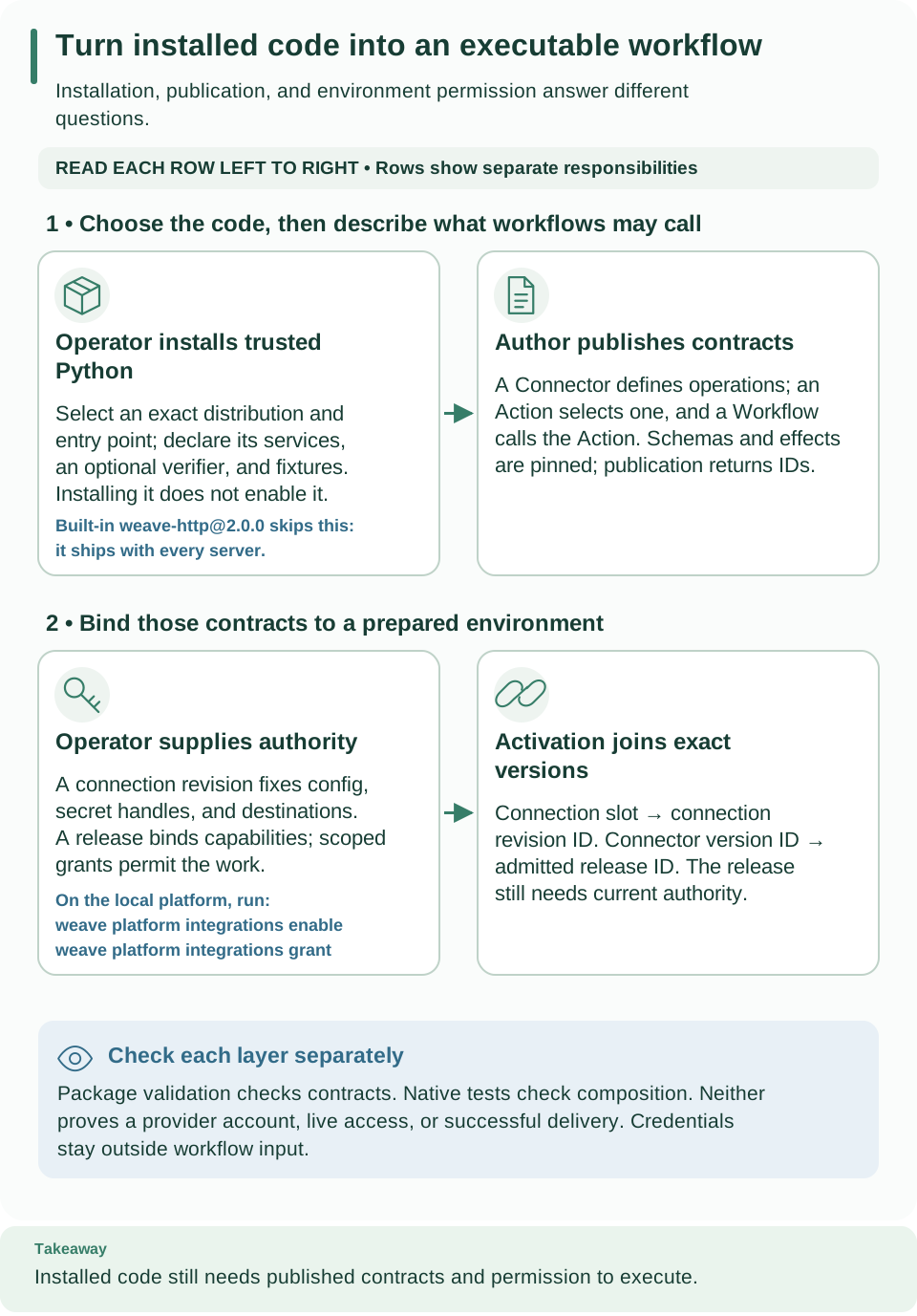
How to read this diagram: Read the first row from installed Python to published contracts, then the second row from environment authority to activation. Use the returned connection revision and release IDs; an installed package alone cannot execute a tenant Workflow.
Choose the built-in HTTP connector or a package
| Your integration | Use | What you produce |
|---|---|---|
One JSON request and response over HTTPS, at a fixed public origin, with none, API-key header, basic, bearer, or OAuth client-credentials authentication |
The built-in weave-http@2.0.0 connector: Call a REST API without code |
Actions only, built with weave connector http-action or import-openapi --target builtin |
| The same kind of HTTP API, but you want a named connector package with its own manifest, version, and wheel | An imported package: OpenAPI import with the default --target package |
A reviewed package that runs on the same native HTTP executor |
| Anything the HTTP profile excludes: non-JSON or multipart bodies, redirects, response headers, other authentication, retry-safe writes, or a protocol other than request and response | A custom package (this guide) or a worker | Python code you review, build, install, and allowlist |
The built-in connector is first-party code that every server already contains, so the operator only publishes its manifest, registers its executor release, and grants it once per environment. A package additionally needs a reviewed build, an installation in the operator's environment, and an allowlist entry.
weave connector import-openapi writes either form from the same reviewed
policy:
--target |
Output in --directory |
Next step |
|---|---|---|
package (default) |
A package project: connector.json, pyproject.toml, README.md, example Actions under examples/, import-provenance.json, and the Python sources under src/ |
Review, weave connector package, install, and allowlist, as described below |
builtin |
actions/*.action.json, connection.example.json, and provenance.json |
Publish the Actions and create a connection; no build or installation |
On the built-in target the side effect follows the method (GET and HEAD are
read_only, everything else non_idempotent), so a policy that marks a GET as
non_idempotent needs the package target. --list, --init-policy, the
relaxations, YAML input, and the OpenAPI 3.0 upgrade work for both targets; the
inventory's verdicts describe the built-in target. These importer options and
--target builtin are new in 0.1.0a7.
What you will build
A connector package is an operator-installed Python distribution. It exports a
ConnectorPackage declaration through the firefly_weave.connectors entry-point
group; the declaration names native PyFly @service classes. Tenant definitions
cannot install packages, choose import paths, or construct services. Package
validation checks authoring and composition contracts; it does not certify a
remote provider. A commercial product name alone does not imply a supported
connector.
Three separate layers turn installed code into a call a workflow can make:
| Layer | What it supplies | Who creates it |
|---|---|---|
| Installed package | Python services and a Connector manifest describing operations | Package author and deployment operator |
| Published Connector and Action | Immutable contracts; an Action selects one operation and its fixed configuration | Project author |
| Connection and activation | Environment destinations and secret handles, and the exact versions and releases a workflow uses | Scoped deployer and operator |
An installed package is not yet a published Connector, and a published Connector is not yet an executable activation. Each layer has its own IDs; keep them apart.
1. Create and validate
Scaffolding gives you a working echo connector to change, and validation checks the declaration as data before anything runs:
# Create an installable echo package in a new directory.
weave connector init ./acme-echo --name acme-echo --output json
# Check the declaration without importing or executing the package.
weave connector validate ./acme-echo/connector.json --output json
Expected: {"directory": ..., "mode": "scaffold"}, then a validation result
with "mode": "offline-data", manifest_digest, and package_digest. Both exit 0.
- Names. A lowercase letter, then lowercase letters and digits, optionally
joined by single hyphens, at most 64 characters, and not a Python keyword.
weave-identities are reserved for the product. - Target. Must be absent or empty, and may not be a symlink. A second
initinto the same directory fails withWV-CONNECTOR-INVALID. - Contents. A native echo service, immutable metadata, an Action example, an installed fixture suite, pytest tests, and a fail-closed provider verifier design example. The verifier is deliberately excluded from service registration: implement the provider admission port before advertising ingress.
validate reads at most 1 MiB of local JSON. It does not import the named module,
execute Python, install dependencies, query entry points, or fetch schemas. It
uses the existing compiler, schema reference policy, and resource budgets.
Malformed schemas and remote references fail. The generated Action compiles
against the generated Connector and its published capabilities.
2. Build and install
Edit the declaration in connector.json and its packaged copy under
src/acme_echo/connector.json together, and review the changes. Then build:
# Check both declaration copies, then run the project's own build backend.
weave connector package ./acme-echo --directory ./acme-echo-dist --output json
Expected: a wheel and a source distribution in the new acme-echo-dist
directory, and a result with "mode": "local-build".
- Checks first.
packagecompares the root and packaged declaration digests and the project's name, version, and entry point before executing the explicitly selected local build backend. The output directory must be absent or empty. - Trusted code. This command executes trusted build code and may install isolated build requirements; it is not a sandbox or a tenant API. Use an isolated build environment and the reviewed Weave wheel.
- Pins. The template pins
firefly-weave[server,client]to the exact version of the CLI that rendered it, and PyFly 26.9.15 to its exact published wheel and SHA-256. Rendering fails if any template placeholder is left unfilled.
Install the generated wheel and its declared dependencies into a separate operator-controlled environment. Installing a wheel does not enable it. Keep wheel hashes and the metadata and manifest digests with the deployment record.
The provider-inbox test package shows a bounded echo adapter and a separate test-only ingress verifier. Use it to understand fixture responsibilities, not as a production provider implementation.
3. Test the installed package
Installed tests prove that the package composes and behaves as declared, using the interpreter it was installed into:
# Run the generated conformance tests.
pytest ./acme-echo/tests/test_conformance.py
# Run the installed fixture suite through a native context.
weave connector test 'acme-echo:acme-echo:acme_echo:package' --output json
# Check native composition only.
weave connector test 'acme-echo:acme-echo:acme_echo:package' --mode native --output json
Expected: passing pytest checks; installed-fixture-contract for the default
fixtures mode and installed-native-contract for --mode native. Both report
the exact selected identity, the metadata and manifest digests, and
live_provider_verification: false.
- What the modes do. The default
fixturesmode requires a declared asynchronous conformance hook, starts a native context, resolves the singleton service, invokes its installed fixture suite, and stops the context.--mode nativeonly verifies native composition. Neither mode changes the package's declared verification status. - Trusted code again. These commands execute operator-selected trusted Python, including lifecycle hooks: inspect the package and its fixtures first. A fixture suite is not an isolation boundary.
The echo fixture suite checks independent output values, read-only effect, deadlines, request and response bounds, cancellation propagation, and classified input rejection without credential access or network calls. It has no transport headers or uncertain external effects. A real transport package must add fixtures for protected headers, destination admission, credential redaction, response limits, transport cancellation, and effect-specific failures.
Preserve ConnectorFailure.outcome: use not_started only before an external
operation, failed when failure is known, and unknown when delivery cannot be
determined. Never describe an unknown outcome as a safe retry or claim
exactly-once delivery. Run real provider tests only with explicit authorization
and test destinations.
4. Enable native composition
The operator selects the installed package by its exact identity on the server or native executor deployment, then restarts it:
# Apply in the operator's process configuration, then restart that deployment.
export WEAVE_CONNECTOR_PACKAGES='["acme-echo:acme-echo:acme_echo:package"]'
The identity is exact distribution:entry-point-name:module:attribute, using the
installed distribution metadata. This is an allowlist, not an installer: setting
it in your authoring terminal does not configure a remote server. See
Package rules for how the identity is matched.
The local platform cannot run packages. weave platform runs only the
built-in HTTP connector; packages need a deployed platform with a native executor
image. See Local development build.
From package to an executable workflow
After the package is enabled, the platform needs the published contracts, an executor release, a connection, grants, and an activation. Do them in this order; each step returns an ID that a later step needs.
- Allowlist the package on the server and native executor, as in step 4. The built-in connectors need no allowlist entry.
- Publish the Connector. Read the installed descriptor from the platform
with
weave connector descriptor ADAPTER --output jsonand publish itssourcefield unchanged withweave definitions publish --collection connectors, wrapped in a request file as{"format": "json", "source": ...}. Save the returned versionid: it is theconnector_version_idof a connection. (weave connector descriptoris new in 0.1.0a7; with an alpha6 or earlier CLI, publishpackage.descriptor.manifestfrom Python as the tutorial shows.) - Register the executor release.
weave workers releases create --request
    FILE
with the image's actualimage_digest, the descriptor's exactcapabilities, its bindings asconnector_bindings, and, when connections use secrets, the task references incredential_capabilities. Save the releaseid. Grant the executor's principal theworkerrole for that release and its task references, and configure the executor as described in native dispatcher setup. - Create the environment connection.
weave connections create --request FILEwithname,connector_version_id,config,secretRef(handles, never values), andallowed_destinations. Save the returnedid, which is the connection revision ID, not the Connector version ID. - Grant the release the connection's credentials, when the connection names
secret handles:
weave workers grant --request FILEwithrelease_id,connection_revision_id, andcapability. The operator also grants each secret handle to the environment. - Publish an Action and a Workflow. The Action selects the Connector's
name@version, an action name, schemas, the side effect, and a fixed config. The Workflow uses that Action through a connection slot. - Activate the Workflow with
weave definitions activations create:connection_revision_idsmaps slot names to connection revision IDs, andconnector_release_idsmaps Connector version UUIDs to release UUIDs. Save the activationidfor run and trigger requests. - Start a run with
weave runs start, then inspect it withweave runs readandweave runs history. Inspect any incident before retrying an external effect.
examples/admit_native.py demonstrates the full
publication, release, grant, connection, and activation sequence for HTTP. Its
read capability and local receiver are example-specific; use your descriptor's
actual capability and approved destination.
HTTP execution explains native executor
configuration; host integration explains
embedding the API in a product.
For the built-in weave-http@2.0.0 connector, step 1 does not apply: it is part
of every server. On the local platform, weave platform integrations enable
performs steps 2 and 3, and weave platform integrations grant performs step 5.
Call a REST API without code walks through steps 4 to 8
with real commands.
Package rules
Manifest and capability bindings
The manifest remains the executable authority. Every action has exactly one
capability binding; the adapter, implementation version, manifest digest, input
and output schemas, side-effect classification, and timeout must agree. Metadata
cannot weaken those contracts. PackageMetadata owns canonical bytes and returns
independent model and data copies. Event schemas use the same canonical schema
validator and require an exact optional verifier service declaration.
Identity matching
- All requested identities are matched before any entry point loads; missing, ambiguous, or repeated identities fail. Unselected entry points never load.
- A selected package with a missing optional dependency fails startup clearly. Its distribution, exact installed version, and adapter must match the installed metadata.
versionremains the adapter implementation SemVer used by connector bindings. Optionaldistribution_versionpins the exact bounded ASCII distribution version, including PEP 440 prereleases such as0.1.0a1; omitted metadata keeps the legacyversioncomparison. No normalization or ordering is inferred. Build-project validation uses that same installed distribution pin.- Reserved adapters and duplicate declarations fail.
Native composition
The app scans an explicit list of core connector modules, then registers the
selected service types before PyFly startup and resolves them with
context.get_bean afterward. No package factory constructs an adapter. Exact
native singleton @service types are required; constructor dependencies must be
provided by the host's native configuration. The host's context remains the owner
of initialization, shutdown, and injected dependencies. Verifier service metadata
is consumed by the provider inbox; package
validation alone does not dispatch provider events.
ConnectorRegistry.register_trusted(reference, adapter) remains an explicit
operator and test seam. The old zero-argument entry-point factory form is
rejected with migration guidance: export a ConnectorPackage object containing
PackageMetadata and the exact service class instead. No shipped connector uses
the old factory form; built-in connectors remain native services.
ConnectorPackage.validate_connection keeps the trusted descriptor callback for
profile-specific connection checks; offline validation does not execute it.
ConnectorDescriptor remains importable from connectors.manifest; authors can
import its pure definition from connectors.descriptor without infrastructure.
Verification status
Verification metadata is a declaration with operation-specific evidence, not an
independently established certification. Allowed statuses are implemented,
contract-tested, local-integration-verified, and live-verified. Any status
beyond implemented requires explicit evidence references.
Inbound provider declarations
Provider declarations may set dispatch_event_kinds to a nonempty unique subset
of the event_schemas keys; omitted means all event kinds. Source creation
validates its mapping against every dispatchable schema; lifecycle-only kinds
must normalize to ignore and still satisfy their own schema and secret policy.
Compute source pins with the pure
firefly_weave.contracts.providers.provider_schema_digest(event_schemas, dispatch_event_kinds)
helper, which includes the sorted effective dispatch capability as well as the
schemas, so capability changes invalidate old source pins. The
tutorial's provider section
shows a verifier step by step.
Errors and optional dependencies
All weave connector commands support --output text|json. Success exits 0. A
failure exits 1 with a classified code and a value-free reason:
| Code | Meaning | What to do |
|---|---|---|
WV-CONNECTOR-INVALID |
The declaration, its schemas, or its inputs are invalid; the reason names the fields or the rule | Fix the named fields; keep both declaration copies identical |
WV-CONNECTOR-BUILD |
The build backend failed | Run python -m build in the project to see why |
WV-CONNECTOR-DEPENDENCY |
A required package is not installed, such as the connector or the build or server extras | Install the missing package into the interpreter you run |
WV-CONNECTOR-IO |
A local file or directory could not be read or written, or a target already exists | Choose an absent or empty directory and check permissions |
WV-CONNECTOR-FAILED |
Any other failure of the operation | Check the declaration and the installed dependencies |
weave connector http-action and import-openapi report their own
WV-HTTP-ACTION-* and WV-IMPORT-* diagnostics instead, also with exit 1.
Malformed CLI usage exits 2 with WV-CLI-USAGE. CLI errors do not echo arbitrary
package exceptions or credential material. SDK functions raise exceptions for host
tools. Build backends control their own output; use only reviewed local projects.
Core, compiler, and base installs need no PyFly, SQLAlchemy, PostgreSQL client, HTTP client, Kafka driver, or provider SDK to scaffold and validate. Native testing and server composition require their explicitly selected optional dependencies. These local deployment operations add no HTTP route; there is no tenant package-installation API to mirror in OpenAPI.
Next steps
- Learn the whole path with a runnable example: Build a custom integration.
- Generate an HTTP package from OpenAPI instead of writing code: OpenAPI connector import.
- Run custom Python outside the platform instead: Implement and operate a worker.
- Receive vendor events: Authenticated provider sources.