Weave AI
Weave AI is an optional Studio assistant for explaining and drafting Weave
definitions (API, permission and role names use lumi).
It returns text and source proposals for review. It cannot publish, activate, run,
delete, upload, or modify resources. Proposals still need the normal compiler and
permission checks before a person applies them.
Weave AI has its own configuration per environment. It never reads a workflow's
llmProfiles, and changing an LLM step does not change the assistant.
The Studio AI models examples and named provider-connection selection shown here use Weave 0.1.0a19. Use the matching 0.1.11 Agentic worker package for the independently deployed Weave AI gateway.
Follow a question through review
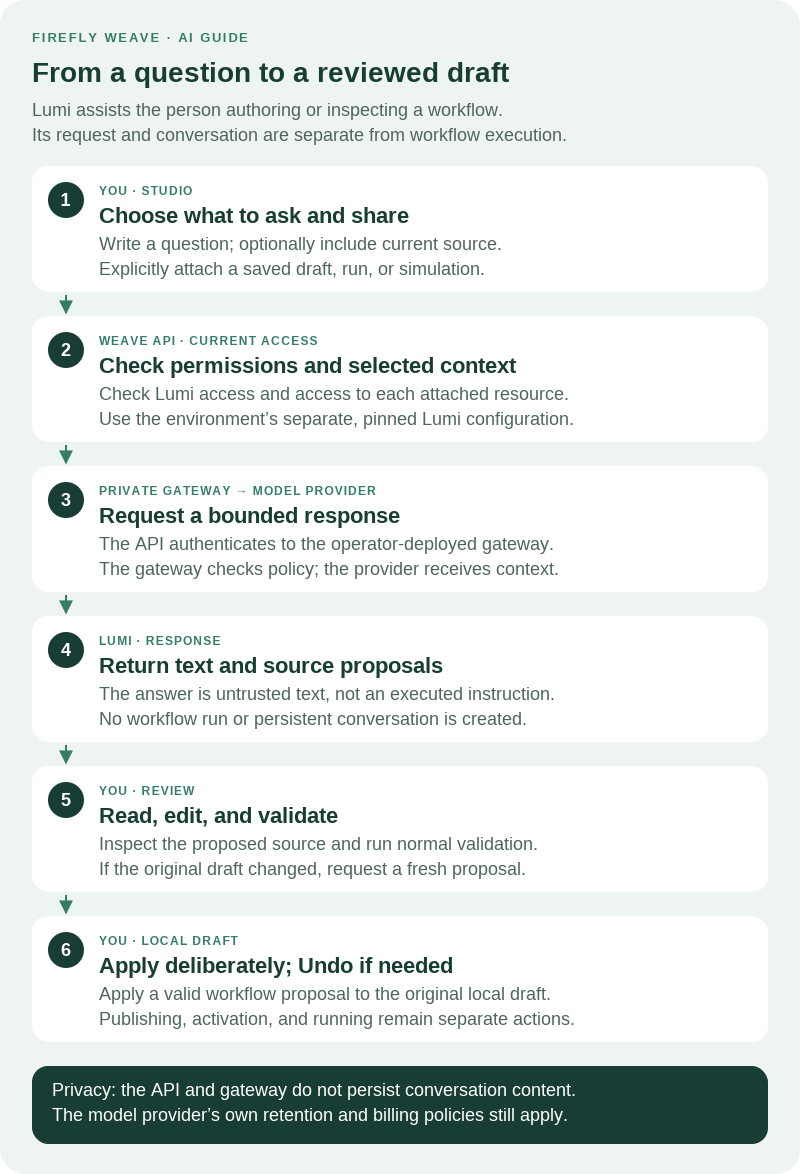
Open the Weave AI review diagram at full size. The person stays in control of both what is shared and what changes:
- Choose a question and context. You can ask a general authoring question without attaching a resource. Include source or a saved resource only when the explanation needs it.
- Weave checks access. Weave AI permission does not grant permission to read another person's draft, run, or simulation. The API checks each attachment.
- The private gateway calls the configured model. The API uses the environment's Weave AI profile and pinned connection. The gateway independently enforces the operator's provider, model, endpoint, and execution limits.
- Read the reply. It may contain an explanation, proposed source, and follow-up questions. A proposal is a suggestion, not an executed command.
- Review and validate. Open the proposed source, edit it if needed, and use the normal compiler validation before applying it.
- Apply deliberately. A valid workflow proposal can replace the original unchanged local draft and offers Undo. Saving, publishing, activating, and running remain separate actions with their normal permissions.
For example, ask “Explain which path this decision takes when the amount is above the limit,” and include the current source. Inspect the explanation against your conditions. If Weave AI proposes a change, review both the condition and its branch output before validating and applying it. Validation checks the definition; it does not prove that a suggested business rule is the one you intended.
Keep the three configurations separate
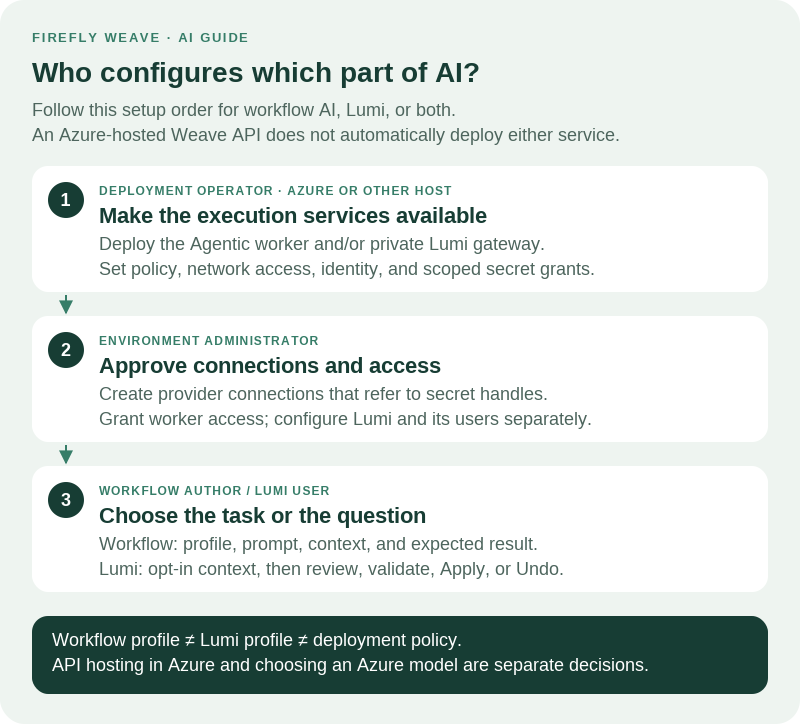
Open the configuration roles diagram at full size. These settings may use the same approved provider, but they are not inherited from one another:
| Configuration | Who maintains it | Purpose |
|---|---|---|
Workflow spec.llmProfiles |
Workflow author | Defines a model task inside a durable workflow run. |
| Environment Weave AI configuration | Administrator with lumi.manage |
Selects the assistant's model profile and pinned provider connection. |
| Deployment policy and services | Deployment operator | Starts the worker or gateway, restricts destinations/models, and provisions secrets and service identity. |
To enable Weave AI from a new deployment, the operator deploys the private gateway and configures the API first. The administrator then prepares the provider connection, grants access, and saves the environment's Weave AI configuration. Users can ask questions only after those layers are ready. Saving settings in Studio does not deploy a gateway, create an API key, or start a workflow worker.
On Azure, the cloud operator is still responsible for these service settings, private connectivity, TLS, mounted secrets, and allowed provider egress. Hosting Weave in Azure does not automatically choose an Azure model or enable Weave AI. The AI worker guide explains the shared operator/administrator handoff.
Use Weave AI in Studio
- Connect Studio to the intended environment and select Ask Weave AI when assistance is available there. Check the environment before sharing context.
- Type your question. Context is opt-in: check Include current source to share the current local draft, including unsaved source edits, or select an available saved draft, run, or simulation attachment. The selected provider receives that included source and authorized context.
- Send the request and read the plain-text answer. If a proposed draft is useful, open it, review its source, and make any corrections you need. The platform checks every proposal before Studio shows it; a proposal it found problems in names them on its button ("2 problems"). Open it and select Ask Weave AI to fix to send the problems, with the proposal, back to Weave AI. A fix sends the proposal whole when it fits the model's context, even on the compact size, because the model needs the values it must fix; a larger proposal goes as an outline with the steps the problems name.
- Select Validate proposal. Address diagnostics before applying. A valid workflow proposal offers Apply to local draft only while the original local draft and source revision remain unchanged. If either changed, ask again against the current draft.
- Apply the reviewed change, then inspect the local workflow. Use Undo if you want to restore the previous draft. Applying does not save to the platform, publish, activate, or run the workflow. Other valid proposal kinds offer Save reviewed draft file for review in their normal authoring tools.
New conversation clears the current exchange. Conversations remain in memory and clear when the workspace, identity, or sign-in session changes. They are not workflow history. Managers configure Weave AI in the Weave AI card of Settings › AI models; Set up Weave AI in the panel opens it. The card sets the enabled flag, pinned connection revision, and model separately from workflow AI profiles. Studio supplies the fixed reply schema from the canonical contract; changing a workflow's AI profile does not configure Weave AI.
Fit the model's context
Weave AI sizes each request to the model's context, which the AI policy records
for the connection's endpoint (contextTokens):
| Context size | When | What Weave AI sends |
|---|---|---|
| Compact | Under 16k tokens, such as a local Ollama model, or an Ollama endpoint whose size the policy does not record (sized as 8,192 tokens) | A short authoring guide, the draft (typed or attached) whole when it fits its share (otherwise an outline of each step's ID, kind and action with the selected step whole), attachments, and the last 4 messages, in at most 4,096 tokens |
| Standard | 16k to 64k tokens | The guide, the workflow schema, the whole draft up to 32 KiB (an outline above that), attachments, and the last 8 messages |
| Full | Over 64k tokens, or when the policy records no size for an endpoint other than Ollama | Every authoring schema, the whole draft, attachments, and the last 16 messages |
Weave AI's instructions, the reply format and the guide come first, at most a third of the compact budget. The draft, attachments and conversation share the rest, each held to at most 40%, 20% and 15% of the budget. A part over its share is trimmed in that order: the draft becomes an outline, then a run lists fewer steps and attachments are left out from the last, then the oldest messages. Weave AI is told what was left out, never given a value cut in half. Choose another size with Context size on the Weave AI card.
On Ollama, which cuts a request longer than the model's context without saying
so, Weave AI counts each request conservatively (identifiers, digits,
punctuation runs and text outside ASCII densely) and refuses one that may not
fit before the model, with WV-LUMI-CONTEXT-LIMIT. The count stays below the
model's only for text ordinary requests do not hold: words of random letters
(up to 1.3 times the count) and long runs of spaces or tabs. On Ollama 0.40 or later it also refuses an answer whose
prompt count shows the model saw only part of the request; an older Ollama cuts
differently, so there the conservative count is the only guard.
The policy's context size must match what the model really runs with. Ollama
does not report the context it runs a model with until the model is loaded, so
Weave AI cannot detect an Ollama on your computer started with a smaller
context than the policy records (see OLLAMA_CONTEXT_LENGTH in the Ollama
guide). Such an Ollama can cut a request without Weave AI noticing.
Small models can start repeating one sentence until they run out of room. On
the compact size, Weave AI answers in at most 512 tokens and asks the model to
answer briefly. On an Ollama endpoint it also discourages repeated words and
stops an answer as soon as it starts repeating itself. The person then sees
WV-LUMI-OUTPUT with a suggestion to try a larger model or start a new
conversation, so less history is sent. The same check can stop an answer that
is meant to repeat itself, such as a decision table with many identical rows or
a long list of the same value; the answer is then not used, never applied.
Local models sometimes propose changes with problems. In our checks on Ollama
with qwen3:4b, which weave platform ai enable offers by default, 4 of 5
proposals for a new workflow and 4 of 5 proposals that changed a small draft
were valid; smaller models such as llama3.2:3b and qwen2.5:1.5b seldom
wrote a valid proposal. A draft too large for the compact size is sent as an
outline, so a change to it has to guess the values of the steps it does not
see. Check each proposal's problems before you apply it, use Ask Weave AI to
fix, or use a larger model.
A run attachment holds only the run's facts: the workflow's name and version, its status and times, failed steps with their error codes, the number of open incidents, and the last five steps with their status and time. Never its input, outputs, logs, keys or hosts.
Explain Operations records
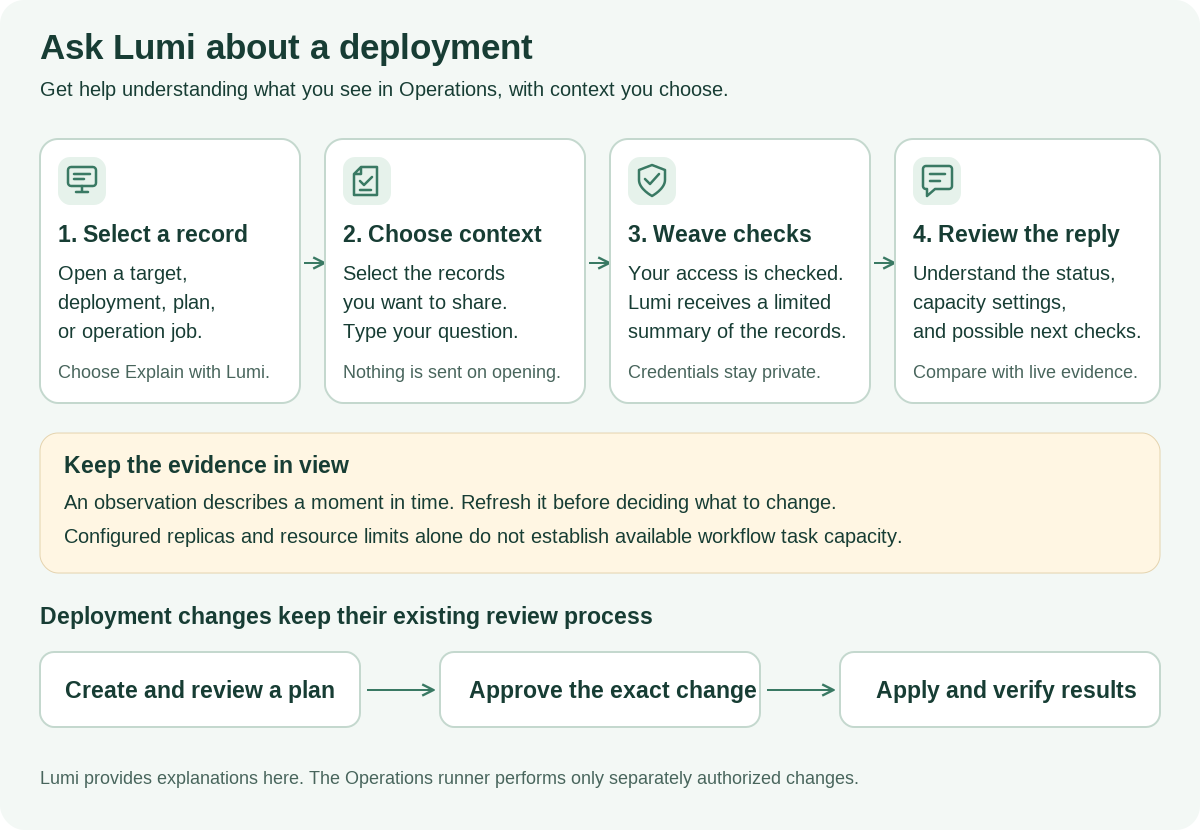
Open a target, desired deployment, plan, or operation in Operations, then select Explain with Weave AI. This opens the attachment choices without sending anything. Check the saved records to include, enter a question, and send it. For example: “Explain the difference between these desired replicas and this observation, and tell me whether the observation is still fresh.”
Weave AI receives a bounded summary of the selected records: adapter and permitted
capabilities, image digests, replica counts, CPU and memory limits, ownership,
freshness, plan risks, and safe operation receipt codes. Provider configuration,
registry addresses, external resource identities, local paths, credentials, and
raw logs are excluded. Each record requires deployment.read on its target in
addition to lumi.use; access is checked again before the reply is released.
Operations replies are explanations only. They do not offer draft proposals, create plans, approve changes, or run operations. Replica and resource counts describe saved deployment records, not available worker task slots or current cloud state. Changing the selected record or environment clears the selected context and conversation. To change a deployment, return to its normal review, approval, and apply controls.
Explain workers, incidents, health and change requests through the API
The API and the SDK also explain a worker, an incident, the environment's platform health and a change request. Attach each record by its kind and ID; for platform health, attach the environment itself:
from firefly_weave.contracts.lumi import LumiAskRequest

answer = await client.ask_lumi(
    LumiAskRequest(
        message="Which resolution is safe for this incident?",
        attachments=[{"kind": "incident", "id": incident_id}],
    )
)
print(answer.answer)
Each attachment needs lumi.use and the record's own read: status.read for a
worker and for platform health, incident.read for an incident (with run.read
for its recent event types), and deployment.read on a change request's target.
The API reference
lists what each kind sends.
Weave AI never receives logs, host names, people, record IDs or what runs carry. It receives codes, states, counts, ages in seconds and the names of workflows, targets, components and task types. Names are sent as written, so keep host names and personal data out of them. Access is read again after the reply, and a reply built from wider access than the second read sees is discarded.
Deploy the private gateway
The Weave API remains on its existing Python runtime. The model gateway uses the
independently built Python 3.13 Agentic worker image described in
AI workers, with the weave-lumi-gateway entry point. It reuses the
same bounded FireflyAgent executor and tested provider adapters. It does not
register a worker, create a workflow run, or store conversations.
Set these gateway environment variables:
| Variable | Purpose |
|---|---|
WEAVE_LUMI_POLICY_FILE |
Mounted AI policy file (version 2, or the version 1 shape); the same file as the AI worker's. |
WEAVE_LUMI_GATEWAY_HOST |
Listener address; defaults to 0.0.0.0. The local platform uses 127.0.0.1 in the API's network namespace. |
WEAVE_LUMI_GATEWAY_TOKEN_FILE |
Mounted service token shared only with the API deployment. |
WEAVE_LUMI_GATEWAY_PORT |
Internal listener port; defaults to 8090. |
Run the gateway behind a private TLS ingress. Its routes are POST /v1/lumi
(assistant replies), POST /v1/test (AI connection tests) and POST /v1/models
(model discovery). The API calls a sibling route at the path next to its
configured endpoint: it reaches /v1/test beside /v1/lumi.
Restrict ingress to the API service and configure ingress request/body limits and idle timeouts for the selected model budget. The container itself speaks HTTP on its private listener; never expose that listener directly to browsers or the public network. Disable request/response body capture at the ingress and APM layers. The process disables access and provider/framework content logs.
Configure the API using operator-owned settings, not a browser-provided URL:
{
  "endpoint": "https://lumi-gateway.internal.example/v1/lumi",
  "token_file": "/run/secrets/lumi-gateway-token",
  "max_concurrency": 4
}
Supply that JSON as WEAVE_LUMI_GATEWAY. The API requires HTTPS, except plain
HTTP to a loopback IP address (for example 127.0.0.1) that the private-origin
file lists as an exact model entry with credentials: loopback, as on the local
platform. The endpoint names its route without a trailing slash, and the API
refuses one that ends in a slash. The API does not follow redirects, ignores proxy
environment variables, and performs no automatic retry. Both processes reread
the mounted service token for every request, allowing rotation. Deploy
overlapping rotation changes carefully: the token file contains one active token,
so mismatched deployments fail closed.
Configure an environment
Grant Weave AI manager (lumi_manager) to the administrator and
Weave AI user (lumi_user) to assistant users at the intended project or
environment scope. Existing viewer/developer roles do not implicitly grant
access to models. A manager also needs connection.manage to select a provider
connection.
Publish the Agentic provider connector and create a connection as described in
AI workers. Configure an operator-approved apiKey secret handle
and exact provider origin. Weave AI pins one immutable connection revision. This is
an explicit delegation: users with lumi.use can spend that connection's model
budget through Weave AI, but do not gain credential.lease, connection management,
or access to other resources.
The connection's handle must already have an operator-provisioned scoped
secret grant. The API reads WEAVE_SECRET_GRANTS at startup; adding or changing
that grant list requires an API restart or deployment rollout. A manager saving
a connection or Weave AI configuration cannot create that grant from the browser.
See Give integrations their secrets.
The operator also supplies WEAVE_LUMI_GATEWAY when starting the API. This is
separate from the administrator's editable environment Weave AI configuration.
Save the settings in Studio
- Open Settings › AI models and find the Weave AI card, or select Set up Weave AI in the Ask Weave AI panel. These settings belong to the current environment. Configuring them needs the Weave AI manager role, and choosing the connection also needs the tenant administrator role.
- Select Turn on Weave AI, choose the Connection, and choose the
Model; Studio suggests one of the platform's approved models for that
connection. Weave AI pins the connection's exact revision, so a later
revision does not silently change the assistant. When the connection has a
newer revision, the card says so and saving moves Weave AI to it. A keyless
connection to a local model, such as
ollama-local, works too: Weave AI sends it no credential. - Select Save Weave AI settings. Saving keeps the stored profile's generation options, reasoning, call and time limits; a new configuration starts from Weave AI's defaults. Studio supplies the fixed reply schema. Use a simple request without attachments to confirm the complete path, as described below.
To create the connection first, use the provider connection steps.
A workflow AI profile never fills these fields automatically. Likewise, a saved Weave AI profile does not change a workflow's model or authorize its worker.
Configure through the API
Use these API operations under the environment URL:
| Method and path | Capability | Behavior |
|---|---|---|
GET /lumi/configuration |
lumi.manage |
Read the pinned connection, profile, enabled flag, and revision. |
PUT /lumi/configuration |
lumi.manage |
Create without If-Match; subsequent changes require the current revision. |
GET /lumi/status |
lumi.use |
Read availability, provider, model, and revision; no connection details. |
POST /lumi/ask |
lumi.use |
Await one private, bounded response. |
Configuration contains enabled, connection_revision_id, and profile. The
profile uses the same strictly bounded options as workflow LLM steps, but its
outputSchema must equal the published LUMI_REPLY_SCHEMA from
firefly_weave.contracts.lumi. The model returns only answer, proposals, and
followUps. Each proposal contains title, kind, format, and source.
An ask request contains a message, up to sixteen prior user/assistant messages, and up to four explicit attachments:
{
  "message": "Explain the failed step and suggest a draft fix.",
  "history": [],
  "attachments": [
    {"kind": "run", "id": "00000000-0000-0000-0000-000000000001"}
  ]
}
To share an unsaved local definition, explicitly include draft: {"format": "yaml",
"source": "..."} (or format: "json"). Source is untrusted text and may be
syntactically incomplete. No URL or file path is fetched from it, and it grants
no access to referenced resources. Its UTF-8 content is limited to 256 KiB; inline
source and authorized resource attachments share the same 256 KiB context budget.
Attachments name existing draft, run, or simulation resources. The server
reads them with the caller's current permissions: catalog admission for drafts,
redacted recorded history for runs (at most twenty events), and creator-scoped,
unexpired simulation inspection. Simulation context contains status, active
node identifiers, and diagnostics rather than variables. A Weave AI grant alone
cannot attach an unread resource. The gateway also receives the current public
authoring schemas. It receives no general resource-query tool.
Privacy and bounds
Conversation history exists only in the current UI identity/environment session and the in-flight request. The API and gateway do not persist prompts, replies, reasoning traces, or model calls in workflow history. Studio clears its temporary conversation when identity or environment changes. All replies and proposed source are untrusted text/code, never rendered as HTML or automatically executed.
The API resolves only the pinned connection's scoped secret handle and forwards the credential to the trusted gateway over TLS; a keyless local connection sends no credential at all. The gateway must therefore be operated as a credential-bearing service. It independently checks an exact provider/model/endpoint policy, rejects expired invocation envelopes, and owns no persistent conversation or model session. Provider account retention policies still apply; Responses API storage is explicitly disabled.
Each process limits concurrent model requests. Model call count, reasoning steps, per-response output tokens, and total time use the AI worker's shared limits. The API body limit is 512 KiB, attached-resource and inline-source context is bounded to 256 KiB, and gateway requests/responses are capped at 1 MiB. The API rechecks the caller's Weave AI and attachment permissions and configuration revision before returning a reply. Disabling or changing configuration discards an in-flight response.
HTTP disconnects cancel and await owned model work. Cancellation or an ambiguous network failure can still incur provider cost; the API deliberately does not retry or replay a request. Operators should also apply provider-side quotas and network egress controls. No live-provider availability is implied by local tests.
Two things to weigh before you choose a cloud model endpoint for Operations explanations:
- The facts an explanation sends, such as workflow, target and component names, codes, counts and ages, go to that provider.
- Workers choose their own task type names. A worker's operator can put any text that passes the name format into a task type, and Weave AI receives it as a name: at most 20 of them, each up to 253 characters. The reply can mislead but can't change anything, since explanations carry no proposals.
Confirm setup without sharing sensitive source
First ask a simple authoring question with no source or attachments, such as “What is the difference between a workflow input and a step output?” A successful reply verifies that this user's current access, environment configuration, gateway, credential, policy, and provider can complete that request. It does not prove future model availability or the correctness of every proposed definition. Then try an explicitly selected, nonsensitive draft and practice reviewing, validating, applying, and undoing one proposed workflow change.
A separate Azure preproduction check on alpha10 completed a real Azure OpenAI request through the Weave AI gateway. Installed alpha10 Studio was also used at desktop and narrow widths to read back Weave AI configuration using an application identity. These checks do not establish interactive Entra sign-in for people or prove that every generated proposal is correct.
| Problem | Responsible next step |
|---|---|
| Weave AI is unavailable | The administrator checks the environment configuration and lumi.use grant; the operator checks that the API has a configured gateway. |
| Configuration cannot use a connection | The administrator checks its immutable revision and provider; the operator checks the exact scoped secret grant. |
| A request is refused or fails | Check current permissions, gateway connectivity/service token, exact model/endpoint policy, provider access, and configured limits. Do not copy keys into a prompt to work around it. |
| A resource cannot be attached | Obtain ordinary read access to that resource; Weave AI access alone is insufficient. |
| A proposal cannot be applied | Resolve validation errors or ask again against the changed local draft. Applying to a different or newer draft is deliberately refused. |
Weave AI has no arbitrary tools, provider plug-ins, or resource-query access. Its supported adapters and bounded reasoning patterns are the ones documented in AI workers. Extending a prompt does not grant the assistant new platform capabilities.